
Client errors
This page lists the error codes that can appear in the Cloudflare One Client (formerly WARP) GUI. If you do not see your error below, refer to common issues or contact Cloudflare Support.
- Unable to login to a captive portal network
- No Internet connectivity
Captive portal detection is turned on and one of the following issues occurred:
- The user did not complete the captive portal login process within the time limit set by the Cloudflare One Client.
- The captive portal redirected the user to a flow that is not yet supported by the captive portal detection feature.
- Increase the captive portal timeout to allow users more time to login.
- If this does not resolve the issue, allow users to manually disconnect. We recommend setting an auto connect value so that the client turns itself back on after a few minutes.
- Unable to connect the Cloudflare One Client
- No Internet connectivity
- User may be behind a captive portal
The initial connectivity check failed for an unknown reason. Refer to Unable to connect the Cloudflare One Client for the most common reasons why this error occurs.
- Retrieve client diagnostic logs for the device.
- Follow the troubleshooting steps in Unable to connect the Cloudflare One Client.
- Unable to connect the Cloudflare One Client
- Unable to browse the Internet
nslookupanddigcommands fail on the device
The Cloudflare One Client was unable to resolve hostnames via its local DNS proxy.
- Verify that the network the user is on has DNS connectivity.
- Verify that DNS resolution works when the Cloudflare One Client is disabled.
- Ensure that no third-party tools are interfering with the Cloudflare One Client for control of DNS.
- Ensure that no third-party tools are performing TLS decryption on traffic to the WARP IP addresses.
- Unable to connect the Cloudflare One Client in a mode that enables DNS filtering.
A third-party process (usually a third-party DNS software) is bound to port 53, which is used by the Cloudflare One Client's local DNS proxy to perform DNS resolution. The name of third-party process will appear in the GUI error message.
On macOS, you may see mDNSResponder instead of the specific application name -- mDNSResponder is a macOS system process that handles DNS requests on behalf of other processes. There is no known way to determine which process caused mDNSResponder to bind to port 53, but the most common culprits are virtual machine software (for example, Docker and VMware Workstation) and the macOS Internet Sharing feature.
- Remove or disable DNS interception in the third-party process.
mDNSResponder
Below is a non-exhaustive list of third-party software that are known to cause mDNSResponder to bind to port 53. Rather than try to stop mDNSResponder, you should either configure the third-party software so that they no longer use port 53, or temporarily disable them before connecting the Cloudflare One Client.
- Docker: Turn off kernel networking for UDP ↗ in Docker. Alternatively, uncheck Start Docker Desktop when you sign in to your computer under Settings > General ↗. Disabling the automatic startup process will prevent Docker from binding to port
53before the Cloudflare One Client. - Internet Sharing feature: To disable Internet Sharing:
- On macOS, go to System Settings > General > Sharing.
- Turn off Internet Sharing.
- Certain VM software (such as VMware Workstation or Parallels): The presence of VM software does not guarantee that it is the offending program, since compatibility with the Cloudflare One Client is highly dependent on the VM's configuration. To work around the issue, connect the Cloudflare One Client before running any VMs:
- Stop/quit all VMs.
- Connect the Cloudflare One Client.
- Start the VMs again.
- Alternatively, switch the Cloudflare One Client to Traffic only mode mode.
- Unable to connect the Cloudflare One Client
- Unable to browse the Internet
The Cloudflare One Client could not read the system DNS configuration, most likely because it contains an invalid nameserver or search domain.
On macOS and Linux, validate that /etc/resolv.conf is formatted correctly ↗ and check for invalid characters.
On Windows, validate that the registry entry HKLM\System\CurrentControlSet\Services\TCPIP\Parameters\SearchList contains only valid search domains. Examples of invalid entries include IP addresses and domains that start with a period (such as .local).
- Unable to connect the Cloudflare One Client
The device failed to present a valid mTLS certificate during device enrollment.
- Ensure that there are no admin restrictions on certificate installation.
- Re-install the client certificate on the device.
- Unable to connect the Cloudflare One Client
A router, firewall, antivirus software, or other third-party security product is blocking UDP on the WARP ports.
- Configure the third-party security product to allow the WARP ingress IPs and ports.
- Ensure that your Internet router is working properly and try rebooting the router.
- Check that the device is not revoked by going to Team & Resources > Devices.
- Unable to connect the Cloudflare One Client
- No Internet connectivity
- User may be behind a captive portal
The connectivity check inside of the WARP tunnel has failed.
- Check for the presence of third-party HTTP filtering software (AV, DLP, or firewall) that could be intercepting traffic to the WARP IPs.
- In the third-party software, bypass inspection for all IP traffic going through the Cloudflare One Client. To find out what traffic routes through the WARP tunnel, refer to Split Tunnels.
- Unable to connect the Cloudflare One Client
- OS warns that the disk is full
The hard drive is full or has incorrect permissions for the Cloudflare One Client to write data.
- Ensure that your device meets the HD space requirements for the Cloudflare One Client.
- Check for disk permissions that may prevent the Cloudflare One Client from using disk space.
- Empty trash or remove large files.
- Unable to connect the Cloudflare One Client
- Unable to open files on the device
The device does not have sufficient file descriptors to create network sockets or open files.
Increase the file descriptor limit in your system settings.
- Unable to connect the Cloudflare One Client
- Device is very slow
The device does not have enough memory to run the Cloudflare One Client.
- Ensure that your device meets the minimum memory requirements for the Cloudflare One Client.
- List all running processes to check memory usage.
- Unable to connect the Cloudflare One Client
The Cloudflare One Client was deployed on the device using an invalid MDM configuration file.
- Review the managed deployment guide for your operating system.
- Locate the MDM configuration file on your device.
- Ensure that the file is formatted correctly and only contains accepted arguments.
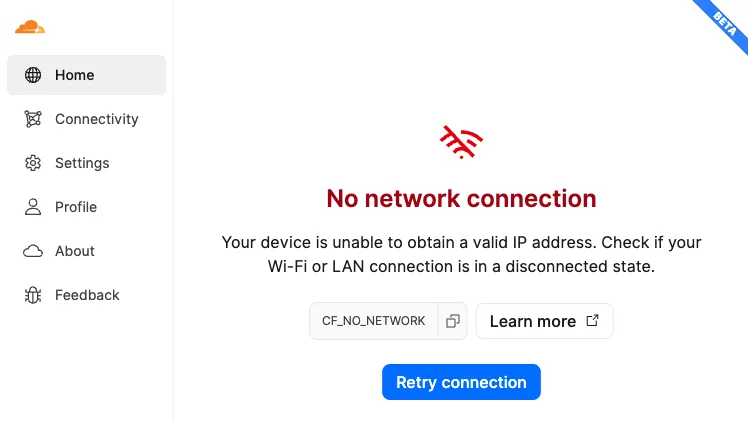
- Unable to connect the Cloudflare One Client
- No Internet connectivity
The device is not connected to a Wi-Fi network or LAN that has connectivity to the Internet.
- Launch the network settings panel on your device.
- Ensure that you are connected to a valid network.
- Check that your device is retrieving a valid IP address.
- If this does not resolve the error, try rebooting your device or running your system's network diagnostics tool.
- Unable to connect the Cloudflare One Client
The device is not authenticated to an organization because:
- The device was revoked in Zero Trust.
- The registration was corrupted or deleted for an unknown reason.
- Launch the Cloudflare One Client.
- Go to Profile > Account information.
- Select Re-Authenticate.
- Complete the authentication steps required by your organization.
- If this does not resolve the error, select Logout and then re-enroll your device. Logging out is only possible if Allow device to leave organization is enabled for your device.
- If the issue persists, contact your administrator for assistance.
- Launch the Cloudflare One Client.
- Select the gear icon and go to Preferences > Account.
- Select Re-Authenticate Session.
- Complete the authentication steps required by your organization.
- If this does not resolve the error, select Logout from Cloudflare Zero Trust and then log back in. Logging out is only possible if Allow device to leave organization is enabled for your device.
- If the issue persists, contact your administrator for assistance.
Your device was unenrolled from your company's organization by an administrator on your account.
Contact your company or team administrator for assistance.
- DNS requests fail to resolve when the Cloudflare One Client is connected.
A third-party application or service is intercepting DNS over HTTPS traffic from the Cloudflare One Client.
Configure the third-party application to exempt the WARP DoH IPs.
- Unable to connect the Cloudflare One Client
A third-party security product on the device or network is performing TLS decryption on HTTPS traffic. For more information, refer to the Troubleshooting guide.
In the third-party security product, disable HTTPS inspection and TLS decryption for the WARP IP addresses.
- Unable to connect the Cloudflare One Client
The account administrator has disconnected the Cloudflare One Client for all devices registered to the account.
The account administrator must turn off both of the following features: - Disconnect the Cloudflare One Client on all devices - Manage device connection using an external signal