
Configure a rule with the Skip action
Use the Skip action in a custom rule to skip one or more security features. A rule configured with the Skip action is also known as a skip rule.
For more information on the available options, refer to Available skip options.
-
In the Cloudflare dashboard, go to the Security rules page.
Go to Security rules -
Create a custom rule by selecting Create rule > Custom rules, or edit an existing custom rule.
-
Define the rule name and the rule expression.
-
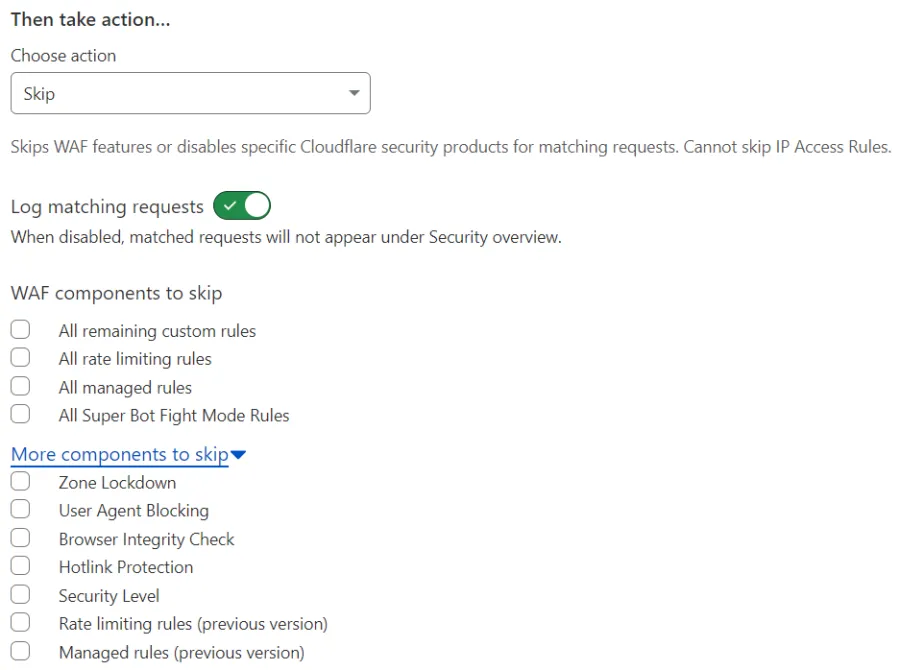
Under Choose action, select Skip from the dropdown.
-
Configure the desired skip options.
-
Save your changes.
-
Log in to the Cloudflare dashboard ↗, and select your account and domain.
-
Go to Security > WAF > Custom rules.
-
Create a custom rule by selecting Create rule, or edit an existing custom rule.
-
Define the rule name and the rule expression.
-
Under Choose action, select Skip from the dropdown.
-
Configure the desired skip options.
-
Save your changes.
Use the Rulesets API to configure custom rules via API.
Refer to API examples for examples of creating skip rules.