

You can now create Durable Objects using Python Workers. A Durable Object is a special kind of Cloudflare Worker which uniquely combines compute with storage, enabling stateful long-running applications which run close to your users. For more info see here.
You can define a Durable Object in Python in a similar way to JavaScript:
Python from workers import DurableObject, Response, WorkerEntrypointfrom urllib.parse import urlparseclass MyDurableObject(DurableObject):def __init__(self, ctx, env):self.ctx = ctxself.env = envdef fetch(self, request):result = self.ctx.storage.sql.exec("SELECT 'Hello, World!' as greeting").one()return Response(result.greeting)class Default(WorkerEntrypoint):async def fetch(self, request):url = urlparse(request.url)id = env.MY_DURABLE_OBJECT.idFromName(url.path)stub = env.MY_DURABLE_OBJECT.get(id)greeting = await stub.fetch(request.url)return greetingDefine the Durable Object in your Wrangler configuration file:
JSONC {"durable_objects": {"bindings": [{"name": "MY_DURABLE_OBJECT","class_name": "MyDurableObject"}]}}TOML [[durable_objects.bindings]]name = "MY_DURABLE_OBJECT"class_name = "MyDurableObject"Then define the storage backend for your Durable Object:
JSONC {"migrations": [{"tag": "v1", // Should be unique for each entry"new_sqlite_classes": [ // Array of new classes"MyDurableObject"]}]}TOML [[migrations]]tag = "v1"new_sqlite_classes = [ "MyDurableObject" ]Then test your new Durable Object locally by running
wrangler dev:npx wrangler devConsult the Durable Objects documentation for more details.
FinalizationRegistry ↗ is now available in Workers. You can opt-in using the
enable_weak_refcompatibility flag.This can reduce memory leaks when using WebAssembly-based Workers, which includes Python Workers and Rust Workers. The FinalizationRegistry works by enabling toolchains such as Emscripten ↗ and wasm-bindgen ↗ to automatically free WebAssembly heap allocations. If you are using WASM and seeing Exceeded Memory errors and cannot determine a cause using memory profiling, you may want to enable the FinalizationRegistry.
For more information refer to the
enable_weak_refcompatibility flag documentation.
You can now create Python Workers which are executed via a cron trigger.
This is similar to how it's done in JavaScript Workers, simply define a scheduled event listener in your Worker:
Python from workers import handler@handlerasync def on_scheduled(event, env, ctx):print("cron processed")Define a cron trigger configuration in your Wrangler configuration file:
JSONC {"triggers": {// Schedule cron triggers:// - At every 3rd minute// - At 15:00 (UTC) on first day of the month// - At 23:59 (UTC) on the last weekday of the month"crons": ["*/3 * * * *","0 15 1 * *","59 23 LW * *"]}}TOML [triggers]crons = [ "*/3 * * * *", "0 15 1 * *", "59 23 LW * *" ]Then test your new handler by using Wrangler with the
--test-scheduledflag and making a request to/cdn-cgi/handler/scheduled?cron=*+*+*+*+*:Terminal window npx wrangler dev --test-scheduledcurl "http://localhost:8787/cdn-cgi/handler/scheduled?cron=*+*+*+*+*"Consult the Workers Cron Triggers page for full details on cron triggers in Workers.
-
Previously, a request to the Workers Create Route API always returned
nullfor "script" and an empty string for "pattern" even if the request was successful.Example request curl https://api.cloudflare.com/client/v4/zones/$CF_ACCOUNT_ID/workers/routes \-X PUT \-H "Authorization: Bearer $CF_API_TOKEN" \-H 'Content-Type: application/json' \--data '{ "pattern": "example.com/*", "script": "hello-world-script" }'Example bad response {"result": {"id": "bf153a27ba2b464bb9f04dcf75de1ef9","pattern": "","script": null,"request_limit_fail_open": false},"success": true,"errors": [],"messages": []}Now, it properly returns all values!
Example good response {"result": {"id": "bf153a27ba2b464bb9f04dcf75de1ef9","pattern": "example.com/*","script": "hello-world-script","request_limit_fail_open": false},"success": true,"errors": [],"messages": []}The Workers and Workers for Platforms secrets APIs are now properly documented in the Cloudflare OpenAPI docs. Previously, these endpoints were not publicly documented, leaving users confused on how to directly manage their secrets via the API. Now, you can find the proper endpoints in our public documentation, as well as in our API Library SDKs such as cloudflare-typescript ↗ (>4.2.0) and cloudflare-python ↗ (>4.1.0).
Note the
cloudflare_workers_secretandcloudflare_workers_for_platforms_script_secretTerraform resources ↗ are being removed in a future release. This resource is not recommended for managing secrets. Users should instead use the:- Secrets Store with the "Secrets Store Secret" binding on Workers and Workers for Platforms Script Upload
- "Secret Text" Binding on Workers Script Upload and Workers for Platforms Script Upload
- Workers (and WFP) Secrets API
D1 read replication is available in public beta to help lower average latency and increase overall throughput for read-heavy applications like e-commerce websites or content management tools.
Workers can leverage read-only database copies, called read replicas, by using D1 Sessions API. A session encapsulates all the queries from one logical session for your application. For example, a session may correspond to all queries coming from a particular web browser session. With Sessions API, D1 queries in a session are guaranteed to be sequentially consistent to avoid data consistency pitfalls. D1 bookmarks can be used from a previous session to ensure logical consistency between sessions.
TypeScript // retrieve bookmark from previous session stored in HTTP headerconst bookmark = request.headers.get("x-d1-bookmark") ?? "first-unconstrained";const session = env.DB.withSession(bookmark);const result = await session.prepare(`SELECT * FROM Customers WHERE CompanyName = 'Bs Beverages'`).run();// store bookmark for a future sessionresponse.headers.set("x-d1-bookmark", session.getBookmark() ?? "");Read replicas are automatically created by Cloudflare (currently one in each supported D1 region), are active/inactive based on query traffic, and are transparently routed to by Cloudflare at no additional cost.
To checkout D1 read replication, deploy the following Worker code using Sessions API, which will prompt you to create a D1 database and enable read replication on said database.
To learn more about how read replication was implemented, go to our blog post ↗.
Cloudflare Pipelines is now available in beta, to all users with a Workers Paid plan.
Pipelines let you ingest high volumes of real time data, without managing the underlying infrastructure. A single pipeline can ingest up to 100 MB of data per second, via HTTP or from a Worker. Ingested data is automatically batched, written to output files, and delivered to an R2 bucket in your account. You can use Pipelines to build a data lake of clickstream data, or to store events from a Worker.
Create your first pipeline with a single command:
Create a pipeline $ npx wrangler@latest pipelines create my-clickstream-pipeline --r2-bucket my-bucket🌀 Authorizing R2 bucket "my-bucket"🌀 Creating pipeline named "my-clickstream-pipeline"✅ Successfully created pipeline my-clickstream-pipelineId: 0e00c5ff09b34d018152af98d06f5a1xvcName: my-clickstream-pipelineSources:HTTP:Endpoint: https://0e00c5ff09b34d018152af98d06f5a1xvc.pipelines.cloudflare.com/Authentication: offFormat: JSONWorker:Format: JSONDestination:Type: R2Bucket: my-bucketFormat: newline-delimited JSONCompression: GZIPBatch hints:Max bytes: 100 MBMax duration: 300 secondsMax records: 100,000🎉 You can now send data to your pipeline!Send data to your pipeline's HTTP endpoint:curl "https://0e00c5ff09b34d018152af98d06f5a1xvc.pipelines.cloudflare.com/" -d '[{ ...JSON_DATA... }]'To send data to your pipeline from a Worker, add the following configuration to your config file:{"pipelines": [{"pipeline": "my-clickstream-pipeline","binding": "PIPELINE"}]}Head over to our getting started guide for an in-depth tutorial to building with Pipelines.
The Workers Observability dashboard ↗ offers a single place to investigate and explore your Workers Logs.
The Overview tab shows logs from all your Workers in one place. The Invocations view groups logs together by invocation, which refers to the specific trigger that started the execution of the Worker (i.e. fetch). The Events view shows logs in the order they were produced, based on timestamp. Previously, you could only view logs for a single Worker.
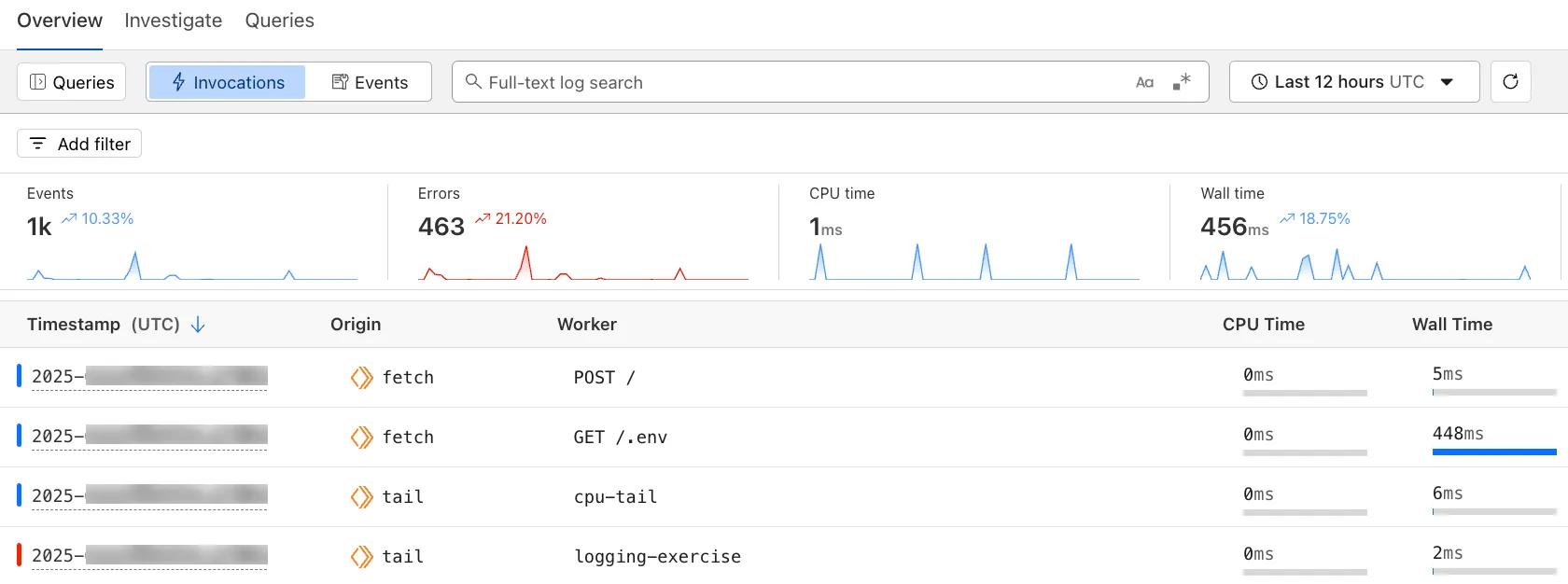
The Investigate tab presents a Query Builder, which helps you write structured queries to investigate and visualize your logs. The Query Builder can help answer questions such as:
- Which paths are experiencing the most 5XX errors?
- What is the wall time distribution by status code for my Worker?
- What are the slowest requests, and where are they coming from?
- Who are my top N users?
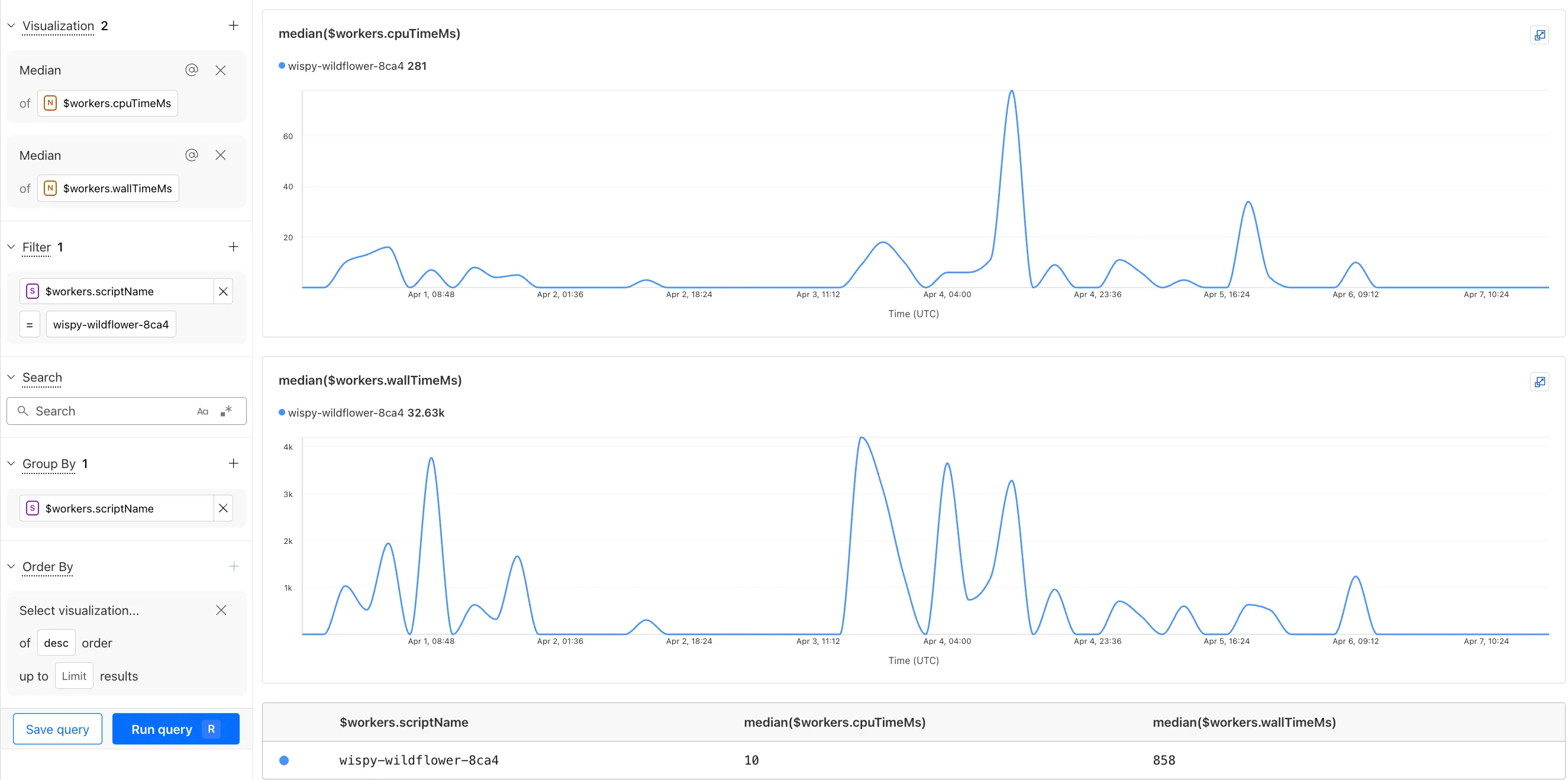
The Query Builder can use any field that you store in your logs as a key to visualize, filter, and group by. Use the Query Builder to quickly access your data, build visualizations, save queries, and share them with your team.
Workers Logs is now Generally Available. With a small change to your Wrangler configuration, Workers Logs ingests, indexes, and stores all logs emitted from your Workers for up to 7 days.
We've introduced a number of changes during our beta period, including:
- Dashboard enhancements with customizable fields as columns in the Logs view and support for invocation-based grouping
- Performance improvements to ensure no adverse impact
- Public API endpoints ↗ for broader consumption
The API documents three endpoints: list the keys in the telemetry dataset, run a query, and list the unique values for a key. For more, visit our REST API documentation ↗.
Visit the docs to learn more about the capabilities and methods exposed by the Query Builder. Start using Workers Logs and the Query Builder today by enabling observability for your Workers:
JSONC {"observability": {"enabled": true,"logs": {"invocation_logs": true,"head_sampling_rate": 1 // optional. default = 1.}}}TOML [observability]enabled = true[observability.logs]invocation_logs = truehead_sampling_rate = 1
You can now observe and investigate the CPU time and Wall time for every Workers Invocations.
- For Workers Logs, CPU time and Wall time are surfaced in the Invocation Log..
- For Tail Workers, CPU time and Wall time are surfaced at the top level of the Workers Trace Events object.
- For Workers Logpush, CPU and Wall time are surfaced at the top level of the Workers Trace Events object. All new jobs will have these new fields included by default. Existing jobs need to be updated to include CPU time and Wall time.
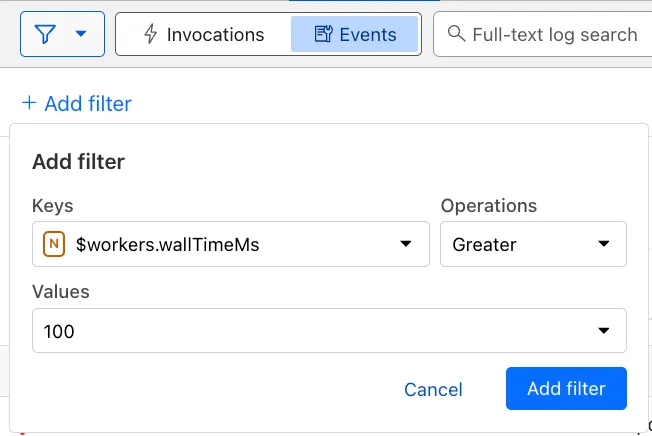
You can use a Workers Logs filter to search for logs where Wall time exceeds 100ms.
You can also use the Workers Observability Query Builder ↗ to find the median CPU time and median Wall time for all of your Workers.
You can now add a Deploy to Cloudflare button to the README of your Git repository containing a Workers application — making it simple for other developers to quickly set up and deploy your project!
The Deploy to Cloudflare button:
- Creates a new Git repository on your GitHub/ GitLab account: Cloudflare will automatically clone and create a new repository on your account, so you can continue developing.
- Automatically provisions resources the app needs: If your repository requires Cloudflare primitives like a Workers KV namespace, a D1 database, or an R2 bucket, Cloudflare will automatically provision them on your account and bind them to your Worker upon deployment.
- Configures Workers Builds (CI/CD): Every new push to your production branch on your newly created repository will automatically build and deploy courtesy of Workers Builds.
- Adds preview URLs to each pull request: If you'd like to test your changes before deploying, you can push changes to a non-production branch and preview URLs will be generated and posted back to GitHub as a comment.
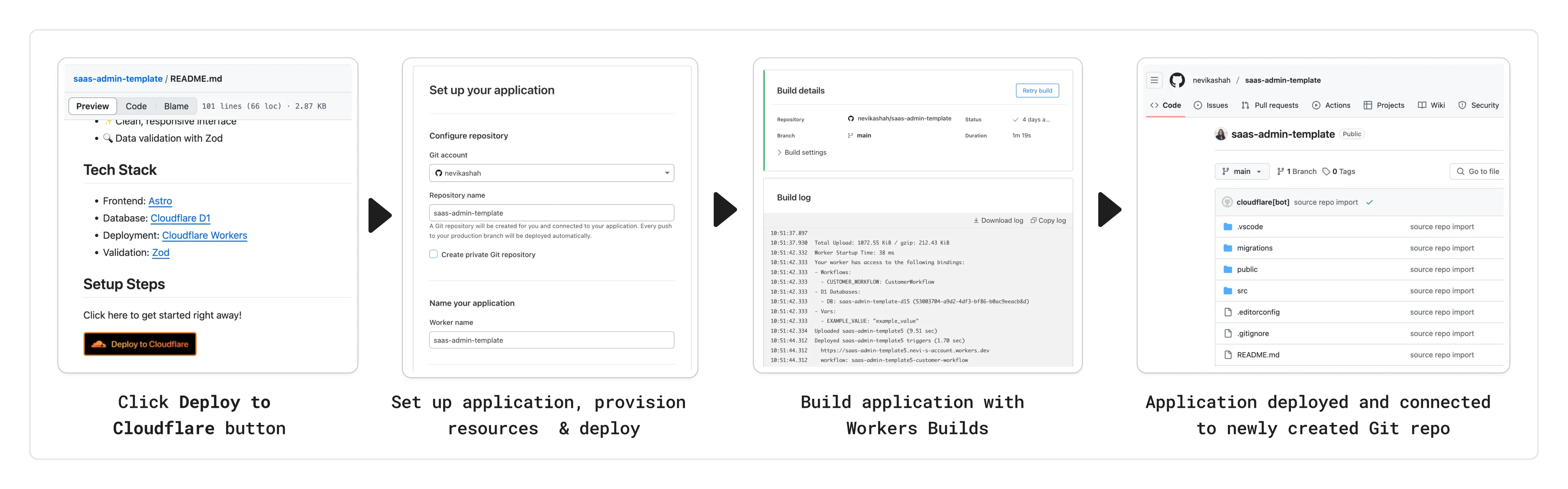
To create a Deploy to Cloudflare button in your README, you can add the following snippet, including your Git repository URL:
[](https://deploy.workers.cloudflare.com/?url=<YOUR_GIT_REPO_URL>)Check out our documentation for more information on how to set up a deploy button for your application and best practices to ensure a successful deployment for other developers.
The following full-stack frameworks now have Generally Available ("GA") adapters for Cloudflare Workers, and are ready for you to use in production:
The following frameworks are now in beta, with GA support coming very soon:
- Next.js, supported through @opennextjs/cloudflare ↗ is now
v1.0-beta. - Angular
- SolidJS (SolidStart)
You can also build complete full-stack apps on Workers without a framework:
- You can “just use Vite" ↗ and React together, and build a back-end API in the same Worker. Follow our React SPA with an API tutorial to learn how.
Get started building today with our framework guides, or read our Developer Week 2025 blog post ↗ about all the updates to building full-stack applications on Workers.
- Next.js, supported through @opennextjs/cloudflare ↗ is now
When using a Worker with the
nodejs_compatcompatibility flag enabled, the following Node.js APIs are now available:This make it easier to reuse existing Node.js code in Workers or use npm packages that depend on these APIs.
The full
node:crypto↗ API is now available in Workers.You can use it to verify and sign data:
JavaScript import { sign, verify } from "node:crypto";const signature = sign("sha256", "-data to sign-", env.PRIVATE_KEY);const verified = verify("sha256", "-data to sign-", env.PUBLIC_KEY, signature);Or, to encrypt and decrypt data:
JavaScript import { publicEncrypt, privateDecrypt } from "node:crypto";const encrypted = publicEncrypt(env.PUBLIC_KEY, "some data");const plaintext = privateDecrypt(env.PRIVATE_KEY, encrypted);See the
node:cryptodocumentation for more information.The following APIs from
node:tlsare now available:This enables secure connections over TLS (Transport Layer Security) to external services.
JavaScript import { connect } from "node:tls";// ... in a request handler ...const connectionOptions = { key: env.KEY, cert: env.CERT };const socket = connect(url, connectionOptions, () => {if (socket.authorized) {console.log("Connection authorized");}});socket.on("data", (data) => {console.log(data);});socket.on("end", () => {console.log("server ends connection");});See the
node:tlsdocumentation for more information.
The Cloudflare Vite plugin has reached v1.0 ↗ and is now Generally Available ("GA").
When you use
@cloudflare/vite-plugin, you can use Vite's local development server and build tooling, while ensuring that while developing, your code runs inworkerd↗, the open-source Workers runtime.This lets you get the best of both worlds for a full-stack app — you can use Hot Module Replacement ↗ from Vite right alongside Durable Objects and other runtime APIs and bindings that are unique to Cloudflare Workers.
@cloudflare/vite-pluginis made possible by the new environment API ↗ in Vite, and was built in partnership with the Vite team ↗.You can build any type of application with
@cloudflare/vite-plugin, using any rendering mode, from single page applications (SPA) and static sites to server-side rendered (SSR) pages and API routes.React Router v7 (Remix) is the first full-stack framework to provide full support for Cloudflare Vite plugin, allowing you to use all parts of Cloudflare's developer platform, without additional build steps.
You can also build complete full-stack apps on Workers without a framework — "just use Vite" ↗ and React together, and build a back-end API in the same Worker. Follow our React SPA with an API tutorial to learn how.
If you're already using Vite ↗ in your build and development toolchain, you can start using our plugin with minimal changes to your
vite.config.ts:vite.config.ts import { defineConfig } from "vite";import { cloudflare } from "@cloudflare/vite-plugin";export default defineConfig({plugins: [cloudflare()],});Take a look at the documentation for our Cloudflare Vite plugin for more information!
The Agents SDK now includes built-in support for building remote MCP (Model Context Protocol) servers directly as part of your Agent. This allows you to easily create and manage MCP servers, without the need for additional infrastructure or configuration.
The SDK includes a new
MCPAgentclass that extends theAgentclass and allows you to expose resources and tools over the MCP protocol, as well as authorization and authentication to enable remote MCP servers.JavaScript export class MyMCP extends McpAgent {server = new McpServer({name: "Demo",version: "1.0.0",});async init() {this.server.resource(`counter`, `mcp://resource/counter`, (uri) => {// ...});this.server.tool("add","Add two numbers together",{ a: z.number(), b: z.number() },async ({ a, b }) => {// ...},);}}TypeScript export class MyMCP extends McpAgent<Env> {server = new McpServer({name: "Demo",version: "1.0.0",});async init() {this.server.resource(`counter`, `mcp://resource/counter`, (uri) => {// ...});this.server.tool("add","Add two numbers together",{ a: z.number(), b: z.number() },async ({ a, b }) => {// ...},);}}See the example ↗ for the full code and as the basis for building your own MCP servers, and the client example ↗ for how to build an Agent that acts as an MCP client.
To learn more, review the announcement blog ↗ as part of Developer Week 2025.
We've made a number of improvements to the Agents SDK, including:
- Support for building MCP servers with the new
MCPAgentclass. - The ability to export the current agent, request and WebSocket connection context using
import { context } from "agents", allowing you to minimize or avoid direct dependency injection when calling tools. - Fixed a bug that prevented query parameters from being sent to the Agent server from the
useAgentReact hook. - Automatically converting the
agentname inuseAgentoruseAgentChatto kebab-case to ensure it matches the naming convention expected byrouteAgentRequest.
To install or update the Agents SDK, run
npm i agents@latestin an existing project, or explore theagents-starterproject:Terminal window npm create cloudflare@latest -- --template cloudflare/agents-starterSee the full release notes and changelog on the Agents SDK repository ↗ and
- Support for building MCP servers with the new
Durable Objects can now be used with zero commitment on the Workers Free plan allowing you to build AI agents with Agents SDK, collaboration tools, and real-time applications like chat or multiplayer games.
Durable Objects let you build stateful, serverless applications with millions of tiny coordination instances that run your application code alongside (in the same thread!) your durable storage. Each Durable Object can access its own SQLite database through a Storage API. A Durable Object class is defined in a Worker script encapsulating the Durable Object's behavior when accessed from a Worker. To try the code below, click the button:
JavaScript import { DurableObject } from "cloudflare:workers";// Durable Objectexport class MyDurableObject extends DurableObject {...async sayHello(name) {return `Hello, ${name}!`;}}// Workerexport default {async fetch(request, env) {// Every unique ID refers to an individual instance of the Durable Object classconst id = env.MY_DURABLE_OBJECT.idFromName("foo");// A stub is a client used to invoke methods on the Durable Objectconst stub = env.MY_DURABLE_OBJECT.get(id);// Methods on the Durable Object are invoked via the stubconst response = await stub.sayHello("world");return response;},};Free plan limits apply to Durable Objects compute and storage usage. Limits allow developers to build real-world applications, with every Worker request able to call a Durable Object on the free plan.
For more information, checkout:
SQLite in Durable Objects is now generally available (GA) with 10GB SQLite database per Durable Object. Since the public beta ↗ in September 2024, we've added feature parity and robustness for the SQLite storage backend compared to the preexisting key-value (KV) storage backend for Durable Objects.
SQLite-backed Durable Objects are recommended for all new Durable Object classes, using
new_sqlite_classesWrangler configuration. Only SQLite-backed Durable Objects have access to Storage API's SQL and point-in-time recovery methods, which provide relational data modeling, SQL querying, and better data management.JavaScript export class MyDurableObject extends DurableObject {sql: SqlStorageconstructor(ctx: DurableObjectState, env: Env) {super(ctx, env);this.sql = ctx.storage.sql;}async sayHello() {let result = this.sql.exec("SELECT 'Hello, World!' AS greeting").one();return result.greeting;}}KV-backed Durable Objects remain for backwards compatibility, and a migration path from key-value storage to SQL storage for existing Durable Object classes will be offered in the future.
For more details on SQLite storage, checkout Zero-latency SQLite storage in every Durable Object blog ↗.
You can now capture a maximum of 256 KB of log events per Workers invocation, helping you gain better visibility into application behavior.
All console.log() statements, exceptions, request metadata, and headers are automatically captured during the Worker invocation and emitted as JSON object. Workers Logs deserializes this object before indexing the fields and storing them. You can also capture, transform, and export the JSON object in a Tail Worker.
256 KB is a 2x increase from the previous 128 KB limit. After you exceed this limit, further context associated with the request will not be recorded in your logs.
This limit is automatically applied to all Workers.
Workflows is now Generally Available (or "GA"): in short, it's ready for production workloads. Alongside marking Workflows as GA, we've introduced a number of changes during the beta period, including:
- A new
waitForEventAPI that allows a Workflow to wait for an event to occur before continuing execution. - Increased concurrency: you can run up to 4,500 Workflow instances concurrently — and this will continue to grow.
- Improved observability, including new CPU time metrics that allow you to better understand which Workflow instances are consuming the most resources and/or contributing to your bill.
- Support for
vitestfor testing Workflows locally and in CI/CD pipelines.
Workflows also supports the new increased CPU limits that apply to Workers, allowing you to run more CPU-intensive tasks (up to 5 minutes of CPU time per instance), not including the time spent waiting on network calls, AI models, or other I/O bound tasks.
The new
step.waitForEventAPI allows a Workflow instance to wait on events and data, enabling human-in-the-the-loop interactions, such as approving or rejecting a request, directly handling webhooks from other systems, or pushing event data to a Workflow while it's running.Because Workflows are just code, you can conditionally execute code based on the result of a
waitForEventcall, and/or callwaitForEventmultiple times in a single Workflow based on what the Workflow needs.For example, if you wanted to implement a human-in-the-loop approval process, you could use
waitForEventto wait for a user to approve or reject a request, and then conditionally execute code based on the result.JavaScript import {WorkflowEntrypoint,WorkflowStep,WorkflowEvent,} from "cloudflare:workers";export class MyWorkflow extends WorkflowEntrypoint {async run(event, step) {// Other steps in your Workflowlet stripeEvent = await step.waitForEvent("receive invoice paid webhook from Stripe",{ type: "stripe-webhook", timeout: "1 hour" },);// Rest of your Workflow}}TypeScript import { WorkflowEntrypoint, WorkflowStep, WorkflowEvent } from "cloudflare:workers";export class MyWorkflow extends WorkflowEntrypoint<Env, Params> {async run(event: WorkflowEvent<Params>, step: WorkflowStep) {// Other steps in your Workflowlet stripeEvent = await step.waitForEvent<IncomingStripeWebhook>("receive invoice paid webhook from Stripe", { type: "stripe-webhook", timeout: "1 hour" })// Rest of your Workflow}}You can then send a Workflow an event from an external service via HTTP or from within a Worker using the Workers API for Workflows:
JavaScript export default {async fetch(req, env) {const instanceId = new URL(req.url).searchParams.get("instanceId");const webhookPayload = await req.json();let instance = await env.MY_WORKFLOW.get(instanceId);// Send our event, with `type` matching the event type defined in// our step.waitForEvent callawait instance.sendEvent({type: "stripe-webhook",payload: webhookPayload,});return Response.json({status: await instance.status(),});},};TypeScript export default {async fetch(req: Request, env: Env) {const instanceId = new URL(req.url).searchParams.get("instanceId")const webhookPayload = await req.json<Payload>()let instance = await env.MY_WORKFLOW.get(instanceId);// Send our event, with `type` matching the event type defined in// our step.waitForEvent callawait instance.sendEvent({type: "stripe-webhook", payload: webhookPayload})return Response.json({status: await instance.status(),});},};Read the GA announcement blog ↗ to learn more about what landed as part of the Workflows GA.
- A new
You can now run a Worker for up to 5 minutes of CPU time for each request.
Previously, each Workers request ran for a maximum of 30 seconds of CPU time — that is the time that a Worker is actually performing a task (we still allowed unlimited wall-clock time, in case you were waiting on slow resources). This meant that some compute-intensive tasks were impossible to do with a Worker. For instance, you might want to take the cryptographic hash of a large file from R2. If this computation ran for over 30 seconds, the Worker request would have timed out.
By default, Workers are still limited to 30 seconds of CPU time. This protects developers from incurring accidental cost due to buggy code.
By changing the
cpu_msvalue in your Wrangler configuration, you can opt in to any value up to 300,000 (5 minutes).JSONC {// ...rest of your configuration..."limits": {"cpu_ms": 300000,},// ...rest of your configuration...}TOML [limits]cpu_ms = 300_000For more information on the updates limits, see the documentation on Wrangler configuration for
cpu_msand on Workers CPU time limits.For building long-running tasks on Cloudflare, we also recommend checking out Workflows and Queues.
Source maps are now Generally Available (GA). You can now be uploaded with a maximum gzipped size of 15 MB. Previously, the maximum size limit was 15 MB uncompressed.
Source maps help map between the original source code and the transformed/minified code that gets deployed to production. By uploading your source map, you allow Cloudflare to map the stack trace from exceptions onto the original source code making it easier to debug.

With no source maps uploaded: notice how all the Javascript has been minified to one file, so the stack trace is missing information on file name, shows incorrect line numbers, and incorrectly references
jsinstead ofts.
With source maps uploaded: all methods reference the correct files and line numbers.
Uploading source maps and stack trace remapping happens out of band from the Worker execution, so source maps do not affect upload speed, bundle size, or cold starts. The remapped stack traces are accessible through Tail Workers, Workers Logs, and Workers Logpush.
To enable source maps, add the following to your Pages Function's or Worker's wrangler configuration:
JSONC {"upload_source_maps": true}TOML upload_source_maps = true
Update: Mon Mar 24th, 11PM UTC: Next.js has made further changes to address a smaller vulnerability introduced in the patches made to its middleware handling. Users should upgrade to Next.js versions
15.2.4,14.2.26,13.5.10or12.3.6. If you are unable to immediately upgrade or are running an older version of Next.js, you can enable the WAF rule described in this changelog as a mitigation.Update: Mon Mar 24th, 8PM UTC: Next.js has now backported the patch for this vulnerability ↗ to cover Next.js v12 and v13. Users on those versions will need to patch to
13.5.9and12.3.5(respectively) to mitigate the vulnerability.Update: Sat Mar 22nd, 4PM UTC: We have changed this WAF rule to opt-in only, as sites that use auth middleware with third-party auth vendors were observing failing requests.
We strongly recommend updating your version of Next.js (if eligible) to the patched versions, as your app will otherwise be vulnerable to an authentication bypass attack regardless of auth provider.
This rule is opt-in only for sites on the Pro plan or above in the WAF managed ruleset.
To enable the rule:
- Head to Security > WAF > Managed rules in the Cloudflare dashboard for the zone (website) you want to protect.
- Click the three dots next to Cloudflare Managed Ruleset and choose Edit
- Scroll down and choose Browse Rules
- Search for CVE-2025-29927 (ruleId:
34583778093748cc83ff7b38f472013e) - Change the Status to Enabled and the Action to Block. You can optionally set the rule to Log, to validate potential impact before enabling it. Log will not block requests.
- Click Next
- Scroll down and choose Save
This will enable the WAF rule and block requests with the
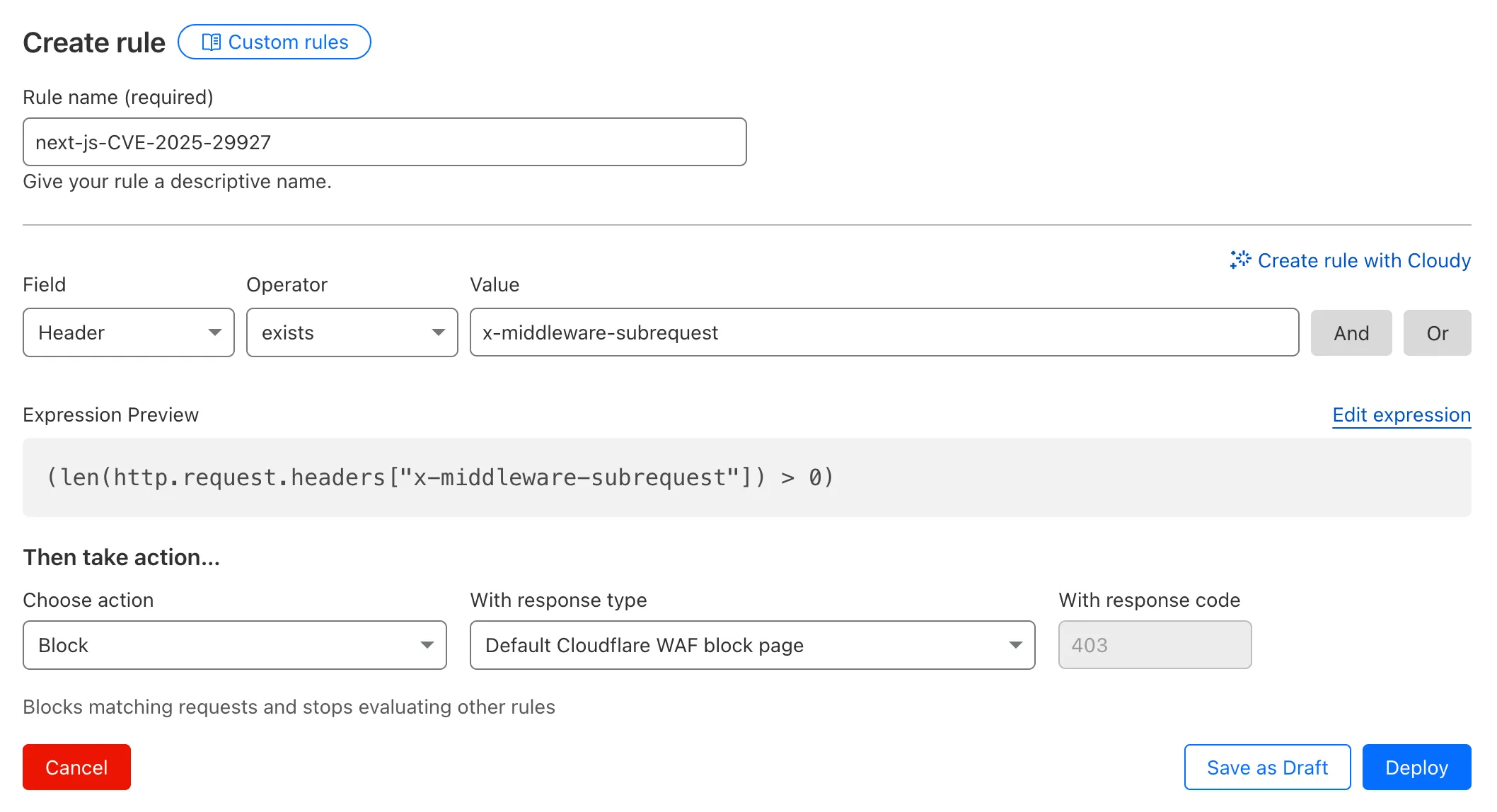
x-middleware-subrequestheader regardless of Next.js version.For users on the Free plan, or who want to define a more specific rule, you can create a Custom WAF rule to block requests with the
x-middleware-subrequestheader regardless of Next.js version.To create a custom rule:
- Head to Security > WAF > Custom rules in the Cloudflare dashboard for the zone (website) you want to protect.
- Give the rule a name - e.g.
next-js-CVE-2025-29927 - Set the matching parameters for the rule match any request where the
x-middleware-subrequestheaderexistsper the rule expression below.
Terminal window (len(http.request.headers["x-middleware-subrequest"]) > 0)- Set the action to 'block'. If you want to observe the impact before blocking requests, set the action to 'log' (and edit the rule later).
- Deploy the rule.
We've made a WAF (Web Application Firewall) rule available to all sites on Cloudflare to protect against the Next.js authentication bypass vulnerability ↗ (
CVE-2025-29927) published on March 21st, 2025.Note: This rule is not enabled by default as it blocked requests across sites for specific authentication middleware.
- This managed rule protects sites using Next.js on Workers and Pages, as well as sites using Cloudflare to protect Next.js applications hosted elsewhere.
- This rule has been made available (but not enabled by default) to all sites as part of our WAF Managed Ruleset and blocks requests that attempt to bypass authentication in Next.js applications.
- The vulnerability affects almost all Next.js versions, and has been fully patched in Next.js
14.2.26and15.2.4. Earlier, interim releases did not fully patch this vulnerability. - Users on older versions of Next.js (
11.1.4to13.5.6) did not originally have a patch available, but this the patch for this vulnerability and a subsequent additional patch have been backported to Next.js versions12.3.6and13.5.10as of Monday, March 24th. Users on Next.js v11 will need to deploy the stated workaround or enable the WAF rule.
The managed WAF rule mitigates this by blocking external user requests with the
x-middleware-subrequestheader regardless of Next.js version, but we recommend users using Next.js 14 and 15 upgrade to the patched versions of Next.js as an additional mitigation.
Smart Placement is a unique Cloudflare feature that can make decisions to move your Worker to run in a more optimal location (such as closer to a database). Instead of always running in the default location (the one closest to where the request is received), Smart Placement uses certain “heuristics” (rules and thresholds) to decide if a different location might be faster or more efficient.
Previously, if these heuristics weren't consistently met, your Worker would revert to running in the default location—even after it had been optimally placed. This meant that if your Worker received minimal traffic for a period of time, the system would reset to the default location, rather than remaining in the optimal one.
Now, once Smart Placement has identified and assigned an optimal location, temporarily dropping below the heuristic thresholds will not force a return to default locations. For example in the previous algorithm, a drop in requests for a few days might return to default locations and heuristics would have to be met again. This was problematic for workloads that made requests to a geographically located resource every few days or longer. In this scenario, your Worker would never get placed optimally. This is no longer the case.
📝 We've renamed the Agents package to
agents!If you've already been building with the Agents SDK, you can update your dependencies to use the new package name, and replace references to
agents-sdkwithagents:Terminal window # Install the new packagenpm i agentsTerminal window # Remove the old (deprecated) packagenpm uninstall agents-sdk# Find instances of the old package name in your codebasegrep -r 'agents-sdk' .# Replace instances of the old package name with the new one# (or use find-replace in your editor)sed -i 's/agents-sdk/agents/g' $(grep -rl 'agents-sdk' .)All future updates will be pushed to the new
agentspackage, and the older package has been marked as deprecated.We've added a number of big new features to the Agents SDK over the past few weeks, including:
- You can now set
cors: truewhen usingrouteAgentRequestto return permissive default CORS headers to Agent responses. - The regular client now syncs state on the agent (just like the React version).
useAgentChatbug fixes for passing headers/credentials, including properly clearing cache on unmount.- Experimental
/schedulemodule with a prompt/schema for adding scheduling to your app (with evals!). - Changed the internal
zodschema to be compatible with the limitations of Google's Gemini models by removing the discriminated union, allowing you to use Gemini models with the scheduling API.
We've also fixed a number of bugs with state synchronization and the React hooks.
JavaScript // via https://github.com/cloudflare/agents/tree/main/examples/cross-domainexport default {async fetch(request, env) {return (// Set { cors: true } to enable CORS headers.(await routeAgentRequest(request, env, { cors: true })) ||new Response("Not found", { status: 404 }));},};TypeScript // via https://github.com/cloudflare/agents/tree/main/examples/cross-domainexport default {async fetch(request: Request, env: Env) {return (// Set { cors: true } to enable CORS headers.(await routeAgentRequest(request, env, { cors: true })) ||new Response("Not found", { status: 404 }));},} satisfies ExportedHandler<Env>;We've added a new
@unstable_callable()decorator for defining methods that can be called directly from clients. This allows you call methods from within your client code: you can call methods (with arguments) and get native JavaScript objects back.JavaScript // server.tsimport { unstable_callable, Agent } from "agents";export class Rpc extends Agent {// Use the decorator to define a callable method@unstable_callable({description: "rpc test",})async getHistory() {return this.sql`SELECT * FROM history ORDER BY created_at DESC LIMIT 10`;}}TypeScript // server.tsimport { unstable_callable, Agent, type StreamingResponse } from "agents";import type { Env } from "../server";export class Rpc extends Agent<Env> {// Use the decorator to define a callable method@unstable_callable({description: "rpc test",})async getHistory() {return this.sql`SELECT * FROM history ORDER BY created_at DESC LIMIT 10`;}}We've fixed a number of small bugs in the
agents-starter↗ project — a real-time, chat-based example application with tool-calling & human-in-the-loop built using the Agents SDK. The starter has also been upgraded to use the latest wrangler v4 release.If you're new to Agents, you can install and run the
agents-starterproject in two commands:Terminal window # Install it$ npm create cloudflare@latest agents-starter -- --template="cloudflare/agents-starter"# Run it$ npm run startYou can use the starter as a template for your own Agents projects: open up
src/server.tsandsrc/client.tsxto see how the Agents SDK is used.We've heard your feedback on the Agents SDK documentation, and we're shipping more API reference material and usage examples, including:
- Expanded API reference documentation, covering the methods and properties exposed by the Agents SDK, as well as more usage examples.
- More Client API documentation that documents
useAgent,useAgentChatand the new@unstable_callableRPC decorator exposed by the SDK. - New documentation on how to route requests to agents and (optionally) authenticate clients before they connect to your Agents.
Note that the Agents SDK is continually growing: the type definitions included in the SDK will always include the latest APIs exposed by the
agentspackage.If you're still wondering what Agents are, read our blog on building AI Agents on Cloudflare ↗ and/or visit the Agents documentation to learn more.
- You can now set
You can now access bindings from anywhere in your Worker by importing the
envobject fromcloudflare:workers.Previously,
envcould only be accessed during a request. This meant that bindings could not be used in the top-level context of a Worker.Now, you can import
envand access bindings such as secrets or environment variables in the initial setup for your Worker:JavaScript import { env } from "cloudflare:workers";import ApiClient from "example-api-client";// API_KEY and LOG_LEVEL now usable in top-level scopeconst apiClient = ApiClient.new({ apiKey: env.API_KEY });const LOG_LEVEL = env.LOG_LEVEL || "info";export default {fetch(req) {// you can use apiClient or LOG_LEVEL, configured before any request is handled},};Additionally,
envwas normally accessed as a argument to a Worker's entrypoint handler, such asfetch. This meant that if you needed to access a binding from a deeply nested function, you had to passenvas an argument through many functions to get it to the right spot. This could be cumbersome in complex codebases.Now, you can access the bindings from anywhere in your codebase without passing
envas an argument:JavaScript // helpers.jsimport { env } from "cloudflare:workers";// env is *not* an argument to this functionexport async function getValue(key) {let prefix = env.KV_PREFIX;return await env.KV.get(`${prefix}-${key}`);}For more information, see documentation on accessing
env.
You can now retry your Cloudflare Pages and Workers builds directly from GitHub. No need to switch to the Cloudflare Dashboard for a simple retry!
Let\u2019s say you push a commit, but your build fails due to a spurious error like a network timeout. Instead of going to the Cloudflare Dashboard to manually retry, you can now rerun the build with just a few clicks inside GitHub, keeping you inside your workflow.
For Pages and Workers projects connected to a GitHub repository:
- When a build fails, go to your GitHub repository or pull request
- Select the failed Check Run for the build
- Select "Details" on the Check Run
- Select "Rerun" to trigger a retry build for that commit
Learn more about Pages Builds and Workers Builds.
We've released the next major version of Wrangler, the CLI for Cloudflare Workers —
wrangler@4.0.0. Wrangler v4 is a major release focused on updates to underlying systems and dependencies, along with improvements to keep Wrangler commands consistent and clear.You can run the following command to install it in your projects:
npm i wrangler@latestyarn add wrangler@latestpnpm add wrangler@latestbun add wrangler@latestUnlike previous major versions of Wrangler, which were foundational rewrites ↗ and rearchitectures ↗ — Version 4 of Wrangler includes a much smaller set of changes. If you use Wrangler today, your workflow is very unlikely to change.
A detailed migration guide is available and if you find a bug or hit a roadblock when upgrading to Wrangler v4, open an issue on the
cloudflare/workers-sdkrepository on GitHub ↗.Going forward, we'll continue supporting Wrangler v3 with bug fixes and security updates until Q1 2026, and with critical security updates until Q1 2027, at which point it will be out of support.