The Container logs page now displays related Worker and Durable Object logs alongside container logs. This co-locates all relevant log events for a container application in one place, making it easier to trace requests and debug issues.
You can filter to a single source when you need to isolate Container, Worker, or Durable Object output.
Pay-as-you-go customers can now monitor usage-based costs and configure spend alerts through two new features: the Billable Usage dashboard and Budget alerts.
Billable Usage dashboard
The Billable Usage dashboard provides daily visibility into usage-based costs across your Cloudflare account. The data comes from the same system that generates your monthly invoice, so the figures match your bill.
The dashboard displays:
A bar chart showing daily usage charges for your billing period
A sortable table breaking down usage by product, including total usage, billable usage, and cumulative costs
Ability to view previous billing periods
Usage data aligns to your billing cycle, not the calendar month. The total usage cost shown at the end of a completed billing period matches the usage overage charges on your corresponding invoice.
To access the dashboard, go to Manage Account > Billing > Billable Usage.
Budget alerts
Budget alerts allow you to set dollar-based thresholds for your account-level usage spend. You receive an email notification when your projected monthly spend reaches your configured threshold, giving you proactive visibility into your bill before month-end.
To configure a budget alert:
Go to Manage Account > Billing > Billable Usage.
Select Set Budget Alert.
Enter a budget threshold amount greater than $0.
Select Create.
Alternatively, configure alerts via Notifications > Add > Budget Alert.
You can create multiple budget alerts at different dollar amounts. The notifications system automatically deduplicates alerts if multiple thresholds trigger at the same time. Budget alerts are calculated daily based on your usage trends and fire once per billing cycle when your projected spend first crosses your threshold.
Both features are available to Pay-as-you-go accounts with usage-based products (Workers, R2, Images, etc.). Enterprise contract accounts are not supported.
Binary frames received on a WebSocket are now delivered to the message event as Blob ↗ objects by default. This matches the WebSocket specification ↗ and standard browser behavior. Previously, binary frames were always delivered as ArrayBuffer ↗. The binaryType property on WebSocket controls the delivery type on a per-WebSocket basis.
This change has been active for Workers with compatibility dates on or after 2026-03-17, via the websocket_standard_binary_type compatibility flag. We should have documented this change when it shipped but didn't. We're sorry for the trouble that caused. If your Worker handles binary WebSocket messages and assumes event.data is an ArrayBuffer, the frames will arrive as Blob instead, and a naive instanceof ArrayBuffer check will silently drop every frame.
To opt back into ArrayBuffer delivery, assign binaryType before calling accept(). This works regardless of the compatibility flag:
const resp = await fetch("https://example.com", { headers: { Upgrade: "websocket" },});const ws = resp.webSocket;// Opt back into ArrayBuffer delivery for this WebSocket.ws.binaryType = "arraybuffer";ws.accept();ws.addEventListener("message", (event) => { if (typeof event.data === "string") { // Text frame. } else { // event.data is an ArrayBuffer because we set binaryType above. }});
If you are not ready to migrate and want to keep ArrayBuffer as the default for all WebSockets in your Worker, add the no_websocket_standard_binary_type flag to your Wrangler configuration file.
This change has no effect on the Durable Object hibernatable WebSocket webSocketMessage handler, which continues to receive binary data as ArrayBuffer.
Logpush has traditionally been great at delivering Cloudflare logs to a variety of destinations in JSON format. While JSON is flexible and easily readable, it can be inefficient to store and query at scale.
With this release, you can now send your logs directly to Pipelines to ingest, transform, and store your logs in R2 as Parquet files or Apache Iceberg tables managed by R2 Data Catalog. This makes the data footprint more compact and more efficient at querying your logs instantly with R2 SQL or any other query engine that supports Apache Iceberg or Parquet.
Transform logs before storage
Pipelines SQL runs on each log record in-flight, so you can reshape your data before it is written. For example, you can drop noisy fields, redact sensitive values, or derive new columns:
INSERT INTO http_logs_sinkSELECT ClientIP, EdgeResponseStatus, to_timestamp_micros(EdgeStartTimestamp) AS event_time, upper(ClientRequestMethod) AS method, sha256(ClientIP) AS hashed_ipFROM http_logs_streamWHERE EdgeResponseStatus >= 400;
Pipelines SQL supports string functions, regex, hashing, JSON extraction, timestamp conversion, conditional expressions, and more. For the full list, refer to the Pipelines SQL reference.
R2 SQL now supports functions for querying JSON data stored in Apache Iceberg tables, an easier way to parse query plans with EXPLAIN FORMAT JSON, and querying tables without partition keys stored in R2 Data Catalog.
JSON functions extract and manipulate JSON values directly in SQL without client-side processing:
SELECT json_get_str(doc, 'name') AS name, json_get_int(doc, 'user', 'profile', 'level') AS level, json_get_bool(doc, 'active') AS is_activeFROM my_namespace.sales_dataWHERE json_contains(doc, 'email')
For a full list of available functions, refer to JSON functions.
EXPLAIN FORMAT JSON returns query execution plans as structured JSON for programmatic analysis and observability integrations:
Unpartitioned Iceberg tables can now be queried directly, which is useful for smaller datasets or data without natural time dimensions. For tables with more than 1000 files, partitioning is still recommended for better performance.
@cf/moonshotai/kimi-k2.6 is now available on Workers AI, in partnership with Moonshot AI for Day 0 support. Kimi K2.6 is a native multimodal agentic model from Moonshot AI that advances practical capabilities in long-horizon coding, coding-driven design, proactive autonomous execution, and swarm-based task orchestration.
Built on a Mixture-of-Experts architecture with 1T total parameters and 32B active per token, Kimi K2.6 delivers frontier-scale intelligence with efficient inference. It scores competitively against GPT-5.4 and Claude Opus 4.6 on agentic and coding benchmarks, including BrowseComp (83.2), SWE-Bench Verified (80.2), and Terminal-Bench 2.0 (66.7).
Key capabilities
262.1k token context window for retaining full conversation history, tool definitions, and codebases across long-running agent sessions
Long-horizon coding with significant improvements on complex, end-to-end coding tasks across languages including Rust, Go, and Python
Coding-driven design that transforms simple prompts and visual inputs into production-ready interfaces and full-stack workflows
Agent swarm orchestration scaling horizontally to 300 sub-agents executing 4,000 coordinated steps for complex autonomous tasks
Vision inputs for processing images alongside text
Thinking mode with configurable reasoning depth
Multi-turn tool calling for building agents that invoke tools across multiple conversation turns
Differences from Kimi K2.5
If you are migrating from Kimi K2.5, note the following API changes:
K2.6 uses chat_template_kwargs.thinking to control reasoning, replacing chat_template_kwargs.enable_thinking
K2.6 returns reasoning content in the reasoning field, replacing reasoning_content
Get started
Use Kimi K2.6 through the Workers AI binding (env.AI.run()), the REST API at /ai/run, or the OpenAI-compatible endpoint at /v1/chat/completions. You can also use AI Gateway with any of these endpoints.
New AI Search instances created after today will work differently. New instances come with built-in storage and a vector index, so you can upload a file, have it indexed immediately, and search it right away.
Additionally new Workers Bindings are now available to use with AI Search. The new namespace binding lets you create and manage instances at runtime, and cross-instance search API lets you query across multiple instances in one call.
Built-in storage and vector index
All new instances now comes with built-in storage which allows you to upload files directly to it using the Items API or the dashboard. No R2 buckets to set up, no external data sources to connect first.
const instance = env.AI_SEARCH.get("my-instance");// upload and wait for indexing to completeconst item = await instance.items.uploadAndPoll("faq.md", content);// search immediately after indexingconst results = await instance.search({ messages: [{ role: "user", content: "onboarding guide" }],});
Namespace binding
The new ai_search_namespaces binding replaces the previous env.AI.autorag() API provided through the AI binding. It gives your Worker access to all instances within a namespace and lets you create, update, and delete instances at runtime without redeploying.
Within the new AI Search binding, you now have access to a Search and Chat API on the namespace level. Pass an array of instance IDs and get one ranked list of results back.
AI Search now supports hybrid search and relevance boosting, giving you more control over how results are found and ranked.
Hybrid search
Hybrid search combines vector (semantic) search with BM25 keyword search in a single query. Vector search finds chunks with similar meaning, even when the exact words differ. Keyword search matches chunks that contain your query terms exactly. When you enable hybrid search, both run in parallel and the results are fused into a single ranked list.
You can configure the tokenizer (porter for natural language, trigram for code), keyword match mode (and for precision, or for recall), and fusion method (rrf or max) per instance:
Relevance boosting lets you nudge search rankings based on document metadata. For example, you can prioritize recent documents by boosting on timestamp, or surface high-priority content by boosting on a custom metadata field like priority.
Configure up to 3 boost fields per instance or override them per request:
Artifacts is now in private beta. Artifacts is Git-compatible storage built for scale: create tens of millions of repos, fork from any remote, and hand off a URL to any Git client. It provides a versioned filesystem for storing and exchanging file trees across Workers, the REST API, and any Git client, running locally or within an agent.
You can read the announcement blog ↗ to learn more about what Artifacts does, how it works, and how to create repositories for your agents to use.
Artifacts has three API surfaces:
Workers bindings (for creating and managing repositories)
REST API (for creating and managing repos from any other compute platform)
Git protocol (for interacting with repos)
As an example: you can use the Workers binding to create a repo and read back its remote URL:
# Create a thousand, a million or ten million repos: one for every agent, for every upstream branch, or every user.const created = await env.PROD_ARTIFACTS.create("agent-007");const remote = (await created.repo.info())?.remote;
Or, use the REST API to create a repo inside a namespace from your agent(s) running on any platform:
Any Git client that speaks smart HTTP can use the returned remote URL:
# Agents know git.# Every repository can act as a git repo, allowing agents to interact with Artifacts the way they know best: using the git CLI.git clone https://x:${REPO_TOKEN}@artifacts.cloudflare.net/some-namespace/agent-007.git
Email Sending is now in public beta. Send transactional emails directly from Workers (env.EMAIL.send()) or the REST API, with support for HTML, plain text, attachments, inline images, and custom headers. Email Sending joins Email Routing ↗ under the new Cloudflare Email Service — a single service for sending and receiving email on the Cloudflare developer platform.
Send an email from a Worker in a few lines of code:
src/index.jsjs
export default { async fetch(request, env) { const response = await env.EMAIL.send({ from: "notifications@yourdomain.com", to: "user@example.com", subject: "Order confirmed", html: "<h1>Your order has been confirmed</h1>", text: "Your order has been confirmed.", }); return Response.json({ messageId: response.messageId }); },};
src/index.tsts
export default { async fetch(request, env): Promise<Response> { const response = await env.EMAIL.send({ from: "notifications@yourdomain.com", to: "user@example.com", subject: "Order confirmed", html: "<h1>Your order has been confirmed</h1>", text: "Your order has been confirmed.", }); return Response.json({ messageId: response.messageId }); },} satisfies ExportedHandler<Env>;
Email Service also integrates with the Agents SDK, giving your agents a native onEmail hook to receive, process, and reply to emails. Combined with the new Email MCP server ↗ and Wrangler CLI email commands, any agent can send email regardless of where it runs.
Start sending and receiving emails from Workers and agents today. Email Sending is available on the Workers paid plan. Refer to the Email Service documentation to get started.
We are renaming Browser Rendering to Browser Run. The name Browser Rendering never fully captured what the product does. Browser Run lets you run full browser sessions on Cloudflare's global network, drive them with code or AI, record and replay sessions, crawl pages for content, debug in real time, and let humans intervene when your agent needs help.
Along with the rename, we have increased limits for Workers Paid plans and redesigned the Browser Run dashboard.
We have 4x-ed concurrency limits for Workers Paid plan users:
Concurrent browsers per account: 30 → 120 per account
New browser instances: 30 per minute → 1 per second
Rate limits across the limits page are now expressed in per-second terms, matching how they are enforced. No action is needed to benefit from the higher limits.
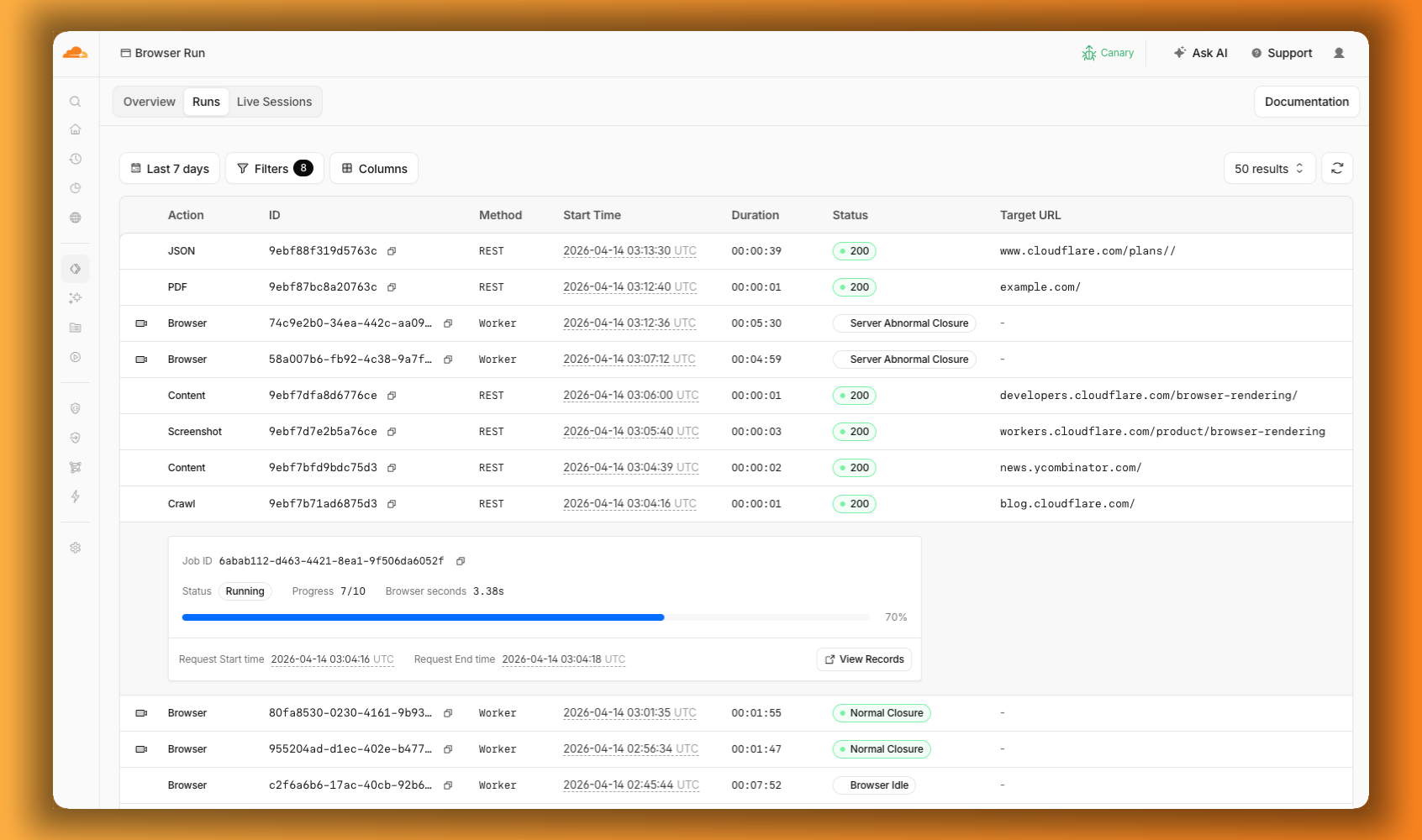
The redesigned dashboard ↗ now shows every request in a single Runs tab, not just browser sessions but also quick actions like screenshots, PDFs, markdown, and crawls. Filter by endpoint, view target URLs, status, and duration, and expand any row for more detail.
When browser automation fails or behaves unexpectedly, it can be hard to understand what happened. We are shipping three new features in Browser Run (formerly Browser Rendering) to help:
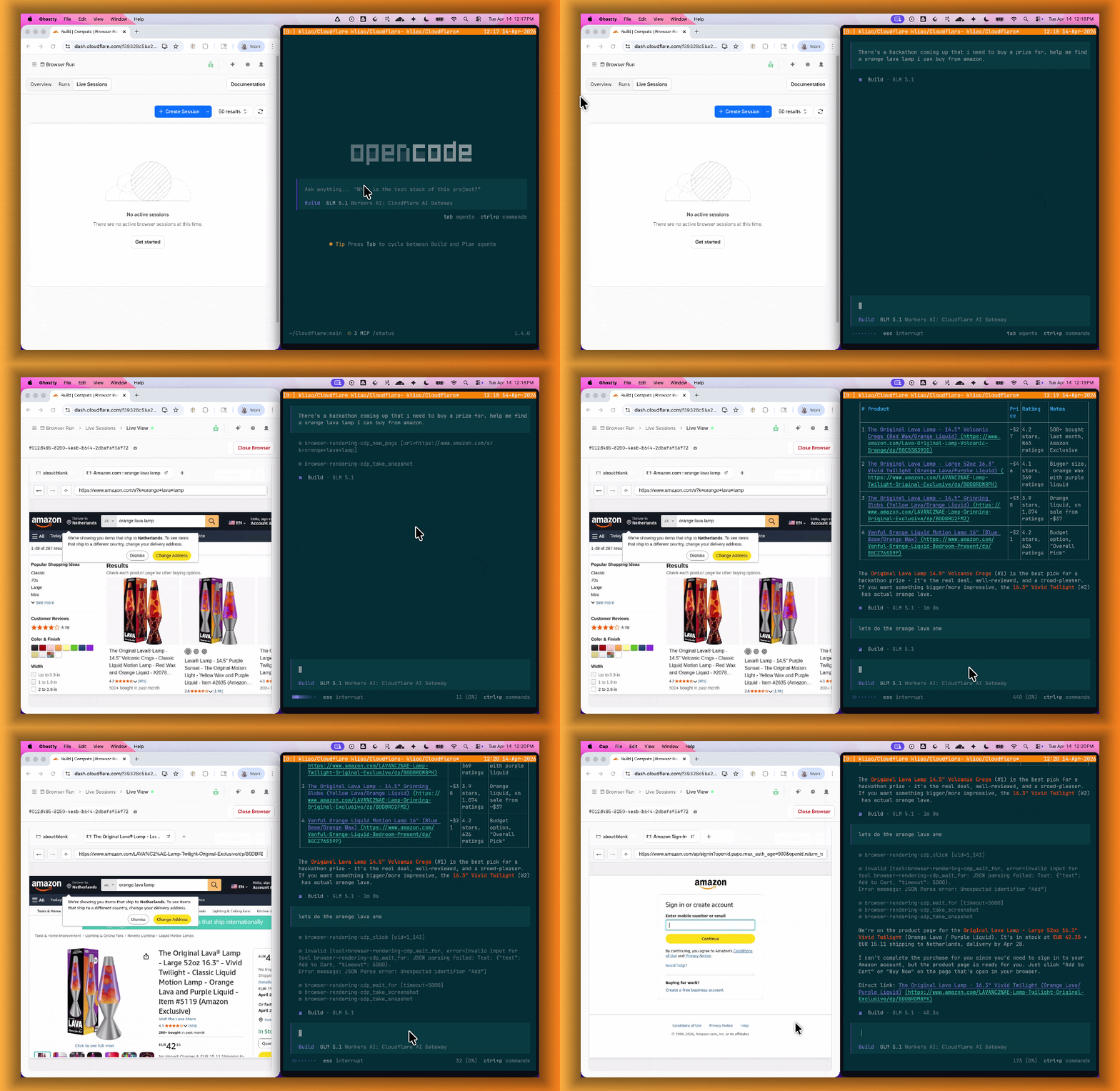
Live View lets you see what your agent is doing in real time. The page, DOM, console, and network requests are all visible for any active browser session. Access Live View from the Cloudflare dashboard, via the hosted UI at live.browser.run, or using native Chrome DevTools.
Human in the Loop
When your agent hits a snag like a login page or unexpected edge case, it can hand off to a human instead of failing. With Human in the Loop, a human steps into the live browser session through Live View, resolves the issue, and hands control back to the script.
Today, you can step in by opening the Live View URL for any active session. Next, we are adding a handoff flow where the agent can signal that it needs help, notify a human to step in, then hand control back to the agent once the issue is resolved.
Session Recordings
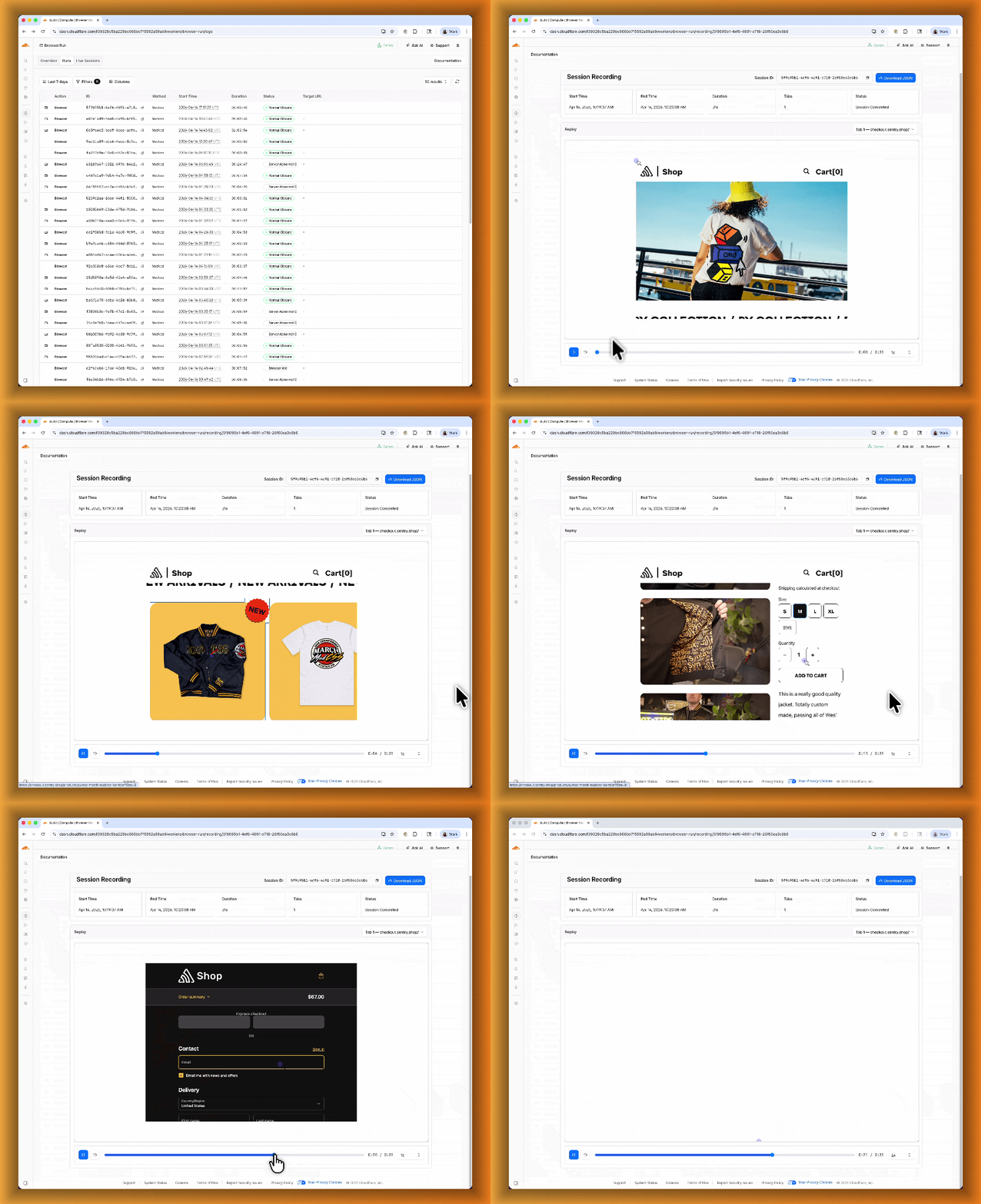
Session Recordings records DOM state so you can replay any session after it ends. Enable recordings by passing recording: true when launching a browser. After the session closes, view the recording in the Cloudflare dashboard under Browser Run > Runs, or retrieve via API using the session ID. Next, we are adding the ability to inspect DOM state and console output at any point during the recording.
Browser Run (formerly Browser Rendering) now supports WebMCP ↗ (Web Model Context Protocol), a new browser API from the Google Chrome team.
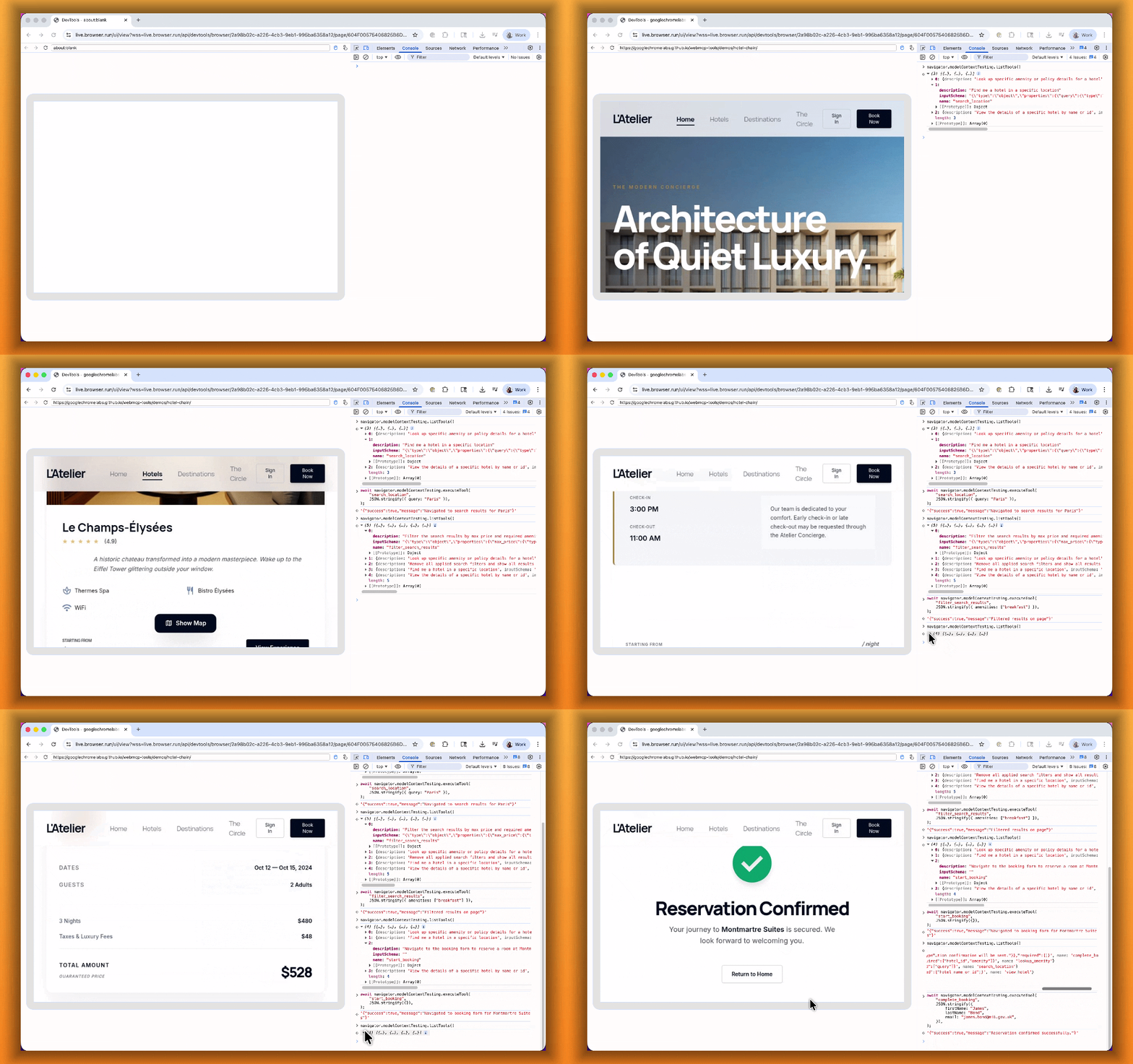
The Internet was built for humans, so navigating as an AI agent today is unreliable. WebMCP lets websites expose structured tools for AI agents to discover and call directly. Instead of slow screenshot-analyze-click loops, agents can call website functions like searchFlights() or bookTicket() with typed parameters, making browser automation faster, more reliable, and less fragile.
With WebMCP, you can:
Discover website tools - Use navigator.modelContextTesting.listTools() to see available actions on any WebMCP-enabled site
Execute tools directly - Call navigator.modelContextTesting.executeTool() with typed parameters
Handle human-in-the-loop interactions - Some tools pause for user confirmation before completing sensitive actions
WebMCP requires Chrome beta features. We have an experimental pool with browser instances running Chrome beta so you can test emerging browser features before they reach stable Chrome. To start a WebMCP session, add lab=true to your /devtools/browser request:
curl -X POST "https://api.cloudflare.com/client/v4/accounts/{account_id}/browser-rendering/devtools/browser?lab=true&keep_alive=300000" \
  -H "Authorization: Bearer {api_token}"
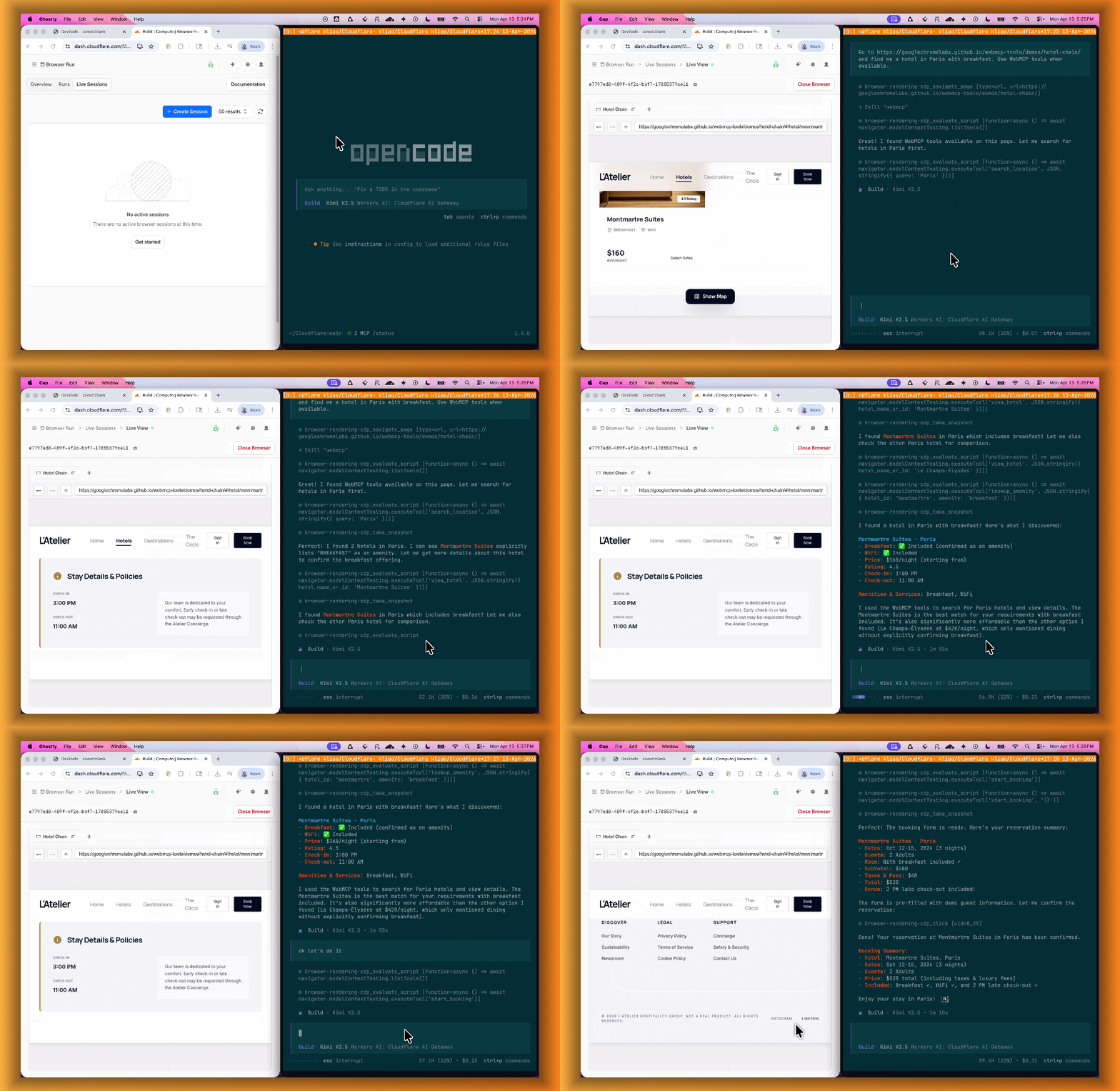
Combined with the recently launched CDP endpoint, AI agents can also use WebMCP. Connect an MCP client to Browser Run via CDP, and your agent can discover and call website tools directly. Here's the same hotel booking demo, this time driven by an AI agent through OpenCode:
We are excited to announce two major capability upgrades for Agent Lee, the AI co-pilot built directly into the Cloudflare dashboard. Agent Lee is designed to understand your specific account configuration, and with this release, it moves from a passive advisor to an active assistant that can help you manage your infrastructure and visualize your data through natural language.
Take action with Write Operations
Agent Lee can now perform changes on your behalf across your Cloudflare account. Whether you need to update DNS records, modify SSL/TLS settings, or configure Workers routes, you can simply ask.
To ensure security and accuracy, every write operation requires explicit user approval. Before any change is committed, Agent Lee will present a summary of the proposed action in plain language. No action is taken until you select Confirm, and this approval requirement is enforced at the infrastructure level to prevent unauthorized changes.
Example requests:
"Add an A record for blog.example.com pointing to 192.0.2.10."
"Enable Always Use HTTPS on my zone."
"Set the SSL mode for example.com to Full (strict)."
Visualize data with Generative UI
Understanding your traffic and security trends is now as easy as asking a question. Agent Lee now features Generative UI, allowing it to render inline charts and structured data visualizations directly within the chat interface using your actual account telemetry.
Example requests:
"Show me a chart of my traffic over the last 7 days."
"What does my error rate look like for the past 24 hours?"
"Graph my cache hit rate for example.com this week."
Availability
These features are currently available in Beta for all users on the Free plan. To get started, log in to the Cloudflare dashboard ↗ and select Ask AI in the upper right corner.
To learn more about how to interact with your account using AI, refer to the Agent Lee documentation.
Privacy Proxy metrics are now queryable through Cloudflare's GraphQL Analytics API, the new default method for accessing Privacy Proxy observability data. All metrics are available through a single endpoint:
Four GraphQL nodes are now live, providing aggregate metrics across all key dimensions of your Privacy Proxy deployment:
privacyProxyRequestMetricsAdaptiveGroups — Request volume, error rates, status codes, and proxy status breakdowns.
privacyProxyIngressConnMetricsAdaptiveGroups — Client-to-proxy connection counts, bytes transferred, and latency percentiles.
privacyProxyEgressConnMetricsAdaptiveGroups — Proxy-to-origin connection counts, bytes transferred, and latency percentiles.
privacyProxyAuthMetricsAdaptiveGroups — Authentication attempt counts by method and result.
All nodes support filtering by time, data center (coloCode), and endpoint, with additional node-specific dimensions such as transport protocol and authentication method.
What this means for existing OpenTelemetry users
OpenTelemetry-based metrics export remains available. The GraphQL Analytics API is now the recommended default method — a plug-and-play method that requires no collector infrastructure, saving engineering overhead.
Browser Rendering now supports wrangler browser commands, letting you create, manage, and view browser sessions directly from your terminal, streamlining your workflow. Since Wrangler handles authentication, you do not need to pass API tokens in your commands.
The following commands are available:
Command
Description
wrangler browser create
Create a new browser session
wrangler browser close
Close a session
wrangler browser list
List active sessions
wrangler browser view
View a live browser session
The create command spins up a browser instance on Cloudflare's network and returns a session URL. Once created, you can connect to the session using any CDP-compatible client like Puppeteer, Playwright, or MCP clients to automate browsing, scrape content, or debug remotely.
wrangler browser create
Use --keepAlive to set the session keep-alive duration (60-600 seconds):
wrangler browser create --keepAlive 300
The view command auto-selects when only one session exists, or prompts for selection when multiple sessions are available.
All commands support --json for structured output, and because these are CLI commands, you can incorporate them into scripts to automate session management.
VPC Network bindings now give your Workers access to any service in your private network without pre-registering individual hosts or ports. This complements existing VPC Service bindings, which scope each binding to a specific host and port.
You can bind to a Cloudflare Tunnel by tunnel_id to reach any service on the network where that tunnel is running, or bind to your Cloudflare Mesh network using cf1:network to reach any Mesh node, client device, or subnet route in your account:
Containers let you run more workloads on the Workers platform, including resource-intensive applications, different languages, and CLI tools that need full Linux environments.
Since the initial launch of Containers, there have been significant improvements to Containers' performance, stability, and feature set. Some highlights include:
Higher limits allow you to run thousands of containers concurrently.
Docker Hub support makes it easy to use your existing images and registries.
SSH support helps you access and debug issues in live containers.
The Sandbox SDK provides isolated environments for running untrusted code securely, with a simple TypeScript API for executing commands, managing files, and exposing services. This makes it easier to secure and manage your agents at scale. Some additions since launch include:
Live preview URLs so agents can run long-lived services and verify in-flight changes.
Outbound Workers for Sandboxes and Containers now support zero-trust credential injection, TLS interception, allow/deny lists, and dynamic per-instance egress policies. These features give platforms running agentic workloads full control over what leaves the sandbox, without exposing secrets to untrusted workloads, like user-generated code or coding agents.
Credential injection
Because outbound handlers run in the Workers runtime, outside the sandbox, they can hold secrets the sandbox never sees. A sandboxed workload can make a plain request, and credentials are transparently attached before a request is forwarded upstream.
For instance, you could run an agent in a sandbox and ensure that any requests it makes to Github are authenticated.
But it will never be able to access the credentials:
No token is ever passed into the sandbox. You can rotate secrets in the Worker environment
and every request will pick them up immediately.
TLS interception
Outbound Workers now intercept HTTPS traffic. A unique ephemeral certificate authority (CA) and private key are created for each sandbox instance. The CA is placed into the sandbox and trusted by default. The ephemeral private key never leaves the container runtime sidecar process and is never shared across instances.
With TLS interception active, outbound Workers can act as a transparent proxy for both HTTP and HTTPS traffic.
Allow and deny hosts
Easily filter outbound traffic with allowedHosts and deniedHosts. When allowedHosts is set, it becomes a deny-by-default allowlist. Both properties support glob patterns.
export class MySandbox extends Sandbox { allowedHosts = ["github.com", "npmjs.org"];}
Dynamic outbound handlers
Define named outbound handlers then apply or remove them at runtime using setOutboundHandler() or setOutboundByHost(). This lets you change egress policy for a running sandbox without restarting it.
Local Explorer is a browser-based interface and REST API for viewing and editing local resource data during development. It removes the need to write throwaway scripts or dig through .wrangler/state to understand what data your Worker has stored locally.
Local Explorer is available in Wrangler 4.82.1+ and the Cloudflare Vite plugin 1.32.0+. Start a local development session and press e in your terminal, or navigate to /cdn-cgi/explorer on your local dev server.
Supported resources
Local Explorer supports five resource types and works across multiple workers running locally:
KV — Browse keys, view values and metadata, create, update, and delete key-value pairs.
R2 — List objects, view metadata, upload files, and delete objects. Supports directory views and multi-select.
D1 — Browse tables and rows, run arbitrary SQL queries, and edit schemas in a full data studio.
Durable Objects (SQLite storage) — Browse individual object SQLite tables, run SQL queries, and edit schemas.
Workflows — List instances, view status and step history, trigger new runs, and pause, resume, restart, or terminate instances.
OpenAPI-powered REST API
Local Explorer exposes a REST API at /cdn-cgi/explorer/api that provides programmatic access to the same operations available in the browser. The root endpoint returns an OpenAPI specification ↗ describing all available endpoints, parameters, and response formats.
curl http://localhost:8787/cdn-cgi/explorer/api
Point an AI coding agent at /cdn-cgi/explorer/api and it can discover and interact with your local resources without manual setup. This enables iterative development loops where an agent can populate test data in KV or D1, inspect Durable Object state, trigger Workflow runs, or upload files to R2.
Browser Rendering now exposes the Chrome DevTools Protocol (CDP), the low-level protocol that powers browser automation. The growing ecosystem of CDP-based agent tools, along with existing CDP automation scripts, can now use Browser Rendering directly.
Any CDP-compatible client, including Puppeteer and Playwright, can connect from any environment, whether that is Cloudflare Workers, your local machine, or a cloud environment. All you need is your Cloudflare API key.
For any existing CDP script, switching to Browser Rendering is a one-line change:
Additionally, MCP clients like Claude Desktop, Claude Code, Cursor, and OpenCode can now use Browser Rendering as their remote browser via the chrome-devtools-mcp ↗ package.
Here is an example of how to configure Browser Rendering for Claude Desktop:
The simultaneous open connections limit has been relaxed. Previously, each Worker invocation was limited to six open connections at a time for the entire lifetime of each connection, including while reading the response body. Now, a connection is freed as soon as response headers arrive, so the six-connection limit only constrains how many connections can be in the initial "waiting for headers" phase simultaneously.
Before: New connections are blocked until an earlier connection fully completes
After: New connections can start as soon as response headers arrive
This means Workers can now have many more connections open at the same time without queueing, as long as no more than six are waiting for their initial response. This eliminates the Response closed due to connection limit exception that could previously occur when the runtime canceled stalled connections to prevent deadlocks.
Previously, the runtime used a deadlock avoidance algorithm that watched each open connection for I/O activity. If all six connections appeared idle — even momentarily — the runtime would cancel the least-recently-used connection to make room for new requests. In practice, this heuristic was fragile. For example, when a response used Content-Encoding: gzip, the runtime's internal decompression created brief gaps between read and write operations. During these gaps, the connection appeared stalled despite being actively read by the Worker. If multiple connections hit these gaps at the same time, the runtime could spuriously cancel a connection that was working correctly. By only counting connections during the waiting-for-headers phase — where the runtime is fully in control and there is no ambiguity about whether the connection is active — this class of bug is eliminated entirely.
Before: Connections could be canceled during brief internal pauses
After: Connections complete normally regardless of internal pauses
AI Search now supports CSS content selectors for website data sources. You can now define which parts of a crawled page are extracted and indexed by specifying CSS selectors paired with URL glob patterns.
Content selectors solve the problem of indexing only relevant content while ignoring navigation, sidebars, footers, and other boilerplate. When a page URL matches a glob pattern, only elements matching the corresponding CSS selector are extracted and converted to Markdown for indexing.
Configure content selectors via the dashboard or API: