

All
wrangler workflowscommands now accept a--localflag to target a Workflow running in a localwrangler devsession instead of the production API.You can now manage the full Workflow lifecycle locally, including triggering Workflows, listing instances, pausing, resuming, restarting, terminating, and sending events:
Terminal window npx wrangler workflows list --localnpx wrangler workflows trigger my-workflow --localnpx wrangler workflows instances list my-workflow --localnpx wrangler workflows instances pause my-workflow <INSTANCE_ID> --localnpx wrangler workflows instances send-event my-workflow <INSTANCE_ID> --type my-event --localAll commands also accept
--portto target a specificwrangler devsession (defaults to8787).For more information, refer to Workflows local development.
Workers Builds now supports Deploy Hooks — trigger builds from your headless CMS, a Cron Trigger, a Slack bot, or any system that can send an HTTP request.
Each Deploy Hook is a unique URL tied to a specific branch. Send it a
POSTand your Worker builds and deploys.Terminal window curl -X POST "https://api.cloudflare.com/client/v4/workers/builds/deploy_hooks/<DEPLOY_HOOK_ID>"To create one, go to Workers & Pages > your Worker > Settings > Builds > Deploy Hooks.
Since a Deploy Hook is a URL, you can also call it from another Worker. For example, a Worker with a Cron Trigger can rebuild your project on a schedule:
JavaScript export default {async scheduled(event, env, ctx) {ctx.waitUntil(fetch(env.DEPLOY_HOOK_URL, { method: "POST" }));},};TypeScript export default {async scheduled(event: ScheduledEvent, env: Env, ctx: ExecutionContext): Promise<void> {ctx.waitUntil(fetch(env.DEPLOY_HOOK_URL, { method: "POST" }));},} satisfies ExportedHandler<Env>;You can also use Deploy Hooks to rebuild when your CMS publishes new content or deploy from a Slack slash command.
- Automatic deduplication: If a Deploy Hook fires multiple times before the first build starts running, redundant builds are automatically skipped. This keeps your build queue clean when webhooks retry or CMS events arrive in bursts.
- Last triggered: The dashboard shows when each hook was last triggered.
- Build source: Your Worker's build history shows which Deploy Hook started each build by name.
Deploy Hooks are rate limited to 10 builds per minute per Worker and 100 builds per minute per account. For all limits, see Limits & pricing.
To get started, read the Deploy Hooks documentation.
Three new properties are now available on
request.cfin Workers that expose Layer 4 transport telemetry from the client connection. These properties let your Worker make decisions based on real-time connection quality signals — such as round-trip time and data delivery rate — without requiring any client-side changes.Previously, this telemetry was only available via the
Server-Timing: cfL4response header. These new properties surface the same data directly in the Workers runtime, so you can use it for routing, logging, or response customization.Property Type Description clientTcpRttnumber | undefined The smoothed TCP round-trip time (RTT) between Cloudflare and the client in milliseconds. Only present for TCP connections (HTTP/1, HTTP/2). For example, 22.clientQuicRttnumber | undefined The smoothed QUIC round-trip time (RTT) between Cloudflare and the client in milliseconds. Only present for QUIC connections (HTTP/3). For example, 42.edgeL4Object | undefined Layer 4 transport statistics. Contains deliveryRate(number) — the most recent data delivery rate estimate for the connection, in bytes per second. For example,123456.JavaScript export default {async fetch(request) {const cf = request.cf;const rtt = cf.clientTcpRtt ?? cf.clientQuicRtt ?? 0;const deliveryRate = cf.edgeL4?.deliveryRate ?? 0;const transport = cf.clientTcpRtt ? "TCP" : "QUIC";console.log(`Transport: ${transport}, RTT: ${rtt}ms, Delivery rate: ${deliveryRate} B/s`);const headers = new Headers(request.headers);headers.set("X-Client-RTT", String(rtt));headers.set("X-Delivery-Rate", String(deliveryRate));return fetch(new Request(request, { headers }));},};For more information, refer to Workers Runtime APIs: Request.
Four new fields are now available on
request.cf.tlsClientAuthin Workers for requests that include a mutual TLS (mTLS) client certificate. These fields encode the client certificate and its intermediate chain in RFC 9440 ↗ format — the same standard format used by theClient-CertandClient-Cert-ChainHTTP headers — so your Worker can forward them directly to your origin without any custom parsing or encoding logic.Field Type Description certRFC9440String The client leaf certificate in RFC 9440 format ( :base64-DER:). Empty if no client certificate was presented.certRFC9440TooLargeBoolean trueif the leaf certificate exceeded 10 KB and was omitted fromcertRFC9440.certChainRFC9440String The intermediate certificate chain in RFC 9440 format as a comma-separated list. Empty if no intermediates were sent or if the chain exceeded 16 KB. certChainRFC9440TooLargeBoolean trueif the intermediate chain exceeded 16 KB and was omitted fromcertChainRFC9440.JavaScript export default {async fetch(request) {const tls = request.cf.tlsClientAuth;// Only forward if cert was verified and chain is completeif (!tls || !tls.certVerified || tls.certRevoked || tls.certChainRFC9440TooLarge) {return new Response("Unauthorized", { status: 401 });}const headers = new Headers(request.headers);headers.set("Client-Cert", tls.certRFC9440);headers.set("Client-Cert-Chain", tls.certChainRFC9440);return fetch(new Request(request, { headers }));},};For more information, refer to Client certificate variables and Mutual TLS authentication.
The new
secretsconfiguration property lets you declare the secret names your Worker requires in your Wrangler configuration file. Required secrets are validated during local development and deploy, and used as the source of truth for type generation.JSONC {"secrets": {"required": ["API_KEY", "DB_PASSWORD"],},}TOML [secrets]required = [ "API_KEY", "DB_PASSWORD" ]When
secretsis defined,wrangler devandvite devload only the keys listed insecrets.requiredfrom.dev.varsor.env/process.env. Additional keys in those files are excluded. If any required secrets are missing, a warning is logged listing the missing names.wrangler typesgenerates typed bindings fromsecrets.requiredinstead of inferring names from.dev.varsor.env. This lets you run type generation in CI or other environments where those files are not present. Per-environment secrets are supported — the aggregatedEnvtype marks secrets that only appear in some environments as optional.wrangler deployandwrangler versions uploadvalidate that all secrets insecrets.requiredare configured on the Worker before the operation succeeds. If any required secrets are missing, the command fails with an error listing which secrets need to be set.For more information, refer to the
secretsconfiguration property reference.
Dynamic Workers are now in open beta ↗ for all paid Workers users. You can now have a Worker spin up other Workers, called Dynamic Workers, at runtime to execute code on-demand in a secure, sandboxed environment. Dynamic Workers start in milliseconds, making them well suited for fast, secure code execution at scale.
- Code Mode: LLMs are trained to write code. Run tool-calling logic written in code instead of stepping through many tool calls, which can save up to 80% in inference tokens and cost.
- AI agents executing code: Run code for tasks like data analysis, file transformation, API calls, and chained actions.
- Running AI-generated code: Run generated code for prototypes, projects, and automations in a secure, isolated sandboxed environment.
- Fast development and previews: Load prototypes, previews, and playgrounds in milliseconds.
- Custom automations: Create custom tools on the fly that execute a task, call an integration, or automate a workflow.
Dynamic Workers support two loading modes:
load(code)— for one-time code execution (equivalent to callingget()with a null ID).get(id, callback)— caches a Dynamic Worker by ID so it can stay warm across requests. Use this when the same code will receive subsequent requests.
JavaScript export default {async fetch(request, env) {const worker = env.LOADER.load({compatibilityDate: "2026-01-01",mainModule: "src/index.js",modules: {"src/index.js": `export default {fetch() {return new Response("Hello from a dynamic Worker");},};`,},// Block all outbound network access from the Dynamic Worker.globalOutbound: null,});return worker.getEntrypoint().fetch(request);},};TypeScript export default {async fetch(request: Request, env: Env): Promise<Response> {const worker = env.LOADER.load({compatibilityDate: "2026-01-01",mainModule: "src/index.js",modules: {"src/index.js": `export default {fetch() {return new Response("Hello from a dynamic Worker");},};`,},// Block all outbound network access from the Dynamic Worker.globalOutbound: null,});return worker.getEntrypoint().fetch(request);},};Here are 3 new libraries to help you build with Dynamic Workers:
-
@cloudflare/codemode↗: Replace individual tool calls with a singlecode()tool, so LLMs write and execute TypeScript that orchestrates multiple API calls in one pass. -
@cloudflare/worker-bundler↗: Resolve npm dependencies and bundle source files into ready-to-load modules for Dynamic Workers, all at runtime. -
@cloudflare/shell↗: Give your agent a virtual filesystem inside a Dynamic Worker with persistent storage backed by SQLite and R2.
Dynamic Workers Starter
Use this starter ↗ to deploy a Worker that can load and execute Dynamic Workers.
Dynamic Workers Playground
Deploy the Dynamic Workers Playground ↗ to write or import code, bundle it at runtime with
@cloudflare/worker-bundler, execute it through a Dynamic Worker, and see real-time responses and execution logs.For the full API reference and configuration options, refer to the Dynamic Workers documentation.
Dynamic Workers pricing is based on three dimensions: Dynamic Workers created daily, requests, and CPU time.
Included Additional usage Dynamic Workers created daily 1,000 unique Dynamic Workers per month +$0.002 per Dynamic Worker per day Requests ¹ 10 million per month +$0.30 per million requests CPU time ¹ 30 million CPU milliseconds per month +$0.02 per million CPU milliseconds ¹ Uses Workers Standard rates and will appear as part of your existing Workers bill, not as separate Dynamic Workers charges.
Note: Dynamic Workers requests and CPU time are already billed as part of your Workers plan and will count toward your Workers requests and CPU usage. The Dynamic Workers created daily charge is not yet active — you will not be billed for the number of Dynamic Workers created at this time. Pricing information is shared in advance so you can estimate future costs.
Workflow instance methods
pause(),resume(),restart(), andterminate()are now available in local development when usingwrangler dev.You can now test the full Workflow instance lifecycle locally:
TypeScript const instance = await env.MY_WORKFLOW.create({id: "my-instance-id",});await instance.pause(); // pauses a running workflow instanceawait instance.resume(); // resumes a paused instanceawait instance.restart(); // restarts the instance from the beginningawait instance.terminate(); // terminates the instance immediately
The latest release of the Agents SDK ↗ exposes agent state as a readable property, prevents duplicate schedule rows across Durable Object restarts, brings full TypeScript inference to
AgentClient, and migrates to Zod 4.Both
useAgent(React) andAgentClient(vanilla JS) now expose astateproperty that reflects the current agent state. Previously, reading state required manually tracking it through theonStateUpdatecallback.React (
useAgent)JavaScript const agent = useAgent({agent: "game-agent",name: "room-123",});// Read state directly — no separate useState + onStateUpdate neededreturn <div>Score: {agent.state?.score}</div>;// Spread for partial updatesagent.setState({ ...agent.state, score: (agent.state?.score ?? 0) + 10 });TypeScript const agent = useAgent<GameAgent, GameState>({agent: "game-agent",name: "room-123",});// Read state directly — no separate useState + onStateUpdate neededreturn <div>Score: {agent.state?.score}</div>;// Spread for partial updatesagent.setState({ ...agent.state, score: (agent.state?.score ?? 0) + 10 });agent.stateis reactive — the component re-renders when state changes from either the server or a client-sidesetState()call.Vanilla JS (
AgentClient)JavaScript const client = new AgentClient({agent: "game-agent",name: "room-123",host: "your-worker.workers.dev",});client.setState({ score: 100 });console.log(client.state); // { score: 100 }TypeScript const client = new AgentClient<GameAgent>({agent: "game-agent",name: "room-123",host: "your-worker.workers.dev",});client.setState({ score: 100 });console.log(client.state); // { score: 100 }State starts as
undefinedand is populated when the server sends the initial state on connect (frominitialState) or whensetState()is called. Use optional chaining (agent.state?.field) for safe access. TheonStateUpdatecallback continues to work as before — the newstateproperty is additive.schedule()now supports anidempotentoption that deduplicates by(type, callback, payload), preventing duplicate rows from accumulating when called in places that run on every Durable Object restart such asonStart().Cron schedules are idempotent by default. Calling
schedule("0 * * * *", "tick")multiple times with the same callback, expression, and payload returns the existing schedule row instead of creating a new one. Pass{ idempotent: false }to override.Delayed and date-scheduled types support opt-in idempotency:
JavaScript import { Agent } from "agents";class MyAgent extends Agent {async onStart() {// Safe across restarts — only one row is createdawait this.schedule(60, "maintenance", undefined, { idempotent: true });}}TypeScript import { Agent } from "agents";class MyAgent extends Agent {async onStart() {// Safe across restarts — only one row is createdawait this.schedule(60, "maintenance", undefined, { idempotent: true });}}Two new warnings help catch common foot-guns:
- Calling
schedule()insideonStart()without{ idempotent: true }emits aconsole.warnwith actionable guidance (once per callback; skipped for cron and whenidempotentis set explicitly). - If an alarm cycle processes 10 or more stale one-shot rows for the same callback, the SDK emits a
console.warnand aschedule:duplicate_warningdiagnostics channel event.
AgentClientnow accepts an optional agent type parameter for full type inference on RPC calls, matching the typed experience already available withuseAgent.JavaScript const client = new AgentClient({agent: "my-agent",host: window.location.host,});// Typed call — method name autocompletes, args and return type inferredconst value = await client.call("getValue");// Typed stub — direct RPC-style proxyawait client.stub.getValue();await client.stub.add(1, 2);TypeScript const client = new AgentClient<MyAgent>({agent: "my-agent",host: window.location.host,});// Typed call — method name autocompletes, args and return type inferredconst value = await client.call("getValue");// Typed stub — direct RPC-style proxyawait client.stub.getValue();await client.stub.add(1, 2);State is automatically inferred from the agent type, so
onStateUpdateis also typed:JavaScript const client = new AgentClient({agent: "my-agent",host: window.location.host,onStateUpdate: (state) => {// state is typed as MyAgent's state type},});TypeScript const client = new AgentClient<MyAgent>({agent: "my-agent",host: window.location.host,onStateUpdate: (state) => {// state is typed as MyAgent's state type},});Existing untyped usage continues to work without changes. The RPC type utilities (
AgentMethods,AgentStub,RPCMethods) are now exported fromagents/clientfor advanced typing scenarios.agents,@cloudflare/ai-chat, and@cloudflare/codemodenow requirezod ^4.0.0. Zod v3 is no longer supported.- Turn serialization —
onChatMessage()and_reply()work is now queued so user requests, tool continuations, andsaveMessages()never stream concurrently. - Duplicate messages on stop — Clicking stop during an active stream no longer splits the assistant message into two entries.
- Duplicate messages after tool calls — Orphaned client IDs no longer leak into persistent storage.
keepAlive()now uses a lightweight in-memory ref count instead of schedule rows. Multiple concurrent callers share a single alarm cycle. The@experimentaltag has been removed from bothkeepAlive()andkeepAliveWhile().A new entry point
@cloudflare/codemode/tanstack-aiadds support for TanStack AI's ↗chat()as an alternative to the Vercel AI SDK'sstreamText():JavaScript import {createCodeTool,tanstackTools,} from "@cloudflare/codemode/tanstack-ai";import { chat } from "@tanstack/ai";const codeTool = createCodeTool({tools: [tanstackTools(myServerTools)],executor,});const stream = chat({ adapter, tools: [codeTool], messages });TypeScript import { createCodeTool, tanstackTools } from "@cloudflare/codemode/tanstack-ai";import { chat } from "@tanstack/ai";const codeTool = createCodeTool({tools: [tanstackTools(myServerTools)],executor,});const stream = chat({ adapter, tools: [codeTool], messages });To update to the latest version:
Terminal window npm i agents@latest @cloudflare/ai-chat@latest- Calling
You can now manage Cloudflare Tunnels directly from Wrangler, the CLI for the Cloudflare Developer Platform. The new
wrangler tunnelcommands let you create, run, and manage tunnels without leaving your terminal.
Available commands:
wrangler tunnel create— Create a new remotely managed tunnel.wrangler tunnel list— List all tunnels in your account.wrangler tunnel info— Display details about a specific tunnel.wrangler tunnel delete— Delete a tunnel.wrangler tunnel run— Run a tunnel using the cloudflared daemon.wrangler tunnel quick-start— Start a free, temporary tunnel without an account using Quick Tunnels.
Wrangler handles downloading and managing the cloudflared binary automatically. On first use, you will be prompted to download
cloudflaredto a local cache directory.These commands are currently experimental and may change without notice.
To get started, refer to the Wrangler tunnel commands documentation.
The latest releases of
@cloudflare/codemode↗ add a new MCP barrel export, removeaiandzodas required peer dependencies from the main entry point, and give you more control over the sandbox.A new
@cloudflare/codemode/mcpentry point provides two functions that wrap MCP servers with Code Mode:codeMcpServer({ server, executor })— wraps an existing MCP server with a singlecodetool where each upstream tool becomes a typedcodemode.*method.openApiMcpServer({ spec, executor, request })— createssearchandexecuteMCP tools from an OpenAPI spec with host-side request proxying and automatic$refresolution.
JavaScript import { codeMcpServer } from "@cloudflare/codemode/mcp";import { DynamicWorkerExecutor } from "@cloudflare/codemode";const executor = new DynamicWorkerExecutor({ loader: env.LOADER });// Wrap an existing MCP server — all its tools become// typed methods the LLM can call from generated codeconst server = await codeMcpServer({ server: upstreamMcp, executor });TypeScript import { codeMcpServer } from "@cloudflare/codemode/mcp";import { DynamicWorkerExecutor } from "@cloudflare/codemode";const executor = new DynamicWorkerExecutor({ loader: env.LOADER });// Wrap an existing MCP server — all its tools become// typed methods the LLM can call from generated codeconst server = await codeMcpServer({ server: upstreamMcp, executor });Breaking change in v0.2.0:
generateTypesand theToolDescriptor/ToolDescriptorstypes have moved to@cloudflare/codemode/ai:JavaScript // Beforeimport { generateTypes } from "@cloudflare/codemode";// Afterimport { generateTypes } from "@cloudflare/codemode/ai";TypeScript // Beforeimport { generateTypes } from "@cloudflare/codemode";// Afterimport { generateTypes } from "@cloudflare/codemode/ai";The main entry point (
@cloudflare/codemode) no longer requires theaiorzodpeer dependencies. It now exports:Export Description sanitizeToolNameSanitize tool names into valid JS identifiers normalizeCodeNormalize LLM-generated code into async arrow functions generateTypesFromJsonSchemaGenerate TypeScript type definitions from plain JSON Schema jsonSchemaToTypeConvert a single JSON Schema to a TypeScript type string DynamicWorkerExecutorSandboxed code execution via Dynamic Worker Loader ToolDispatcherRPC target for dispatching tool calls from sandbox to host The
aiandzodpeer dependencies are now optional — only required when importing from@cloudflare/codemode/ai.DynamicWorkerExecutornow accepts an optionalmodulesoption to inject custom ES modules into the sandbox:JavaScript const executor = new DynamicWorkerExecutor({loader: env.LOADER,modules: {"utils.js": `export function add(a, b) { return a + b; }`,},});// Sandbox code can then: import { add } from "utils.js"TypeScript const executor = new DynamicWorkerExecutor({loader: env.LOADER,modules: {"utils.js": `export function add(a, b) { return a + b; }`,},});// Sandbox code can then: import { add } from "utils.js"DynamicWorkerExecutornow normalizes code and sanitizes tool names internally. You no longer need to callnormalizeCode()orsanitizeToolName()before passing code and functions toexecute().Terminal window npm i @cloudflare/codemode@latestSee the Code Mode documentation for the full API reference.
Cloudflare Workflows allows you to configure specific retry logic for each step in your workflow execution. Now, you can access which retry attempt is currently executing for calls to
step.do():TypeScript await step.do("my-step", async (ctx) => {// ctx.attempt is 1 on first try, 2 on first retry, etc.console.log(`Attempt ${ctx.attempt}`);});You can use the step context for improved logging & observability, progressive backoff, or conditional logic in your workflow definition.
Note that the current attempt number is 1-indexed. For more information on retry behavior, refer to Sleeping and Retrying.
Each Workflow on Workers Paid now supports 10,000 steps by default, configurable up to 25,000 steps in your
wrangler.jsoncfile:{"workflows": [{"name": "my-workflow","binding": "MY_WORKFLOW","class_name": "MyWorkflow","limits": {"steps": 25000}}]}Previously, each instance was limited to 1,024 steps. Now, Workflows can support more complex, long-running executions without the additional complexity of recursive or child workflow calls.
Note that the maximum persisted state limit per Workflow instance remains 100 MB for Workers Free and 1 GB for Workers Paid. Refer to Workflows limits for more information.
The latest release of the Agents SDK ↗ rewrites observability from scratch with
diagnostics_channel, addskeepAlive()to prevent Durable Object eviction during long-running work, and introduceswaitForMcpConnectionsso MCP tools are always available whenonChatMessageruns.The previous observability system used
console.log()with a customObservability.emit()interface. v0.7.0 replaces it with structured events published to diagnostics channels — silent by default, zero overhead when nobody is listening.Every event has a
type,payload, andtimestamp. Events are routed to seven named channels:Channel Event types agents:statestate:updateagents:rpcrpc,rpc:erroragents:messagemessage:request,message:response,message:clear,message:cancel,message:error,tool:result,tool:approvalagents:scheduleschedule:create,schedule:execute,schedule:cancel,schedule:retry,schedule:error,queue:retry,queue:erroragents:lifecycleconnect,destroyagents:workflowworkflow:start,workflow:event,workflow:approved,workflow:rejected,workflow:terminated,workflow:paused,workflow:resumed,workflow:restartedagents:mcpmcp:client:preconnect,mcp:client:connect,mcp:client:authorize,mcp:client:discoverUse the typed
subscribe()helper fromagents/observabilityfor type-safe access:JavaScript import { subscribe } from "agents/observability";const unsub = subscribe("rpc", (event) => {if (event.type === "rpc") {console.log(`RPC call: ${event.payload.method}`);}if (event.type === "rpc:error") {console.error(`RPC failed: ${event.payload.method} — ${event.payload.error}`,);}});// Clean up when doneunsub();TypeScript import { subscribe } from "agents/observability";const unsub = subscribe("rpc", (event) => {if (event.type === "rpc") {console.log(`RPC call: ${event.payload.method}`);}if (event.type === "rpc:error") {console.error(`RPC failed: ${event.payload.method} — ${event.payload.error}`,);}});// Clean up when doneunsub();In production, all diagnostics channel messages are automatically forwarded to Tail Workers — no subscription code needed in the agent itself:
JavaScript export default {async tail(events) {for (const event of events) {for (const msg of event.diagnosticsChannelEvents) {// msg.channel is "agents:rpc", "agents:workflow", etc.console.log(msg.timestamp, msg.channel, msg.message);}}},};TypeScript export default {async tail(events) {for (const event of events) {for (const msg of event.diagnosticsChannelEvents) {// msg.channel is "agents:rpc", "agents:workflow", etc.console.log(msg.timestamp, msg.channel, msg.message);}}},};The custom
Observabilityoverride interface is still supported for users who need to filter or forward events to external services.For the full event reference, refer to the Observability documentation.
Durable Objects are evicted after a period of inactivity (typically 70-140 seconds with no incoming requests, WebSocket messages, or alarms). During long-running operations — streaming LLM responses, waiting on external APIs, running multi-step computations — the agent can be evicted mid-flight.
keepAlive()prevents this by creating a 30-second heartbeat schedule. The alarm firing resets the inactivity timer. Returns a disposer function that cancels the heartbeat when called.JavaScript const dispose = await this.keepAlive();try {const result = await longRunningComputation();await sendResults(result);} finally {dispose();}TypeScript const dispose = await this.keepAlive();try {const result = await longRunningComputation();await sendResults(result);} finally {dispose();}keepAliveWhile()wraps an async function with automatic cleanup — the heartbeat starts before the function runs and stops when it completes:JavaScript const result = await this.keepAliveWhile(async () => {const data = await longRunningComputation();return data;});TypeScript const result = await this.keepAliveWhile(async () => {const data = await longRunningComputation();return data;});Key details:
- Multiple concurrent callers — Each
keepAlive()call returns an independent disposer. Disposing one does not affect others. - AIChatAgent built-in —
AIChatAgentautomatically callskeepAlive()during streaming responses. You do not need to add it yourself. - Uses the scheduling system — The heartbeat does not conflict with your own schedules. It shows up in
getSchedules()if you need to inspect it.
For the full API reference and when-to-use guidance, refer to Schedule tasks — Keeping the agent alive.
AIChatAgentnow waits for MCP server connections to settle before callingonChatMessage. This ensuresthis.mcp.getAITools()returns the full set of tools, especially after Durable Object hibernation when connections are being restored in the background.JavaScript export class ChatAgent extends AIChatAgent {// Default — waits up to 10 seconds// waitForMcpConnections = { timeout: 10_000 };// Wait foreverwaitForMcpConnections = true;// Disable waitingwaitForMcpConnections = false;}TypeScript export class ChatAgent extends AIChatAgent {// Default — waits up to 10 seconds// waitForMcpConnections = { timeout: 10_000 };// Wait foreverwaitForMcpConnections = true;// Disable waitingwaitForMcpConnections = false;}Value Behavior { timeout: 10_000 }Wait up to 10 seconds (default) { timeout: N }Wait up to NmillisecondstrueWait indefinitely until all connections ready falseDo not wait (old behavior before 0.2.0) For lower-level control, call
this.mcp.waitForConnections()directly insideonChatMessageinstead.- MCP deduplication by name and URL —
addMcpServerwith HTTP transport now deduplicates on both server name and URL. Calling it with the same name but a different URL creates a new connection. URLs are normalized before comparison (trailing slashes, default ports, hostname case). callbackHostoptional for non-OAuth servers —addMcpServerno longer requirescallbackHostwhen connecting to MCP servers that do not use OAuth.- MCP URL security — Server URLs are validated before connection to prevent SSRF. Private IP ranges, loopback addresses, link-local addresses, and cloud metadata endpoints are blocked.
- Custom denial messages —
addToolOutputnow supportsstate: "output-error"witherrorTextfor custom denial messages in human-in-the-loop tool approval flows. requestIdin chat options —onChatMessageoptions now include arequestIdfor logging and correlating events.
To update to the latest version:
Terminal window npm i agents@latest @cloudflare/ai-chat@latest- Multiple concurrent callers — Each
The latest release of the Agents SDK ↗ lets you define an Agent and an McpAgent in the same Worker and connect them over RPC — no HTTP, no network overhead. It also makes OAuth opt-in for simple MCP connections, hardens the schema converter for production workloads, and ships a batch of
@cloudflare/ai-chatreliability fixes.You can now connect an Agent to an McpAgent in the same Worker using a Durable Object binding instead of an HTTP URL. The connection stays entirely within the Cloudflare runtime — no network round-trips, no serialization overhead.
Pass the Durable Object namespace directly to
addMcpServer:JavaScript import { Agent } from "agents";export class MyAgent extends Agent {async onStart() {// Connect via DO binding — no HTTP, no network overheadawait this.addMcpServer("counter", env.MY_MCP);// With props for per-user contextawait this.addMcpServer("counter", env.MY_MCP, {props: { userId: "user-123", role: "admin" },});}}TypeScript import { Agent } from "agents";export class MyAgent extends Agent {async onStart() {// Connect via DO binding — no HTTP, no network overheadawait this.addMcpServer("counter", env.MY_MCP);// With props for per-user contextawait this.addMcpServer("counter", env.MY_MCP, {props: { userId: "user-123", role: "admin" },});}}The
addMcpServermethod now acceptsstring | DurableObjectNamespaceas the second parameter with full TypeScript overloads, so HTTP and RPC paths are type-safe and cannot be mixed.Key capabilities:
- Hibernation support — RPC connections survive Durable Object hibernation automatically. The binding name and props are persisted to storage and restored on wake-up, matching the behavior of HTTP MCP connections.
- Deduplication — Calling
addMcpServerwith the same server name returns the existing connection instead of creating duplicates. Connection IDs are stable across hibernation restore. - Smaller surface area — The RPC transport internals have been rewritten and reduced from 609 lines to 245 lines.
RPCServerTransportnow usesJSONRPCMessageSchemafrom the MCP SDK for validation instead of hand-written checks.
addMcpServer()no longer eagerly creates an OAuth provider for every connection. For servers that do not require authentication, a simple call is all you need:JavaScript // No callbackHost, no OAuth config — just worksawait this.addMcpServer("my-server", "https://mcp.example.com");TypeScript // No callbackHost, no OAuth config — just worksawait this.addMcpServer("my-server", "https://mcp.example.com");If the server responds with a 401, the SDK throws a clear error:
"This MCP server requires OAuth authentication. Provide callbackHost in addMcpServer options to enable the OAuth flow."The restore-from-storage flow also handles missing callback URLs gracefully, skipping auth provider creation for non-OAuth servers.The schema converter used by
generateTypes()andgetAITools()now handles edge cases that previously caused crashes in production:- Depth and circular reference guards — Prevents stack overflows on recursive or deeply nested schemas
$refresolution — Supports internal JSON Pointers (#/definitions/...,#/$defs/...,#)- Tuple support —
prefixItems(JSON Schema 2020-12) and arrayitems(draft-07) - OpenAPI 3.0
nullable: true— Supported across all schema branches - Per-tool error isolation — One malformed schema cannot crash the full pipeline in
generateTypes()orgetAITools() - Missing
inputSchemafallback —getAITools()falls back to{ type: "object" }instead of throwing
- Tool denial flow — Denied tool approvals (
approved: false) now transition tooutput-deniedwith atool_result, fixing Anthropic provider compatibility. Custom denial messages are supported viastate: "output-error"anderrorText. - Abort/cancel support — Streaming responses now properly cancel the reader loop when the abort signal fires and send a done signal to the client.
- Duplicate message persistence —
persistMessages()now reconciles assistant messages by content and order, preventing duplicate rows when clients resend full history. requestIdinOnChatMessageOptions— Handlers can now send properly-tagged error responses for pre-stream failures.redacted_thinkingpreservation — The message sanitizer no longer strips Anthropicredacted_thinkingblocks./get-messagesreliability — Endpoint handling moved from a prototypeonRequest()override to a constructor wrapper, so it works even when users overrideonRequestwithout callingsuper.onRequest().- Client tool APIs undeprecated —
createToolsFromClientSchemas,clientTools,AITool,extractClientToolSchemas, and thetoolsoption onuseAgentChatare restored for SDK use cases where tools are defined dynamically at runtime. jsonSchemainitialization — FixedjsonSchema not initializederror when callinggetAITools()inonChatMessage.
To update to the latest version:
Terminal window npm i agents@latest @cloudflare/ai-chat@latest
Pywrangler ↗, the CLI tool for managing Python Workers and packages, now supports Windows, allowing you to develop and deploy Python Workers from Windows environments. Previously, Pywrangler was only available on macOS and Linux.
You can install and use Pywrangler on Windows the same way you would on other platforms. Specify your Worker's Python dependencies in your
pyproject.tomlfile, then use the following commands to develop and deploy:Terminal window uvx --from workers-py pywrangler devuvx --from workers-py pywrangler deployAll existing Pywrangler functionality, including package management, local development, and deployment, works on Windows without any additional configuration.
This feature requires the following minimum versions:
wrangler>= 4.64.0workers-py>= 1.72.0uv>= 0.29.8
To upgrade
workers-py(which includes Pywrangler) in your project, run:Terminal window uv tool upgrade workers-pyTo upgrade
wrangler, run:Terminal window npm install -g wrangler@latestTo upgrade
uv, run:Terminal window uv self updateTo get started with Python Workers on Windows, refer to the Python packages documentation for full details on Pywrangler.
Workers Observability now includes a query language that lets you write structured queries directly in the search bar to filter your logs and traces. The search bar doubles as a free text search box — type any term to search across all metadata and attributes, or write field-level queries for precise filtering.
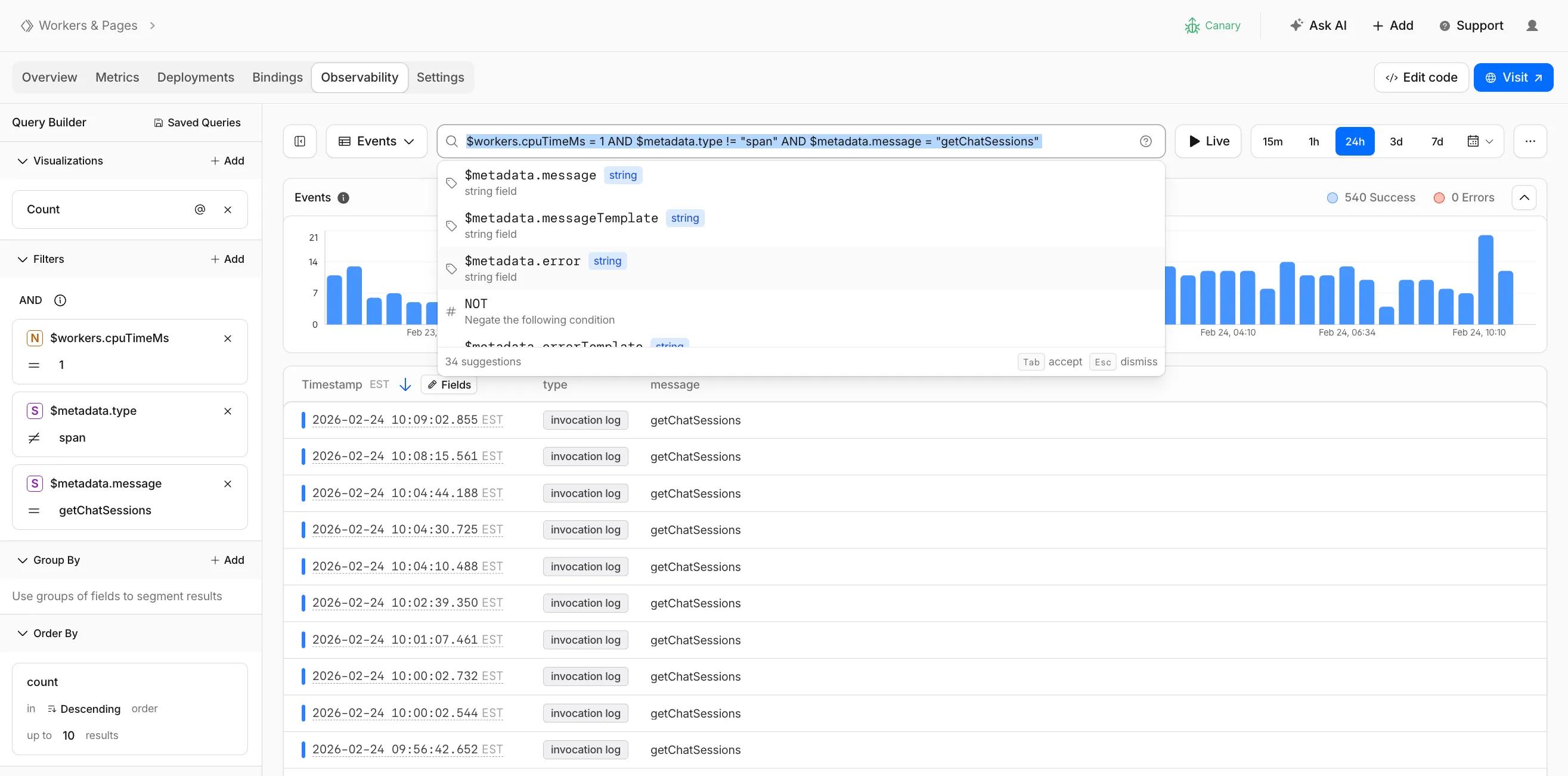
Queries written in the search bar sync with the Query Builder sidebar, so you can write a query by hand and then refine it visually, or build filters in the Query Builder and see the corresponding query syntax. The search bar provides autocomplete suggestions for metadata fields and operators as you type.
The query language supports:
- Free text search — search everywhere with a keyword like
error, or match an exact phrase with"exact phrase" - Field queries — filter by specific fields using comparison operators (for example,
status = 500or$workers.wallTimeMs > 100) - Operators —
=,!=,>,>=,<,<=, and:(contains) - Functions —
contains(field, value),startsWith(field, prefix),regex(field, pattern), andexists(field) - Boolean logic — add conditions with
AND,OR, andNOT
Select the help icon next to the search bar to view the full syntax reference, including all supported operators, functions, and keyboard shortcuts.
Go to the Workers Observability dashboard ↗ to try the query language.
- Free text search — search everywhere with a keyword like
You can now deploy any existing project to Cloudflare Workers — even without a Wrangler configuration file — and
wrangler deploywill just work.Starting with Wrangler 4.68.0, running
wrangler deployautomatically configures your project by detecting your framework, installing required adapters, and deploying it to Cloudflare Workers.Terminal window npx wrangler deployWhen you run
wrangler deployin a project without a configuration file, Wrangler:- Detects your framework from
package.json - Prompts you to confirm the detected settings
- Installs any required adapters
- Generates a
wrangler.jsoncconfiguration file - Deploys your project to Cloudflare Workers
You can also use
wrangler setupto configure without deploying, or pass--yesto skip prompts.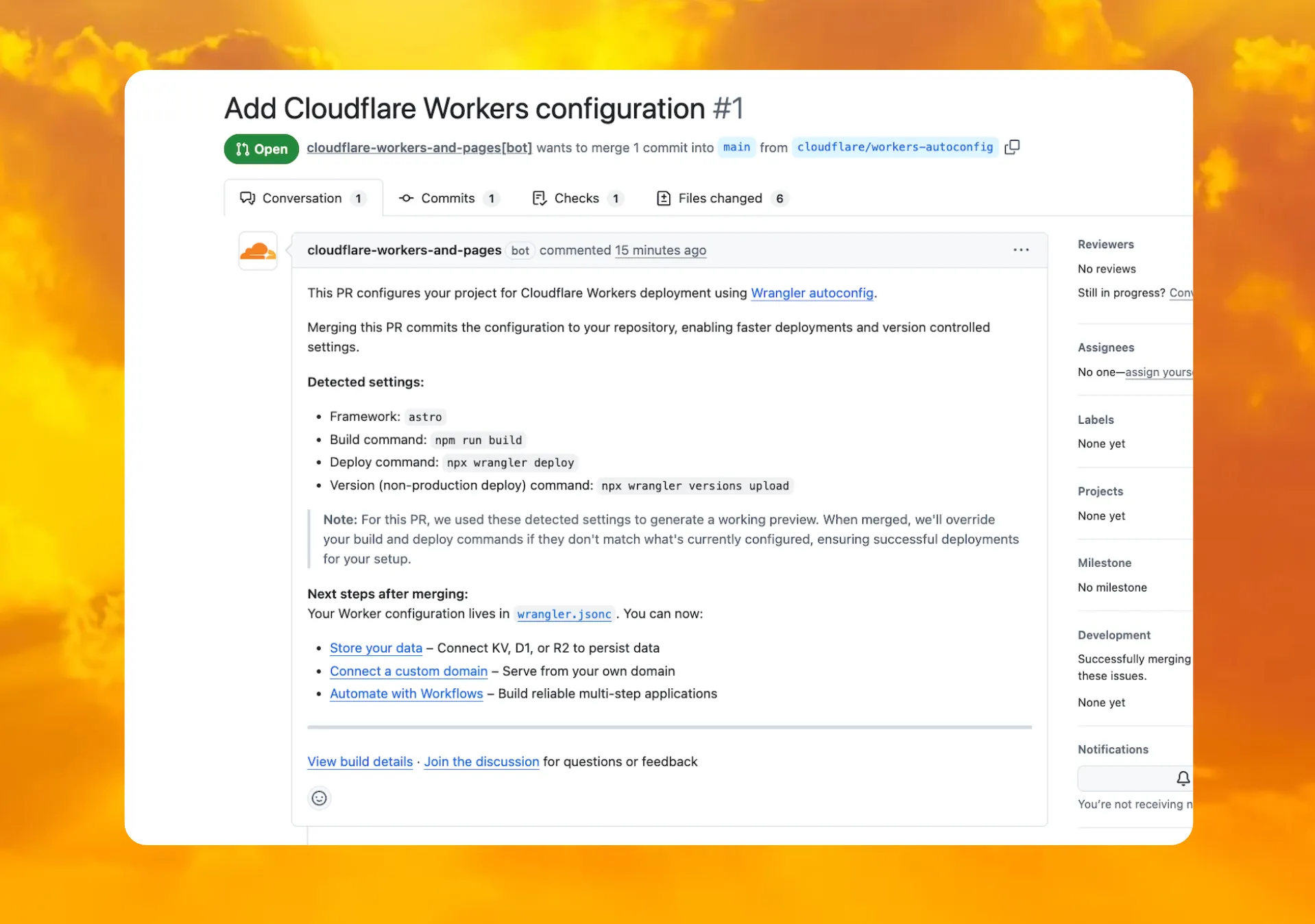
When you connect a repository through the Workers dashboard ↗, a pull request is generated for you with all necessary files, and a preview deployment to check before merging.
In December 2025, we introduced automatic configuration as an experimental feature. It is now generally available and the default behavior.
If you have questions or run into issues, join the GitHub discussion ↗.
- Detects your framework from
deleteAll()now deletes a Durable Object alarm in addition to stored data for Workers with a compatibility date of2026-02-24or later. This change simplifies clearing a Durable Object's storage with a single API call.Previously,
deleteAll()only deleted user-stored data for an object. Alarm usage stores metadata in an object's storage, which required a separatedeleteAlarm()call to fully clean up all storage for an object. ThedeleteAll()change applies to both KV-backed and SQLite-backed Durable Objects.JavaScript // Before: two API calls required to clear all storageawait this.ctx.storage.deleteAlarm();await this.ctx.storage.deleteAll();// Now: a single call clears both data and the alarmawait this.ctx.storage.deleteAll();For more information, refer to the Storage API documentation.
Cloudflare Pipelines ingests streaming data via Workers or HTTP endpoints, transforms it with SQL, and writes it to R2 as Apache Iceberg tables. Today we're shipping three improvements to help you understand why streaming events get dropped, catch data quality issues early, and set up Pipelines faster.
When stream events don't match the expected schema, Pipelines accepts them during ingestion but drops them when attempting to deliver them to the sink. To help you identify the root cause of these issues, we are introducing a new dashboard and metrics that surface dropped events with detailed error messages.
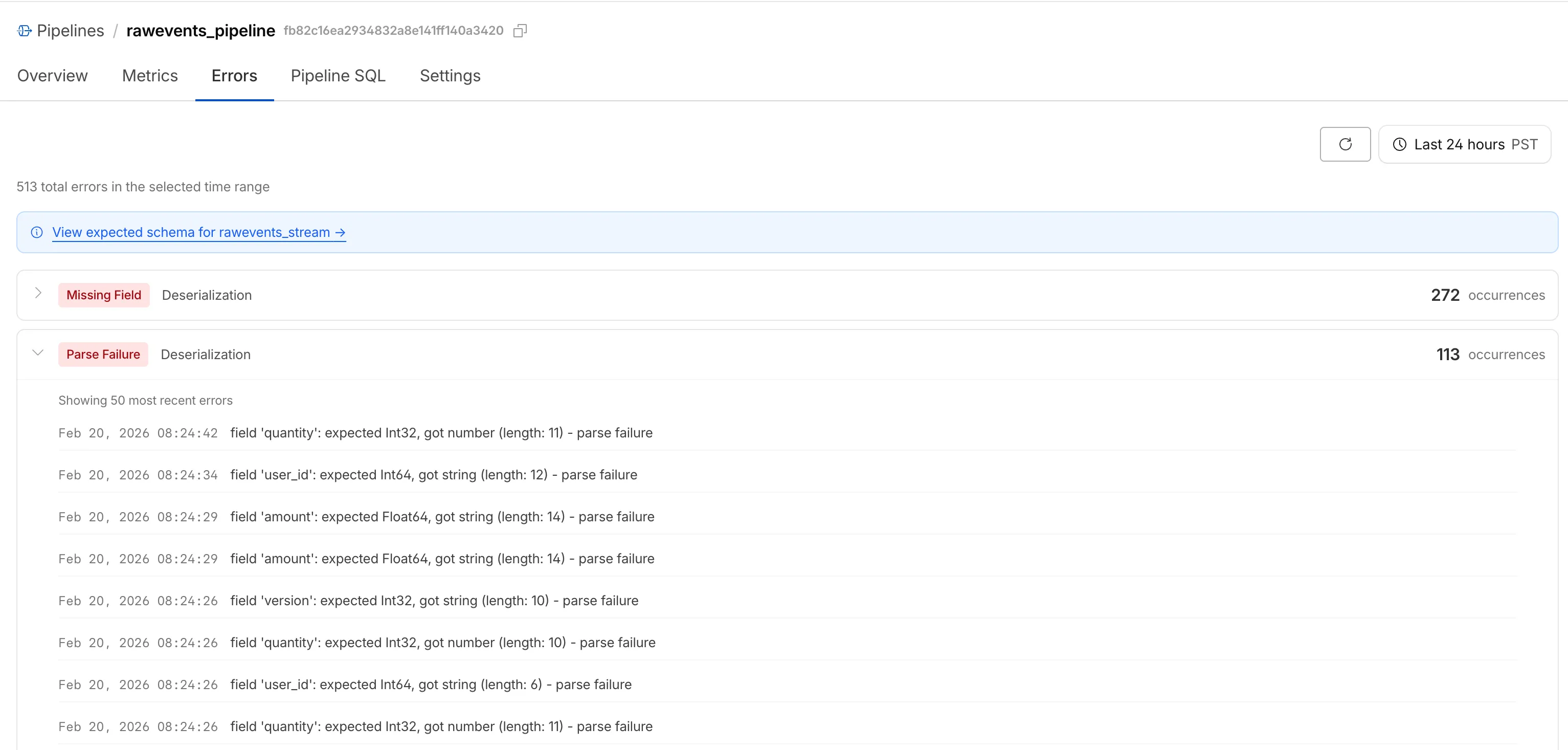
Dropped events can also be queried programmatically via the new
pipelinesUserErrorsAdaptiveGroupsGraphQL dataset. The dataset breaks down failures by specific error type (missing_field,type_mismatch,parse_failure, ornull_value) so you can trace issues back to the source.query GetPipelineUserErrors($accountTag: String!$pipelineId: String!$datetimeStart: Time!$datetimeEnd: Time!) {viewer {accounts(filter: { accountTag: $accountTag }) {pipelinesUserErrorsAdaptiveGroups(limit: 100filter: {pipelineId: $pipelineIddatetime_geq: $datetimeStartdatetime_leq: $datetimeEnd}orderBy: [count_DESC]) {countdimensions {errorFamilyerrorType}}}}}For the full list of dimensions, error types, and additional query examples, refer to User error metrics.
Sending data to a Pipeline from a Worker previously used a generic
Pipeline<PipelineRecord>type, which meant schema mismatches (wrong field names, incorrect types) were only caught at runtime as dropped events.Running
wrangler typesnow generates schema-specific TypeScript types for your Pipeline bindings. TypeScript catches missing required fields and incorrect field types at compile time, before your code is deployed.TypeScript declare namespace Cloudflare {type EcommerceStreamRecord = {user_id: string;event_type: string;product_id?: string;amount?: number;};interface Env {STREAM: import("cloudflare:pipelines").Pipeline<Cloudflare.EcommerceStreamRecord>;}}For more information, refer to Typed Pipeline bindings.
Setting up a new Pipeline previously required multiple manual steps: creating an R2 bucket, enabling R2 Data Catalog, generating an API token, and configuring format, compression, and rolling policies individually.
The
wrangler pipelines setupcommand now offers a Simple setup mode that applies recommended defaults and automatically creates the R2 bucket and enables R2 Data Catalog if they do not already exist. Validation errors during setup prompt you to retry inline rather than restarting the entire process.For a full walkthrough, refer to the Getting started guide.
The
@cloudflare/codemode↗ package has been rewritten into a modular, runtime-agnostic SDK.Code Mode ↗ enables LLMs to write and execute code that orchestrates your tools, instead of calling them one at a time. This can (and does) yield significant token savings, reduces context window pressure and improves overall model performance on a task.
The new
Executorinterface is runtime agnostic and comes with a prebuiltDynamicWorkerExecutorto run generated code in a Dynamic Worker Loader.- Removed
experimental_codemode()andCodeModeProxy— the package no longer owns an LLM call or model choice - New import path:
createCodeTool()is now exported from@cloudflare/codemode/ai
createCodeTool()— Returns a standard AI SDKToolto use in your AI agents.Executorinterface — Minimalexecute(code, fns)contract. Implement for any code sandboxing primitive or runtime.
Runs code in a Dynamic Worker. It comes with the following features:
- Network isolation —
fetch()andconnect()blocked by default (globalOutbound: null) when usingDynamicWorkerExecutor - Console capture —
console.log/warn/errorcaptured and returned inExecuteResult.logs - Execution timeout — Configurable via
timeoutoption (default 30s)
JavaScript import { createCodeTool } from "@cloudflare/codemode/ai";import { DynamicWorkerExecutor } from "@cloudflare/codemode";import { streamText } from "ai";const executor = new DynamicWorkerExecutor({ loader: env.LOADER });const codemode = createCodeTool({ tools: myTools, executor });const result = streamText({model,tools: { codemode },messages,});TypeScript import { createCodeTool } from "@cloudflare/codemode/ai";import { DynamicWorkerExecutor } from "@cloudflare/codemode";import { streamText } from "ai";const executor = new DynamicWorkerExecutor({ loader: env.LOADER });const codemode = createCodeTool({ tools: myTools, executor });const result = streamText({model,tools: { codemode },messages,});JSONC {"worker_loaders": [{ "binding": "LOADER" }],}TOML [[worker_loaders]]binding = "LOADER"See the Code Mode documentation for full API reference and examples.
Terminal window npm i @cloudflare/codemode@latest- Removed
The latest release of the Agents SDK ↗ adds built-in retry utilities, per-connection protocol message control, and a fully rewritten
@cloudflare/ai-chatwith data parts, tool approval persistence, and zero breaking changes.A new
this.retry()method lets you retry any async operation with exponential backoff and jitter. You can pass an optionalshouldRetrypredicate to bail early on non-retryable errors.JavaScript class MyAgent extends Agent {async onRequest(request) {const data = await this.retry(() => callUnreliableService(), {maxAttempts: 4,shouldRetry: (err) => !(err instanceof PermanentError),});return Response.json(data);}}TypeScript class MyAgent extends Agent {async onRequest(request: Request) {const data = await this.retry(() => callUnreliableService(), {maxAttempts: 4,shouldRetry: (err) => !(err instanceof PermanentError),});return Response.json(data);}}Retry options are also available per-task on
queue(),schedule(),scheduleEvery(), andaddMcpServer():JavaScript // Per-task retry configuration, persisted in SQLite alongside the taskawait this.schedule(Date.now() + 60_000,"sendReport",{ userId: "abc" },{retry: { maxAttempts: 5 },},);// Class-level retry defaultsclass MyAgent extends Agent {static options = {retry: { maxAttempts: 3 },};}TypeScript // Per-task retry configuration, persisted in SQLite alongside the taskawait this.schedule(Date.now() + 60_000, "sendReport", { userId: "abc" }, {retry: { maxAttempts: 5 },});// Class-level retry defaultsclass MyAgent extends Agent {static options = {retry: { maxAttempts: 3 },};}Retry options are validated eagerly at enqueue/schedule time, and invalid values throw immediately. Internal retries have also been added for workflow operations (
terminateWorkflow,pauseWorkflow, and others) with Durable Object-aware error detection.Agents automatically send JSON text frames (identity, state, MCP server lists) to every WebSocket connection. You can now suppress these per-connection for clients that cannot handle them — binary-only devices, MQTT clients, or lightweight embedded systems.
JavaScript class MyAgent extends Agent {shouldSendProtocolMessages(connection, ctx) {// Suppress protocol messages for MQTT clientsconst subprotocol = ctx.request.headers.get("Sec-WebSocket-Protocol");return subprotocol !== "mqtt";}}TypeScript class MyAgent extends Agent {shouldSendProtocolMessages(connection: Connection, ctx: ConnectionContext) {// Suppress protocol messages for MQTT clientsconst subprotocol = ctx.request.headers.get("Sec-WebSocket-Protocol");return subprotocol !== "mqtt";}}Connections with protocol messages disabled still fully participate in RPC and regular messaging. Use
isConnectionProtocolEnabled(connection)to check a connection's status at any time. The flag persists across Durable Object hibernation.See Protocol messages for full documentation.
The first stable release of
@cloudflare/ai-chatships alongside this release with a major refactor ofAIChatAgentinternals — newResumableStreamclass, WebSocketChatTransport, and simplified SSE parsing — with zero breaking changes. Existing code usingAIChatAgentanduseAgentChatworks as-is.Key new features:
- Data parts — Attach typed JSON blobs (
data-*) to messages alongside text. Supports reconciliation (type+id updates in-place), append, and transient parts (ephemeral viaonDatacallback). See Data parts. - Tool approval persistence — The
needsApprovalapproval UI now survives page refresh and DO hibernation. The streaming message is persisted to SQLite when a tool entersapproval-requestedstate. maxPersistedMessages— Cap SQLite message storage with automatic oldest-message deletion.bodyoption onuseAgentChat— Send custom data with every request (static or dynamic).- Incremental persistence — Hash-based cache to skip redundant SQL writes.
- Row size guard — Automatic two-pass compaction when messages approach the SQLite 2 MB limit.
autoContinueAfterToolResultdefaults totrue— Client-side tool results and tool approvals now automatically trigger a server continuation, matching server-executed tool behavior. SetautoContinueAfterToolResult: falseinuseAgentChatto restore the previous behavior.
Notable bug fixes:
- Resolved stream resumption race conditions
- Resolved an issue where
setMessagesfunctional updater sent empty arrays - Resolved an issue where client tool schemas were lost after DO hibernation
- Resolved
InvalidPromptErrorafter tool approval (approval.idwas dropped) - Resolved an issue where message metadata was not propagated on broadcast/resume paths
- Resolved an issue where
clearAll()did not clear in-memory chunk buffers - Resolved an issue where
reasoning-deltasilently dropped data whenreasoning-startwas missed during stream resumption
getQueue(),getQueues(),getSchedule(),dequeue(),dequeueAll(), anddequeueAllByCallback()were unnecessarilyasyncdespite only performing synchronous SQL operations. They now return values directly instead of wrapping them in Promises. This is backward compatible — existing code usingawaiton these methods will continue to work.- Fix TypeScript "excessively deep" error — A depth counter on
CanSerializeandIsSerializableParamtypes bails out totrueafter 10 levels of recursion, preventing the "Type instantiation is excessively deep" error with deeply nested types like AI SDKCoreMessage[]. - POST SSE keepalive — The POST SSE handler now sends
event: pingevery 30 seconds to keep the connection alive, matching the existing GET SSE handler behavior. This prevents POST response streams from being silently dropped by proxies during long-running tool calls. - Widened peer dependency ranges — Peer dependency ranges across packages have been widened to prevent cascading major bumps during 0.x minor releases.
@cloudflare/ai-chatand@cloudflare/codemodeare now marked as optional peer dependencies.
To update to the latest version:
Terminal window npm i agents@latest @cloudflare/ai-chat@latest- Data parts — Attach typed JSON blobs (
Cloudflare has deprecated the Workers Quick Editor dev tools inspector and replaced it with a lightweight log viewer.
This aligns our logging with
wrangler tailand gives us the opportunity to focus our efforts on bringing benefits from the work we have invested in observability, which would not be possible otherwise.We have made improvements to this logging viewer based on your feedback such that you can log object and array types, and easily clear the list of logs. This does not include class instances. Limitations are documented in the Workers Playground docs.
If you do need to develop your Worker with a remote inspector, you can still do this using Wrangler locally. Cloning a project from your quick editor to your computer for local development can be done with the
wrangler init --from-dashcommand. For more information, refer to Wrangler commands.
A new Workers Best Practices guide provides opinionated recommendations for building fast, reliable, observable, and secure Workers. The guide draws on production patterns, Cloudflare internal usage, and best practices observed from developers building on Workers.
Key guidance includes:
- Keep your compatibility date current and enable
nodejs_compat— Ensure you have access to the latest runtime features and Node.js built-in modules.
JSONC {"name": "my-worker","main": "src/index.ts",// Set this to today's date"compatibility_date": "2026-04-04","compatibility_flags": ["nodejs_compat"],}TOML name = "my-worker"main = "src/index.ts"# Set this to today's datecompatibility_date = "2026-04-04"compatibility_flags = [ "nodejs_compat" ]- Generate binding types with
wrangler types— Never hand-write yourEnvinterface. Let Wrangler generate it from your actual configuration to catch mismatches at compile time. - Stream request and response bodies — Avoid buffering large payloads in memory. Use
TransformStreamandpipeToto stay within the 128 MB memory limit and improve time-to-first-byte. - Use bindings, not REST APIs — Bindings to KV, R2, D1, Queues, and other Cloudflare services are direct, in-process references with no network hop and no authentication overhead.
- Use Queues and Workflows for background work — Move long-running or retriable tasks out of the critical request path. Use Queues for simple fan-out and buffering, and Workflows for multi-step durable processes.
- Enable Workers Logs and Traces — Configure observability before deploying to production so you have data when you need to debug.
- Avoid global mutable state — Workers reuse isolates across requests. Storing request-scoped data in module-level variables causes cross-request data leaks.
- Always
awaitorwaitUntilyour Promises — Floating promises cause silent bugs and dropped work. - Use Web Crypto for secure token generation — Never use
Math.random()for security-sensitive operations.
To learn more, refer to Workers Best Practices.
- Keep your compatibility date current and enable
We're excited to announce GLM-4.7-Flash on Workers AI, a fast and efficient text generation model optimized for multilingual dialogue and instruction-following tasks, along with the brand-new @cloudflare/tanstack-ai ↗ package and workers-ai-provider v3.1.1 ↗.
You can now run AI agents entirely on Cloudflare. With GLM-4.7-Flash's multi-turn tool calling support, plus full compatibility with TanStack AI and the Vercel AI SDK, you have everything you need to build agentic applications that run completely at the edge.
@cf/zai-org/glm-4.7-flashis a multilingual model with a 131,072 token context window, making it ideal for long-form content generation, complex reasoning tasks, and multilingual applications.Key Features and Use Cases:
- Multi-turn Tool Calling for Agents: Build AI agents that can call functions and tools across multiple conversation turns
- Multilingual Support: Built to handle content generation in multiple languages effectively
- Large Context Window: 131,072 tokens for long-form writing, complex reasoning, and processing long documents
- Fast Inference: Optimized for low-latency responses in chatbots and virtual assistants
- Instruction Following: Excellent at following complex instructions for code generation and structured tasks
Use GLM-4.7-Flash through the Workers AI binding (
env.AI.run()), the REST API at/runor/v1/chat/completions, AI Gateway, or via workers-ai-provider for the Vercel AI SDK.Pricing is available on the model page or pricing page.
We've released
@cloudflare/tanstack-ai, a new package that brings Workers AI and AI Gateway support to TanStack AI ↗. This provides a framework-agnostic alternative for developers who prefer TanStack's approach to building AI applications.Workers AI adapters support four configuration modes — plain binding (
env.AI), plain REST, AI Gateway binding (env.AI.gateway(id)), and AI Gateway REST — across all capabilities:- Chat (
createWorkersAiChat) — Streaming chat completions with tool calling, structured output, and reasoning text streaming. - Image generation (
createWorkersAiImage) — Text-to-image models. - Transcription (
createWorkersAiTranscription) — Speech-to-text. - Text-to-speech (
createWorkersAiTts) — Audio generation. - Summarization (
createWorkersAiSummarize) — Text summarization.
AI Gateway adapters route requests from third-party providers — OpenAI, Anthropic, Gemini, Grok, and OpenRouter — through Cloudflare AI Gateway for caching, rate limiting, and unified billing.
To get started:
Terminal window npm install @cloudflare/tanstack-ai @tanstack/aiThe Workers AI provider for the Vercel AI SDK ↗ now supports three new capabilities beyond chat and image generation:
- Transcription (
provider.transcription(model)) — Speech-to-text with automatic handling of model-specific input formats across binding and REST paths. - Text-to-speech (
provider.speech(model)) — Audio generation with support for voice and speed options. - Reranking (
provider.reranking(model)) — Document reranking for RAG pipelines and search result ordering.
TypeScript import { createWorkersAI } from "workers-ai-provider";import {experimental_transcribe,experimental_generateSpeech,rerank,} from "ai";const workersai = createWorkersAI({ binding: env.AI });const transcript = await experimental_transcribe({model: workersai.transcription("@cf/openai/whisper-large-v3-turbo"),audio: audioData,mediaType: "audio/wav",});const speech = await experimental_generateSpeech({model: workersai.speech("@cf/deepgram/aura-1"),text: "Hello world",voice: "asteria",});const ranked = await rerank({model: workersai.reranking("@cf/baai/bge-reranker-base"),query: "What is machine learning?",documents: ["ML is a branch of AI.", "The weather is sunny."],});This release also includes a comprehensive reliability overhaul (v3.0.5):
- Fixed streaming — Responses now stream token-by-token instead of buffering all chunks, using a proper
TransformStreampipeline with backpressure. - Fixed tool calling — Resolved issues with tool call ID sanitization, conversation history preservation, and a heuristic that silently fell back to non-streaming mode when tools were defined.
- Premature stream termination detection — Streams that end unexpectedly now report
finishReason: "error"instead of silently reporting"stop". - AI Search support — Added
createAISearchas the canonical export (renamed from AutoRAG).createAutoRAGstill works with a deprecation warning.
To upgrade:
Terminal window npm install workers-ai-provider@latest ai
Workers no longer have a limit of 1000 subrequests per invocation, allowing you to make more
fetch()calls or requests to Cloudflare services on every incoming request. This is especially important for long-running Workers requests, such as open websockets on Durable Objects or long-running Workflows, as these could often exceed this limit and error.By default, Workers on paid plans are now limited to 10,000 subrequests per invocation, but this limit can be increased up to 10 million by setting the new
subrequestslimit in your Wrangler configuration file.JSONC {"limits": {"subrequests": 50000,},}TOML [limits]subrequests = 50_000Workers on the free plan remain limited to 50 external subrequests and 1000 subrequests to Cloudflare services per invocation.
To protect against runaway code or unexpected costs, you can also set a lower limit for both subrequests and CPU usage.
JSONC {"limits": {"subrequests": 10,"cpu_ms": 1000,},}TOML [limits]subrequests = 10cpu_ms = 1_000For more information, refer to the Wrangler configuration documentation for limits and subrequest limits.