
Before

Workers applications now use reusable Cloudflare Access policies to reduce duplication and simplify access management across multiple Workers.
Previously, enabling Cloudflare Access on a Worker created per-application policies, unique to each application. Now, we create reusable policies that can be shared across applications:
Preview URLs: All Workers preview URLs share a single "Cloudflare Workers Preview URLs" policy across your account. This policy is automatically created the first time you enable Access on any preview URL. By sharing a single policy across all preview URLs, you can configure access rules once and have them apply company-wide to all Workers which protect preview URLs. This makes it much easier to manage who can access preview environments without having to update individual policies for each Worker.
Production workers.dev URLs: When enabled, each Worker gets its own reusable policy (named <worker-name> - Production) by default. We recognize production services often have different access requirements and having individual policies here makes it easier to configure service-to-service authentication or protect internal dashboards or applications with specific user groups. Keeping these policies separate gives you the flexibility to configure exactly the right access rules for each production service. When you disable Access on a production Worker, the associated policy is automatically cleaned up if it's not being used by other applications.
This change reduces policy duplication, simplifies cross-company access management for preview environments, and provides the flexibility needed for production services. You can still customize access rules by editing the reusable policies in the Zero Trust dashboard.
To enable Cloudflare Access on your Worker:
workers.dev or Preview URLs, click Enable Cloudflare Access.For more information on configuring Cloudflare Access for Workers, refer to the Workers Access documentation.
The latest release of @cloudflare/agents ↗ brings resumable streaming, significant MCP client improvements, and critical fixes for schedules and Durable Object lifecycle management.
AIChatAgent now supports resumable streaming, allowing clients to reconnect and continue receiving streamed responses without losing data. This is useful for:
Streams are maintained across page refreshes, broken connections, and syncing across open tabs and devices.
The MCPClientManager API has been redesigned for better clarity and control:
registerServer() method: Register MCP servers without immediately connectingconnectToServer() method: Establish connections to registered serversrestoreConnectionsFromStorage() now properly handles failed connections// Register a server to Agentconst { id } = await this.mcp.registerServer({ name: "my-server", url: "https://my-mcp-server.example.com",});
// Connect when readyawait this.mcp.connectToServer(id);
// Discover tools, prompts and resourcesawait this.mcp.discoverIfConnected(id);The SDK now includes a formalized MCPConnectionState enum with states: idle, connecting, authenticating, connected, discovering, and ready.
MCP discovery fetches the available tools, prompts, and resources from an MCP server so your agent knows what capabilities are available. The MCPClientConnection class now includes a dedicated discover() method with improved reliability:
this.schedule(new Date(), ...) would not fireTo update to the latest version:
npm i agents@latestWorkers Builds now supports up to 64 environment variables, and each environment variable can be up to 5 KB in size. The previous limit was 5 KB total across all environment variables.
This change enables better support for complex build configurations, larger application settings, and more flexible CI/CD workflows.
For more details, refer to the build limits documentation.
Until now, if a Worker had been previously deployed via the Cloudflare Dashboard ↗, a subsequent deployment done via the Cloudflare Workers CLI, Wrangler
(through the deploy command), would allow the user to override the Worker's dashboard settings without providing details on
what dashboard settings would be lost.
Now instead, wrangler deploy presents a helpful representation of the differences between the local configuration
and the remote dashboard settings, and offers to update your local configuration file for you.
See example below showing a before and after for wrangler deploy when a local configuration is expected to override a Worker's dashboard settings:
Before
After
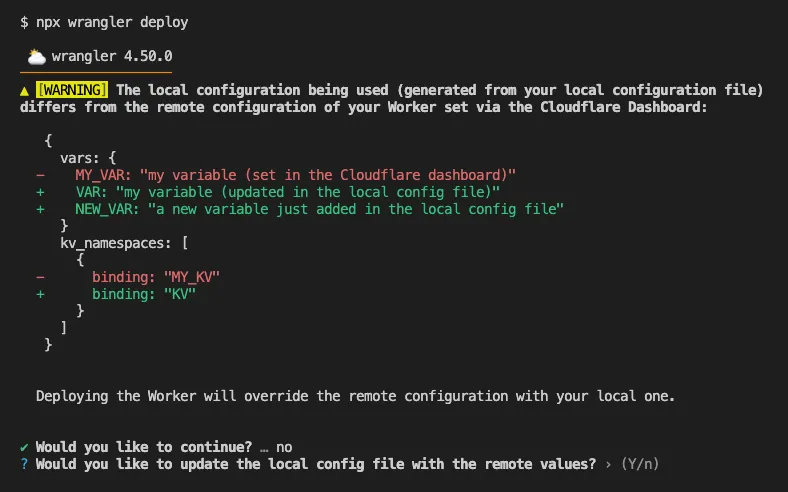
Also, if instead Wrangler detects that a deployment would override remote dashboard settings but in an additive way, without modifying or removing any of them, it will simply proceed with the deployment without requesting any user interaction.
Update to Wrangler v4.50.0 or greater to take advantage of this improved deploy flow.
You can now perform more powerful queries directly in Workers Analytics Engine ↗ with a major expansion of our SQL function library.
Workers Analytics Engine allows you to ingest and store high-cardinality data at scale (such as custom analytics) and query your data through a simple SQL API.
Today, we've expanded Workers Analytics Engine's SQL capabilities with several new functions:
countIf() - count the number of rows which satisfy a provided conditionsumIf() - calculate a sum from rows which satisfy a provided conditionavgIf() - calculate an average from rows which satisfy a provided conditionNew date and time functions: ↗
toYear()toMonth()toDayOfMonth()toDayOfWeek()toHour()toMinute()toSecond()toStartOfYear()toStartOfMonth()toStartOfWeek()toStartOfDay()toStartOfHour()toStartOfFifteenMinutes()toStartOfTenMinutes()toStartOfFiveMinutes()toStartOfMinute()today()toYYYYMM()Whether you're building usage-based billing systems, customer analytics dashboards, or other custom analytics, these functions let you get the most out of your data. Get started with Workers Analytics Engine and explore all available functions in our SQL reference documentation.
Wrangler now supports using the CLOUDFLARE_ENV environment variable to select the active environment for your Worker commands. This provides a more flexible way to manage environments, especially when working with build tools and CI/CD pipelines.
Environment selection via environment variable:
CLOUDFLARE_ENV to specify which environment to use for Wrangler commands--env flag--env command line argument takes precedence over the CLOUDFLARE_ENV environment variable# Deploy to the production environment using CLOUDFLARE_ENVCLOUDFLARE_ENV=production wrangler deploy
# Upload a version to the staging environmentCLOUDFLARE_ENV=staging wrangler versions upload
# The --env flag takes precedence over CLOUDFLARE_ENVCLOUDFLARE_ENV=dev wrangler deploy --env production# This will deploy to production, not devThe CLOUDFLARE_ENV environment variable is particularly useful when working with build tools like Vite. You can set the environment once during the build process, and it will be used for both building and deploying your Worker:
# Set the environment for both build and deployCLOUDFLARE_ENV=production npm run build & wrangler deployWhen using @cloudflare/vite-plugin, the build process generates a "redirected deploy config" that is flattened to only contain the active environment. Wrangler will validate that the environment specified matches the environment used during the build to prevent accidentally deploying a Worker built for one environment to a different environment.
Enable automatic tracing on your Workers, giving you detailed metadata and timing information for every operation your Worker performs.
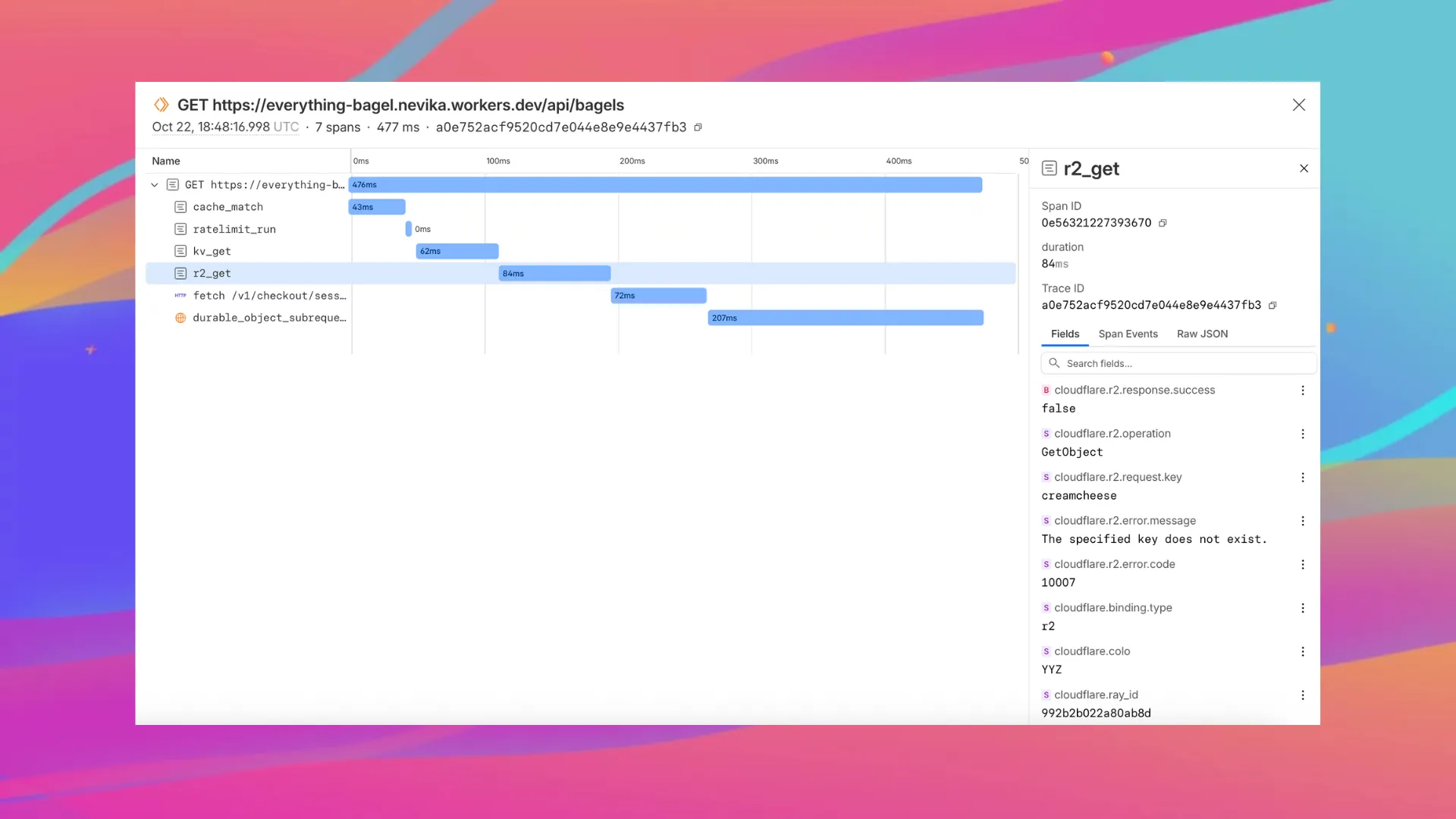
Tracing helps you identify performance bottlenecks, resolve errors, and understand how your Worker interacts with other services on the Workers platform. You can now answer questions like:
You can now:
{ "observability": { "tracing": { "enabled": true, }, },}You can now set a jurisdiction when creating a D1 database to guarantee where your database runs and stores data. Jurisdictions can help you comply with data localization regulations such as GDPR. Supported jurisdictions include eu and fedramp.
A jurisdiction can only be set at database creation time via wrangler, REST API or the UI and cannot be added/updated after the database already exists.
npx wrangler@latest d1 create db-with-jurisdiction --jurisdiction eucurl -X POST "https://api.cloudflare.com/client/v4/accounts/<account_id>/d1/database" \ -H "Authorization: Bearer $TOKEN" \ -H "Content-Type: application/json" \ --data '{"name": "db-wth-jurisdiction", "jurisdiction": "eu" }'To learn more, visit D1's data location documentation.
You can now capture Wrangler command output in a structured ND-JSON ↗ format by setting the WRANGLER_OUTPUT_FILE_PATH or WRANGLER_OUTPUT_FILE_DIRECTORY environment variables. This feature is particularly useful for CI/CD pipelines and automation tools that need programmatic access to deployment information such as worker names, version IDs, deployment URLs, and error details. Commands that support this feature include wrangler deploy, wrangler versions upload, wrangler versions deploy, and wrangler pages deploy.
Workers, including those using Durable Objects and Browser Rendering, may now process WebSocket messages up to 32 MiB in size. Previously, this limit was 1 MiB.
This change allows Workers to handle use cases requiring large message sizes, such as processing Chrome Devtools Protocol messages.
For more information, please see the Durable Objects startup limits.
We've raised the Cloudflare Workflows account-level limits for all accounts on the Workers paid plan:
These increases mean you can create new instances up to 10x faster, and have more workflow instances concurrently executing. To learn more and get started with Workflows, refer to the getting started guide.
If your application requires a higher limit, fill out the Limit Increase Request Form or contact your account team. Please refer to Workflows pricing for more information.
You can now access preview URLs directly from the build details page, making it easier to test your changes when reviewing builds in the dashboard.
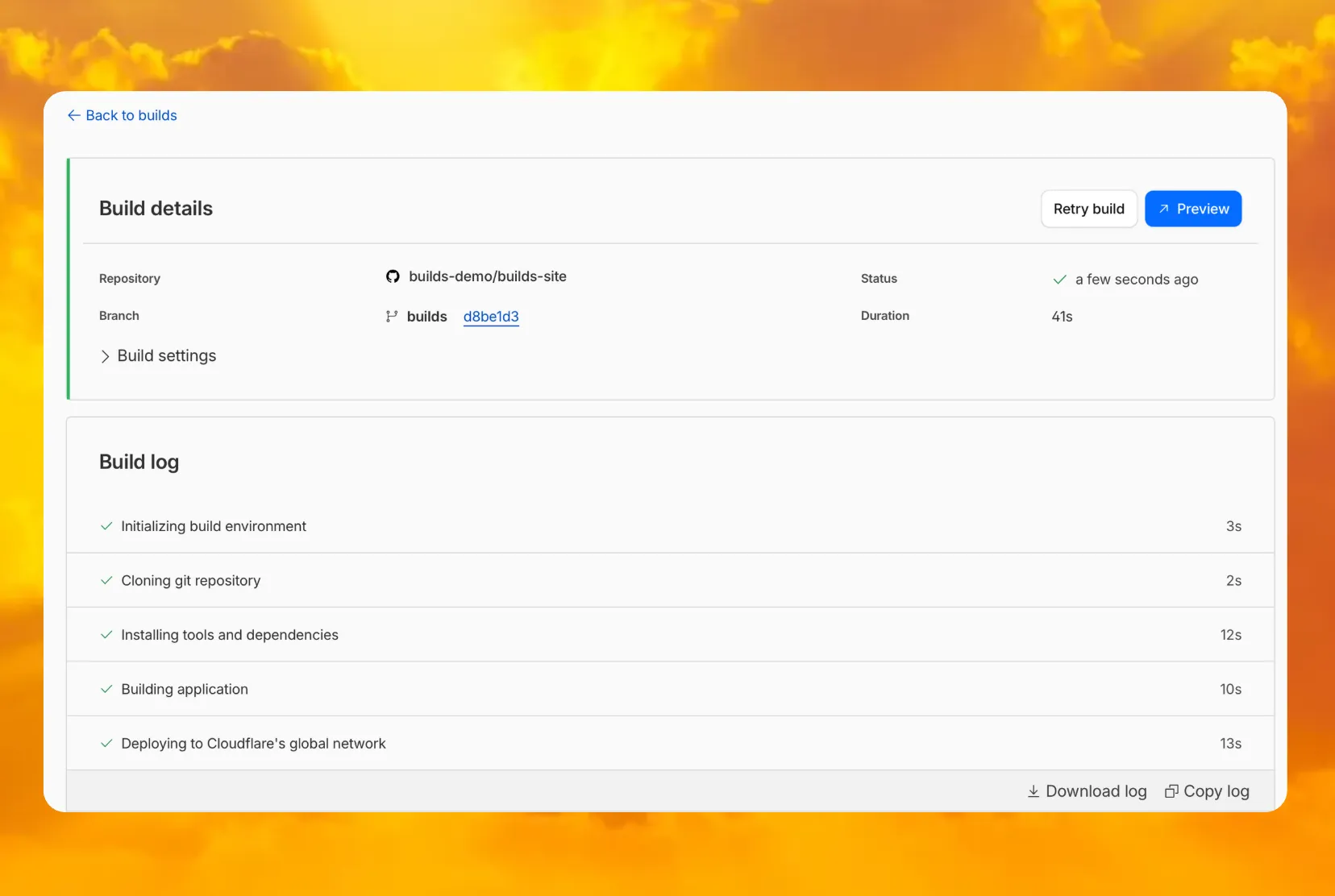
What's new
Previously, if you wanted to develop or deploy a worker with attached resources, you'd have to first manually create the desired resources. Now, if your Wrangler configuration file includes a KV namespace, D1 database, or R2 bucket that does not yet exist on your account, you can develop locally and deploy your application seamlessly, without having to run additional commands.
Automatic provisioning is launching as an open beta, and we'd love to hear your feedback to help us make improvements! It currently works for KV, R2, and D1 bindings. You can disable the feature using the --no-x-provision flag.
To use this feature, update to wrangler@4.45.0 and add bindings to your config file without resource IDs e.g.:
{ "kv_namespaces": [{ "binding": "MY_KV" }], "d1_databases": [{ "binding": "MY_DB" }], "r2_buckets": [{ "binding": "MY_R2" }],}wrangler dev will then automatically create these resources for you locally, and on your next run of wrangler deploy, Wrangler will call the Cloudflare API to create the requested resources and link them to your Worker.
Though resource IDs will be automatically written back to your Wrangler config file after resource creation, resources will stay linked across future deploys even without adding the resource IDs to the config file. This is especially useful for shared templates, which now no longer need to include account-specific resource IDs when adding a binding.
The Cloudflare Vite plugin now supports TanStack Start ↗ apps. Get started with new or existing projects.
Create a new TanStack Start project that uses the Cloudflare Vite plugin via the create-cloudflare CLI:
npm create cloudflare@latest -- my-tanstack-start-app --framework=tanstack-startyarn create cloudflare my-tanstack-start-app --framework=tanstack-startpnpm create cloudflare@latest my-tanstack-start-app --framework=tanstack-startMigrate an existing TanStack Start project to use the Cloudflare Vite plugin:
@cloudflare/vite-plugin and wranglernpm i -D @cloudflare/vite-plugin wrangleryarn add -D @cloudflare/vite-plugin wranglerpnpm add -D @cloudflare/vite-plugin wranglerbun add -d @cloudflare/vite-plugin wranglerimport { defineConfig } from "vite";import { tanstackStart } from "@tanstack/react-start/plugin/vite";import viteReact from "@vitejs/plugin-react";import { cloudflare } from "@cloudflare/vite-plugin";
export default defineConfig({ plugins: [ cloudflare({ viteEnvironment: { name: "ssr" } }), tanstackStart(), viteReact(), ],});{ "$schema": "./node_modules/wrangler/config-schema.json", "name": "my-tanstack-start-app", // Set this to today's date "compatibility_date": "2026-04-04", "compatibility_flags": [ "nodejs_compat" ], "main": "@tanstack/react-start/server-entry"}"$schema" = "./node_modules/wrangler/config-schema.json"name = "my-tanstack-start-app"# Set this to today's datecompatibility_date = "2026-04-04"compatibility_flags = [ "nodejs_compat" ]main = "@tanstack/react-start/server-entry"package.json{ "scripts": { "dev": "vite dev", "build": "vite build && tsc --noEmit", "start": "node .output/server/index.mjs", "preview": "vite preview", "deploy": "npm run build && wrangler deploy", "cf-typegen": "wrangler types" }}See the TanStack Start framework guide for more info.
We have updated the default behavior for Cloudflare Workers Preview URLs. Going forward, if a preview URL setting is not explicitly configured during deployment, its default behavior will automatically match the setting of your workers.dev subdomain.
This change is intended to provide a more intuitive and secure experience by aligning your preview URL's default state with your workers.dev configuration to prevent cases where a preview URL might remain public even after you disabled your workers.dev route.
What this means for you:
You can override the default setting by explicitly enabling or disabling the preview URL in your Worker's configuration through the API, Dashboard, or Wrangler.
Wrangler Version Behavior
The default behavior depends on the version of Wrangler you are using. This new logic applies to the latest version. Here is a summary of the behavior across different versions:
Why we’re making this change
In July, we introduced preview URLs to Workers, which let you preview code changes before deploying to production. This made disabling your Worker’s workers.dev URL an ambiguous action — the preview URL, served as a subdomain of workers.dev (ex: preview-id-worker-name.account-name.workers.dev) would still be live even if you had disabled your Worker’s workers.dev route. If you misinterpreted what it meant to disable your workers.dev route, you might unintentionally leave preview URLs enabled when you didn’t mean to, and expose them to the public Internet.
To address this, we made a one-time update to disable preview URLs on existing Workers that had their workers.dev route disabled and changed the default behavior to be disabled for all new deployments where a preview URL setting was not explicitly configured.
While this change helped secure many customers, it was disruptive for customers who keep their workers.dev route enabled and actively use the preview functionality, as it now required them to explicitly enable preview URLs on every redeployment.This new, more intuitive behavior ensures that your preview URL settings align with your workers.dev configuration by default, providing a more secure and predictable experience.
Securing access to workers.dev and preview URL endpoints
To further secure your workers.dev subdomain and preview URL, you can enable Cloudflare Access with a single click in your Worker's settings to limit access to specific users or groups.
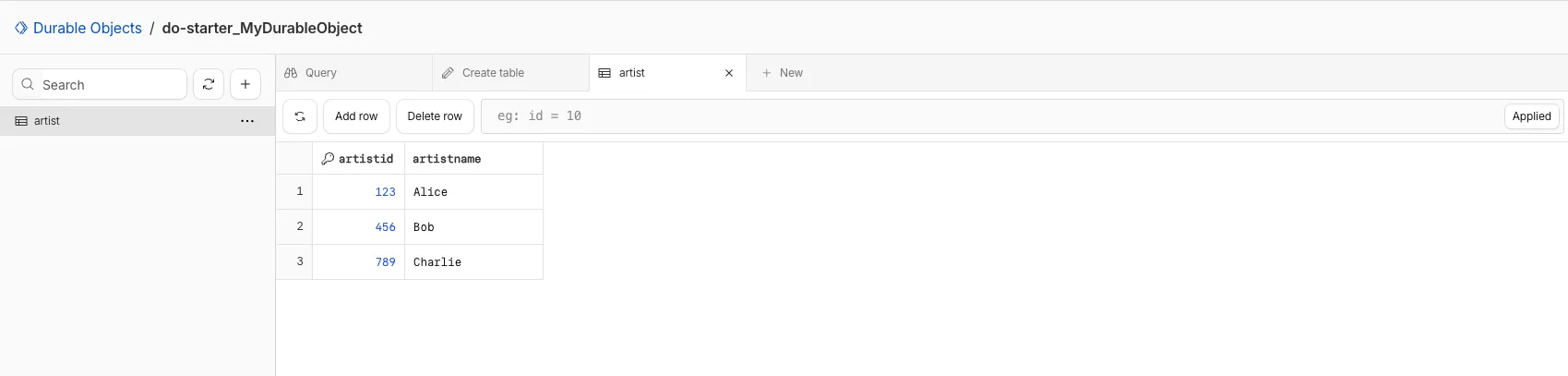
You can now view and write to each Durable Object's storage using a UI editor on the Cloudflare dashboard. Only Durable Objects using SQLite storage can use Data Studio.
Go to Durable ObjectsData Studio unlocks easier data access with Durable Objects for prototyping application data models to debugging production storage usage. Before, querying your Durable Objects data required deploying a Worker.
To access a Durable Object, you can provide an object's unique name or ID generated by Cloudflare. Data Studio requires you to have at least the Workers Platform Admin role, and all queries are captured with audit logging for your security and compliance needs. Queries executed by Data Studio send requests to your remote, deployed objects and incur normal usage billing.
To learn more, visit the Data Studio documentation. If you have feedback or suggestions for the new Data Studio, please share your experience on Discord ↗
You can now upload a Worker that takes up 1 second to parse and execute its global scope. Previously, startup time was limited to 400 ms.
This allows you to run Workers that import more complex packages and execute more code prior to requests being handled.
For more information, see the documentation on Workers startup limits.
You can now upload Workers with static assets (like HTML, CSS, JavaScript, images) with the Cloudflare Terraform provider v5.11.0 ↗, making it even easier to deploy and manage full-stack apps with IaC.
Previously, you couldn't use Terraform to upload static assets without writing custom scripts to handle generating an asset manifest, calling the Cloudflare API to upload assets in chunks, and handling change detection.
Now, you simply define the directory where your assets are built, and we handle the rest. Check out the examples for what this looks like in Terraform configuration.
You can get started today with the Cloudflare Terraform provider (v5.11.0) ↗, using either the existing cloudflare_workers_script resource ↗, or the beta cloudflare_worker_version resource ↗.
Here's how you can use the existing cloudflare_workers_script ↗ resource to upload your Worker code and assets in one shot.
resource "cloudflare_workers_script" "my_app" {  account_id  = var.account_id  script_name = "my-app"
  content_file   = "./dist/worker/index.js"  content_sha256 = filesha256("./dist/worker/index.js")  main_module    = "index.js"
# Just point to your assets directory - that's it! assets = { directory = "./dist/static" }}And here's an example using the beta cloudflare_worker_version ↗ resource, alongside the cloudflare_worker ↗ and cloudflare_workers_deployment ↗ resources:
# This tracks the existence of your Worker, so that you# can upload code and assets separately from tracking Worker state.
resource "cloudflare_worker" "my_app" {  account_id = var.account_id  name       = "my-app"}
resource "cloudflare_worker_version" "my_app_version" {  account_id = var.account_id  worker_id  = cloudflare_worker.my_app.id
  # Just point to your assets directory - that's it!  assets = {    directory = "./dist/static"  }
  modules = [{    name         = "index.js"    content_file = "./dist/worker/index.js"    content_type = "application/javascript+module"  }]}
resource "cloudflare_workers_deployment" "my_app_deployment" {  account_id  = var.account_id  script_name = cloudflare_worker.my_app.name
strategy = "percentage" versions = [{ version_id = cloudflare_worker_version.my_app_version.id percentage = 100 }]}Under the hood, the Cloudflare Terraform provider now handles the same logic that Wrangler uses for static asset uploads. This includes scanning your assets directory, computing hashes for each file, generating a manifest with file metadata, and calling the Cloudflare API to upload any missing files in chunks. We support large directories with parallel uploads and chunking, and when the asset manifest hash changes, we detect what's changed and trigger an upload for only those changed files.
cloudflare_workers_script resource ↗ to upload your Worker code and assets in one resource.cloudflare_worker_version resource ↗ (along with the cloudflare_worker ↗ and cloudflare_workers_deployment ↗) resources to more granularly control the lifecycle of each Worker resource.You can now create and manage Workflows using Terraform, now supported in the Cloudflare Terraform provider v5.11.0 ↗. Workflows allow you to build durable, multi-step applications -- without needing to worry about retrying failed tasks or managing infrastructure.
Now, you can deploy and manage Workflows through Terraform using the new cloudflare_workflow resource ↗:
resource "cloudflare_workflow" "my_workflow" { account_id = var.account_id workflow_name = "my-workflow" class_name = "MyWorkflow" script_name = "my-worker"}Here are full examples of how to configure cloudflare_workflow in Terraform, using the existing cloudflare_workers_script resource ↗, and the beta cloudflare_worker_version resource ↗.
resource "cloudflare_workers_script" "workflow_worker" {  account_id  = var.cloudflare_account_id  script_name = "my-workflow-worker"
  content_file   = "${path.module}/../dist/worker/index.js"  content_sha256 = filesha256("${path.module}/../dist/worker/index.js")  main_module    = "index.js"}
resource "cloudflare_workflow" "workflow" { account_id = var.cloudflare_account_id workflow_name = "my-workflow" class_name = "MyWorkflow" script_name = cloudflare_workers_script.workflow_worker.script_name}You can more granularly control the lifecycle of each Worker resource using the beta cloudflare_worker_version ↗ resource, alongside the cloudflare_worker ↗ and cloudflare_workers_deployment ↗ resources.
resource "cloudflare_worker" "workflow_worker" {  account_id = var.cloudflare_account_id  name       = "my-workflow-worker"}
resource "cloudflare_worker_version" "workflow_worker_version" {  account_id = var.cloudflare_account_id  worker_id  = cloudflare_worker.workflow_worker.id
  main_module         = "index.js"
  modules = [{    name         = "index.js"    content_file = "${path.module}/../dist/worker/index.js"    content_type = "application/javascript+module"  }]}
resource "cloudflare_workers_deployment" "workflow_deployment" {  account_id  = var.cloudflare_account_id  script_name = cloudflare_worker.workflow_worker.name
  strategy = "percentage"  versions = [{    version_id = cloudflare_worker_version.workflow_worker_version.id    percentage = 100  }]}
resource "cloudflare_workflow" "my_workflow" { account_id = var.cloudflare_account_id workflow_name = "my-workflow" class_name = "MyWorkflow" script_name = cloudflare_worker.workflow_worker.name}cloudflare_workflow resource ↗.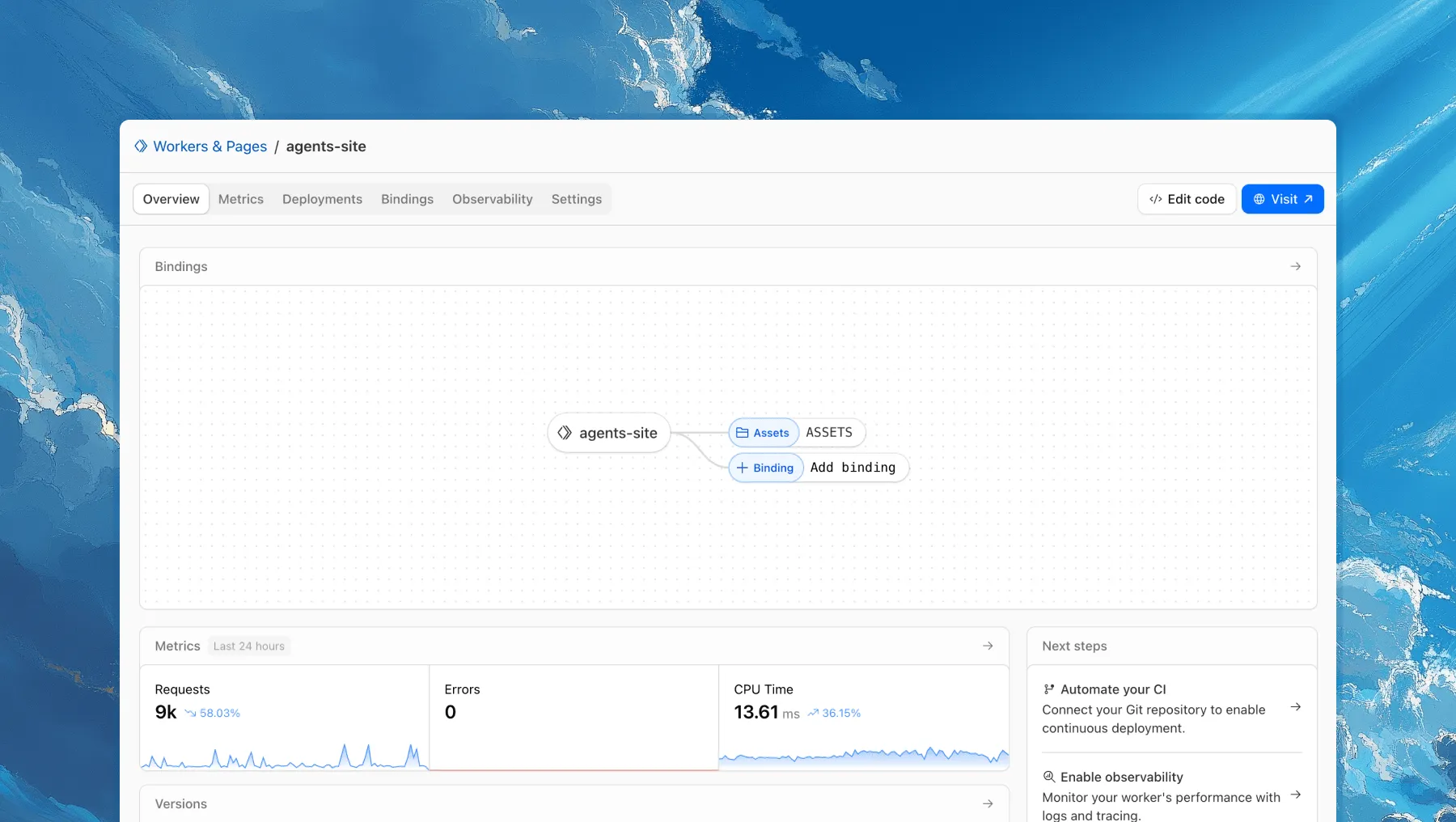
Each of your Workers now has a new overview page in the Cloudflare dashboard.
The goal is to make it easier to understand your Worker without digging through multiple tabs. Think of it as a new home base, a place to get a high-level overview on what's going on.
It's the first place you land when you open a Worker in the dashboard, and it gives you an immediate view of what’s going on. You can see requests, errors, and CPU time at a glance. You can view and add bindings, and see recent versions of your app, including who published them.
Navigation is also simpler, with visually distinct tabs at the top of the page. At the bottom right you'll find guided steps for what to do next that are based on the state of your Worker, such as adding a binding or connecting a custom domain.
We plan to add more here over time. Better insights, more controls, and ways to manage your Worker from one page.
If you have feedback or suggestions for the new Overview page or your Cloudflare Workers experience in general, we'd love to hear from you. Join the Cloudflare developer community on Discord ↗.
You can now enable Cloudflare Access for your workers.dev and Preview URLs in a single click.
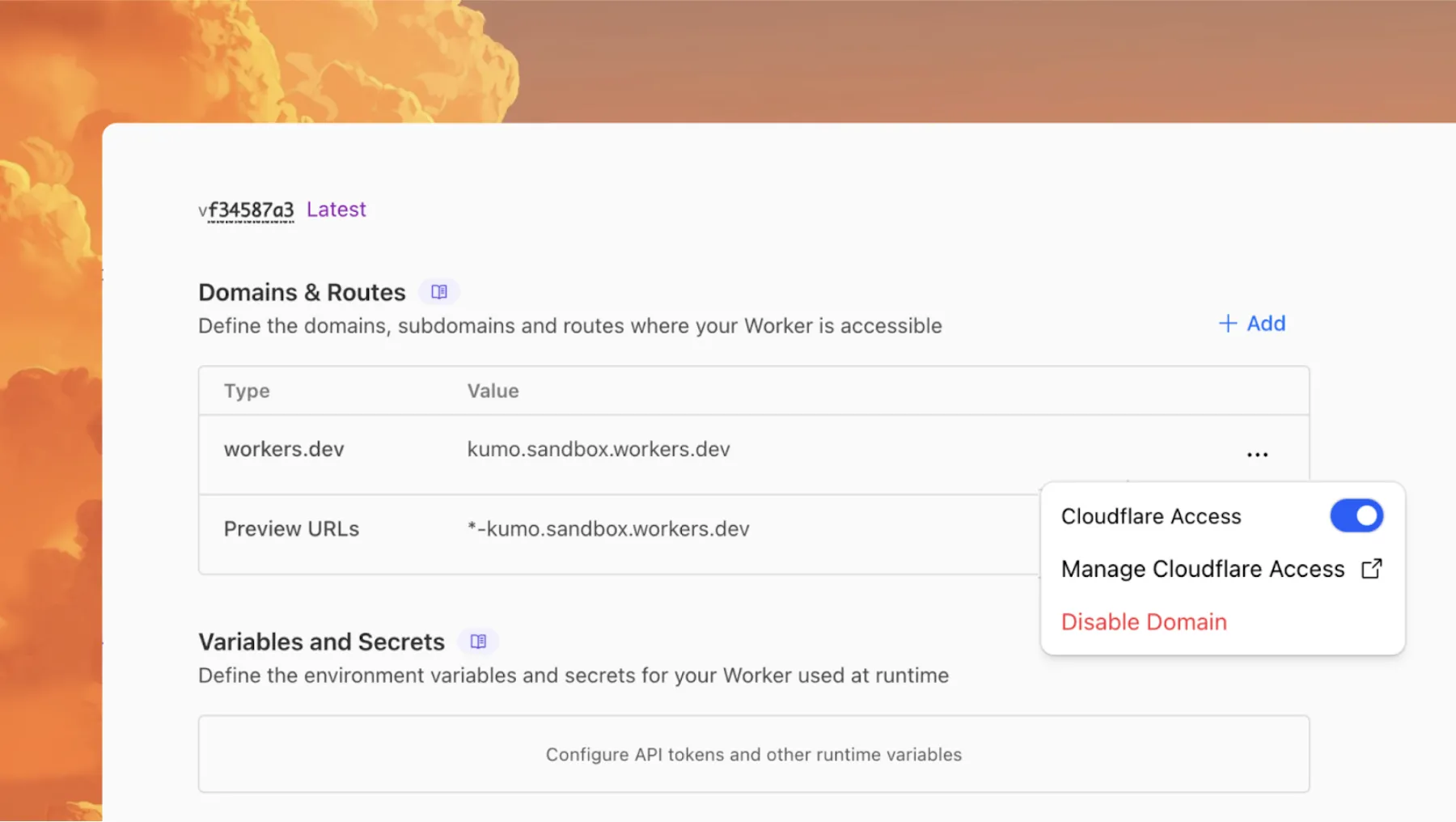
Access allows you to limit access to your Workers to specific users or groups. You can limit access to yourself, your teammates, your organization, or anyone else you specify in your Access policy.
To enable Cloudflare Access:
In the Cloudflare dashboard, go to the Workers & Pages page.
Go to Workers & PagesIn Overview, select your Worker.
Go to Settings > Domains & Routes.
For workers.dev or Preview URLs, click Enable Cloudflare Access.
Optionally, to configure the Access application, click Manage Cloudflare Access. There, you can change the email addresses you want to authorize. View Access policies to learn about configuring alternate rules.
To fully secure your application, it is important that you validate the JWT that Cloudflare Access adds to the Cf-Access-Jwt-Assertion header on the incoming request.
The following code will validate the JWT using the jose NPM package ↗:
import { jwtVerify, createRemoteJWKSet } from "jose";
export default {  async fetch(request, env, ctx) {    // Verify the POLICY_AUD environment variable is set    if (!env.POLICY_AUD) {      return new Response("Missing required audience", {        status: 403,        headers: { "Content-Type": "text/plain" },      });    }
    // Get the JWT from the request headers    const token = request.headers.get("cf-access-jwt-assertion");
    // Check if token exists    if (!token) {      return new Response("Missing required CF Access JWT", {        status: 403,        headers: { "Content-Type": "text/plain" },      });    }
    try {      // Create JWKS from your team domain      const JWKS = createRemoteJWKSet(        new URL(`${env.TEAM_DOMAIN}/cdn-cgi/access/certs`),      );
      // Verify the JWT      const { payload } = await jwtVerify(token, JWKS, {        issuer: env.TEAM_DOMAIN,        audience: env.POLICY_AUD,      });
// Token is valid, proceed with your application logic return new Response(`Hello ${payload.email || "authenticated user"}!`, { headers: { "Content-Type": "text/plain" }, }); } catch (error) { // Token verification failed return new Response(`Invalid token: ${error.message}`, { status: 403, headers: { "Content-Type": "text/plain" }, }); } },};Add these environment variables to your Worker:
POLICY_AUD: Your application's AUD tagTEAM_DOMAIN: https://<your-team-name>.cloudflareaccess.comBoth of these appear in the modal that appears when you enable Cloudflare Access.
You can set these variables by adding them to your Worker's Wrangler configuration file, or via the Cloudflare dashboard under Workers & Pages > your-worker > Settings > Environment Variables.
You can now perform more powerful queries directly in Workers Analytics Engine ↗ with a major expansion of our SQL function library.
Workers Analytics Engine allows you to ingest and store high-cardinality data at scale (such as custom analytics) and query your data through a simple SQL API.
Today, we've expanded Workers Analytics Engine's SQL capabilities with several new functions:
argMin() - Returns the value associated with the minimum in a groupargMax() - Returns the value associated with the maximum in a grouptopK() - Returns an array of the most frequent values in a grouptopKWeighted() - Returns an array of the most frequent values in a group using weightsfirst_value() - Returns the first value in an ordered set of values within a partitionlast_value() - Returns the last value in an ordered set of values within a partitionbitAnd() - Returns the bitwise AND of two expressionsbitCount() - Returns the number of bits set to one in the binary representation of a numberbitHammingDistance() - Returns the number of bits that differ between two numbersbitNot() - Returns a number with all bits flippedbitOr() - Returns the inclusive bitwise OR of two expressionsbitRotateLeft() - Rotates all bits in a number left by specified positionsbitRotateRight() - Rotates all bits in a number right by specified positionsbitShiftLeft() - Shifts all bits in a number left by specified positionsbitShiftRight() - Shifts all bits in a number right by specified positionsbitTest() - Returns the value of a specific bit in a numberbitXor() - Returns the bitwise exclusive-or of two expressionsabs() - Returns the absolute value of a numberlog() - Computes the natural logarithm of a numberround() - Rounds a number to a specified number of decimal placesceil() - Rounds a number up to the nearest integerfloor() - Rounds a number down to the nearest integerpow() - Returns a number raised to the power of another numberlowerUTF8() - Converts a string to lowercase using UTF-8 encodingupperUTF8() - Converts a string to uppercase using UTF-8 encodinghex() - Converts a number to its hexadecimal representationbin() - Converts a string to its binary representationNew type conversion functions: ↗
toUInt8() - Converts any numeric expression, or expression resulting in a string representation of a decimal, into an unsigned 8 bit integerWhether you're building usage-based billing systems, customer analytics dashboards, or other custom analytics, these functions let you get the most out of your data. Get started with Workers Analytics Engine and explore all available functions in our SQL reference documentation.
The ctx.exports API contains automatically-configured bindings corresponding to your Worker's top-level exports. For each top-level export extending WorkerEntrypoint, ctx.exports will contain a Service Binding by the same name, and for each export extending DurableObject (and for which storage has been configured via a migration), ctx.exports will contain a Durable Object namespace binding. This means you no longer have to configure these bindings explicitly in wrangler.jsonc/wrangler.toml.
Example:
import { WorkerEntrypoint } from "cloudflare:workers";
export class Greeter extends WorkerEntrypoint {  greet(name) {    return `Hello, ${name}!`;  }}
export default {  async fetch(request, env, ctx) {    let greeting = await ctx.exports.Greeter.greet("World")    return new Response(greeting);  }}
At present, you must use the enable_ctx_exports compatibility flag to enable this API, though it will be on by default in the future.
You can run multiple Workers in a single dev command by passing multiple config files to wrangler dev:
wrangler dev --config ./web/wrangler.jsonc --config ./api/wrangler.jsoncPreviously, if you ran the command above and then also ran wrangler dev for a different Worker, the Workers running in separate wrangler dev sessions could not communicate with each other. This prevented you from being able to use Service Bindings ↗ and Tail Workers ↗ in local development, when running separate wrangler dev sessions.
Now, the following works as expected:
# Terminal 1: Run your application that includes both Web and API workerswrangler dev --config ./web/wrangler.jsonc --config ./api/wrangler.jsonc
# Terminal 2: Run your auth worker separatelywrangler dev --config ./auth/wrangler.jsonc
These Workers can now communicate with each other across separate dev commands, regardless of your development setup.
export default {  async fetch(request, env) {    // This service binding call now works across dev commands    const authorized = await env.AUTH.isAuthorized(request);
    if (!authorized) {      return new Response('Unauthorized', { status: 401 });    }
    return new Response('Hello from API Worker!', { status: 200 });  },};
Check out the Developing with multiple Workers guide to learn more about the different approaches and when to use each one.
Rate Limiting within Cloudflare Workers is now Generally Available (GA).
The ratelimit binding is now stable and recommended for all production workloads. Existing deployments using the unsafe binding will continue to function to allow for a smooth transition.
For more details, refer to Workers Rate Limiting documentation.