

We’ve shipped a major release for the @cloudflare/sandbox ↗ SDK, turning it into a full-featured, container-based execution platform that runs securely on Cloudflare Workers.
This update adds live streaming of output, persistent Python and JavaScript code interpreters with rich output support (charts, tables, HTML, JSON), file system access, Git operations, full background process control, and the ability to expose running services via public URLs.
This makes it ideal for building AI agents, CI runners, cloud REPLs, data analysis pipelines, or full developer tools — all without managing infrastructure.
Create persistent code contexts with support for rich visual + structured outputs.
Creates a new code execution context with persistent state.
TypeScript // Create a Python contextconst pythonCtx = await sandbox.createCodeContext({ language: "python" });// Create a JavaScript contextconst jsCtx = await sandbox.createCodeContext({ language: "javascript" });Options:
- language: Programming language ('python' | 'javascript' | 'typescript')
- cwd: Working directory (default: /workspace)
- envVars: Environment variables for the context
Executes code with optional streaming callbacks.
TypeScript // Simple executionconst execution = await sandbox.runCode('print("Hello World")', {context: pythonCtx,});// With streaming callbacksawait sandbox.runCode(`for i in range(5):print(f"Step {i}")time.sleep(1)`,{context: pythonCtx,onStdout: (output) => console.log("Real-time:", output.text),onResult: (result) => console.log("Result:", result),},);Options:
- language: Programming language ('python' | 'javascript' | 'typescript')
- cwd: Working directory (default: /workspace)
- envVars: Environment variables for the context
Returns a streaming response for real-time processing.
TypeScript const stream = await sandbox.runCodeStream("import time; [print(i) for i in range(10)]",);// Process the stream as neededInterpreter outputs are auto-formatted and returned in multiple formats:
- text
- html (e.g., Pandas tables)
- png, svg (e.g., Matplotlib charts)
- json (structured data)
- chart (parsed visualizations)
TypeScript const result = await sandbox.runCode(`import seaborn as snsimport matplotlib.pyplot as pltdata = sns.load_dataset("flights")pivot = data.pivot("month", "year", "passengers")sns.heatmap(pivot, annot=True, fmt="d")plt.title("Flight Passengers")plt.show()pivot.to_dict()`,{ context: pythonCtx },);if (result.png) {console.log("Chart output:", result.png);}Start background processes and expose them with live URLs.
TypeScript await sandbox.startProcess("python -m http.server 8000");const preview = await sandbox.exposePort(8000);console.log("Live preview at:", preview.url);Start, inspect, and terminate long-running background processes.
TypeScript const process = await sandbox.startProcess("node server.js");console.log(`Started process ${process.id} with PID ${process.pid}`);// Monitor the processconst logStream = await sandbox.streamProcessLogs(process.id);for await (const log of parseSSEStream<LogEvent>(logStream)) {console.log(`Server: ${log.data}`);}- listProcesses() - List all running processes
- getProcess(id) - Get detailed process status
- killProcess(id, signal) - Terminate specific processes
- killAllProcesses() - Kill all processes
- streamProcessLogs(id, options) - Stream logs from running processes
- getProcessLogs(id) - Get accumulated process output
Clone Git repositories directly into the sandbox.
TypeScript await sandbox.gitCheckout("https://github.com/user/repo", {branch: "main",targetDir: "my-project",});Sandboxes are still experimental. We're using them to explore how isolated, container-like workloads might scale on Cloudflare — and to help define the developer experience around them.
As part of the ongoing open beta for Workers Builds, we’ve increased the available disk space for builds from 8 GB to 20 GB for both Free and Paid plans.
This provides more space for larger projects, dependencies, and build artifacts while improving overall build reliability.
Metric Free Plan Paid Plans Disk Space 20 GB 20 GB All other build limits — including CPU, memory, build minutes, and timeout remain unchanged.
You can now configure and run Containers alongside your Worker during local development when using the Cloudflare Vite plugin. Previously, you could only develop locally when using Wrangler as your local development server.
You can simply configure your Worker and your Container(s) in your Wrangler configuration file:
JSONC {"name": "container-starter","main": "src/index.js","containers": [{"class_name": "MyContainer","image": "./Dockerfile","instances": 5}],"durable_objects": {"bindings": [{"class_name": "MyContainer","name": "MY_CONTAINER"}]},"migrations": [{"new_sqlite_classes": ["MyContainer"],"tag": "v1"}],}TOML name = "container-starter"main = "src/index.js"[[containers]]class_name = "MyContainer"image = "./Dockerfile"instances = 5[[durable_objects.bindings]]class_name = "MyContainer"name = "MY_CONTAINER"[[migrations]]new_sqlite_classes = [ "MyContainer" ]tag = "v1"Once your Worker and Containers are configured, you can access the Container instances from your Worker code:
TypeScript import { Container, getContainer } from "@cloudflare/containers";export class MyContainer extends Container {defaultPort = 4000; // Port the container is listening onsleepAfter = "10m"; // Stop the instance if requests not sent for 10 minutes}async fetch(request, env) {const { "session-id": sessionId } = await request.json();// Get the container instance for the given session IDconst containerInstance = getContainer(env.MY_CONTAINER, sessionId)// Pass the request to the container instance on its default portreturn containerInstance.fetch(request);}To develop your Worker locally, start a local dev server by running
Terminal window vite devin your terminal.
Learn more about Cloudflare Containers ↗ or the Cloudflare Vite plugin ↗ in our developer docs.
Any template which uses Worker environment variables, secrets, or Secrets Store secrets can now be deployed using a Deploy to Cloudflare button.
Define environment variables and secrets store bindings in your Wrangler configuration file as normal:
JSONC {"name": "my-worker","main": "./src/index.ts",// Set this to today's date"compatibility_date": "2026-04-04","vars": {"API_HOST": "https://example.com",},"secrets_store_secrets": [{"binding": "API_KEY","store_id": "demo","secret_name": "api-key"}]}TOML name = "my-worker"main = "./src/index.ts"# Set this to today's datecompatibility_date = "2026-04-04"[vars]API_HOST = "https://example.com"[[secrets_store_secrets]]binding = "API_KEY"store_id = "demo"secret_name = "api-key"Add secrets to a
.dev.vars.exampleor.env.examplefile:.dev.vars.example COOKIE_SIGNING_KEY=my-secret # commentAnd optionally, you can add a description for these bindings in your template's
package.jsonto help users understand how to configure each value:package.json {"name": "my-worker","private": true,"cloudflare": {"bindings": {"API_KEY": {"description": "Select your company's API key for connecting to the example service."},"COOKIE_SIGNING_KEY": {"description": "Generate a random string using `openssl rand -hex 32`."}}}}These secrets and environment variables will be presented to users in the dashboard as they deploy this template, allowing them to configure each value. Additional information about creating templates and Deploy to Cloudflare buttons can be found in our documentation.
Now, when you connect your Cloudflare Worker to a git repository on GitHub or GitLab, each branch of your repository has its own stable preview URL, that you can use to preview code changes before merging the pull request and deploying to production.
This works the same way that Cloudflare Pages does — every time you create a pull request, you'll automatically get a shareable preview link where you can see your changes running, without affecting production. The link stays the same, even as you add commits to the same branch. These preview URLs are named after your branch and are posted as a comment to each pull request. The URL stays the same with every commit and always points to the latest version of that branch.
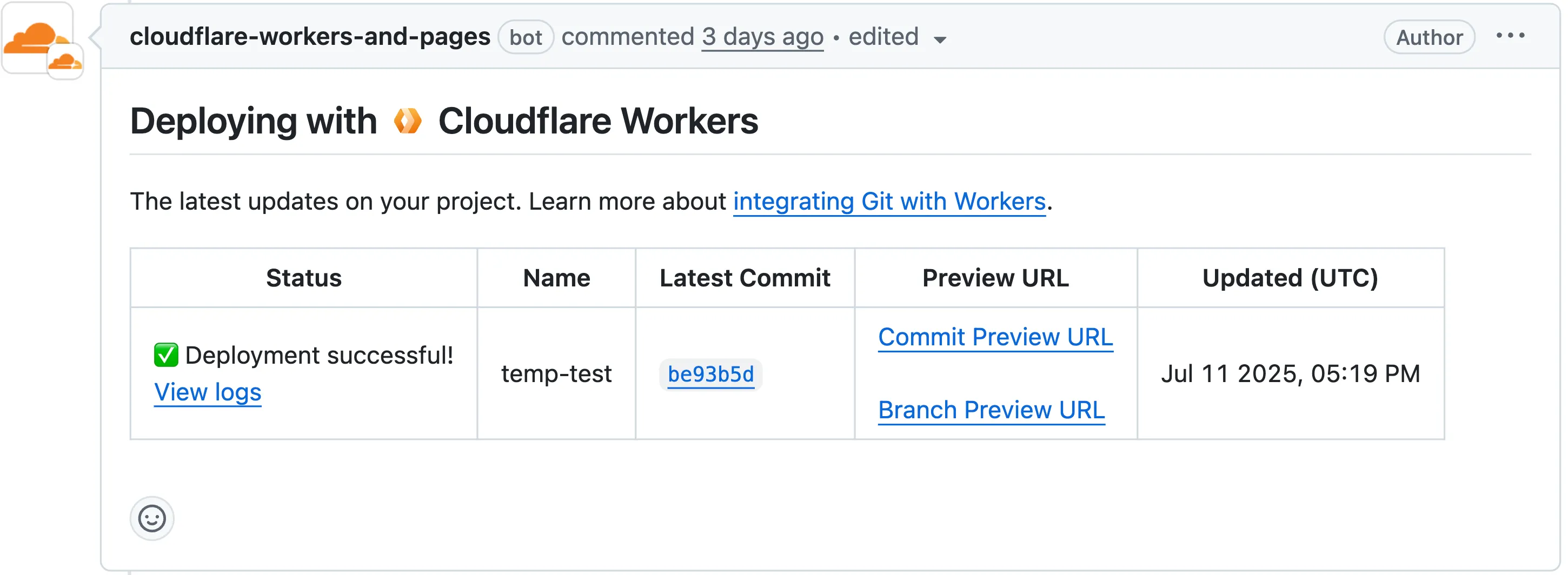
Each comment includes two preview URLs as shown above:
- Commit Preview URL: Unique to the specific version/commit (e.g.,
<version-prefix>-<worker-name>.<subdomain>.workers.dev) - Branch Preview URL: A stable alias based on the branch name (e.g.,
<branch-name>-<worker-name>.<subdomain>.workers.dev)
When you create a pull request:
- A preview alias is automatically created based on the Git branch name (e.g.,
<branch-name>becomes<branch-name>-<worker-name>.<subdomain>.workers.dev) - No configuration is needed, the alias is generated for you
- The link stays the same even as you add commits to the same branch
- Preview URLs are posted directly to your pull request as comments (just like they are in Cloudflare Pages)
You can also assign a custom preview alias using the Wrangler CLI, by passing the
--preview-aliasflag when uploading a version of your Worker:Terminal window wrangler versions upload --preview-alias staging- Only available on the workers.dev subdomain (custom domains not yet supported)
- Requires Wrangler v4.21.0+
- Preview URLs are not generated for Workers that use Durable Objects
- Not yet supported for Workers for Platforms
- Commit Preview URL: Unique to the specific version/commit (e.g.,
Vite 7 ↗ is now supported in the Cloudflare Vite plugin. See the Vite changelog ↗ for a list of changes.
Note that the minimum Node.js versions supported by Vite 7 are 20.19 and 22.12. We continue to support Vite 6 so you do not need to immediately upgrade.
Workers now support breakpoint debugging using VSCode's built-in JavaScript Debug Terminals ↗. All you have to do is open a JS debug terminal (
Cmd + Shift + Pand then typejavascript debug) and runwrangler dev(orvite dev) from within the debug terminal. VSCode will automatically connect to your running Worker (even if you're running multiple Workers at once!) and start a debugging session.In 2023 we announced breakpoint debugging support ↗ for Workers, which meant that you could easily debug your Worker code in Wrangler's built-in devtools (accessible via the
[d]hotkey) as well as multiple other devtools clients, including VSCode ↗. For most developers, breakpoint debugging via VSCode is the most natural flow, but until now it's required manually configuring alaunch.jsonfile ↗, runningwrangler dev, and connecting via VSCode's built-in debugger. Now it's much more seamless!
You can now use any of Vite's static asset handling ↗ features in your Worker as well as in your frontend. These include importing assets as URLs, importing as strings and importing from the
publicdirectory as well as inlining assets.Additionally, assets imported as URLs in your Worker are now automatically moved to the client build output.
Here is an example that fetches an imported asset using the assets binding and modifies the response.
TypeScript // Import the asset URL// This returns the resolved path in development and productionimport myImage from "./my-image.png";export default {async fetch(request, env) {// Fetch the asset using the bindingconst response = await env.ASSETS.fetch(new URL(myImage, request.url));// Create a new `Response` object that can be modifiedconst modifiedResponse = new Response(response.body, response);// Add an additional headermodifiedResponse.headers.append("my-header", "imported-asset");// Return the modfied responsereturn modifiedResponse;},};Refer to Static Assets in the Cloudflare Vite plugin docs for more info.
We recently announced ↗ our public beta for remote bindings, which allow you to connect to deployed resources running on your Cloudflare account (like R2 buckets or D1 databases) while running a local development session.
Now, you can use remote bindings with your Next.js applications through the
@opennextjs/cloudflareadaptor ↗ by enabling the experimental feature in yournext.config.ts:initOpenNextCloudflareForDev();initOpenNextCloudflareForDev({experimental: { remoteBindings: true }});Then, all you have to do is specify which bindings you want connected to the deployed resource on your Cloudflare account via the
experimental_remoteflag in your binding definition:JSONC {"r2_buckets": [{"bucket_name": "testing-bucket","binding": "MY_BUCKET","experimental_remote": true,},],}TOML [[r2_buckets]]bucket_name = "testing-bucket"binding = "MY_BUCKET"experimental_remote = trueYou can then run
next devto start a local development session (or start a preview withopennextjs-cloudflare preview), and all requests toenv.MY_BUCKETwill be proxied to the remotetesting-bucket— rather than the default local binding simulations.Remote bindings are also used during the build process, which comes with significant benefits for pages using Incremental Static Regeneration (ISR) ↗. During the build step for an ISR page, your server executes the page's code just as it would for normal user requests. If a page needs data to display (like fetching user info from KV), those requests are actually made. The server then uses this fetched data to render the final HTML.
Data fetching is a critical part of this process, as the finished HTML is only as good as the data it was built with. If the build process can't fetch real data, you end up with a pre-rendered page that's empty or incomplete.
With remote bindings support in OpenNext, your pre-rendered pages are built with real data from the start. The build process uses any configured remote bindings, and any data fetching occurs against the deployed resources on your Cloudflare account.
Want to learn more? Get started with remote bindings and OpenNext ↗.
Have feedback? Join the discussion in our beta announcement ↗ to share feedback or report any issues.
Workers can now talk to each other across separate dev commands using service bindings and tail consumers, whether started with
vite devorwrangler dev.Simply start each Worker in its own terminal:
Terminal window # Terminal 1vite dev# Terminal 2wrangler devThis is useful when different teams maintain different Workers, or when each Worker has its own build setup or tooling.
Check out the Developing with multiple Workers guide to learn more about the different approaches and when to use each one.
AI is supercharging app development for everyone, but we need a safe way to run untrusted, LLM-written code. We’re introducing Sandboxes ↗, which let your Worker run actual processes in a secure, container-based environment.
TypeScript import { getSandbox } from "@cloudflare/sandbox";export { Sandbox } from "@cloudflare/sandbox";export default {async fetch(request: Request, env: Env) {const sandbox = getSandbox(env.Sandbox, "my-sandbox");return sandbox.exec("ls", ["-la"]);},};exec(command: string, args: string[], options?: { stream?: boolean }):Execute a command in the sandbox.gitCheckout(repoUrl: string, options: { branch?: string; targetDir?: string; stream?: boolean }): Checkout a git repository in the sandbox.mkdir(path: string, options: { recursive?: boolean; stream?: boolean }): Create a directory in the sandbox.writeFile(path: string, content: string, options: { encoding?: string; stream?: boolean }): Write content to a file in the sandbox.readFile(path: string, options: { encoding?: string; stream?: boolean }): Read content from a file in the sandbox.deleteFile(path: string, options?: { stream?: boolean }): Delete a file from the sandbox.renameFile(oldPath: string, newPath: string, options?: { stream?: boolean }): Rename a file in the sandbox.moveFile(sourcePath: string, destinationPath: string, options?: { stream?: boolean }): Move a file from one location to another in the sandbox.ping(): Ping the sandbox.
Sandboxes are still experimental. We're using them to explore how isolated, container-like workloads might scale on Cloudflare — and to help define the developer experience around them.
You can try it today from your Worker, with just a few lines of code. Let us know what you build.
The new @cloudflare/actors ↗ library is now in beta!
The
@cloudflare/actorslibrary is a new SDK for Durable Objects and provides a powerful set of abstractions for building real-time, interactive, and multiplayer applications on top of Durable Objects. With beta usage and feedback,@cloudflare/actorswill become the recommended way to build on Durable Objects and draws upon Cloudflare's experience building products/features on Durable Objects.The name "actors" originates from the actor programming model, which closely ties to how Durable Objects are modelled.
The
@cloudflare/actorslibrary includes:- Storage helpers for querying embeddeded, per-object SQLite storage
- Storage helpers for managing SQL schema migrations
- Alarm helpers for scheduling multiple alarms provided a date, delay in seconds, or cron expression
Actorclass for using Durable Objects with a defined pattern- Durable Objects Workers API ↗ is always available for your application as needed
Storage and alarm helper methods can be combined with any Javascript class ↗ that defines your Durable Object, i.e, ones that extend
DurableObjectincluding theActorclass.JavaScript import { Storage } from "@cloudflare/actors/storage";export class ChatRoom extends DurableObject<Env> {storage: Storage;constructor(ctx: DurableObjectState, env: Env) {super(ctx, env)this.storage = new Storage(ctx.storage);this.storage.migrations = [{idMonotonicInc: 1,description: "Create users table",sql: "CREATE TABLE IF NOT EXISTS users (id INTEGER PRIMARY KEY)"}]}async fetch(request: Request): Promise<Response> {// Run migrations before executing SQL queryawait this.storage.runMigrations();// Query with SQL templatelet userId = new URL(request.url).searchParams.get("userId");const query = this.storage.sql`SELECT * FROM users WHERE id = ${userId};`return new Response(`${JSON.stringify(query)}`);}}@cloudflare/actorslibrary introduces theActorclass pattern.Actorlets you access Durable Objects without writing the Worker that communicates with your Durable Object (the Worker is created for you). By default, requests are routed to a Durable Object named "default".JavaScript export class MyActor extends Actor<Env> {async fetch(request: Request): Promise<Response> {return new Response('Hello, World!')}}export default handler(MyActor);You can route to different Durable Objects by name within your
Actorclass usingnameFromRequest↗.JavaScript export class MyActor extends Actor<Env> {static nameFromRequest(request: Request): string {let url = new URL(request.url);return url.searchParams.get("userId") ?? "foo";}async fetch(request: Request): Promise<Response> {return new Response(`Actor identifier (Durable Object name): ${this.identifier}`);}}export default handler(MyActor);For more examples, check out the library README ↗.
@cloudflare/actorslibrary is a place for more helpers and built-in patterns, like retry handling and Websocket-based applications, to reduce development overhead for common Durable Objects functionality. Please share feedback and what more you would like to see on our Discord channel ↗.
We’ve increased the total allowed size of
blobfields on data points written to Workers Analytics Engine from 5 KB to 16 KB.This change gives you more flexibility when logging rich observability data — such as base64-encoded payloads, AI inference traces, or custom metadata — without hitting request size limits.
You can find full details on limits for queries, filters, payloads, and more here in the Workers Analytics Engine limits documentation.
JavaScript export default {async fetch(request, env) {env.analyticsDataset.writeDataPoint({// The sum of all of the blob's sizes can now be 16 KBblobs: [// The URL of the request to the Workerrequest.url,// Some metadata about your application you'd like to storeJSON.stringify(metadata),// The version of your Worker this datapoint was collected fromenv.versionMetadata.tag,],indexes: ["sample-index"],});},};TypeScript export default {async fetch(request, env) {env.analyticsDataset.writeDataPoint({// The sum of all of the blob's sizes can now be 16 KBblobs: [// The URL of the request to the Workerrequest.url,// Some metadata about your application you'd like to storeJSON.stringify(metadata),// The version of your Worker this datapoint was collected fromenv.versionMetadata.tag,],indexes: ["sample-index"],});}};
-
We've simplified the programmatic deployment of Workers via our Cloudflare SDKs. This update abstracts away the low-level complexities of the
multipart/form-dataupload process, allowing you to focus on your code while we handle the deployment mechanics.This new interface is available in:
- cloudflare-typescript ↗ (4.4.1)
- cloudflare-python ↗ (4.3.1)
For complete examples, see our guide on programmatic Worker deployments.
Previously, deploying a Worker programmatically required manually constructing a
multipart/form-dataHTTP request, packaging your code and a separatemetadata.jsonfile. This was more complicated and verbose, and prone to formatting errors.For example, here's how you would upload a Worker script previously with cURL:
Terminal window curl https://api.cloudflare.com/client/v4/accounts/<account_id>/workers/scripts/my-hello-world-script \-X PUT \-H 'Authorization: Bearer <api_token>' \-F 'metadata={"main_module": "my-hello-world-script.mjs","bindings": [{"type": "plain_text","name": "MESSAGE","text": "Hello World!"}],"compatibility_date": "$today"};type=application/json' \-F 'my-hello-world-script.mjs=@-;filename=my-hello-world-script.mjs;type=application/javascript+module' <<EOFexport default {async fetch(request, env, ctx) {return new Response(env.MESSAGE, { status: 200 });}};EOFWith the new SDK interface, you can now define your entire Worker configuration using a single, structured object.
This approach allows you to specify metadata like
main_module,bindings, andcompatibility_dateas clearer properties directly alongside your script content. Our SDK takes this logical object and automatically constructs the complex multipart/form-data API request behind the scenes.Here's how you can now programmatically deploy a Worker via the
cloudflare-typescriptSDK ↗JavaScript import Cloudflare from "cloudflare";import { toFile } from "cloudflare/index";// ... client setup, script content, etc.const script = await client.workers.scripts.update(scriptName, {account_id: accountID,metadata: {main_module: scriptFileName,bindings: [],},files: {[scriptFileName]: await toFile(Buffer.from(scriptContent), scriptFileName, {type: "application/javascript+module",}),},});TypeScript import Cloudflare from 'cloudflare';import { toFile } from 'cloudflare/index';// ... client setup, script content, etc.const script = await client.workers.scripts.update(scriptName, {account_id: accountID,metadata: {main_module: scriptFileName,bindings: [],},files: {[scriptFileName]: await toFile(Buffer.from(scriptContent), scriptFileName, {type: 'application/javascript+module',}),},});View the complete example here: https://github.com/cloudflare/cloudflare-typescript/blob/main/examples/workers/script-upload.ts ↗
We've also made several fixes and enhancements to the Cloudflare Terraform provider ↗:
- Fixed the
cloudflare_workers_script↗ resource in Terraform, which previously was producing a diff even when there were no changes. Now, yourterraform planoutputs will be cleaner and more reliable. - Fixed the
cloudflare_workers_for_platforms_dispatch_namespace↗, where the provider would attempt to recreate the namespace on aterraform apply. The resource now correctly reads its remote state, ensuring stability for production environments and CI/CD workflows. - The
cloudflare_workers_route↗ resource now allows for thescriptproperty to be empty, null, or omitted to indicate that pattern should be negated for all scripts (see routes docs). You can now reserve a pattern or temporarily disable a Worker on a route without deleting the route definition itself. - Using
primary_location_hintin thecloudflare_d1_database↗ resource will no longer always try to recreate. You can now safely change the location hint for a D1 database without causing a destructive operation.
We've also properly documented the Workers Script And Version Settings in our public OpenAPI spec and SDKs.
Today we announced the public beta ↗ of remote bindings for local development. With remote bindings, you can now connect to deployed resources like R2 buckets and D1 databases while running Worker code on your local machine. This means you can test your local code changes against real data and services, without the overhead of deploying for each iteration.
To enable remote mode, add
"experimental_remote" : trueto each binding that you want to rely on a remote resource running on Cloudflare:JSONC {"name": "my-worker",// Set this to today's date"compatibility_date": "2026-04-04","r2_buckets": [{"bucket_name": "screenshots-bucket","binding": "screenshots_bucket","experimental_remote": true,},],}TOML name = "my-worker"# Set this to today's datecompatibility_date = "2026-04-04"[[r2_buckets]]bucket_name = "screenshots-bucket"binding = "screenshots_bucket"experimental_remote = trueWhen remote bindings are configured, your Worker still executes locally, but all binding calls are proxied to the deployed resource that runs on Cloudflare's network.
You can try out remote bindings for local development today with:
- Wrangler v4.20.3: Use the
wrangler dev --x-remote-bindingscommand. - The Cloudflare Vite Plugin: Refer to the documentation for how to enable in your Vite config.
- The Cloudflare Vitest Plugin: Refer to the documentation for how to enable in your Vitest config.
Have feedback? Join the discussion in our beta announcement ↗ to share feedback or report any issues.
- Wrangler v4.20.3: Use the
For those building Single Page Applications (SPAs) on Workers, you can now explicitly define which routes invoke your Worker script in Wrangler configuration. The
run_worker_firstconfig option has now been expanded to accept an array of route patterns, allowing you to more granularly specify when your Worker script runs.Configuration example:
JSONC {"name": "my-spa-worker",// Set this to today's date"compatibility_date": "2026-04-04","main": "./src/index.ts","assets": {"directory": "./dist/","not_found_handling": "single-page-application","binding": "ASSETS","run_worker_first": ["/api/*", "!/api/docs/*"]}}TOML name = "my-spa-worker"# Set this to today's datecompatibility_date = "2026-04-04"main = "./src/index.ts"[assets]directory = "./dist/"not_found_handling = "single-page-application"binding = "ASSETS"run_worker_first = [ "/api/*", "!/api/docs/*" ]This new routing control was done in partnership with our community and customers who provided great feedback on our public proposal ↗. Thank you to everyone who brought forward use-cases and feedback on the design!
To use advanced routing control with
run_worker_first, you'll need:- Wrangler v4.20.0 and above
- Cloudflare Vite plugin v1.7.0 and above
Mitigations have been put in place for all existing and future deployments of sites with the Cloudflare adapter for Open Next in response to an identified Server-Side Request Forgery (SSRF) vulnerability in the
@opennextjs/cloudflarepackage.The vulnerability stemmed from an unimplemented feature in the Cloudflare adapter for Open Next, which allowed users to proxy arbitrary remote content via the
/_next/imageendpoint.This issue allowed attackers to load remote resources from arbitrary hosts under the victim site's domain for any site deployed using the Cloudflare adapter for Open Next. For example:
https://victim-site.com/_next/image?url=https://attacker.com. In this example, attacker-controlled content fromattacker.comis served through the victim site's domain (victim-site.com), violating the same-origin policy and potentially misleading users or other services.References: https://www.cve.org/cverecord?id=CVE-2025-6087 ↗, https://github.com/opennextjs/opennextjs-cloudflare/security/advisories/GHSA-rvpw-p7vw-wj3m ↗
- SSRF via unrestricted remote URL loading
- Arbitrary remote content loading
- Potential internal service exposure or phishing risks through domain abuse
The following mitigations have been put in place:
Server side updates to Cloudflare's platform to restrict the content loaded via the
/_next/imageendpoint to images. The update automatically mitigates the issue for all existing and any future sites deployed to Cloudflare using the affected version of the Cloudflare adapter for Open NextRoot cause fix: Pull request #727 ↗ to the Cloudflare adapter for Open Next. The patched version of the adapter has been released as
@opennextjs/cloudflare@1.3.0Package dependency update: Pull request cloudflare/workers-sdk#9608 ↗ to create-cloudflare (c3) to use the fixed version of the Cloudflare adapter for Open Next. The patched version of create-cloudflare has been published as
create-cloudflare@2.49.3.In addition to the automatic mitigation deployed on Cloudflare's platform, we encourage affected users to upgrade to
@opennext/cloudflarev1.3.0 and use theremotePatterns↗ filter in Next config if they need to allow-list external urls with images assets.
You can now grant members of your Cloudflare account read-only access to the Workers Platform.
The new "Workers Platform (Read-only)" role grants read-only access to all products typically used as part of Cloudflare's Developer Platform, including Workers, Pages, Durable Objects, KV, R2, Zones, Zone Analytics and Page Rules. When Cloudflare introduces new products to the Workers platform, we will add additional read-only permissions to this role.
Additionally, the role previously named "Workers Admin" has been renamed to "Workers Platform Admin". This change ensures that the name more accurately reflects the permissions granted — this role has always granted access to more than just Workers — it grants read and write access to the products mentioned above, and similarly, as new products are added to the Workers platform, we will add additional read and write permissions to this role.
You can review the updated roles in the developer docs.
Workers Builds connects your Worker to a Git repository, and automates building and deploying your code on each pushed change.
To make CI/CD pipelines even more flexible, Workers Builds now automatically injects default environment variables into your build process (much like the defaults in Cloudflare Pages projects). You can use these variables to customize your build process based on the deployment context, such as the branch or commit.
The following environment variables are injected by default:
Environment Variable Injected value Example use-case CItrueChanging build behavior when run on CI versus locally WORKERS_CI1Changing build behavior when run on Workers Builds versus locally WORKERS_CI_BUILD_UUID<build-uuid-of-current-build>Passing the Build UUID along to custom workflows WORKERS_CI_COMMIT_SHA<sha1-hash-of-current-commit>Passing current commit ID to error reporting, for example, Sentry WORKERS_CI_BRANCH<branch-name-from-push-eventCustomizing build based on branch, for example, disabling debug logging on productionYou can override these default values and add your own custom environment variables by navigating to your Worker > Settings > Environment variables.
Learn more in the Build configuration documentation.
Workers native integrations were originally launched in May 2023 ↗ to connect to popular database and observability providers with your Worker in just a few clicks. We are changing how developers connect Workers to these external services. The Integrations tab in the dashboard has been removed in favor of a more direct, command-line-based approach using Wrangler secrets.
- Integrations tab removed: The integrations setup flow is no longer available in the Workers dashboard.
- Manual secret configuration: New connections should be configured by adding credentials as secrets to your Workers using
npx wrangler secret putcommands.
Existing integrations will continue to work without any changes required. If you have integrations that were previously created through the dashboard, they will remain functional.
If you'd like to modify your existing integration, you can update the secrets, environment variables, or Tail Workers that were created from the original integration setup.
- Update secrets: Use
npx wrangler secret put <SECRET_NAME>to update credential values. - Modify environment variables: Update variables through the dashboard or Wrangler configuration.
- Dashboard management: Access your Worker's settings in the Cloudflare dashboard ↗ to modify connections created by our removed native integrations feature.
If you have previously set up an observability integration with Sentry ↗, the following environment variables were set and are still modifiable:
BLOCKED_HEADERS: headers to exclude sending to SentryEXCEPTION_SAMPLING_RATE: number from 0 - 100, where 0 = no events go through to Sentry, and 100 = all events go through to SentrySTATUS_CODES_TO_SAMPLING_RATES: a map of status codes -- like 400 or with wildcards like 4xx -- to sampling rates described above
For new connections, refer to our step-by-step guides on connecting to popular database and observability providers including: Sentry, Turso, Neon, Supabase, PlanetScale, Upstash, Xata.
With the release of the Cloudflare adapter for Open Next v1.0.0 in May 2025, we already had followups plans to improve performance and size ↗.
@opennextjs/cloudflarev1.2 released on June 5, 2025 delivers on these enhancements. By removingbabelfrom the app code and dropping a dependency on@ampproject/toolbox-optimizer, we were able to reduce generated bundle sizes. Additionally, by stopping preloading of all app routes, we were able to improve the cold start time.This means that users will now see a decrease from 14 to 8MiB (2.3 to 1.6MiB gzipped) in generated bundle size for a Next app created via create-next-app, and typically 100ms faster startup times for their medium-sized apps.
Users only need to update to the latest version of
@opennextjs/cloudflareto automatically benefit from these improvements.Note that we published CVE-2005-6087 ↗ for a SSRF vulnerability in the
@opennextjs/cloudflarepackage. The vulnerability has been fixed from@opennextjs/cloudflarev1.3.0 onwards. Please update to any version after this one.
You can now visualize, explore and modify your Worker’s architecture directly in the Cloudflare dashboard, making it easier to understand how your application connects to Cloudflare resources like D1 databases, Durable Objects, KV namespaces, and more.
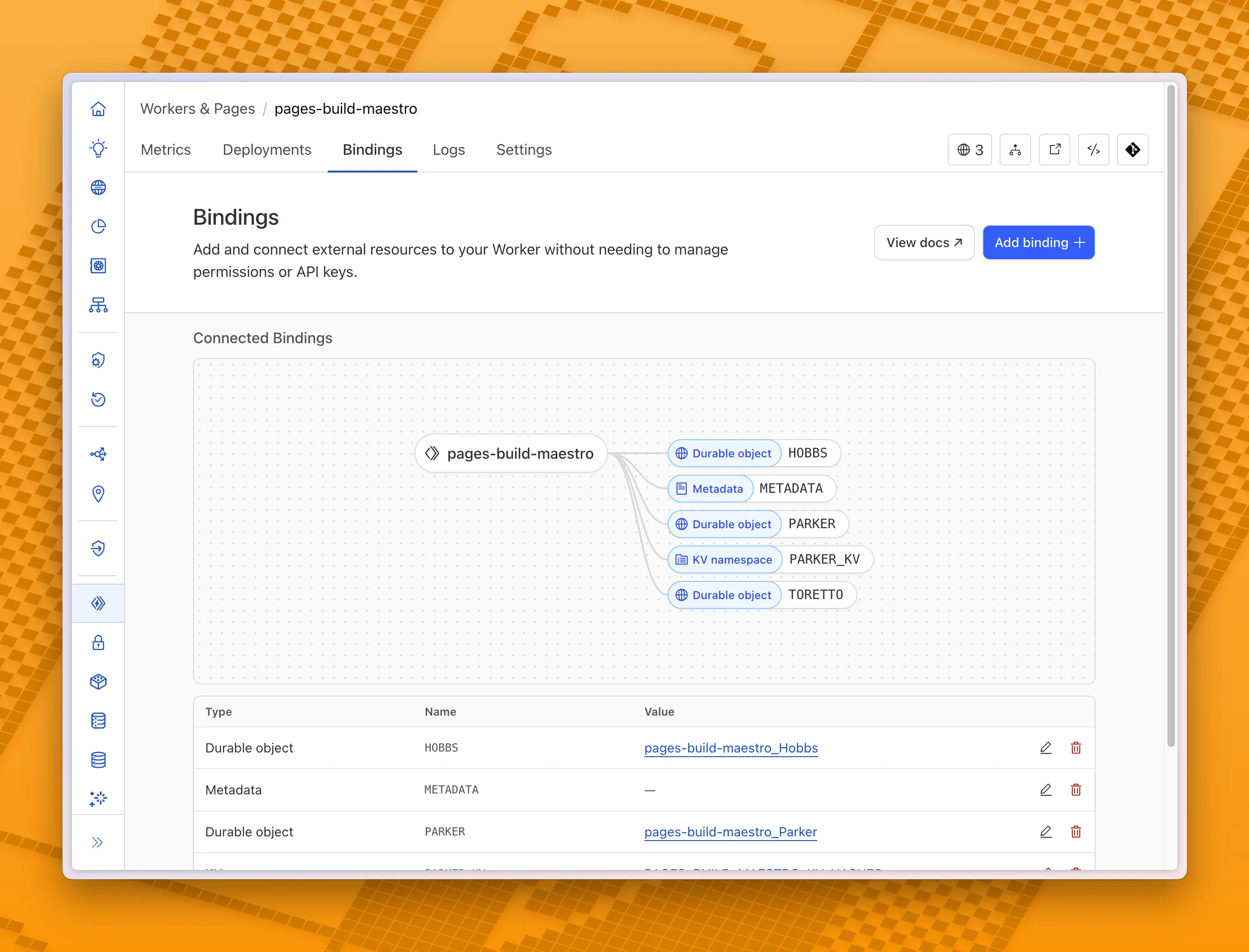
With this new view, you can easily:
- Explore existing bindings in a visual, architecture-style diagram
- Add and manage bindings directly from the same interface
- Discover the full range of compute, storage, AI, and media resources you can attach to your Workers application.
To get started, head to the Cloudflare dashboard ↗ and open the Bindings tab of any Workers application.
You can now debug, profile, view logs, and analyze memory usage for your Worker ↗ using Chrome Devtools ↗ when your Worker runs locally using the Cloudflare Vite plugin ↗.
Previously, this was only possible if your Worker ran locally using the Wrangler CLI ↗, and now you can do all the same things if your Worker uses Vite ↗.
When you run
vite, you'll now see a debug URL in your console:VITE v6.3.5 ready in 461 ms➜ Local: http://localhost:5173/➜ Network: use --host to expose➜ Debug: http://localhost:5173/__debug➜ press h + enter to show helpOpen the URL in Chrome, and an instance of Chrome Devtools will open and connect to your Worker running locally. You can then use Chrome Devtools to debug and introspect performance issues. For example, you can navigate to the Performance tab to understand where CPU time is spent in your Worker:
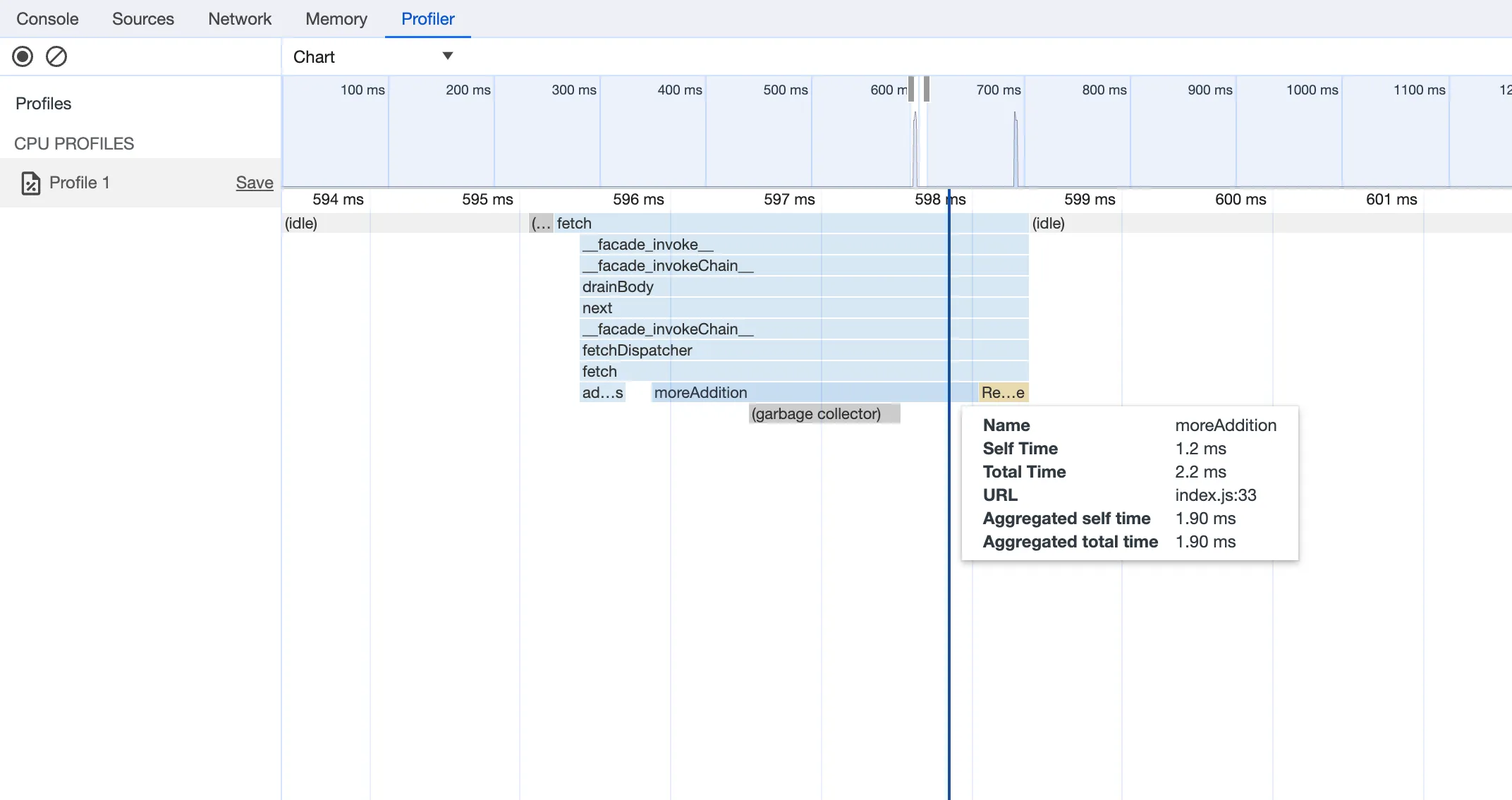
For more information on how to get the most out of Chrome Devtools, refer to the following docs:
Users using Cloudflare's REST API to query their D1 database can see lower end-to-end request latency now that D1 authentication is performed at the closest Cloudflare network data center that received the request. Previously, authentication required D1 REST API requests to proxy to Cloudflare's core, centralized data centers, which added network round trips and latency.
Latency improvements range from 50-500 ms depending on request location and database location and only apply to the REST API. REST API requests and databases outside the United States see a bigger benefit since Cloudflare's primary core data centers reside in the United States.
D1 query endpoints like
/queryand/rawhave the most noticeable improvements since they no longer access Cloudflare's core data centers. D1 control plane endpoints such as those to create and delete databases see smaller improvements, since they still require access to Cloudflare's core data centers for other control plane metadata.
In Cloudflare Workers, you can now attach an event listener to
Requestobjects, using thesignalproperty ↗. This allows you to perform tasks when the request to your Worker is canceled by the client. To use this feature, you must set theenable_request_signalcompatibility flag.You can use a listener to perform cleanup tasks or write to logs before your Worker's invocation ends. For example, if you run the Worker below, and then abort the request from the client, a log will be written:
index.js export default {async fetch(request, env, ctx) {// This sets up an event listener that will be called if the client disconnects from your// worker.request.signal.addEventListener("abort", () => {console.log("The request was aborted!");});const { readable, writable } = new IdentityTransformStream();sendPing(writable);return new Response(readable, {headers: { "Content-Type": "text/plain" },});},};async function sendPing(writable) {const writer = writable.getWriter();const enc = new TextEncoder();for (;;) {// Send 'ping' every second to keep the connection aliveawait writer.write(enc.encode("ping\r\n"));await scheduler.wait(1000);}}index.ts export default {async fetch(request, env, ctx): Promise<Response> {// This sets up an event listener that will be called if the client disconnects from your// worker.request.signal.addEventListener('abort', () => {console.log('The request was aborted!');});const { readable, writable } = new IdentityTransformStream();sendPing(writable);return new Response(readable, { headers: { 'Content-Type': 'text/plain' } });},} satisfies ExportedHandler<Env>;async function sendPing(writable: WritableStream): Promise<void> {const writer = writable.getWriter();const enc = new TextEncoder();for (;;) {// Send 'ping' every second to keep the connection aliveawait writer.write(enc.encode('ping\r\n'));await scheduler.wait(1000);}}For more information see the
Requestdocumentation.