

Browser Rendering now exposes the Chrome DevTools Protocol (CDP), the low-level protocol that powers browser automation. The growing ecosystem of CDP-based agent tools, along with existing CDP automation scripts, can now use Browser Rendering directly.
Any CDP-compatible client, including Puppeteer and Playwright, can connect from any environment, whether that is Cloudflare Workers, your local machine, or a cloud environment. All you need is your Cloudflare API key.
For any existing CDP script, switching to Browser Rendering is a one-line change:
JavaScript const puppeteer = require("puppeteer-core");const browser = await puppeteer.connect({browserWSEndpoint:`wss://api.cloudflare.com/client/v4/accounts/${ACCOUNT_ID}/browser-rendering/devtools/browser?keep_alive=600000`,headers: { Authorization: `Bearer ${API_TOKEN}` },});const page = await browser.newPage();await page.goto("https://example.com");console.log(await page.title());await browser.close();Additionally, MCP clients like Claude Desktop, Claude Code, Cursor, and OpenCode can now use Browser Rendering as their remote browser via the chrome-devtools-mcp ↗ package.
Here is an example of how to configure Browser Rendering for Claude Desktop:
{"mcpServers": {"browser-rendering": {"command": "npx","args": ["-y","chrome-devtools-mcp@latest","--wsEndpoint=wss://api.cloudflare.com/client/v4/accounts/<ACCOUNT_ID>/browser-rendering/devtools/browser?keep_alive=600000","--wsHeaders={\"Authorization\":\"Bearer <API_TOKEN>\"}"]}}}To get started, refer to the CDP documentation.
AI Search now supports CSS content selectors for website data sources. You can now define which parts of a crawled page are extracted and indexed by specifying CSS selectors paired with URL glob patterns.
Content selectors solve the problem of indexing only relevant content while ignoring navigation, sidebars, footers, and other boilerplate. When a page URL matches a glob pattern, only elements matching the corresponding CSS selector are extracted and converted to Markdown for indexing.
Configure content selectors via the dashboard or API:
Terminal window curl "https://api.cloudflare.com/client/v4/accounts/{account_id}/ai-search/instances" \-H "Authorization: Bearer {api_token}" \-H "Content-Type: application/json" \-d '{"id": "my-ai-search","source": "https://example.com","type": "web-crawler","source_params": {"web_crawler": {"parse_options": {"content_selector": [{"path": "**/blog/**","selector": "article .post-body"}]}}}}'Selectors are evaluated in order, and the first matching pattern wins. You can define up to 10 content selector entries per instance.
For configuration details and examples, refer to the content selectors documentation.
AI Search now supports four additional Workers AI models across text generation and embedding.
Model Context window (tokens) @cf/zai-org/glm-4.7-flash131,072 @cf/qwen/qwen3-30b-a3b-fp832,000 GLM-4.7-Flash is a lightweight model from Zhipu AI with a 131,072 token context window, suitable for long-document summarization and retrieval tasks. Qwen3-30B-A3B is a mixture-of-experts model from Alibaba that activates only 3 billion parameters per forward pass, keeping inference fast while maintaining strong response quality.
Model Vector dims Input tokens Metric @cf/qwen/qwen3-embedding-0.6b1,024 4,096 cosine @cf/google/embeddinggemma-300m768 512 cosine Qwen3-Embedding-0.6B supports up to 4,096 input tokens, making it a good fit for indexing longer text chunks. EmbeddingGemma-300M from Google produces 768-dimension vectors and is optimized for low-latency embedding workloads.
All four models are available without additional provider keys since they run on Workers AI. Select them when creating or updating an AI Search instance in the dashboard or through the API.
For the full list of supported models, refer to Supported models.
We are partnering with Google to bring
@cf/google/gemma-4-26b-a4b-itto Workers AI. Gemma 4 26B A4B is a Mixture-of-Experts (MoE) model built from Gemini 3 research, with 26B total parameters and only 4B active per forward pass. By activating a small subset of parameters during inference, the model runs almost as fast as a 4B-parameter model while delivering the quality of a much larger one.Gemma 4 is Google's most capable family of open models, designed to maximize intelligence-per-parameter.
- Mixture-of-Experts architecture with 8 active experts out of 128 total (plus 1 shared expert), delivering frontier-level performance at a fraction of the compute cost of dense models
- 256,000 token context window for retaining full conversation history, tool definitions, and long documents across extended sessions
- Built-in thinking mode that lets the model reason step-by-step before answering, improving accuracy on complex tasks
- Vision understanding for object detection, document and PDF parsing, screen and UI understanding, chart comprehension, OCR (including multilingual), and handwriting recognition, with support for variable aspect ratios and resolutions
- Function calling with native support for structured tool use, enabling agentic workflows and multi-step planning
- Multilingual with out-of-the-box support for 35+ languages, pre-trained on 140+ languages
- Coding for code generation, completion, and correction
Use Gemma 4 26B A4B through the Workers AI binding (
env.AI.run()), the REST API at/runor/v1/chat/completions, or the OpenAI-compatible endpoint.For more information, refer to the Gemma 4 26B A4B model page.
AI Gateway now supports automatic retries at the gateway level. When an upstream provider returns an error, your gateway retries the request based on the retry policy you configure, without requiring any client-side changes.
You can configure the retry count (up to 5 attempts), the delay between retries (from 100ms to 5 seconds), and the backoff strategy (Constant, Linear, or Exponential). These defaults apply to all requests through the gateway, and per-request headers can override them.
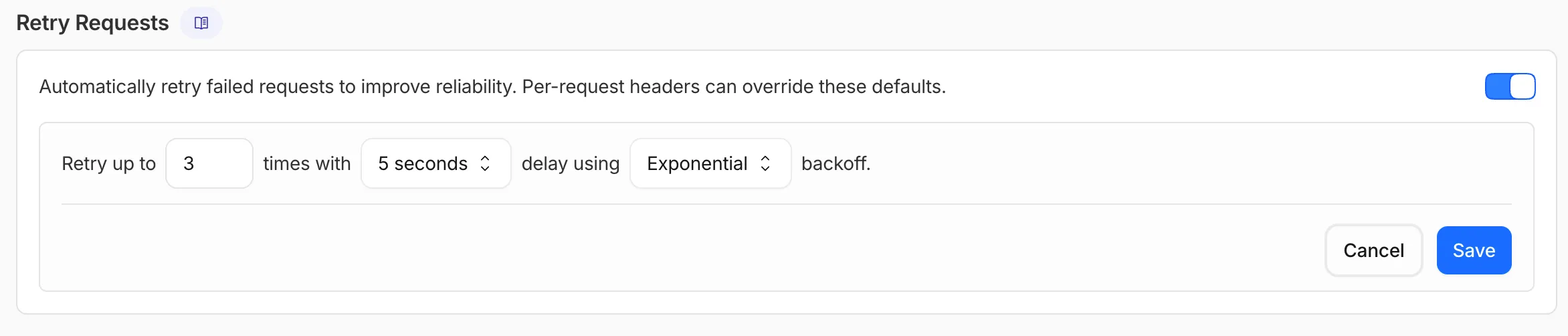
This is particularly useful when you do not control the client making the request and cannot implement retry logic on the caller side. For more complex failover scenarios — such as failing across different providers — use Dynamic Routing.
For more information, refer to Manage gateways.
AI Search supports a
wrangler ai-searchcommand namespace. Use it to manage instances from the command line.The following commands are available:
Command Description wrangler ai-search createCreate a new instance with an interactive wizard wrangler ai-search listList all instances in your account wrangler ai-search getGet details of a specific instance wrangler ai-search updateUpdate the configuration of an instance wrangler ai-search deleteDelete an instance wrangler ai-search searchRun a search query against an instance wrangler ai-search statsGet usage statistics for an instance The
createcommand guides you through setup, choosing a name, source type (r2orweb), and data source. You can also pass all options as flags for non-interactive use:Terminal window wrangler ai-search create my-instance --type r2 --source my-bucketUse
wrangler ai-search searchto query an instance directly from the CLI:Terminal window wrangler ai-search search my-instance --query "how do I configure caching?"All commands support
--jsonfor structured output that scripts and AI agents can parse directly.For full usage details, refer to the Wrangler commands documentation.
AI Crawl Control now supports extending the underlying WAF rule with custom modifications. Any changes you make directly in the WAF custom rules editor — such as adding path-based exceptions, extra user agents, or additional expression clauses — are preserved when you update crawler actions in AI Crawl Control.
If the WAF rule expression has been modified in a way AI Crawl Control cannot parse, a warning banner appears on the Crawlers page with a link to view the rule directly in WAF.
For more information, refer to WAF rule management.
The latest release of the Agents SDK ↗ exposes agent state as a readable property, prevents duplicate schedule rows across Durable Object restarts, brings full TypeScript inference to
AgentClient, and migrates to Zod 4.Both
useAgent(React) andAgentClient(vanilla JS) now expose astateproperty that reflects the current agent state. Previously, reading state required manually tracking it through theonStateUpdatecallback.React (
useAgent)JavaScript const agent = useAgent({agent: "game-agent",name: "room-123",});// Read state directly — no separate useState + onStateUpdate neededreturn <div>Score: {agent.state?.score}</div>;// Spread for partial updatesagent.setState({ ...agent.state, score: (agent.state?.score ?? 0) + 10 });TypeScript const agent = useAgent<GameAgent, GameState>({agent: "game-agent",name: "room-123",});// Read state directly — no separate useState + onStateUpdate neededreturn <div>Score: {agent.state?.score}</div>;// Spread for partial updatesagent.setState({ ...agent.state, score: (agent.state?.score ?? 0) + 10 });agent.stateis reactive — the component re-renders when state changes from either the server or a client-sidesetState()call.Vanilla JS (
AgentClient)JavaScript const client = new AgentClient({agent: "game-agent",name: "room-123",host: "your-worker.workers.dev",});client.setState({ score: 100 });console.log(client.state); // { score: 100 }TypeScript const client = new AgentClient<GameAgent>({agent: "game-agent",name: "room-123",host: "your-worker.workers.dev",});client.setState({ score: 100 });console.log(client.state); // { score: 100 }State starts as
undefinedand is populated when the server sends the initial state on connect (frominitialState) or whensetState()is called. Use optional chaining (agent.state?.field) for safe access. TheonStateUpdatecallback continues to work as before — the newstateproperty is additive.schedule()now supports anidempotentoption that deduplicates by(type, callback, payload), preventing duplicate rows from accumulating when called in places that run on every Durable Object restart such asonStart().Cron schedules are idempotent by default. Calling
schedule("0 * * * *", "tick")multiple times with the same callback, expression, and payload returns the existing schedule row instead of creating a new one. Pass{ idempotent: false }to override.Delayed and date-scheduled types support opt-in idempotency:
JavaScript import { Agent } from "agents";class MyAgent extends Agent {async onStart() {// Safe across restarts — only one row is createdawait this.schedule(60, "maintenance", undefined, { idempotent: true });}}TypeScript import { Agent } from "agents";class MyAgent extends Agent {async onStart() {// Safe across restarts — only one row is createdawait this.schedule(60, "maintenance", undefined, { idempotent: true });}}Two new warnings help catch common foot-guns:
- Calling
schedule()insideonStart()without{ idempotent: true }emits aconsole.warnwith actionable guidance (once per callback; skipped for cron and whenidempotentis set explicitly). - If an alarm cycle processes 10 or more stale one-shot rows for the same callback, the SDK emits a
console.warnand aschedule:duplicate_warningdiagnostics channel event.
AgentClientnow accepts an optional agent type parameter for full type inference on RPC calls, matching the typed experience already available withuseAgent.JavaScript const client = new AgentClient({agent: "my-agent",host: window.location.host,});// Typed call — method name autocompletes, args and return type inferredconst value = await client.call("getValue");// Typed stub — direct RPC-style proxyawait client.stub.getValue();await client.stub.add(1, 2);TypeScript const client = new AgentClient<MyAgent>({agent: "my-agent",host: window.location.host,});// Typed call — method name autocompletes, args and return type inferredconst value = await client.call("getValue");// Typed stub — direct RPC-style proxyawait client.stub.getValue();await client.stub.add(1, 2);State is automatically inferred from the agent type, so
onStateUpdateis also typed:JavaScript const client = new AgentClient({agent: "my-agent",host: window.location.host,onStateUpdate: (state) => {// state is typed as MyAgent's state type},});TypeScript const client = new AgentClient<MyAgent>({agent: "my-agent",host: window.location.host,onStateUpdate: (state) => {// state is typed as MyAgent's state type},});Existing untyped usage continues to work without changes. The RPC type utilities (
AgentMethods,AgentStub,RPCMethods) are now exported fromagents/clientfor advanced typing scenarios.agents,@cloudflare/ai-chat, and@cloudflare/codemodenow requirezod ^4.0.0. Zod v3 is no longer supported.- Turn serialization —
onChatMessage()and_reply()work is now queued so user requests, tool continuations, andsaveMessages()never stream concurrently. - Duplicate messages on stop — Clicking stop during an active stream no longer splits the assistant message into two entries.
- Duplicate messages after tool calls — Orphaned client IDs no longer leak into persistent storage.
keepAlive()now uses a lightweight in-memory ref count instead of schedule rows. Multiple concurrent callers share a single alarm cycle. The@experimentaltag has been removed from bothkeepAlive()andkeepAliveWhile().A new entry point
@cloudflare/codemode/tanstack-aiadds support for TanStack AI's ↗chat()as an alternative to the Vercel AI SDK'sstreamText():JavaScript import {createCodeTool,tanstackTools,} from "@cloudflare/codemode/tanstack-ai";import { chat } from "@tanstack/ai";const codeTool = createCodeTool({tools: [tanstackTools(myServerTools)],executor,});const stream = chat({ adapter, tools: [codeTool], messages });TypeScript import { createCodeTool, tanstackTools } from "@cloudflare/codemode/tanstack-ai";import { chat } from "@tanstack/ai";const codeTool = createCodeTool({tools: [tanstackTools(myServerTools)],executor,});const stream = chat({ adapter, tools: [codeTool], messages });To update to the latest version:
Terminal window npm i agents@latest @cloudflare/ai-chat@latest- Calling
AI Search now offers new REST API endpoints for search and chat that use an OpenAI compatible format. This means you can use the familiar
messagesarray structure that works with existing OpenAI SDKs and tools. The messages array also lets you pass previous messages within a session, so the model can maintain context across multiple turns.Endpoint Path Chat Completions POST /accounts/{account_id}/ai-search/instances/{name}/chat/completionsSearch POST /accounts/{account_id}/ai-search/instances/{name}/searchHere is an example request to the Chat Completions endpoint using the new
messagesarray format:Terminal window curl https://api.cloudflare.com/client/v4/accounts/{ACCOUNT_ID}/ai-search/instances/{NAME}/chat/completions \-H "Content-Type: application/json" \-H "Authorization: Bearer {API_TOKEN}" \-d '{"messages": [{"role": "system","content": "You are a helpful documentation assistant."},{"role": "user","content": "How do I get started?"}]}'For more details, refer to the AI Search REST API guide.
If you are using the previous AutoRAG API endpoints (
/autorag/rags/), we recommend migrating to the new endpoints. The previous AutoRAG API endpoints will continue to be fully supported.Refer to the migration guide for step-by-step instructions.
AI Search now supports public endpoints, UI snippets, and MCP, making it easy to add search to your website or connect AI agents.
Public endpoints allow you to expose AI Search capabilities without requiring API authentication. To enable public endpoints:
- Go to AI Search in the Cloudflare dashboard. Go to AI Search
- Select your instance, and turn on Public Endpoint in Settings. For more details, refer to Public endpoint configuration.
UI snippets are pre-built search and chat components you can embed in your website. Visit search.ai.cloudflare.com ↗ to configure and preview components for your AI Search instance.
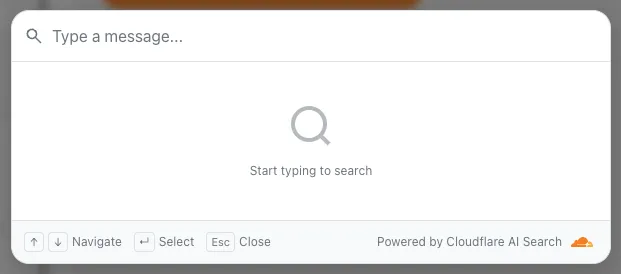
To add a search modal to your page:
<scripttype="module"src="https://<INSTANCE_ID>.search.ai.cloudflare.com/assets/v0.0.25/search-snippet.es.js"></script><search-modal-snippetapi-url="https://<INSTANCE_ID>.search.ai.cloudflare.com/"placeholder="Search..."></search-modal-snippet>For more details, refer to the UI snippets documentation.
The MCP endpoint allows AI agents to search your content via the Model Context Protocol. Connect your MCP client to:
https://<INSTANCE_ID>.search.ai.cloudflare.com/mcpFor more details, refer to the MCP documentation.
AI Search now supports custom metadata filtering, allowing you to define your own metadata fields and filter search results based on attributes like category, version, or any custom field you define.
You can define up to 5 custom metadata fields per AI Search instance. Each field has a name and data type (
text,number, orboolean):Terminal window curl -X POST https://api.cloudflare.com/client/v4/accounts/{ACCOUNT_ID}/ai-search/instances \-H "Content-Type: application/json" \-H "Authorization: Bearer {API_TOKEN}" \-d '{"id": "my-instance","type": "r2","source": "my-bucket","custom_metadata": [{ "field_name": "category", "data_type": "text" },{ "field_name": "version", "data_type": "number" },{ "field_name": "is_public", "data_type": "boolean" }]}'How you attach metadata depends on your data source:
- R2 bucket: Set metadata using S3-compatible custom headers (
x-amz-meta-*) when uploading objects. Refer to R2 custom metadata for examples. - Website: Add
<meta>tags to your HTML pages. Refer to Website custom metadata for details.
Use custom metadata fields in your search queries alongside built-in attributes like
folderandtimestamp:Terminal window curl https://api.cloudflare.com/client/v4/accounts/{ACCOUNT_ID}/ai-search/instances/{NAME}/search \-H "Content-Type: application/json" \-H "Authorization: Bearer {API_TOKEN}" \-d '{"messages": [{"content": "How do I configure authentication?","role": "user"}],"ai_search_options": {"retrieval": {"filters": {"category": "documentation","version": { "$gte": 2.0 }}}}}'Learn more in the metadata filtering documentation.
- R2 bucket: Set metadata using S3-compatible custom headers (
Workers AI is officially in the big models game.
@cf/moonshotai/kimi-k2.5is the first frontier-scale open-source model on our AI inference platform — a large model with a full 256k context window, multi-turn tool calling, vision inputs, and structured outputs. By bringing a frontier-scale model directly onto the Cloudflare Developer Platform, you can now run the entire agent lifecycle on a single, unified platform.The model has proven to be a fast, efficient alternative to larger proprietary models without sacrificing quality. As AI adoption increases, the volume of inference is skyrocketing — now you can access frontier intelligence at a fraction of the cost.
- 256,000 token context window for retaining full conversation history, tool definitions, and entire codebases across long-running agent sessions
- Multi-turn tool calling for building agents that invoke tools across multiple conversation turns
- Vision inputs for processing images alongside text
- Structured outputs with JSON mode and JSON Schema support for reliable downstream parsing
- Function calling for integrating external tools and APIs into agent workflows
When an agent sends a new prompt, it resends all previous prompts, tools, and context from the session. The delta between consecutive requests is usually just a few new lines of input. Prefix caching avoids reprocessing the shared context, saving time and compute from the prefill stage. This means faster Time to First Token (TTFT) and higher Tokens Per Second (TPS) throughput.
Workers AI has done prefix caching, but we are now surfacing cached tokens as a usage metric and offering a discount on cached tokens compared to input tokens (pricing is listed on the model page).
Terminal window curl -X POST \"https://api.cloudflare.com/client/v4/accounts/{account_id}/ai/run/@cf/moonshotai/kimi-k2.5" \-H "Authorization: Bearer {api_token}" \-H "Content-Type: application/json" \-H "x-session-affinity: ses_12345678" \-d '{"messages": [{"role": "system","content": "You are a helpful assistant."},{"role": "user","content": "What is prefix caching and why does it matter?"}],"max_tokens": 2400,"stream": true}'Some clients like OpenCode ↗ implement session affinity automatically. The Agents SDK ↗ starter also sets up the wiring for you.
For volumes of requests that exceed synchronous rate limits, you can submit batches of inferences to be completed asynchronously. We have revamped the Asynchronous Batch API with a pull-based system that processes queued requests as soon as capacity is available. With internal testing, async requests usually execute within 5 minutes, but this depends on live traffic.
The async API is the best way to avoid capacity errors in durable workflows. It is ideal for use cases that are not real-time, such as code scanning agents or research agents.
To use the asynchronous API, pass
queueRequest: true:JavaScript // 1. Push a batch of requests into the queueconst res = await env.AI.run("@cf/moonshotai/kimi-k2.5",{requests: [{messages: [{ role: "user", content: "Tell me a joke" }],},{messages: [{ role: "user", content: "Explain the Pythagoras theorem" }],},],},{ queueRequest: true },);// 2. Grab the request IDconst requestId = res.request_id;// 3. Poll for the resultconst result = await env.AI.run("@cf/moonshotai/kimi-k2.5", {request_id: requestId,});if (result.status === "queued" || result.status === "running") {// Retry by polling again} else {return Response.json(result);}You can also set up event notifications to know when inference is complete instead of polling.
Use Kimi K2.5 through the Workers AI binding (
env.AI.run()), the REST API at/runor/v1/chat/completions, AI Gateway, or via the OpenAI-compatible endpoint.For more information, refer to the Kimi K2.5 model page, pricing, and prompt caching.
The latest releases of
@cloudflare/codemode↗ add a new MCP barrel export, removeaiandzodas required peer dependencies from the main entry point, and give you more control over the sandbox.A new
@cloudflare/codemode/mcpentry point provides two functions that wrap MCP servers with Code Mode:codeMcpServer({ server, executor })— wraps an existing MCP server with a singlecodetool where each upstream tool becomes a typedcodemode.*method.openApiMcpServer({ spec, executor, request })— createssearchandexecuteMCP tools from an OpenAPI spec with host-side request proxying and automatic$refresolution.
JavaScript import { codeMcpServer } from "@cloudflare/codemode/mcp";import { DynamicWorkerExecutor } from "@cloudflare/codemode";const executor = new DynamicWorkerExecutor({ loader: env.LOADER });// Wrap an existing MCP server — all its tools become// typed methods the LLM can call from generated codeconst server = await codeMcpServer({ server: upstreamMcp, executor });TypeScript import { codeMcpServer } from "@cloudflare/codemode/mcp";import { DynamicWorkerExecutor } from "@cloudflare/codemode";const executor = new DynamicWorkerExecutor({ loader: env.LOADER });// Wrap an existing MCP server — all its tools become// typed methods the LLM can call from generated codeconst server = await codeMcpServer({ server: upstreamMcp, executor });Breaking change in v0.2.0:
generateTypesand theToolDescriptor/ToolDescriptorstypes have moved to@cloudflare/codemode/ai:JavaScript // Beforeimport { generateTypes } from "@cloudflare/codemode";// Afterimport { generateTypes } from "@cloudflare/codemode/ai";TypeScript // Beforeimport { generateTypes } from "@cloudflare/codemode";// Afterimport { generateTypes } from "@cloudflare/codemode/ai";The main entry point (
@cloudflare/codemode) no longer requires theaiorzodpeer dependencies. It now exports:Export Description sanitizeToolNameSanitize tool names into valid JS identifiers normalizeCodeNormalize LLM-generated code into async arrow functions generateTypesFromJsonSchemaGenerate TypeScript type definitions from plain JSON Schema jsonSchemaToTypeConvert a single JSON Schema to a TypeScript type string DynamicWorkerExecutorSandboxed code execution via Dynamic Worker Loader ToolDispatcherRPC target for dispatching tool calls from sandbox to host The
aiandzodpeer dependencies are now optional — only required when importing from@cloudflare/codemode/ai.DynamicWorkerExecutornow accepts an optionalmodulesoption to inject custom ES modules into the sandbox:JavaScript const executor = new DynamicWorkerExecutor({loader: env.LOADER,modules: {"utils.js": `export function add(a, b) { return a + b; }`,},});// Sandbox code can then: import { add } from "utils.js"TypeScript const executor = new DynamicWorkerExecutor({loader: env.LOADER,modules: {"utils.js": `export function add(a, b) { return a + b; }`,},});// Sandbox code can then: import { add } from "utils.js"DynamicWorkerExecutornow normalizes code and sanitizes tool names internally. You no longer need to callnormalizeCode()orsanitizeToolName()before passing code and functions toexecute().Terminal window npm i @cloudflare/codemode@latestSee the Code Mode documentation for the full API reference.
AI Gateway now supports the
cf-aig-collect-log-payloadheader, which controls whether request and response bodies are stored in logs. By default, this header is set totrueand payloads are stored alongside metadata. Set this header tofalseto skip payload storage while still logging metadata such as token counts, model, provider, status code, cost, and duration.This is useful when you need usage metrics but do not want to persist sensitive prompt or response data.
Terminal window curl https://gateway.ai.cloudflare.com/v1/$ACCOUNT_ID/$GATEWAY_ID/openai/chat/completions \--header "Authorization: Bearer $TOKEN" \--header 'Content-Type: application/json' \--header 'cf-aig-collect-log-payload: false' \--data '{"model": "gpt-4o-mini","messages": [{"role": "user","content": "What is the email address and phone number of user123?"}]}'For more information, refer to Logging.
You can now set
topKup to50when a Vectorize query returns values or full metadata. This raises the previous limit of20for queries that usereturnValues: trueorreturnMetadata: "all".Use the higher limit when you need more matches in a single query response without dropping values or metadata. Refer to the Vectorize API reference for query options and current
topKlimits.
We're excited to partner with NVIDIA to bring
@cf/nvidia/nemotron-3-120b-a12bto Workers AI. NVIDIA Nemotron 3 Super is a Mixture-of-Experts (MoE) model with a hybrid Mamba-transformer architecture, 120B total parameters, and 12B active parameters per forward pass.The model is optimized for running many collaborating agents per application. It delivers high accuracy for reasoning, tool calling, and instruction following across complex multi-step tasks.
Key capabilities:
- Hybrid Mamba-transformer architecture delivers over 50% higher token generation throughput compared to leading open models, reducing latency for real-world applications
- Tool calling support for building AI agents that invoke tools across multiple conversation turns
- Multi-Token Prediction (MTP) accelerates long-form text generation by predicting several future tokens simultaneously in a single forward pass
- 32,000 token context window for retaining conversation history and plan states across multi-step agent workflows
Use Nemotron 3 Super through the Workers AI binding (
env.AI.run()), the REST API at/runor/v1/chat/completions, or the OpenAI-compatible endpoint.For more information, refer to the Nemotron 3 Super model page.
Edit: this post has been edited to clarify crawling behavior with respect to site guidance.
You can now crawl an entire website with a single API call using Browser Rendering's new
/crawlendpoint, available in open beta. Submit a starting URL, and pages are automatically discovered, rendered in a headless browser, and returned in multiple formats, including HTML, Markdown, and structured JSON. The endpoint is a signed-agent ↗ that respects robots.txt and AI Crawl Control ↗ by default, making it easy for developers to comply with website rules, and making it less likely for crawlers to ignore web-owner guidance. This is great for training models, building RAG pipelines, and researching or monitoring content across a site.Crawl jobs run asynchronously. You submit a URL, receive a job ID, and check back for results as pages are processed.
Terminal window # Initiate a crawlcurl -X POST 'https://api.cloudflare.com/client/v4/accounts/{account_id}/browser-rendering/crawl' \-H 'Authorization: Bearer <apiToken>' \-H 'Content-Type: application/json' \-d '{"url": "https://blog.cloudflare.com/"}'# Check resultscurl -X GET 'https://api.cloudflare.com/client/v4/accounts/{account_id}/browser-rendering/crawl/{job_id}' \-H 'Authorization: Bearer <apiToken>'Key features:
- Multiple output formats - Return crawled content as HTML, Markdown, and structured JSON (powered by Workers AI)
- Crawl scope controls - Configure crawl depth, page limits, and wildcard patterns to include or exclude specific URL paths
- Automatic page discovery - Discovers URLs from sitemaps, page links, or both
- Incremental crawling - Use
modifiedSinceandmaxAgeto skip pages that haven't changed or were recently fetched, saving time and cost on repeated crawls - Static mode - Set
render: falseto fetch static HTML without spinning up a browser, for faster crawling of static sites - Well-behaved bot - Honors
robots.txtdirectives, includingcrawl-delay
Available on both the Workers Free and Paid plans.
Note: the /crawl endpoint cannot bypass Cloudflare bot detection or captchas, and self-identifies as a bot.
To get started, refer to the crawl endpoint documentation. If you are setting up your own site to be crawled, review the robots.txt and sitemaps best practices.
Real-time transcription in RealtimeKit now supports 10 languages with regional variants, powered by Deepgram Nova-3 running on Workers AI.
During a meeting, participant audio is routed through AI Gateway to Nova-3 on Workers AI — so transcription runs on Cloudflare's network end-to-end, reducing latency compared to routing through external speech-to-text services.
Set the language when creating a meeting via
ai_config.transcription.language:{"ai_config": {"transcription": {"language": "fr"}}}Supported languages include English, Spanish, French, German, Hindi, Russian, Portuguese, Japanese, Italian, and Dutch — with regional variants like
en-AU,en-GB,en-IN,en-NZ,es-419,fr-CA,de-CH,pt-BR, andpt-PT. Usemultifor automatic multilingual detection.If you are building voice agents or real-time translation workflows, your agent can now transcribe in the caller's language natively — no extra services or routing logic needed.
Browser Rendering REST API rate limits for Workers Paid plans have been increased from 3 requests per second (180/min) to 10 requests per second (600/min). No action is needed to benefit from the higher limit.

The REST API lets you perform common browser tasks with a single API call, and you can now do it at a higher rate.
- /content - Fetch HTML
- /screenshot - Capture screenshot
- /pdf - Render PDF
- /markdown - Extract Markdown from a webpage
- /snapshot - Take a webpage snapshot
- /scrape - Scrape HTML elements
- /json - Capture structured data using AI
- /links - Retrieve links from a webpage
If you use the Browser Sessions method, increases to concurrent browser and new browser limits are coming soon. Stay tuned.
For full details, refer to the Browser Rendering limits page.
You can now customize how the Markdown Conversion service processes different file types by passing a
conversionOptionsobject.Available options:
- Images: Set the language for AI-generated image descriptions
- HTML: Use CSS selectors to extract specific content, or provide a hostname to resolve relative links
- PDF: Exclude metadata from the output
Use the
env.AIbinding:JavaScript await env.AI.toMarkdown({ name: "page.html", blob: new Blob([html]) },{conversionOptions: {html: { cssSelector: "article.content" },image: { descriptionLanguage: "es" },},},);TypeScript await env.AI.toMarkdown({ name: "page.html", blob: new Blob([html]) },{conversionOptions: {html: { cssSelector: "article.content" },image: { descriptionLanguage: "es" },},},);Or call the REST API:
Terminal window curl https://api.cloudflare.com/client/v4/accounts/{ACCOUNT_ID}/ai/tomarkdown \-H 'Authorization: Bearer {API_TOKEN}' \-F 'files=@index.html' \-F 'conversionOptions={"html": {"cssSelector": "article.content"}}'For more details, refer to Conversion Options.
Sandboxes now support real-time filesystem watching via
sandbox.watch(). The method returns a Server-Sent Events ↗ stream backed by native inotify, so your Worker receivescreate,modify,delete, andmoveevents as they happen inside the container.Pass a directory path and optional filters. The returned stream is a standard
ReadableStreamyou can proxy directly to a browser client or consume server-side.JavaScript // Stream events to a browser clientconst stream = await sandbox.watch("/workspace/src", {recursive: true,include: ["*.ts", "*.js"],});return new Response(stream, {headers: { "Content-Type": "text/event-stream" },});TypeScript // Stream events to a browser clientconst stream = await sandbox.watch("/workspace/src", {recursive: true,include: ["*.ts", "*.js"],});return new Response(stream, {headers: { "Content-Type": "text/event-stream" },});Use
parseSSEStreamto iterate over events inside a Worker without forwarding them to a client.JavaScript import { parseSSEStream } from "@cloudflare/sandbox";const stream = await sandbox.watch("/workspace/src", { recursive: true });for await (const event of parseSSEStream(stream)) {console.log(event.type, event.path);}TypeScript import { parseSSEStream } from "@cloudflare/sandbox";import type { FileWatchSSEEvent } from "@cloudflare/sandbox";const stream = await sandbox.watch("/workspace/src", { recursive: true });for await (const event of parseSSEStream<FileWatchSSEEvent>(stream)) {console.log(event.type, event.path);}Each event includes a
typefield (create,modify,delete, ormove) and the affectedpath. Move events also include afromfield with the original path.Option Type Description recursivebooleanWatch subdirectories. Defaults to false.includestring[]Glob patterns to filter events. Omit to receive all events. To update to the latest version:
Terminal window npm i @cloudflare/sandbox@latestFor full API details, refer to the Sandbox file watching reference.
The latest release of the Agents SDK ↗ rewrites observability from scratch with
diagnostics_channel, addskeepAlive()to prevent Durable Object eviction during long-running work, and introduceswaitForMcpConnectionsso MCP tools are always available whenonChatMessageruns.The previous observability system used
console.log()with a customObservability.emit()interface. v0.7.0 replaces it with structured events published to diagnostics channels — silent by default, zero overhead when nobody is listening.Every event has a
type,payload, andtimestamp. Events are routed to seven named channels:Channel Event types agents:statestate:updateagents:rpcrpc,rpc:erroragents:messagemessage:request,message:response,message:clear,message:cancel,message:error,tool:result,tool:approvalagents:scheduleschedule:create,schedule:execute,schedule:cancel,schedule:retry,schedule:error,queue:retry,queue:erroragents:lifecycleconnect,destroyagents:workflowworkflow:start,workflow:event,workflow:approved,workflow:rejected,workflow:terminated,workflow:paused,workflow:resumed,workflow:restartedagents:mcpmcp:client:preconnect,mcp:client:connect,mcp:client:authorize,mcp:client:discoverUse the typed
subscribe()helper fromagents/observabilityfor type-safe access:JavaScript import { subscribe } from "agents/observability";const unsub = subscribe("rpc", (event) => {if (event.type === "rpc") {console.log(`RPC call: ${event.payload.method}`);}if (event.type === "rpc:error") {console.error(`RPC failed: ${event.payload.method} — ${event.payload.error}`,);}});// Clean up when doneunsub();TypeScript import { subscribe } from "agents/observability";const unsub = subscribe("rpc", (event) => {if (event.type === "rpc") {console.log(`RPC call: ${event.payload.method}`);}if (event.type === "rpc:error") {console.error(`RPC failed: ${event.payload.method} — ${event.payload.error}`,);}});// Clean up when doneunsub();In production, all diagnostics channel messages are automatically forwarded to Tail Workers — no subscription code needed in the agent itself:
JavaScript export default {async tail(events) {for (const event of events) {for (const msg of event.diagnosticsChannelEvents) {// msg.channel is "agents:rpc", "agents:workflow", etc.console.log(msg.timestamp, msg.channel, msg.message);}}},};TypeScript export default {async tail(events) {for (const event of events) {for (const msg of event.diagnosticsChannelEvents) {// msg.channel is "agents:rpc", "agents:workflow", etc.console.log(msg.timestamp, msg.channel, msg.message);}}},};The custom
Observabilityoverride interface is still supported for users who need to filter or forward events to external services.For the full event reference, refer to the Observability documentation.
Durable Objects are evicted after a period of inactivity (typically 70-140 seconds with no incoming requests, WebSocket messages, or alarms). During long-running operations — streaming LLM responses, waiting on external APIs, running multi-step computations — the agent can be evicted mid-flight.
keepAlive()prevents this by creating a 30-second heartbeat schedule. The alarm firing resets the inactivity timer. Returns a disposer function that cancels the heartbeat when called.JavaScript const dispose = await this.keepAlive();try {const result = await longRunningComputation();await sendResults(result);} finally {dispose();}TypeScript const dispose = await this.keepAlive();try {const result = await longRunningComputation();await sendResults(result);} finally {dispose();}keepAliveWhile()wraps an async function with automatic cleanup — the heartbeat starts before the function runs and stops when it completes:JavaScript const result = await this.keepAliveWhile(async () => {const data = await longRunningComputation();return data;});TypeScript const result = await this.keepAliveWhile(async () => {const data = await longRunningComputation();return data;});Key details:
- Multiple concurrent callers — Each
keepAlive()call returns an independent disposer. Disposing one does not affect others. - AIChatAgent built-in —
AIChatAgentautomatically callskeepAlive()during streaming responses. You do not need to add it yourself. - Uses the scheduling system — The heartbeat does not conflict with your own schedules. It shows up in
getSchedules()if you need to inspect it.
For the full API reference and when-to-use guidance, refer to Schedule tasks — Keeping the agent alive.
AIChatAgentnow waits for MCP server connections to settle before callingonChatMessage. This ensuresthis.mcp.getAITools()returns the full set of tools, especially after Durable Object hibernation when connections are being restored in the background.JavaScript export class ChatAgent extends AIChatAgent {// Default — waits up to 10 seconds// waitForMcpConnections = { timeout: 10_000 };// Wait foreverwaitForMcpConnections = true;// Disable waitingwaitForMcpConnections = false;}TypeScript export class ChatAgent extends AIChatAgent {// Default — waits up to 10 seconds// waitForMcpConnections = { timeout: 10_000 };// Wait foreverwaitForMcpConnections = true;// Disable waitingwaitForMcpConnections = false;}Value Behavior { timeout: 10_000 }Wait up to 10 seconds (default) { timeout: N }Wait up to NmillisecondstrueWait indefinitely until all connections ready falseDo not wait (old behavior before 0.2.0) For lower-level control, call
this.mcp.waitForConnections()directly insideonChatMessageinstead.- MCP deduplication by name and URL —
addMcpServerwith HTTP transport now deduplicates on both server name and URL. Calling it with the same name but a different URL creates a new connection. URLs are normalized before comparison (trailing slashes, default ports, hostname case). callbackHostoptional for non-OAuth servers —addMcpServerno longer requirescallbackHostwhen connecting to MCP servers that do not use OAuth.- MCP URL security — Server URLs are validated before connection to prevent SSRF. Private IP ranges, loopback addresses, link-local addresses, and cloud metadata endpoints are blocked.
- Custom denial messages —
addToolOutputnow supportsstate: "output-error"witherrorTextfor custom denial messages in human-in-the-loop tool approval flows. requestIdin chat options —onChatMessageoptions now include arequestIdfor logging and correlating events.
To update to the latest version:
Terminal window npm i agents@latest @cloudflare/ai-chat@latest- Multiple concurrent callers — Each
You can now start using AI Gateway with a single API call — no setup required. Use
defaultas your gateway ID, and AI Gateway creates one for you automatically on the first request.To try it out, create an API token with
AI Gateway - Read,AI Gateway - Edit, andWorkers AI - Readpermissions, then run:Terminal window curl -X POST https://gateway.ai.cloudflare.com/v1/$CLOUDFLARE_ACCOUNT_ID/default/compat/chat/completions \--header "cf-aig-authorization: Bearer $CLOUDFLARE_API_TOKEN" \--header 'Content-Type: application/json' \--data '{"model": "workers-ai/@cf/meta/llama-3.3-70b-instruct-fp8-fast","messages": [{"role": "user","content": "What is Cloudflare?"}]}'AI Gateway gives you logging, caching, rate limiting, and access to multiple AI providers through a single endpoint. For more information, refer to Get started.
The latest release of the Agents SDK ↗ lets you define an Agent and an McpAgent in the same Worker and connect them over RPC — no HTTP, no network overhead. It also makes OAuth opt-in for simple MCP connections, hardens the schema converter for production workloads, and ships a batch of
@cloudflare/ai-chatreliability fixes.You can now connect an Agent to an McpAgent in the same Worker using a Durable Object binding instead of an HTTP URL. The connection stays entirely within the Cloudflare runtime — no network round-trips, no serialization overhead.
Pass the Durable Object namespace directly to
addMcpServer:JavaScript import { Agent } from "agents";export class MyAgent extends Agent {async onStart() {// Connect via DO binding — no HTTP, no network overheadawait this.addMcpServer("counter", env.MY_MCP);// With props for per-user contextawait this.addMcpServer("counter", env.MY_MCP, {props: { userId: "user-123", role: "admin" },});}}TypeScript import { Agent } from "agents";export class MyAgent extends Agent {async onStart() {// Connect via DO binding — no HTTP, no network overheadawait this.addMcpServer("counter", env.MY_MCP);// With props for per-user contextawait this.addMcpServer("counter", env.MY_MCP, {props: { userId: "user-123", role: "admin" },});}}The
addMcpServermethod now acceptsstring | DurableObjectNamespaceas the second parameter with full TypeScript overloads, so HTTP and RPC paths are type-safe and cannot be mixed.Key capabilities:
- Hibernation support — RPC connections survive Durable Object hibernation automatically. The binding name and props are persisted to storage and restored on wake-up, matching the behavior of HTTP MCP connections.
- Deduplication — Calling
addMcpServerwith the same server name returns the existing connection instead of creating duplicates. Connection IDs are stable across hibernation restore. - Smaller surface area — The RPC transport internals have been rewritten and reduced from 609 lines to 245 lines.
RPCServerTransportnow usesJSONRPCMessageSchemafrom the MCP SDK for validation instead of hand-written checks.
addMcpServer()no longer eagerly creates an OAuth provider for every connection. For servers that do not require authentication, a simple call is all you need:JavaScript // No callbackHost, no OAuth config — just worksawait this.addMcpServer("my-server", "https://mcp.example.com");TypeScript // No callbackHost, no OAuth config — just worksawait this.addMcpServer("my-server", "https://mcp.example.com");If the server responds with a 401, the SDK throws a clear error:
"This MCP server requires OAuth authentication. Provide callbackHost in addMcpServer options to enable the OAuth flow."The restore-from-storage flow also handles missing callback URLs gracefully, skipping auth provider creation for non-OAuth servers.The schema converter used by
generateTypes()andgetAITools()now handles edge cases that previously caused crashes in production:- Depth and circular reference guards — Prevents stack overflows on recursive or deeply nested schemas
$refresolution — Supports internal JSON Pointers (#/definitions/...,#/$defs/...,#)- Tuple support —
prefixItems(JSON Schema 2020-12) and arrayitems(draft-07) - OpenAPI 3.0
nullable: true— Supported across all schema branches - Per-tool error isolation — One malformed schema cannot crash the full pipeline in
generateTypes()orgetAITools() - Missing
inputSchemafallback —getAITools()falls back to{ type: "object" }instead of throwing
- Tool denial flow — Denied tool approvals (
approved: false) now transition tooutput-deniedwith atool_result, fixing Anthropic provider compatibility. Custom denial messages are supported viastate: "output-error"anderrorText. - Abort/cancel support — Streaming responses now properly cancel the reader loop when the abort signal fires and send a done signal to the client.
- Duplicate message persistence —
persistMessages()now reconciles assistant messages by content and order, preventing duplicate rows when clients resend full history. requestIdinOnChatMessageOptions— Handlers can now send properly-tagged error responses for pre-stream failures.redacted_thinkingpreservation — The message sanitizer no longer strips Anthropicredacted_thinkingblocks./get-messagesreliability — Endpoint handling moved from a prototypeonRequest()override to a constructor wrapper, so it works even when users overrideonRequestwithout callingsuper.onRequest().- Client tool APIs undeprecated —
createToolsFromClientSchemas,clientTools,AITool,extractClientToolSchemas, and thetoolsoption onuseAgentChatare restored for SDK use cases where tools are defined dynamically at runtime. jsonSchemainitialization — FixedjsonSchema not initializederror when callinggetAITools()inonChatMessage.
To update to the latest version:
Terminal window npm i agents@latest @cloudflare/ai-chat@latest
Sandboxes now support
createBackup()andrestoreBackup()methods for creating and restoring point-in-time snapshots of directories.This allows you to restore environments quickly. For instance, in order to develop in a sandbox, you may need to include a user's codebase and run a build step. Unfortunately
git cloneandnpm installcan take minutes, and you don't want to run these steps every time the user starts their sandbox.Now, after the initial setup, you can just call
createBackup(), thenrestoreBackup()the next time this environment is needed. This makes it practical to pick up exactly where a user left off, even after days of inactivity, without repeating expensive setup steps.TypeScript const sandbox = getSandbox(env.Sandbox, "my-sandbox");// Make non-trivial changes to the file systemawait sandbox.gitCheckout(endUserRepo, { targetDir: "/workspace" });await sandbox.exec("npm install", { cwd: "/workspace" });// Create a point-in-time backup of the directoryconst backup = await sandbox.createBackup({ dir: "/workspace" });// Store the handle for later useawait env.KV.put(`backup:${userId}`, JSON.stringify(backup));// ... in a future session...// Restore instead of re-cloning and reinstallingawait sandbox.restoreBackup(backup);Backups are stored in R2 and can take advantage of R2 object lifecycle rules to ensure they do not persist forever.
Key capabilities:
- Persist and reuse across sandbox sessions — Easily store backup handles in KV, D1, or Durable Object storage for use in subsequent sessions
- Usable across multiple instances — Fork a backup across many sandboxes for parallel work
- Named backups — Provide optional human-readable labels for easier management
- TTLs — Set time-to-live durations so backups are automatically removed from storage once they are no longer neeeded
To get started, refer to the backup and restore guide for setup instructions and usage patterns, or the Backups API reference for full method documentation.