

AI is supercharging app development for everyone, but we need a safe way to run untrusted, LLM-written code. We’re introducing Sandboxes ↗, which let your Worker run actual processes in a secure, container-based environment.
TypeScript import { getSandbox } from "@cloudflare/sandbox";export { Sandbox } from "@cloudflare/sandbox";export default {async fetch(request: Request, env: Env) {const sandbox = getSandbox(env.Sandbox, "my-sandbox");return sandbox.exec("ls", ["-la"]);},};exec(command: string, args: string[], options?: { stream?: boolean }):Execute a command in the sandbox.gitCheckout(repoUrl: string, options: { branch?: string; targetDir?: string; stream?: boolean }): Checkout a git repository in the sandbox.mkdir(path: string, options: { recursive?: boolean; stream?: boolean }): Create a directory in the sandbox.writeFile(path: string, content: string, options: { encoding?: string; stream?: boolean }): Write content to a file in the sandbox.readFile(path: string, options: { encoding?: string; stream?: boolean }): Read content from a file in the sandbox.deleteFile(path: string, options?: { stream?: boolean }): Delete a file from the sandbox.renameFile(oldPath: string, newPath: string, options?: { stream?: boolean }): Rename a file in the sandbox.moveFile(sourcePath: string, destinationPath: string, options?: { stream?: boolean }): Move a file from one location to another in the sandbox.ping(): Ping the sandbox.
Sandboxes are still experimental. We're using them to explore how isolated, container-like workloads might scale on Cloudflare — and to help define the developer experience around them.
You can try it today from your Worker, with just a few lines of code. Let us know what you build.
The new @cloudflare/actors ↗ library is now in beta!
The
@cloudflare/actorslibrary is a new SDK for Durable Objects and provides a powerful set of abstractions for building real-time, interactive, and multiplayer applications on top of Durable Objects. With beta usage and feedback,@cloudflare/actorswill become the recommended way to build on Durable Objects and draws upon Cloudflare's experience building products/features on Durable Objects.The name "actors" originates from the actor programming model, which closely ties to how Durable Objects are modelled.
The
@cloudflare/actorslibrary includes:- Storage helpers for querying embeddeded, per-object SQLite storage
- Storage helpers for managing SQL schema migrations
- Alarm helpers for scheduling multiple alarms provided a date, delay in seconds, or cron expression
Actorclass for using Durable Objects with a defined pattern- Durable Objects Workers API ↗ is always available for your application as needed
Storage and alarm helper methods can be combined with any Javascript class ↗ that defines your Durable Object, i.e, ones that extend
DurableObjectincluding theActorclass.JavaScript import { Storage } from "@cloudflare/actors/storage";export class ChatRoom extends DurableObject<Env> {storage: Storage;constructor(ctx: DurableObjectState, env: Env) {super(ctx, env)this.storage = new Storage(ctx.storage);this.storage.migrations = [{idMonotonicInc: 1,description: "Create users table",sql: "CREATE TABLE IF NOT EXISTS users (id INTEGER PRIMARY KEY)"}]}async fetch(request: Request): Promise<Response> {// Run migrations before executing SQL queryawait this.storage.runMigrations();// Query with SQL templatelet userId = new URL(request.url).searchParams.get("userId");const query = this.storage.sql`SELECT * FROM users WHERE id = ${userId};`return new Response(`${JSON.stringify(query)}`);}}@cloudflare/actorslibrary introduces theActorclass pattern.Actorlets you access Durable Objects without writing the Worker that communicates with your Durable Object (the Worker is created for you). By default, requests are routed to a Durable Object named "default".JavaScript export class MyActor extends Actor<Env> {async fetch(request: Request): Promise<Response> {return new Response('Hello, World!')}}export default handler(MyActor);You can route to different Durable Objects by name within your
Actorclass usingnameFromRequest↗.JavaScript export class MyActor extends Actor<Env> {static nameFromRequest(request: Request): string {let url = new URL(request.url);return url.searchParams.get("userId") ?? "foo";}async fetch(request: Request): Promise<Response> {return new Response(`Actor identifier (Durable Object name): ${this.identifier}`);}}export default handler(MyActor);For more examples, check out the library README ↗.
@cloudflare/actorslibrary is a place for more helpers and built-in patterns, like retry handling and Websocket-based applications, to reduce development overhead for common Durable Objects functionality. Please share feedback and what more you would like to see on our Discord channel ↗.
Zero Trust now includes Data security analytics, providing you with unprecedented visibility into your organization sensitive data.
The new dashboard includes:
-
Sensitive Data Movement Over Time:
- See patterns and trends in how sensitive data moves across your environment. This helps understand where data is flowing and identify common paths.
-
Sensitive Data at Rest in SaaS & Cloud:
- View an inventory of sensitive data stored within your corporate SaaS applications (for example, Google Drive, Microsoft 365) and cloud accounts (such as AWS S3).
-
DLP Policy Activity:
- Identify which of your Data Loss Prevention (DLP) policies are being triggered most often.
- See which specific users are responsible for triggering DLP policies.
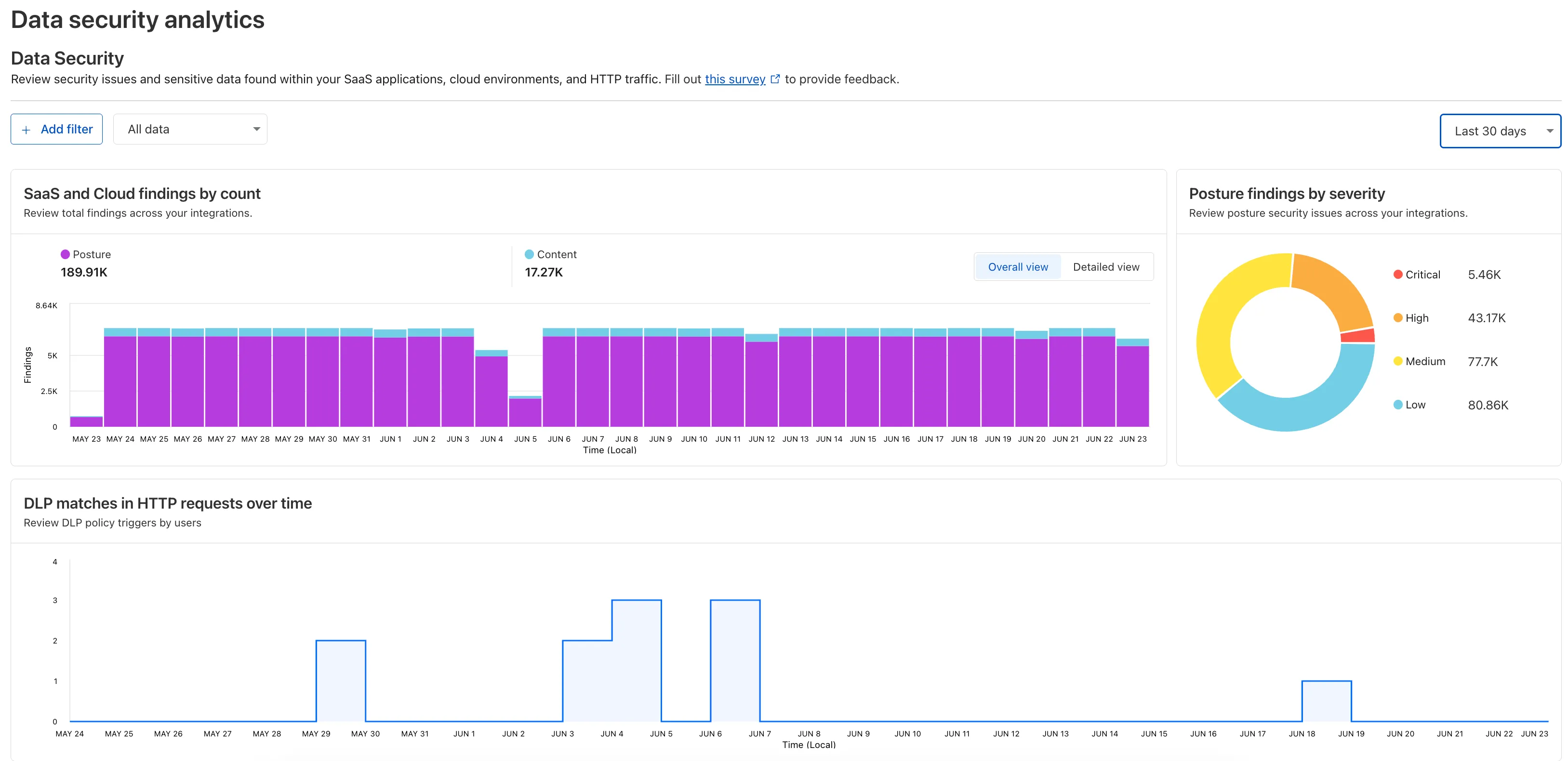
To access the new dashboard, log in to Cloudflare One ↗ and go to Insights on the sidebar.
-
We're announcing the GA of User Groups for Cloudflare Dashboard and System for Cross Domain Identity Management (SCIM) User Groups, strengthening our RBAC capabilities with stable, production-ready primitives for managing access at scale.
What's New
User Groups [GA]: User Groups are a new Cloudflare IAM primitive that enable administrators to create collections of account members that are treated equally from an access control perspective. User Groups can be assigned permission policies, with individual members in the group inheriting all permissions granted to the User Group. User Groups can be created manually or via our APIs.
SCIM User Groups [GA]: Centralize & simplify your user and group management at scale by syncing memberships directly from your upstream identity provider (like Okta or Entra ID) to the Cloudflare Platform. This ensures Cloudflare stays in sync with your identity provider, letting you apply Permission Policies to those synced groups directly within the Cloudflare Dashboard.
Stability & Scale: These features have undergone extensive testing during the Public Beta period and are now ready for production use across enterprises of all sizes.
For more info:
Customers using Cloudflare Network Interconnect with the v1 dataplane can now subscribe to maintenance alert emails. These alerts notify you of planned maintenance windows that may affect your CNI circuits.
For more information, refer to Monitoring and alerts.
We’ve increased the total allowed size of
blobfields on data points written to Workers Analytics Engine from 5 KB to 16 KB.This change gives you more flexibility when logging rich observability data — such as base64-encoded payloads, AI inference traces, or custom metadata — without hitting request size limits.
You can find full details on limits for queries, filters, payloads, and more here in the Workers Analytics Engine limits documentation.
JavaScript export default {async fetch(request, env) {env.analyticsDataset.writeDataPoint({// The sum of all of the blob's sizes can now be 16 KBblobs: [// The URL of the request to the Workerrequest.url,// Some metadata about your application you'd like to storeJSON.stringify(metadata),// The version of your Worker this datapoint was collected fromenv.versionMetadata.tag,],indexes: ["sample-index"],});},};TypeScript export default {async fetch(request, env) {env.analyticsDataset.writeDataPoint({// The sum of all of the blob's sizes can now be 16 KBblobs: [// The URL of the request to the Workerrequest.url,// Some metadata about your application you'd like to storeJSON.stringify(metadata),// The version of your Worker this datapoint was collected fromenv.versionMetadata.tag,],indexes: ["sample-index"],});}};
In AutoRAG, you can now view your object's custom metadata in the response from
/searchand/ai-search, and optionally add acontextfield in the custom metadata of an object to provide additional guidance for AI-generated answers.You can add custom metadata to an object when uploading it to your R2 bucket.
When you run a search, AutoRAG now returns any custom metadata associated with the object. This metadata appears in the response inside
attributesthenfile, and can be used for downstream processing.For example, the
attributessection of your search response may look like:{"attributes": {"timestamp": 1750001460000,"folder": "docs/","filename": "launch-checklist.md","file": {"url": "https://wiki.company.com/docs/launch-checklist","context": "A checklist for internal launch readiness, including legal, engineering, and marketing steps."}}}When you include a custom metadata field named
context, AutoRAG attaches that value to each chunk of the file. When you run an/ai-searchquery, thiscontextis passed to the LLM and can be used as additional input when generating an answer.We recommend using the
contextfield to describe supplemental information you want the LLM to consider, such as a summary of the document or a source URL. If you have several different metadata attributes, you can join them together however you choose within thecontextstring.For example:
{"context": "summary: 'Checklist for internal product launch readiness, including legal, engineering, and marketing steps.'; url: 'https://wiki.company.com/docs/launch-checklist'"}This gives you more control over how your content is interpreted, without requiring you to modify the original contents of the file.
Learn more in AutoRAG's metadata filtering documentation.
In AutoRAG, you can now filter by an object's file name using the
filenameattribute, giving you more control over which files are searched for a given query.This is useful when your application has already determined which files should be searched. For example, you might query a PostgreSQL database to get a list of files a user has access to based on their permissions, and then use that list to limit what AutoRAG retrieves.
For example, your search query may look like:
JavaScript const response = await env.AI.autorag("my-autorag").search({query: "what is the project deadline?",filters: {type: "eq",key: "filename",value: "project-alpha-roadmap.md",},});This allows you to connect your application logic with AutoRAG's retrieval process, making it easy to control what gets searched without needing to reindex or modify your data.
Learn more in AutoRAG's metadata filtering documentation.
Authoritative DNS analytics are now available on the account level via the Cloudflare GraphQL Analytics API.
This allows users to query DNS analytics across multiple zones in their account, by using the
accountsfilter.Here is an example to retrieve the most recent DNS queries across all zones in your account that resulted in an
NXDOMAINresponse over a given time frame. Please replacea30f822fcd7c401984bf85d8f2a5111cwith your actual account ID.GraphQL example for account-level DNS analytics query GetLatestNXDOMAINResponses {viewer {accounts(filter: { accountTag: "a30f822fcd7c401984bf85d8f2a5111c" }) {dnsAnalyticsAdaptive(filter: {date_geq: "2025-06-16"date_leq: "2025-06-18"responseCode: "NXDOMAIN"}limit: 10000orderBy: [datetime_DESC]) {zoneTagqueryNameresponseCodequeryTypedatetime}}}}To learn more and get started, refer to the DNS Analytics documentation.
-
We've simplified the programmatic deployment of Workers via our Cloudflare SDKs. This update abstracts away the low-level complexities of the
multipart/form-dataupload process, allowing you to focus on your code while we handle the deployment mechanics.This new interface is available in:
- cloudflare-typescript ↗ (4.4.1)
- cloudflare-python ↗ (4.3.1)
For complete examples, see our guide on programmatic Worker deployments.
Previously, deploying a Worker programmatically required manually constructing a
multipart/form-dataHTTP request, packaging your code and a separatemetadata.jsonfile. This was more complicated and verbose, and prone to formatting errors.For example, here's how you would upload a Worker script previously with cURL:
Terminal window curl https://api.cloudflare.com/client/v4/accounts/<account_id>/workers/scripts/my-hello-world-script \-X PUT \-H 'Authorization: Bearer <api_token>' \-F 'metadata={"main_module": "my-hello-world-script.mjs","bindings": [{"type": "plain_text","name": "MESSAGE","text": "Hello World!"}],"compatibility_date": "$today"};type=application/json' \-F 'my-hello-world-script.mjs=@-;filename=my-hello-world-script.mjs;type=application/javascript+module' <<EOFexport default {async fetch(request, env, ctx) {return new Response(env.MESSAGE, { status: 200 });}};EOFWith the new SDK interface, you can now define your entire Worker configuration using a single, structured object.
This approach allows you to specify metadata like
main_module,bindings, andcompatibility_dateas clearer properties directly alongside your script content. Our SDK takes this logical object and automatically constructs the complex multipart/form-data API request behind the scenes.Here's how you can now programmatically deploy a Worker via the
cloudflare-typescriptSDK ↗JavaScript import Cloudflare from "cloudflare";import { toFile } from "cloudflare/index";// ... client setup, script content, etc.const script = await client.workers.scripts.update(scriptName, {account_id: accountID,metadata: {main_module: scriptFileName,bindings: [],},files: {[scriptFileName]: await toFile(Buffer.from(scriptContent), scriptFileName, {type: "application/javascript+module",}),},});TypeScript import Cloudflare from 'cloudflare';import { toFile } from 'cloudflare/index';// ... client setup, script content, etc.const script = await client.workers.scripts.update(scriptName, {account_id: accountID,metadata: {main_module: scriptFileName,bindings: [],},files: {[scriptFileName]: await toFile(Buffer.from(scriptContent), scriptFileName, {type: 'application/javascript+module',}),},});View the complete example here: https://github.com/cloudflare/cloudflare-typescript/blob/main/examples/workers/script-upload.ts ↗
We've also made several fixes and enhancements to the Cloudflare Terraform provider ↗:
- Fixed the
cloudflare_workers_script↗ resource in Terraform, which previously was producing a diff even when there were no changes. Now, yourterraform planoutputs will be cleaner and more reliable. - Fixed the
cloudflare_workers_for_platforms_dispatch_namespace↗, where the provider would attempt to recreate the namespace on aterraform apply. The resource now correctly reads its remote state, ensuring stability for production environments and CI/CD workflows. - The
cloudflare_workers_route↗ resource now allows for thescriptproperty to be empty, null, or omitted to indicate that pattern should be negated for all scripts (see routes docs). You can now reserve a pattern or temporarily disable a Worker on a route without deleting the route definition itself. - Using
primary_location_hintin thecloudflare_d1_database↗ resource will no longer always try to recreate. You can now safely change the location hint for a D1 database without causing a destructive operation.
We've also properly documented the Workers Script And Version Settings in our public OpenAPI spec and SDKs.
Gateway will now evaluate Network (Layer 4) policies before HTTP (Layer 7) policies. This change preserves your existing security posture and does not affect which traffic is filtered — but it may impact how notifications are displayed to end users.
This change will roll out progressively between July 14–18, 2025. If you use HTTP policies, we recommend reviewing your configuration ahead of rollout to ensure the user experience remains consistent.
Previous order:
- DNS policies
- HTTP policies
- Network policies
New order:
- DNS policies
- Network policies
- HTTP policies
This change may affect block notifications. For example:
- You have an HTTP policy to block
example.comand display a block page. - You also have a Network policy to block
example.comsilently (no client notification).
With the new order, the Network policy will trigger first — and the user will no longer see the HTTP block page.
To ensure users still receive a block notification, you can:
- Add a client notification to your Network policy, or
- Use only the HTTP policy for that domain.
This update is based on user feedback and aims to:
- Create a more intuitive model by evaluating network-level policies before application-level policies.
- Minimize 526 connection errors by verifying the network path to an origin before attempting to establish a decrypted TLS connection.
To learn more, visit the Gateway order of enforcement documentation.
Log Explorer is now GA, providing native observability and forensics for traffic flowing through Cloudflare.
Search and analyze your logs, natively in the Cloudflare dashboard. These logs are also stored in Cloudflare's network, eliminating many of the costs associated with other log providers.
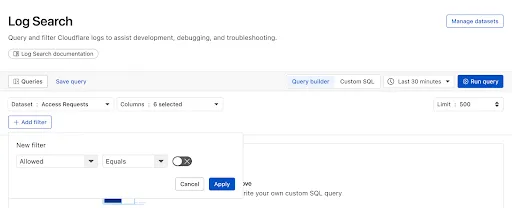
With Log Explorer, you can now:
- Monitor security and performance issues with custom dashboards – use natural language to define charts for measuring response time, error rates, top statistics and more.
- Investigate and troubleshoot issues with Log Search – use data type-aware search filters or custom sql to investigate detailed logs.
- Save time and collaborate with saved queries – save Log Search queries for repeated use or sharing with other users in your account.
- Access Log Explorer at the account and zone level – easily find Log Explorer at the account and zone level for querying any dataset.
For help getting started, refer to our documentation.
Today we announced the public beta ↗ of remote bindings for local development. With remote bindings, you can now connect to deployed resources like R2 buckets and D1 databases while running Worker code on your local machine. This means you can test your local code changes against real data and services, without the overhead of deploying for each iteration.
To enable remote mode, add
"experimental_remote" : trueto each binding that you want to rely on a remote resource running on Cloudflare:JSONC {"name": "my-worker",// Set this to today's date"compatibility_date": "2026-04-04","r2_buckets": [{"bucket_name": "screenshots-bucket","binding": "screenshots_bucket","experimental_remote": true,},],}TOML name = "my-worker"# Set this to today's datecompatibility_date = "2026-04-04"[[r2_buckets]]bucket_name = "screenshots-bucket"binding = "screenshots_bucket"experimental_remote = trueWhen remote bindings are configured, your Worker still executes locally, but all binding calls are proxied to the deployed resource that runs on Cloudflare's network.
You can try out remote bindings for local development today with:
- Wrangler v4.20.3: Use the
wrangler dev --x-remote-bindingscommand. - The Cloudflare Vite Plugin: Refer to the documentation for how to enable in your Vite config.
- The Cloudflare Vitest Plugin: Refer to the documentation for how to enable in your Vitest config.
Have feedback? Join the discussion in our beta announcement ↗ to share feedback or report any issues.
- Wrangler v4.20.3: Use the
A new Beta release for the Windows WARP client is now available on the beta releases downloads page.
This release contains new improvements in addition to the features and improvements introduced in Beta client version 2025.5.735.1.
Changes and improvements
- Improvement to better handle multi-user fast user switching.
- Fix for an issue causing WARP connectivity to fail without full system reboot.
Known issues
Microsoft has confirmed a regression with Windows 11 starting around 24H2 that may cause performance issues for some users. These performance issues could manifest as mouse lag, audio cracking, or other slowdowns. A fix from Microsoft is expected in early July.
Devices with
KB5055523installed may receive a warning aboutWin32/ClickFix.ABAbeing present in the installer. To resolve this false positive, update Microsoft Security Intelligence to version 1.429.19.0 or later.DNS resolution may be broken when the following conditions are all true:
- WARP is in Secure Web Gateway without DNS filtering (tunnel-only) mode.
- A custom DNS server address is configured on the primary network adapter.
- The custom DNS server address on the primary network adapter is changed while WARP is connected. To work around this issue, reconnect the WARP client by toggling off and back on.
A new Beta release for the macOS WARP client is now available on the beta releases downloads page.
This release contains new improvements in addition to the features and improvements introduced in Beta client version 2025.5.735.1.
Changes and improvements
- Improvement for WARP connectivity issues on macOS due to the operating system not accepting DNS server configurations.
Known issues
- macOS Sequoia: Due to changes Apple introduced in macOS 15.0.x, the WARP client may not behave as expected. Cloudflare recommends the use of macOS 15.4 or later.
Earlier this year, we announced the launch of the new Terraform v5 Provider. Unlike the earlier Terraform providers, v5 is automatically generated based on the OpenAPI Schemas for our REST APIs. Since launch, we have seen an unexpectedly high number of issues ↗ reported by customers. These issues currently impact about 15% of resources. We have been working diligently to address these issues across the company, and have released the v5.6.0 release which includes a number of bug fixes. Please keep an eye on this changelog for more information about upcoming releases.
- Broad fixes across resources with recurring diffs, including, but not limited to:
cloudflare_zero_trust_access_identity_providercloudflare_zone
cloudflare_page_rulesruntime panic when settingcache_leveltocache_ttl_by_status- Failure to serialize requests in
cloudflare_zero_trust_tunnel_cloudflared_config - Undocumented field 'priority' on
zone_lockdownresource - Missing importability for
cloudflare_zero_trust_device_default_profile_local_domain_fallbackandcloudflare_account_subscription - New resources:
cloudflare_schema_validation_operation_settingscloudflare_schema_validation_schemascloudflare_schema_validation_settingscloudflare_zero_trust_device_settings
- Other bug fixes
For a more detailed look at all of the changes, see the changelog ↗ in GitHub.
- #5098: 500 Server Error on updating 'zero_trust_tunnel_cloudflared_virtual_network' Terraform resource ↗
- #5148: cloudflare_user_agent_blocking_rule doesn’t actually support user agents ↗
- #5472: cloudflare_zone showing changes in plan after following upgrade steps ↗
- #5508: cloudflare_zero_trust_tunnel_cloudflared_config failed to serialize http request ↗
- #5509: cloudflare_zone: Problematic Terraform behaviour with paused zones ↗
- #5520: Resource 'cloudflare_magic_wan_static_route' is not working ↗
- #5524: Optional fields cause crash in cloudflare_zero_trust_tunnel_cloudflared(s) when left null ↗
- #5526: Provider v5 migration issue: no import method for cloudflare_zero_trust_device_default_profile_local_domain_fallback ↗
- #5532: cloudflare_zero_trust_access_identity_provider detects changes on every plan ↗
- #5561: cloudflare_zero_trust_tunnel_cloudflared: cannot rotate tunnel secret ↗
- #5569: cloudflare_zero_trust_device_custom_profile_local_domain_fallback not allowing multiple DNS Server entries ↗
- #5577: Panic modifying page_rule resource ↗
- #5653: cloudflare_zone_setting resource schema confusion in 5.5.0: value vs enabled ↗
If you have an unaddressed issue with the provider, we encourage you to check the open issues ↗ and open a new one if one does not already exist for what you are experiencing.
If you are evaluating a move from v4 to v5, please make use of the migration guide ↗. We have provided automated migration scripts using Grit which simplify the transition, although these do not support implementations which use Terraform modules, so customers making use of modules need to migrate manually. Please make use of
terraform planto test your changes before applying, and let us know if you encounter any additional issues by reporting to our GitHub repository ↗.- Broad fixes across resources with recurring diffs, including, but not limited to:
For those building Single Page Applications (SPAs) on Workers, you can now explicitly define which routes invoke your Worker script in Wrangler configuration. The
run_worker_firstconfig option has now been expanded to accept an array of route patterns, allowing you to more granularly specify when your Worker script runs.Configuration example:
JSONC {"name": "my-spa-worker",// Set this to today's date"compatibility_date": "2026-04-04","main": "./src/index.ts","assets": {"directory": "./dist/","not_found_handling": "single-page-application","binding": "ASSETS","run_worker_first": ["/api/*", "!/api/docs/*"]}}TOML name = "my-spa-worker"# Set this to today's datecompatibility_date = "2026-04-04"main = "./src/index.ts"[assets]directory = "./dist/"not_found_handling = "single-page-application"binding = "ASSETS"run_worker_first = [ "/api/*", "!/api/docs/*" ]This new routing control was done in partnership with our community and customers who provided great feedback on our public proposal ↗. Thank you to everyone who brought forward use-cases and feedback on the design!
To use advanced routing control with
run_worker_first, you'll need:- Wrangler v4.20.0 and above
- Cloudflare Vite plugin v1.7.0 and above
Mitigations have been put in place for all existing and future deployments of sites with the Cloudflare adapter for Open Next in response to an identified Server-Side Request Forgery (SSRF) vulnerability in the
@opennextjs/cloudflarepackage.The vulnerability stemmed from an unimplemented feature in the Cloudflare adapter for Open Next, which allowed users to proxy arbitrary remote content via the
/_next/imageendpoint.This issue allowed attackers to load remote resources from arbitrary hosts under the victim site's domain for any site deployed using the Cloudflare adapter for Open Next. For example:
https://victim-site.com/_next/image?url=https://attacker.com. In this example, attacker-controlled content fromattacker.comis served through the victim site's domain (victim-site.com), violating the same-origin policy and potentially misleading users or other services.References: https://www.cve.org/cverecord?id=CVE-2025-6087 ↗, https://github.com/opennextjs/opennextjs-cloudflare/security/advisories/GHSA-rvpw-p7vw-wj3m ↗
- SSRF via unrestricted remote URL loading
- Arbitrary remote content loading
- Potential internal service exposure or phishing risks through domain abuse
The following mitigations have been put in place:
Server side updates to Cloudflare's platform to restrict the content loaded via the
/_next/imageendpoint to images. The update automatically mitigates the issue for all existing and any future sites deployed to Cloudflare using the affected version of the Cloudflare adapter for Open NextRoot cause fix: Pull request #727 ↗ to the Cloudflare adapter for Open Next. The patched version of the adapter has been released as
@opennextjs/cloudflare@1.3.0Package dependency update: Pull request cloudflare/workers-sdk#9608 ↗ to create-cloudflare (c3) to use the fixed version of the Cloudflare adapter for Open Next. The patched version of create-cloudflare has been published as
create-cloudflare@2.49.3.In addition to the automatic mitigation deployed on Cloudflare's platform, we encourage affected users to upgrade to
@opennext/cloudflarev1.3.0 and use theremotePatterns↗ filter in Next config if they need to allow-list external urls with images assets.
Participating beta testers can now fully configure Internal DNS directly in the Cloudflare dashboard ↗.
-
Map internal hostnames to private IPs for services, devices, and applications not exposed to the public Internet
-
Resolve internal DNS queries securely through Cloudflare Gateway
-
Use split-horizon DNS to return different responses based on network context
-
Consolidate internal and public DNS zones within a single management platform
- Beta participants can now create and manage internal zones and views in the Cloudflare dashboard
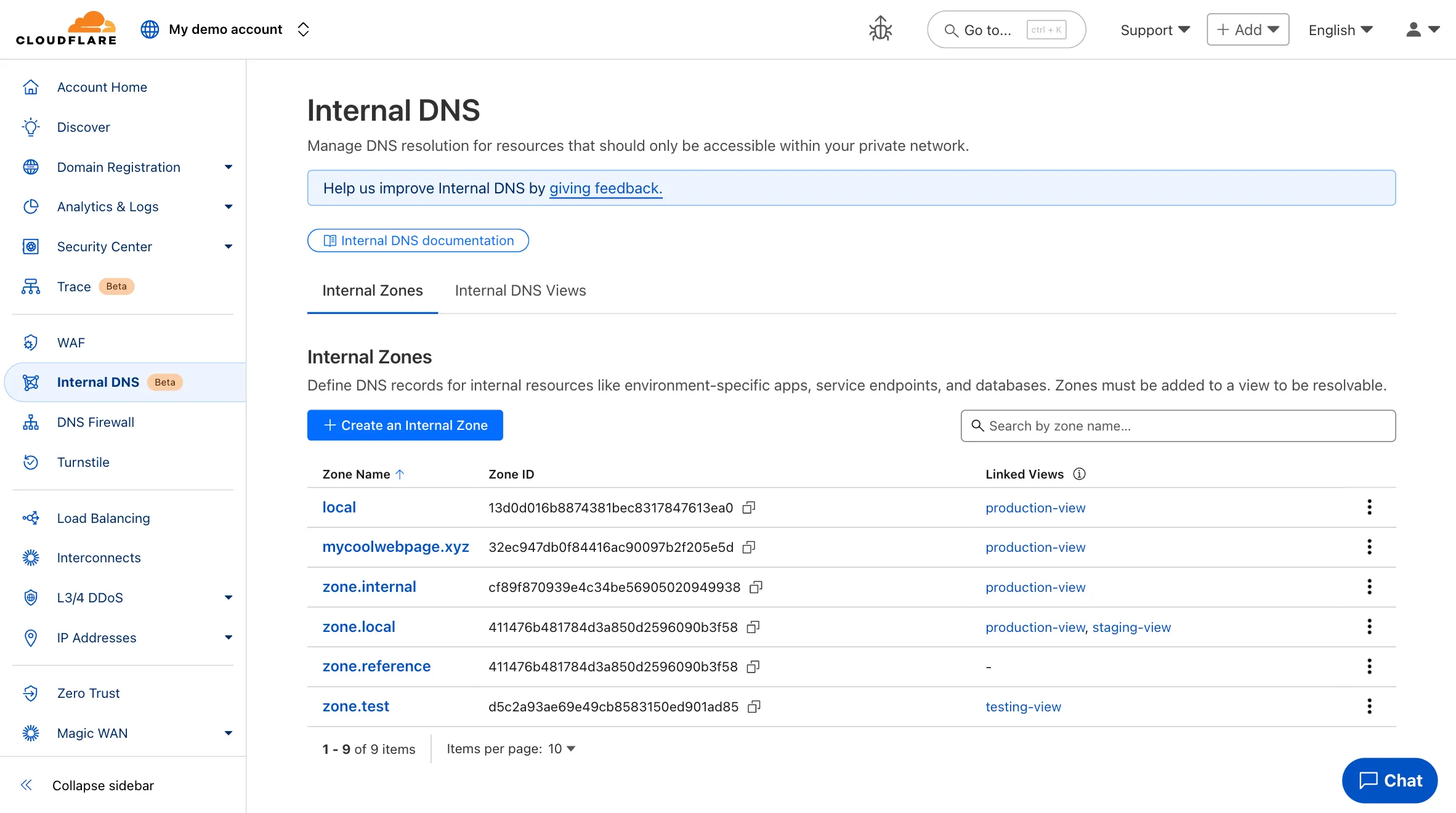
To learn more and get started, refer to the Internal DNS documentation.
-
This week’s roundup highlights multiple critical vulnerabilities across popular web frameworks, plugins, and enterprise platforms. The focus lies on remote code execution (RCE), server-side request forgery (SSRF), and insecure file upload vectors that enable full system compromise or data exfiltration.
Key Findings
- Cisco IOS XE (CVE-2025-20188): Critical RCE vulnerability enabling unauthenticated attackers to execute arbitrary commands on network infrastructure devices, risking total router compromise.
- Axios (CVE-2024-39338): SSRF flaw impacting server-side request control, allowing attackers to manipulate internal service requests when misconfigured with unsanitized user input.
- vBulletin (CVE-2025-48827, CVE-2025-48828): Two high-impact RCE flaws enabling attackers to remotely execute PHP code, compromising forum installations and underlying web servers.
- Invision Community (CVE-2025-47916): A critical RCE vulnerability allowing authenticated attackers to run arbitrary code in community platforms, threatening data and lateral movement risk.
- CrushFTP (CVE-2025-32102, CVE-2025-32103): SSRF vulnerabilities in upload endpoint processing permit attackers to pivot internal network scans and abuse internal services.
- Roundcube (CVE-2025-49113): RCE via email processing enables attackers to execute code upon viewing a crafted email — particularly dangerous for webmail deployments.
- WooCommerce WordPress Plugin (CVE-2025-47577): Dangerous file upload vulnerability permits unauthenticated users to upload executable payloads, leading to full WordPress site takeover.
- Cross-Site Scripting (XSS) Detection Improvements: Enhanced detection patterns.
Impact
These vulnerabilities span core systems — from routers to e-commerce to email. RCE in Cisco IOS XE, Roundcube, and vBulletin poses full system compromise. SSRF in Axios and CrushFTP supports internal pivoting, while WooCommerce’s file upload bug opens doors to mass WordPress exploitation.
Ruleset Rule ID Legacy Rule ID Description Previous Action New Action Comments Cloudflare Managed Ruleset 100783 Cisco IOS XE - Remote Code Execution - CVE:CVE-2025-20188 Log Block This is a New Detection Cloudflare Managed Ruleset 100784 Axios - SSRF - CVE:CVE-2024-39338 Log Block This is a New Detection Cloudflare Managed Ruleset 100785 vBulletin - Remote Code Execution - CVE:CVE-2025-48827, CVE:CVE-2025-48828
Log Block This is a New Detection Cloudflare Managed Ruleset 100786 Invision Community - Remote Code Execution - CVE:CVE-2025-47916 Log Block This is a New Detection Cloudflare Managed Ruleset 100791 CrushFTP - SSRF - CVE:CVE-2025-32102, CVE:CVE-2025-32103 Log Block This is a New Detection Cloudflare Managed Ruleset 100792 Roundcube - Remote Code Execution - CVE:CVE-2025-49113 Log Block This is a New Detection Cloudflare Managed Ruleset 100793 XSS - Ontoggle Log Disabled This is a New Detection Cloudflare Managed Ruleset 100794 WordPress WooCommerce Plugin - Dangerous File Upload - CVE:CVE-2025-47577
Log Block This is a New Detection
You can now grant members of your Cloudflare account read-only access to the Workers Platform.
The new "Workers Platform (Read-only)" role grants read-only access to all products typically used as part of Cloudflare's Developer Platform, including Workers, Pages, Durable Objects, KV, R2, Zones, Zone Analytics and Page Rules. When Cloudflare introduces new products to the Workers platform, we will add additional read-only permissions to this role.
Additionally, the role previously named "Workers Admin" has been renamed to "Workers Platform Admin". This change ensures that the name more accurately reflects the permissions granted — this role has always granted access to more than just Workers — it grants read and write access to the products mentioned above, and similarly, as new products are added to the Workers platform, we will add additional read and write permissions to this role.
You can review the updated roles in the developer docs.
Enterprise customers can now select NSEC3 as method for proof of non-existence on their zones.
What's new:
-
NSEC3 support for live-signed zones – For both primary and secondary zones that are configured to be live-signed (also known as "on-the-fly signing"), NSEC3 can now be selected as proof of non-existence.
-
NSEC3 support for pre-signed zones – Secondary zones that are transferred to Cloudflare in a pre-signed setup now also support NSEC3 as proof of non-existence.
For more information and how to enable NSEC3, refer to the NSEC3 documentation.
-
We have increased the limits for Media Transformations:
- Input file size limit is now 100MB (was 40MB)
- Output video duration limit is now 1 minute (was 30 seconds)
Additionally, we have improved caching of the input asset, resulting in fewer requests to origin storage even when transformation options may differ.
For more information, learn about Transforming Videos.
Workers Builds connects your Worker to a Git repository, and automates building and deploying your code on each pushed change.
To make CI/CD pipelines even more flexible, Workers Builds now automatically injects default environment variables into your build process (much like the defaults in Cloudflare Pages projects). You can use these variables to customize your build process based on the deployment context, such as the branch or commit.
The following environment variables are injected by default:
Environment Variable Injected value Example use-case CItrueChanging build behavior when run on CI versus locally WORKERS_CI1Changing build behavior when run on Workers Builds versus locally WORKERS_CI_BUILD_UUID<build-uuid-of-current-build>Passing the Build UUID along to custom workflows WORKERS_CI_COMMIT_SHA<sha1-hash-of-current-commit>Passing current commit ID to error reporting, for example, Sentry WORKERS_CI_BRANCH<branch-name-from-push-eventCustomizing build based on branch, for example, disabling debug logging on productionYou can override these default values and add your own custom environment variables by navigating to your Worker > Settings > Environment variables.
Learn more in the Build configuration documentation.
Custom Errors can now fetch and store assets and error pages from your origin even if they are served with a 4xx or 5xx HTTP status code — previously, only 200 OK responses were allowed.
What’s new:
- You can now upload error pages and error assets that return error status codes (for example, 403, 500, 502, 503, 504) when fetched.
- These assets are stored and minified at the edge, so they can be reused across multiple Custom Error rules without triggering requests to the origin.
This is especially useful for retrieving error content or downtime banners from your backend when you can’t override the origin status code.
Learn more in the Custom Errors documentation.