Skip to content

Changelog

New updates and improvements at Cloudflare.

Application performance
hero image
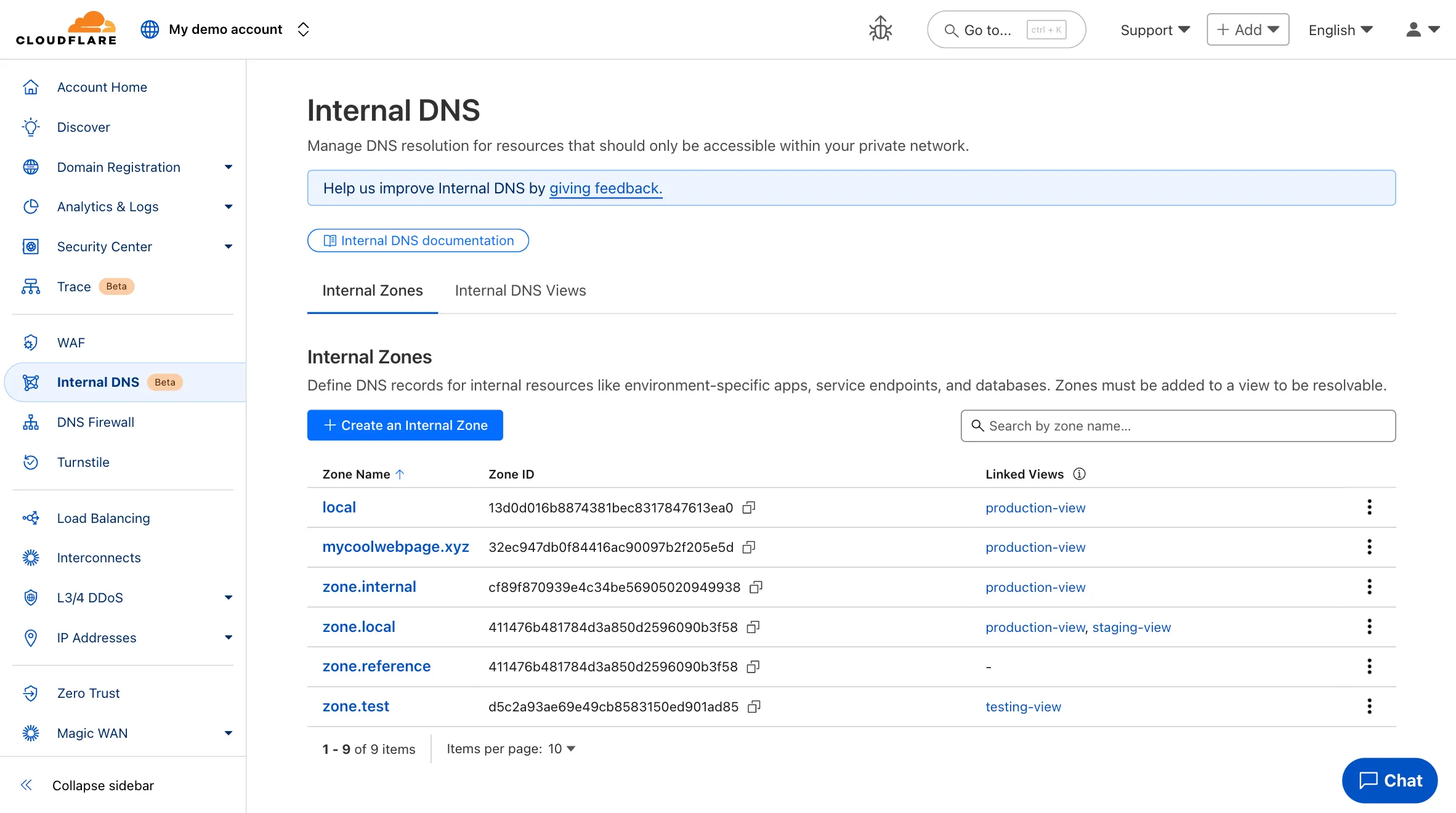
  1. Participating beta testers can now fully configure Internal DNS directly in the Cloudflare dashboard.

    Internal DNS enables customers to:

    • Map internal hostnames to private IPs for services, devices, and applications not exposed to the public Internet

    • Resolve internal DNS queries securely through Cloudflare Gateway

    • Use split-horizon DNS to return different responses based on network context

    • Consolidate internal and public DNS zones within a single management platform

    What’s new in this release:

    • Beta participants can now create and manage internal zones and views in the Cloudflare dashboard
    Internal DNS UI

    To learn more and get started, refer to the Internal DNS documentation.

  1. Enterprise customers can now select NSEC3 as method for proof of non-existence on their zones.

    What's new:

    • NSEC3 support for live-signed zones – For both primary and secondary zones that are configured to be live-signed (also known as "on-the-fly signing"), NSEC3 can now be selected as proof of non-existence.

    • NSEC3 support for pre-signed zones – Secondary zones that are transferred to Cloudflare in a pre-signed setup now also support NSEC3 as proof of non-existence.

    For more information and how to enable NSEC3, refer to the NSEC3 documentation.

  1. Custom Errors can now fetch and store assets and error pages from your origin even if they are served with a 4xx or 5xx HTTP status code — previously, only 200 OK responses were allowed.

    What’s new:

    • You can now upload error pages and error assets that return error status codes (for example, 403, 500, 502, 503, 504) when fetched.
    • These assets are stored and minified at the edge, so they can be reused across multiple Custom Error rules without triggering requests to the origin.

    This is especially useful for retrieving error content or downtime banners from your backend when you can’t override the origin status code.

    Learn more in the Custom Errors documentation.

  1. You can now use the cf.worker.upstream_zone field in Transform Rules to control rule execution based on whether a request originates from Workers, including subrequests issued by Workers in other zones.

    Match Workers subrequests by upstream zone in Transform Rules

    What's new:

    • cf.worker.upstream_zone is now supported in Transform Rules expressions.
    • Skip or apply logic conditionally when handling Workers subrequests.

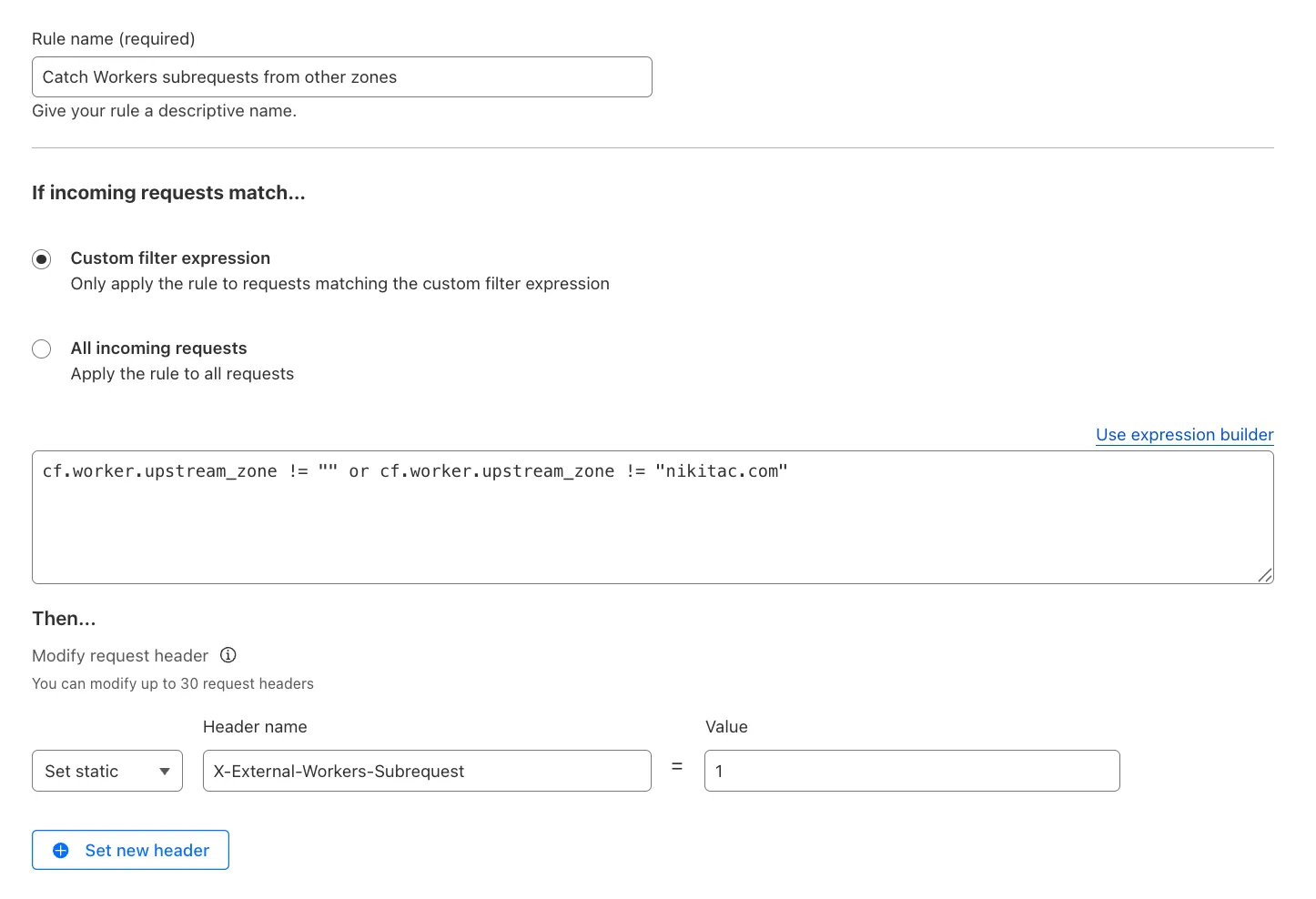
    For example, to add a header when the subrequest comes from another zone:

    Text in Expression Editor (replace myappexample.com with your domain):

    (cf.worker.upstream_zone != "" and cf.worker.upstream_zone != "myappexample.com")

    Selected operation under Modify request header: Set static

    Header name: X-External-Workers-Subrequest

    Value: 1
    This gives you more granular control in how you handle incoming requests for your zone.

    Learn more in the Transform Rules documentation and Rules language fields reference.

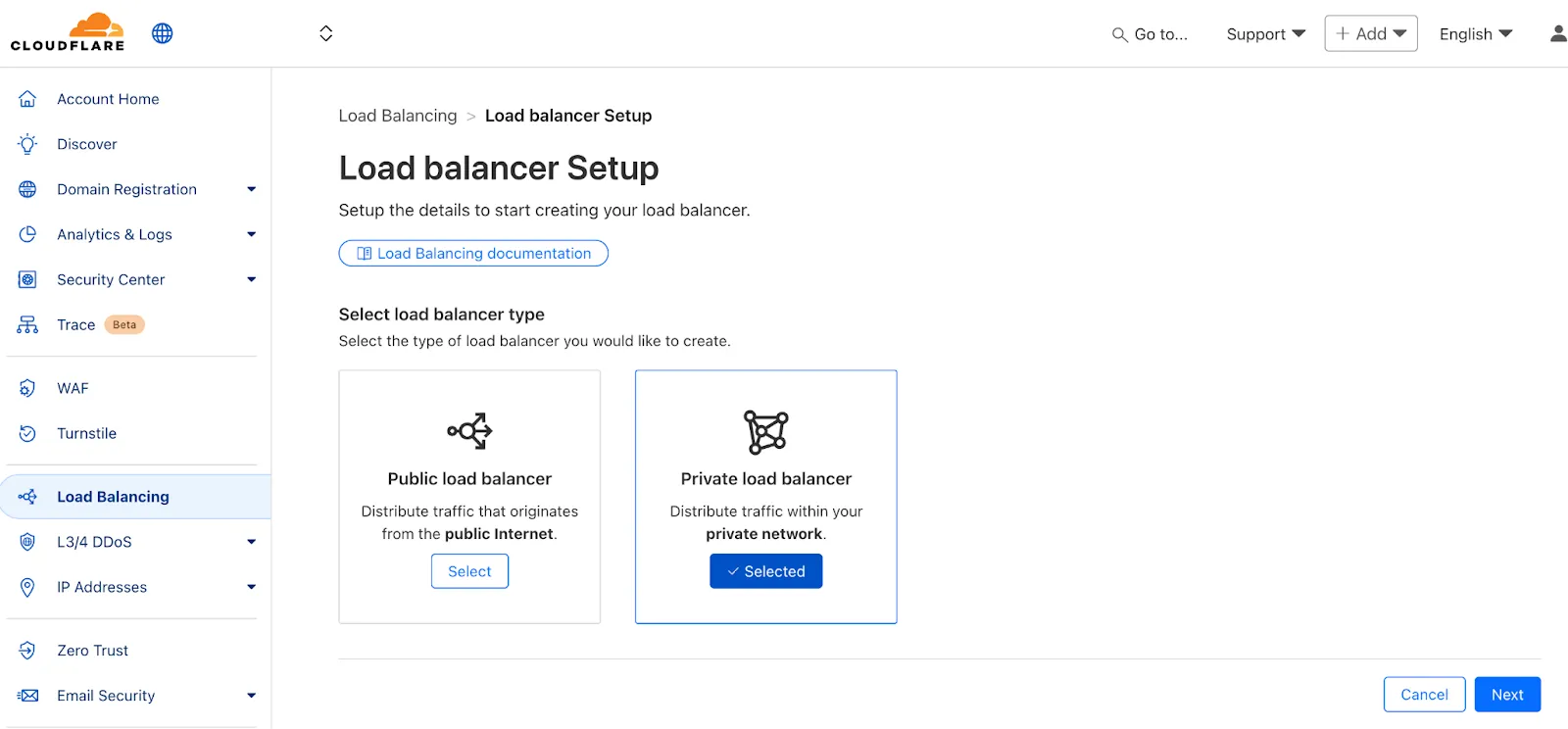
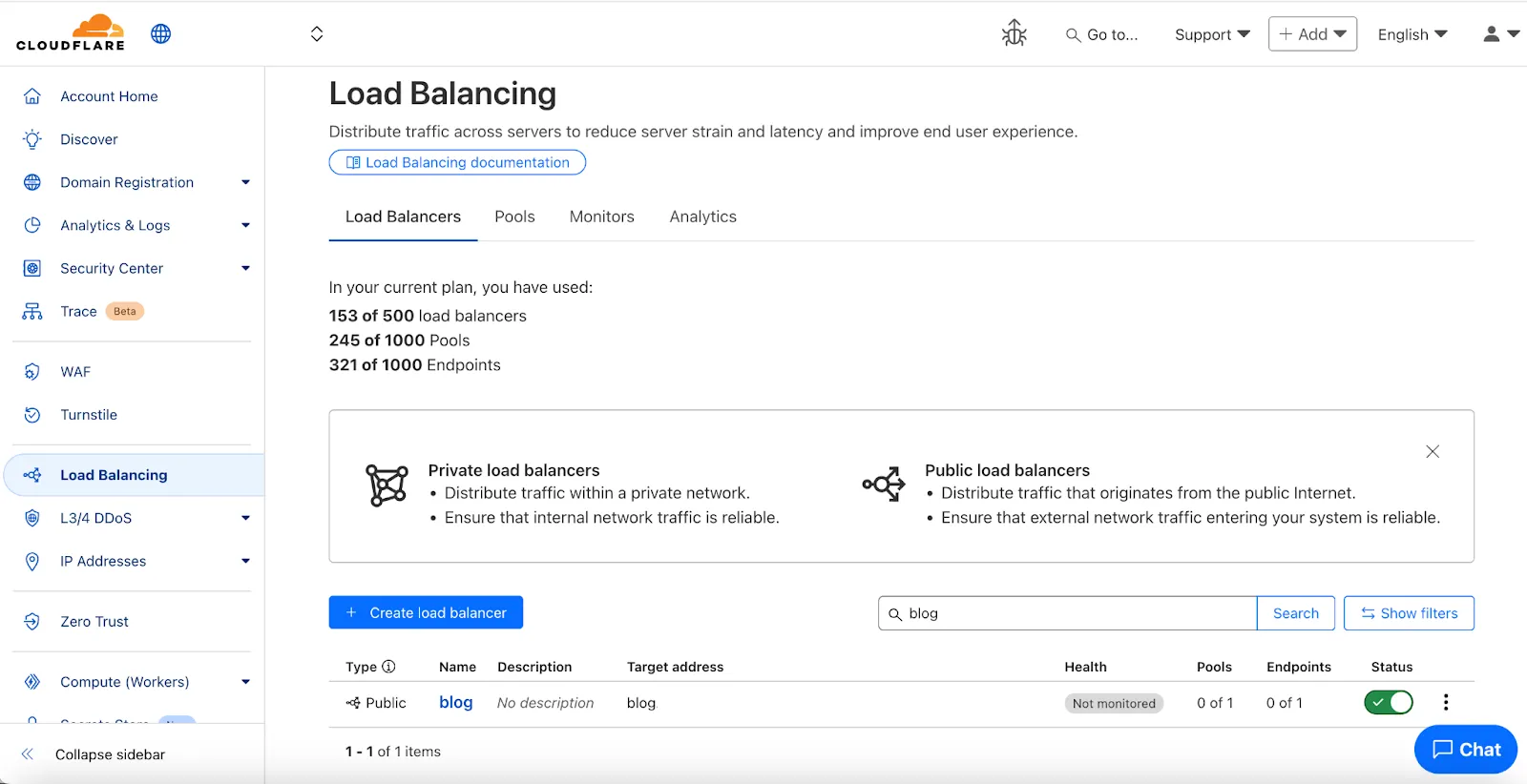
  1. We've made two large changes to load balancing:

    • Redesigned the user interface, now centralized at the account level.
    • Introduced Private Load Balancers to the UI, enabling you to manage traffic for all of your external and internal applications in a single spot.

    This update streamlines how you manage load balancers across multiple zones and extends robust traffic management to your private network infrastructure.

    Load Balancing UI

    Key Enhancements:

    • Account-Level UI Consolidation:

      • Unified Management: Say goodbye to navigating individual zones for load balancing tasks. You can now view, configure, and monitor all your load balancers across every zone in your account from a single, intuitive interface at the account level.

      • Improved Efficiency: This centralized approach provides a more streamlined workflow, making it faster and easier to manage both your public-facing and internal traffic distribution.

    • Private Network Load Balancing:

      • Secure Internal Application Access: Create Private Load Balancers to distribute traffic to applications hosted within your private network, ensuring they are not exposed to the public Internet.

      • WARP & Magic WAN Integration: Effortlessly direct internal traffic from users connected via Cloudflare WARP or through your Magic WAN infrastructure to the appropriate internal endpoint pools.

      • Enhanced Security for Internal Resources: Combine reliable Load Balancing with Zero Trust access controls to ensure your internal services are both performant and only accessible by verified users.

    Private Load Balancers
  1. Shopify merchants can now onboard to O2O automatically, without needing to contact support or community members.

    What's new:

    • Automatic enablement – O2O is available for all mutual Cloudflare and Shopify customers.

    • Branded record display – Merchants see a Shopify logo in DNS records, complete with helpful tooltips.

      Shopify O2O logo

    • Checkout protection – Workers and Snippets are blocked from running on the checkout path to reduce risk and improve security.

    For more information, refer to the provider guide.

  1. You can now enable Polish with the webp format directly in Configuration Rules, allowing you to optimize image delivery for specific routes, user agents, or A/B tests — without applying changes zone-wide.

    What’s new:

    • WebP is now a supported value in the Polish setting for Configuration Rules.

    This gives you more precise control over how images are compressed and delivered, whether you're targeting modern browsers, running experiments, or tailoring performance by geography or device type.

    Learn more in the Polish and Configuration Rules documentation.

  1. With upgraded limits to all free and paid plans, you can now scale more easily with Cloudflare for SaaS and Secrets Store.

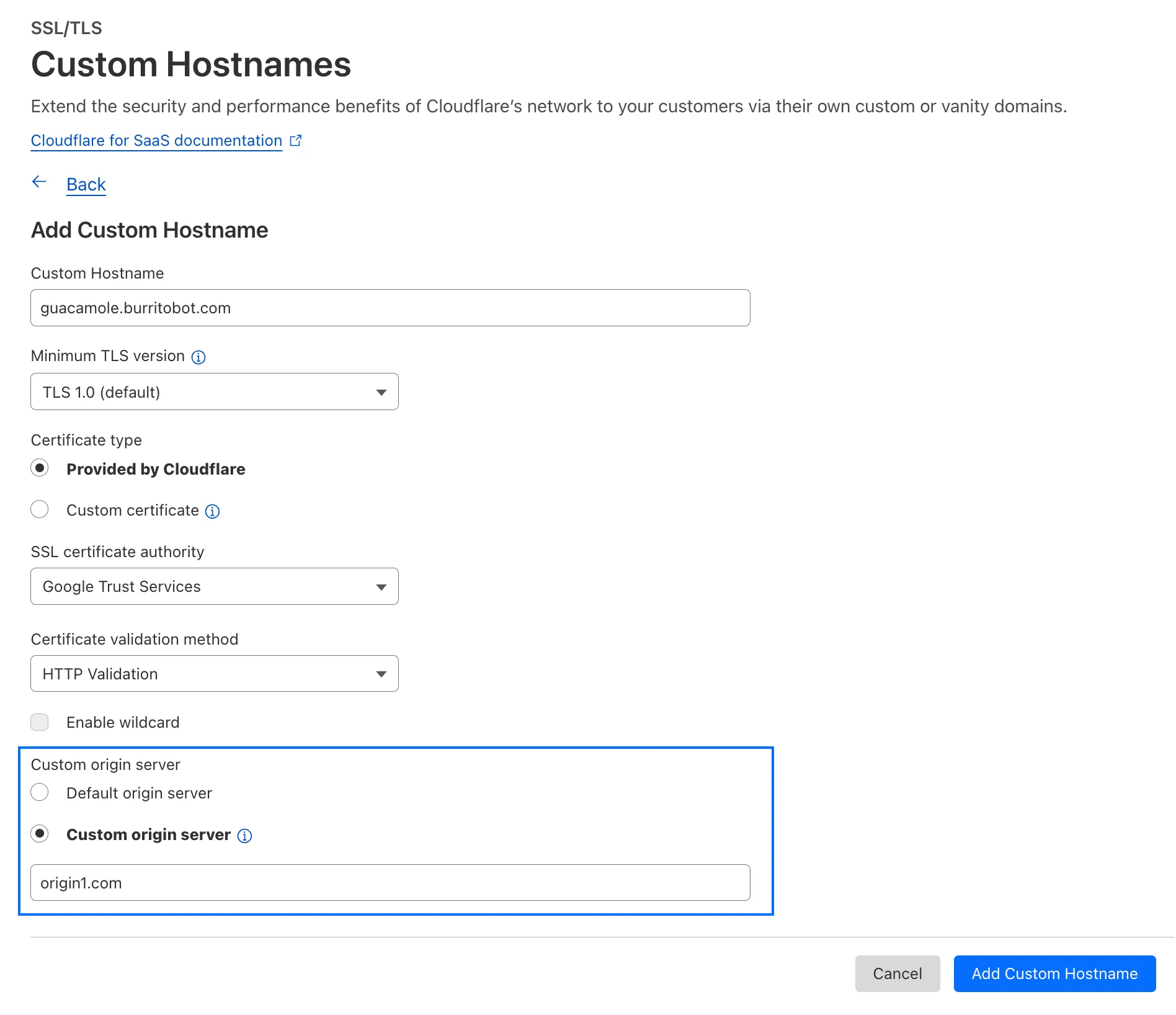
    Cloudflare for SaaS allows you to extend the benefits of Cloudflare to your customers via their own custom or vanity domains. Now, the limit for custom hostnames on a Cloudflare for SaaS Pay-as-you-go plan has been raised from 5,000 custom hostnames to 50,000 custom hostnames.

    With custom origin server -- previously an enterprise-only feature -- you can route traffic from one or more custom hostnames somewhere other than your default proxy fallback. Custom origin server is now available to Cloudflare for SaaS customers on Free, Pro, and Business plans.

    You can enable custom origin server on a per-custom hostname basis via the API or the UI:

    Import repo or choose template

    Currently in beta with a Workers integration, Cloudflare Secrets Store allows you to store, manage, and deploy account level secrets from a secure, centralized platform your Cloudflare Workers. Now, you can create and deploy 100 secrets per account. Try it out in the dashboard, with Wrangler, or via the API today.

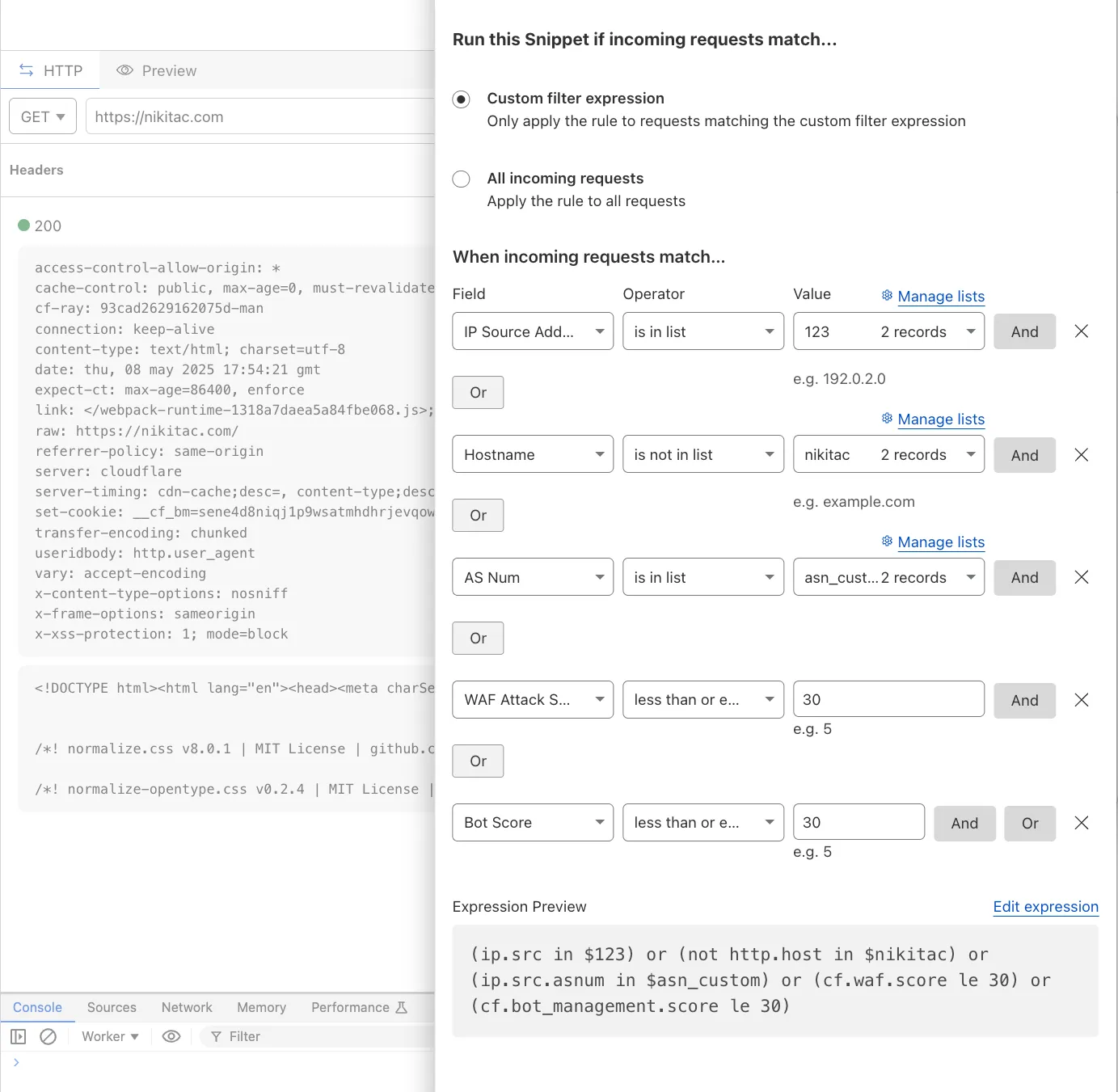
  1. You can now use IP, Autonomous System (AS), and Hostname custom lists to route traffic to Snippets and Cloud Connector, giving you greater precision and control over how you match and process requests at the edge.

    In Snippets, you can now also match on Bot Score and WAF Attack Score, unlocking smarter edge logic for everything from request filtering and mitigation to tarpitting and logging.

    What’s new:

    • Custom lists matching – Snippets and Cloud Connector now support user-created IP, AS, and Hostname lists via dashboard or Lists API. Great for shared logic across zones.
    • Bot Score and WAF Attack Score – Use Cloudflare’s intelligent traffic signals to detect bots or attacks and take advanced, tailored actions with just a few lines of code.
    New fields in Snippets

    These enhancements unlock new possibilities for building smarter traffic workflows with minimal code and maximum efficiency.

    Learn more in the Snippets and Cloud Connector documentation.

  1. Cloudflare Load Balancing now supports UDP (Layer 4) and ICMP (Layer 3) health monitors for private endpoints. This makes it simple to track the health and availability of internal services that don’t respond to HTTP, TCP, or other protocol probes.

    What you can do:

    • Set up ICMP ping monitors to check if your private endpoints are reachable.
    • Use UDP monitors for lightweight health checks on non-TCP workloads, such as DNS, VoIP, or custom UDP-based services.
    • Gain better visibility and uptime guarantees for services running behind Private Network Load Balancing, without requiring public IP addresses.

    This enhancement is ideal for internal applications that rely on low-level protocols, especially when used in conjunction with Cloudflare Tunnel, WARP, and Magic WAN to create a secure and observable private network.

    Learn more about Private Network Load Balancing or view the full list of supported health monitor protocols.

  1. Custom Errors are now generally available for all paid plans — bringing a unified and powerful experience for customizing error responses at both the zone and account levels.

    You can now manage Custom Error Rules, Custom Error Assets, and redesigned Error Pages directly from the Cloudflare dashboard. These features let you deliver tailored messaging when errors occur, helping you maintain brand consistency and improve user experience — whether it’s a 404 from your origin or a security challenge from Cloudflare.

    What's new:

    • Custom Errors are now GA – Available on all paid plans and ready for production traffic.
    • UI for Custom Error Rules and Assets – Manage your zone-level rules from the Rules > Overview and your zone-level assets from the Rules > Settings tabs.
    • Define inline content or upload assets – Create custom responses directly in the rule builder, upload new or reuse previously stored assets.
    • Refreshed UI and new name for Error Pages – Formerly known as “Custom Pages,” Error Pages now offer a cleaner, more intuitive experience for both zone and account-level configurations.
    • Powered by Ruleset Engine – Custom Error Rules support conditional logic and override Error Pages for 500 and 1000 class errors, as well as errors originating from your origin or other Cloudflare products. You can also configure Response Header Transform Rules to add, change, or remove HTTP headers from responses returned by Custom Error Rules.

    Learn more in the Custom Errors documentation.

  1. Cloudflare Snippets are now GA

    Cloudflare Snippets are now generally available at no extra cost across all paid plans — giving you a fast, flexible way to programmatically control HTTP traffic using lightweight JavaScript.

    You can now use Snippets to modify HTTP requests and responses with confidence, reliability, and scale. Snippets are production-ready and deeply integrated with Cloudflare Rules, making them ideal for everything from quick dynamic header rewrites to advanced routing logic.

    What's new:

    • Snippets are now GA – Available at no extra cost on all Pro, Business, and Enterprise plans.

    • Ready for production – Snippets deliver a production-grade experience built for scale.

    • Part of the Cloudflare Rules platform – Snippets inherit request modifications from other Cloudflare products and support sequential execution, allowing you to run multiple Snippets on the same request and apply custom modifications step by step.


    • Trace integration – Use Cloudflare Trace to see which Snippets were triggered on a request — helping you understand traffic flow and debug more effectively.

      Snippets shown in Cloudflare Trace results

    Learn more in the launch blog post.

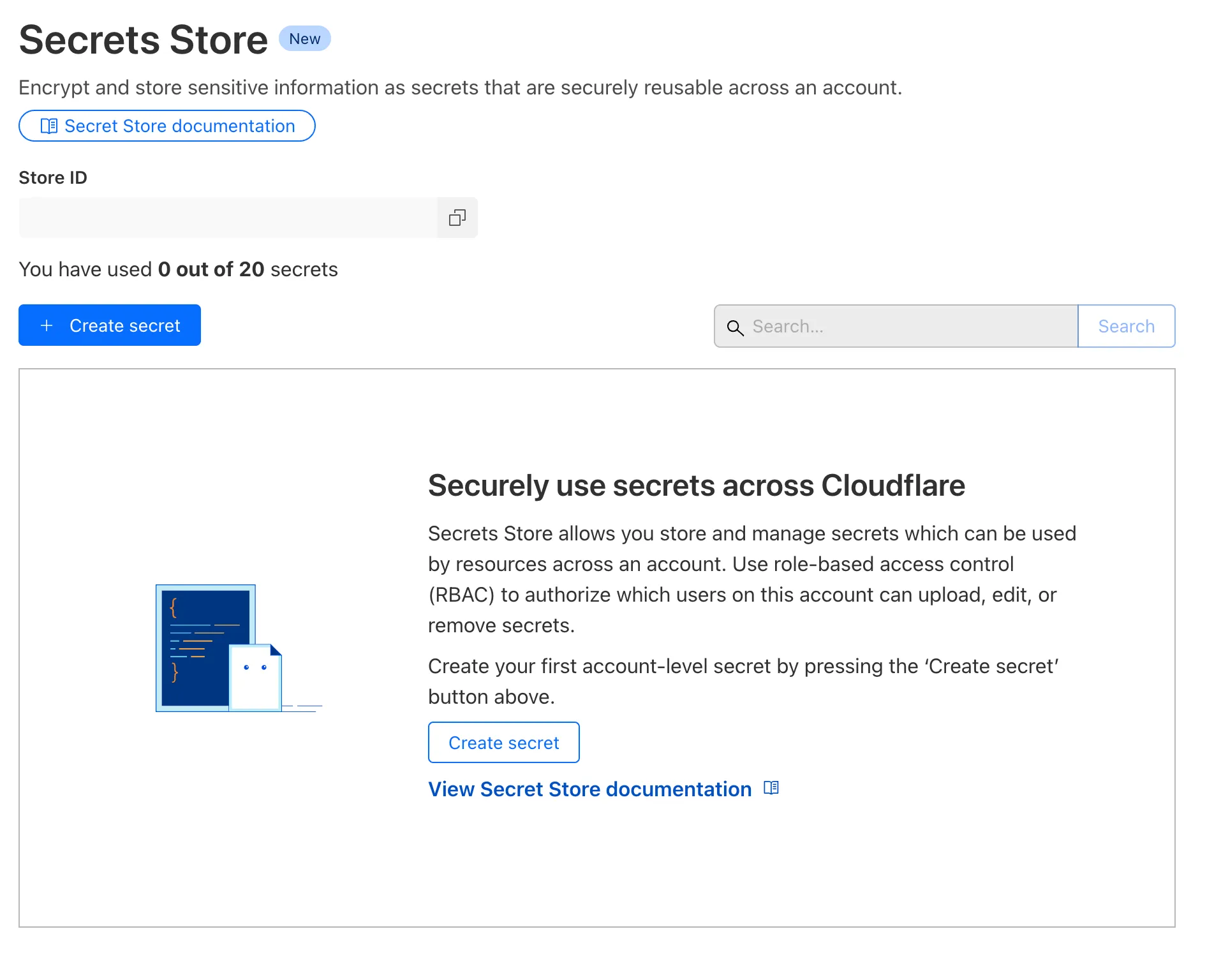
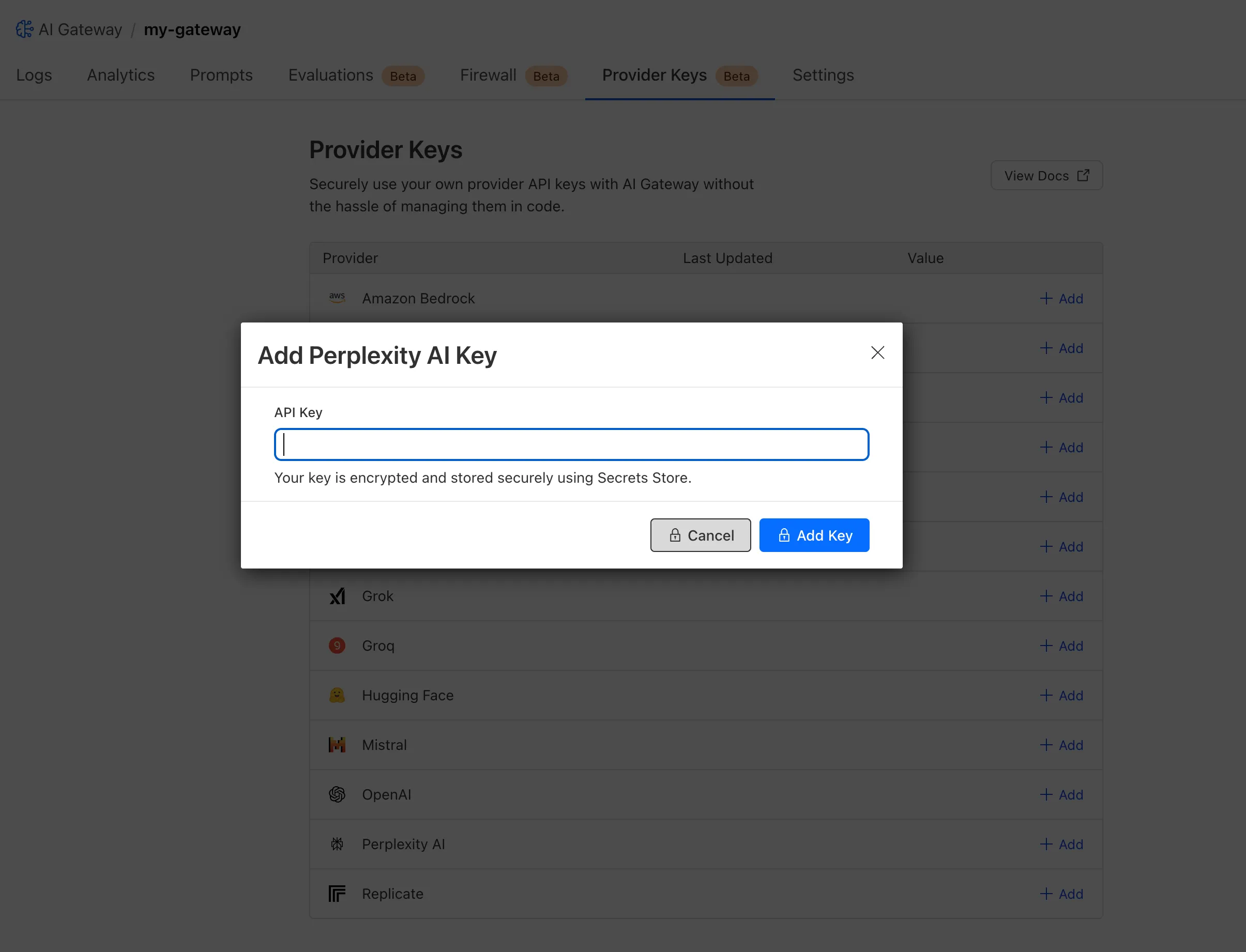
  1. Cloudflare Secrets Store is available today in Beta. You can now store, manage, and deploy account level secrets from a secure, centralized platform to your Workers.

    Import repo or choose template

    To spin up your Cloudflare Secrets Store, simply click the new Secrets Store tab in the dashboard or use this Wrangler command:

    Terminal window
    wrangler secrets-store store create <name> --remote

    The following are supported in the Secrets Store beta:

    • Secrets Store UI & API: create your store & create, duplicate, update, scope, and delete a secret
    • Workers UI: bind a new or existing account level secret to a Worker and deploy in code
    • Wrangler: create your store & create, duplicate, update, scope, and delete a secret
    • Account Management UI & API: assign Secrets Store permissions roles & view audit logs for actions taken in Secrets Store core platform

    For instructions on how to get started, visit our developer documentation.

  1. You can now programmatically override Cache Rules using the cf object in the fetch() command. This feature gives you fine-grained control over caching behavior on a per-request basis, allowing Workers to customize cache settings dynamically based on request properties, user context, or business logic.

    How it works

    Using the cf object in fetch(), you can override specific Cache Rules settings by:

    1. Setting custom cache options: Pass cache properties in the cf object as the second argument to fetch() to override default Cache Rules.
    2. Dynamic cache control: Apply different caching strategies based on request headers, cookies, or other runtime conditions.
    3. Per-request customization: Bypass or modify Cache Rules for individual requests while maintaining default behavior for others.
    4. Programmatic cache management: Implement complex caching logic that adapts to your application's needs.

    What can be configured

    Workers can override the following Cache Rules settings through the cf object:

    • cacheEverything: Treat all content as static and cache all file types beyond the default cached content.
    • cacheTtl: Set custom time-to-live values in seconds for cached content at the edge, regardless of origin headers.
    • cacheTtlByStatus: Set different TTLs based on the response status code (for example, { "200-299": 86400, 404: 1, "500-599": 0 }).
    • cacheKey: Customize cache keys to control which requests are treated as the same for caching purposes (Enterprise only).
    • cacheTags: Append additional cache tags for targeted cache purging operations.

    Benefits

    • Enhanced flexibility: Customize cache behavior without modifying zone-level Cache Rules.
    • Dynamic optimization: Adjust caching strategies in real-time based on request context.
    • Simplified configuration: Reduce the number of Cache Rules needed by handling edge cases programmatically.
    • Improved performance: Fine-tune cache behavior for specific use cases to maximize hit rates.

    Get started

    To get started, refer to the Workers Fetch API documentation and the cf object properties documentation.

  1. You can now access all Cloudflare cache purge methods — no matter which plan you’re on. Whether you need to update a single asset or instantly invalidate large portions of your site’s content, you now have the same powerful tools previously reserved for Enterprise customers.

    Anyone on Cloudflare can now:

    1. Purge Everything: Clears all cached content associated with a website.
    2. Purge by Prefix: Targets URLs sharing a common prefix.
    3. Purge by Hostname: Invalidates content by specific hostnames.
    4. Purge by URL (single-file purge): Precisely targets individual URLs.
    5. Purge by Tag: Uses Cache-Tag response headers to invalidate grouped assets, offering flexibility for complex cache management scenarios.

    Want to learn how each purge method works, when to use them, or what limits apply to your plan? Dive into our purge cache documentation and API reference for all the details.

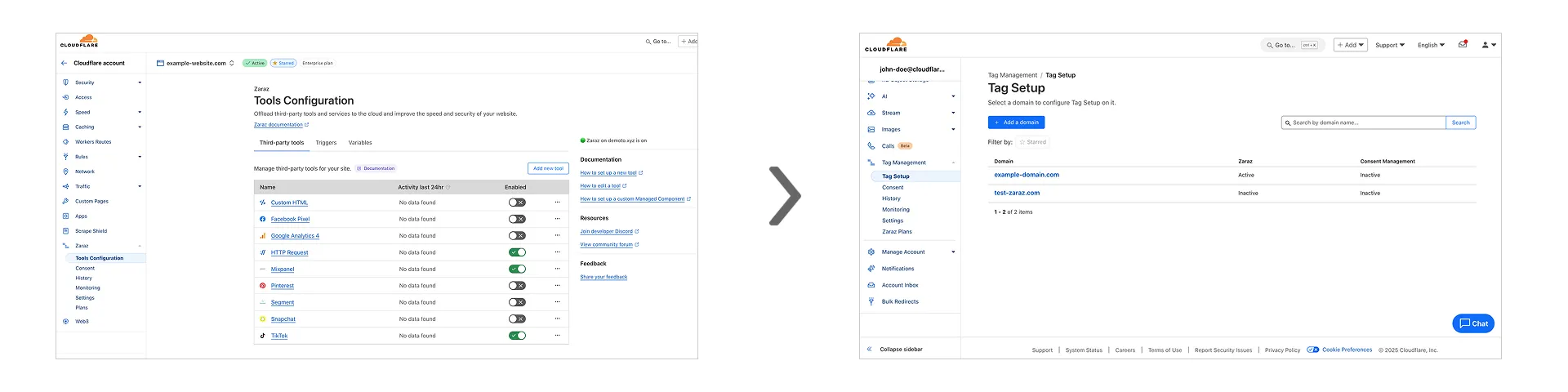
  1. Zaraz at zone level to Tag management at account level

    Previously, you could only configure Zaraz by going to each individual zone under your Cloudflare account. Now, if you’d like to get started with Zaraz or manage your existing configuration, you can navigate to the Tag Management section on the Cloudflare dashboard – this will make it easier to compare and configure the same settings across multiple zones.

    These changes will not alter any existing configuration or entitlements for zones you already have Zaraz enabled on. If you’d like to edit existing configurations, you can go to the Tag Setup section of the dashboard, and select the zone you'd like to edit.

  1. Cloudflare has supported both RSA and ECDSA certificates across our platform for a number of years. Both certificates offer the same security, but ECDSA is more performant due to a smaller key size. However, RSA is more widely adopted and ensures compatibility with legacy clients. Instead of choosing between them, you may want both – that way, ECDSA is used when clients support it, but RSA is available if not.

    Now, you can upload both an RSA and ECDSA certificate on a custom hostname via the API.

    curl -X POST https://api.cloudflare.com/client/v4/zones/$ZONE_ID/custom_hostnames \
    -H 'Content-Type: application/json' \
    -H "X-Auth-Email: $CLOUDFLARE_EMAIL" \
    -H "X-Auth-Key: $CLOUDFLARE_API_KEY" \
    -d '{
    "hostname": "hostname",
    "ssl": {
    "custom_cert_bundle": [
    {
    "custom_certificate": "RSA Cert",
    "custom_key": "RSA Key"
    },
    {
    "custom_certificate": "ECDSA Cert",
    "custom_key": "ECDSA Key"
    }
    ],
    "bundle_method": "force",
    "wildcard": false,
    "settings": {
    "min_tls_version": "1.0"
    }
    }
    }’

    You can also:

    • Upload an RSA or ECDSA certificate to a custom hostname with an existing ECDSA or RSA certificate, respectively.

    • Replace the RSA or ECDSA certificate with a certificate of its same type.

    • Delete the RSA or ECDSA certificate (if the custom hostname has both an RSA and ECDSA uploaded).

    This feature is available for Business and Enterprise customers who have purchased custom certificates.

  1. You can now configure HTTP/2 multiplexing settings for origin connections on Enterprise plans. This feature allows you to optimize how Cloudflare manages concurrent requests over HTTP/2 connections to your origin servers, improving cache efficiency and reducing connection overhead.

    How it works

    HTTP/2 multiplexing allows multiple requests to be sent over a single TCP connection. With this configuration option, you can:

    1. Control concurrent streams: Adjust the maximum number of concurrent streams per connection.
    2. Optimize connection reuse: Fine-tune connection pooling behavior for your origin infrastructure.
    3. Reduce connection overhead: Minimize the number of TCP connections required between Cloudflare and your origin.
    4. Improve cache performance: Better connection management can enhance cache fetch efficiency.

    Benefits

    • Customizable performance: Tailor multiplexing settings to your origin's capabilities.
    • Reduced latency: Fewer connection handshakes improve response times.
    • Lower origin load: More efficient connection usage reduces server resource consumption.
    • Enhanced scalability: Better connection management supports higher traffic volumes.

    Get started

    Enterprise customers can configure HTTP/2 multiplexing settings in the Cloudflare Dashboard or through our API.

  1. We have upgraded and streamlined Cloudflare Rules limits across all plans, simplifying rule management and improving scalability for everyone.

    New limits by product:

    • Bulk Redirects
      • Free: 2010,000 URL redirects across lists
      • Pro: 50025,000 URL redirects across lists
      • Business: 50050,000 URL redirects across lists
      • Enterprise: 10,0001,000,000 URL redirects across lists
    • Cloud Connector
      • Free: 510 connectors
      • Enterprise: 125300 connectors
    • Custom Errors
      • Pro: 525 error assets and rules
      • Business: 2050 error assets and rules
      • Enterprise: 50300 error assets and rules
    • Snippets
      • Pro: 1025 code snippets and rules
      • Business: 2550 code snippets and rules
      • Enterprise: 50300 code snippets and rules
    • Cache Rules, Configuration Rules, Compression Rules, Origin Rules, Single Redirects, and Transform Rules
      • Enterprise: 125300 rules
  1. We're introducing Custom Errors (beta), which builds on our existing Custom Error Responses feature with new asset storage capabilities.

    This update allows you to store externally hosted error pages on Cloudflare and reference them in custom error rules, eliminating the need to supply inline content.

    This brings the following new capabilities:

    • Custom error assets – Fetch and store external error pages at the edge for use in error responses.
    • Account-Level custom errors – Define error handling rules and assets at the account level for consistency across multiple zones. Zone-level rules take precedence over account-level ones, and assets are not shared between levels.

    You can use Cloudflare API to upload your existing assets for use with Custom Errors:

    Terminal window
    curl "https://api.cloudflare.com/client/v4/zones/{zone_id}/custom_pages/assets" \
    --header "Authorization: Bearer <API_TOKEN>" \
    --header 'Content-Type: application/json' \
    --data '{
    "name": "maintenance",
    "description": "Maintenance template page",
    "url": "https://example.com/"
    }'

    You can then reference the stored asset in a Custom Error rule:

    Terminal window
    curl --request PUT \
    "https://api.cloudflare.com/client/v4/zones/{zone_id}/rulesets/phases/http_custom_errors/entrypoint" \
    --header "Authorization: Bearer <API_TOKEN>" \
    --header 'Content-Type: application/json' \
    --data '{
    "rules": [
    {
    "action": "serve_error",
    "action_parameters": {
    "asset_name": "maintenance",
    "content_type": "text/html",
    "status_code": 503
    },
    "enabled": true,
    "expression": "http.request.uri.path contains \"error\""
    }
    ]
    }'
  1. You can now implement our child safety tooling, the CSAM Scanning Tool, more easily. Instead of requiring external reporting credentials, you only need a verified email address for notifications to onboard. This change makes the tool more accessible to a wider range of customers.

    How It Works

    When enabled, the tool automatically hashes images for enabled websites as they enter the Cloudflare cache. These hashes are then checked against a database of known abusive images.

    • Potential match detected?
      • The content URL is blocked, and
      • Cloudflare will notify you about the found matches via the provided email address.

    Updated Service-Specific Terms

    We have also made updates to our Service-Specific Terms to reflect these changes.

  1. Cloudflare is removing five fields from the meta object of DNS records. These fields have been unused for more than a year and are no longer set on new records. This change may take up to four weeks to fully roll out.

    The affected fields are:

    • the auto_added boolean
    • the managed_by_apps boolean and corresponding apps_install_id
    • the managed_by_argo_tunnel boolean and corresponding argo_tunnel_id

    An example record returned from the API would now look like the following:

    Updated API Response
    {
    "result": {
    "id": "<ID>",
    "zone_id": "<ZONE_ID>",
    "zone_name": "example.com",
    "name": "www.example.com",
    "type": "A",
    "content": "192.0.2.1",
    "proxiable": true,
    "proxied": false,
    "ttl": 1,
    "locked": false,
    "meta": {
    "auto_added": false,
    "managed_by_apps": false,
    "managed_by_argo_tunnel": false,
    "source": "primary"
    },
    "comment": null,
    "tags": [],
    "created_on": "2025-03-17T20:37:05.368097Z",
    "modified_on": "2025-03-17T20:37:05.368097Z"
    },
    "success": true,
    "errors": [],
    "messages": []
    }

    For more guidance, refer to Manage DNS records.

  1. The new Snippets code editor lets you edit Snippet code and rule in one place, making it easier to test and deploy changes without switching between pages.

    New Snippets code editor

    What’s new:

    • Single-page editing for code and rule – No need to jump between screens.
    • Auto-complete & syntax highlighting – Get suggestions and avoid mistakes.
    • Code formatting & refactoring – Write cleaner, more readable code.

    Try it now in Rules > Snippets.

  1. Rules Overview gives you a single page to manage all your Cloudflare Rules.

    What you can do:

    • See all your rules in one place – No more clicking around.
    • Find rules faster – Search by name.
    • Understand execution order – See how rules run in sequence.
    • Debug easily – Use Trace without switching tabs.

    Check it out in Rules > Overview.

  1. You can now achieve higher cache hit rates and reduce origin load when using Load Balancing with Smart Tiered Cache. Cloudflare automatically selects a single, optimal tiered data center for all origins in your Load Balancing Pool.

    How it works

    When you use Load Balancing with Smart Tiered Cache, Cloudflare analyzes performance metrics across your pool's origins and automatically selects the optimal Upper Tier data center for the entire pool. This means:

    • Consistent cache location: All origins in the pool share the same Upper Tier cache.
    • Higher HIT rates: Requests for the same content hit the cache more frequently.
    • Reduced origin requests: Fewer requests reach your origin servers.
    • Improved performance: Faster response times for cache HITs.

    Example workflow

    Load Balancing Pool: api-pool
    ├── Origin 1: api-1.example.com
    ├── Origin 2: api-2.example.com
    └── Origin 3: api-3.example.com
    Selected Upper Tier: [Optimal data center based on pool performance]

    Get started

    To get started, enable Smart Tiered Cache on your zone and configure your Load Balancing Pool.