

In the Cloudflare One dashboard, the overview page for a specific Cloudflare Tunnel now shows all replicas of that tunnel and supports streaming logs from multiple replicas at once.

Previously, you could only stream logs from one replica at a time. With this update:
- Replicas on the tunnel overview — All active replicas for the selected tunnel now appear on that tunnel's overview page under Connectors. Select any replica to stream its logs.
- Multi-connector log streaming — Stream logs from multiple replicas simultaneously, making it easier to correlate events across your infrastructure during debugging or incident response. To try it out, log in to Cloudflare One ↗ and go to Networks > Connectors > Cloudflare Tunnels. Select View logs next to the tunnel you want to monitor.
For more information, refer to Tunnel log streams and Deploy replicas.
Service Key authentication for the Cloudflare API is deprecated. Service Keys will stop working on September 30, 2026.
API Tokens replace Service Keys with fine-grained permissions, expiration, and revocation.
Replace any use of the
X-Auth-User-Service-Keyheader with an API Token scoped to the permissions your integration requires.If you use
cloudflared, update to a version from November 2022 or later. These versions already use API Tokens.If you use origin-ca-issuer ↗, update to a version that supports API Token authentication.
For more information, refer to API deprecations.
Hyperdrive now supports custom TLS/SSL certificates for MySQL databases, bringing the same certificate options previously available for PostgreSQL to MySQL connections.
You can now configure:
- Server certificate verification with
VERIFY_CAorVERIFY_IDENTITYSSL modes to verify that your MySQL database server's certificate is signed by the expected certificate authority (CA). - Client certificates (mTLS) for Hyperdrive to authenticate itself to your MySQL database with credentials beyond username and password.
Create a Hyperdrive configuration with custom certificates for MySQL:
Terminal window # Upload a CA certificatenpx wrangler cert upload certificate-authority --ca-cert your-ca-cert.pem --name your-custom-ca-name# Create a Hyperdrive with VERIFY_IDENTITY modenpx wrangler hyperdrive create your-hyperdrive-config \--connection-string="mysql://user:password@hostname:port/database" \--ca-certificate-id <CA_CERT_ID> \--sslmode VERIFY_IDENTITYFor more information, refer to SSL/TLS certificates for Hyperdrive and MySQL TLS/SSL modes.
- Server certificate verification with
You can now manage Cloudflare Tunnels directly from Wrangler, the CLI for the Cloudflare Developer Platform. The new
wrangler tunnelcommands let you create, run, and manage tunnels without leaving your terminal.
Available commands:
wrangler tunnel create— Create a new remotely managed tunnel.wrangler tunnel list— List all tunnels in your account.wrangler tunnel info— Display details about a specific tunnel.wrangler tunnel delete— Delete a tunnel.wrangler tunnel run— Run a tunnel using the cloudflared daemon.wrangler tunnel quick-start— Start a free, temporary tunnel without an account using Quick Tunnels.
Wrangler handles downloading and managing the cloudflared binary automatically. On first use, you will be prompted to download
cloudflaredto a local cache directory.These commands are currently experimental and may change without notice.
To get started, refer to the Wrangler tunnel commands documentation.
Workers AI is officially in the big models game.
@cf/moonshotai/kimi-k2.5is the first frontier-scale open-source model on our AI inference platform — a large model with a full 256k context window, multi-turn tool calling, vision inputs, and structured outputs. By bringing a frontier-scale model directly onto the Cloudflare Developer Platform, you can now run the entire agent lifecycle on a single, unified platform.The model has proven to be a fast, efficient alternative to larger proprietary models without sacrificing quality. As AI adoption increases, the volume of inference is skyrocketing — now you can access frontier intelligence at a fraction of the cost.
- 256,000 token context window for retaining full conversation history, tool definitions, and entire codebases across long-running agent sessions
- Multi-turn tool calling for building agents that invoke tools across multiple conversation turns
- Vision inputs for processing images alongside text
- Structured outputs with JSON mode and JSON Schema support for reliable downstream parsing
- Function calling for integrating external tools and APIs into agent workflows
When an agent sends a new prompt, it resends all previous prompts, tools, and context from the session. The delta between consecutive requests is usually just a few new lines of input. Prefix caching avoids reprocessing the shared context, saving time and compute from the prefill stage. This means faster Time to First Token (TTFT) and higher Tokens Per Second (TPS) throughput.
Workers AI has done prefix caching, but we are now surfacing cached tokens as a usage metric and offering a discount on cached tokens compared to input tokens (pricing is listed on the model page).
Terminal window curl -X POST \"https://api.cloudflare.com/client/v4/accounts/{account_id}/ai/run/@cf/moonshotai/kimi-k2.5" \-H "Authorization: Bearer {api_token}" \-H "Content-Type: application/json" \-H "x-session-affinity: ses_12345678" \-d '{"messages": [{"role": "system","content": "You are a helpful assistant."},{"role": "user","content": "What is prefix caching and why does it matter?"}],"max_tokens": 2400,"stream": true}'Some clients like OpenCode ↗ implement session affinity automatically. The Agents SDK ↗ starter also sets up the wiring for you.
For volumes of requests that exceed synchronous rate limits, you can submit batches of inferences to be completed asynchronously. We have revamped the Asynchronous Batch API with a pull-based system that processes queued requests as soon as capacity is available. With internal testing, async requests usually execute within 5 minutes, but this depends on live traffic.
The async API is the best way to avoid capacity errors in durable workflows. It is ideal for use cases that are not real-time, such as code scanning agents or research agents.
To use the asynchronous API, pass
queueRequest: true:JavaScript // 1. Push a batch of requests into the queueconst res = await env.AI.run("@cf/moonshotai/kimi-k2.5",{requests: [{messages: [{ role: "user", content: "Tell me a joke" }],},{messages: [{ role: "user", content: "Explain the Pythagoras theorem" }],},],},{ queueRequest: true },);// 2. Grab the request IDconst requestId = res.request_id;// 3. Poll for the resultconst result = await env.AI.run("@cf/moonshotai/kimi-k2.5", {request_id: requestId,});if (result.status === "queued" || result.status === "running") {// Retry by polling again} else {return Response.json(result);}You can also set up event notifications to know when inference is complete instead of polling.
Use Kimi K2.5 through the Workers AI binding (
env.AI.run()), the REST API at/runor/v1/chat/completions, AI Gateway, or via the OpenAI-compatible endpoint.For more information, refer to the Kimi K2.5 model page, pricing, and prompt caching.
Cloudflare dashboard SCIM provisioning operations are now captured in Audit Logs v2, giving you visibility into user and group changes made by your identity provider.
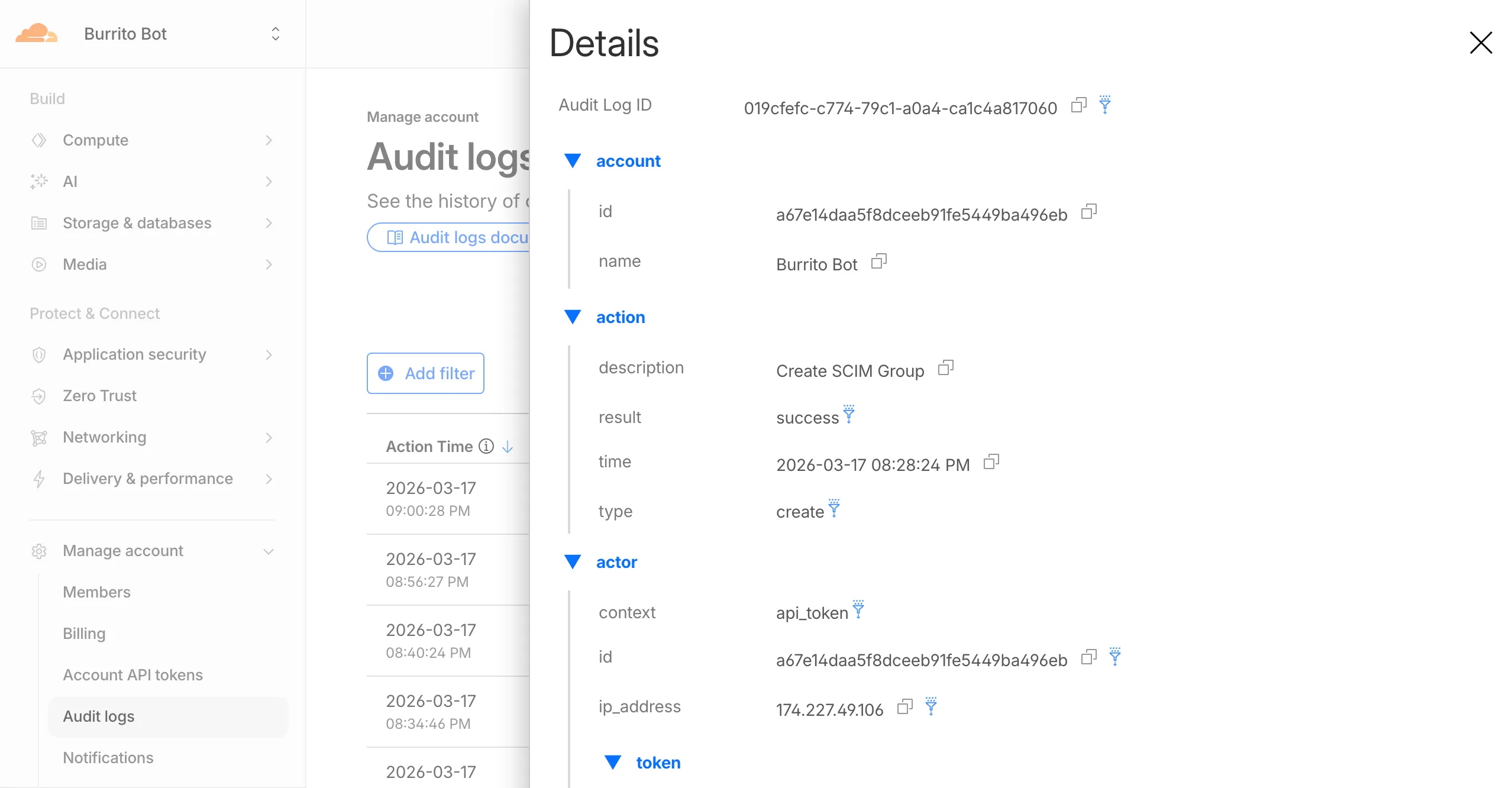
Logged actions:
Action Type Description Create SCIM User User provisioned from IdP Replace SCIM User User fully replaced (PUT) Update SCIM User User attributes modified (PATCH) Delete SCIM User Member deprovisioned Create SCIM Group Group provisioned from IdP Update SCIM Group Group membership or attributes modified Delete SCIM Group Group deprovisioned For more details, refer to the Audit Logs v2 documentation.
The
cf.timings.worker_msecfield is now available in the Ruleset Engine. This field reports the wall-clock time that a Cloudflare Worker spent handling a request, measured in milliseconds.You can use this field to identify slow Worker executions, detect performance regressions, or build rules that respond differently based on Worker processing time, such as logging requests that exceed a latency threshold.
Field Type Description cf.timings.worker_msecInteger The time spent executing a Cloudflare Worker in milliseconds. Returns 0if no Worker was invoked.Example filter expression:
cf.timings.worker_msec > 500For more information, refer to the Fields reference.
We are introducing Logo Match Preview, bringing the same pre-save visibility to visual assets that was previously only available for string-based queries. This update allows you to fine-tune your brand detection strategy before committing to a live monitor.
- Upload your brand logo and immediately see a sample of potential matches from recently detected sites before finalizing the query
- Adjust your similarity score (from 75% to 100%) and watch the results refresh in real-time to find the balance between broad detection and noise reduction
- Review the specific logos triggered by your current settings to ensure your query is capturing the right level of brand infringement
If you are ready to test your brand assets, go to the Brand Protection dashboard ↗ to try the new preview tool.
You can now use a Workers binding to transform videos with Media Transformations. This allows you to resize, crop, extract frames, and extract audio from videos stored anywhere, even in private locations like R2 buckets.
The Media Transformations binding is useful when you want to:
- Transform videos stored in private or protected sources
- Optimize videos and store the output directly back to R2 for re-use
- Extract still frames for classification or description with Workers AI
- Extract audio tracks for transcription using Workers AI
To get started, add the Media binding to your Wrangler configuration:
{"$schema": "./node_modules/wrangler/config-schema.json","media": {"binding": "MEDIA"}}[media]binding = "MEDIA"Then use the binding in your Worker to transform videos:
JavaScript export default {async fetch(request, env) {const video = await env.R2_BUCKET.get("input.mp4");const result = env.MEDIA.input(video.body).transform({ width: 480, height: 270 }).output({ mode: "video", duration: "5s" });return await result.response();},};TypeScript export default {async fetch(request, env) {const video = await env.R2_BUCKET.get("input.mp4");const result = env.MEDIA.input(video.body).transform({ width: 480, height: 270 }).output({ mode: "video", duration: "5s" });return await result.response();},};Output modes include
videofor optimized MP4 clips,framefor still images,spritesheetfor multiple frames, andaudiofor M4A extraction.For more information, refer to the Media Transformations binding documentation.
The latest releases of
@cloudflare/codemode↗ add a new MCP barrel export, removeaiandzodas required peer dependencies from the main entry point, and give you more control over the sandbox.A new
@cloudflare/codemode/mcpentry point provides two functions that wrap MCP servers with Code Mode:codeMcpServer({ server, executor })— wraps an existing MCP server with a singlecodetool where each upstream tool becomes a typedcodemode.*method.openApiMcpServer({ spec, executor, request })— createssearchandexecuteMCP tools from an OpenAPI spec with host-side request proxying and automatic$refresolution.
JavaScript import { codeMcpServer } from "@cloudflare/codemode/mcp";import { DynamicWorkerExecutor } from "@cloudflare/codemode";const executor = new DynamicWorkerExecutor({ loader: env.LOADER });// Wrap an existing MCP server — all its tools become// typed methods the LLM can call from generated codeconst server = await codeMcpServer({ server: upstreamMcp, executor });TypeScript import { codeMcpServer } from "@cloudflare/codemode/mcp";import { DynamicWorkerExecutor } from "@cloudflare/codemode";const executor = new DynamicWorkerExecutor({ loader: env.LOADER });// Wrap an existing MCP server — all its tools become// typed methods the LLM can call from generated codeconst server = await codeMcpServer({ server: upstreamMcp, executor });Breaking change in v0.2.0:
generateTypesand theToolDescriptor/ToolDescriptorstypes have moved to@cloudflare/codemode/ai:JavaScript // Beforeimport { generateTypes } from "@cloudflare/codemode";// Afterimport { generateTypes } from "@cloudflare/codemode/ai";TypeScript // Beforeimport { generateTypes } from "@cloudflare/codemode";// Afterimport { generateTypes } from "@cloudflare/codemode/ai";The main entry point (
@cloudflare/codemode) no longer requires theaiorzodpeer dependencies. It now exports:Export Description sanitizeToolNameSanitize tool names into valid JS identifiers normalizeCodeNormalize LLM-generated code into async arrow functions generateTypesFromJsonSchemaGenerate TypeScript type definitions from plain JSON Schema jsonSchemaToTypeConvert a single JSON Schema to a TypeScript type string DynamicWorkerExecutorSandboxed code execution via Dynamic Worker Loader ToolDispatcherRPC target for dispatching tool calls from sandbox to host The
aiandzodpeer dependencies are now optional — only required when importing from@cloudflare/codemode/ai.DynamicWorkerExecutornow accepts an optionalmodulesoption to inject custom ES modules into the sandbox:JavaScript const executor = new DynamicWorkerExecutor({loader: env.LOADER,modules: {"utils.js": `export function add(a, b) { return a + b; }`,},});// Sandbox code can then: import { add } from "utils.js"TypeScript const executor = new DynamicWorkerExecutor({loader: env.LOADER,modules: {"utils.js": `export function add(a, b) { return a + b; }`,},});// Sandbox code can then: import { add } from "utils.js"DynamicWorkerExecutornow normalizes code and sanitizes tool names internally. You no longer need to callnormalizeCode()orsanitizeToolName()before passing code and functions toexecute().Terminal window npm i @cloudflare/codemode@latestSee the Code Mode documentation for the full API reference.
AI Gateway now supports the
cf-aig-collect-log-payloadheader, which controls whether request and response bodies are stored in logs. By default, this header is set totrueand payloads are stored alongside metadata. Set this header tofalseto skip payload storage while still logging metadata such as token counts, model, provider, status code, cost, and duration.This is useful when you need usage metrics but do not want to persist sensitive prompt or response data.
Terminal window curl https://gateway.ai.cloudflare.com/v1/$ACCOUNT_ID/$GATEWAY_ID/openai/chat/completions \--header "Authorization: Bearer $TOKEN" \--header 'Content-Type: application/json' \--header 'cf-aig-collect-log-payload: false' \--data '{"model": "gpt-4o-mini","messages": [{"role": "user","content": "What is the email address and phone number of user123?"}]}'For more information, refer to Logging.
The Security Overview has been updated to provide Application Security customers with more actionable insights and a clearer view of their security posture.
Key improvements include:
- Criticality for all Insights: Every insight now includes a criticality rating, allowing you to prioritize the most impactful security action items first.
- Detection Tools Section: A new section displays the security detection tools available to you, indicating which are currently enabled and which can be activated to strengthen your defenses.
- Industry Peer Comparison (Enterprise customers): A new module from Security Reports benchmarks your security posture against industry peers, highlighting relative strengths and areas for improvement.
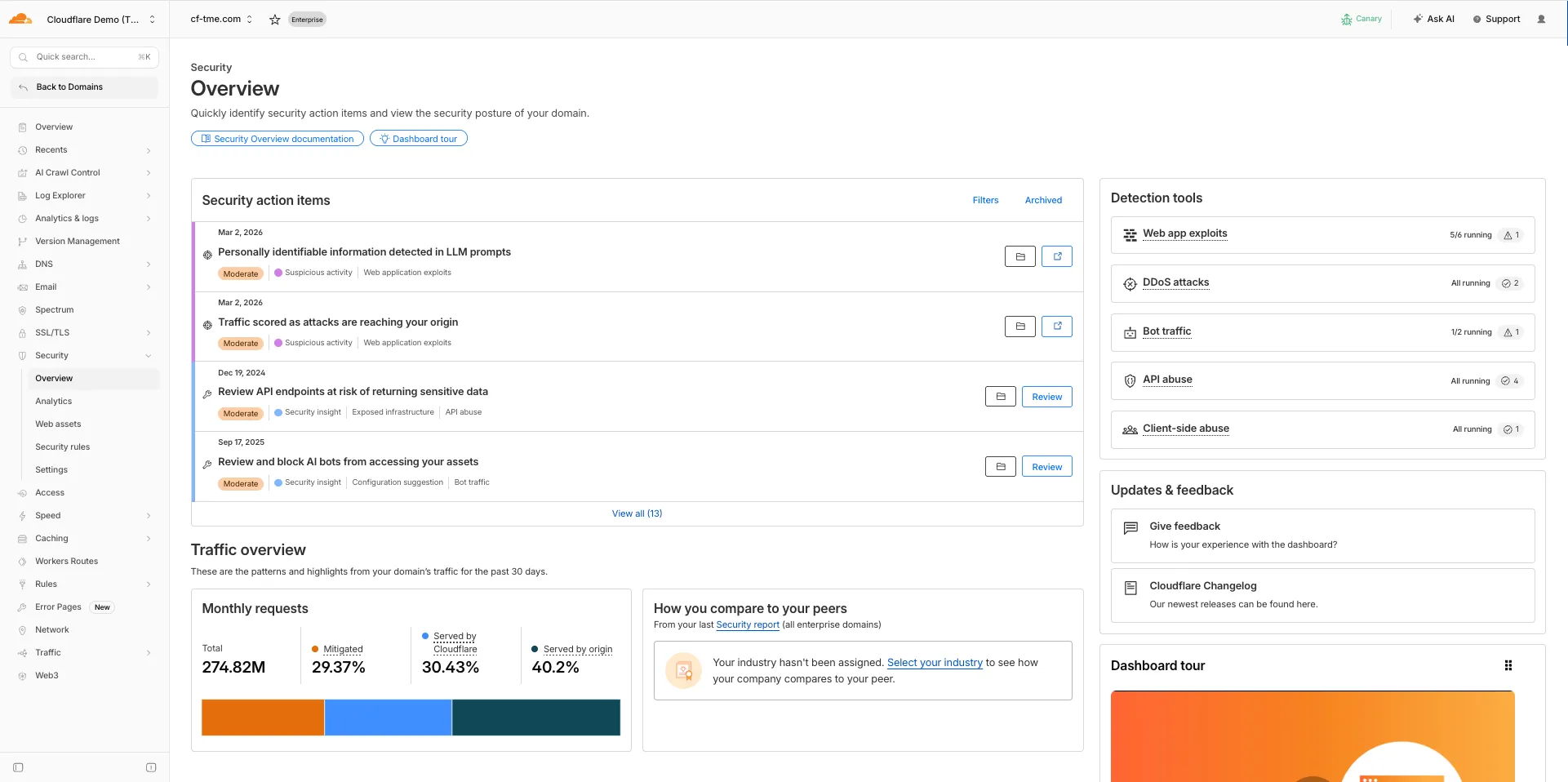
For more information, refer to Security Overview.
You can now set
topKup to50when a Vectorize query returns values or full metadata. This raises the previous limit of20for queries that usereturnValues: trueorreturnMetadata: "all".Use the higher limit when you need more matches in a single query response without dropping values or metadata. Refer to the Vectorize API reference for query options and current
topKlimits.
Announcement Date Release Date Release Behavior Legacy Rule ID Rule ID Description Comments 2026-03-16 2026-03-23 Log N/A Command Injection - Generic 9 - URI Vector This is a new detection. 2026-03-16 2026-03-23 Log N/A Command Injection - Generic 9 - Header Vector This is a new detection. 2026-03-16 2026-03-23 Log N/A Command Injection - Generic 9 - Body Vector This is a new detection. 2026-03-16 2026-03-23 Log N/A PHP, vBulletin, jQuery File Upload - Code Injection, Dangerous File Upload - CVE:CVE-2018-9206, CVE:CVE-2019-17132 (beta) This rule will be merged into the original rule "PHP, vBulletin, jQuery File Upload - Code Injection, Dangerous File Upload - CVE:CVE-2018-9206, CVE:CVE-2019-17132" (ID:
You can now SSH into running Container instances using Wrangler. This is useful for debugging, inspecting running processes, or executing one-off commands inside a Container.
To connect, enable
wrangler_sshin your Container configuration and add yourssh-ed25519public key toauthorized_keys:{"containers": [{"wrangler_ssh": {"enabled": true},"authorized_keys": [{"name": "<NAME>","public_key": "<YOUR_PUBLIC_KEY_HERE>"}]}]}[[containers]][containers.wrangler_ssh]enabled = true[[containers.authorized_keys]]name = "<NAME>"public_key = "<YOUR_PUBLIC_KEY_HERE>"Then connect with:
Terminal window wrangler containers ssh <INSTANCE_ID>You can also run a single command without opening an interactive shell:
Terminal window wrangler containers ssh <INSTANCE_ID> -- ls -alUse
wrangler containers instances <APPLICATION>to find the instance ID for a running Container.For more information, refer to the SSH documentation.
A new
wrangler containers instancescommand lists all instances for a given Container application. This mirrors the instances view in the Cloudflare dashboard.The command displays each instance's ID, name, state, location, version, and creation time:
Terminal window wrangler containers instances <APPLICATION_ID>Use the
--jsonflag for machine-readable output, which is also the default format in non-interactive environments such as CI pipelines.For the full list of options, refer to the
containers instancescommand reference.
Cloudflare-generated 1xxx error responses now include a standard
Retry-AfterHTTP header when the error is retryable. Agents and HTTP clients can read the recommended wait time from response headers alone — no body parsing required.Seven retryable error codes now emit
Retry-After:Error code Retry-After (seconds) Error name 1004 120 DNS resolution error 1005 120 Banned zone 1015 30 Rate limited 1033 120 Argo Tunnel error 1038 60 HTTP headers limit exceeded 1200 60 Cache connection limit 1205 5 Too many redirects The header value matches the existing
retry_afterbody field in JSON and Markdown responses.If a WAF rate limiting rule has already set a dynamic
Retry-Aftervalue on the response, that value takes precedence.Available for all zones on all plans.
Check for the header on any retryable error:
Terminal window curl -s --compressed -D - -o /dev/null -H "Accept: application/json" -A "TestAgent/1.0" -H "Accept-Encoding: gzip, deflate" "<YOUR_DOMAIN>/cdn-cgi/error/1015" | grep -i retry-afterReferences:
This week's release introduces new detections for vulnerabilities in Ivanti Endpoint Manager Mobile (CVE-2026-1281 and CVE-2026-1340), alongside a new generic detection rule designed to identify and block Cross-Site Scripting (XSS) injection attempts within the
Content-Security-Policy(CSP) HTTP request header.Key Findings
- CVE-2026-1281 & CVE-2026-1340: Ivanti Endpoint Manager Mobile processes HTTP requests through Apache RevwriteMap directives that pass user-controlled input to Bash scripts (
/mi/bin/map-appstore-urland/mi/bin/map-aft-store-url). Bash scripts do not sanitize user input and are vulnerable to shell arithmetic expansion thereby allowing attackers to achieve unauthenticated remote code execution. - Generic XSS in CSP Header: This rule identifies malicious payloads embedded within the request's
Content-Security-Policyheader. It specifically targets scenarios where web frameworks or applications trust and extract values directly from the CSP header in the incoming request without sufficient validation. Attackers can provide crafted header values to inject scripts or malicious directives that are subsequently processed by the server.
Impact
Successful exploitation of Ivanti EPMM vulnerability allows unauthenticated remote code execution and generic XSS in CSP header allows attackers to inject malicious scripts during page rendering. In environments using server-side caching, this poisoned XSS content can subsequently be cached and automatically served to all visitors.
Ruleset Rule ID Legacy Rule ID Description Previous Action New Action Comments Cloudflare Managed Ruleset N/A Ivanti EPMM - Code Injection - CVE:CVE-2026-1281 CVE:CVE-2026-1340 Log Block This is a new detection. Cloudflare Managed Ruleset N/A Anomaly:Header:Content-Security-Policy N/A Block This is a new detection. - CVE-2026-1281 & CVE-2026-1340: Ivanti Endpoint Manager Mobile processes HTTP requests through Apache RevwriteMap directives that pass user-controlled input to Bash scripts (
Cloudflare-generated 1xxx errors now return structured JSON when clients send
Accept: application/jsonorAccept: application/problem+json. JSON responses follow RFC 9457 (Problem Details for HTTP APIs) ↗, so any HTTP client that understands Problem Details can parse the base members without Cloudflare-specific code.The Markdown frontmatter field
http_statushas been renamed tostatus. Agents consuming Markdown frontmatter should update parsers accordingly.JSON format. Clients sending
Accept: application/jsonorAccept: application/problem+jsonnow receive a structured JSON object with the same operational fields as Markdown frontmatter, plus RFC 9457 standard members.RFC 9457 standard members (JSON only):
type— URI pointing to Cloudflare documentation for the specific error codestatus— HTTP status code (matching the response status)title— short, human-readable summarydetail— human-readable explanation specific to this occurrenceinstance— Ray ID identifying this specific error occurrence
Field renames:
http_status->status(JSON and Markdown)what_happened->detail(JSON only — Markdown prose sections are unchanged)
Content-Type mirroring. Clients sending
Accept: application/problem+jsonreceiveContent-Type: application/problem+json; charset=utf-8back;Accept: application/jsonreceivesapplication/json; charset=utf-8. Same body in both cases.Request header sent Response format Accept: application/jsonJSON ( application/jsoncontent type)Accept: application/problem+jsonJSON ( application/problem+jsoncontent type)Accept: application/json, text/markdown;q=0.9JSON Accept: text/markdownMarkdown Accept: text/markdown, application/jsonMarkdown (equal q, first-listed wins)Accept: */*HTML (default) Available now for Cloudflare-generated 1xxx errors.
Terminal window curl -s --compressed -H "Accept: application/json" -A "TestAgent/1.0" -H "Accept-Encoding: gzip, deflate" "<YOUR_DOMAIN>/cdn-cgi/error/1015" | jq .Terminal window curl -s --compressed -H "Accept: application/problem+json" -A "TestAgent/1.0" -H "Accept-Encoding: gzip, deflate" "<YOUR_DOMAIN>/cdn-cgi/error/1015" | jq .References:
Cloudflare Log Explorer now allows you to customize exactly which data fields are ingested and stored when enabling or managing log datasets.
Previously, ingesting logs often meant taking an "all or nothing" approach to data fields. With Ingest Field Selection, you can now choose from a list of available and recommended fields for each dataset. This allows you to reduce noise, focus on the metrics that matter most to your security and performance analysis, and manage your data footprint more effectively.
- Granular control: Select only the specific fields you need when enabling a new dataset.
- Dynamic updates: Update fields for existing, already enabled logstreams at any time.
- Historical consistency: Even if you disable a field later, you can still query and receive results for that field for the period it was captured.
- Data integrity: Core fields, such as
Timestamp, are automatically retained to ensure your logs remain searchable and chronologically accurate.
When configuring a dataset via the dashboard or API, you can define a specific set of fields. The
Timestampfield remains mandatory to ensure data indexability.{"dataset": "firewall_events","enabled": true,"fields": ["Timestamp","ClientRequestHost","ClientIP","Action","EdgeResponseStatus","OriginResponseStatus"]}For more information, refer to the Log Explorer documentation.
We're excited to partner with NVIDIA to bring
@cf/nvidia/nemotron-3-120b-a12bto Workers AI. NVIDIA Nemotron 3 Super is a Mixture-of-Experts (MoE) model with a hybrid Mamba-transformer architecture, 120B total parameters, and 12B active parameters per forward pass.The model is optimized for running many collaborating agents per application. It delivers high accuracy for reasoning, tool calling, and instruction following across complex multi-step tasks.
Key capabilities:
- Hybrid Mamba-transformer architecture delivers over 50% higher token generation throughput compared to leading open models, reducing latency for real-world applications
- Tool calling support for building AI agents that invoke tools across multiple conversation turns
- Multi-Token Prediction (MTP) accelerates long-form text generation by predicting several future tokens simultaneously in a single forward pass
- 32,000 token context window for retaining conversation history and plan states across multi-step agent workflows
Use Nemotron 3 Super through the Workers AI binding (
env.AI.run()), the REST API at/runor/v1/chat/completions, or the OpenAI-compatible endpoint.For more information, refer to the Nemotron 3 Super model page.
A new Beta release for the macOS WARP client is now available on the beta releases downloads page.
This release contains minor fixes and introduces a brand new visual style for the client interface. The new Cloudflare One Client interface changes connectivity management from a toggle to a button and brings useful connectivity settings to the home screen. The redesign also introduces a collapsible navigation bar. When expanded, more client information can be accessed including connectivity, settings, and device profile information. If you have any feedback or questions, visit the Cloudflare Community forum and let us know.
Changes and improvements
- Empty MDM files are now rejected instead of being incorrectly accepted as a single MDM config.
- Fixed an issue in proxy mode where the client could become unresponsive due to upstream connection timeouts.
- Fixed emergency disconnect state from a previous organization incorrectly persisting after switching organizations.
- Consumer-only CLI commands are now clearly distinguished from Zero Trust commands.
- Added detailed QUIC connection metrics to diagnostic logs for better troubleshooting.
- Added monitoring for tunnel statistics collection timeouts.
- Switched tunnel congestion control algorithm to Cubic for improved reliability across platforms.
- Fixed initiating managed network detection checks when no network is available, which caused device profile flapping.
Known issues
- The client may become stuck in a
Connectingstate. To resolve this issue, reconnect the client by selecting Disconnect and then Connect in the client user interface. Alternatively, change the client's operation mode. - The client may display an empty white screen upon the device waking from sleep. To resolve this issue, exit and then open the client to re-launch it.
- Canceling login during a single MDM configuration setup results in an empty page with no way to resume authentication. To work around this issue, exit and relaunch the client.
A new Beta release for the Windows WARP client is now available on the beta releases downloads page.
This release contains minor fixes and introduces a brand new visual style for the client interface. The new Cloudflare One Client interface changes connectivity management from a toggle to a button and brings useful connectivity settings to the home screen. The redesign also introduces a collapsible navigation bar. When expanded, more client information can be accessed including connectivity, settings, and device profile information. If you have any feedback or questions, visit the Cloudflare Community forum and let us know.
Changes and improvements
- Consumer-only CLI commands are now clearly distinguished from Zero Trust commands.
- Added detailed QUIC connection metrics to diagnostic logs for better troubleshooting.
- Added monitoring for tunnel statistics collection timeouts.
- Switched tunnel congestion control algorithm to Cubic for improved reliability across platforms.
- Fixed packet capture failing on tunnel interface when the tunnel interface is renamed by SCCM VPN boundary support.
- Fixed unnecessary registration deletion caused by RDP connections in multi-user mode.
- Fixed increased tunnel interface start-up time due to a race between duplicate address detection (DAD) and disabling NetBT.
- Fixed tunnel failing to connect when the system DNS search list contains unexpected characters.
- Empty MDM files are now rejected instead of being incorrectly accepted as a single MDM config.
- Fixed an issue in proxy mode where the client could become unresponsive due to upstream connection timeouts.
- Fixed emergency disconnect state from a previous organization incorrectly persisting after switching organizations.
- Fixed initiating managed network detection checks when no network is available, which caused device profile flapping.
Known issues
- The client may unexpectedly terminate during captive portal login. To work around this issue, use a web browser to authenticate with the captive portal and then re-launch the client.
- An error indicating that Microsoft Edge can't read and write to its data directory may be displayed during captive portal login; this error is benign and can be dismissed.
- The client may become stuck in a
Connectingstate. To resolve this issue, reconnect the client by selecting Disconnect and then Connect in the client user interface. Alternatively, change the client's operation mode. - The client may display an empty white screen upon the device waking from sleep. To resolve this issue, exit and then open the client to re-launch it.
- Canceling login during a single MDM configuration setup results in an empty page with no way to resume authentication. To work around this issue, exit and relaunch the client.
- For Windows 11 24H2 users, Microsoft has confirmed a regression that may lead to performance issues like mouse lag, audio cracking, or other slowdowns. Cloudflare recommends users experiencing these issues upgrade to a minimum Windows 11 24H2 version KB5062553 or higher for resolution.
- Devices with KB5055523 installed may receive a warning about
Win32/ClickFix.ABAbeing present in the installer. To resolve this false positive, update Microsoft Security Intelligence to version 1.429.19.0 or later. This warning will be omitted from future release notes. This Microsoft Security Intelligence update was released in May 2025. - DNS resolution may be broken when the following conditions are all true:
- The client is in Secure Web Gateway without DNS filtering (tunnel-only) mode.
- A custom DNS server address is configured on the primary network adapter.
- The custom DNS server address on the primary network adapter is changed while the client is connected. To work around this issue, reconnect the client by selecting Disconnect and then Connect in the client user interface.
Audit Logs v2 is now generally available to all Cloudflare customers.

Audit Logs v2 provides a unified and standardized system for tracking and recording all user and system actions across Cloudflare products. Built on Cloudflare's API Shield / OpenAPI gateway, logs are generated automatically without requiring manual instrumentation from individual product teams, ensuring consistency across ~95% of Cloudflare products.
What's available at GA:
- Standardized logging — Audit logs follow a consistent format across all Cloudflare products, making it easier to search, filter, and investigate activity.
- Expanded product coverage — ~95% of Cloudflare products covered, up from ~75% in v1.
- Granular filtering — Filter by actor, action type, action result, resource, raw HTTP method, zone, and more. Over 20 filter parameters available via the API.
- Enhanced context — Each log entry includes authentication method, interface (API or dashboard), Cloudflare Ray ID, and actor token details.
- 18-month retention — Logs are retained for 18 months. Full history is accessible via the API or Logpush.
Access:
- Dashboard: Go to Manage Account > Audit Logs. Audit Logs v2 is shown by default.
- API:
GET https://api.cloudflare.com/client/v4/accounts/{account_id}/logs/audit - Logpush: Available via the
audit_logs_v2account-scoped dataset.
Important notes:
- Approximately 30 days of logs from the Beta period (back to ~February 8, 2026) are available at GA. These Beta logs will expire on ~April 9, 2026. Logs generated after GA will be retained for the full 18 months. Older logs remain available in Audit Logs v1.
- The UI query window is limited to 90 days for performance reasons. Use the API or Logpush for access to the full 18-month history.
GETrequests (view actions) and4xxerror responses are not logged at GA.GETlogging will be selectively re-enabled for sensitive read operations in a future release.- Audit Logs v1 continues to run in parallel. A deprecation timeline will be communicated separately.
- Before and after values — the ability to see what a value changed from and to — is a highly requested feature and is on our roadmap for a post-GA release. In the meantime, we recommend using Audit Logs v1 for before and after values. Audit Logs v1 will continue to run in parallel until this feature is available in v2.
For more details, refer to the Audit Logs v2 documentation.
Edit: this post has been edited to clarify crawling behavior with respect to site guidance.
You can now crawl an entire website with a single API call using Browser Rendering's new
/crawlendpoint, available in open beta. Submit a starting URL, and pages are automatically discovered, rendered in a headless browser, and returned in multiple formats, including HTML, Markdown, and structured JSON. The endpoint is a signed-agent ↗ that respects robots.txt and AI Crawl Control ↗ by default, making it easy for developers to comply with website rules, and making it less likely for crawlers to ignore web-owner guidance. This is great for training models, building RAG pipelines, and researching or monitoring content across a site.Crawl jobs run asynchronously. You submit a URL, receive a job ID, and check back for results as pages are processed.
Terminal window # Initiate a crawlcurl -X POST 'https://api.cloudflare.com/client/v4/accounts/{account_id}/browser-rendering/crawl' \-H 'Authorization: Bearer <apiToken>' \-H 'Content-Type: application/json' \-d '{"url": "https://blog.cloudflare.com/"}'# Check resultscurl -X GET 'https://api.cloudflare.com/client/v4/accounts/{account_id}/browser-rendering/crawl/{job_id}' \-H 'Authorization: Bearer <apiToken>'Key features:
- Multiple output formats - Return crawled content as HTML, Markdown, and structured JSON (powered by Workers AI)
- Crawl scope controls - Configure crawl depth, page limits, and wildcard patterns to include or exclude specific URL paths
- Automatic page discovery - Discovers URLs from sitemaps, page links, or both
- Incremental crawling - Use
modifiedSinceandmaxAgeto skip pages that haven't changed or were recently fetched, saving time and cost on repeated crawls - Static mode - Set
render: falseto fetch static HTML without spinning up a browser, for faster crawling of static sites - Well-behaved bot - Honors
robots.txtdirectives, includingcrawl-delay
Available on both the Workers Free and Paid plans.
Note: the /crawl endpoint cannot bypass Cloudflare bot detection or captchas, and self-identifies as a bot.
To get started, refer to the crawl endpoint documentation. If you are setting up your own site to be crawled, review the robots.txt and sitemaps best practices.