

Introducing Cloudflare's Web and API Vulnerability Scanner (Open Beta)
Cloudflare is launching the Open Beta of the Web and API Vulnerability Scanner ↗ for all API Shield customers. This new, stateful Dynamic Application Security Testing (DAST) platform helps teams proactively find logic flaws in their APIs.
The initial release focuses on detecting Broken Object Level Authorization (BOLA) vulnerabilities by building API call graphs to simulate attacker and owner contexts, then testing these contexts by sending real HTTP requests to your APIs.
The scanner is now available via the Cloudflare API. To scan, set up your target environment, owner and attacker credentials, and upload your OpenAPI file with response schemas. The scanner will be available in the Cloudflare dashboard in a future release.
Access: This feature is only available to API Shield subscribers via the Cloudflare API. We hope you will use the API for programmatic integration into your CI/CD pipelines and security dashboards.
Documentation: Refer to the developer documentation to start scanning your endpoints today.
Cloudflare has added new fields across multiple Logpush datasets:
- MCP Portal Logs: A new dataset with fields including
ClientCountry,ClientIP,ColoCode,Datetime,Error,Method,PortalAUD,PortalID,PromptGetName,ResourceReadURI,ServerAUD,ServerID,ServerResponseDurationMs,ServerURL,SessionID,Success,ToolCallName,UserEmail, andUserID.
- DEX Application Tests:
HTTPRedirectEndMs,HTTPRedirectStartMs,HTTPResponseBody, andHTTPResponseHeaders. - DEX Device State Events:
ExperimentalExtra. - Firewall Events:
FraudUserID. - Gateway HTTP:
AppControlInfoandApplicationStatuses. - Gateway DNS:
InternalDNSDurationMs. - HTTP Requests:
FraudEmailRisk,FraudUserID, andPayPerCrawlStatus. - Network Analytics Logs:
DNSQueryName,DNSQueryType, andPFPCustomTag. - WARP Toggle Changes:
UserEmail. - WARP Config Changes:
UserEmail. - Zero Trust Network Session Logs:
SNI.
For the complete field definitions for each dataset, refer to Logpush datasets.
- MCP Portal Logs: A new dataset with fields including
Cloudflare Workflows allows you to configure specific retry logic for each step in your workflow execution. Now, you can access which retry attempt is currently executing for calls to
step.do():TypeScript await step.do("my-step", async (ctx) => {// ctx.attempt is 1 on first try, 2 on first retry, etc.console.log(`Attempt ${ctx.attempt}`);});You can use the step context for improved logging & observability, progressive backoff, or conditional logic in your workflow definition.
Note that the current attempt number is 1-indexed. For more information on retry behavior, refer to Sleeping and Retrying.
Radar ships several new features that improve the flexibility and usability of the platform, as well as visibility into what is happening on the Internet.
All location-aware pages now support filtering by region, including continents, geographic subregions (Middle East ↗, Eastern Asia ↗, etc.), political regions (EU ↗, African Union ↗), and US Census regions/divisions (for example, New England ↗, US Northeast ↗).
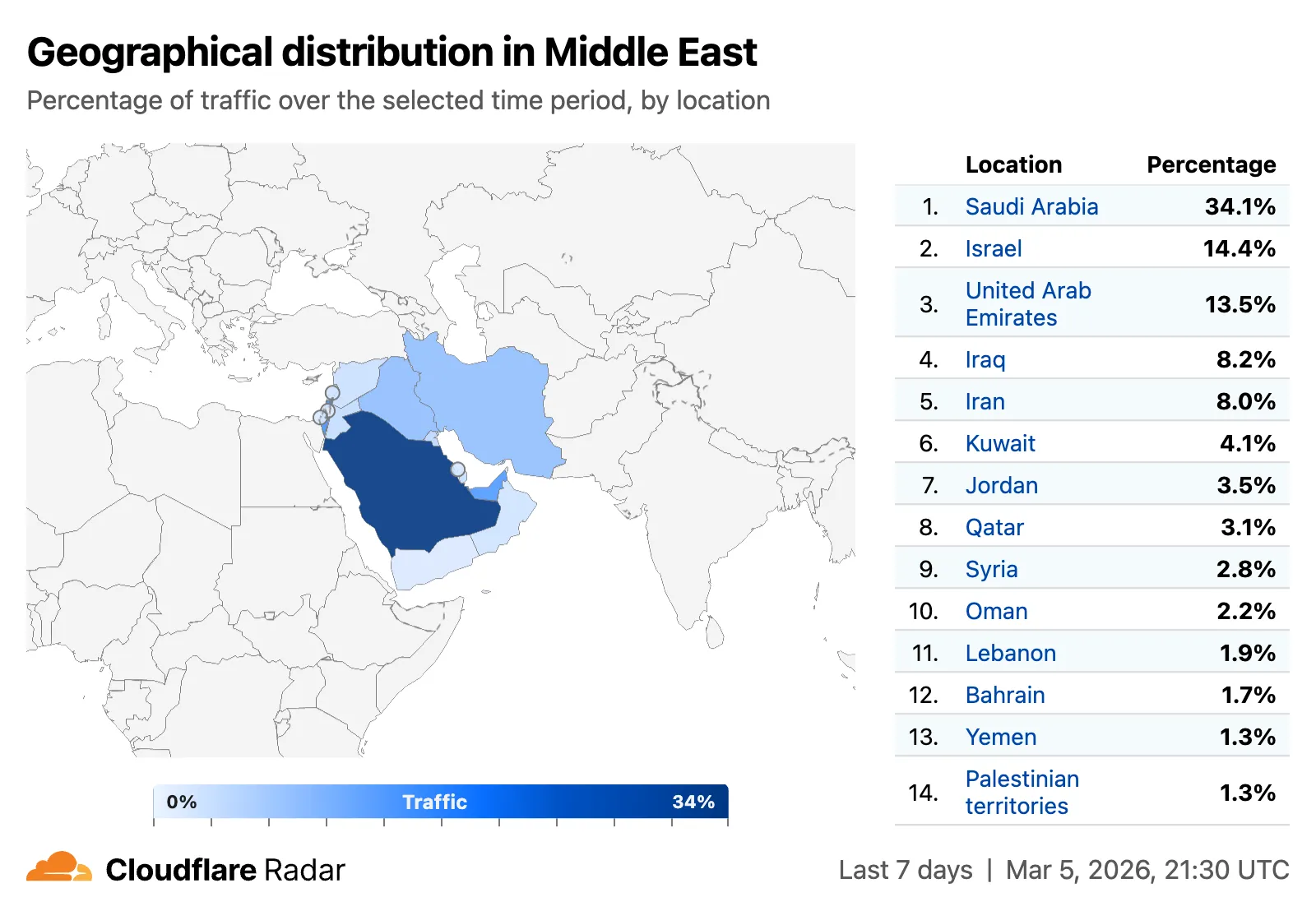
A new traffic volume view shows the top autonomous systems and countries/territories for a given location. This is useful for quickly determining which network providers in a location may be experiencing connectivity issues, or how traffic is distributed across a region.
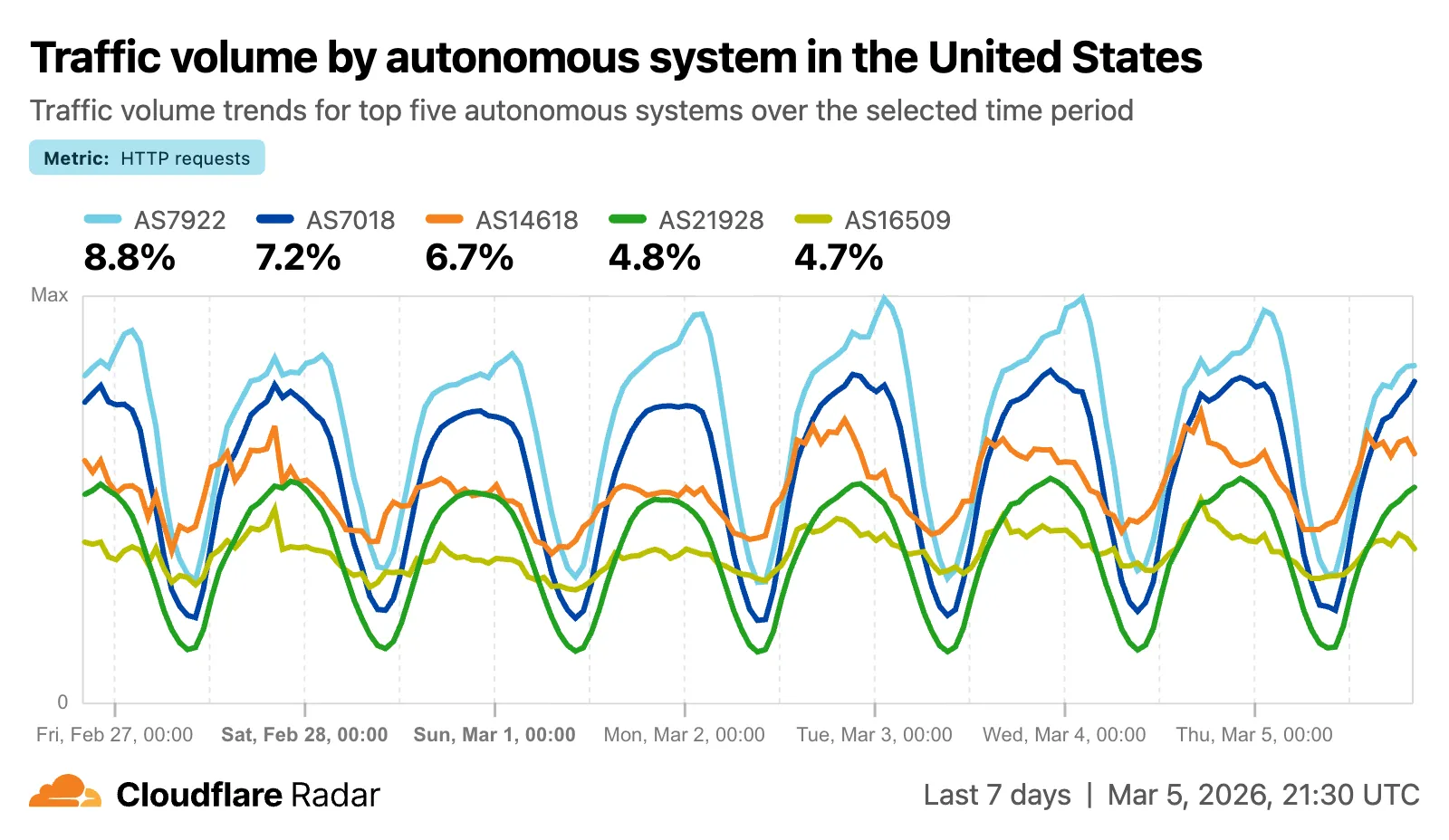
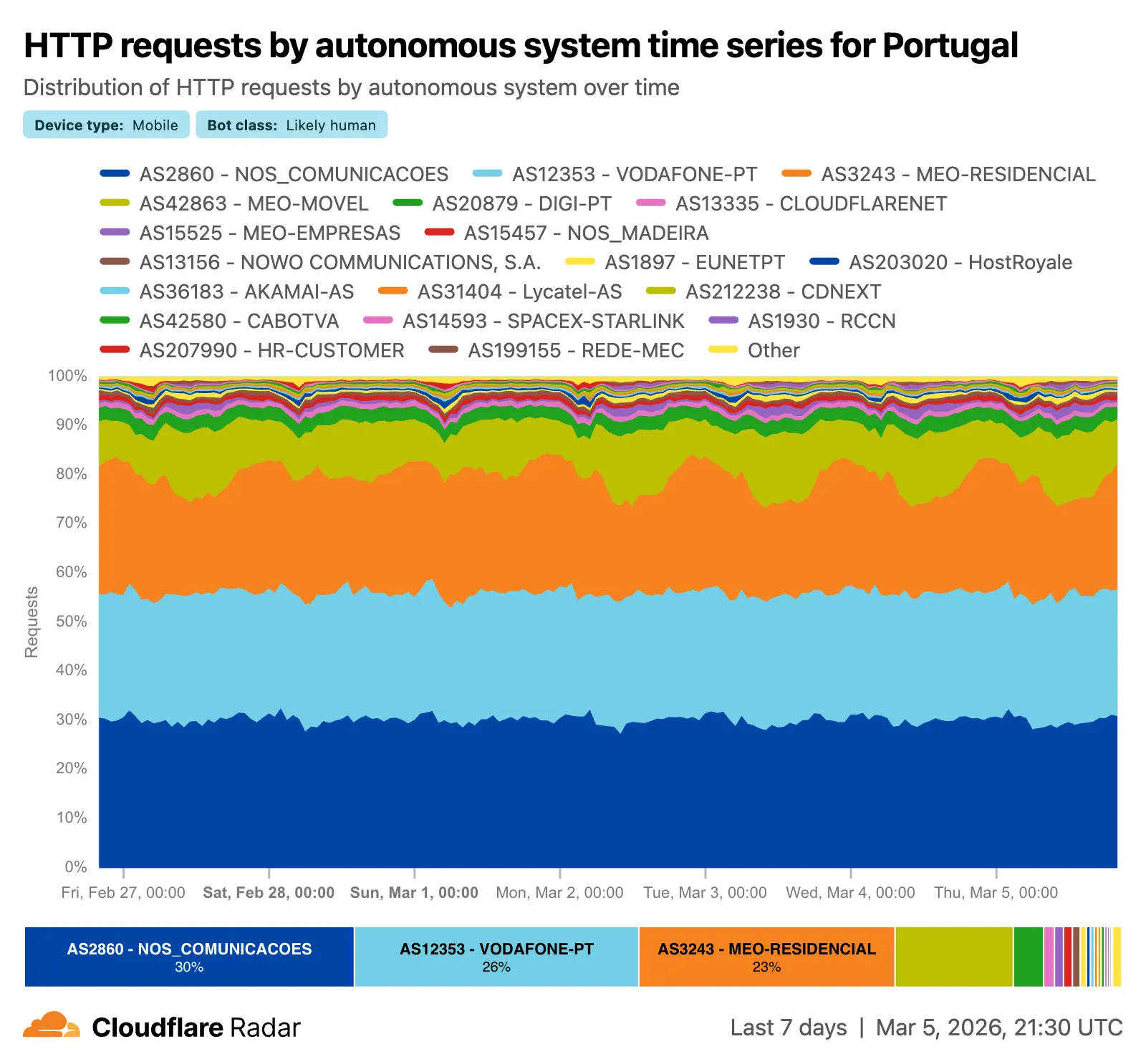
The new AS and location dimensions have also been added to the Data Explorer ↗ for the HTTP, DNS, and NetFlows datasets. Combined with other available filters, this provides a powerful tool for generating unique insights.
Finally, breadcrumb navigation is now available on most pages, allowing easier navigation between parent and related pages.
Check out these features on Cloudflare Radar ↗.
Real-time transcription in RealtimeKit now supports 10 languages with regional variants, powered by Deepgram Nova-3 running on Workers AI.
During a meeting, participant audio is routed through AI Gateway to Nova-3 on Workers AI — so transcription runs on Cloudflare's network end-to-end, reducing latency compared to routing through external speech-to-text services.
Set the language when creating a meeting via
ai_config.transcription.language:{"ai_config": {"transcription": {"language": "fr"}}}Supported languages include English, Spanish, French, German, Hindi, Russian, Portuguese, Japanese, Italian, and Dutch — with regional variants like
en-AU,en-GB,en-IN,en-NZ,es-419,fr-CA,de-CH,pt-BR, andpt-PT. Usemultifor automatic multilingual detection.If you are building voice agents or real-time translation workflows, your agent can now transcribe in the caller's language natively — no extra services or routing logic needed.
We have introduced new triage controls to help you manage your Brand Protection results more efficiently. You can now clear out the noise by dismissing matches while maintaining full visibility into your historical decisions.
- Dismiss matches: Users can now mark specific results as dismissed if they are determined to be benign or false positives, removing them from the primary triage view.
- Show/Hide toggle: A new visibility control allows you to instantly switch between viewing only active matches and including previously dismissed ones.
- Persistent review states: Dismissed status is saved across sessions, ensuring that your workspace remains organized and focused on new or high-priority threats.
- Reduce alert fatigue by hiding known-safe results, allowing your team to focus exclusively on unreviewed or high-risk infringements.
- Auditability and recovery through the visibility toggle, ensuring that no match is ever truly "lost" and can be re-evaluated if a site's content changes.
- Improved collaboration as your team members can see which matches have already been vetted and dismissed by others.
Ready to clean up your match queue? Learn more in our Brand Protection documentation.
Browser Rendering REST API rate limits for Workers Paid plans have been increased from 3 requests per second (180/min) to 10 requests per second (600/min). No action is needed to benefit from the higher limit.

The REST API lets you perform common browser tasks with a single API call, and you can now do it at a higher rate.
- /content - Fetch HTML
- /screenshot - Capture screenshot
- /pdf - Render PDF
- /markdown - Extract Markdown from a webpage
- /snapshot - Take a webpage snapshot
- /scrape - Scrape HTML elements
- /json - Capture structured data using AI
- /links - Retrieve links from a webpage
If you use the Workers Bindings method, increases to concurrent browser and new browser limits are coming soon. Stay tuned.
For full details, refer to the Browser Rendering limits page.
You can now use user risk scores in your Access policies. The new User Risk Score selector allows you to create Access policies that respond to user behavior patterns detected by Cloudflare's risk scoring system, including impossible travel, high DLP policy matches, and more.
For more information, refer to Use risk scores in Access policies.
The Gateway Authorization Proxy and PAC file hosting are now in open beta for all plan types.
Previously, proxy endpoints relied on static source IP addresses to authorize traffic, providing no user-level identity in logs or policies. The new authorization proxy replaces IP-based authorization with Cloudflare Access authentication, verifying who a user is before applying Gateway filtering without installing the WARP client.
This is ideal for environments where you cannot deploy a device client, such as virtual desktops (VDI), mergers and acquisitions, or compliance-restricted endpoints.
- Identity-aware proxy traffic — Users authenticate through your identity provider (Okta, Microsoft Entra ID, Google Workspace, and others) via Cloudflare Access. Logs now show exactly which user accessed which site, and you can write identity-based policies like "only the Finance team can access this accounting tool."
- Multiple identity providers — Display one or multiple login methods simultaneously, giving flexibility for organizations managing users across different identity systems.
- Cloudflare-hosted PAC files — Create and host PAC files directly in Cloudflare One with pre-configured templates for Okta and Azure, hosted at
https://pac.cloudflare-gateway.com/<account-id>/<slug>on Cloudflare's global network. - Simplified billing — Each user occupies a seat, exactly like they do with the Cloudflare One Client. No new metrics to track.
- In Cloudflare One ↗, go to Networks > Resolvers & Proxies > Proxy endpoints.
- Create an authorization proxy endpoint and configure Access policies.
- Create a hosted PAC file or write your own.
- Configure browsers to use the PAC file URL.
- Install the Cloudflare certificate for HTTPS inspection.
For more details, refer to the proxy endpoints documentation and the announcement blog post ↗.
You can now customize how the Markdown Conversion service processes different file types by passing a
conversionOptionsobject.Available options:
- Images: Set the language for AI-generated image descriptions
- HTML: Use CSS selectors to extract specific content, or provide a hostname to resolve relative links
- PDF: Exclude metadata from the output
Use the
env.AIbinding:JavaScript await env.AI.toMarkdown({ name: "page.html", blob: new Blob([html]) },{conversionOptions: {html: { cssSelector: "article.content" },image: { descriptionLanguage: "es" },},},);TypeScript await env.AI.toMarkdown({ name: "page.html", blob: new Blob([html]) },{conversionOptions: {html: { cssSelector: "article.content" },image: { descriptionLanguage: "es" },},},);Or call the REST API:
Terminal window curl https://api.cloudflare.com/client/v4/accounts/{ACCOUNT_ID}/ai/tomarkdown \-H 'Authorization: Bearer {API_TOKEN}' \-F 'files=@index.html' \-F 'conversionOptions={"html": {"cssSelector": "article.content"}}'For more details, refer to Conversion Options.
Each Workflow on Workers Paid now supports 10,000 steps by default, configurable up to 25,000 steps in your
wrangler.jsoncfile:{"workflows": [{"name": "my-workflow","binding": "MY_WORKFLOW","class_name": "MyWorkflow","limits": {"steps": 25000}}]}Previously, each instance was limited to 1,024 steps. Now, Workflows can support more complex, long-running executions without the additional complexity of recursive or child workflow calls.
Note that the maximum persisted state limit per Workflow instance remains 100 MB for Workers Free and 1 GB for Workers Paid. Refer to Workflows limits for more information.
Sandboxes now support real-time filesystem watching via
sandbox.watch(). The method returns a Server-Sent Events ↗ stream backed by native inotify, so your Worker receivescreate,modify,delete, andmoveevents as they happen inside the container.Pass a directory path and optional filters. The returned stream is a standard
ReadableStreamyou can proxy directly to a browser client or consume server-side.JavaScript // Stream events to a browser clientconst stream = await sandbox.watch("/workspace/src", {recursive: true,include: ["*.ts", "*.js"],});return new Response(stream, {headers: { "Content-Type": "text/event-stream" },});TypeScript // Stream events to a browser clientconst stream = await sandbox.watch("/workspace/src", {recursive: true,include: ["*.ts", "*.js"],});return new Response(stream, {headers: { "Content-Type": "text/event-stream" },});Use
parseSSEStreamto iterate over events inside a Worker without forwarding them to a client.JavaScript import { parseSSEStream } from "@cloudflare/sandbox";const stream = await sandbox.watch("/workspace/src", { recursive: true });for await (const event of parseSSEStream(stream)) {console.log(event.type, event.path);}TypeScript import { parseSSEStream } from "@cloudflare/sandbox";import type { FileWatchSSEEvent } from "@cloudflare/sandbox";const stream = await sandbox.watch("/workspace/src", { recursive: true });for await (const event of parseSSEStream<FileWatchSSEEvent>(stream)) {console.log(event.type, event.path);}Each event includes a
typefield (create,modify,delete, ormove) and the affectedpath. Move events also include afromfield with the original path.Option Type Description recursivebooleanWatch subdirectories. Defaults to false.includestring[]Glob patterns to filter events. Omit to receive all events. To update to the latest version:
Terminal window npm i @cloudflare/sandbox@latestFor full API details, refer to the Sandbox file watching reference.
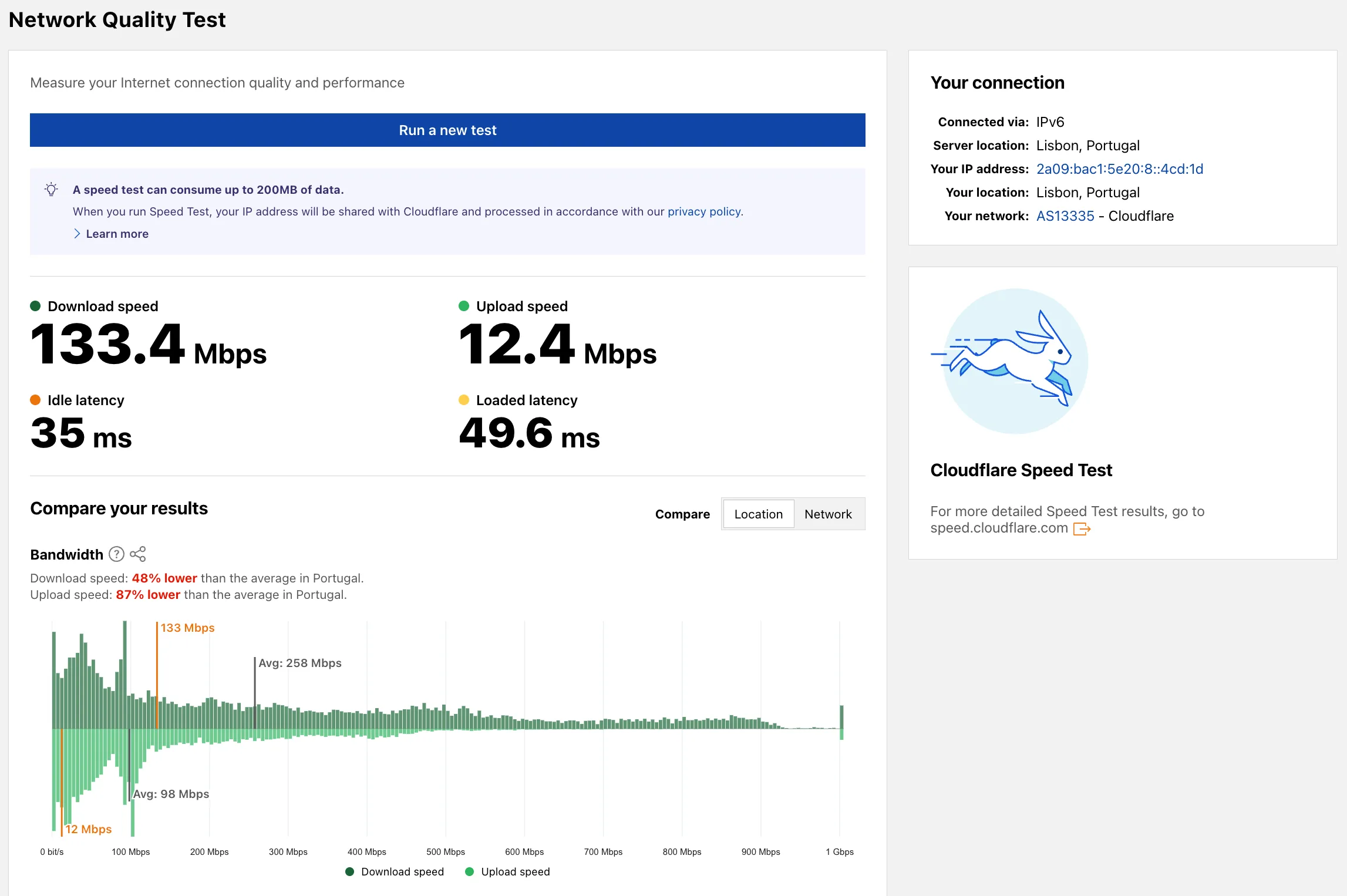
Radar now includes a Network Quality Test ↗ page. The tool measures Internet connection quality and performance, showing connection details such as IP address, server location, network (ASN), and IP version. For more detailed speed test results, the page links to speed.cloudflare.com ↗.
The latest release of the Agents SDK ↗ rewrites observability from scratch with
diagnostics_channel, addskeepAlive()to prevent Durable Object eviction during long-running work, and introduceswaitForMcpConnectionsso MCP tools are always available whenonChatMessageruns.The previous observability system used
console.log()with a customObservability.emit()interface. v0.7.0 replaces it with structured events published to diagnostics channels — silent by default, zero overhead when nobody is listening.Every event has a
type,payload, andtimestamp. Events are routed to seven named channels:Channel Event types agents:statestate:updateagents:rpcrpc,rpc:erroragents:messagemessage:request,message:response,message:clear,message:cancel,message:error,tool:result,tool:approvalagents:scheduleschedule:create,schedule:execute,schedule:cancel,schedule:retry,schedule:error,queue:retry,queue:erroragents:lifecycleconnect,destroyagents:workflowworkflow:start,workflow:event,workflow:approved,workflow:rejected,workflow:terminated,workflow:paused,workflow:resumed,workflow:restartedagents:mcpmcp:client:preconnect,mcp:client:connect,mcp:client:authorize,mcp:client:discoverUse the typed
subscribe()helper fromagents/observabilityfor type-safe access:JavaScript import { subscribe } from "agents/observability";const unsub = subscribe("rpc", (event) => {if (event.type === "rpc") {console.log(`RPC call: ${event.payload.method}`);}if (event.type === "rpc:error") {console.error(`RPC failed: ${event.payload.method} — ${event.payload.error}`,);}});// Clean up when doneunsub();TypeScript import { subscribe } from "agents/observability";const unsub = subscribe("rpc", (event) => {if (event.type === "rpc") {console.log(`RPC call: ${event.payload.method}`);}if (event.type === "rpc:error") {console.error(`RPC failed: ${event.payload.method} — ${event.payload.error}`,);}});// Clean up when doneunsub();In production, all diagnostics channel messages are automatically forwarded to Tail Workers — no subscription code needed in the agent itself:
JavaScript export default {async tail(events) {for (const event of events) {for (const msg of event.diagnosticsChannelEvents) {// msg.channel is "agents:rpc", "agents:workflow", etc.console.log(msg.timestamp, msg.channel, msg.message);}}},};TypeScript export default {async tail(events) {for (const event of events) {for (const msg of event.diagnosticsChannelEvents) {// msg.channel is "agents:rpc", "agents:workflow", etc.console.log(msg.timestamp, msg.channel, msg.message);}}},};The custom
Observabilityoverride interface is still supported for users who need to filter or forward events to external services.For the full event reference, refer to the Observability documentation.
Durable Objects are evicted after a period of inactivity (typically 70-140 seconds with no incoming requests, WebSocket messages, or alarms). During long-running operations — streaming LLM responses, waiting on external APIs, running multi-step computations — the agent can be evicted mid-flight.
keepAlive()prevents this by creating a 30-second heartbeat schedule. The alarm firing resets the inactivity timer. Returns a disposer function that cancels the heartbeat when called.JavaScript const dispose = await this.keepAlive();try {const result = await longRunningComputation();await sendResults(result);} finally {dispose();}TypeScript const dispose = await this.keepAlive();try {const result = await longRunningComputation();await sendResults(result);} finally {dispose();}keepAliveWhile()wraps an async function with automatic cleanup — the heartbeat starts before the function runs and stops when it completes:JavaScript const result = await this.keepAliveWhile(async () => {const data = await longRunningComputation();return data;});TypeScript const result = await this.keepAliveWhile(async () => {const data = await longRunningComputation();return data;});Key details:
- Multiple concurrent callers — Each
keepAlive()call returns an independent disposer. Disposing one does not affect others. - AIChatAgent built-in —
AIChatAgentautomatically callskeepAlive()during streaming responses. You do not need to add it yourself. - Uses the scheduling system — The heartbeat does not conflict with your own schedules. It shows up in
getSchedules()if you need to inspect it.
For the full API reference and when-to-use guidance, refer to Schedule tasks — Keeping the agent alive.
AIChatAgentnow waits for MCP server connections to settle before callingonChatMessage. This ensuresthis.mcp.getAITools()returns the full set of tools, especially after Durable Object hibernation when connections are being restored in the background.JavaScript export class ChatAgent extends AIChatAgent {// Default — waits up to 10 seconds// waitForMcpConnections = { timeout: 10_000 };// Wait foreverwaitForMcpConnections = true;// Disable waitingwaitForMcpConnections = false;}TypeScript export class ChatAgent extends AIChatAgent {// Default — waits up to 10 seconds// waitForMcpConnections = { timeout: 10_000 };// Wait foreverwaitForMcpConnections = true;// Disable waitingwaitForMcpConnections = false;}Value Behavior { timeout: 10_000 }Wait up to 10 seconds (default) { timeout: N }Wait up to NmillisecondstrueWait indefinitely until all connections ready falseDo not wait (old behavior before 0.2.0) For lower-level control, call
this.mcp.waitForConnections()directly insideonChatMessageinstead.- MCP deduplication by name and URL —
addMcpServerwith HTTP transport now deduplicates on both server name and URL. Calling it with the same name but a different URL creates a new connection. URLs are normalized before comparison (trailing slashes, default ports, hostname case). callbackHostoptional for non-OAuth servers —addMcpServerno longer requirescallbackHostwhen connecting to MCP servers that do not use OAuth.- MCP URL security — Server URLs are validated before connection to prevent SSRF. Private IP ranges, loopback addresses, link-local addresses, and cloud metadata endpoints are blocked.
- Custom denial messages —
addToolOutputnow supportsstate: "output-error"witherrorTextfor custom denial messages in human-in-the-loop tool approval flows. requestIdin chat options —onChatMessageoptions now include arequestIdfor logging and correlating events.
To update to the latest version:
Terminal window npm i agents@latest @cloudflare/ai-chat@latest- Multiple concurrent callers — Each
You can now start using AI Gateway with a single API call — no setup required. Use
defaultas your gateway ID, and AI Gateway creates one for you automatically on the first request.To try it out, create an API token with
AI Gateway - Read,AI Gateway - Edit, andWorkers AI - Readpermissions, then run:Terminal window curl -X POST https://gateway.ai.cloudflare.com/v1/$CLOUDFLARE_ACCOUNT_ID/default/compat/chat/completions \--header "cf-aig-authorization: Bearer $CLOUDFLARE_API_TOKEN" \--header 'Content-Type: application/json' \--data '{"model": "workers-ai/@cf/meta/llama-3.3-70b-instruct-fp8-fast","messages": [{"role": "user","content": "What is Cloudflare?"}]}'AI Gateway gives you logging, caching, rate limiting, and access to multiple AI providers through a single endpoint. For more information, refer to Get started.
You can now copy Cloudflare One resources as JSON or as a ready-to-use API POST request directly from the dashboard. This makes it simple to transition workflows into API calls, automation scripts, or infrastructure-as-code pipelines.
To use this feature, click the overflow menu (⋮) on any supported resource and select Copy as JSON or Copy as POST request. The copied output includes only the fields present on your resource, giving you a clean and minimal starting point for your own API calls.
Initially supported resources:
- Access applications
- Access policies
- Gateway policies
- Resolver policies
- Service tokens
- Identity providers
We will continue to add support for more resources throughout 2026.
This week's release introduces new detections for vulnerabilities in SmarterTools SmarterMail (CVE-2025-52691 and CVE-2026-23760), alongside improvements to an existing Command Injection (nslookup) detection to enhance coverage.
Key Findings
- CVE-2025-52691: SmarterTools SmarterMail mail server is vulnerable to Arbitrary File Upload, allowing an unauthenticated attacker to upload files to any location on the mail server, potentially enabling remote code execution.
- CVE-2026-23760: SmarterTools SmarterMail versions prior to build 9511 contain an authentication bypass vulnerability in the password reset API permitting unaunthenticated to reset system administrator accounts failing to verify existing password or reset token.
Impact
Successful exploitation of these SmarterMail vulnerabilities could lead to full system compromise or unauthorized administrative access to mail servers. Administrators are strongly encouraged to apply vendor patches without delay.
Ruleset Rule ID Legacy Rule ID Description Previous Action New Action Comments Cloudflare Managed Ruleset N/A SmarterMail - Arbitrary File Upload - CVE-2025-52691 Log Block This is a new detection. Cloudflare Managed Ruleset N/A SmarterMail - Authentication Bypass - CVE-2026-23760 Log Block This is a new detection. Cloudflare Managed Ruleset N/A Command Injection - Nslookup - Beta Log Block This rule is merged into the original rule "Command Injection - Nslookup" (ID:
You can now configure clipboard controls for browser-based RDP with Cloudflare Access. Clipboard controls allow administrators to restrict whether users can copy or paste text between their local machine and the remote Windows server.
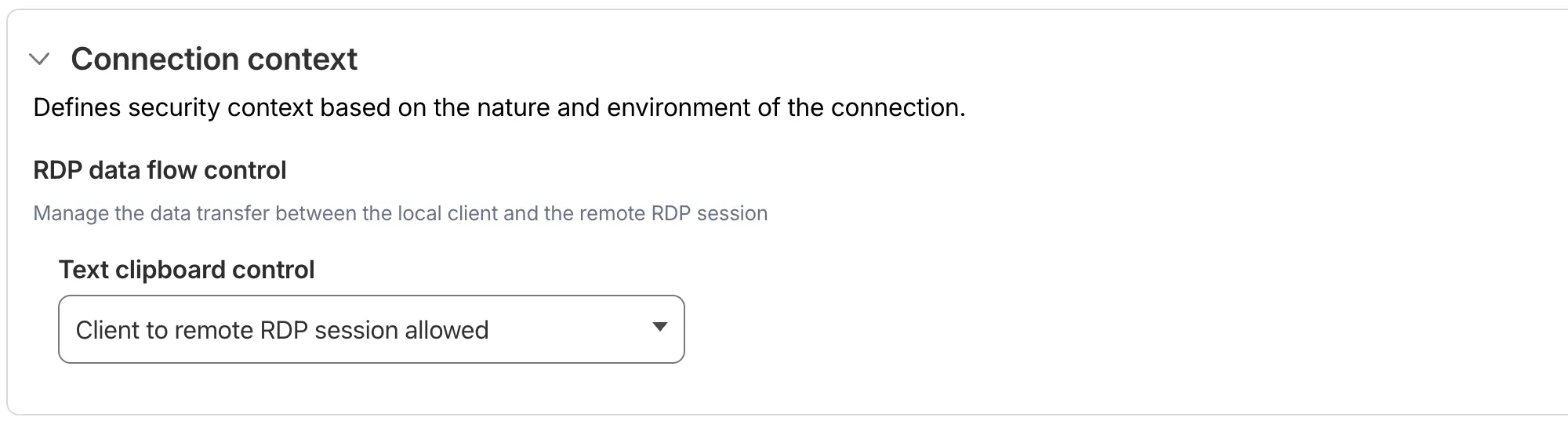
This feature is useful for organizations that support bring-your-own-device (BYOD) policies or third-party contractors using unmanaged devices. By restricting clipboard access, you can prevent sensitive data from being transferred out of the remote session to a user's personal device.
Clipboard controls are configured per policy within your Access application. For each policy, you can independently allow or deny:
- Copy from local client to remote RDP session — Users can copy/paste text from their local machine into the browser-based RDP session.
- Copy from remote RDP session to local client — Users can copy/paste text from the browser-based RDP session to their local machine.
By default, both directions are denied for new policies. For existing Access applications created before this feature was available, clipboard access remains enabled to preserve backwards compatibility.
When a user attempts a restricted clipboard action, the clipboard content is replaced with an error message informing them that the action is not allowed.
For more information, refer to Clipboard controls for browser-based RDP.
-
MCP server portals now supports Logpush integration. You can automatically export MCP server portal activity logs to third-party storage destinations or security information and event management (SIEM) tools for analysis and auditing.
The MCP server portal logs dataset includes fields such as:
Datetime— Timestamp of the requestPortalID/PortalAUD— Portal identifiersServerID/ServerURL— Upstream MCP server detailsMethod— JSON-RPC method (for example,tools/call,prompts/get,resources/read)ToolCallName/PromptGetName/ResourceReadURI— Method-specific identifiersUserID/UserEmail— Authenticated user informationSuccess/Error— Request outcomeServerResponseDurationMs— Response time from upstream server
For the complete field reference, refer to MCP portal logs.
To configure Logpush for MCP server portal logs, refer to Logpush integration.
Gateway Protocol Detection now supports seven additional protocols in beta:
Protocol Notes IMAP Internet Message Access Protocol — email retrieval POP3 Post Office Protocol v3 — email retrieval SMTP Simple Mail Transfer Protocol — email sending MYSQL MySQL database wire protocol RSYNC-DAEMON rsync daemon protocol LDAP Lightweight Directory Access Protocol NTP Network Time Protocol These protocols join the existing set of detected protocols (HTTP, HTTP2, SSH, TLS, DCERPC, MQTT, and TPKT) and can be used with the Detected Protocol selector in Network policies to identify and filter traffic based on the application-layer protocol, without relying on port-based identification.
If protocol detection is enabled on your account, these protocols will automatically be logged when detected in your Gateway network traffic.
For more information on using Protocol Detection, refer to the Protocol detection documentation.
Radar now tracks post-quantum encryption support on origin servers, provides a tool to test any host for post-quantum compatibility, and introduces a Key Transparency dashboard for monitoring end-to-end encrypted messaging audit logs.
The new
Post-QuantumAPI provides the following endpoints:/post_quantum/tls/support- Tests whether a host supports post-quantum TLS key exchange./post_quantum/origin/summary/{dimension}- Returns origin post-quantum data summarized by key agreement algorithm./post_quantum/origin/timeseries_groups/{dimension}- Returns origin post-quantum timeseries data grouped by key agreement algorithm.
The new Post-Quantum Encryption ↗ page shows the share of customer origins supporting X25519MLKEM768, derived from daily automated TLS scans of TLS 1.3-compatible origins. The scanner tests for algorithm support rather than the origin server's configured preference.
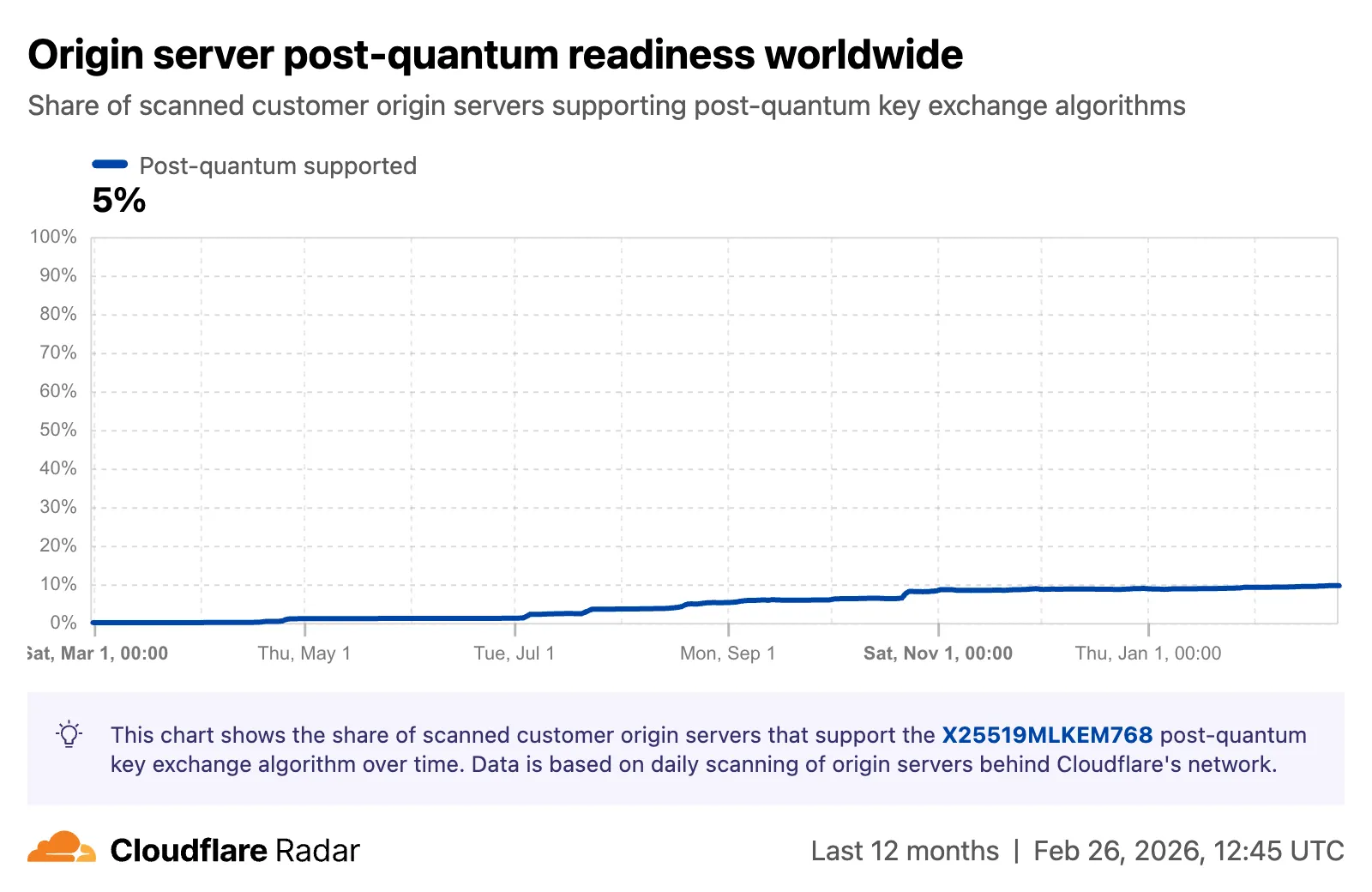
A host test tool allows checking any publicly accessible website for post-quantum encryption compatibility. Enter a hostname and optional port to see whether the server negotiates a post-quantum key exchange algorithm.
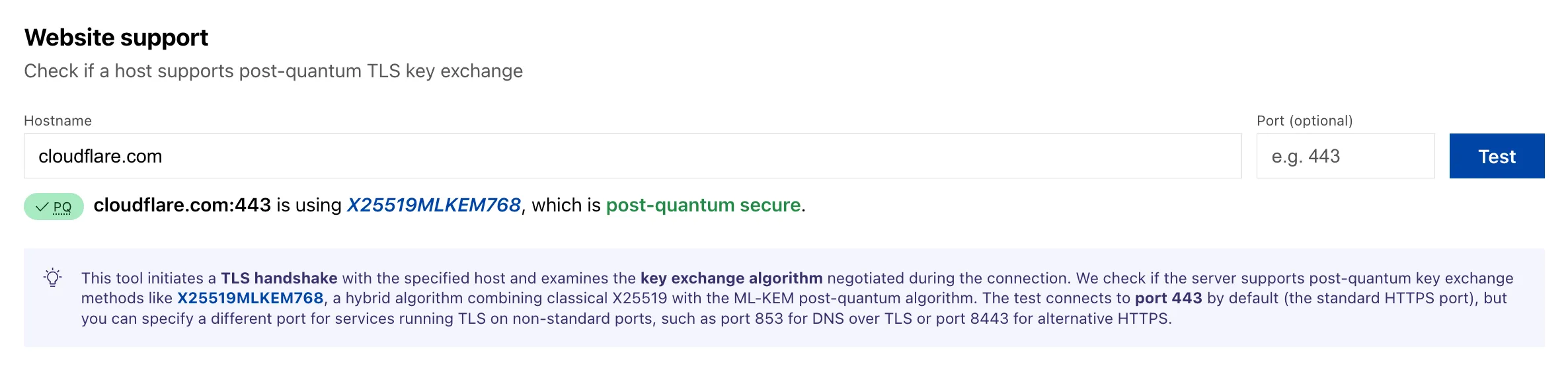
A new Key Transparency ↗ section displays the audit status of Key Transparency logs for end-to-end encrypted messaging services. The page launches with two monitored logs: WhatsApp and Facebook Messenger Transport.
Each log card shows the current status, last signed epoch, last verified epoch, and the root hash of the Auditable Key Directory tree. The data is also available through the Key Transparency Auditor API.
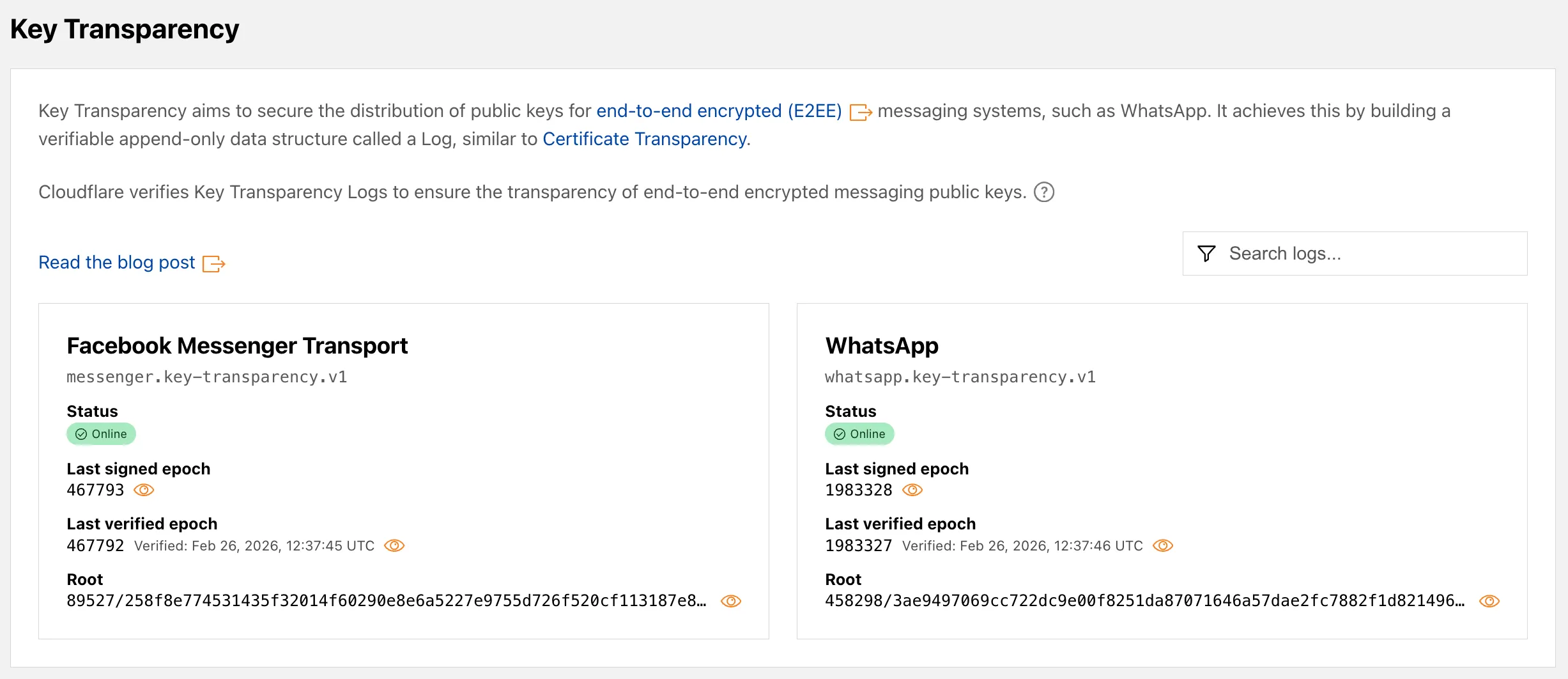
Learn more about these features in our blog post ↗ and check out the Post-Quantum Encryption ↗ and Key Transparency ↗ pages to explore the data.
Cloudflare's
stale-while-revalidatesupport is now fully asynchronous. Previously, the first request for a stale (expired) asset in cache had to wait for an origin response, after which that visitor received a REVALIDATED or EXPIRED status. Now, the first request after the asset expires triggers revalidation in the background and immediately receives stale content with an UPDATING status. All following requests also receive stale content with anUPDATINGstatus until the origin responds, after which subsequent requests receive fresh content with aHITstatus.stale-while-revalidateis aCache-Controldirective set by your origin server that allows Cloudflare to serve an expired cached asset while a fresh copy is fetched from the origin.Asynchronous revalidation brings:
- Lower latency: No visitor is waiting for the origin when the asset is already in cache. Every request is served from cache during revalidation.
- Consistent experience: All visitors receive the same cached response during revalidation.
- Reduced error exposure: The first request is no longer vulnerable to origin timeouts or errors. All visitors receive a cached response while revalidation happens in the background.
This change is live for all Free, Pro, and Business zones. Approximately 75% of Enterprise zones have been migrated, with the remaining zones rolling out throughout the quarter.
To use this feature, make sure your origin includes the
stale-while-revalidatedirective in theCache-Controlheader. Refer to the Cache-Control documentation for details.
Cloudflare now returns structured Markdown responses for Cloudflare-generated 1xxx errors when clients send
Accept: text/markdown.Each response includes YAML frontmatter plus guidance sections (
What happened/What you should do) so agents can make deterministic retry and escalation decisions without parsing HTML.In measured 1,015 comparisons, Markdown reduced payload size and token footprint by over 98% versus HTML.
Included frontmatter fields:
error_code,error_name,error_category,http_statusray_id,timestamp,zonecloudflare_error,retryable,retry_after(when applicable),owner_action_required
Default behavior is unchanged: clients that do not explicitly request Markdown continue to receive HTML error pages.
Cloudflare uses standard HTTP content negotiation on the
Acceptheader.Accept: text/markdown-> MarkdownAccept: text/markdown, text/html;q=0.9-> MarkdownAccept: text/*-> MarkdownAccept: */*-> HTML (default browser behavior)
When multiple values are present, Cloudflare selects the highest-priority supported media type using
qvalues. If Markdown is not explicitly preferred, HTML is returned.Available now for Cloudflare-generated 1xxx errors.
Terminal window curl -H "Accept: text/markdown" https://<your-domain>/cdn-cgi/error/1015Reference: Cloudflare 1xxx error documentation
The latest release of the Agents SDK ↗ lets you define an Agent and an McpAgent in the same Worker and connect them over RPC — no HTTP, no network overhead. It also makes OAuth opt-in for simple MCP connections, hardens the schema converter for production workloads, and ships a batch of
@cloudflare/ai-chatreliability fixes.You can now connect an Agent to an McpAgent in the same Worker using a Durable Object binding instead of an HTTP URL. The connection stays entirely within the Cloudflare runtime — no network round-trips, no serialization overhead.
Pass the Durable Object namespace directly to
addMcpServer:JavaScript import { Agent } from "agents";export class MyAgent extends Agent {async onStart() {// Connect via DO binding — no HTTP, no network overheadawait this.addMcpServer("counter", env.MY_MCP);// With props for per-user contextawait this.addMcpServer("counter", env.MY_MCP, {props: { userId: "user-123", role: "admin" },});}}TypeScript import { Agent } from "agents";export class MyAgent extends Agent {async onStart() {// Connect via DO binding — no HTTP, no network overheadawait this.addMcpServer("counter", env.MY_MCP);// With props for per-user contextawait this.addMcpServer("counter", env.MY_MCP, {props: { userId: "user-123", role: "admin" },});}}The
addMcpServermethod now acceptsstring | DurableObjectNamespaceas the second parameter with full TypeScript overloads, so HTTP and RPC paths are type-safe and cannot be mixed.Key capabilities:
- Hibernation support — RPC connections survive Durable Object hibernation automatically. The binding name and props are persisted to storage and restored on wake-up, matching the behavior of HTTP MCP connections.
- Deduplication — Calling
addMcpServerwith the same server name returns the existing connection instead of creating duplicates. Connection IDs are stable across hibernation restore. - Smaller surface area — The RPC transport internals have been rewritten and reduced from 609 lines to 245 lines.
RPCServerTransportnow usesJSONRPCMessageSchemafrom the MCP SDK for validation instead of hand-written checks.
addMcpServer()no longer eagerly creates an OAuth provider for every connection. For servers that do not require authentication, a simple call is all you need:JavaScript // No callbackHost, no OAuth config — just worksawait this.addMcpServer("my-server", "https://mcp.example.com");TypeScript // No callbackHost, no OAuth config — just worksawait this.addMcpServer("my-server", "https://mcp.example.com");If the server responds with a 401, the SDK throws a clear error:
"This MCP server requires OAuth authentication. Provide callbackHost in addMcpServer options to enable the OAuth flow."The restore-from-storage flow also handles missing callback URLs gracefully, skipping auth provider creation for non-OAuth servers.The schema converter used by
generateTypes()andgetAITools()now handles edge cases that previously caused crashes in production:- Depth and circular reference guards — Prevents stack overflows on recursive or deeply nested schemas
$refresolution — Supports internal JSON Pointers (#/definitions/...,#/$defs/...,#)- Tuple support —
prefixItems(JSON Schema 2020-12) and arrayitems(draft-07) - OpenAPI 3.0
nullable: true— Supported across all schema branches - Per-tool error isolation — One malformed schema cannot crash the full pipeline in
generateTypes()orgetAITools() - Missing
inputSchemafallback —getAITools()falls back to{ type: "object" }instead of throwing
- Tool denial flow — Denied tool approvals (
approved: false) now transition tooutput-deniedwith atool_result, fixing Anthropic provider compatibility. Custom denial messages are supported viastate: "output-error"anderrorText. - Abort/cancel support — Streaming responses now properly cancel the reader loop when the abort signal fires and send a done signal to the client.
- Duplicate message persistence —
persistMessages()now reconciles assistant messages by content and order, preventing duplicate rows when clients resend full history. requestIdinOnChatMessageOptions— Handlers can now send properly-tagged error responses for pre-stream failures.redacted_thinkingpreservation — The message sanitizer no longer strips Anthropicredacted_thinkingblocks./get-messagesreliability — Endpoint handling moved from a prototypeonRequest()override to a constructor wrapper, so it works even when users overrideonRequestwithout callingsuper.onRequest().- Client tool APIs undeprecated —
createToolsFromClientSchemas,clientTools,AITool,extractClientToolSchemas, and thetoolsoption onuseAgentChatare restored for SDK use cases where tools are defined dynamically at runtime. jsonSchemainitialization — FixedjsonSchema not initializederror when callinggetAITools()inonChatMessage.
To update to the latest version:
Terminal window npm i agents@latest @cloudflare/ai-chat@latest
You can now run more Containers concurrently with significantly higher limits on memory, vCPU, and disk.
Limit Previous Limit New Limit Memory for concurrent live Container instances 400GiB 6TiB vCPU for concurrent live Container instances 100 1,500 Disk for concurrent live Container instances 2TB 30TB This 15x increase enables larger-scale workloads on Containers. You can now run 15,000 instances of the
liteinstance type, 6,000 instances ofbasic, over 1,500 instances ofstandard-1, or over 1,000 instances ofstandard-2concurrently.Refer to Limits for more details on the available instance types and limits.