

Cloudflare Logpush now supports BigQuery as a native destination.
Logs from Cloudflare can be sent to Google Cloud BigQuery ↗ via Logpush. The destination can be configured through the Logpush UI in the Cloudflare dashboard or by using the Logpush API.
For more information, refer to the Destination Configuration documentation.
Two new fields are now available in rule expressions that surface Layer 4 transport telemetry from the client connection. Together with the existing
cf.timings.client_tcp_rtt_msecfield, these fields give you a complete picture of connection quality for both TCP and QUIC traffic — enabling transport-aware rules without requiring any client-side changes.Previously, QUIC RTT and delivery rate data was only available via the
Server-Timing: cfL4response header. These new fields make the same data available directly in rule expressions, so you can use them in Transform Rules, WAF Custom Rules, and other phases that support dynamic fields.Field Type Description cf.timings.client_quic_rtt_msecInteger The smoothed QUIC round-trip time (RTT) between Cloudflare and the client in milliseconds. Only populated for QUIC (HTTP/3) connections. Returns 0for TCP connections.cf.edge.l4.delivery_rateInteger The most recent data delivery rate estimate for the client connection, in bytes per second. Returns 0when L4 statistics are not available for the request.Use a request header transform rule to tag requests from high-latency connections, so your origin can serve a lighter page variant:
Rule expression:
cf.timings.client_tcp_rtt_msec > 200 or cf.timings.client_quic_rtt_msec > 200Header modifications:
Operation Header name Value Set X-High-Latencytruecf.edge.l4.delivery_rate > 0 and cf.edge.l4.delivery_rate < 100000For more information, refer to Request Header Transform Rules and the fields reference.
Logpush now supports higher-precision timestamp formats for log output. You can configure jobs to output timestamps at millisecond or nanosecond precision. This is available in both the Logpush UI in the Cloudflare dashboard and the Logpush API.
To use the new formats, set
timestamp_formatin your Logpush job'soutput_options:rfc3339ms—2024-02-17T23:52:01.123Zrfc3339ns—2024-02-17T23:52:01.123456789Z
Default timestamp formats apply unless explicitly set. The dashboard defaults to
rfc3339and the API defaults tounixnano.For more information, refer to the Log output options documentation.
Cloudflare now exposes four new fields in the Transform Rules phase that encode client certificate data in RFC 9440 ↗ format. Previously, forwarding client certificate information to your origin required custom parsing of PEM-encoded fields or non-standard HTTP header formats. These new fields produce output in the standardized
Client-CertandClient-Cert-Chainheader format defined by RFC 9440, so your origin can consume them directly without any additional decoding logic.Each certificate is DER-encoded, Base64-encoded, and wrapped in colons. For example,
:MIIDsT...Vw==:. A chain of intermediates is expressed as a comma-separated list of such values.Field Type Description cf.tls_client_auth.cert_rfc9440String The client leaf certificate in RFC 9440 format. Empty if no client certificate was presented. cf.tls_client_auth.cert_rfc9440_too_largeBoolean trueif the leaf certificate exceeded 10 KB and was omitted. In practice this will almost always befalse.cf.tls_client_auth.cert_chain_rfc9440String The intermediate certificate chain in RFC 9440 format as a comma-separated list. Empty if no intermediate certificates were sent or if the chain exceeded 16 KB. cf.tls_client_auth.cert_chain_rfc9440_too_largeBoolean trueif the intermediate chain exceeded 16 KB and was omitted.The chain encoding follows the same ordering as the TLS handshake: the certificate closest to the leaf appears first, working up toward the trust anchor. The root certificate is not included.
Add a request header transform rule to set the
Client-CertandClient-Cert-Chainheaders on requests forwarded to your origin server. For example, to forward headers for verified, non-revoked certificates:Rule expression:
cf.tls_client_auth.cert_verified and not cf.tls_client_auth.cert_revokedHeader modifications:
Operation Header name Value Set Client-Certcf.tls_client_auth.cert_rfc9440Set Client-Cert-Chaincf.tls_client_auth.cert_chain_rfc9440To get the most out of these fields, upload your client CA certificate to Cloudflare so that Cloudflare validates the client certificate at the edge and populates
cf.tls_client_auth.cert_verifiedandcf.tls_client_auth.cert_revoked.For more information, refer to Mutual TLS authentication, Request Header Transform Rules, and the fields reference.
AI Crawl Control now supports extending the underlying WAF rule with custom modifications. Any changes you make directly in the WAF custom rules editor — such as adding path-based exceptions, extra user agents, or additional expression clauses — are preserved when you update crawler actions in AI Crawl Control.
If the WAF rule expression has been modified in a way AI Crawl Control cannot parse, a warning banner appears on the Crawlers page with a link to view the rule directly in WAF.
For more information, refer to WAF rule management.
In the Cloudflare One dashboard, the overview page for a specific Cloudflare Tunnel now shows all replicas of that tunnel and supports streaming logs from multiple replicas at once.

Previously, you could only stream logs from one replica at a time. With this update:
- Replicas on the tunnel overview — All active replicas for the selected tunnel now appear on that tunnel's overview page under Connectors. Select any replica to stream its logs.
- Multi-connector log streaming — Stream logs from multiple replicas simultaneously, making it easier to correlate events across your infrastructure during debugging or incident response. To try it out, log in to Cloudflare One ↗ and go to Networks > Connectors > Cloudflare Tunnels. Select View logs next to the tunnel you want to monitor.
For more information, refer to Tunnel log streams and Deploy replicas.
Service Key authentication for the Cloudflare API is deprecated. Service Keys will stop working on September 30, 2026.
API Tokens replace Service Keys with fine-grained permissions, expiration, and revocation.
Replace any use of the
X-Auth-User-Service-Keyheader with an API Token scoped to the permissions your integration requires.If you use
cloudflared, update to a version from November 2022 or later. These versions already use API Tokens.If you use origin-ca-issuer ↗, update to a version that supports API Token authentication.
For more information, refer to API deprecations.
You can now manage Cloudflare Tunnels directly from Wrangler, the CLI for the Cloudflare Developer Platform. The new
wrangler tunnelcommands let you create, run, and manage tunnels without leaving your terminal.
Available commands:
wrangler tunnel create— Create a new remotely managed tunnel.wrangler tunnel list— List all tunnels in your account.wrangler tunnel info— Display details about a specific tunnel.wrangler tunnel delete— Delete a tunnel.wrangler tunnel run— Run a tunnel using the cloudflared daemon.wrangler tunnel quick-start— Start a free, temporary tunnel without an account using Quick Tunnels.
Wrangler handles downloading and managing the cloudflared binary automatically. On first use, you will be prompted to download
cloudflaredto a local cache directory.These commands are currently experimental and may change without notice.
To get started, refer to the Wrangler tunnel commands documentation.
Cloudflare dashboard SCIM provisioning now supports Authentik ↗ as an identity provider, joining Okta and Microsoft Entra ID as explicitly supported providers.
Customers can now sync users and group information from Authentik to Cloudflare, apply Permission Policies to those groups, and manage the lifecycle of users & groups directly from your Authentik Identity Provider.
For more information:
Cloudflare dashboard SCIM provisioning operations are now captured in Audit Logs v2, giving you visibility into user and group changes made by your identity provider.
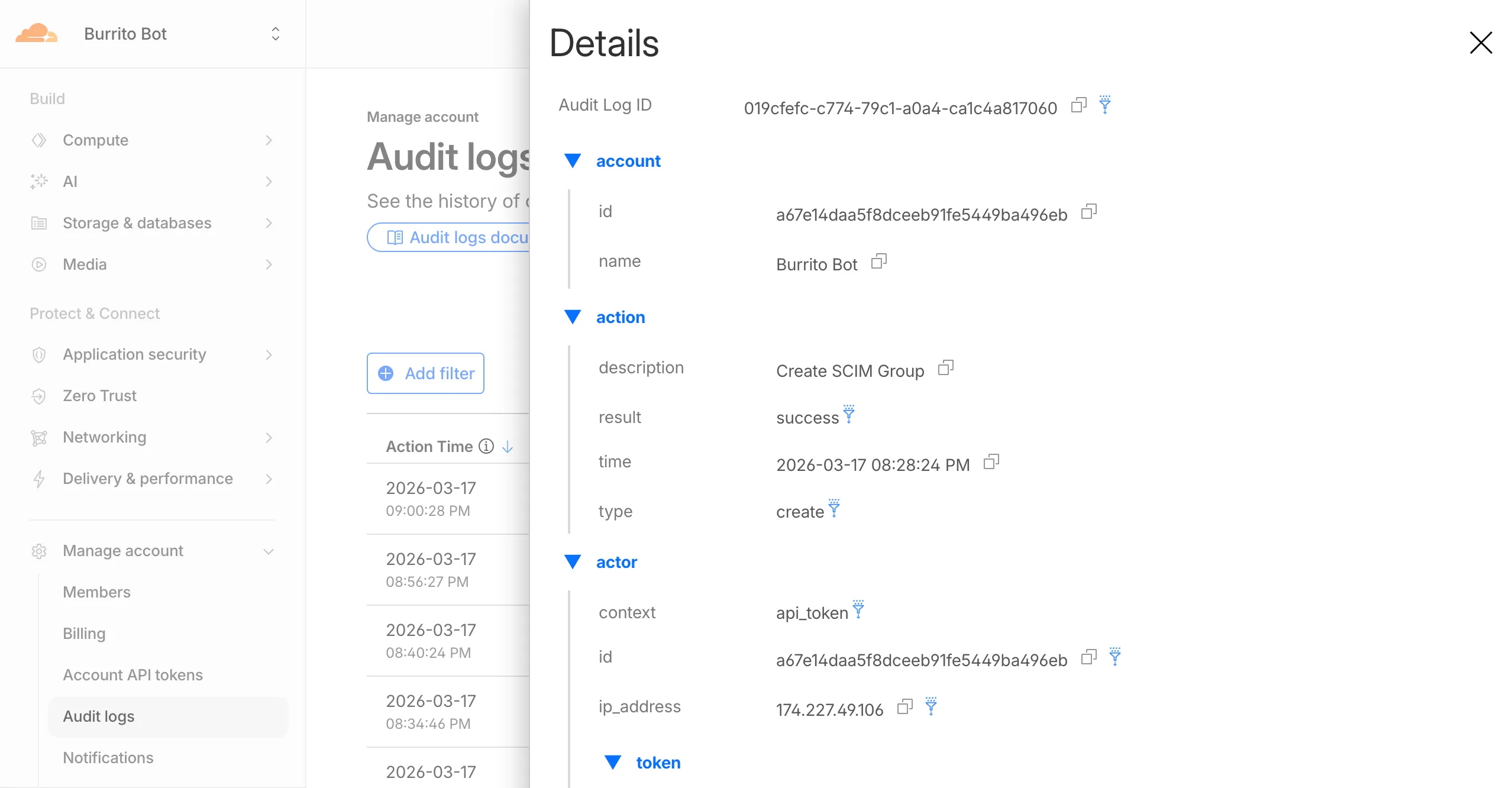
Logged actions:
Action Type Description Create SCIM User User provisioned from IdP Replace SCIM User User fully replaced (PUT) Update SCIM User User attributes modified (PATCH) Delete SCIM User Member deprovisioned Create SCIM Group Group provisioned from IdP Update SCIM Group Group membership or attributes modified Delete SCIM Group Group deprovisioned For more details, refer to the Audit Logs v2 documentation.
The
cf.timings.worker_msecfield is now available in the Ruleset Engine. This field reports the wall-clock time that a Cloudflare Worker spent handling a request, measured in milliseconds.You can use this field to identify slow Worker executions, detect performance regressions, or build rules that respond differently based on Worker processing time, such as logging requests that exceed a latency threshold.
Field Type Description cf.timings.worker_msecInteger The time spent executing a Cloudflare Worker in milliseconds. Returns 0if no Worker was invoked.Example filter expression:
cf.timings.worker_msec > 500For more information, refer to the Fields reference.
Cloudflare-generated 1xxx error responses now include a standard
Retry-AfterHTTP header when the error is retryable. Agents and HTTP clients can read the recommended wait time from response headers alone — no body parsing required.Seven retryable error codes now emit
Retry-After:Error code Retry-After (seconds) Error name 1004 120 DNS resolution error 1005 120 Banned zone 1015 30 Rate limited 1033 120 Argo Tunnel error 1038 60 HTTP headers limit exceeded 1200 60 Cache connection limit 1205 5 Too many redirects The header value matches the existing
retry_afterbody field in JSON and Markdown responses.If a WAF rate limiting rule has already set a dynamic
Retry-Aftervalue on the response, that value takes precedence.Available for all zones on all plans.
Check for the header on any retryable error:
Terminal window curl -s --compressed -D - -o /dev/null -H "Accept: application/json" -A "TestAgent/1.0" -H "Accept-Encoding: gzip, deflate" "<YOUR_DOMAIN>/cdn-cgi/error/1015" | grep -i retry-afterReferences:
Cloudflare-generated 1xxx errors now return structured JSON when clients send
Accept: application/jsonorAccept: application/problem+json. JSON responses follow RFC 9457 (Problem Details for HTTP APIs) ↗, so any HTTP client that understands Problem Details can parse the base members without Cloudflare-specific code.The Markdown frontmatter field
http_statushas been renamed tostatus. Agents consuming Markdown frontmatter should update parsers accordingly.JSON format. Clients sending
Accept: application/jsonorAccept: application/problem+jsonnow receive a structured JSON object with the same operational fields as Markdown frontmatter, plus RFC 9457 standard members.RFC 9457 standard members (JSON only):
type— URI pointing to Cloudflare documentation for the specific error codestatus— HTTP status code (matching the response status)title— short, human-readable summarydetail— human-readable explanation specific to this occurrenceinstance— Ray ID identifying this specific error occurrence
Field renames:
http_status->status(JSON and Markdown)what_happened->detail(JSON only — Markdown prose sections are unchanged)
Content-Type mirroring. Clients sending
Accept: application/problem+jsonreceiveContent-Type: application/problem+json; charset=utf-8back;Accept: application/jsonreceivesapplication/json; charset=utf-8. Same body in both cases.Request header sent Response format Accept: application/jsonJSON ( application/jsoncontent type)Accept: application/problem+jsonJSON ( application/problem+jsoncontent type)Accept: application/json, text/markdown;q=0.9JSON Accept: text/markdownMarkdown Accept: text/markdown, application/jsonMarkdown (equal q, first-listed wins)Accept: */*HTML (default) Available now for Cloudflare-generated 1xxx errors.
Terminal window curl -s --compressed -H "Accept: application/json" -A "TestAgent/1.0" -H "Accept-Encoding: gzip, deflate" "<YOUR_DOMAIN>/cdn-cgi/error/1015" | jq .Terminal window curl -s --compressed -H "Accept: application/problem+json" -A "TestAgent/1.0" -H "Accept-Encoding: gzip, deflate" "<YOUR_DOMAIN>/cdn-cgi/error/1015" | jq .References:
Cloudflare Log Explorer now allows you to customize exactly which data fields are ingested and stored when enabling or managing log datasets.
Previously, ingesting logs often meant taking an "all or nothing" approach to data fields. With Ingest Field Selection, you can now choose from a list of available and recommended fields for each dataset. This allows you to reduce noise, focus on the metrics that matter most to your security and performance analysis, and manage your data footprint more effectively.
- Granular control: Select only the specific fields you need when enabling a new dataset.
- Dynamic updates: Update fields for existing, already enabled logstreams at any time.
- Historical consistency: Even if you disable a field later, you can still query and receive results for that field for the period it was captured.
- Data integrity: Core fields, such as
Timestamp, are automatically retained to ensure your logs remain searchable and chronologically accurate.
When configuring a dataset via the dashboard or API, you can define a specific set of fields. The
Timestampfield remains mandatory to ensure data indexability.{"dataset": "firewall_events","enabled": true,"fields": ["Timestamp","ClientRequestHost","ClientIP","Action","EdgeResponseStatus","OriginResponseStatus"]}For more information, refer to the Log Explorer documentation.
Audit Logs v2 is now generally available to all Cloudflare customers.

Audit Logs v2 provides a unified and standardized system for tracking and recording all user and system actions across Cloudflare products. Built on Cloudflare's API Shield / OpenAPI gateway, logs are generated automatically without requiring manual instrumentation from individual product teams, ensuring consistency across ~95% of Cloudflare products.
What's available at GA:
- Standardized logging — Audit logs follow a consistent format across all Cloudflare products, making it easier to search, filter, and investigate activity.
- Expanded product coverage — ~95% of Cloudflare products covered, up from ~75% in v1.
- Granular filtering — Filter by actor, action type, action result, resource, raw HTTP method, zone, and more. Over 20 filter parameters available via the API.
- Enhanced context — Each log entry includes authentication method, interface (API or dashboard), Cloudflare Ray ID, and actor token details.
- 18-month retention — Logs are retained for 18 months. Full history is accessible via the API or Logpush.
Access:
- Dashboard: Go to Manage Account > Audit Logs. Audit Logs v2 is shown by default.
- API:
GET https://api.cloudflare.com/client/v4/accounts/{account_id}/logs/audit - Logpush: Available via the
audit_logs_v2account-scoped dataset.
Important notes:
- Approximately 30 days of logs from the Beta period (back to ~February 8, 2026) are available at GA. These Beta logs will expire on ~April 9, 2026. Logs generated after GA will be retained for the full 18 months. Older logs remain available in Audit Logs v1.
- The UI query window is limited to 90 days for performance reasons. Use the API or Logpush for access to the full 18-month history.
GETrequests (view actions) and4xxerror responses are not logged at GA.GETlogging will be selectively re-enabled for sensitive read operations in a future release.- Audit Logs v1 continues to run in parallel. A deprecation timeline will be communicated separately.
- Before and after values — the ability to see what a value changed from and to — is a highly requested feature and is on our roadmap for a post-GA release. In the meantime, we recommend using Audit Logs v1 for before and after values. Audit Logs v1 will continue to run in parallel until this feature is available in v2.
For more details, refer to the Audit Logs v2 documentation.
Cloudflare has added new fields across multiple Logpush datasets:
- MCP Portal Logs: A new dataset with fields including
ClientCountry,ClientIP,ColoCode,Datetime,Error,Method,PortalAUD,PortalID,PromptGetName,ResourceReadURI,ServerAUD,ServerID,ServerResponseDurationMs,ServerURL,SessionID,Success,ToolCallName,UserEmail, andUserID.
- DEX Application Tests:
HTTPRedirectEndMs,HTTPRedirectStartMs,HTTPResponseBody, andHTTPResponseHeaders. - DEX Device State Events:
ExperimentalExtra. - Firewall Events:
FraudUserID. - Gateway HTTP:
AppControlInfoandApplicationStatuses. - Gateway DNS:
InternalDNSDurationMs. - HTTP Requests:
FraudEmailRisk,FraudUserID, andPayPerCrawlStatus. - Network Analytics Logs:
DNSQueryName,DNSQueryType, andPFPCustomTag. - WARP Toggle Changes:
UserEmail. - WARP Config Changes:
UserEmail. - Zero Trust Network Session Logs:
SNI.
For the complete field definitions for each dataset, refer to Logpush datasets.
- MCP Portal Logs: A new dataset with fields including
Cloudflare now returns structured Markdown responses for Cloudflare-generated 1xxx errors when clients send
Accept: text/markdown.Each response includes YAML frontmatter plus guidance sections (
What happened/What you should do) so agents can make deterministic retry and escalation decisions without parsing HTML.In measured 1,015 comparisons, Markdown reduced payload size and token footprint by over 98% versus HTML.
Included frontmatter fields:
error_code,error_name,error_category,http_statusray_id,timestamp,zonecloudflare_error,retryable,retry_after(when applicable),owner_action_required
Default behavior is unchanged: clients that do not explicitly request Markdown continue to receive HTML error pages.
Cloudflare uses standard HTTP content negotiation on the
Acceptheader.Accept: text/markdown-> MarkdownAccept: text/markdown, text/html;q=0.9-> MarkdownAccept: text/*-> MarkdownAccept: */*-> HTML (default browser behavior)
When multiple values are present, Cloudflare selects the highest-priority supported media type using
qvalues. If Markdown is not explicitly preferred, HTML is returned.Available now for Cloudflare-generated 1xxx errors.
Terminal window curl -H "Accept: text/markdown" https://<your-domain>/cdn-cgi/error/1015Reference: Cloudflare 1xxx error documentation
Cloudflare Tunnel is now available in the main Cloudflare Dashboard at Networking > Tunnels ↗, bringing first-class Tunnel management to developers using Tunnel for securing origin servers.

This new experience provides everything you need to manage Tunnels for public applications, including:
- Full Tunnel lifecycle management: Create, configure, delete, and monitor all your Tunnels in one place.
- Native integrations: View Tunnels by name when configuring DNS records and Workers VPC — no more copy-pasting UUIDs.
- Real-time visibility: Monitor replicas and Tunnel health status directly in the dashboard.
- Routing map: Manage all ingress routes for your Tunnel, including public applications, private hostnames, private CIDRs, and Workers VPC services, from a single interactive interface.
Core Dashboard: Navigate to Networking > Tunnels ↗ to manage Tunnels for:
- Securing origin servers and public applications with CDN, WAF, Load Balancing, and DDoS protection
- Connecting Workers to private services via Workers VPC
Cloudflare One Dashboard: Navigate to Zero Trust > Networks > Connectors ↗ to manage Tunnels for:
- Securing your public applications with Zero Trust access policies
- Connecting users to private applications
- Building a private mesh network
Both dashboards provide complete Tunnel management capabilities — choose based on your primary workflow.
New to Tunnel? Learn how to get started with Cloudflare Tunnel or explore advanced use cases like securing SSH servers or running Tunnels in Kubernetes.
The Server-Timing header now includes a new
cfWorkermetric that measures time spent executing Cloudflare Workers, including any subrequests performed by the Worker. This helps developers accurately identify whether high Time to First Byte (TTFB) is caused by Worker processing or slow upstream dependencies.Previously, Worker execution time was included in the
edgemetric, making it harder to identify true edge performance. The newcfWorkermetric provides this visibility:Metric Description edgeTotal time spent on the Cloudflare edge, including Worker execution originTime spent fetching from the origin server cfWorkerTime spent in Worker execution, including subrequests but excluding origin fetch time Server-Timing: cdn-cache; desc=DYNAMIC, edge; dur=20, origin; dur=100, cfWorker; dur=7In this example, the edge took 20ms, the origin took 100ms, and the Worker added just 7ms of processing time.
The
cfWorkermetric is enabled by default if you have Real User Monitoring (RUM) enabled. Otherwise, you can enable it using Rules.This metric is particularly useful for:
- Performance debugging: Quickly determine if latency is caused by Worker code, external API calls within Workers, or slow origins.
- Optimization targeting: Identify which component of your request path needs optimization.
- Real User Monitoring (RUM): Access detailed timing breakdowns directly from response headers for client-side analytics.
For more information about Server-Timing headers, refer to the W3C Server Timing specification ↗.
When AI systems request pages from any website that uses Cloudflare and has Markdown for Agents enabled, they can express the preference for
text/markdownin the request: our network will automatically and efficiently convert the HTML to markdown, when possible, on the fly.This release adds the following improvements:
- The origin response limit was raised from 1 MB to 2 MB (2,097,152 bytes).
- We no longer require the origin to send the
content-lengthheader. - We now support content encoded responses from the origin.
If you haven’t enabled automatic Markdown conversion yet, visit the AI Crawl Control ↗ section of the Cloudflare dashboard and enable Markdown for Agents.
Refer to our developer documentation for more details.
Fine-grained permissions for Access policies and Access service tokens are available. These new resource-scoped roles expand the existing RBAC model, enabling administrators to grant permissions scoped to individual resources.
- Cloudflare Access policy admin: Can edit a specific Access policy in an account.
- Cloudflare Access service token admin: Can edit a specific Access service token in an account.
These roles complement the existing resource-scoped roles for Access applications, identity providers, and infrastructure targets.
For more information:
Disclaimer: Please note that v5.0.0-beta.1 is in Beta and we are still testing it for stability.
Full Changelog: v4.3.1...v5.0.0-beta.1 ↗
In this release, you'll see a large number of breaking changes. This is primarily due to a change in OpenAPI definitions, which our libraries are based off of, and codegen updates that we rely on to read those OpenAPI definitions and produce our SDK libraries. As the codegen is always evolving and improving, so are our code bases.
There may be changes that are not captured in this changelog. Feel free to open an issue to report any inaccuracies, and we will make sure it gets into the changelog before the v5.0.0 release.
Most of the breaking changes below are caused by improvements to the accuracy of the base OpenAPI schemas, which sometimes translates to breaking changes in downstream clients that depend on those schemas.
Please ensure you read through the list of changes below and the migration guide before moving to this version - this will help you understand any down or upstream issues it may cause to your environments.
The following resources have breaking changes. See the v5 Migration Guide ↗ for detailed migration instructions.
abusereportsacm.totaltlsapigateway.configurationscloudforceone.threateventsd1.databaseintel.indicatorfeedslogpush.edgeorigintlsclientauth.hostnamesqueues.consumersradar.bgprulesets.rulesschemavalidation.schemassnippetszerotrust.dlpzerotrust.networks
abusereports- Abuse report managementabusereports.mitigations- Abuse report mitigation actionsai.tomarkdown- AI-powered markdown conversionaigateway.dynamicrouting- AI Gateway dynamic routing configurationaigateway.providerconfigs- AI Gateway provider configurationsaisearch- AI-powered search functionalityaisearch.instances- AI Search instance managementaisearch.tokens- AI Search authentication tokensalerting.silences- Alert silence managementbrandprotection.logomatches- Brand protection logo match detectionbrandprotection.logos- Brand protection logo managementbrandprotection.matches- Brand protection match resultsbrandprotection.queries- Brand protection query managementcloudforceone.binarystorage- CloudForce One binary storageconnectivity.directory- Connectivity directory servicesd1.database- D1 database managementdiagnostics.endpointhealthchecks- Endpoint health check diagnosticsfraud- Fraud detection and preventioniam.sso- IAM Single Sign-On configurationloadbalancers.monitorgroups- Load balancer monitor groupsorganizations- Organization managementorganizations.organizationprofile- Organization profile settingsorigintlsclientauth.hostnamecertificates- Origin TLS client auth hostname certificatesorigintlsclientauth.hostnames- Origin TLS client auth hostnamesorigintlsclientauth.zonecertificates- Origin TLS client auth zone certificatespipelines- Data pipeline managementpipelines.sinks- Pipeline sink configurationspipelines.streams- Pipeline stream configurationsqueues.subscriptions- Queue subscription managementr2datacatalog- R2 Data Catalog integrationr2datacatalog.credentials- R2 Data Catalog credentialsr2datacatalog.maintenanceconfigs- R2 Data Catalog maintenance configurationsr2datacatalog.namespaces- R2 Data Catalog namespacesradar.bots- Radar bot analyticsradar.ct- Radar certificate transparency dataradar.geolocations- Radar geolocation datarealtimekit.activesession- Real-time Kit active session managementrealtimekit.analytics- Real-time Kit analyticsrealtimekit.apps- Real-time Kit application managementrealtimekit.livestreams- Real-time Kit live streamingrealtimekit.meetings- Real-time Kit meeting managementrealtimekit.presets- Real-time Kit preset configurationsrealtimekit.recordings- Real-time Kit recording managementrealtimekit.sessions- Real-time Kit session managementrealtimekit.webhooks- Real-time Kit webhook configurationstokenvalidation.configuration- Token validation configurationtokenvalidation.rules- Token validation rulesworkers.beta- Workers beta features
edit()update()
list()
create()get()update()
scan_list()scan_review()scan_trigger()
create()delete()list()
get()
list()
summary()timeseries()timeseries_groups()
changes()snapshot()
delete()
create()delete()edit()get()list()
- Type inference improvements: Allow Pyright to properly infer TypedDict types within SequenceNotStr
- Type completeness: Add missing types to method arguments and response models
- Pydantic compatibility: Ensure compatibility with Pydantic versions prior to 2.8.0 when using additional fields
- Multipart form data: Correctly handle sending multipart/form-data requests with JSON data
- Header handling: Do not send headers with default values set to omit
- GET request headers: Don't send Content-Type header on GET requests
- Response body model accuracy: Broad improvements to the correctness of models
- Discriminated unions: Correctly handle nested discriminated unions in response parsing
- Extra field types: Parse extra field types correctly
- Empty metadata: Ignore empty metadata fields during parsing
- Singularization rules: Update resource name singularization rules for better consistency
Cloudflare's network now supports real-time content conversion at the source, for enabled zones using content negotiation ↗ headers. When AI systems request pages from any website that uses Cloudflare and has Markdown for Agents enabled, they can express the preference for
text/markdownin the request: our network will automatically and efficiently convert the HTML to markdown, when possible, on the fly.Here is a curl example with the
Acceptnegotiation header requesting this page from our developer documentation:Terminal window curl https://developers.cloudflare.com/fundamentals/reference/markdown-for-agents/ \-H "Accept: text/markdown"The response to this request is now formatted in markdown:
HTTP/2 200date: Wed, 11 Feb 2026 11:44:48 GMTcontent-type: text/markdown; charset=utf-8content-length: 2899vary: acceptx-markdown-tokens: 725content-signal: ai-train=yes, search=yes, ai-input=yes---title: Markdown for Agents · Cloudflare Agents docs---## What is Markdown for AgentsMarkdown has quickly become the lingua franca for agents and AI systemsas a whole. The format’s explicit structure makes it ideal for AI processing,ultimately resulting in better results while minimizing token waste....Refer to our developer documentation and our blog announcement ↗ for more details.
In January 2025, we announced the launch of the new Terraform v5 Provider. We greatly appreciate the proactive engagement and valuable feedback from the Cloudflare community following the v5 release. In response, we have established a consistent and rapid 2-3 week cadence ↗ for releasing targeted improvements, demonstrating our commitment to stability and reliability.
With the help of the community, we have a growing number of resources that we have marked as stable ↗, with that list continuing to grow with every release. The most used resources ↗ are on track to be stable by the end of March 2026, when we will also be releasing a new migration tool to help you migrate from v4 to v5 with ease.
This release brings new capabilities for AI Search, enhanced Workers Script placement controls, and numerous bug fixes based on community feedback. We also begun laying foundational work for improving the v4 to v5 migration process. Stay tuned for more details as we approach the March 2026 release timeline.
Thank you for continuing to raise issues. They make our provider stronger and help us build products that reflect your needs.
- ai_search_instance: add data source for querying AI Search instances
- ai_search_token: add data source for querying AI Search tokens
- account: add support for tenant unit management with new
unitfield - account: add automatic mapping from
managed_by.parent_org_idtounit.id - authenticated_origin_pulls_certificate: add data source for querying authenticated origin pull certificates
- authenticated_origin_pulls_hostname_certificate: add data source for querying hostname-specific authenticated origin pull certificates
- authenticated_origin_pulls_settings: add data source for querying authenticated origin pull settings
- workers_kv: add
valuefield to data source to retrieve KV values directly - workers_script: add
scriptfield to data source to retrieve script content - workers_script: add support for
simplerate limit binding - workers_script: add support for targeted placement mode with
placement.targetarray for specifying placement targets (region, hostname, host) - workers_script: add
placement_modeandplacement_statuscomputed fields - zero_trust_dex_test: add data source with filter support for finding specific tests
- zero_trust_dlp_predefined_profile: add
enabled_entriesfield for flexible entry management
- account: map
managed_by.parent_org_idtounit.idin unmarshall and add acceptance tests - authenticated_origin_pulls_certificate: add certificate normalization to prevent drift
- authenticated_origin_pulls: handle array response and implement full lifecycle
- authenticated_origin_pulls_hostname_certificate: fix resource and tests
- cloudforce_one_request_message: use correct
request_idfield instead ofidin API calls - dns_zone_transfers_incoming: use correct
zone_idfield instead ofidin API calls - dns_zone_transfers_outgoing: use correct
zone_idfield instead ofidin API calls - email_routing_settings: use correct
zone_idfield instead ofidin API calls - hyperdrive_config: add proper handling for write-only fields to prevent state drift
- hyperdrive_config: add normalization for empty
mtlsobjects to prevent unnecessary diffs - magic_network_monitoring_rule: use correct
account_idfield instead ofidin API calls - mtls_certificates: fix resource and test
- pages_project: revert build_config to computed optional
- stream_key: use correct
account_idfield instead ofidin API calls - total_tls: use upsert pattern for singleton zone setting
- waiting_room_rules: use correct
waiting_room_idfield instead ofidin API calls - workers_script: add support for placement mode/status
- zero_trust_access_application: update v4 version on migration tests
- zero_trust_device_posture_rule: update tests to match API
- zero_trust_dlp_integration_entry: use correct
entry_idfield instead ofidin API calls - zero_trust_dlp_predefined_entry: use correct
entry_idfield instead ofidin API calls - zero_trust_organization: fix plan issues
- add state upgraders to 95+ resources to lay the foundation for replacing Grit (still under active development)
- certificate_pack: add state migration handler for SDKv2 to Framework conversion
- custom_hostname_fallback_origin: add comprehensive lifecycle test and migration support
- dns_record: add state migration handler for SDKv2 to Framework conversion
- leaked_credential_check: add import functionality and tests
- load_balancer_pool: add state migration handler with detection for v4 vs v5 format
- pages_project: add state migration handlers
- tiered_cache: add state migration handlers
- zero_trust_dlp_predefined_profile: deprecate
entriesfield in favor ofenabled_entries
AI Crawl Control metrics have been enhanced with new views, improved filtering, and better data visualization.
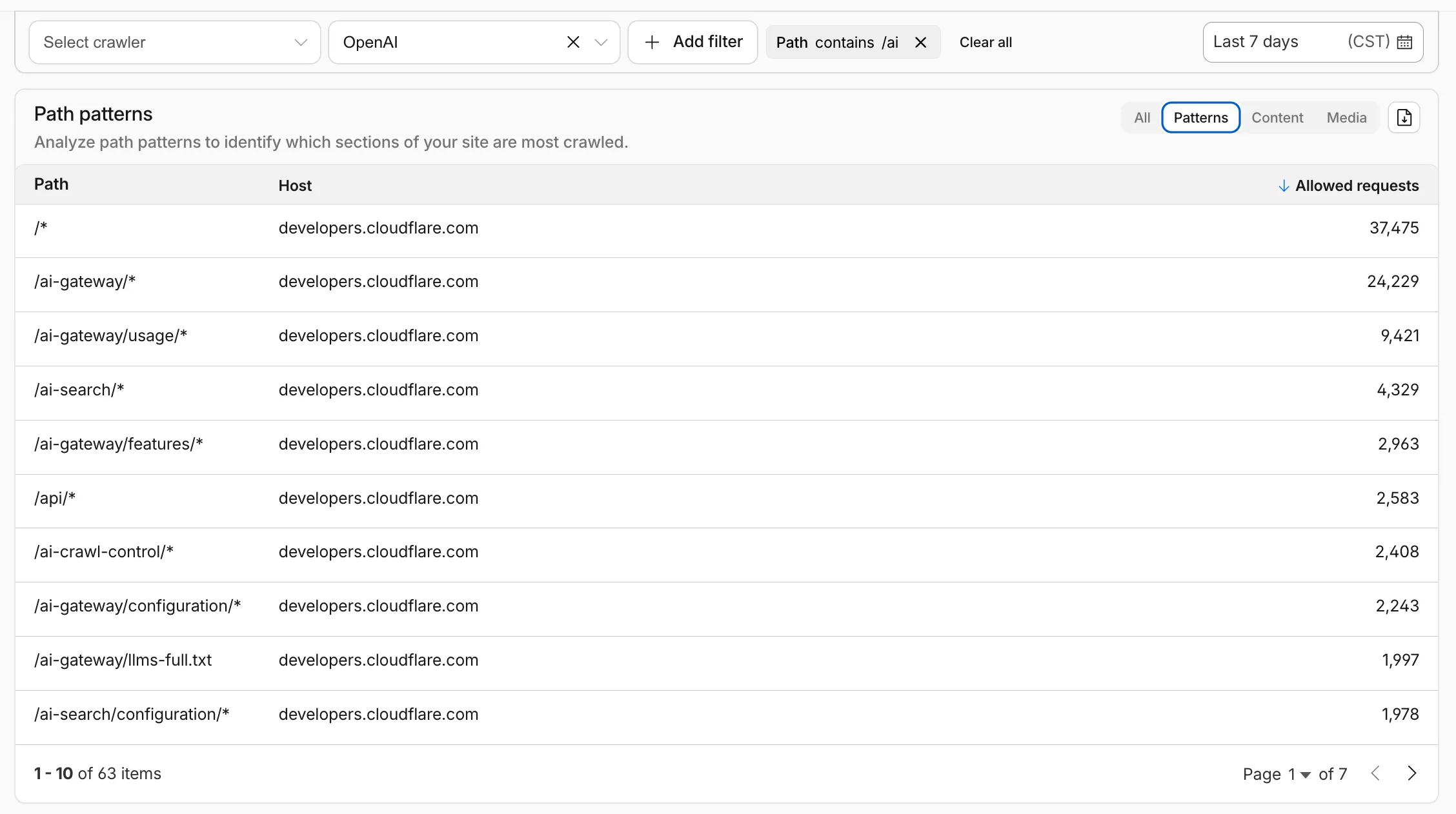
Path pattern grouping
- In the Metrics tab > Most popular paths table, use the new Patterns tab that groups requests by URI pattern (
/blog/*,/api/v1/*,/docs/*) to identify which site areas crawlers target most. Refer to the screenshot above.
Enhanced referral analytics
- Destination patterns show which site areas receive AI-driven referral traffic.
- In the Metrics tab, a new Referrals over time chart shows trends by operator or source.
Data transfer metrics
- In the Metrics tab > Allowed requests over time chart, toggle Bytes to show bandwidth consumption.
- In the Crawlers tab, a new Bytes Transferred column shows bandwidth per crawler.
Image exports
- Export charts and tables as images for reports and presentations.
Learn more about analyzing AI traffic.
- In the Metrics tab > Most popular paths table, use the new Patterns tab that groups requests by URI pattern (