

Skip to content

Changelog

New updates and improvements at Cloudflare.

Core platform
hero image
  1. Cloudflare Logpush now supports IBM Cloud Logs as a native destination.

    Logs from Cloudflare can be sent to IBM Cloud Logs via Logpush. The setup can be done through the Logpush UI in the Cloudflare Dashboard or by using the Logpush API. The integration requires IBM Cloud Logs HTTP Source Address and an IBM API Key. The feature also allows for filtering events and selecting specific log fields.

    For more information, refer to Destination Configuration documentation.

  1. Earlier this year, we announced the launch of the new Terraform v5 Provider. We are aware of the high number of issues reported by the Cloudflare community related to the v5 release. We have committed to releasing improvements on a 2 week cadeance to ensure it's stability and reliability. We have also pivoted from an issue-to-issue approach to a resource-per-resource approach - we will be focusing on specific resources for every release, stabilizing the release and closing all associated bugs with that resource before moving onto resolving migration issues.

    Thank you for continuing to raise issues. We triage them weekly and they help make our products stronger.

    Changes

    • Resources stabilized:
      • cloudflare_custom_pages
      • cloudflare_page_rule
      • cloudflare_dns_record
      • cloudflare_argo_tiered_caching
    • Addressed chronic drift issues in cloudflare_logpush_job, cloudflare_zero_trust_dns_location, cloudflare_ruleset & cloudflare_api_token
    • cloudflare_zone_subscription returns expected values rate_plan.id from former versions
    • cloudflare_workers_script can now successfully be destroyed with bindings & migration for Durable Objects now recorded in tfstate
    • Ability to configure add_headers under cloudflare_zero_trust_gateway_policy
    • Other bug fixes

    For a more detailed look at all of the changes, see the changelog in GitHub.

    Issues Closed

    If you have an unaddressed issue with the provider, we encourage you to check the open issues and open a new one if one does not already exist for what you are experiencing.

    Upgrading

    We suggest holding off on migration to v5 while we work on stabilization. This help will you avoid any blocking issues while the Terraform resources are actively being stabilized.

    If you'd like more information on migrating from v4 to v5, please make use of the migration guide. We have provided automated migration scripts using Grit which simplify the transition, although these do not support implementations which use Terraform modules, so customers making use of modules need to migrate manually. Please make use of terraform plan to test your changes before applying, and let us know if you encounter any additional issues by reporting to our GitHub repository.

    For more info

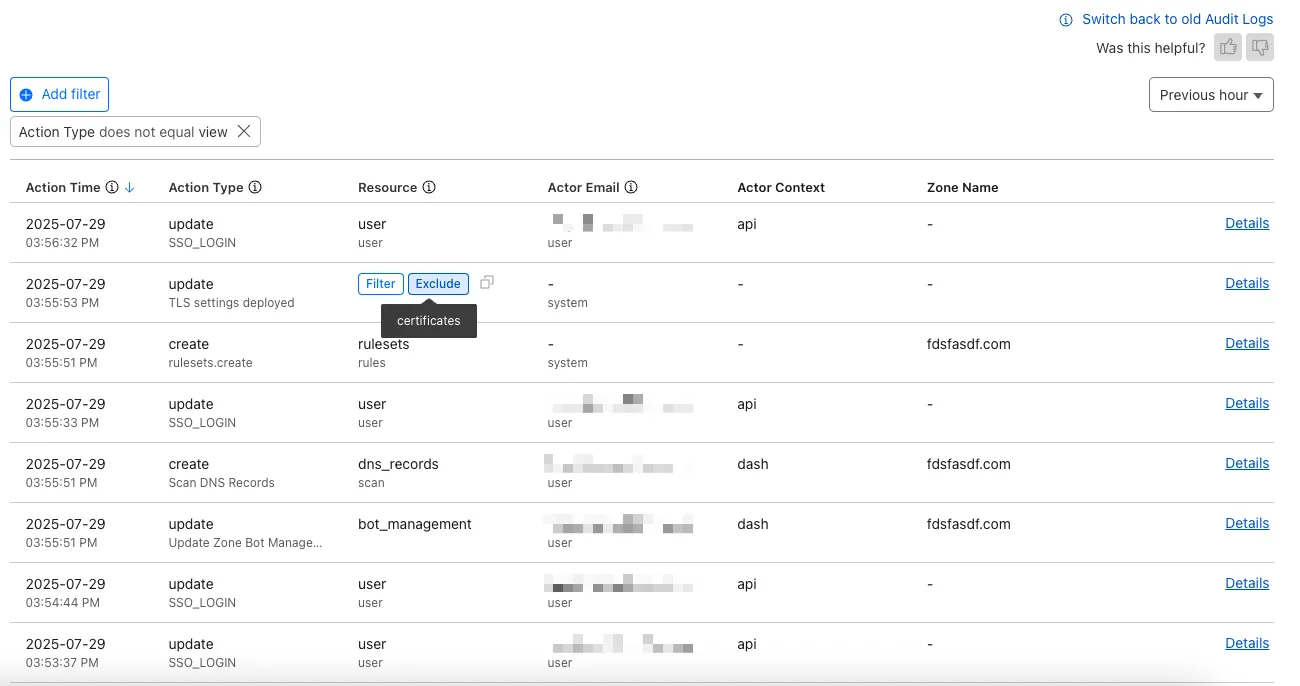
  1. The Audit Logs v2 UI is now available to all Cloudflare customers in Beta. This release builds on the public Beta of the Audit Logs v2 API and introduces a redesigned user interface with powerful new capabilities to make it easier to investigate account activity.

    Enabling the new UI

    To try the new user interface, go to Manage Account > Audit Logs. The previous version of Audit Logs remains available and can be re-enabled at any time using the Switch back to old Audit Logs link in the banner at the top of the page.

    New Features:

    • Advanced Filtering: Filter logs by actor, resource, method, and more for faster insights.
    • On-hover filter controls: Easily include or exclude values in queries by hovering over fields within a log entry.
    • Detailed Log Sidebar: View rich context for each log entry without leaving the main view.
    • JSON Log View: Inspect the raw log data in a structured JSON format.
    • Custom Time Ranges: Define your own time windows to view historical activity.
    • Infinite Scroll: Seamlessly browse logs without clicking through pages.
    Audit Logs v2 new UI

    For more details on Audit Logs v2, see the Audit Logs documentation.

    Known issues

    • A small number of audit logs may currently be unavailable in Audit Logs v2. In some cases, certain fields such as actor information may be missing in certain audit logs. We are actively working to improve coverage and completeness for General Availability.
    • Export to CSV is not supported in the new UI.

    We are actively refining the Audit Logs v2 experience and welcome your feedback. You can share overall feedback by clicking the thumbs up or thumbs down icons at the top of the page, or provide feedback on specific audit log entries using the thumbs icons next to each audit log line or by filling out our feedback form.

  1. Your real-time applications running over Cloudflare Tunnel are now faster and more reliable. We've completely re-architected the way cloudflared proxies UDP traffic in order to isolate it from other traffic, ensuring latency-sensitive applications like private DNS are no longer slowed down by heavy TCP traffic (like file transfers) on the same Tunnel.

    This is a foundational improvement to Cloudflare Tunnel, delivered automatically to all customers. There are no settings to configure — your UDP traffic is already flowing faster and more reliably.

    What’s new:

    • Faster UDP performance: We've significantly reduced the latency for establishing new UDP sessions, making applications like private DNS much more responsive.
    • Greater reliability for mixed traffic: UDP packets are no longer affected by heavy TCP traffic, preventing timeouts and connection drops for your real-time services.

    Learn more about running TCP or UDP applications and private networks through Cloudflare Tunnel.

  1. Earlier this year, we announced the launch of the new Terraform v5 Provider. We are aware of the high number of issues reported by the Cloudflare community related to the v5 release, with 13.5% of resources impacted. We have committed to releasing improvements on a 2 week cadeance to ensure it's stability and relability, including the v5.7 release.

    Thank you for continuing to raise issues and please keep an eye on this changelog for more information about upcoming releases.

    Changes

    • Addressed permanent diff bug on Cloudflare Tunnel config
    • State is now saved correctly for Zero Trust Access applications
    • Exact match is now working as expected within data.cloudflare_zero_trust_access_applications
    • cloudflare_zero_trust_access_policy now supports OIDC claims & diff issues resolved
    • Self hosted applications with private IPs no longer require a public domain for cloudflare_zero_trust_access_application.
    • New resource:
      • cloudflare_zero_trust_tunnel_warp_connector
    • Other bug fixes

    For a more detailed look at all of the changes, see the changelog in GitHub.

    Issues Closed

    If you have an unaddressed issue with the provider, we encourage you to check the open issues and open a new one if one does not already exist for what you are experiencing.

    Upgrading

    We suggest holding on migration to v5 while we work on stabilization of the v5 provider. This will ensure Cloudflare can work ahead and avoid any blocking issues.

    If you'd like more information on migrating from v4 to v5, please make use of the migration guide. We have provided automated migration scripts using Grit which simplify the transition, although these do not support implementations which use Terraform modules, so customers making use of modules need to migrate manually. Please make use of terraform plan to test your changes before applying, and let us know if you encounter any additional issues by reporting to our GitHub repository.

    For more info

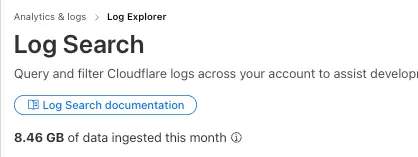
  1. Log Explorer customers can now monitor their data ingestion volume to keep track of their billing. Monthly usage is displayed at the top of the Log Search and Manage Datasets screens in Log Explorer.

    Ingested data
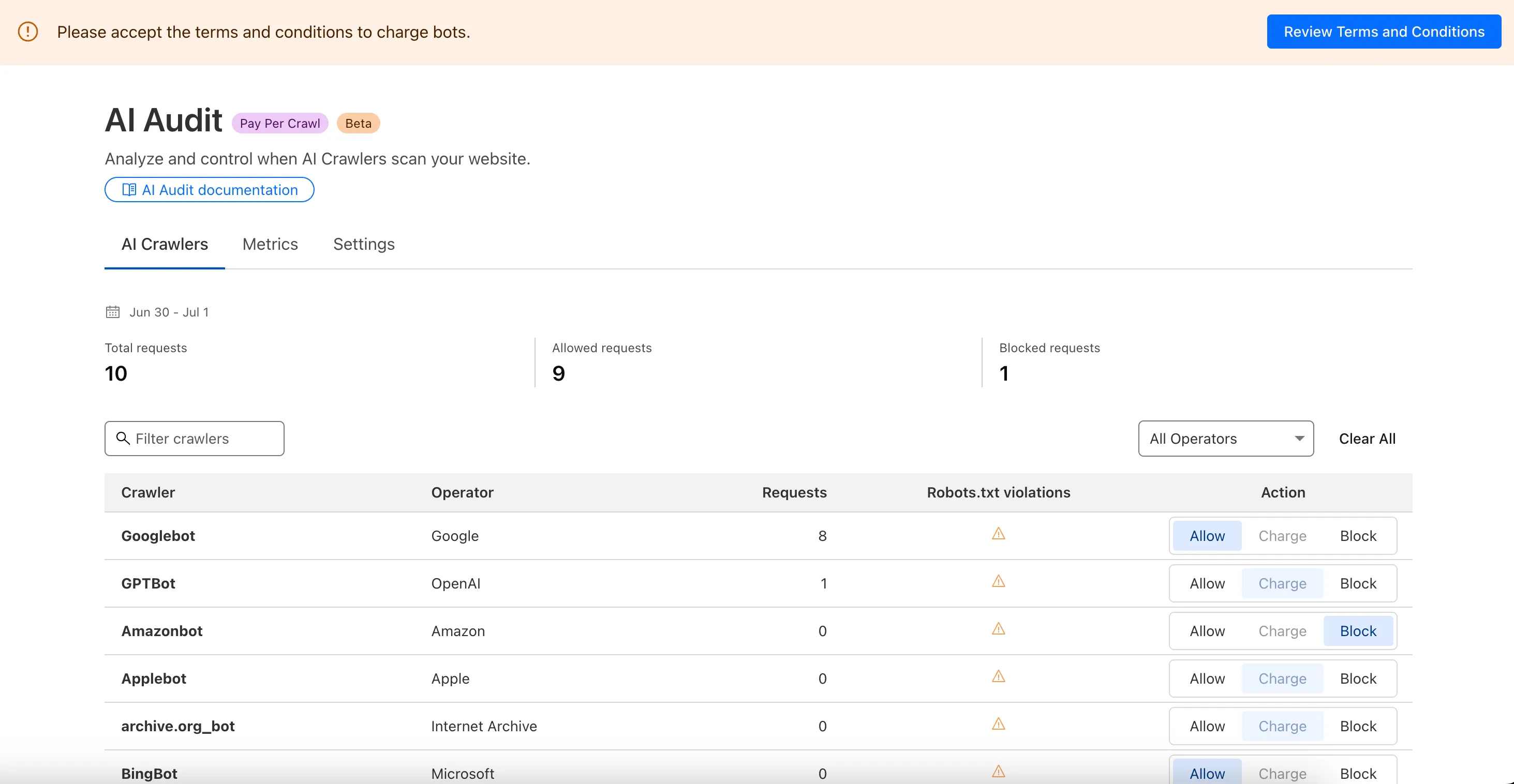
  1. We are introducing a new feature of AI Crawl Control — Pay Per Crawl. Pay Per Crawl enables site owners to require payment from AI crawlers every time the crawlers access their content, thereby fostering a fairer Internet by enabling site owners to control and monetize how their content gets used by AI.

    Pay per crawl

    For Site Owners:

    • Set pricing and select which crawlers to charge for content access
    • Manage payments via Stripe
    • Monitor analytics on successful content deliveries

    For AI Crawler Owners:

    • Use HTTP headers to request and accept pricing
    • Receive clear confirmations on charges for accessed content

    Learn more in the Pay Per Crawl documentation.

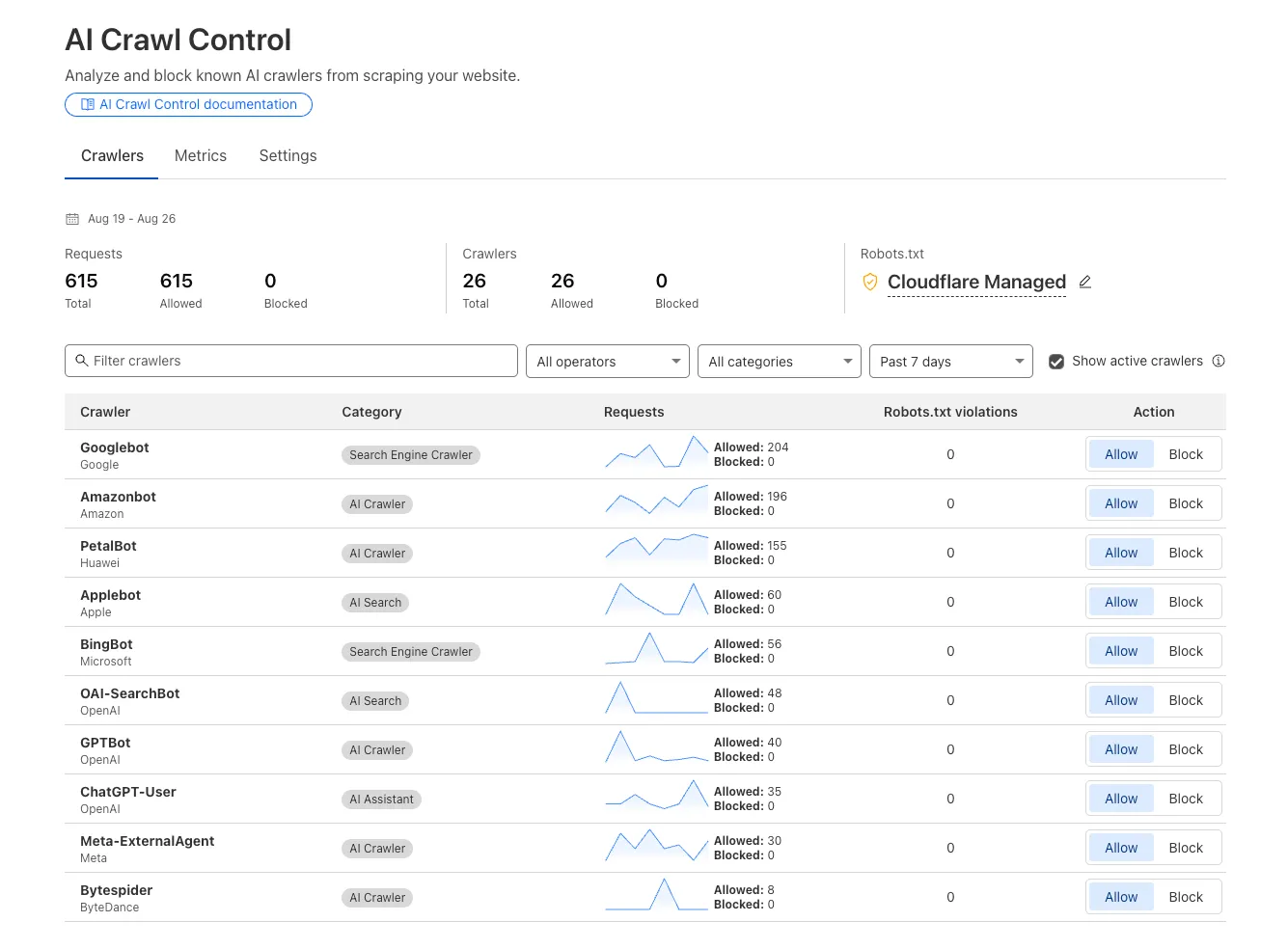
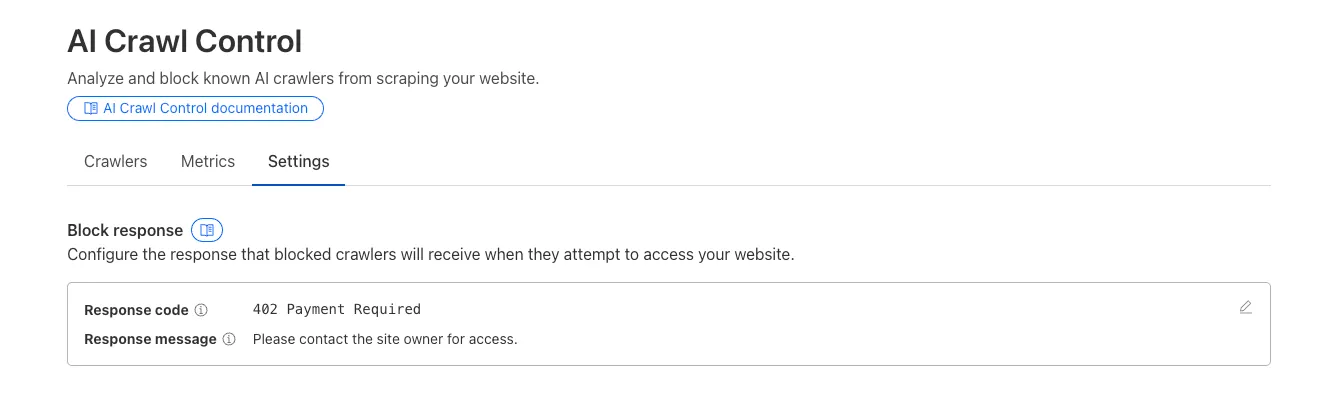
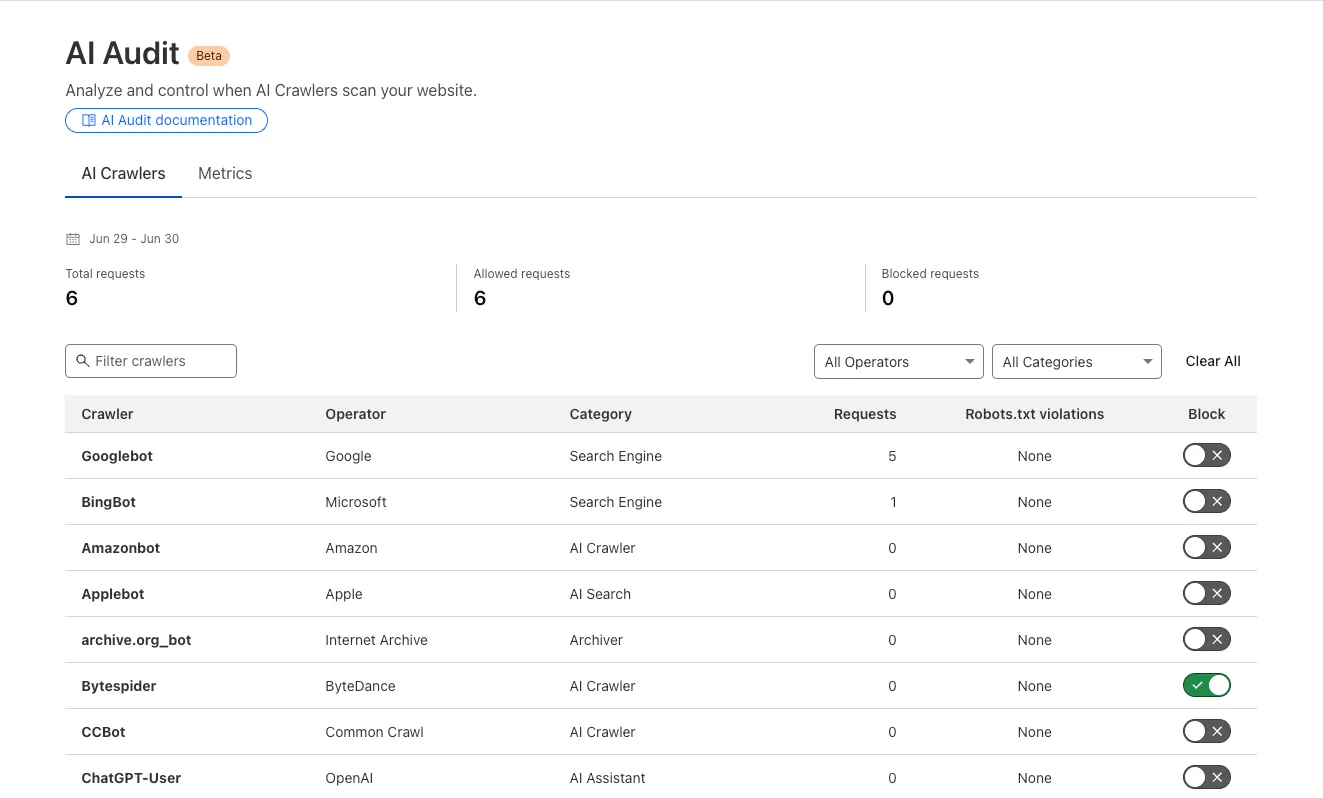
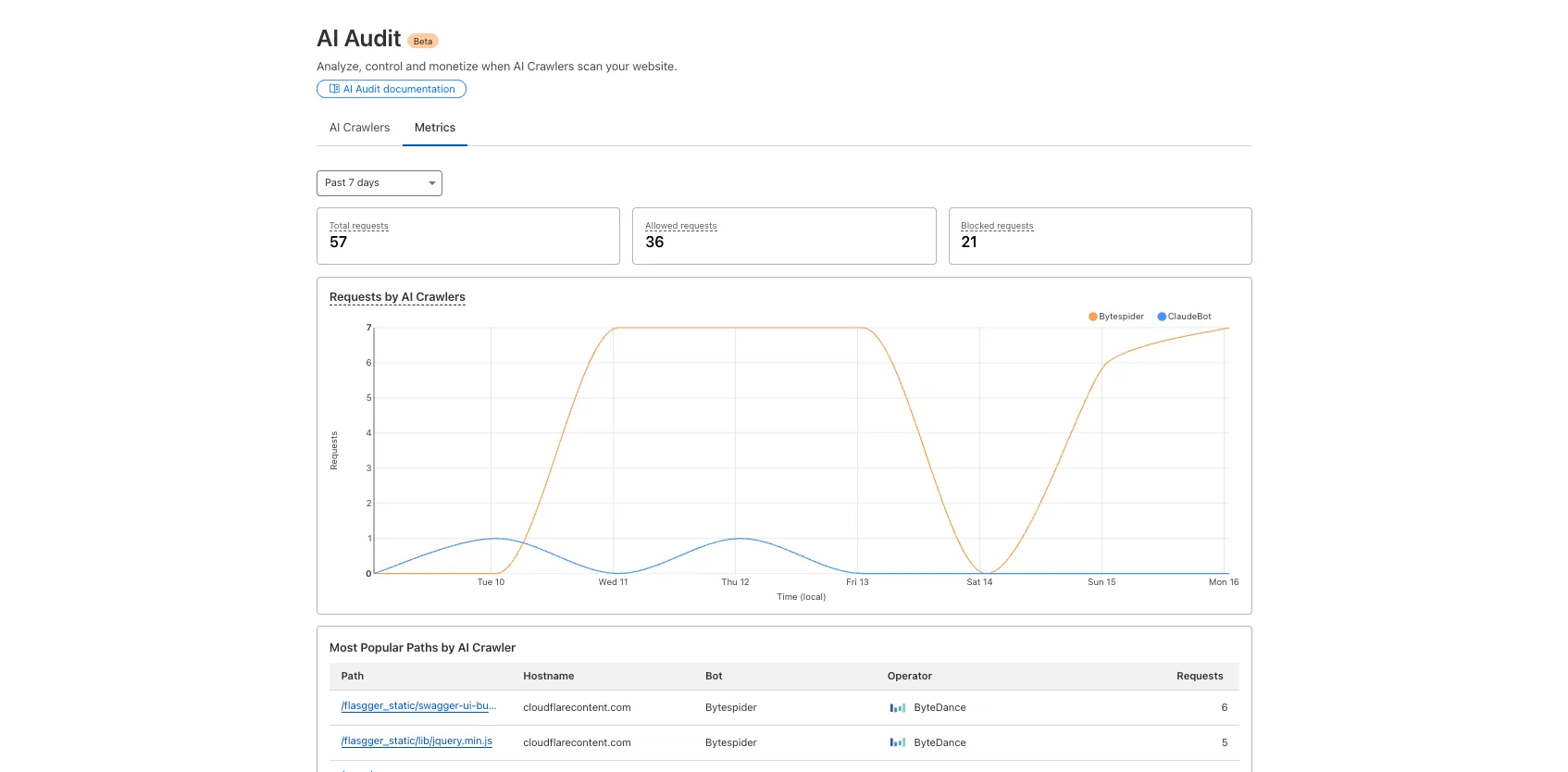
  1. We redesigned the AI Crawl Control dashboard to provide more intuitive and granular control over AI crawlers.

    • From the new AI Crawlers tab: block specific AI crawlers.
    • From the new Metrics tab: view AI Crawl Control metrics.
    Block AI crawlers Analyze AI crawler activity

    To get started, explore:

  1. We're announcing the GA of User Groups for Cloudflare Dashboard and System for Cross Domain Identity Management (SCIM) User Groups, strengthening our RBAC capabilities with stable, production-ready primitives for managing access at scale.

    What's New

    User Groups [GA]: User Groups are a new Cloudflare IAM primitive that enable administrators to create collections of account members that are treated equally from an access control perspective. User Groups can be assigned permission policies, with individual members in the group inheriting all permissions granted to the User Group. User Groups can be created manually or via our APIs.

    SCIM User Groups [GA]: Centralize & simplify your user and group management at scale by syncing memberships directly from your upstream identity provider (like Okta or Entra ID) to the Cloudflare Platform. This ensures Cloudflare stays in sync with your identity provider, letting you apply Permission Policies to those synced groups directly within the Cloudflare Dashboard.

    Stability & Scale: These features have undergone extensive testing during the Public Beta period and are now ready for production use across enterprises of all sizes.

    For more info:

  1. Log Explorer is now GA, providing native observability and forensics for traffic flowing through Cloudflare.

    Search and analyze your logs, natively in the Cloudflare dashboard. These logs are also stored in Cloudflare's network, eliminating many of the costs associated with other log providers.

    Log Explorer dashboard

    With Log Explorer, you can now:

    • Monitor security and performance issues with custom dashboards – use natural language to define charts for measuring response time, error rates, top statistics and more.
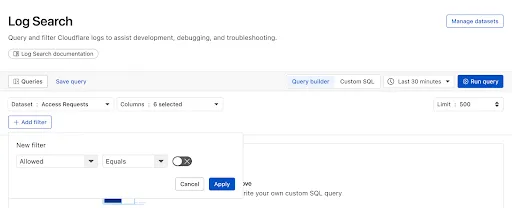
    • Investigate and troubleshoot issues with Log Search – use data type-aware search filters or custom sql to investigate detailed logs.
    • Save time and collaborate with saved queries – save Log Search queries for repeated use or sharing with other users in your account.
    • Access Log Explorer at the account and zone level – easily find Log Explorer at the account and zone level for querying any dataset.

    For help getting started, refer to our documentation.

  1. Earlier this year, we announced the launch of the new Terraform v5 Provider. Unlike the earlier Terraform providers, v5 is automatically generated based on the OpenAPI Schemas for our REST APIs. Since launch, we have seen an unexpectedly high number of issues reported by customers. These issues currently impact about 15% of resources. We have been working diligently to address these issues across the company, and have released the v5.6.0 release which includes a number of bug fixes. Please keep an eye on this changelog for more information about upcoming releases.

    Changes

    • Broad fixes across resources with recurring diffs, including, but not limited to:
      • cloudflare_zero_trust_access_identity_provider
        • cloudflare_zone
    • cloudflare_page_rules runtime panic when setting cache_level to cache_ttl_by_status
    • Failure to serialize requests in cloudflare_zero_trust_tunnel_cloudflared_config
    • Undocumented field 'priority' on zone_lockdown resource
    • Missing importability for cloudflare_zero_trust_device_default_profile_local_domain_fallback and cloudflare_account_subscription
    • New resources:
      • cloudflare_schema_validation_operation_settings
      • cloudflare_schema_validation_schemas
      • cloudflare_schema_validation_settings
      • cloudflare_zero_trust_device_settings
    • Other bug fixes

    For a more detailed look at all of the changes, see the changelog in GitHub.

    Issues Closed

    If you have an unaddressed issue with the provider, we encourage you to check the open issues and open a new one if one does not already exist for what you are experiencing.

    Upgrading

    If you are evaluating a move from v4 to v5, please make use of the migration guide. We have provided automated migration scripts using Grit which simplify the transition, although these do not support implementations which use Terraform modules, so customers making use of modules need to migrate manually. Please make use of terraform plan to test your changes before applying, and let us know if you encounter any additional issues by reporting to our GitHub repository.

    For more info

  1. Custom Errors can now fetch and store assets and error pages from your origin even if they are served with a 4xx or 5xx HTTP status code — previously, only 200 OK responses were allowed.

    What’s new:

    • You can now upload error pages and error assets that return error status codes (for example, 403, 500, 502, 503, 504) when fetched.
    • These assets are stored and minified at the edge, so they can be reused across multiple Custom Error rules without triggering requests to the origin.

    This is especially useful for retrieving error content or downtime banners from your backend when you can’t override the origin status code.

    Learn more in the Custom Errors documentation.

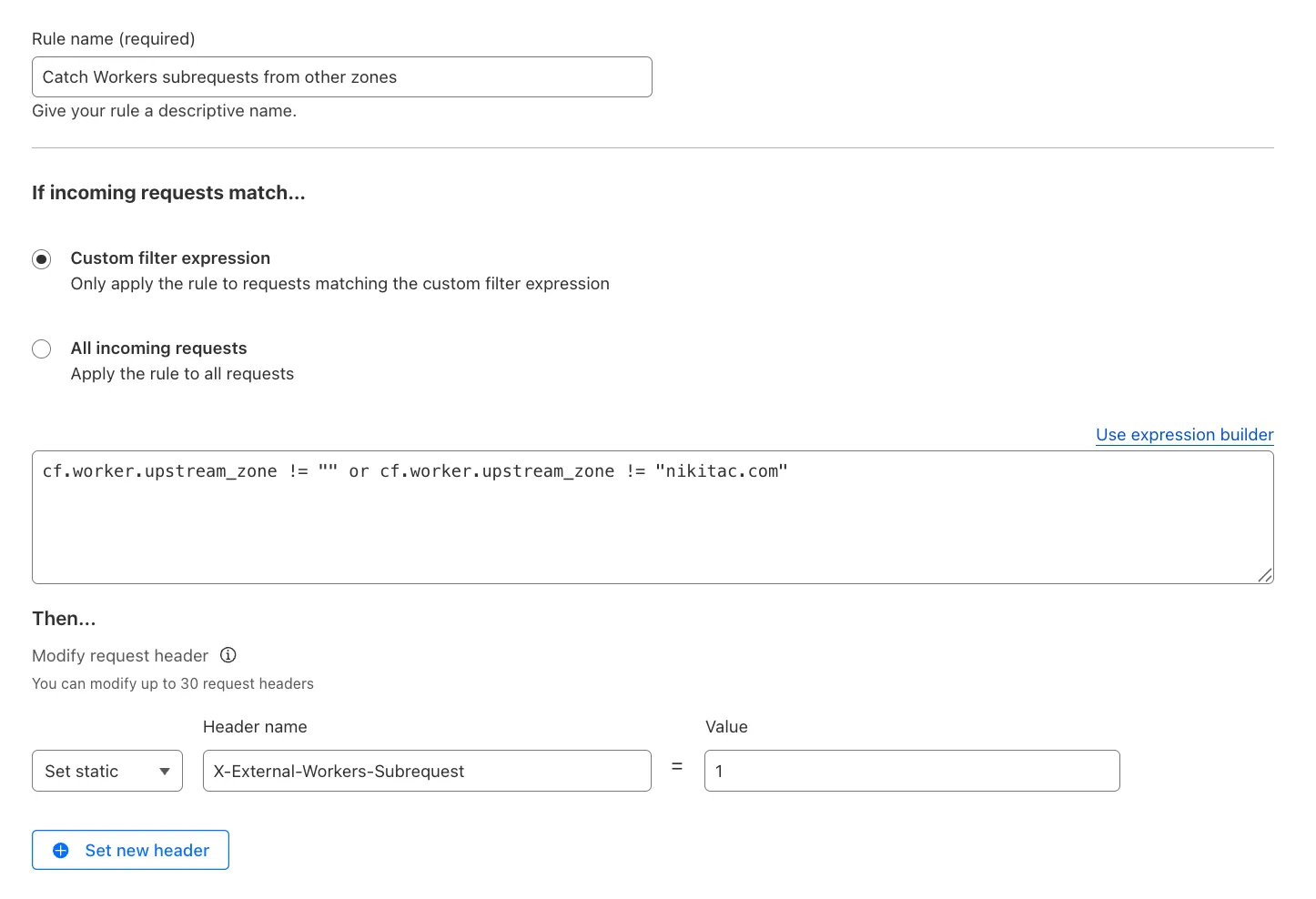
  1. You can now use the cf.worker.upstream_zone field in Transform Rules to control rule execution based on whether a request originates from Workers, including subrequests issued by Workers in other zones.

    Match Workers subrequests by upstream zone in Transform Rules

    What's new:

    • cf.worker.upstream_zone is now supported in Transform Rules expressions.
    • Skip or apply logic conditionally when handling Workers subrequests.

    For example, to add a header when the subrequest comes from another zone:

    Text in Expression Editor (replace myappexample.com with your domain):

    (cf.worker.upstream_zone != "" and cf.worker.upstream_zone != "myappexample.com")

    Selected operation under Modify request header: Set static

    Header name: X-External-Workers-Subrequest

    Value: 1

    This gives you more granular control in how you handle incoming requests for your zone.

    Learn more in the Transform Rules documentation and Rules language fields reference.

  1. We're excited to announce the Public Beta launch of User Groups for Cloudflare Dashboard and System for Cross Domain Identity Management (SCIM) User Groups, expanding our RBAC capabilities to simplify user and group management at scale.

    We've also visually overhauled the Permission Policies UI to make defining permissions more intuitive.

    What's New

    User Groups [BETA]: User Groups are a new Cloudflare IAM primitive that enable administrators to create collections of account members that are treated equally from an access control perspective. User Groups can be assigned permission policies, with individual members in the group inheriting all permissions granted to the User Group. User Groups can be created manually or via our APIs.

    SCIM User Groups [BETA]: Centralize & simplify your user and group management at scale by syncing memberships directly from your upstream identity provider (like Okta or Entra ID) to the Cloudflare Platform. This ensures Cloudflare stays in sync with your identity provider, letting you apply Permission Policies to those synced groups directly within the Cloudflare Dashboard.

    Revamped Permission Policies UI [BETA]: As Cloudflare's services have grown, so has the need for precise, role-based access control. We've given the Permission Policies builder a visual overhaul to make it much easier for administrators to find and define the exact permissions they want for specific principals.

    Updated Permissions Policy UX

    For more info:

  1. You can now enable Polish with the webp format directly in Configuration Rules, allowing you to optimize image delivery for specific routes, user agents, or A/B tests — without applying changes zone-wide.

    What’s new:

    • WebP is now a supported value in the Polish setting for Configuration Rules.

    This gives you more precise control over how images are compressed and delivered, whether you're targeting modern browsers, running experiments, or tailoring performance by geography or device type.

    Learn more in the Polish and Configuration Rules documentation.

  1. We’ve launched two powerful new tools to make the GraphQL Analytics API more accessible:

    GraphQL API Explorer

    The new GraphQL API Explorer helps you build, test, and run queries directly in your browser. Features include:

    • In-browser schema documentation to browse available datasets and fields
    • Interactive query editor with autocomplete and inline documentation
    • A "Run in GraphQL API Explorer" button to execute example queries from our docs
    • Seamless OAuth authentication — no manual setup required
    GraphQL API Explorer

    GraphQL Model Context Protocol (MCP) Server

    MCP Servers let you use natural language tools like Claude to generate structured queries against your data. See our blog post for details on how they work and which servers are available. The new GraphQL MCP server helps you discover and generate useful queries for the GraphQL Analytics API. With this server, you can:

    • Explore what data is available to query
    • Generate and refine queries using natural language, with one-click links to run them in the API Explorer
    • Build dashboards and visualizations from structured query outputs

    Example prompts include:

    • “Show me HTTP traffic for the last 7 days for example.com”
    • “What GraphQL node returns firewall events?”
    • “Can you generate a link to the Cloudflare GraphQL API Explorer with a pre-populated query and variables?”

    We’re continuing to expand these tools, and your feedback helps shape what’s next. Explore the documentation to learn more and get started.

  1. Earlier this year, we announced the launch of the new Terraform v5 Provider. Unlike the earlier Terraform providers, v5 is automatically generated based on the OpenAPI Schemas for our REST APIs. Since launch, we have seen an unexpectedly high number of issues reported by customers. These issues currently impact about 15% of resources. We have been working diligently to address these issues across the company, and have released the v5.5.0 release which includes a number of bug fixes. Please keep an eye on this changelog for more information about upcoming releases.

    Changes

    • Broad fixes across resources with recurring diffs, including, but not limited to:
      • cloudflare_zero_trust_gateway_policy
      • cloudflare_zero_trust_access_application
      • cloudflare_zero_trust_tunnel_cloudflared_route
      • cloudflare_zone_setting
      • cloudflare_ruleset
      • cloudflare_page_rule
    • Zone settings can be re-applied without client errors
    • Page rules conversion errors are fixed
    • Failure to apply changes to cloudflare_zero_trust_tunnel_cloudflared_route
    • Other bug fixes

    For a more detailed look at all of the changes, see the changelog in GitHub.

    Issues Closed

    If you have an unaddressed issue with the provider, we encourage you to check the open issues and open a new one if one does not already exist for what you are experiencing.

    Upgrading

    If you are evaluating a move from v4 to v5, please make use of the migration guide. We have provided automated migration scripts using Grit which simplify the transition, although these do not support implementations which use Terraform modules, so customers making use of modules need to migrate manually. Please make use of terraform plan to test your changes before applying, and let us know if you encounter any additional issues by reporting to our GitHub repository.

    For more info

  1. You can now use IP, Autonomous System (AS), and Hostname custom lists to route traffic to Snippets and Cloud Connector, giving you greater precision and control over how you match and process requests at the edge.

    In Snippets, you can now also match on Bot Score and WAF Attack Score, unlocking smarter edge logic for everything from request filtering and mitigation to tarpitting and logging.

    What’s new:

    • Custom lists matching – Snippets and Cloud Connector now support user-created IP, AS, and Hostname lists via dashboard or Lists API. Great for shared logic across zones.
    • Bot Score and WAF Attack Score – Use Cloudflare’s intelligent traffic signals to detect bots or attacks and take advanced, tailored actions with just a few lines of code.
    New fields in Snippets

    These enhancements unlock new possibilities for building smarter traffic workflows with minimal code and maximum efficiency.

    Learn more in the Snippets and Cloud Connector documentation.

  1. Earlier this year, we announced the launch of the new Terraform v5 Provider. Unlike the earlier Terraform providers, v5 is automatically generated based on the OpenAPI Schemas for our REST APIs. Since launch, we have seen an unexpectedly high number of issues reported by customers. These issues currently impact about 15% of resources. We have been working diligently to address these issues across the company, and have released the v5.4.0 release which includes a number of bug fixes. Please keep an eye on this changelog for more information about upcoming releases.

    Changes

    • Removes the worker_platforms_script_secret resource from the provider (see migration guide for alternatives—applicable to both Workers and Workers for Platforms)
    • Removes duplicated fields in cloudflare_cloud_connector_rules resource
    • Fixes cloudflare_workers_route id issues #5134 #5501
    • Fixes issue around refreshing resources that have unsupported response types
      Affected resources
      • cloudflare_certificate_pack
      • cloudflare_registrar_domain
      • cloudflare_stream_download
      • cloudflare_stream_webhook
      • cloudflare_user
      • cloudflare_workers_kv
      • cloudflare_workers_script
    • Fixes cloudflare_workers_kv state refresh issues
    • Fixes issues around configurability of nested properties without computed values for the following resources
      Affected resources
      • cloudflare_account
      • cloudflare_account_dns_settings
      • cloudflare_account_token
      • cloudflare_api_token
      • cloudflare_cloud_connector_rules
      • cloudflare_custom_ssl
      • cloudflare_d1_database
      • cloudflare_dns_record
      • email_security_trusted_domains
      • cloudflare_hyperdrive_config
      • cloudflare_keyless_certificate
      • cloudflare_list_item
      • cloudflare_load_balancer
      • cloudflare_logpush_dataset_job
      • cloudflare_magic_network_monitoring_configuration
      • cloudflare_magic_transit_site
      • cloudflare_magic_transit_site_lan
      • cloudflare_magic_transit_site_wan
      • cloudflare_magic_wan_static_route
      • cloudflare_notification_policy
      • cloudflare_pages_project
      • cloudflare_queue
      • cloudflare_queue_consumer
      • cloudflare_r2_bucket_cors
      • cloudflare_r2_bucket_event_notification
      • cloudflare_r2_bucket_lifecycle
      • cloudflare_r2_bucket_lock
      • cloudflare_r2_bucket_sippy
      • cloudflare_ruleset
      • cloudflare_snippet_rules
      • cloudflare_snippets
      • cloudflare_spectrum_application
      • cloudflare_workers_deployment
      • cloudflare_zero_trust_access_application
      • cloudflare_zero_trust_access_group
    • Fixed defaults that made cloudflare_workers_script fail when using Assets
    • Fixed Workers Logpush setting in cloudflare_workers_script mistakenly being readonly
    • Fixed cloudflare_pages_project broken when using "source"

    The detailed changelog is available on GitHub.

    Upgrading

    If you are evaluating a move from v4 to v5, please make use of the migration guide. We have provided automated migration scripts using Grit which simplify the transition, although these do not support implementations which use Terraform modules, so customers making use of modules need to migrate manually. Please make use of terraform plan to test your changes before applying, and let us know if you encounter any additional issues either by reporting to our GitHub repository, or by opening a support ticket.

    For more info

  1. Custom Errors are now generally available for all paid plans — bringing a unified and powerful experience for customizing error responses at both the zone and account levels.

    You can now manage Custom Error Rules, Custom Error Assets, and redesigned Error Pages directly from the Cloudflare dashboard. These features let you deliver tailored messaging when errors occur, helping you maintain brand consistency and improve user experience — whether it’s a 404 from your origin or a security challenge from Cloudflare.

    What's new:

    • Custom Errors are now GA – Available on all paid plans and ready for production traffic.
    • UI for Custom Error Rules and Assets – Manage your zone-level rules from the Rules > Overview and your zone-level assets from the Rules > Settings tabs.
    • Define inline content or upload assets – Create custom responses directly in the rule builder, upload new or reuse previously stored assets.
    • Refreshed UI and new name for Error Pages – Formerly known as “Custom Pages,” Error Pages now offer a cleaner, more intuitive experience for both zone and account-level configurations.
    • Powered by Ruleset Engine – Custom Error Rules support conditional logic and override Error Pages for 500 and 1000 class errors, as well as errors originating from your origin or other Cloudflare products. You can also configure Response Header Transform Rules to add, change, or remove HTTP headers from responses returned by Custom Error Rules.

    Learn more in the Custom Errors documentation.

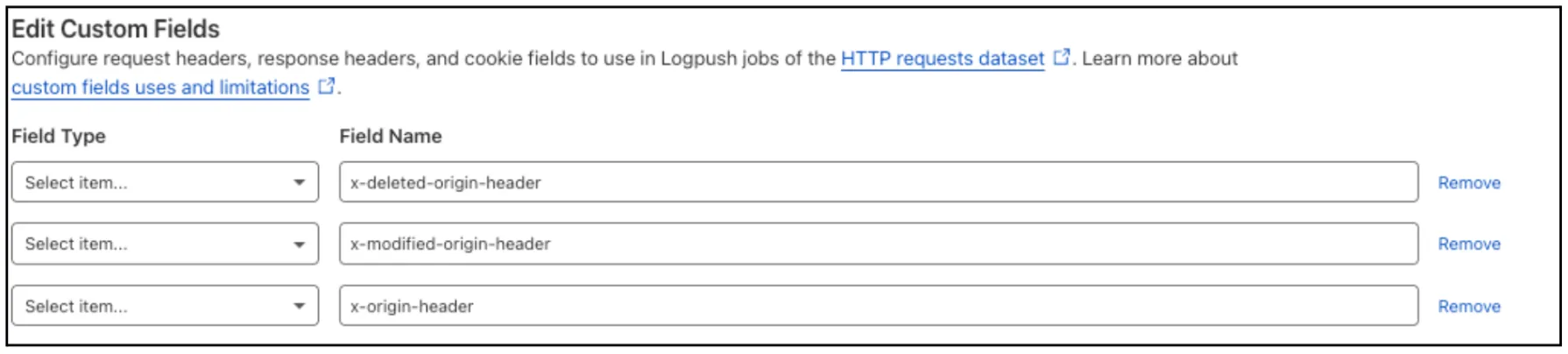
  1. Custom Fields now support logging both raw and transformed values for request and response headers in the HTTP requests dataset.

    These fields are configured per zone and apply to all Logpush jobs in that zone that include request headers, response headers. Each header can be logged in only one format—either raw or transformed—not both.

    By default:

    • Request headers are logged as raw values
    • Response headers are logged as transformed values

    These defaults can be overridden to suit your logging needs.

    For more information refer to Custom fields documentation

  1. Cloudflare Registrar API is now in beta.

    You can now use the Cloudflare API to:

    • Search for domain names.
    • Check real-time availability and pricing.
    • Register supported domains programmatically.

    This beta supports a subset of popular extensions available through Cloudflare Registrar. Search returns suggestions across API-supported extensions, check confirms current availability and pricing, and registration starts a workflow that can complete immediately or be polled if it takes longer.

    Because the Registrar API is part of the Cloudflare API, it can also be used in Cloudflare MCP and other agent-driven workflows.

    If you are using Cloudflare MCP or other agent-driven workflows, prompts can be as simple as:

    • Search for domain ideas for a coffee shop based in Evergreen, Colorado.
    • Check whether example.com is available and show me the current price.
    • Register example.com

    For supported operations, extension availability, and workflow details, refer to:

  1. Cloudflare Snippets are now GA

    Cloudflare Snippets are now generally available at no extra cost across all paid plans — giving you a fast, flexible way to programmatically control HTTP traffic using lightweight JavaScript.

    You can now use Snippets to modify HTTP requests and responses with confidence, reliability, and scale. Snippets are production-ready and deeply integrated with Cloudflare Rules, making them ideal for everything from quick dynamic header rewrites to advanced routing logic.

    What's new:

    • Snippets are now GA – Available at no extra cost on all Pro, Business, and Enterprise plans.

    • Ready for production – Snippets deliver a production-grade experience built for scale.

    • Part of the Cloudflare Rules platform – Snippets inherit request modifications from other Cloudflare products and support sequential execution, allowing you to run multiple Snippets on the same request and apply custom modifications step by step.

    • Trace integration – Use Cloudflare Trace to see which Snippets were triggered on a request — helping you understand traffic flow and debug more effectively.

      Snippets shown in Cloudflare Trace results

    Learn more in the launch blog post.

  1. Example search for .ai domains

    Cloudflare Registrar now supports .ai and .shop domains. These are two of our most highly-requested top-level domains (TLDs) and are great additions to the 300+ other TLDs we support.

    Starting today, customers can:

    • Register and renew these domains at cost without any markups or add-on fees
    • Enjoy best-in-class security and performance with native integrations with Cloudflare DNS, CDN, and SSL services like one-click DNSSEC
    • Combat domain hijacking with Custom Domain Protection (available on enterprise plans)

    We can't wait to see what AI and e-commerce projects you deploy on Cloudflare. To get started, transfer your domains to Cloudflare or search for new ones to register.

  1. The latest version of audit logs streamlines audit logging by automatically capturing all user and system actions performed through the Cloudflare Dashboard or public APIs. This update leverages Cloudflare’s existing API Shield to generate audit logs based on OpenAPI schemas, ensuring a more consistent and automated logging process.

    Availability: Audit logs (version 2) is now in Beta, with support limited to API access.

    Use the following API endpoint to retrieve audit logs:

    JavaScript
    GET https://api.cloudflare.com/client/v4/accounts/<account_id>/logs/audit?since=<date>&before=<date>

    You can access detailed documentation for audit logs (version 2) Beta API release here.

    Key Improvements in the Beta Release:

    • Automated & standardized logging: Logs are now generated automatically using a standardized system, replacing manual, team-dependent logging. This ensures consistency across all Cloudflare services.

    • Expanded product coverage: Increased audit log coverage from 75% to 95%. Key API endpoints such as /accounts, /zones, and /organizations are now included.

    • Granular filtering: Logs now follow a uniform format, enabling precise filtering by actions, users, methods, and resources—allowing for faster and more efficient investigations.

    • Enhanced context and traceability: Each log entry now includes detailed context, such as the authentication method used, the interface (API or Dashboard) through which the action was performed, and mappings to Cloudflare Ray IDs for better traceability.

    • Comprehensive activity capture: Expanded logging to include GET requests and failed attempts, ensuring that all critical activities are recorded.

    Known Limitations in Beta

    • Error handling for the API is not implemented.
    • There may be gaps or missing entries in the available audit logs.
    • UI is unavailable in this Beta release.
    • System-level logs and User-Activity logs are not included.

    Support for these features is coming as part of the GA release later this year. For more details, including a sample audit log, check out our blog post: Introducing Automatic Audit Logs