
Designing a distributed web performance architecture
This guide describes a comprehensive layer 7 (L7) Application Performance strategy for architects and developers. In today's competitive digital landscape, application performance is a critical business differentiator. However, the ultimate objective is finding the performance-security equilibrium point.
While this guide focuses on maximizing speed and user experience (UX), performance cannot come at the expense of security. Architects must balance latency reduction against the necessary processing overhead of rigorous security controls, such as DDoS protection, WAF and Bot Management.
In high-risk scenarios, security must take precedence, where the "latency budget" gained from these performance optimizations is strategically reinvested to power essential protections, ensuring the application remains both fast enough to convert users and secure enough to protect the business.
| Key business metrics | Why it matters |
|---|---|
| User Engagement & Retention | First Impressions & Abandonment: A fast-loading website is fundamental to a positive user experience. Users today expect instant access to information, and research highlights this, showing that a significant portion of users will abandon a website if it takes too long to load ↗, directly increasing the bounce rate. |
| Revenue Generation & Conversion | Direct Business Impact: Web performance directly impacts a website's conversion rate, which is the percentage of visitors who complete a desired action, such as making a purchase or signing up for a newsletter. A faster site leads to higher conversion rates; for example, one study ↗ found that even a 100-millisecond reduction in homepage load time resulted in a 1.11% increase in conversions. |
| Organic Visibility & Search Ranking | Traffic Acquisition & Authority: Search Engine Optimization (SEO) is how search engines like Google use page speed as a ranking factor. Faster-loading websites tend to rank higher in search results, which leads to more organic traffic. Google's Core Web Vitals (CWVs) are a set of metrics that measure a page's loading speed, interactivity, and visual stability, all of which are directly tied to performance and can significantly boost a site's search engine ranking. |
| High-Speed Delivery & Reliability | User Experience & Trust: This metric combines a high Download Success Rate (Availability/Resiliency) with maximum Download Throughput (Speed). For mission-critical assets like software, video, or AI models, it ensures users get the file fast and reliably, directly impacting product usability and customer trust, especially during traffic spikes. |
| Edge Efficiency & Cost Control | Operational Cost Reduction: This metric is primarily measured by the Cache Hit Ratio (CHR) for large files. Maximizing the CHR offloads traffic from the origin server, which is the key driver for minimizing infrastructure load and achieving significant Data Egress Cost Reduction (for example, through the Bandwidth Alliance ↗), directly translating to lower operational costs and greater profitability for the business. |
Measuring the Impact: While marketing dashboards (for example, Google Analytics) track business outcomes, Cloudflare Web Analytics and Observatory measure the performance drivers. Use them to correlate real-time Core Web Vitals (CWV) and Real User Monitoring (RUM) improvements directly with reduced bounce rates and higher conversions, without compromising privacy or relying on heavy client-side scripts.
By following this architecture, organizations can expect:
- Improving Core Web Vitals (CWV) like LCP and INP, which can help reduce bounce rates and drive sales.
- Maximizing Cache Hit Ratio, which offloads traffic from the origin, reducing infrastructure spend, and overall lowering operational costs.
- Ensuring high uptime/availability and business resiliency even during traffic spikes.
Measuring performance is tricky ↗, and it serves a broader business context where Security and Compliance ↗ are often non-negotiable prerequisites. Organizations frequently validate that their architecture meets regulatory standards (such as data residency ↗ or encryption protocols, including Post-Quantum Cryptography (PQC)) before unlocking performance capabilities.
Once these security and compliance baselines are secured, effective optimization starts with measuring the “right” things - which interestingly is slightly different for everyone. Nonetheless, most people would agree to focus on user-centric metrics for website performance, using TTFB as a diagnostic tool ↗ for server responsiveness, but prioritizing Core Web Vitals (CWV) ↗ for measuring user experience.
Successful implementation is measured by these metrics:
| Metric | Target (75th percentile) | What it measures |
|---|---|---|
| Largest Contentful Paint (LCP) | < 2.5 s | Loading performance (hero image/text visibility). |
| Interaction to Next Paint (INP) | < 200 ms | Interactivity and responsiveness to inputs. |
| Cumulative Layout Shift (CLS) | < 0.1 | Visual stability (unexpected layout shifts). |
| Time to First Byte (TTFB) | < 800 ms | Server responsiveness (network + processing time). Gain deep visibility into connection performance by leveraging fields like cf.timings.origin_ttfb_msec to isolate origin latency from network overhead. |
The 75th percentile target is based on previous analysis ↗ for reasonable balance.
This diagram illustrates the request lifecycle, highlighting how Cloudflare's layers/phases - Network, Optimization, Caching, and Origin connectivity - work together to minimize latency.
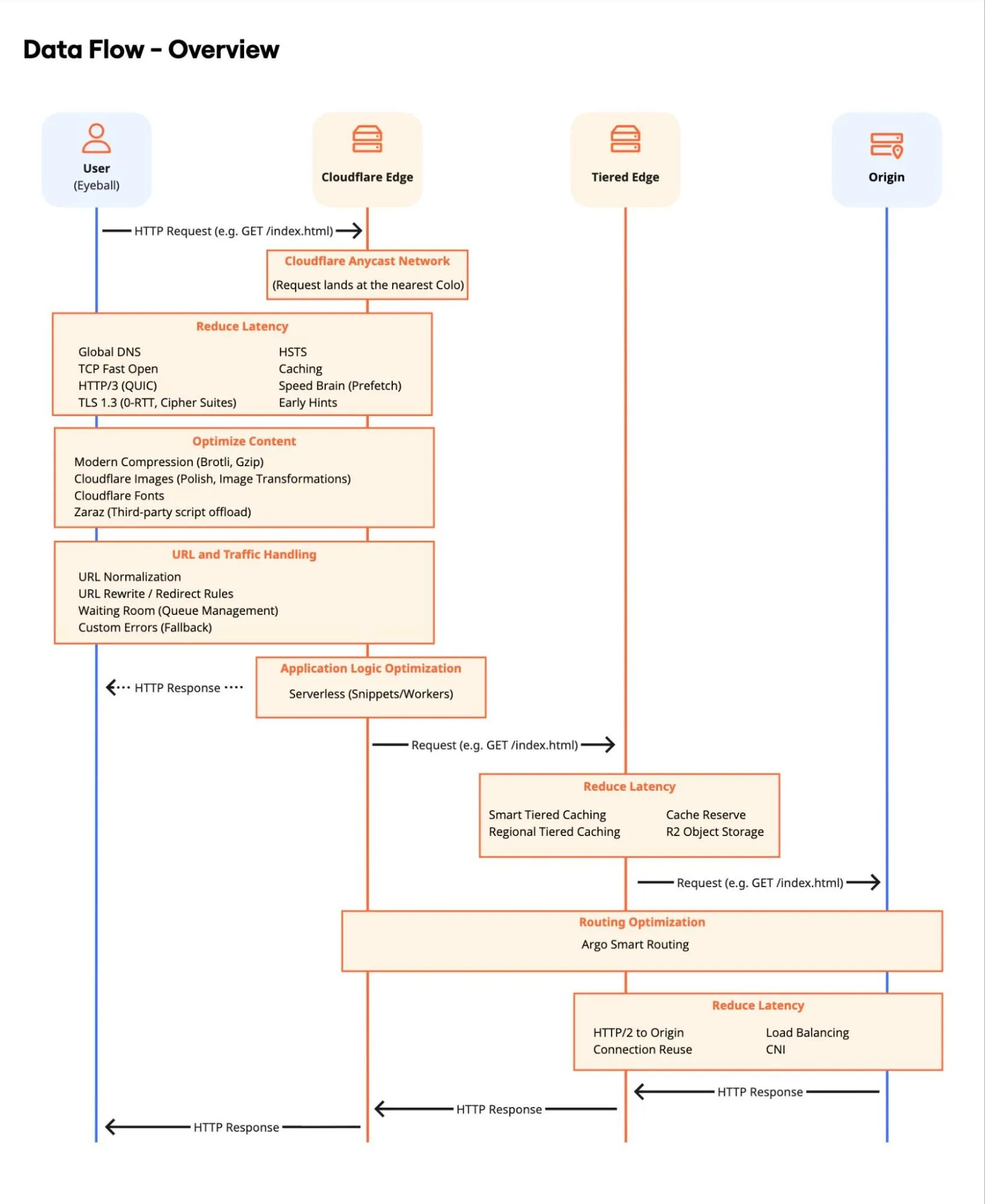
For demonstration purposes, the architecture is organized into four logical layers and follows specific phases. Optimizing every step in this chain is required to achieve the best aggregate performance.
The performance journey begins at the client's device. Device hardware, browser ↗, network quality and topology determine initial responsiveness. The goal here is to establish the fastest possible connection to the Cloudflare network.
- DNS Resolution: The client device queries the domain, going through both a public DNS resolver and, ultimately, to an authoritative DNS server. Cloudflare's global anycast network ↗ routes requests to the nearest Point of Presence (PoP), with global DNS ↗ resolution ensuring minimal lookup latency, including the possibility to expand to mainland China.
- Connection Establishment: The client establishes a connection via IPv4/IPv6 using HTTP/3 (QUIC) and TLS 1.3 - this also allows for Post-Quantum Cryptography (PQC). If the client has visited before, 0-RTT Connection Resumption eliminates round-trips during the handshake. Additionally, HTTP Strict Transport Security (HSTS) enforces browser-side redirects to HTTPS, removing unnecessary server round-trips. It is generally recommended to enforce HTTPS connections. Furthermore, by leveraging relevant TCP fields, you can implement adaptive performance strategies.
- Browser Optimization: Features like Speed Brain (Speculation Rules API) proactively prefetch resources, while Early Hints send link headers to the browser during "server think time", speeding up page rendering.
- Third-Party Offloading: Zaraz offloads third-party tools (like Google Analytics 4 or Mixpanel) to the cloud. This reduces main thread blocking on the device, significantly improving INP.
- Web Analytics (RUM): Leverage Cloudflare Web Analytics to collect privacy-first, cookie-less performance data directly from the user's browser. This lightweight JavaScript beacon provides real-world insights into Core Web Vitals (LCP, INP, CLS) without tracking users or storing client-side state.
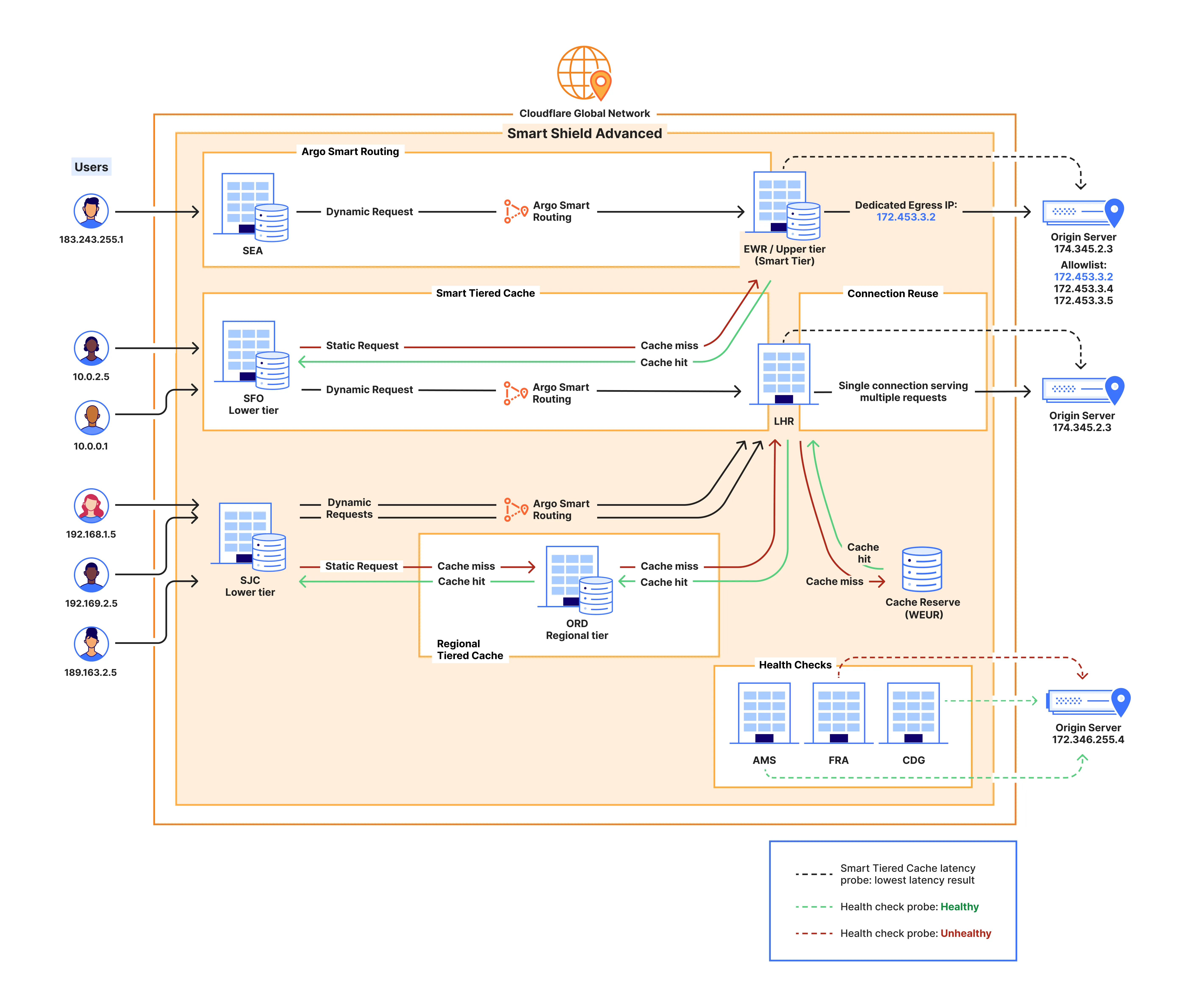
Once the request reaches the network edge, Cloudflare processes and optimizes the content before it is served or fetched from the cache.
- Traffic Management: The request is inspected. URL Normalization ensures consistency, while Redirect Rules or Transform Rules handle path modifications efficiently. Waiting Room protects the backend during massive traffic surges, maintaining availability.
- Programmatic Customization: For advanced use cases where standard rules are insufficient, Snippets and Workers allow for programmatic customization. This enables executing custom code logic to modify headers, rewrite URLs, image optimizations, or implement unique caching logic directly at the edge. Utilize Service Bindings to facilitate low-latency, zero-overhead communication between these Workers.
- Content Optimization: Text assets are compressed using Compression Rules (Brotli/Gzip). Images are processed on-the-fly via Image Transformations or Polish to ensure they are served in the optimal format (AVIF/WebP) and size for the device, significantly improving LCP and CLS.
- Font & Tag Optimization: Cloudflare Fonts eliminates DNS lookups and TLS connections to Google Fonts by serving them inline from the domain. Google Tag Gateway improves ad signal measurement and privacy.
- Routing, Availability & Protocol Intelligence: Cloudflare operates one of the most interconnected networks ↗ in the world, peering with over 13,000 networks, operating a global backbone ↗, and participating in a leading number of Internet Exchange Points (IXPs) ↗ globally. We leverage the unique intelligence ↗ derived from this massive dataset to dynamically optimize Congestion Control (CC) at the protocol level - automatically selecting the optimal algorithm and tuning adequate parameters for every connection based on real-time network conditions. For dynamic requests that cannot be cached, Argo Smart Routing finds the fastest path through the network to the origin. Custom Errors provide a consistent brand experience during failures.
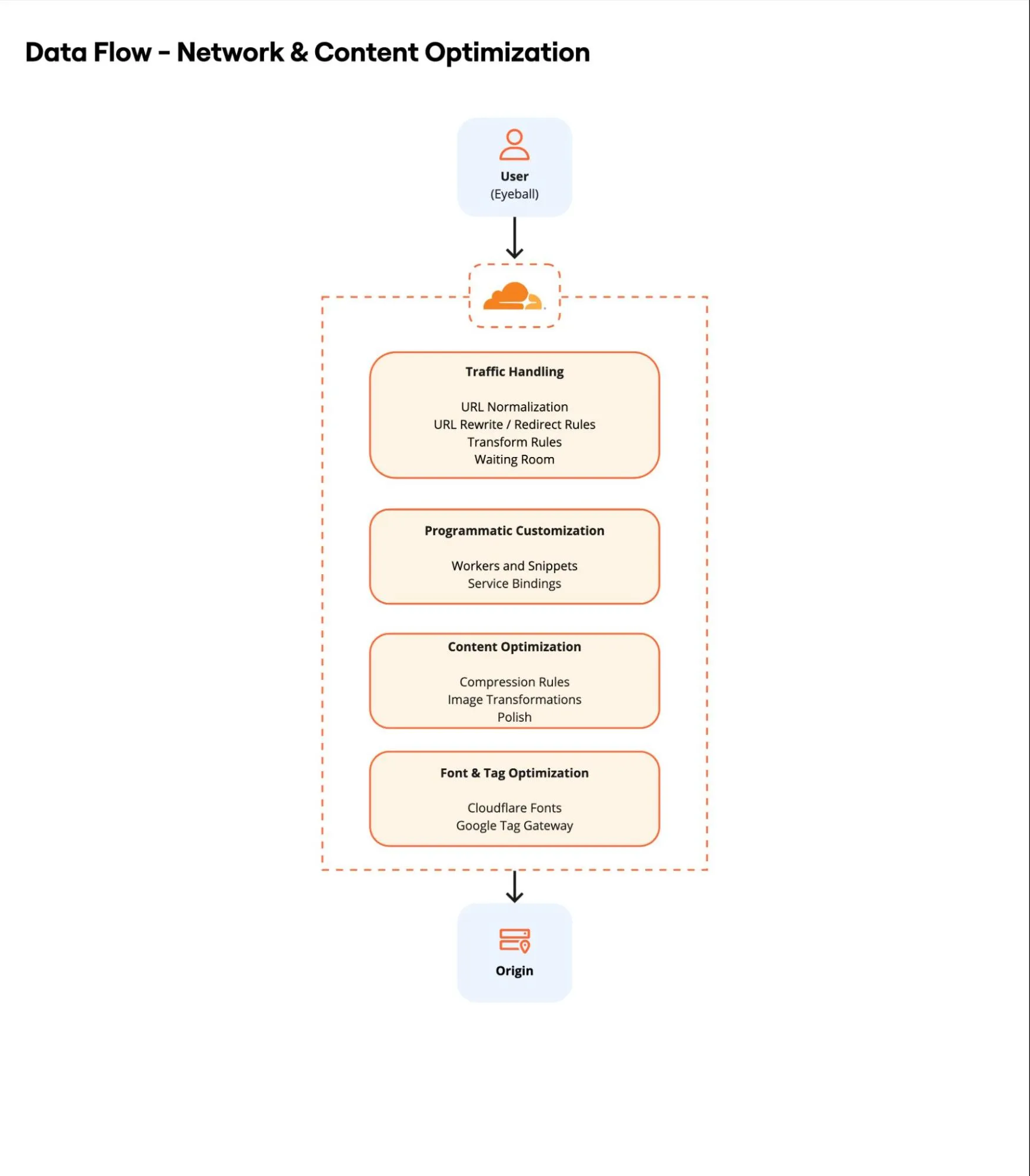
Cloudflare can be organized into a specific topology. This layer handles content retention and retrieval. It acts as a shield for the origin and a high-speed store for the client.
- Cache Logic: Origin Cache Control Headers, Cache Rules and Caching Levels allow precise control over TTL and query string handling. Implement Cache Normalization strategies to consolidate requests with variable URLs - such as those with distinct marketing or SEO parameters - into a single Cache Key, significantly improving cache hit ratios. Prefetch URLs can pre-populate the cache with critical assets via manifest files to further reduce latency. Note the default caching behavior and limits.
- Tiered Caching: If the content is not on the local PoP, Cloudflare checks an upper-tier cache topology. Smart Tiered Caching and Regional Tiered Cache centralize connections, increasing cache hit ratios and reducing global origin load. For a more customized approach, Enterprise customers can opt for a Custom Tiered Cache topology.
- Dedicated long-term Cache: Cache Reserve extends the life of large, infrequently accessed assets (for example, images, archived video, software updates, or static AI models) by moving infrequently accessed content to persistent object storage backend (powered by R2). This prevents eviction due to Least Recently Used (LRU) algorithms and avoids latency-inducing origin fetches, while simultaneously supporting storage redundancy and resilience requirements.
- Instant Purge: Leverage Cloudflare's decentralized purging architecture ↗ to invalidate content globally in approximately 150ms. This Instant Purge capability supports various granular approaches - including Purge by URL, Tag, Prefix, or Hostname - ensuring users receive fresh content immediately without waiting for TTL expiration.
- Cloud Connectivity: Cloud Connector Rules simplify routing traffic to public cloud providers (AWS, Azure, GCP) for specific object storage or origin requirements. For private infrastructure, Workers VPC enables direct connectivity to private storage endpoints or databases on public clouds (for example, AWS, Azure) without exposing them to the public Internet.
- Static Asset Hosting: Entire parts of an application (frontend assets, images, including large media files, software packages) can be stored directly in R2 Object Storage or Workers Static Assets, serving them from the edge without ever hitting a traditional origin server. Additional storage options are available.
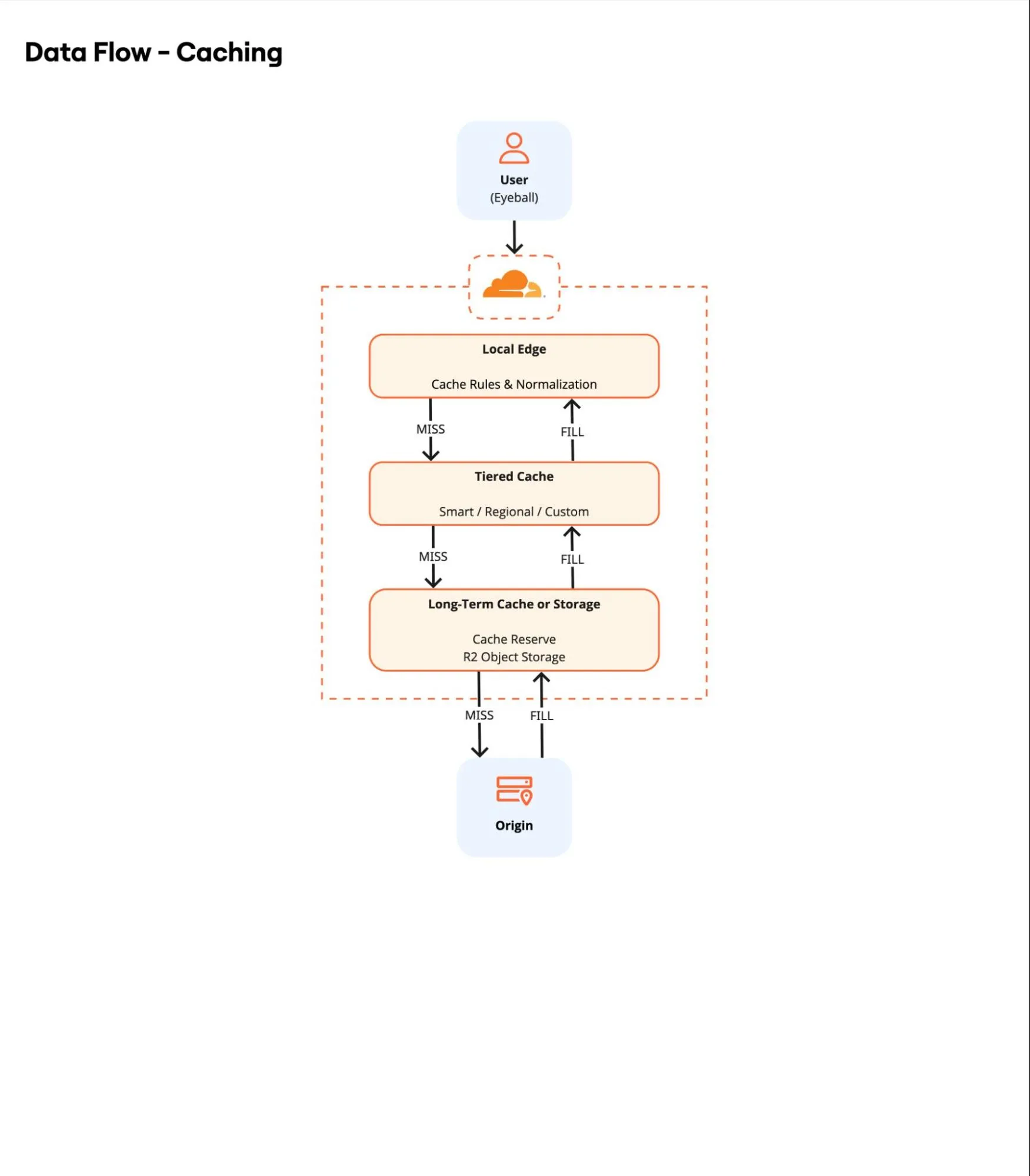
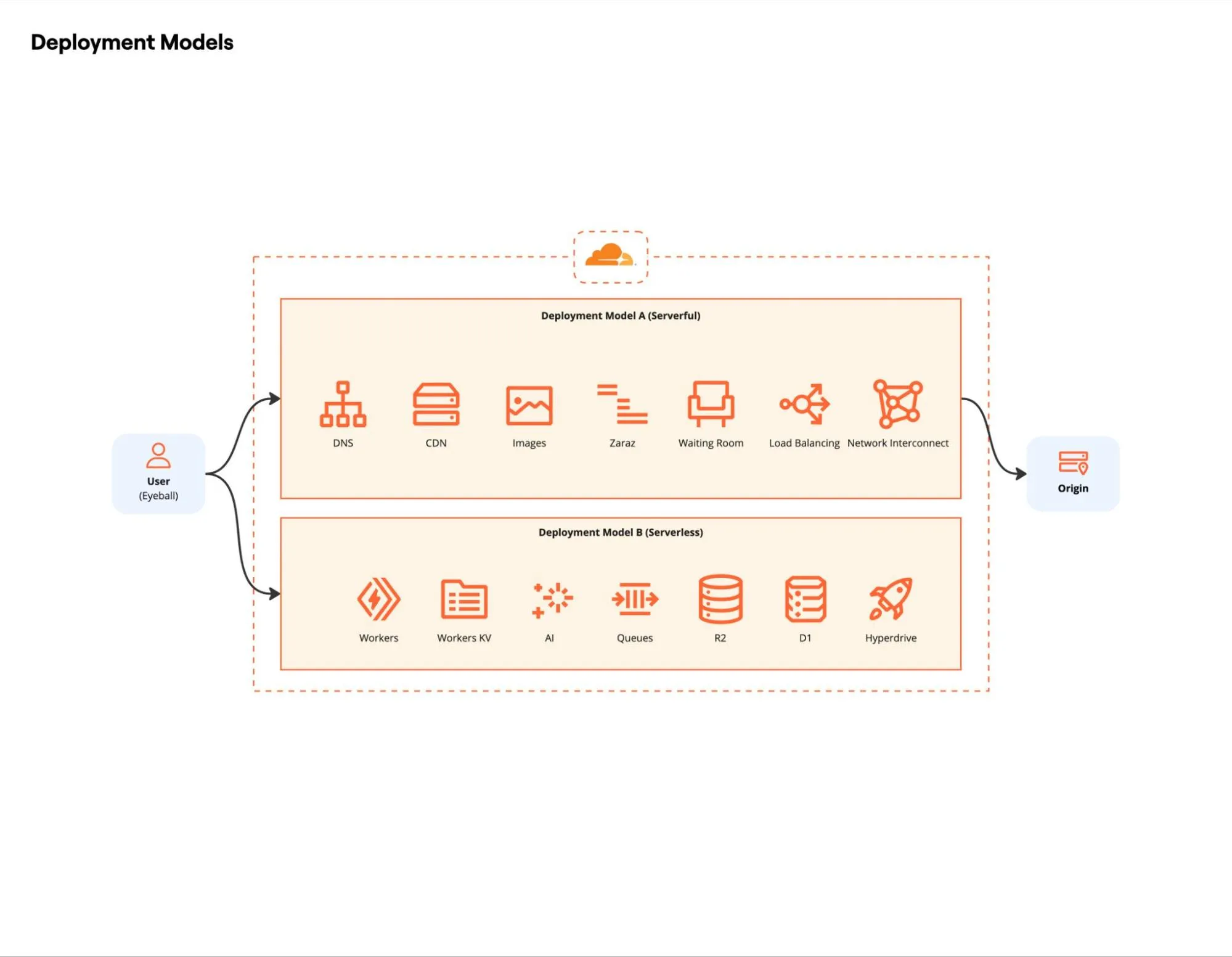
For requests that must traverse the full path (that is, dynamic content or cache misses), the origin configuration determines the final latency impact. Architects have two primary paths here: adopting the performant, resilient serverless model (also known as originless), or optimizing connectivity and security for a traditional Origin Server.
Serverless: Cloudflare's Developer Platform achieves the optimal performance tier by enabling an "originless" model. Fullstack applications are built and deployed directly on the global edge network worldwide, eliminating the full path traversal to a distant origin. Dynamic requests execute at the nearest Cloudflare PoP and provide seamless access to integrated edge storage solutions like R2 Object Storage and D1 Serverless SQLite Database. This drastically reduces TTFB and contributes significantly to aggressive CWV targets. Furthermore, this Originless model, leveraging Workers and R2, is the optimal design for high-performance file distribution, eliminating the need for a traditional backend server to deliver large datasets and media.
Traditional Origin Optimization: For applications that cannot be refactored or modernized ↗ to an originless model, the following optimizations are required to minimize the resulting latency impact of traditional infrastructure:
- Connectivity: Cloudflare connects using HTTP/2 to Origin, utilizing Connection Reuse to multiplex requests over a single persistent connection, reducing TCP/TLS overhead. For enhanced reliability and security, Cloudflare Network Interconnect (CNI) allows you to connect your network infrastructure directly to Cloudflare - bypassing the public Internet - for a more performant and secure experience. Additionally, leveraging the Bandwidth Alliance ↗ (including partners like Microsoft Azure Routing Preference ↗) can significantly reduce or waive data egress fees.
- Private Infrastructure: Workers VPC and Cloudflare Tunnel enable direct connectivity to private storage endpoints or databases on public clouds without necessarily exposing them to the public Internet.
- Load Balancing: Traffic is distributed across healthy servers using Cloudflare Load Balancing. If an origin fails, traffic is instantly rerouted to healthy server pools. Alternatively, Round-Robin DNS can be used for simpler distribution strategies.
Continuous monitoring and testing verify each optimization. Measurement and logging confirm real gains, surface regressions early, and reveal edge cases long before they affect clients.
When analyzing this data, it is important to take into account connection limits and TCP connection behavior, while also accounting for Cloudflare crawlers and the /cdn-cgi/ endpoint, as well as potential data discrepancies between Cloudflare and Google Analytics.
- Cloudflare Observatory ↗: The primary dashboard for performance. It combines Synthetic tests (Google Lighthouse) for standardized baselines with Real User Monitoring (RUM) to capture actual user experiences across different devices and regions.
- GraphQL Analytics API: Use this for Trends and Timing Insights ↗. Query specific metrics like
edgeDnsResponseTimeMsversusoriginResponseDurationMsto pinpoint exactly where latency is introduced. - Web Analytics: Specific for privacy-first, edge-based RUM analytics.
- Cache Analytics: Critical for analyzing Cache Hit Ratio (CHR) and "Requests by Cache Status" to find uncached content that causes origin load.
- Ruleset Engine: Review and leverage the extensive library of fields, including network metrics like TCP RTT and TCP fields, to implement precise custom logic for routing, caching, and security based on real-time connection properties.
- Logging & Forensics:
- Log Explorer: For ad-hoc querying of request logs directly in the dashboard. Use Custom Log Fields to log additional request headers, response headers and cookies.
- Logpush: For exporting logs to third-party SIEMs with optional Log Output Options, supporting formats such as CSV or JSON. Essential for analyzing custom fields and long-term trends, as well as calculating the Download Success Rate and analyzing Download Throughput for large files.
- Instant Logs: Real-time traffic inspection for immediate debugging.
- Network Error Logging (NEL): Captures client-side connectivity issues that the server might never see.
- Cloudflare Telescope ↗: An open-source, cross-browser front-end testing agent capable of running tests in all major browsers. Use this to automate performance regression testing in your CI/CD pipeline.
- Cloudflare Speed Test ↗: Measures realistic Internet connection quality - including loaded latency, jitter, and packet loss - by simulating real-world usage on Cloudflare's global network using predefined data blocks, rather than simply testing for peak throughput saturation.
- Cloudflare Prometheus Exporter ↗: Scrapes metrics from the GraphQL Analytics API and exposes them in a Prometheus-compatible format, allowing you to visualize Cloudflare performance data alongside your infrastructure metrics in Grafana or similar tools.
While Cloudflare provides internal metrics, external (third-party) tools are vital for independent validation and deep-dive analysis of the critical rendering path.
- WebPageTest ↗: Detailed waterfall charts and deep analysis of loading behavior.
- Google PageSpeed Insights ↗: The standard for Core Web Vitals assessment (Field & Lab data).
- DebugBear ↗: Excellent for continuous monitoring and tracking speed history.
- Pingdom ↗: Useful for simple, geographic-based availability and speed testing.
- Treo.sh ↗: Fast, historical visualization of Chrome User Experience Report (CrUX) data.