

When AI systems request pages from any website that uses Cloudflare and has Markdown for Agents enabled, they can express the preference for
text/markdownin the request: our network will automatically and efficiently convert the HTML to markdown, when possible, on the fly.This release adds the following improvements:
- The origin response limit was raised from 1 MB to 2 MB (2,097,152 bytes).
- We no longer require the origin to send the
content-lengthheader. - We now support content encoded responses from the origin.
If you haven’t enabled automatic Markdown conversion yet, visit the AI Crawl Control ↗ section of the Cloudflare dashboard and enable Markdown for Agents.
Refer to our developer documentation for more details.
Fine-grained permissions for Access policies and Access service tokens are available. These new resource-scoped roles expand the existing RBAC model, enabling administrators to grant permissions scoped to individual resources.
- Cloudflare Access policy admin: Can edit a specific Access policy in an account.
- Cloudflare Access service token admin: Can edit a specific Access service token in an account.
These roles complement the existing resource-scoped roles for Access applications, identity providers, and infrastructure targets.
For more information:
Disclaimer: Please note that v5.0.0-beta.1 is in Beta and we are still testing it for stability.
Full Changelog: v4.3.1...v5.0.0-beta.1 ↗
In this release, you'll see a large number of breaking changes. This is primarily due to a change in OpenAPI definitions, which our libraries are based off of, and codegen updates that we rely on to read those OpenAPI definitions and produce our SDK libraries. As the codegen is always evolving and improving, so are our code bases.
There may be changes that are not captured in this changelog. Feel free to open an issue to report any inaccuracies, and we will make sure it gets into the changelog before the v5.0.0 release.
Most of the breaking changes below are caused by improvements to the accuracy of the base OpenAPI schemas, which sometimes translates to breaking changes in downstream clients that depend on those schemas.
Please ensure you read through the list of changes below and the migration guide before moving to this version - this will help you understand any down or upstream issues it may cause to your environments.
The following resources have breaking changes. See the v5 Migration Guide ↗ for detailed migration instructions.
abusereportsacm.totaltlsapigateway.configurationscloudforceone.threateventsd1.databaseintel.indicatorfeedslogpush.edgeorigintlsclientauth.hostnamesqueues.consumersradar.bgprulesets.rulesschemavalidation.schemassnippetszerotrust.dlpzerotrust.networks
abusereports- Abuse report managementabusereports.mitigations- Abuse report mitigation actionsai.tomarkdown- AI-powered markdown conversionaigateway.dynamicrouting- AI Gateway dynamic routing configurationaigateway.providerconfigs- AI Gateway provider configurationsaisearch- AI-powered search functionalityaisearch.instances- AI Search instance managementaisearch.tokens- AI Search authentication tokensalerting.silences- Alert silence managementbrandprotection.logomatches- Brand protection logo match detectionbrandprotection.logos- Brand protection logo managementbrandprotection.matches- Brand protection match resultsbrandprotection.queries- Brand protection query managementcloudforceone.binarystorage- CloudForce One binary storageconnectivity.directory- Connectivity directory servicesd1.database- D1 database managementdiagnostics.endpointhealthchecks- Endpoint health check diagnosticsfraud- Fraud detection and preventioniam.sso- IAM Single Sign-On configurationloadbalancers.monitorgroups- Load balancer monitor groupsorganizations- Organization managementorganizations.organizationprofile- Organization profile settingsorigintlsclientauth.hostnamecertificates- Origin TLS client auth hostname certificatesorigintlsclientauth.hostnames- Origin TLS client auth hostnamesorigintlsclientauth.zonecertificates- Origin TLS client auth zone certificatespipelines- Data pipeline managementpipelines.sinks- Pipeline sink configurationspipelines.streams- Pipeline stream configurationsqueues.subscriptions- Queue subscription managementr2datacatalog- R2 Data Catalog integrationr2datacatalog.credentials- R2 Data Catalog credentialsr2datacatalog.maintenanceconfigs- R2 Data Catalog maintenance configurationsr2datacatalog.namespaces- R2 Data Catalog namespacesradar.bots- Radar bot analyticsradar.ct- Radar certificate transparency dataradar.geolocations- Radar geolocation datarealtimekit.activesession- Real-time Kit active session managementrealtimekit.analytics- Real-time Kit analyticsrealtimekit.apps- Real-time Kit application managementrealtimekit.livestreams- Real-time Kit live streamingrealtimekit.meetings- Real-time Kit meeting managementrealtimekit.presets- Real-time Kit preset configurationsrealtimekit.recordings- Real-time Kit recording managementrealtimekit.sessions- Real-time Kit session managementrealtimekit.webhooks- Real-time Kit webhook configurationstokenvalidation.configuration- Token validation configurationtokenvalidation.rules- Token validation rulesworkers.beta- Workers beta features
edit()update()
list()
create()get()update()
scan_list()scan_review()scan_trigger()
create()delete()list()
get()
list()
summary()timeseries()timeseries_groups()
changes()snapshot()
delete()
create()delete()edit()get()list()
- Type inference improvements: Allow Pyright to properly infer TypedDict types within SequenceNotStr
- Type completeness: Add missing types to method arguments and response models
- Pydantic compatibility: Ensure compatibility with Pydantic versions prior to 2.8.0 when using additional fields
- Multipart form data: Correctly handle sending multipart/form-data requests with JSON data
- Header handling: Do not send headers with default values set to omit
- GET request headers: Don't send Content-Type header on GET requests
- Response body model accuracy: Broad improvements to the correctness of models
- Discriminated unions: Correctly handle nested discriminated unions in response parsing
- Extra field types: Parse extra field types correctly
- Empty metadata: Ignore empty metadata fields during parsing
- Singularization rules: Update resource name singularization rules for better consistency
Cloudflare's network now supports real-time content conversion at the source, for enabled zones using content negotiation ↗ headers. When AI systems request pages from any website that uses Cloudflare and has Markdown for Agents enabled, they can express the preference for
text/markdownin the request: our network will automatically and efficiently convert the HTML to markdown, when possible, on the fly.Here is a curl example with the
Acceptnegotiation header requesting this page from our developer documentation:Terminal window curl https://developers.cloudflare.com/fundamentals/reference/markdown-for-agents/ \-H "Accept: text/markdown"The response to this request is now formatted in markdown:
HTTP/2 200date: Wed, 11 Feb 2026 11:44:48 GMTcontent-type: text/markdown; charset=utf-8content-length: 2899vary: acceptx-markdown-tokens: 725content-signal: ai-train=yes, search=yes, ai-input=yes---title: Markdown for Agents · Cloudflare Agents docs---## What is Markdown for AgentsMarkdown has quickly become the lingua franca for agents and AI systemsas a whole. The format’s explicit structure makes it ideal for AI processing,ultimately resulting in better results while minimizing token waste....Refer to our developer documentation and our blog announcement ↗ for more details.
In January 2025, we announced the launch of the new Terraform v5 Provider. We greatly appreciate the proactive engagement and valuable feedback from the Cloudflare community following the v5 release. In response, we have established a consistent and rapid 2-3 week cadence ↗ for releasing targeted improvements, demonstrating our commitment to stability and reliability.
With the help of the community, we have a growing number of resources that we have marked as stable ↗, with that list continuing to grow with every release. The most used resources ↗ are on track to be stable by the end of March 2026, when we will also be releasing a new migration tool to help you migrate from v4 to v5 with ease.
This release brings new capabilities for AI Search, enhanced Workers Script placement controls, and numerous bug fixes based on community feedback. We also begun laying foundational work for improving the v4 to v5 migration process. Stay tuned for more details as we approach the March 2026 release timeline.
Thank you for continuing to raise issues. They make our provider stronger and help us build products that reflect your needs.
- ai_search_instance: add data source for querying AI Search instances
- ai_search_token: add data source for querying AI Search tokens
- account: add support for tenant unit management with new
unitfield - account: add automatic mapping from
managed_by.parent_org_idtounit.id - authenticated_origin_pulls_certificate: add data source for querying authenticated origin pull certificates
- authenticated_origin_pulls_hostname_certificate: add data source for querying hostname-specific authenticated origin pull certificates
- authenticated_origin_pulls_settings: add data source for querying authenticated origin pull settings
- workers_kv: add
valuefield to data source to retrieve KV values directly - workers_script: add
scriptfield to data source to retrieve script content - workers_script: add support for
simplerate limit binding - workers_script: add support for targeted placement mode with
placement.targetarray for specifying placement targets (region, hostname, host) - workers_script: add
placement_modeandplacement_statuscomputed fields - zero_trust_dex_test: add data source with filter support for finding specific tests
- zero_trust_dlp_predefined_profile: add
enabled_entriesfield for flexible entry management
- account: map
managed_by.parent_org_idtounit.idin unmarshall and add acceptance tests - authenticated_origin_pulls_certificate: add certificate normalization to prevent drift
- authenticated_origin_pulls: handle array response and implement full lifecycle
- authenticated_origin_pulls_hostname_certificate: fix resource and tests
- cloudforce_one_request_message: use correct
request_idfield instead ofidin API calls - dns_zone_transfers_incoming: use correct
zone_idfield instead ofidin API calls - dns_zone_transfers_outgoing: use correct
zone_idfield instead ofidin API calls - email_routing_settings: use correct
zone_idfield instead ofidin API calls - hyperdrive_config: add proper handling for write-only fields to prevent state drift
- hyperdrive_config: add normalization for empty
mtlsobjects to prevent unnecessary diffs - magic_network_monitoring_rule: use correct
account_idfield instead ofidin API calls - mtls_certificates: fix resource and test
- pages_project: revert build_config to computed optional
- stream_key: use correct
account_idfield instead ofidin API calls - total_tls: use upsert pattern for singleton zone setting
- waiting_room_rules: use correct
waiting_room_idfield instead ofidin API calls - workers_script: add support for placement mode/status
- zero_trust_access_application: update v4 version on migration tests
- zero_trust_device_posture_rule: update tests to match API
- zero_trust_dlp_integration_entry: use correct
entry_idfield instead ofidin API calls - zero_trust_dlp_predefined_entry: use correct
entry_idfield instead ofidin API calls - zero_trust_organization: fix plan issues
- add state upgraders to 95+ resources to lay the foundation for replacing Grit (still under active development)
- certificate_pack: add state migration handler for SDKv2 to Framework conversion
- custom_hostname_fallback_origin: add comprehensive lifecycle test and migration support
- dns_record: add state migration handler for SDKv2 to Framework conversion
- leaked_credential_check: add import functionality and tests
- load_balancer_pool: add state migration handler with detection for v4 vs v5 format
- pages_project: add state migration handlers
- tiered_cache: add state migration handlers
- zero_trust_dlp_predefined_profile: deprecate
entriesfield in favor ofenabled_entries
AI Crawl Control metrics have been enhanced with new views, improved filtering, and better data visualization.
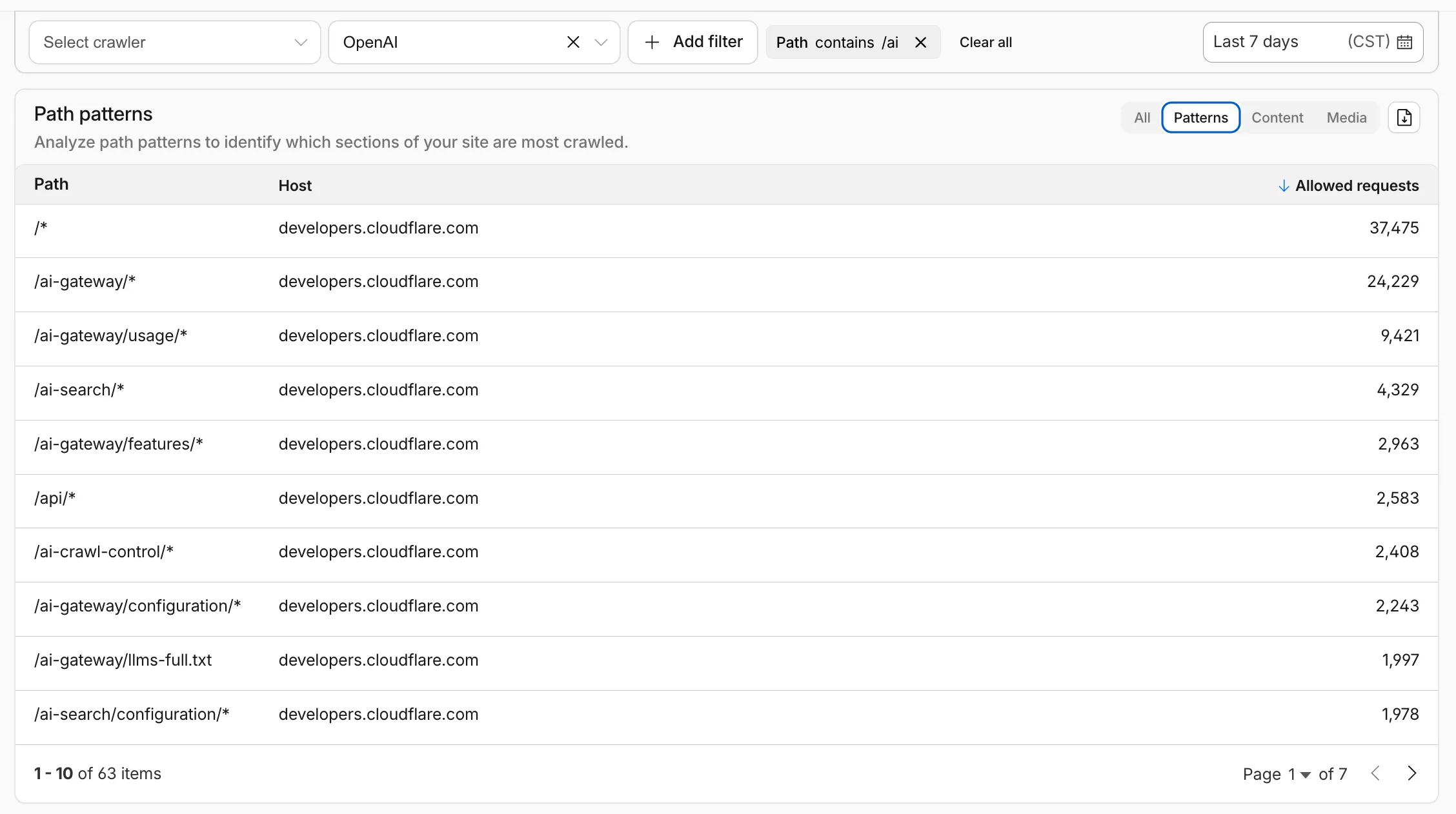
Path pattern grouping
- In the Metrics tab > Most popular paths table, use the new Patterns tab that groups requests by URI pattern (
/blog/*,/api/v1/*,/docs/*) to identify which site areas crawlers target most. Refer to the screenshot above.
Enhanced referral analytics
- Destination patterns show which site areas receive AI-driven referral traffic.
- In the Metrics tab, a new Referrals over time chart shows trends by operator or source.
Data transfer metrics
- In the Metrics tab > Allowed requests over time chart, toggle Bytes to show bandwidth consumption.
- In the Crawlers tab, a new Bytes Transferred column shows bandwidth per crawler.
Image exports
- Export charts and tables as images for reports and presentations.
Learn more about analyzing AI traffic.
- In the Metrics tab > Most popular paths table, use the new Patterns tab that groups requests by URI pattern (
Log Explorer now supports multiple concurrent queries with the new Tabs feature. Work with multiple queries simultaneously and pivot between datasets to investigate malicious activity more effectively.
- Multiple tabs: Open and switch between multiple query tabs to compare results across different datasets.
- Quick filtering: Select the filter button from query results to add a value as a filter to your current query.
- Pivot to new tab: Use Cmd + click on the filter button to start a new query tab with that filter applied.
- Preserved progress: Your query progress is preserved on each tab if you navigate away and return.
For more information, refer to the Log Explorer documentation.
New reference documentation is now available for AI Crawl Control:
- GraphQL API reference — Query examples for crawler requests, top paths, referral traffic, and data transfer. Includes key filters for detection IDs, user agents, and referrer domains.
- Bot reference — Detection IDs and user agents for major AI crawlers from OpenAI, Anthropic, Google, Meta, and others.
- Worker templates — Deploy the x402 Payment-Gated Proxy to monetize crawler access or charge bots while letting humans through free.
You can now set the timezone in the Cloudflare dashboard as Coordinated Universal Time (UTC) or your browser or system's timezone.
Unless otherwise specified in the user interface, all dates and times in the Cloudflare dashboard are now displayed in the selected timezone.
You can change the timezone setting from the user profile dropdown.
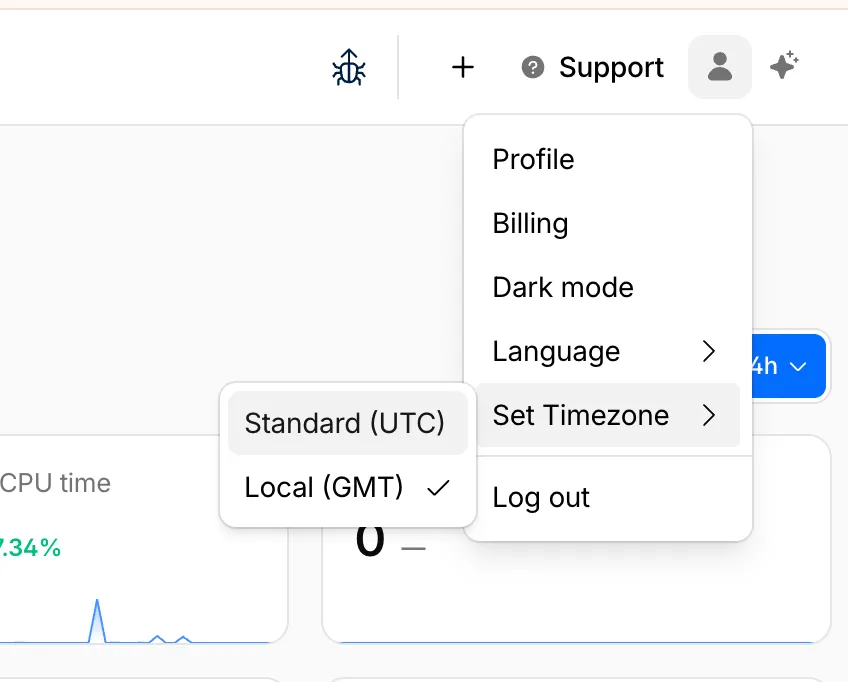
The page will reload to apply the new timezone setting.
You can now control how Cloudflare buffers HTTP request and response bodies using two new settings in Configuration Rules.
Controls how Cloudflare buffers HTTP request bodies before forwarding them to your origin server:
Mode Behavior Standard (default) Cloudflare can inspect a prefix of the request body for enabled functionality such as WAF and Bot Management. Full Buffers the entire request body before sending to origin. None No buffering — the request body streams directly to origin without inspection. Controls how Cloudflare buffers HTTP response bodies before forwarding them to the client:
Mode Behavior Standard (default) Cloudflare can inspect a prefix of the response body for enabled functionality. None No buffering — the response body streams directly to the client without inspection. {"action": "set_config","action_parameters": {"request_body_buffering": "standard","response_body_buffering": "none"}}For more information, refer to Configuration Rules.
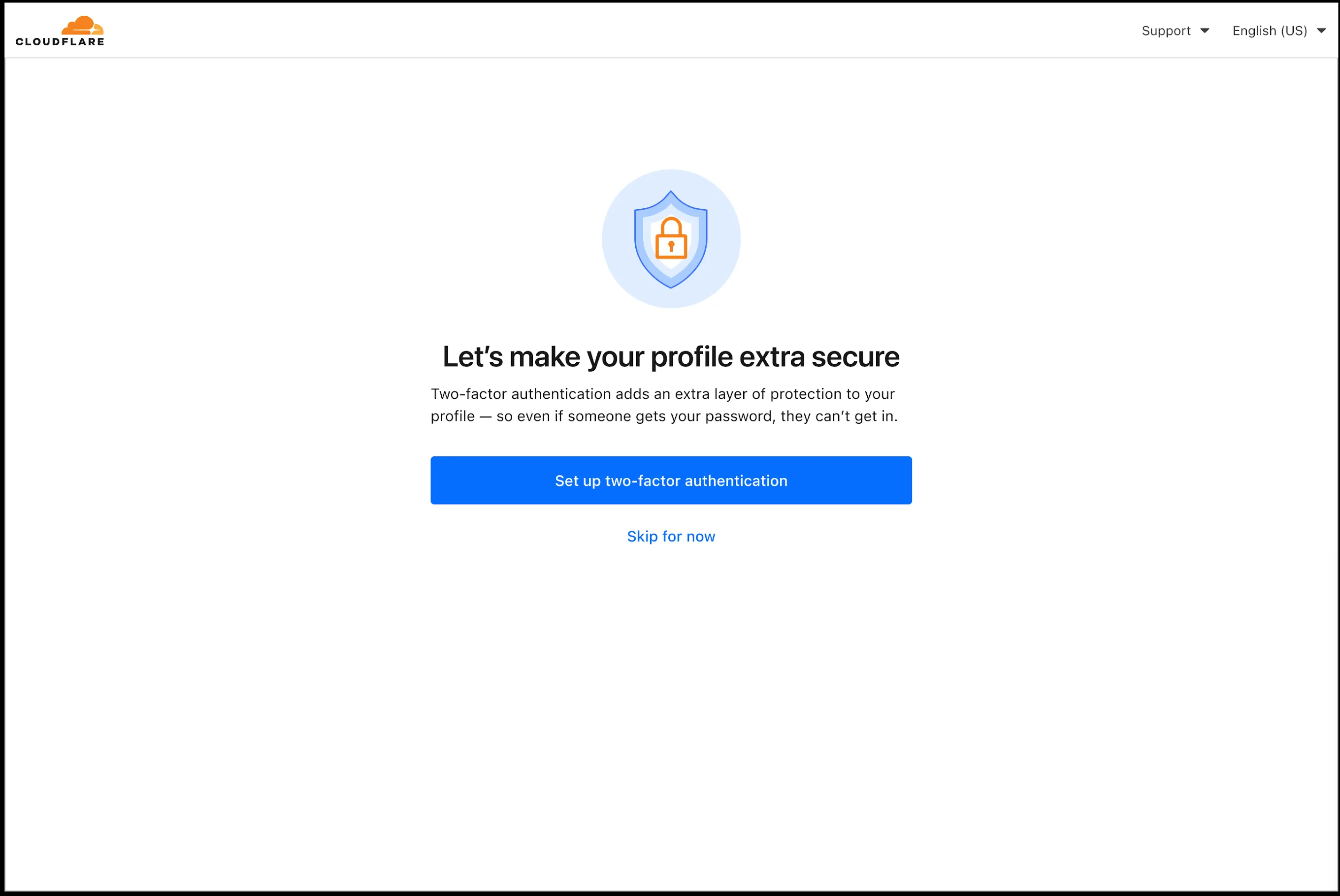
In an effort to improve overall user security, users without 2FA will be prompted upon login to enroll in email 2FA. This will improve user security posture while minimizing friction. Users without email 2FA enabled will see a prompt to secure their account with additional factors upon logging in. Enrolling in 2FA remains optional, but strongly encouraged as it is the best way to prevent account takeovers.
We also made changes to existing 2FA screens to improve the user experience. Now we have distinct experiences for each 2FA factor type, reflective of the way that factor works.
Cloudflare Rulesets now includes
encode_base64()andsha256()functions, enabling you to generate signed request headers directly in rule expressions. These functions support common patterns like constructing a canonical string from request attributes, computing a SHA256 digest, and Base64-encoding the result.
Function Description Availability encode_base64(input, flags)Encodes a string to Base64 format. Optional flagsparameter:ufor URL-safe encoding,pfor padding (adds=characters to make the output length a multiple of 4, as required by some systems). By default, output is standard Base64 without padding.All plans (in header transform rules) sha256(input)Computes a SHA256 hash of the input string. Requires enablement
Encode a string to Base64 format:
encode_base64("hello world")Returns:
aGVsbG8gd29ybGQEncode a string to Base64 format with padding:
encode_base64("hello world", "p")Returns:
aGVsbG8gd29ybGQ=Perform a URL-safe Base64 encoding of a string:
encode_base64("hello world", "u")Returns:
aGVsbG8gd29ybGQCompute the SHA256 hash of a secret token:
sha256("my-token")Returns a hash that your origin can validate to authenticate requests.
Compute the SHA256 hash of a string and encode the result to Base64 format:
encode_base64(sha256("my-token"))Combines hashing and encoding for systems that expect Base64-encoded signatures.
For more information, refer to the Functions reference.
-
Cloudflare Rulesets now include new functions that enable advanced expression logic for evaluating arrays and maps. These functions allow you to build rules that match against lists of values in request or response headers, enabling use cases like country-based blocking using custom headers.
Function Description split(source, delimiter)Splits a string into an array of strings using the specified delimiter. join(array, delimiter)Joins an array of strings into a single string using the specified delimiter. has_key(map, key)Returns trueif the specified key exists in the map.has_value(map, value)Returns trueif the specified value exists in the map.
Check if a country code exists in a header list:
has_value(split(http.response.headers["x-allow-country"][0], ","), ip.src.country)Check if a specific header key exists:
has_key(http.request.headers, "x-custom-header")Join array values for logging or comparison:
join(http.request.headers.names, ", ")For more information, refer to the Functions reference.
Disclaimer: Please note that v6.0.0-beta.1 is in Beta and we are still testing it for stability.
Full Changelog: v5.2.0...v6.0.0-beta.1 ↗
In this release, you'll see a large number of breaking changes. This is primarily due to a change in OpenAPI definitions, which our libraries are based off of, and codegen updates that we rely on to read those OpenAPI definitions and produce our SDK libraries. As the codegen is always evolving and improving, so are our code bases.
Some breaking changes were introduced due to bug fixes, also listed below.
Please ensure you read through the list of changes below before moving to this version - this will help you understand any down or upstream issues it may cause to your environments.
BGPPrefixCreateParams.cidr: optional → requiredPrefixCreateParams.asn:number | null→numberPrefixCreateParams.loa_document_id: required → optionalServiceBindingCreateParams.cidr: optional → requiredServiceBindingCreateParams.service_id: optional → required
ConfigurationUpdateResponseremovedPublicSchema→OldPublicSchemaSchemaUpload→UserSchemaCreateResponseConfigurationUpdateParams.propertiesremoved; usenormalize
ThreatEventBulkCreateResponse:number→ complex object with counts and errors
DatabaseQueryParams: simple interface → union type (D1SingleQuery | MultipleQueries)DatabaseRawParams: same change- Supports batch queries via
batcharray
All record type interfaces renamed from
*Recordto short names:RecordResponse.ARecord→RecordResponse.ARecordResponse.AAAARecord→RecordResponse.AAAARecordResponse.CNAMERecord→RecordResponse.CNAMERecordResponse.MXRecord→RecordResponse.MXRecordResponse.NSRecord→RecordResponse.NSRecordResponse.PTRRecord→RecordResponse.PTRRecordResponse.TXTRecord→RecordResponse.TXTRecordResponse.CAARecord→RecordResponse.CAARecordResponse.CERTRecord→RecordResponse.CERTRecordResponse.DNSKEYRecord→RecordResponse.DNSKEYRecordResponse.DSRecord→RecordResponse.DSRecordResponse.HTTPSRecord→RecordResponse.HTTPSRecordResponse.LOCRecord→RecordResponse.LOCRecordResponse.NAPTRRecord→RecordResponse.NAPTRRecordResponse.SMIMEARecord→RecordResponse.SMIMEARecordResponse.SRVRecord→RecordResponse.SRVRecordResponse.SSHFPRecord→RecordResponse.SSHFPRecordResponse.SVCBRecord→RecordResponse.SVCBRecordResponse.TLSARecord→RecordResponse.TLSARecordResponse.URIRecord→RecordResponse.URIRecordResponse.OpenpgpkeyRecord→RecordResponse.Openpgpkey
ResourceGroupCreateResponse.scope: optional single → required arrayResourceGroupCreateResponse.id: optional → required
OriginCACertificateCreateParams.csr: optional → requiredOriginCACertificateCreateParams.hostnames: optional → requiredOriginCACertificateCreateParams.request_type: optional → required
- Renamed:
DeploymentsSinglePage→DeploymentListResponsesV4PagePaginationArray - Domain response fields: many optional → required
- Entire v0 API deprecated; use v1 methods (
createV1,listV1, etc.) - New sub-resources:
Sinks,Streams
EventNotificationUpdateParams.rules: optional → required- Super Slurper:
bucket,secretnow required in source params
dataSource:string→ typed enum (23 values)eventType:string→ typed enum (6 values)- V2 methods require
dimensionparameter (breaking signature change)
- Removed:
status_messagefield from all recipient response types
- Consolidated
SchemaCreateResponse,SchemaListResponse,SchemaEditResponse,SchemaGetResponse→PublicSchema - Renamed:
SchemaListResponsesV4PagePaginationArray→PublicSchemasV4PagePaginationArray
- Renamed union members:
AppListResponse.UnionMember0→SpectrumConfigAppConfig - Renamed union members:
AppListResponse.UnionMember1→SpectrumConfigPaygoAppConfig
- Removed:
WorkersBindingKindTailConsumertype (all occurrences) - Renamed:
ScriptsSinglePage→ScriptListResponsesSinglePage - Removed:
DeploymentsSinglePage
datasets.create(),update(),get()return types changedPredefinedGetResponseunion members renamed toUnionMember0-5
- Removed:
CloudflaredCreateResponse,CloudflaredListResponse,CloudflaredDeleteResponse,CloudflaredEditResponse,CloudflaredGetResponse - Removed:
CloudflaredListResponsesV4PagePaginationArray
- Reports:
create,list,get - Mitigations: sub-resource for abuse mitigations
- Instances:
create,update,list,delete,read,stats - Items:
list,get - Jobs:
create,list,get,logs - Tokens:
create,update,list,delete,read
- Directory Services:
create,update,list,delete,get - Supports IPv4, IPv6, dual-stack, and hostname configurations
- Organizations:
create,update,list,delete,get - OrganizationProfile:
update,get - Hierarchical organization support with parent/child relationships
- Catalog:
list,enable,disable,get - Credentials:
create - MaintenanceConfigs:
update,get - Namespaces:
list - Tables:
list, maintenance config management - Apache Iceberg integration
- Apps:
get,post - Meetings:
create,get, participant management - Livestreams: 10+ methods for streaming
- Recordings: start, pause, stop, get
- Sessions: transcripts, summaries, chat
- Webhooks: full CRUD
- ActiveSession: polls, kick participants
- Analytics: organization analytics
- Configuration:
create,list,delete,edit,get - Credentials:
update - Rules:
create,list,delete,bulkCreate,bulkEdit,edit,get - JWT validation with RS256/384/512, PS256/384/512, ES256, ES384
create,update,list,delete,get
create,update,list,delete,get,beginVerification
- Sinks:
create,list,delete,get - Streams:
create,update,list,delete,get
- Portals:
create,update,list,delete,read - Servers:
create,update,list,delete,read,sync
managed_byfield withparent_org_id,parent_org_name
auto_generatedfield onLOADocumentCreateResponse
delegate_loa_creation,irr_validation_state,ownership_validation_state,ownership_validation_token,rpki_validation_state
- Added
toMarkdown.supported()method to get all supported conversion formats
zdrfield added to all responses and params
- New alert type:
abuse_report_alert typefield added to PolicyFilter
ContentCreateParams: refined to discriminated union (Variant0 | Variant1)- Split into URL-based and HTML-based parameter variants for better type safety
reactivateparameter in edit
ThreatEventCreateParams.indicatorType: required → optionalhasChildrenfield added to all threat event response typesdatasetIdsquery parameter onAttackerListParams,CategoryListParams,TargetIndustryListParamscategoryUuidfield onTagCreateResponseindicatorsarray for multi-indicator support per eventuuidandpreserveUuidfields for UUID preservation in bulk createformatquery parameter ('json' | 'stix2') onThreatEventListParamscreatedAt,datasetIdfields onThreatEventEditParams
- Added
create(),update(),get()methods
- New page types:
basic_challenge,under_attack,waf_challenge
served_by_colo- colo that handled queryjurisdiction-'eu' | 'fedramp'- Time Travel (
client.d1.database.timeTravel):getBookmark(),restore()- point-in-time recovery
- New fields on
InvestigateListResponse/InvestigateGetResponse:envelope_from,envelope_to,postfix_id_outbound,replyto - New detection classification:
'outbound_ndr' - Enhanced
Findinginterface withattachment,detection,field,portion,reason,score - Added
cursorquery parameter toInvestigateListParams
- New list types:
CATEGORY,LOCATION,DEVICE
- New issue type:
'configuration_suggestion' payloadfield:unknown→ typedPayloadinterface withdetection_method,zone_tag
- Added
detections.get()method
- New datasets:
dex_application_tests,dex_device_state_events,ipsec_logs,warp_config_changes,warp_toggle_changes
Monitor.port:number→number | nullPool.load_shedding:LoadShedding→LoadShedding | nullPool.origin_steering:OriginSteering→OriginSteering | null
license_keyfield on connectorsprovision_licenseparameter for auto-provisioning- IPSec:
custom_remote_identitieswith FQDN support - Snapshots: Bond interface,
probed_mtufield
- New response types:
ProjectCreateResponse,ProjectListResponse,ProjectEditResponse,ProjectGetResponse - Deployment methods return specific response types instead of generic
Deployment
- Added
subscriptions.get()method - Enhanced
SubscriptionGetResponsewith typed event source interfaces - New event source types: Images, KV, R2, Vectorize, Workers AI, Workers Builds, Workflows
- Sippy: new provider
s3(S3-compatible endpoints) - Sippy:
bucketUrlfield for S3-compatible sources - Super Slurper:
keysfield on source response schemas (specify specific keys to migrate) - Super Slurper:
pathPrefixfield on source schemas - Super Slurper:
regionfield on S3 source params
- Added
geolocations.list(),geolocations.get()methods - Added V2 dimension-based methods (
summaryV2,timeseriesGroupsV2) to radar sub-resources
- Added
terminalboolean field to Resource Error interfaces
- Added
idfield toItemDeleteParams.Item
- New buffering fields on
SetConfigRule:request_body_buffering,response_body_buffering
- New scopes:
'dex','access'(in addition to'workers','ai_gateway')
- Response types now proper interfaces (was
unknown) - Fields now required:
id,certificates,hosts,status,type
payloadfield:unknown→ typedPayloadinterface withdetection_method,zone_tag
- Added:
CloudflareTunnelsV4PagePaginationArraypagination class
- Added
subdomains.delete()method Worker.references- track external dependencies (domains, Durable Objects, queues)Worker.startup_time_ms- startup timingScript.observability- observability settings with loggingScript.tag,Script.tags- immutable ID and tags- Placement: support for region, hostname, host-based placement
tags,tail_consumersnow accept| null- Telemetry:
tracesfield,$containersevent info,durableObjectId,transactionName,abr_levelfields
ScriptUpdateResponse: new fieldsentry_point,observability,tag,tagsplacementfield now union of 4 variants (smart mode, region, hostname, host)tags,tail_consumersnow nullableTagUpdateParams.bodynow acceptsnull
instance_retention:unknown→ typedInstanceRetentioninterface witherror_retention,success_retention- New status option:
'restart'added toStatusEditParams.status
- External emergency disconnect settings (4 new fields)
antivirusdevice posture check typeos_version_extradocumentation improvements
- New response types:
SubscriptionCreateResponse,SubscriptionUpdateResponse,SubscriptionGetResponse
- New
ApplicationTypevalues:'mcp','mcp_portal','proxy_endpoint' - New destination type:
ViaMcpServerPortalDestinationfor MCP server access
- Added
rules.listTenant()method
ProxyEndpoint: interface → discriminated union (ZeroTrustGatewayProxyEndpointIP | ZeroTrustGatewayProxyEndpointIdentity)ProxyEndpointCreateParams: interface → union type- Added
kindfield:'ip' | 'identity'
WARPConnector*Response: union type → interface
- API Gateway:
UserSchemas,Settings,SchemaValidationresources - Audit Logs:
auditLogId.not(useid.not) - CloudforceOne:
ThreatEvents.get(),IndicatorTypes.list() - Devices:
public_ipfield (use DEX API) - Email Security:
item_countfield in Move responses - Pipelines: v0 methods (use v1)
- Radar: old
summary()andtimeseriesGroups()methods (use V2) - Rulesets:
disable_apps,miragefields - WARP Connector:
connectionsfield - Workers:
environmentparameter in Domains - Zones:
ResponseBufferingpage rule
- mcp: correct code tool API endpoint (599703c ↗)
- mcp: return correct lines on typescript errors (5d6f999 ↗)
- organization_profile: fix bad reference (d84ea77 ↗)
- schema_validation: correctly reflect model to openapi mapping (bb86151 ↗)
- workers: fix tests (2ee37f7 ↗)
In January 2025, we announced the launch of the new Terraform v5 Provider. We greatly appreciate the proactive engagement and valuable feedback from the Cloudflare community following the v5 release. In response, we've established a consistent and rapid 2-3 week cadence ↗ for releasing targeted improvements, demonstrating our commitment to stability and reliability.
With the help of the community, we have a growing number of resources that we have marked as stable ↗, with that list continuing to grow with every release. The most used resources ↗ are on track to be stable by the end of March 2026, when we will also be releasing a new migration tool to you migrate from v4 to v5 with ease.
Thank you for continuing to raise issues. They make our provider stronger and help us build products that reflect your needs.
This release includes bug fixes, the stabilization of even more popular resources, and more.
- custom_pages: add "waf_challenge" as new supported error page type identifier in both resource and data source schemas
- list: enhance CIDR validator to check for normalized CIDR notation requiring network address for IPv4 and IPv6
- magic_wan_gre_tunnel: add automatic_return_routing attribute for automatic routing control
- magic_wan_gre_tunnel: add BGP configuration support with new BGP model attribute
- magic_wan_gre_tunnel: add bgp_status computed attribute for BGP connection status information
- magic_wan_gre_tunnel: enhance schema with BGP-related attributes and validators
- magic_wan_ipsec_tunnel: add automatic_return_routing attribute for automatic routing control
- magic_wan_ipsec_tunnel: add BGP configuration support with new BGP model attribute
- magic_wan_ipsec_tunnel: add bgp_status computed attribute for BGP connection status information
- magic_wan_ipsec_tunnel: add custom_remote_identities attribute for custom identity configuration
- magic_wan_ipsec_tunnel: enhance schema with BGP and identity-related attributes
- ruleset: add request body buffering support
- ruleset: enhance ruleset data source with additional configuration options
- workers_script: add observability logs attributes to list data source model
- workers_script: enhance list data source schema with additional configuration options
- account_member: fix resource importability issues
- dns_record: remove unnecessary fmt.Sprintf wrapper around LoadTestCase call in test configuration helper function
- load_balancer: fix session_affinity_ttl type expectations to match Float64 in initial creation and Int64 after migration
- workers_kv: handle special characters correctly in URL encoding
- account_subscription: update schema description for rate_plan.sets attribute to clarify it returns an array of strings
- api_shield: add resource-level description for API Shield management of auth ID characteristics
- api_shield: enhance auth_id_characteristics.name attribute description to include JWT token configuration format requirements
- api_shield: specify JSONPath expression format for JWT claim locations
- hyperdrive_config: add description attribute to name attribute explaining its purpose in dashboard and API identification
- hyperdrive_config: apply description improvements across resource, data source, and list data source schemas
- hyperdrive_config: improve schema descriptions for cache settings to clarify default values
- hyperdrive_config: update port description to clarify defaults for different database types
-
Cloudflare now provides more accurate visibility into HTTP/3 client request cancellations, giving you better insight into real client behavior and reducing unnecessary load on your origins.
Previously, when an HTTP/3 client cancelled a request, the cancellation was not always actioned immediately. This meant requests could continue through the CDN — potentially all the way to your origin — even after the client had abandoned them. In these cases, logs would show the upstream response status (such as
200or a timeout-related code) rather than reflecting the client cancellation.Now, Cloudflare terminates cancelled HTTP/3 requests immediately and accurately logs them with a
499status code.
When HTTP/3 clients cancel requests, Cloudflare now immediately reflects this in your logs with a
499status code. This gives you:- More accurate traffic analysis: Understand exactly when and how often clients cancel requests.
- Clearer debugging: Distinguish between true errors and intentional client cancellations.
- Better availability metrics: Separate client-initiated cancellations from server-side issues.
Cloudflare now terminates cancelled requests faster, which means:
- Less wasted compute: Your origin no longer processes requests that clients have already abandoned.
- Lower bandwidth usage: Responses are no longer generated and transmitted for cancelled requests.
- Improved efficiency: Resources are freed up to handle active requests.
You may notice an increase in
499status codes for HTTP/3 traffic. For HTTP/3, a499indicates the client cancelled the request stream ↗ before receiving a complete response — the underlying connection may remain open. This is a normal part of web traffic.Tip: If you use
499codes in availability calculations, consider whether client-initiated cancellations should be excluded from error rates. These typically represent normal user behavior — such as closing a browser, navigating away from a page, mobile network drops, or cancelling a download — rather than service issues.
For more information, refer to Error 499.
We have made it easier to validate connectivity when deploying WARP Connector as part of your software-defined private network.
You can now
pingthe WARP Connector host directly on its LAN IP address immediately after installation. This provides a fast, familiar way to confirm that the Connector is online and reachable within your network before testing access to downstream services.Starting with version 2025.10.186.0, WARP Connector responds to traffic addressed to its own LAN IP, giving you immediate visibility into Connector reachability.
Learn more about deploying WARP Connector and building private network connectivity with Cloudflare One.
Account administrators can now assign the AI Crawl Control Read Only role to provide read-only access to AI Crawl Control at the domain level.
Users with this role can view the Overview, Crawlers, Metrics, Robots.txt, and Settings tabs but cannot modify crawler actions or settings.
This role is specific for AI Crawl Control. You still require correct permissions to access other areas / features of the dashboard.
To assign, go to Manage Account > Members and add a policy with the AI Crawl Control Read Only role scoped to the desired domain.
The
ip.src.metro_codefield in the Ruleset Engine is now populated with DMA (Designated Market Area) data.You can use this field to build rules that target traffic based on geographic market areas, enabling more granular location-based policies for your applications.
Field Type Description ip.src.metro_codeString | null The metro code (DMA) of the incoming request's IP address. Returns the designated market area code for the client's location. Example filter expression:
ip.src.metro_code eq "501"For more information, refer to the Fields reference.
Earlier this year, we announced the launch of the new Terraform v5 Provider. We are aware of the high number of issues reported by the Cloudflare community related to the v5 release. We have committed to releasing improvements on a 2-3 week cadence ↗ to ensure its stability and reliability, including the v5.15 release. We have also pivoted from an issue-to-issue approach to a resource-per-resource approach ↗ - we will be focusing on specific resources to not only stabilize the resource but also ensure it is migration-friendly for those migrating from v4 to v5.
Thank you for continuing to raise issues. They make our provider stronger and help us build products that reflect your needs.
This release includes bug fixes, the stabilization of even more popular resources, and more.
- ai_search: Add AI Search endpoints (6f02adb ↗)
- certificate_pack: Ensure proper Terraform resource ID handling for path parameters in API calls (081f32a ↗)
- worker_version: Support
startup_time_ms(286ab55 ↗) - zero_trust_dlp_custom_entry: Support
upload_status(7dc0fe3 ↗) - zero_trust_dlp_entry: Support
upload_status(7dc0fe3 ↗) - zero_trust_dlp_integration_entry: Support
upload_status(7dc0fe3 ↗) - zero_trust_dlp_predefined_entry: Support
upload_status(7dc0fe3 ↗) - zero_trust_gateway_policy: Support
forensic_copy(5741fd0 ↗) - zero_trust_list: Support additional types (category, location, device) (5741fd0 ↗)
- access_rules: Add validation to prevent state drift. Ideally, we'd use Semantic Equality but since that isn't an option, this will remove a foot-gun. (4457791 ↗)
- cloudflare_pages_project: Addressing drift issues (6edffcf ↗) (3db318e ↗)
- cloudflare_worker: Can be cleanly imported (4859b52 ↗)
- cloudflare_worker: Ensure clean imports (5b525bc ↗)
- list_items: Add validation for IP List items to avoid inconsistent state (b6733dc ↗)
- zero_trust_access_application: Remove all conditions from sweeper (3197f1a ↗)
- spectrum_application: Map missing fields during spectrum resource import (#6495 ↗) (ddb4e72 ↗)
We suggest waiting to migrate to v5 while we work on stabilization. This helps with avoiding any blocking issues while the Terraform resources are actively being stabilized ↗. We will be releasing a new migration tool in March 2026 to help support v4 to v5 transitions for our most popular resources.
The Overview tab is now the default view in AI Crawl Control. The previous default view with controls for individual AI crawlers is available in the Crawlers tab.
- Executive summary — Monitor total requests, volume change, most common status code, most popular path, and high-volume activity
- Operator grouping — Track crawlers by their operating companies (OpenAI, Microsoft, Google, ByteDance, Anthropic, Meta)
- Customizable filters — Filter your snapshot by date range, crawler, operator, hostname, or path
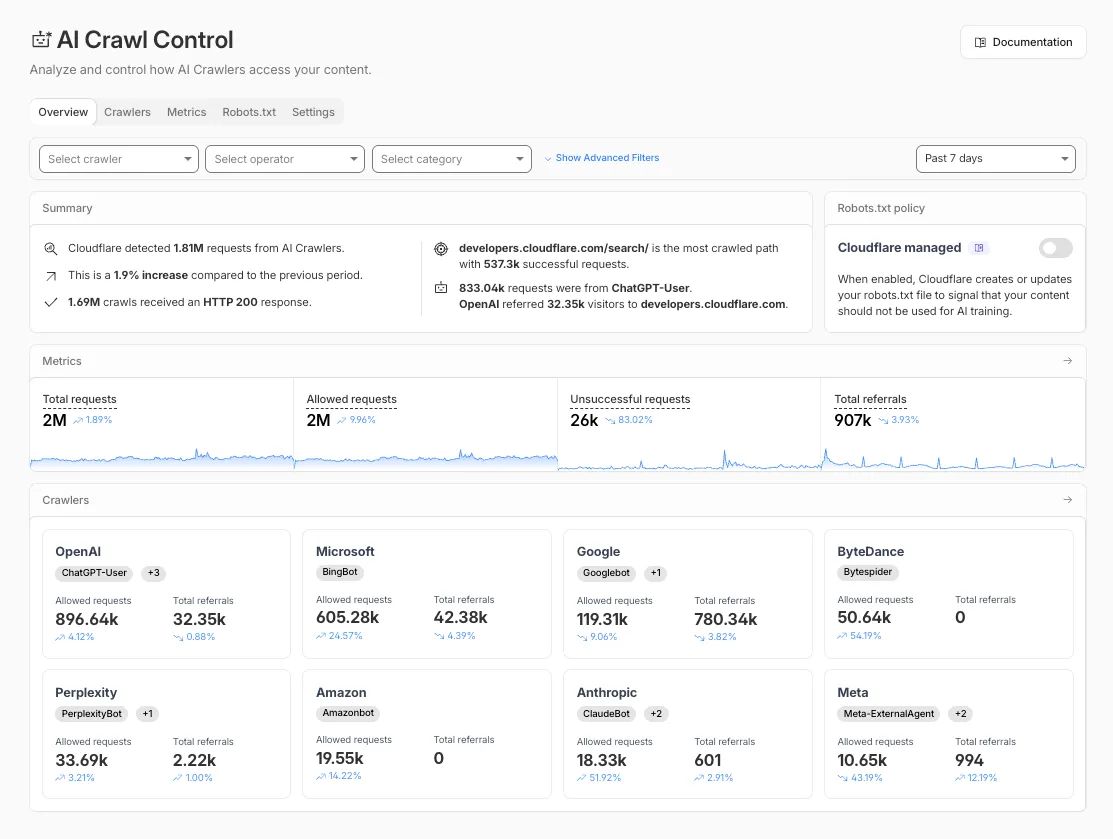
- Log in to the Cloudflare dashboard and select your account and domain.
- Go to AI Crawl Control, where the Overview tab opens by default with your activity snapshot.
- Use filters to customize your view by date range, crawler, operator, hostname, or path.
- Navigate to the Crawlers tab to manage controls for individual crawlers.
Learn more about analyzing AI traffic and managing AI crawlers.
The cached/uncached classification logic used in Zone Overview analytics has been updated to improve accuracy.
Previously, requests were classified as "cached" based on an overly broad condition that included blocked 403 responses, Snippets requests, and other non-cache request types. This caused inflated cache hit ratios — in some cases showing near-100% cached — and affected approximately 15% of requests classified as cached in rollups.
The condition has been removed from the Zone Overview page. Cached/uncached classification now aligns with the heuristics used in HTTP Analytics, so only requests genuinely served from cache are counted as cached.
What changed:
- Zone Overview — Cache ratios now reflect actual cache performance.
- HTTP Analytics — No change. HTTP Analytics already used the correct classification logic.
- Historical data — This fix applies to new requests only. Previously logged data is not retroactively updated.
Cloudflare Logpush now supports SentinelOne as a native destination.
Logs from Cloudflare can be sent to SentinelOne AI SIEM ↗ via Logpush. The destination can be configured through the Logpush UI in the Cloudflare dashboard or by using the Logpush API.
For more information, refer to the Destination Configuration documentation.
Pay Per Crawl is introducing enhancements for both AI crawler operators and site owners, focusing on programmatic discovery, flexible pricing models, and granular configuration control.
A new authenticated API endpoint allows verified crawlers to programmatically discover domains participating in Pay Per Crawl. Crawlers can use this to build optimized crawl queues, cache domain lists, and identify new participating sites. This eliminates the need to discover payable content through trial requests.
The API endpoint is
GET https://crawlers-api.ai-audit.cfdata.org/charged_zonesand requires Web Bot Auth authentication. Refer to Discover payable content for authentication steps, request parameters, and response schema.Payment headers (
crawler-exact-priceorcrawler-max-price) must now be included in the Web Bot Authsignature-inputheader components. This security enhancement prevents payment header tampering, ensures authenticated payment intent, validates crawler identity with payment commitment, and protects against replay attacks with modified pricing. Crawlers must add their payment header to the list of signed components when constructing the signature-input header.Pay Per Crawl error responses now include a new
crawler-errorheader with 11 specific error codes for programmatic handling. Error response bodies remain unchanged for compatibility. These codes enable robust error handling, automated retry logic, and accurate spending tracking.Site owners can now offer free access to specific pages like homepages, navigation, or discovery pages while charging for other content. Create a Configuration Rule in Rules > Configuration Rules, set your URI pattern using wildcard, exact, or prefix matching on the URI Full field, and enable the Disable Pay Per Crawl setting. When disabled for a URI pattern, crawler requests pass through without blocking or charging.
Some paths are always free to crawl. These paths are:
/robots.txt,/sitemap.xml,/security.txt,/.well-known/security.txt,/crawlers.json.AI crawler operators: Discover payable content | Crawl pages
Site owners: Advanced configuration
Earlier this year, we announced the launch of the new Terraform v5 Provider. We are aware of the high number of issues reported by the Cloudflare community related to the v5 release. We have committed to releasing improvements on a 2-3 week cadence ↗ to ensure its stability and reliability, including the v5.14 release. We have also pivoted from an issue-to-issue approach to a resource-per-resource approach ↗ - we will be focusing on specific resources to not only stabilize the resource but also ensure it is migration-friendly for those migrating from v4 to v5.
Thank you for continuing to raise issues. They make our provider stronger and help us build products that reflect your needs.
This release includes bug fixes, the stabilization of even more popular resources, and more.
Resource affected:
api_shield_discovery_operationCloudflare continuously discovers and updates API endpoints and web assets of your web applications. To improve the maintainability of these dynamic resources, we are working on reducing the need to actively engage with discovered operations.
The corresponding public API endpoint of discovered operations ↗ is not affected and will continue to be supported.
- pages_project: Add v4 -> v5 migration tests (#6506 ↗)
- account_members: Makes member policies a set (#6488 ↗)
- pages_project: Ensures non empty refresh plans (#6515 ↗)
- R2: Improves sweeper (#6512 ↗)
- workers_kv: Ignores value import state for verify (#6521 ↗)
- workers_script: No longer treats the migrations attribute as WriteOnly (#6489 ↗)
- workers_script: Resolves resource drift when worker has unmanaged secret (#6504 ↗)
- zero_trust_device_posture_rule: Preserves input.version and other fields (#6500 ↗) and (#6503 ↗)
- zero_trust_dlp_custom_profile: Adds sweepers for
dlp_custom_profile - zone_subscription|account_subscription: Adds
partners_entas valid enum forrate_plan.id(#6505 ↗) - zone: Ensures datasource model schema parity (#6487 ↗)
- subscription: Updates import signature to accept account_id/subscription_id to import account subscription (#6510 ↗)
We suggest waiting to migrate to v5 while we work on stabilization. This helps with avoiding any blocking issues while the Terraform resources are actively being stabilized ↗. We will be releasing a new migration tool in March 2026 to help support v4 to v5 transitions for our most popular resources.