

Cloudflare now returns structured Markdown responses for Cloudflare-generated 1xxx errors when clients send
Accept: text/markdown.Each response includes YAML frontmatter plus guidance sections (
What happened/What you should do) so agents can make deterministic retry and escalation decisions without parsing HTML.In measured 1,015 comparisons, Markdown reduced payload size and token footprint by over 98% versus HTML.
Included frontmatter fields:
error_code,error_name,error_category,http_statusray_id,timestamp,zonecloudflare_error,retryable,retry_after(when applicable),owner_action_required
Default behavior is unchanged: clients that do not explicitly request Markdown continue to receive HTML error pages.
Cloudflare uses standard HTTP content negotiation on the
Acceptheader.Accept: text/markdown-> MarkdownAccept: text/markdown, text/html;q=0.9-> MarkdownAccept: text/*-> MarkdownAccept: */*-> HTML (default browser behavior)
When multiple values are present, Cloudflare selects the highest-priority supported media type using
qvalues. If Markdown is not explicitly preferred, HTML is returned.Available now for Cloudflare-generated 1xxx errors.
Terminal window curl -H "Accept: text/markdown" https://<your-domain>/cdn-cgi/error/1015Reference: Cloudflare 1xxx error documentation
The latest release of the Agents SDK ↗ lets you define an Agent and an McpAgent in the same Worker and connect them over RPC — no HTTP, no network overhead. It also makes OAuth opt-in for simple MCP connections, hardens the schema converter for production workloads, and ships a batch of
@cloudflare/ai-chatreliability fixes.You can now connect an Agent to an McpAgent in the same Worker using a Durable Object binding instead of an HTTP URL. The connection stays entirely within the Cloudflare runtime — no network round-trips, no serialization overhead.
Pass the Durable Object namespace directly to
addMcpServer:JavaScript import { Agent } from "agents";export class MyAgent extends Agent {async onStart() {// Connect via DO binding — no HTTP, no network overheadawait this.addMcpServer("counter", env.MY_MCP);// With props for per-user contextawait this.addMcpServer("counter", env.MY_MCP, {props: { userId: "user-123", role: "admin" },});}}TypeScript import { Agent } from "agents";export class MyAgent extends Agent {async onStart() {// Connect via DO binding — no HTTP, no network overheadawait this.addMcpServer("counter", env.MY_MCP);// With props for per-user contextawait this.addMcpServer("counter", env.MY_MCP, {props: { userId: "user-123", role: "admin" },});}}The
addMcpServermethod now acceptsstring | DurableObjectNamespaceas the second parameter with full TypeScript overloads, so HTTP and RPC paths are type-safe and cannot be mixed.Key capabilities:
- Hibernation support — RPC connections survive Durable Object hibernation automatically. The binding name and props are persisted to storage and restored on wake-up, matching the behavior of HTTP MCP connections.
- Deduplication — Calling
addMcpServerwith the same server name returns the existing connection instead of creating duplicates. Connection IDs are stable across hibernation restore. - Smaller surface area — The RPC transport internals have been rewritten and reduced from 609 lines to 245 lines.
RPCServerTransportnow usesJSONRPCMessageSchemafrom the MCP SDK for validation instead of hand-written checks.
addMcpServer()no longer eagerly creates an OAuth provider for every connection. For servers that do not require authentication, a simple call is all you need:JavaScript // No callbackHost, no OAuth config — just worksawait this.addMcpServer("my-server", "https://mcp.example.com");TypeScript // No callbackHost, no OAuth config — just worksawait this.addMcpServer("my-server", "https://mcp.example.com");If the server responds with a 401, the SDK throws a clear error:
"This MCP server requires OAuth authentication. Provide callbackHost in addMcpServer options to enable the OAuth flow."The restore-from-storage flow also handles missing callback URLs gracefully, skipping auth provider creation for non-OAuth servers.The schema converter used by
generateTypes()andgetAITools()now handles edge cases that previously caused crashes in production:- Depth and circular reference guards — Prevents stack overflows on recursive or deeply nested schemas
$refresolution — Supports internal JSON Pointers (#/definitions/...,#/$defs/...,#)- Tuple support —
prefixItems(JSON Schema 2020-12) and arrayitems(draft-07) - OpenAPI 3.0
nullable: true— Supported across all schema branches - Per-tool error isolation — One malformed schema cannot crash the full pipeline in
generateTypes()orgetAITools() - Missing
inputSchemafallback —getAITools()falls back to{ type: "object" }instead of throwing
- Tool denial flow — Denied tool approvals (
approved: false) now transition tooutput-deniedwith atool_result, fixing Anthropic provider compatibility. Custom denial messages are supported viastate: "output-error"anderrorText. - Abort/cancel support — Streaming responses now properly cancel the reader loop when the abort signal fires and send a done signal to the client.
- Duplicate message persistence —
persistMessages()now reconciles assistant messages by content and order, preventing duplicate rows when clients resend full history. requestIdinOnChatMessageOptions— Handlers can now send properly-tagged error responses for pre-stream failures.redacted_thinkingpreservation — The message sanitizer no longer strips Anthropicredacted_thinkingblocks./get-messagesreliability — Endpoint handling moved from a prototypeonRequest()override to a constructor wrapper, so it works even when users overrideonRequestwithout callingsuper.onRequest().- Client tool APIs undeprecated —
createToolsFromClientSchemas,clientTools,AITool,extractClientToolSchemas, and thetoolsoption onuseAgentChatare restored for SDK use cases where tools are defined dynamically at runtime. jsonSchemainitialization — FixedjsonSchema not initializederror when callinggetAITools()inonChatMessage.
To update to the latest version:
Terminal window npm i agents@latest @cloudflare/ai-chat@latest
You can now run more Containers concurrently with significantly higher limits on memory, vCPU, and disk.
Limit Previous Limit New Limit Memory for concurrent live Container instances 400GiB 6TiB vCPU for concurrent live Container instances 100 1,500 Disk for concurrent live Container instances 2TB 30TB This 15x increase enables larger-scale workloads on Containers. You can now run 15,000 instances of the
liteinstance type, 6,000 instances ofbasic, over 1,500 instances ofstandard-1, or over 1,000 instances ofstandard-2concurrently.Refer to Limits for more details on the available instance types and limits.
Radar now includes Autonomous System Provider Authorization (ASPA) ↗ deployment insights, providing visibility into the adoption and verification of ASPA objects across the global routing ecosystem.
The new
ASPAAPI provides the following endpoints:/bgp/rpki/aspa/snapshot- Retrieves current or historical ASPA objects./bgp/rpki/aspa/changes- Retrieves changes to ASPA objects over time./bgp/rpki/aspa/timeseries- Retrieves ASPA object counts over time as a timeseries.
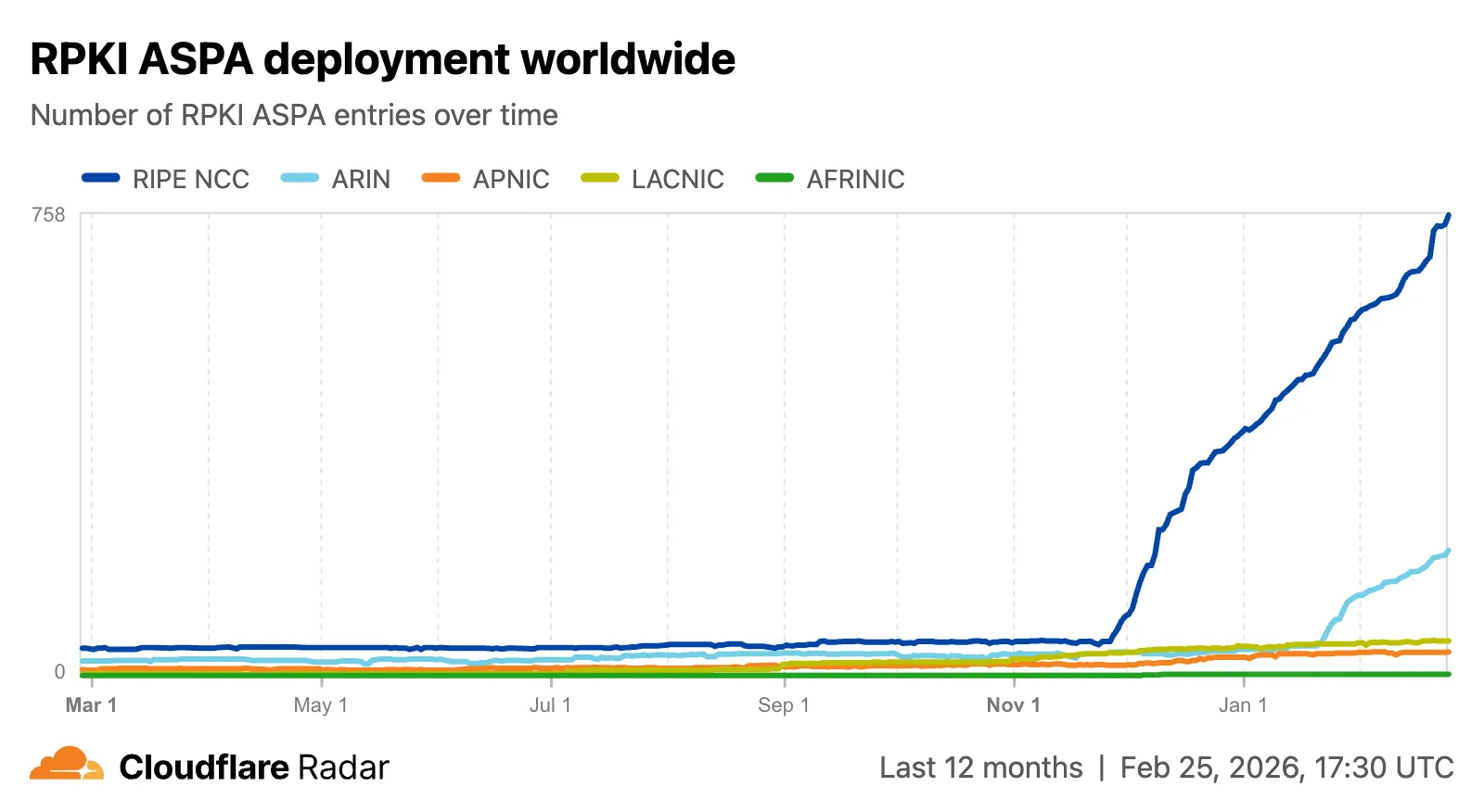
The global routing page ↗ now shows the ASPA deployment trend over time by counting daily ASPA objects.
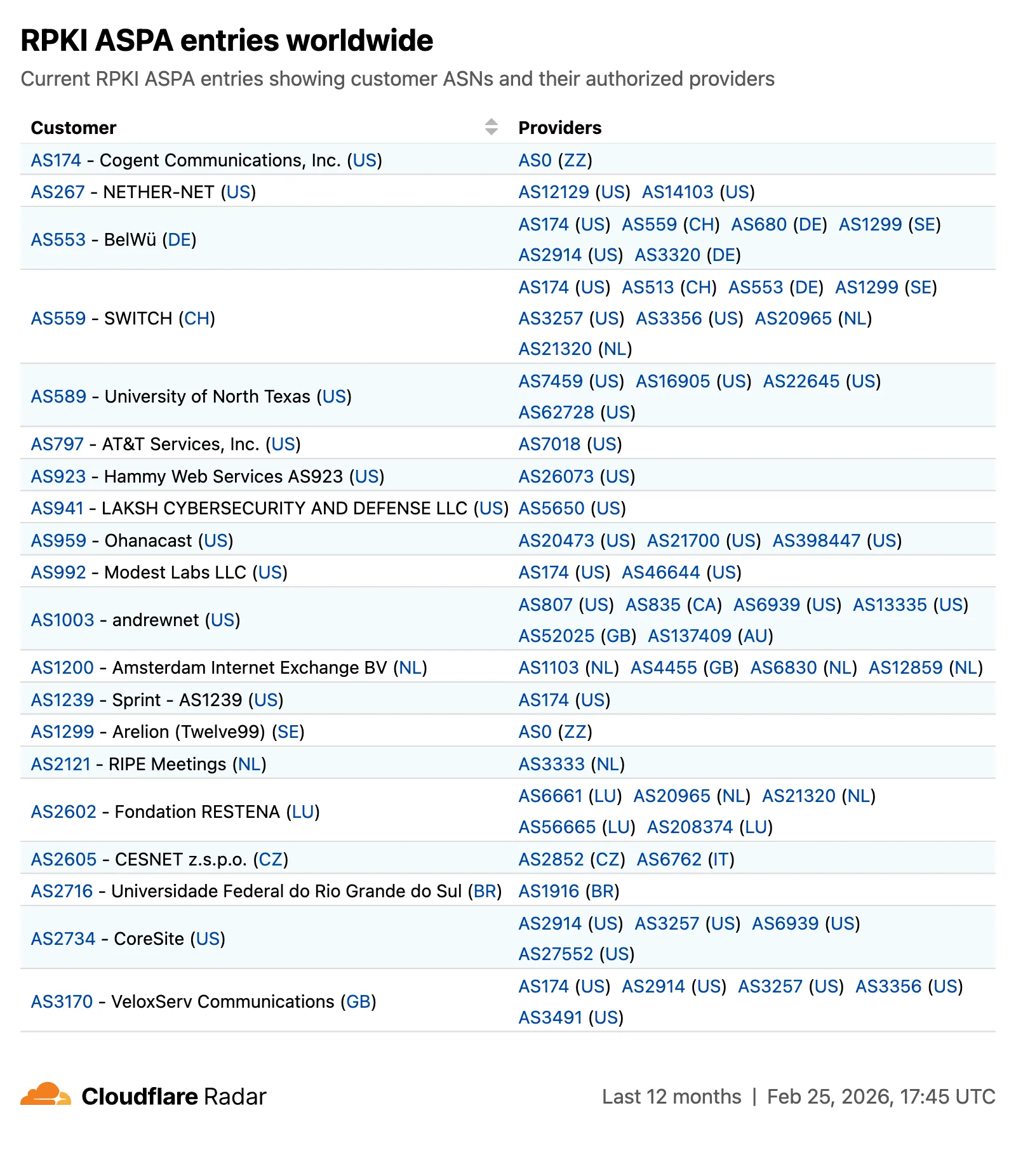
The global routing page also displays the most recent ASPA objects, searchable by ASN or AS name.
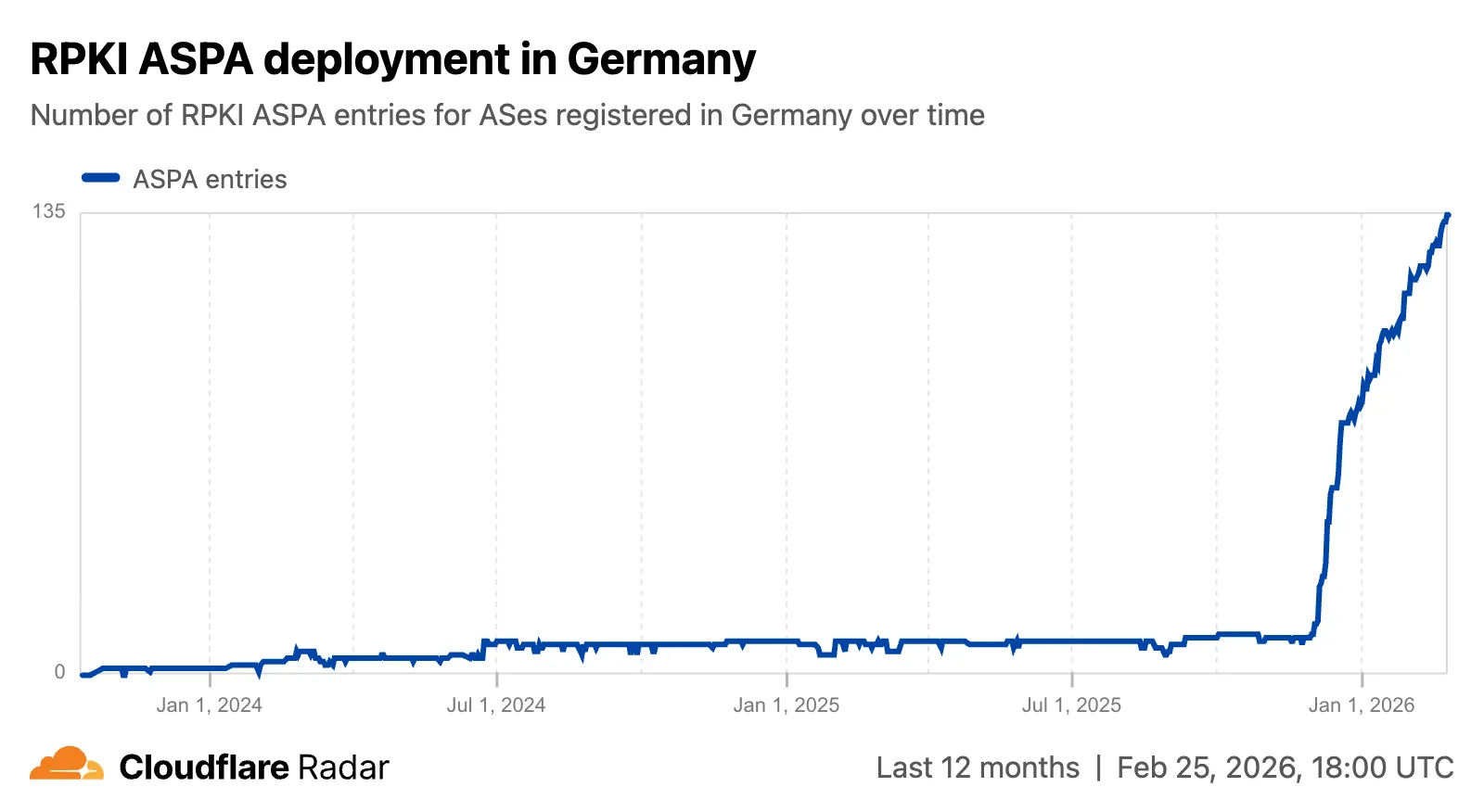
On country and region routing pages, a new widget shows the ASPA deployment rate for ASNs registered in the selected country or region.
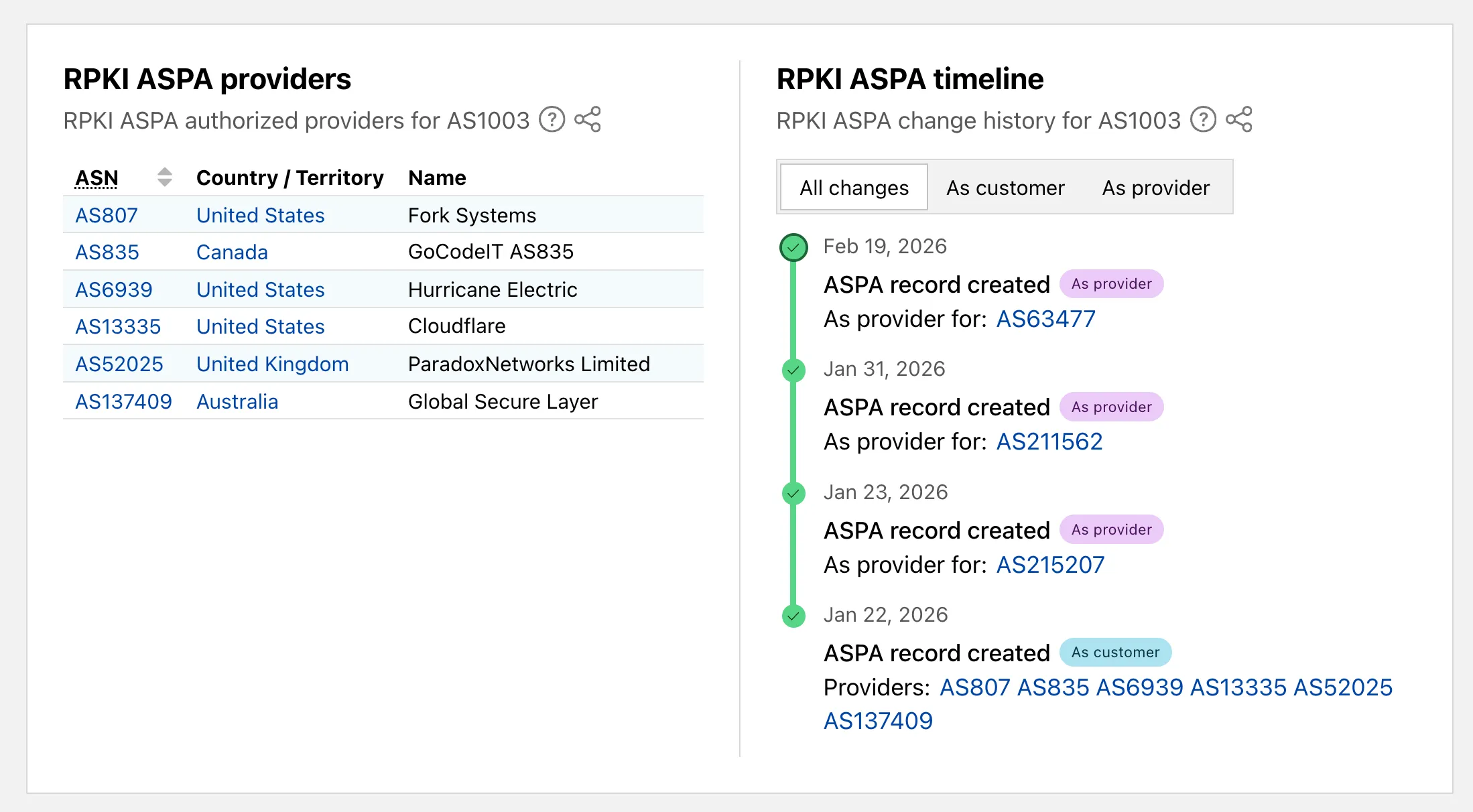
On AS routing pages, the connectivity table now includes checkmarks for ASPA-verified upstreams. All ASPA upstreams are listed in a dedicated table, and a timeline shows ASPA changes at daily granularity.
Check out the Radar routing page ↗ to explore the data.
Pywrangler ↗, the CLI tool for managing Python Workers and packages, now supports Windows, allowing you to develop and deploy Python Workers from Windows environments. Previously, Pywrangler was only available on macOS and Linux.
You can install and use Pywrangler on Windows the same way you would on other platforms. Specify your Worker's Python dependencies in your
pyproject.tomlfile, then use the following commands to develop and deploy:Terminal window uvx --from workers-py pywrangler devuvx --from workers-py pywrangler deployAll existing Pywrangler functionality, including package management, local development, and deployment, works on Windows without any additional configuration.
This feature requires the following minimum versions:
wrangler>= 4.64.0workers-py>= 1.72.0uv>= 0.29.8
To upgrade
workers-py(which includes Pywrangler) in your project, run:Terminal window uv tool upgrade workers-pyTo upgrade
wrangler, run:Terminal window npm install -g wrangler@latestTo upgrade
uv, run:Terminal window uv self updateTo get started with Python Workers on Windows, refer to the Python packages documentation for full details on Pywrangler.
Workers Observability now includes a query language that lets you write structured queries directly in the search bar to filter your logs and traces. The search bar doubles as a free text search box — type any term to search across all metadata and attributes, or write field-level queries for precise filtering.
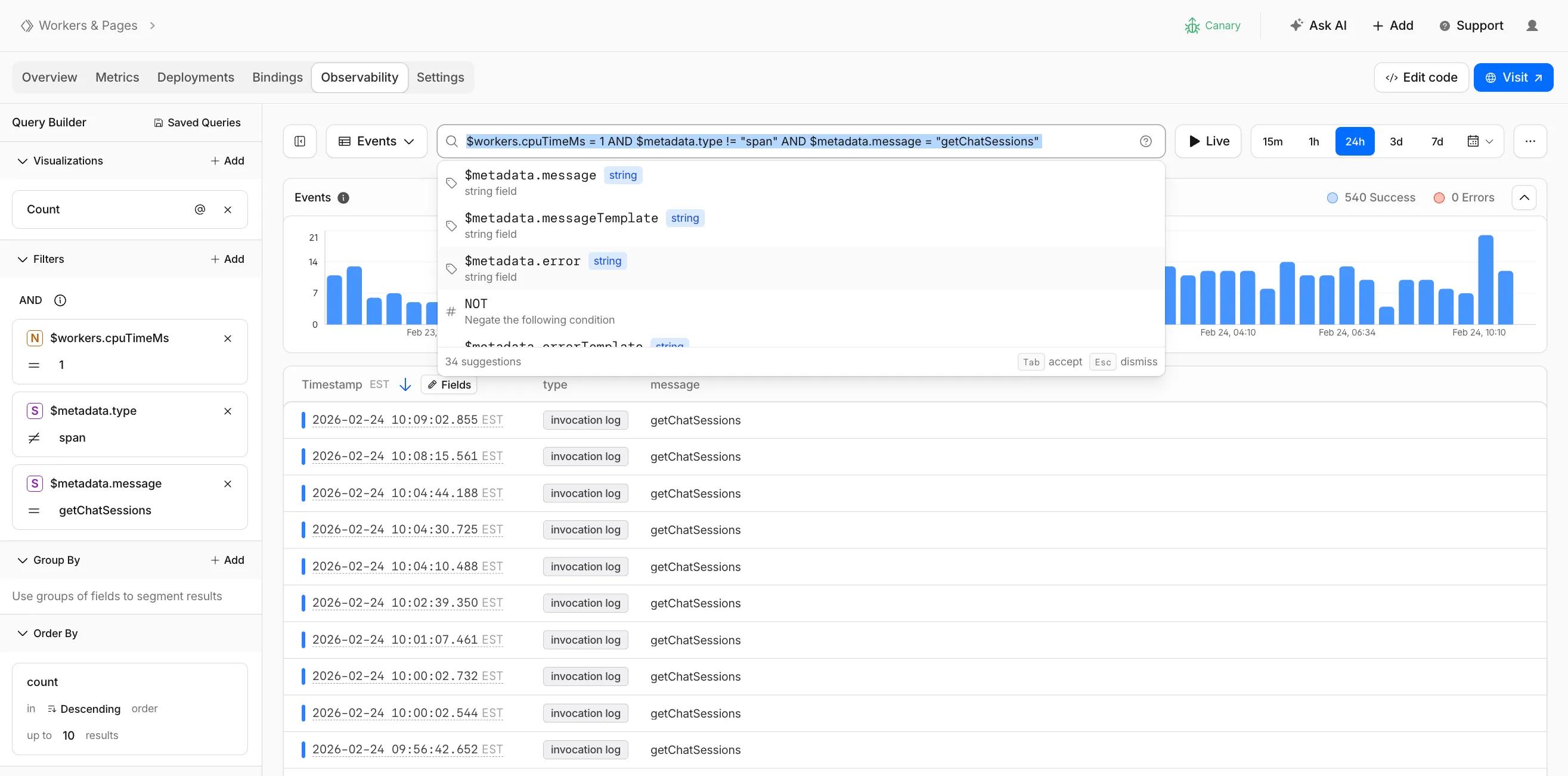
Queries written in the search bar sync with the Query Builder sidebar, so you can write a query by hand and then refine it visually, or build filters in the Query Builder and see the corresponding query syntax. The search bar provides autocomplete suggestions for metadata fields and operators as you type.
The query language supports:
- Free text search — search everywhere with a keyword like
error, or match an exact phrase with"exact phrase" - Field queries — filter by specific fields using comparison operators (for example,
status = 500or$workers.wallTimeMs > 100) - Operators —
=,!=,>,>=,<,<=, and:(contains) - Functions —
contains(field, value),startsWith(field, prefix),regex(field, pattern), andexists(field) - Boolean logic — add conditions with
AND,OR, andNOT
Select the help icon next to the search bar to view the full syntax reference, including all supported operators, functions, and keyboard shortcuts.
Go to the Workers Observability dashboard ↗ to try the query language.
- Free text search — search everywhere with a keyword like
You can now deploy any existing project to Cloudflare Workers — even without a Wrangler configuration file — and
wrangler deploywill just work.Starting with Wrangler 4.68.0, running
wrangler deployautomatically configures your project by detecting your framework, installing required adapters, and deploying it to Cloudflare Workers.Terminal window npx wrangler deployWhen you run
wrangler deployin a project without a configuration file, Wrangler:- Detects your framework from
package.json - Prompts you to confirm the detected settings
- Installs any required adapters
- Generates a
wrangler.jsoncconfiguration file - Deploys your project to Cloudflare Workers
You can also use
wrangler setupto configure without deploying, or pass--yesto skip prompts.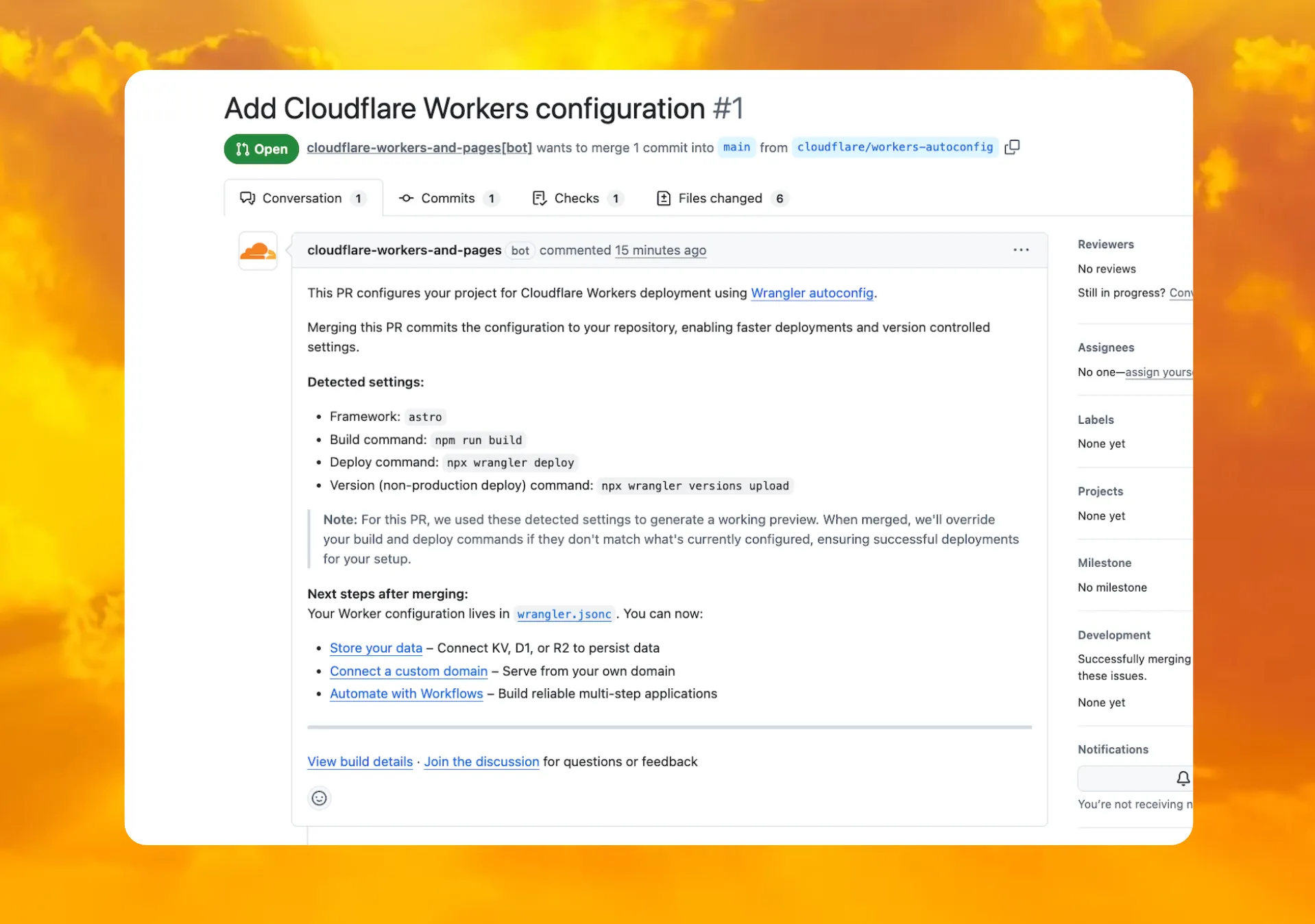
When you connect a repository through the Workers dashboard ↗, a pull request is generated for you with all necessary files, and a preview deployment to check before merging.
In December 2025, we introduced automatic configuration as an experimental feature. It is now generally available and the default behavior.
If you have questions or run into issues, join the GitHub discussion ↗.
- Detects your framework from
A new GA release for the Windows WARP client is now available on the stable releases downloads page.
This release contains minor fixes, improvements, and new features.
Changes and improvements
- Improvements to multi-user mode. Fixed an issue where when switching from a pre-login registration to a user registration, Mobile Device Management (MDM) configuration association could be lost.
- Added a new feature to manage NetBIOS over TCP/IP functionality on the Windows client. NetBIOS over TCP/IP on the Windows client is now disabled by default and can be enabled in device profile settings.
- Fixed an issue causing failure of the local network exclusion feature when configured with a timeout of
0. - Improvement for the Windows client certificate posture check to ensure logged results are from checks that run once users log in.
- Improvement for more accurate reporting of device colocation information in the Cloudflare One dashboard.
- Fixed an issue where misconfigured DEX HTTP tests prevented new registrations.
- Fixed an issue causing DNS requests to fail with clients in Traffic and DNS mode.
- Improved service shutdown behavior in cases where the daemon is unresponsive.
Known issues
For Windows 11 24H2 users, Microsoft has confirmed a regression that may lead to performance issues like mouse lag, audio cracking, or other slowdowns. Cloudflare recommends users experiencing these issues upgrade to a minimum Windows 11 24H2 KB5062553 or higher for resolution.
Devices with KB5055523 installed may receive a warning about
Win32/ClickFix.ABAbeing present in the installer. To resolve this false positive, update Microsoft Security Intelligence to version 1.429.19.0 or later.DNS resolution may be broken when the following conditions are all true:
- WARP is in Secure Web Gateway without DNS filtering (tunnel-only) mode.
- A custom DNS server address is configured on the primary network adapter.
- The custom DNS server address on the primary network adapter is changed while WARP is connected.
To work around this issue, reconnect the WARP client by toggling off and back on.
A new GA release for the macOS WARP client is now available on the stable releases downloads page.
This release contains minor fixes and improvements.
Changes and improvements
- Fixed an issue causing failure of the local network exclusion feature when configured with a timeout of
0. - Improvement for more accurate reporting of device colocation information in the Cloudflare One dashboard.
- Fixed an issue with DNS server configuration failures that caused tunnel connection delays.
- Fixed an issue where misconfigured DEX HTTP tests prevented new registrations.
- Fixed an issue causing DNS requests to fail with clients in Traffic and DNS mode.
- Fixed an issue causing failure of the local network exclusion feature when configured with a timeout of
A new GA release for the Linux WARP client is now available on the stable releases downloads page.
This release contains minor fixes and improvements.
WARP client version 2025.8.779.0 introduced an updated public key for Linux packages. The public key must be updated if it was installed before September 12, 2025 to ensure the repository remains functional after December 4, 2025. Instructions to make this update are available at pkg.cloudflareclient.com.
Changes and improvements
- Fixed an issue causing failure of the local network exclusion feature when configured with a timeout of
0. - Improvement for more accurate reporting of device colocation information in the Cloudflare One dashboard.
- Fixed an issue where misconfigured DEX HTTP tests prevented new registrations.
- Fixed issues causing DNS requests to fail with clients in Traffic and DNS mode or DNS only mode.
- Fixed an issue causing failure of the local network exclusion feature when configured with a timeout of
deleteAll()now deletes a Durable Object alarm in addition to stored data for Workers with a compatibility date of2026-02-24or later. This change simplifies clearing a Durable Object's storage with a single API call.Previously,
deleteAll()only deleted user-stored data for an object. Alarm usage stores metadata in an object's storage, which required a separatedeleteAlarm()call to fully clean up all storage for an object. ThedeleteAll()change applies to both KV-backed and SQLite-backed Durable Objects.JavaScript // Before: two API calls required to clear all storageawait this.ctx.storage.deleteAlarm();await this.ctx.storage.deleteAll();// Now: a single call clears both data and the alarmawait this.ctx.storage.deleteAll();For more information, refer to the Storage API documentation.
Cloudflare Pipelines ingests streaming data via Workers or HTTP endpoints, transforms it with SQL, and writes it to R2 as Apache Iceberg tables. Today we're shipping three improvements to help you understand why streaming events get dropped, catch data quality issues early, and set up Pipelines faster.
When stream events don't match the expected schema, Pipelines accepts them during ingestion but drops them when attempting to deliver them to the sink. To help you identify the root cause of these issues, we are introducing a new dashboard and metrics that surface dropped events with detailed error messages.
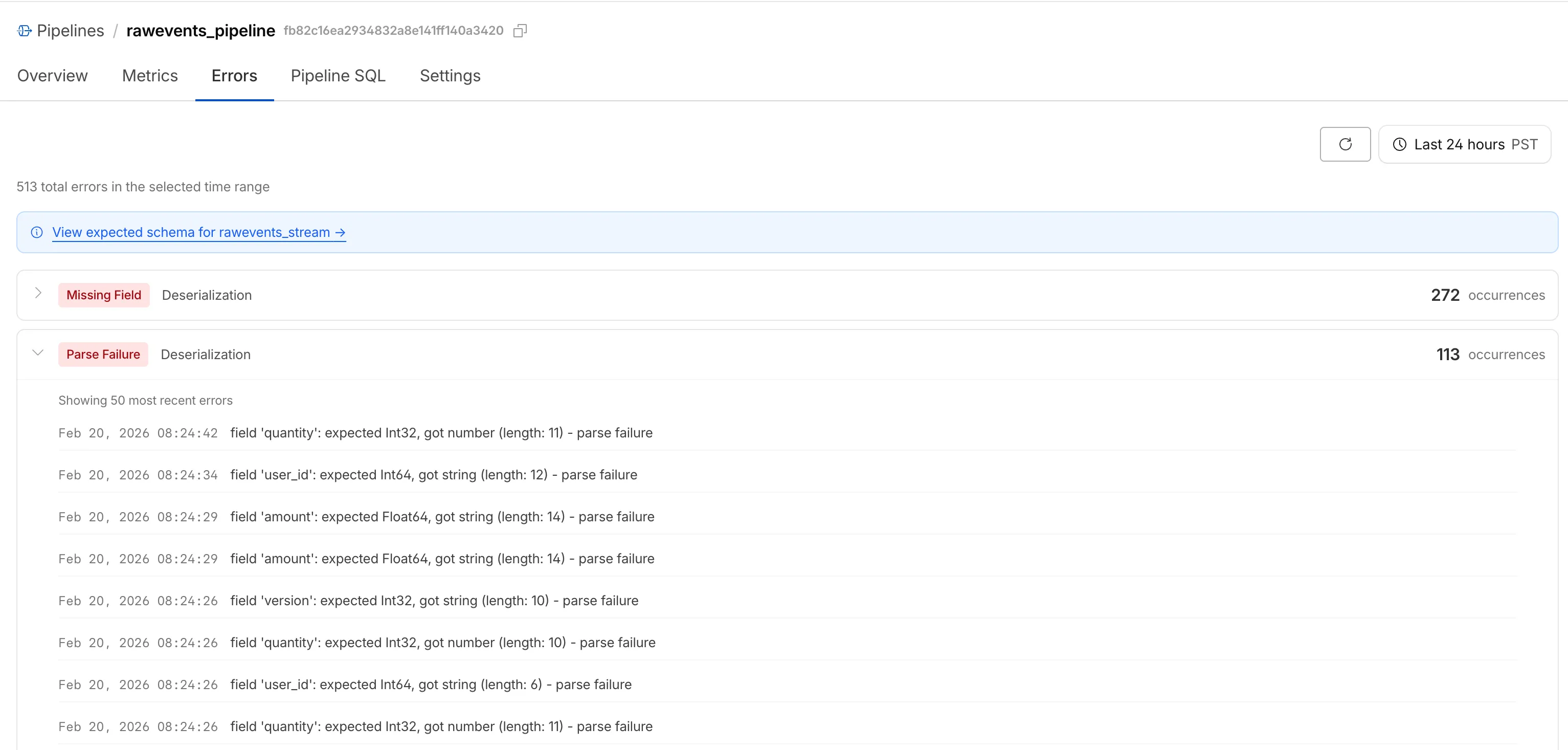
Dropped events can also be queried programmatically via the new
pipelinesUserErrorsAdaptiveGroupsGraphQL dataset. The dataset breaks down failures by specific error type (missing_field,type_mismatch,parse_failure, ornull_value) so you can trace issues back to the source.query GetPipelineUserErrors($accountTag: String!$pipelineId: String!$datetimeStart: Time!$datetimeEnd: Time!) {viewer {accounts(filter: { accountTag: $accountTag }) {pipelinesUserErrorsAdaptiveGroups(limit: 100filter: {pipelineId: $pipelineIddatetime_geq: $datetimeStartdatetime_leq: $datetimeEnd}orderBy: [count_DESC]) {countdimensions {errorFamilyerrorType}}}}}For the full list of dimensions, error types, and additional query examples, refer to User error metrics.
Sending data to a Pipeline from a Worker previously used a generic
Pipeline<PipelineRecord>type, which meant schema mismatches (wrong field names, incorrect types) were only caught at runtime as dropped events.Running
wrangler typesnow generates schema-specific TypeScript types for your Pipeline bindings. TypeScript catches missing required fields and incorrect field types at compile time, before your code is deployed.TypeScript declare namespace Cloudflare {type EcommerceStreamRecord = {user_id: string;event_type: string;product_id?: string;amount?: number;};interface Env {STREAM: import("cloudflare:pipelines").Pipeline<Cloudflare.EcommerceStreamRecord>;}}For more information, refer to Typed Pipeline bindings.
Setting up a new Pipeline previously required multiple manual steps: creating an R2 bucket, enabling R2 Data Catalog, generating an API token, and configuring format, compression, and rolling policies individually.
The
wrangler pipelines setupcommand now offers a Simple setup mode that applies recommended defaults and automatically creates the R2 bucket and enables R2 Data Catalog if they do not already exist. Validation errors during setup prompt you to retry inline rather than restarting the entire process.For a full walkthrough, refer to the Getting started guide.
You can now disable a live input to reject incoming RTMPS and SRT connections. When a live input is disabled, any broadcast attempts will fail to connect.
This gives you more control over your live inputs:
- Temporarily pause an input without deleting it
- Programmatically end creator broadcasts
- Prevent new broadcasts from starting on a specific input
To disable a live input via the API, set the
enabledproperty tofalse:Terminal window curl --request PUT \https://api.cloudflare.com/client/v4/accounts/{account_id}/stream/live_inputs/{input_id} \--header "Authorization: Bearer <API_TOKEN>" \--data '{"enabled": false}'You can also disable or enable a live input from the Live inputs list page or the live input detail page in the Dashboard.
All existing live inputs remain enabled by default. For more information, refer to Start a live stream.
Sandboxes now support
createBackup()andrestoreBackup()methods for creating and restoring point-in-time snapshots of directories.This allows you to restore environments quickly. For instance, in order to develop in a sandbox, you may need to include a user's codebase and run a build step. Unfortunately
git cloneandnpm installcan take minutes, and you don't want to run these steps every time the user starts their sandbox.Now, after the initial setup, you can just call
createBackup(), thenrestoreBackup()the next time this environment is needed. This makes it practical to pick up exactly where a user left off, even after days of inactivity, without repeating expensive setup steps.TypeScript const sandbox = getSandbox(env.Sandbox, "my-sandbox");// Make non-trivial changes to the file systemawait sandbox.gitCheckout(endUserRepo, { targetDir: "/workspace" });await sandbox.exec("npm install", { cwd: "/workspace" });// Create a point-in-time backup of the directoryconst backup = await sandbox.createBackup({ dir: "/workspace" });// Store the handle for later useawait env.KV.put(`backup:${userId}`, JSON.stringify(backup));// ... in a future session...// Restore instead of re-cloning and reinstallingawait sandbox.restoreBackup(backup);Backups are stored in R2 and can take advantage of R2 object lifecycle rules to ensure they do not persist forever.
Key capabilities:
- Persist and reuse across sandbox sessions — Easily store backup handles in KV, D1, or Durable Object storage for use in subsequent sessions
- Usable across multiple instances — Fork a backup across many sandboxes for parallel work
- Named backups — Provide optional human-readable labels for easier management
- TTLs — Set time-to-live durations so backups are automatically removed from storage once they are no longer neeeded
To get started, refer to the backup and restore guide for setup instructions and usage patterns, or the Backups API reference for full method documentation.
Hyperdrive now treats queries containing PostgreSQL
STABLEfunctions as uncacheable, in addition toVOLATILEfunctions.Previously, only functions that PostgreSQL categorizes ↗ as
VOLATILE(for example,RANDOM(),LASTVAL()) were detected as uncacheable.STABLEfunctions (for example,NOW(),CURRENT_TIMESTAMP,CURRENT_DATE) were incorrectly allowed to be cached.Because
STABLEfunctions can return different results across different SQL statements within the same transaction, caching their results could serve stale or incorrect data. This change aligns Hyperdrive's caching behavior with PostgreSQL's function volatility semantics.If your queries use
STABLEfunctions, and you were relying on them being cached, move the function call to your application code and pass the result as a query parameter. For example, instead ofWHERE created_at > NOW(), compute the timestamp in your Worker and pass it asWHERE created_at > $1.Hyperdrive uses text-based pattern matching to detect uncacheable functions. References to function names like
NOW()in SQL comments also cause the query to be marked as uncacheable.For more information, refer to Query caching and Troubleshoot and debug.
TL;DR: You can now create and save custom configurations of the Threat Events dashboard, allowing you to instantly return to specific filtered views — such as industry-specific attacks or regional Sankey flows — without manual reconfiguration.
Threat intelligence is most effective when it is personalized. Previously, analysts had to manually re-apply complex filters (like combining specific industry datasets with geographic origins) every time they logged in. This update provides material value by:
- Analysts can now jump straight into "Known Ransomware Infrastructure" or "Retail Sector Targets" views with a single click, eliminating repetitive setup tasks
- Teams can ensure everyone is looking at the same data subsets by using standardized saved views, reducing the risk of missing critical patterns due to inconsistent filtering.
Cloudforce One subscribers can start saving their custom views now in Application Security > Threat Intelligence > Threat Events ↗.
The
@cloudflare/codemode↗ package has been rewritten into a modular, runtime-agnostic SDK.Code Mode ↗ enables LLMs to write and execute code that orchestrates your tools, instead of calling them one at a time. This can (and does) yield significant token savings, reduces context window pressure and improves overall model performance on a task.
The new
Executorinterface is runtime agnostic and comes with a prebuiltDynamicWorkerExecutorto run generated code in a Dynamic Worker Loader.- Removed
experimental_codemode()andCodeModeProxy— the package no longer owns an LLM call or model choice - New import path:
createCodeTool()is now exported from@cloudflare/codemode/ai
createCodeTool()— Returns a standard AI SDKToolto use in your AI agents.Executorinterface — Minimalexecute(code, fns)contract. Implement for any code sandboxing primitive or runtime.
Runs code in a Dynamic Worker. It comes with the following features:
- Network isolation —
fetch()andconnect()blocked by default (globalOutbound: null) when usingDynamicWorkerExecutor - Console capture —
console.log/warn/errorcaptured and returned inExecuteResult.logs - Execution timeout — Configurable via
timeoutoption (default 30s)
JavaScript import { createCodeTool } from "@cloudflare/codemode/ai";import { DynamicWorkerExecutor } from "@cloudflare/codemode";import { streamText } from "ai";const executor = new DynamicWorkerExecutor({ loader: env.LOADER });const codemode = createCodeTool({ tools: myTools, executor });const result = streamText({model,tools: { codemode },messages,});TypeScript import { createCodeTool } from "@cloudflare/codemode/ai";import { DynamicWorkerExecutor } from "@cloudflare/codemode";import { streamText } from "ai";const executor = new DynamicWorkerExecutor({ loader: env.LOADER });const codemode = createCodeTool({ tools: myTools, executor });const result = streamText({model,tools: { codemode },messages,});{"worker_loaders": [{ "binding": "LOADER" }],}[[worker_loaders]]binding = "LOADER"See the Code Mode documentation for full API reference and examples.
Terminal window npm i @cloudflare/codemode@latest- Removed
You can now easily understand your SaaS security posture findings and why they were detected with Cloudy Summaries in CASB. This feature integrates Cloudflare's Cloudy AI directly into your CASB Posture Findings to automatically generate clear, plain-language summaries of complex security misconfigurations, third-party app risks, and data exposures.
This allows security teams and IT administrators to drastically reduce triage time by immediately understanding the context, potential impact, and necessary remediation steps for any given finding—without needing to be an expert in every connected SaaS application.
To view a summary, simply navigate to your Posture Findings in the Cloudflare One dashboard (under Cloud and SaaS findings) and open the finding details of a specific instance of a Finding.
Cloudy Summaries are supported on all available integrations, including Microsoft 365, Google Workspace, Salesforce, GitHub, AWS, Slack, and Dropbox. See the full list of supported integrations here.
- Contextual explanations — Quickly understand the specifics of a finding with plain-language summaries detailing exactly what was detected, from publicly shared sensitive files to risky third-party app scopes.
- Clear risk assessment — Instantly grasp the potential security impact of the finding, such as data breach risks, unauthorized account access, or email spoofing vulnerabilities.
- Actionable guidance — Get clear recommendations and next steps on how to effectively remediate the issue and secure your environment.
- Built-in feedback — Help improve future AI summarization accuracy by submitting feedback directly using the thumbs-up and thumbs-down buttons.
- Learn more about managing CASB Posture Findings in Cloudflare.
Cloudy Summaries in CASB are available to all Cloudflare CASB users today.
Cloudflare Tunnel is now available in the main Cloudflare Dashboard at Networking > Tunnels ↗, bringing first-class Tunnel management to developers using Tunnel for securing origin servers.

This new experience provides everything you need to manage Tunnels for public applications, including:
- Full Tunnel lifecycle management: Create, configure, delete, and monitor all your Tunnels in one place.
- Native integrations: View Tunnels by name when configuring DNS records and Workers VPC — no more copy-pasting UUIDs.
- Real-time visibility: Monitor replicas and Tunnel health status directly in the dashboard.
- Routing map: Manage all ingress routes for your Tunnel, including public applications, private hostnames, private CIDRs, and Workers VPC services, from a single interactive interface.
Core Dashboard: Navigate to Networking > Tunnels ↗ to manage Tunnels for:
- Securing origin servers and public applications with CDN, WAF, Load Balancing, and DDoS protection
- Connecting Workers to private services via Workers VPC
Cloudflare One Dashboard: Navigate to Zero Trust > Networks > Connectors ↗ to manage Tunnels for:
- Securing your public applications with Zero Trust access policies
- Connecting users to private applications
- Building a private mesh network
Both dashboards provide complete Tunnel management capabilities — choose based on your primary workflow.
New to Tunnel? Learn how to get started with Cloudflare Tunnel or explore advanced use cases like securing SSH servers or running Tunnels in Kubernetes.
Workers AI and AI Gateway have received a series of dashboard improvements to help you get started faster and manage your AI workloads more easily.
Navigation and discoverability
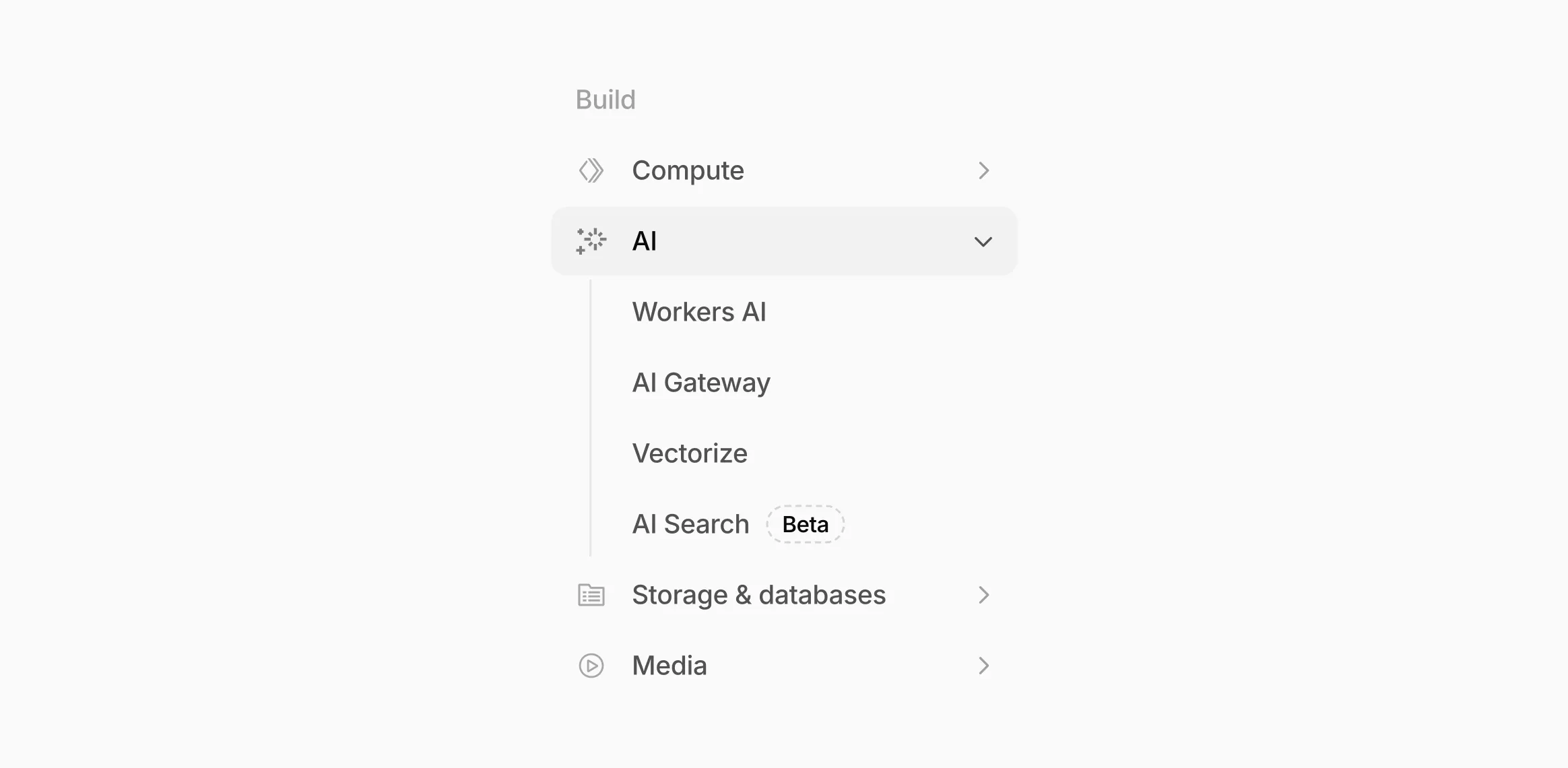
AI now has its own top-level section in the Cloudflare dashboard sidebar, so you can find AI features without digging through menus.
Onboarding and getting started
Getting started with AI Gateway is now simpler. When you create your first gateway, we now show your gateway's OpenAI-compatible endpoint and step-by-step guidance to help you configure it. The Playground also includes helpful prompts, and usage pages have clear next steps if you have not made any requests yet.
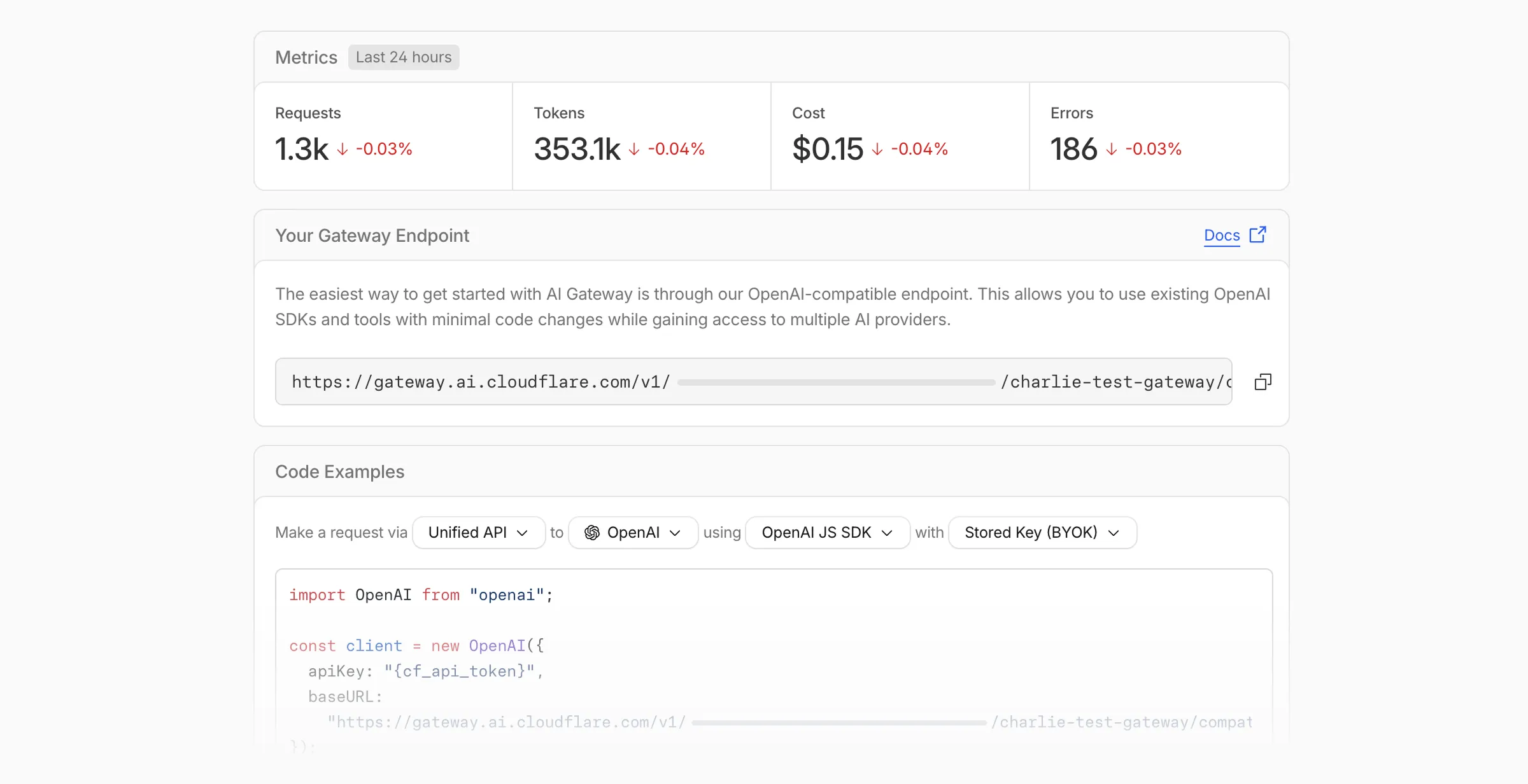
We've also combined the previously separate code example sections into one view with dropdown selectors for API type, provider, SDK, and authentication method so you can now customize the exact code snippet you need from one place.
Dynamic Routing
- The route builder is now more performant and responsive.
- You can now copy route names to your clipboard with a single click.
- Code examples use the Universal Endpoint format, making it easier to integrate routes into your application.
Observability and analytics
- Small monetary values now display correctly in cost analytics charts, so you can accurately track spending at any scale.
Accessibility
- Improvements to keyboard navigation within the AI Gateway, specifically when exploring usage by provider.
- Improvements to sorting and filtering components on the Workers AI models page.
For more information, refer to the AI Gateway documentation.
Digital Experience Monitoring (DEX) provides visibility into WARP device connectivity and performance to any internal or external application.
Now, all DEX logs are fully compatible with Cloudflare's Customer Metadata Boundary (CMB) setting for the 'EU' (European Union), which ensures that DEX logs will not be stored outside the 'EU' when the option is configured.
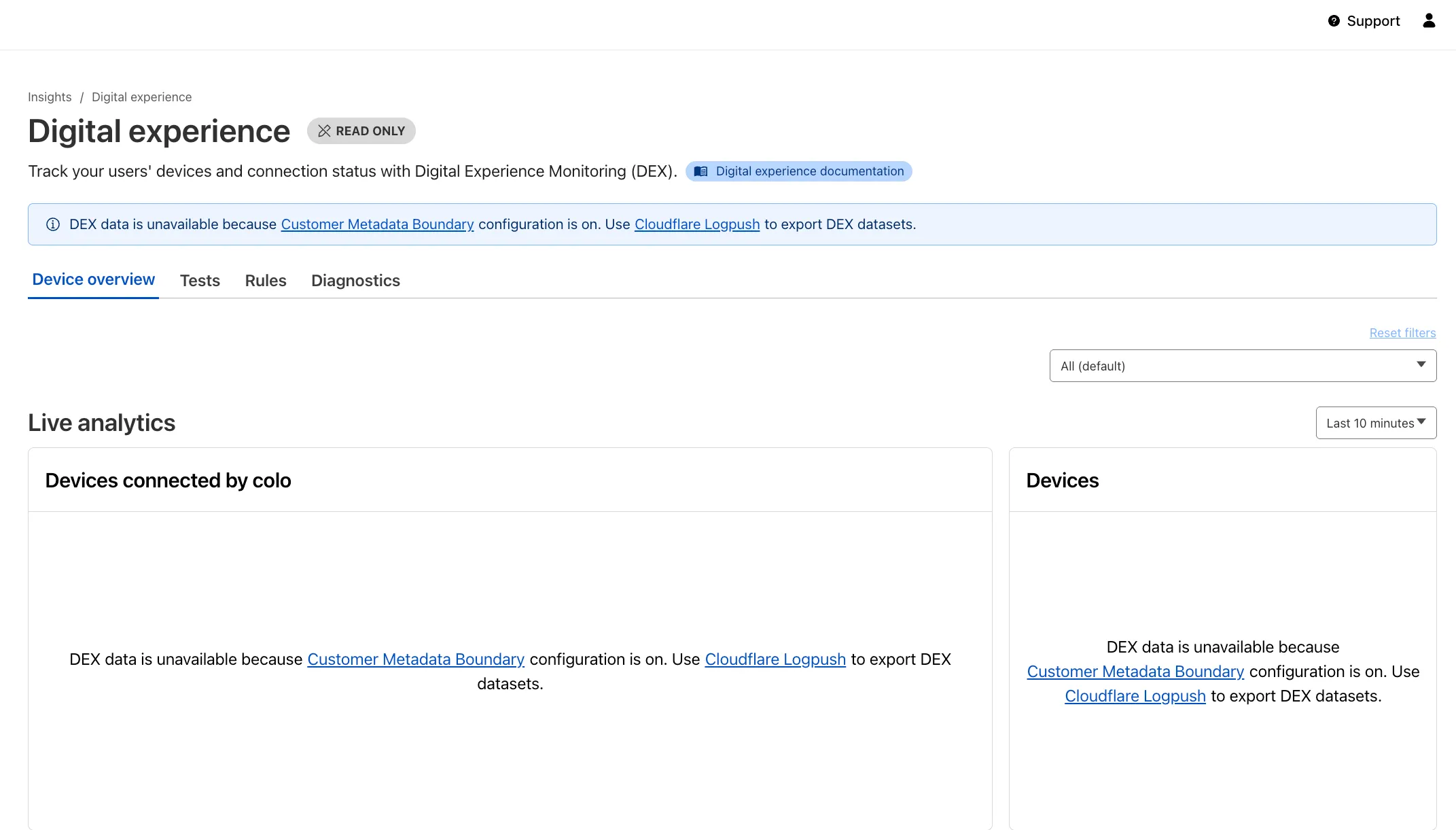
If a Cloudflare One customer using DEX enables CMB 'EU', they will not see any DEX data in the Cloudflare One dashboard. Customers can ingest DEX data via LogPush, and build their own analytics and dashboards.
If a customer enables CMB in their account, they will see the following message in the Digital Experience dashboard: "DEX data is unavailable because Customer Metadata Boundary configuration is on. Use Cloudflare LogPush to export DEX datasets."
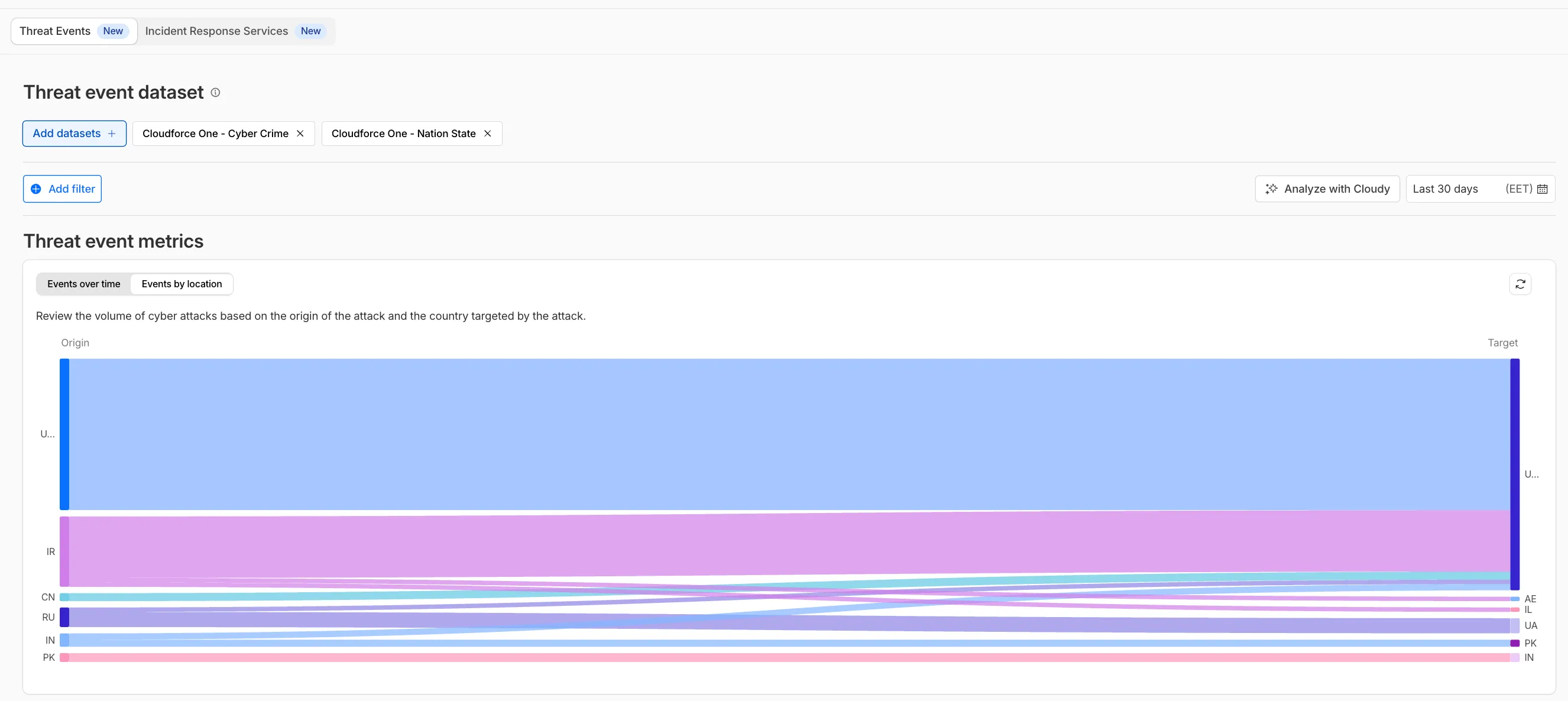
We have introduced dynamic visualizations to the Threat Events dashboard to help you better understand the threat landscape and identify emerging patterns at a glance.
What's new:
- Sankey Diagrams: Trace the flow of attacks from country of origin to target country to identify which regions are being hit hardest and where the threat infrastructure resides.
- Dataset Distribution over time: Instantly pivot your view to understand if a specific campaign is targeting your sector or if it is a broad-spectrum commodity attack.
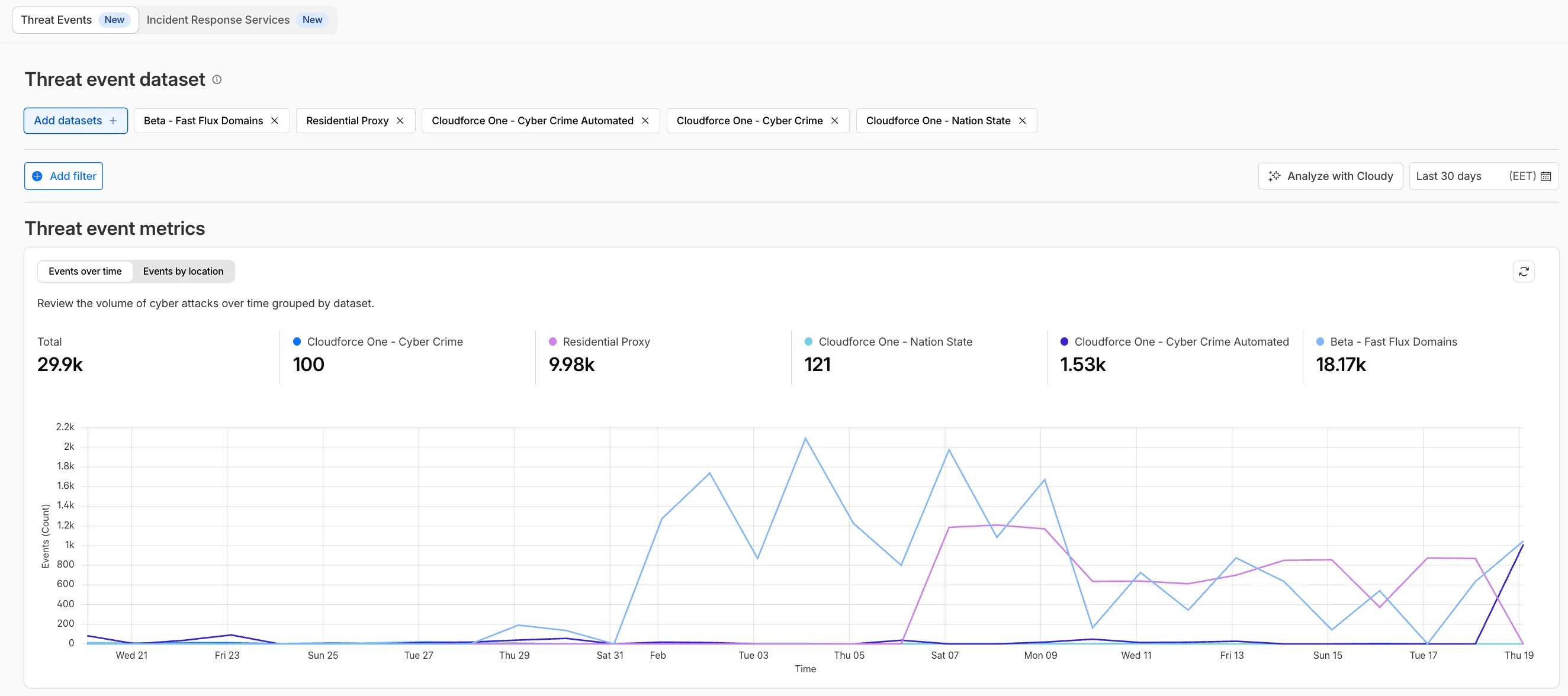
- Enhanced Filtering: Use these visual tools to filter and drill down into specific attack vectors directly from the charts.
Cloudforce One subscribers can explore these new views now in Application Security > Threat Intelligence > Threat Events ↗.
The Server-Timing header now includes a new
cfWorkermetric that measures time spent executing Cloudflare Workers, including any subrequests performed by the Worker. This helps developers accurately identify whether high Time to First Byte (TTFB) is caused by Worker processing or slow upstream dependencies.Previously, Worker execution time was included in the
edgemetric, making it harder to identify true edge performance. The newcfWorkermetric provides this visibility:Metric Description edgeTotal time spent on the Cloudflare edge, including Worker execution originTime spent fetching from the origin server cfWorkerTime spent in Worker execution, including subrequests but excluding origin fetch time Server-Timing: cdn-cache; desc=DYNAMIC, edge; dur=20, origin; dur=100, cfWorker; dur=7In this example, the edge took 20ms, the origin took 100ms, and the Worker added just 7ms of processing time.
The
cfWorkermetric is enabled by default if you have Real User Monitoring (RUM) enabled. Otherwise, you can enable it using Rules.This metric is particularly useful for:
- Performance debugging: Quickly determine if latency is caused by Worker code, external API calls within Workers, or slow origins.
- Optimization targeting: Identify which component of your request path needs optimization.
- Real User Monitoring (RUM): Access detailed timing breakdowns directly from response headers for client-side analytics.
For more information about Server-Timing headers, refer to the W3C Server Timing specification ↗.
A new Allow clientless access setting makes it easier to connect users without a device client to internal applications, without using public DNS.

Previously, to provide clientless access to a private hostname or IP without a published application, you had to create a separate bookmark application pointing to a prefixed Clientless Web Isolation URL (for example,
https://<your-teamname>.cloudflareaccess.com/browser/https://10.0.0.1/). This bookmark was visible to all users in the App Launcher, regardless of whether they had access to the underlying application.Now, you can manage clientless access directly within your private self-hosted application. When Allow clientless access is turned on, users who pass your Access application policies will see a tile in their App Launcher pointing to the prefixed URL. Users must have remote browser permissions to open the link.
You can now assign Access policies to bookmark applications. This lets you control which users see a bookmark in the App Launcher based on identity, device posture, and other policy rules.
Previously, bookmark applications were visible to all users in your organization. With policy support, you can now:
- Tailor the App Launcher to each user — Users only see the applications they have access to, reducing clutter and preventing accidental clicks on irrelevant resources.
- Restrict visibility of sensitive bookmarks — Limit who can view bookmarks to internal tools or partner resources based on group membership, identity provider, or device posture.
Bookmarks support all Access policy configurations except purpose justification, temporary authentication, and application isolation. If no policy is assigned, the bookmark remains visible to all users (maintaining backwards compatibility).
For more information, refer to Add bookmarks.