
Changelog
New updates and improvements at Cloudflare.

You can now scope Cloudflare permissions to individual Cloudflare Tunnel instances and Cloudflare Mesh nodes. Administrators can delegate access to specific Tunnels or Mesh nodes without granting account-wide control over private networking.
When you add a member or create a permission policy, the resource picker now lists Cloudflare Tunnel instances and Cloudflare Mesh nodes as scopable resource types. You can:
- Grant a read-only role on a single Cloudflare Tunnel instance to a support operator for log streaming and diagnostics — without exposing other Tunnels or destructive actions.
- Grant a write role on a specific Cloudflare Mesh node to an application team — without giving them access to the rest of your private network.
- Scope a single policy to one or many Tunnels and Mesh nodes at once.
Granular permissions are a parallel layer to existing account-level roles — they do not replace them.
- Existing account-level roles continue to work. A member with
Cloudflare AccessorCloudflare Zero Trustretains write access to every Tunnel and Mesh node in the account. This ensures backward compatibility for existing automation and tokens. - Granular permissions are additive. For any API request on a specific Tunnel or Mesh node, access is granted if the principal has either the account-level role or a granular permission for that resource.
- Resource enumeration is authorization-aware. Listing endpoints (
GET /accounts/{id}/cfd_tunnel,GET /accounts/{id}/warp_connector) return only the resources the principal has at least read access to.
- Configure granular permissions for Cloudflare Tunnel.
- Configure granular permissions for Cloudflare Tunnel and Cloudflare Mesh in Cloudflare One.
- Review the resource-scoped roles on the Cloudflare role reference.
Cloudflare Access now supports using Cloudflare itself as an identity provider. If you publish an Access application and select Cloudflare as the login method, users can sign in with their existing Cloudflare account — no one-time PINs, no third-party IdP configuration, and no shared email inboxes. Authentication is backed by Cloudflare's own account security (including multi-factor authentication), making it both simpler to set up and more secure than OTP-based login for most use cases.
Cloudflare is now the default identity provider for all newly created Zero Trust accounts, replacing One-time PIN.
This also enables two new capabilities:
- Cloudflare Account Member selector — A new policy selector that matches users based on their membership in a Cloudflare account. You can target the current account or specify a different account ID for cross-account access scenarios.
- Restrict to account members — An identity provider configuration option that limits authentication to users who are members of your Cloudflare account.
To get started, add Cloudflare as an identity provider in your Zero Trust settings.
Cloudflare CASB now integrates with the Claude Compliance API ↗. This enhancement gives security teams visibility into Claude usage patterns, admin activity, and compliance-relevant events across their organization.
The Claude Compliance API provides structured access to audit logs and administrative actions within Claude Enterprise and Claude Platform. Cloudflare CASB ingests this data to surface security findings that help organizations enhance their security posture and enforce AI governance.
Starting today, security teams can scan for security findings across the following assets:
- Public projects — Projects set to public visibility
- Project attachment — Files and documents added to projects that violate DLP policies
- Chat files — User-uploaded and provider-generated files that violate DLP policies
- Chat messages — User prompts and provider responses that violate DLP policies
- Artifacts — Provider-generated documents and files that violate DLP policies
This integration is available to all Cloudflare One customers. New Cloudflare customers can sign up and start with their first two integrations for free. Existing customers can enable the integration directly in the dashboard. The integration begins scanning immediately and surfaces findings in the dashboard within minutes.
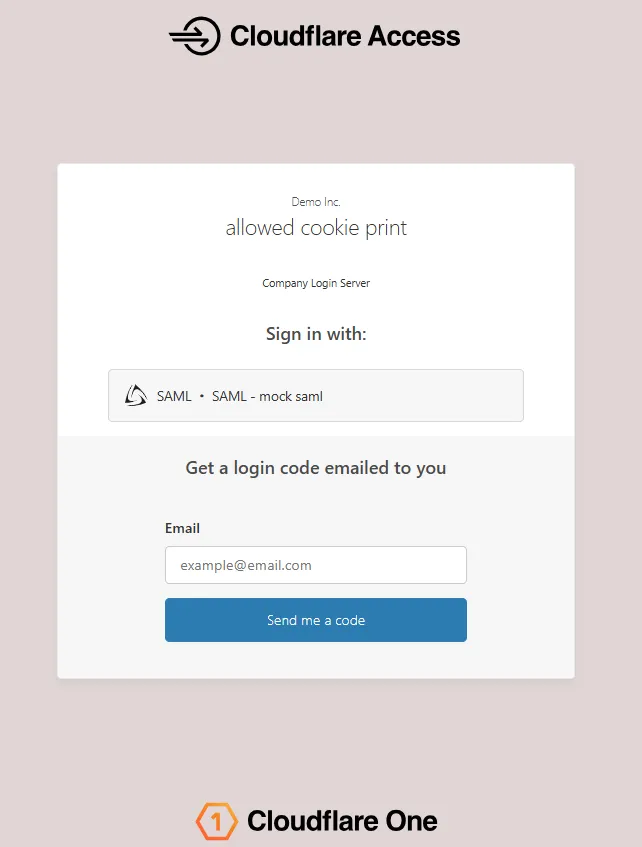
The Access login page and one-time password (OTP) page now feature a refreshed design that improves visual consistency, user trust, and mobile responsiveness.
Before:
After:
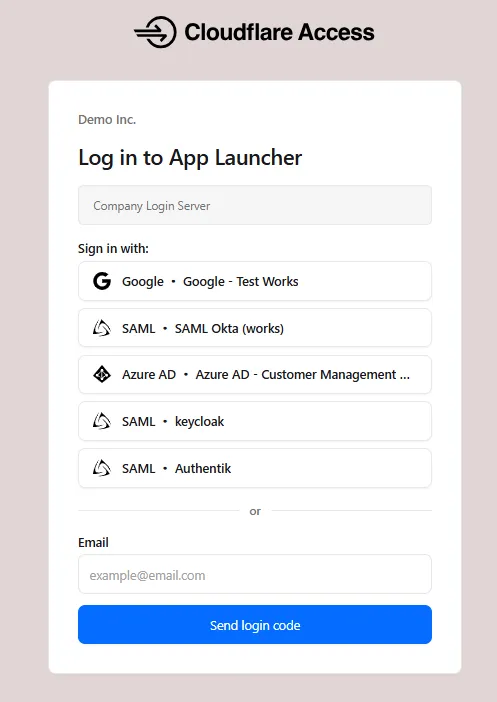
The updated login experience includes:
- Unified authentication card - All sign-in options (identity provider buttons, email input, OTP) now appear in a single card with consistent styling, replacing the previous multi-section layout.
- Consistent button styling - Identity provider buttons use a uniform size and layout for easier scanning and selection.
- Better mobile experience - Responsive layout improvements ensure the login page renders correctly on phones and tablets.
- Dark mode support - The login page now supports dark mode.
Cloudflare Gateway now supports natural language policy creation for DNS, HTTP, and Network firewall policies. Administrators can describe the outcome they want in plain language, and Cloudflare will generate a complete policy rule that populates the policy builder form.
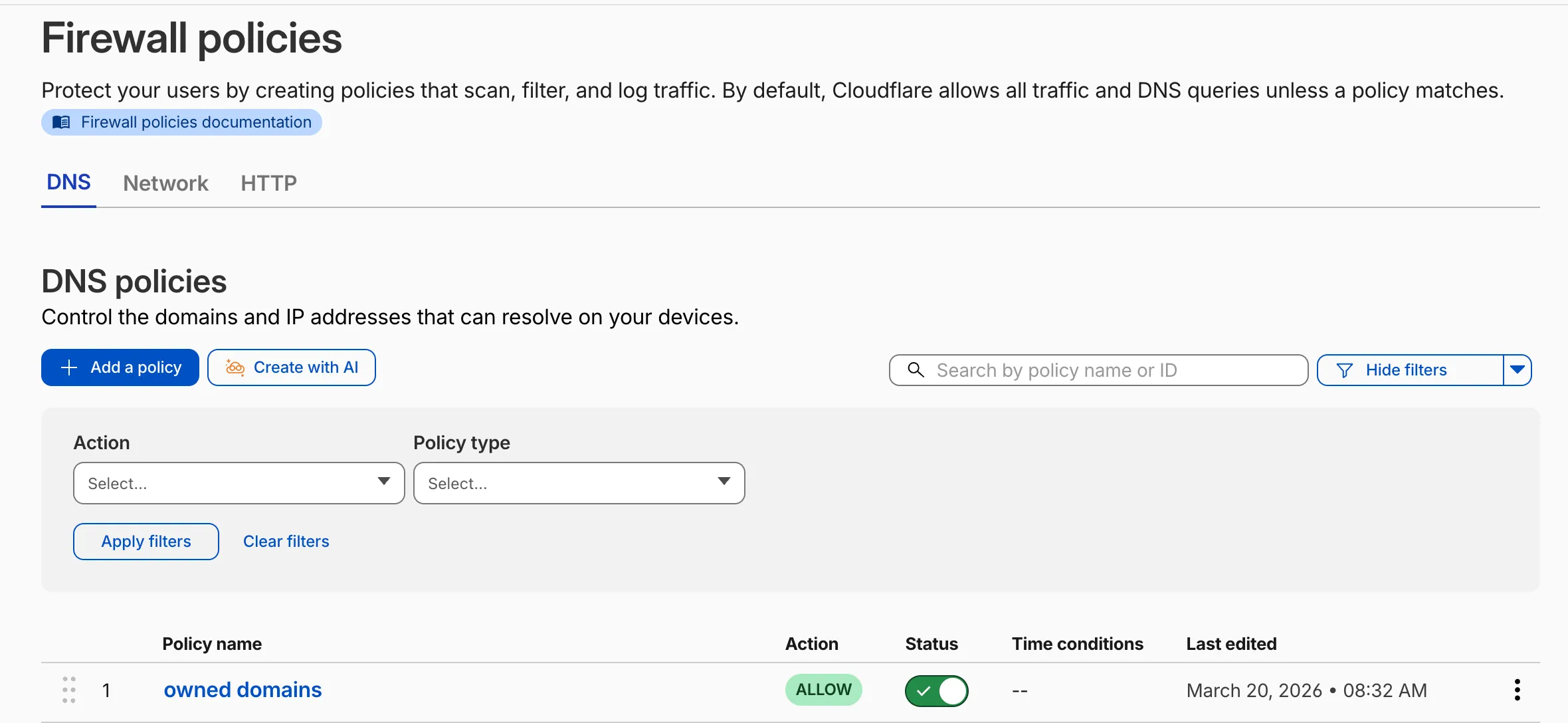
To create a policy with natural language, select Create with AI on any Gateway firewall policy tab. Choose a policy type, describe what the policy should do, and a fully configured rule will appear in the policy builder for review. You can edit any field before saving, or re-generate with a different prompt.
The generated policy incorporates your account context - including lists, DLP profiles, applications, and device posture checks - so that references to your existing resources resolve automatically.
A built-in feedback mechanism allows you to rate each generated policy and provide optional comments, which Cloudflare uses to improve output quality over time.
For more information, refer to Gateway firewall policies.
A new GA release for the Windows Cloudflare One Client is now available on the stable releases downloads page.
This release introduces the new Cloudflare One Client UI for Windows! You can expect a cleaner and more intuitive design as well as easier access to common actions and information. Here are some of the many things we have found our users appreciate:
- Right click context menu to access the most common client actions quickly
- Built-in captive portal login experience
Additional Changes and improvements
- Added a new CLI command: warp-cli mdm refresh. This command executes an immediate refresh of the Mobile Device Management (MDM) configuration file.
Known issues
- Registration authentication for devices via the integrated WebView2 browser is unavailable in this version as a temporary measure. As a result, the client will utilize the default browser on the device to complete the authentication process.
- An error indicating that Microsoft Edge can't read and write to its data directory may be displayed during captive portal login; this error is benign and can be dismissed.
- Registration may hang at "Checking your organization configuration" due to IPC errors. A system reboot should resolve the error, allowing registration to proceed.
- Split tunnel list configuration is not available in the new UI. Management of Split Tunnel entries is currently only possible via
warp-cli tunnel ipandwarp-cli tunnel host. UI support will be added in a future release. - Windows ARM may prompt the user to close running applications while trying to install this version. Simply click “Ok” with the default highlighted option.
- DNS resolution may be broken when the following conditions are all true:
- The client is in Secure Web Gateway without DNS filtering (tunnel-only) mode.
- A custom DNS server address is configured on the primary network adapter.
- The custom DNS server address on the primary network adapter is changed while the client is connected.
To work around this issue, please reconnect the client by selecting "disconnect" and then "connect" in the client user interface.
A new GA release for the macOS Cloudflare One Client is now available on the stable releases downloads page.
This release introduces the new Cloudflare One Client UI for macOS! You can expect a cleaner and more intuitive design as well as easier access to common actions and information. Here are some of the many things we have found our users appreciate:
- Right click context menu to access the most common client actions quickly
- Built-in captive portal login experience
Additional Changes and improvements
- Added a new CLI command: warp-cli mdm refresh. This command executes an immediate refresh of the Mobile Device Management (MDM) configuration file.
Known issues
- Registration may hang at "Checking your organization configuration" due to IPC errors. A system reboot should resolve the error, allowing registration to proceed.
- Split tunnel list configuration is not available in the new UI. Management of split tunnel entries is currently only possible via
warp-cli tunnel ipandwarp-cli tunnel host. UI support will be added in a future release.
A new GA release for the Linux Cloudflare One Client is now available on the stable releases downloads page.
This release introduces the new Cloudflare One Client UI for Linux! You can expect a cleaner and more intuitive design as well as easier access to common actions and information. Here are some of the many things we have found our users appreciate:
- Right click context menu to access the most common client actions quickly
- Built-in captive portal login experience
Changes and improvements
- Added a new CLI command: warp-cli mdm refresh. This command executes an immediate refresh of the Mobile Device Management (MDM) configuration file.
- Official support for RHEL 9 has been added for Cloudflare Mesh nodes. To install the RHEL 9 package, the Extra Packages for Enterprise Linux (EPEL) repository must be active, as it contains dependencies required for the tray icon and captive portal webview.
Known issues
- Registration may hang at "Checking your organization configuration" due to IPC errors. A system reboot should resolve the error, allowing registration to proceed.
- Split tunnel list configuration is not available in the new UI. Management of split tunnel entries is currently only possible via
warp-cli tunnel ipandwarp-cli tunnel host. UI support will be added in a future release.
Cloudflare IPsec now supports the standard NAT traversal (NAT-T) flow, where IKE begins on UDP port
500and switches to UDP port4500after NAT is detected.Previously, devices behind NAT had to be configured to initiate IKE on UDP port
4500directly. Devices that started on UDP port500could not complete the IKE handshake when NAT was in the path. This required custom configuration on devices such as VeloCloud SD-WAN edges, Cisco IOS-XE routers, and Juniper SRX firewalls, and was not possible on every platform.What changed:
- Devices behind NAT can now initiate IKE on either UDP port
500or UDP port4500. - Devices that start IKE on UDP port
500and switch to UDP port4500after NAT detection now complete the handshake successfully. - No configuration change is required on Cloudflare. The change is available for all IPsec tunnels on Cloudflare WAN and Magic Transit.
This change does not affect existing tunnels:
- Tunnels using UDP port
500with no NAT detected continue to operate as before. - Tunnels configured to start IKE on UDP port
4500continue to operate as before. - NAT detection logic is unchanged.
For configuration details, refer to GRE and IPsec tunnels.
- Devices behind NAT can now initiate IKE on either UDP port
When the Cloudflare One Appliance is acting as the DHCP server for a LAN, you can now configure custom DHCP options on the leases it issues. This unlocks workflows such as PXE / iPXE boot, VoIP phone provisioning, and vendor-specific client configuration.
Each option is defined by
option_number,value, and one of four value types:text,integer,hex, orip. Configurations are validated on the appliance before being applied — invalid configurations are rejected and the underlying error is returned to the API caller, so a bad option will not disrupt the live DHCP service.For details, refer to DHCP server options.
Breakout and traffic prioritization rules on the Cloudflare One Appliance can now match by source in addition to destination application. You can pin breakout or priority behavior to:
- A source LAN interface — VLANs attached to that LAN are included automatically.
- A source IP address, range, or CIDR block.
This is the natural way to break out a guest VLAN to the local Internet, or to prioritize traffic from a specific subnet, without enumerating destination applications.
For details, refer to Breakout traffic.
You can now create, rotate, and delete Cloudflare One Virtual Appliance instances and their license keys directly via the API and Terraform.
- Create a virtual appliance and receive a license key:
POST /accounts/{account_id}/magic/connectorswithdevice.provision_license: true. - Rotate the license key for an existing virtual appliance:
PATCH /accounts/{account_id}/magic/connectors/{connector_id}withprovision_license: true. The previous key is immediately and irrevocably revoked. - Delete a virtual appliance to release the associated licensed device.
The license key is returned in the response only once, at create or rotate time. Copy and store it securely.
For details, refer to Configure a Cloudflare One Virtual Appliance.
- Create a virtual appliance and receive a license key:
PhishNet users can now access Cloudy summaries directly within the email investigation experience. When reviewing a message in PhishNet, users will see an AI-generated summary that provides additional context and key details about the email.
These summaries help users quickly understand the nature of a message without needing to manually parse through headers, body content, and detection signals. Cloudy surfaces the most relevant information so users can make faster, more informed decisions about suspicious emails.
These summaries are not trained on customer data. They are generated using the outputs of our existing detection models and analysis systems.
This feature is available for PhishNet with Office 365. Support for Gmail will be available by the end of the quarter.
Cloudflare Mesh nodes now support IPv6 CIDR routes. You can advertise both IPv4 and IPv6 subnets through your Mesh nodes, making IPv6-only or dual-stack private networks reachable from any enrolled device.
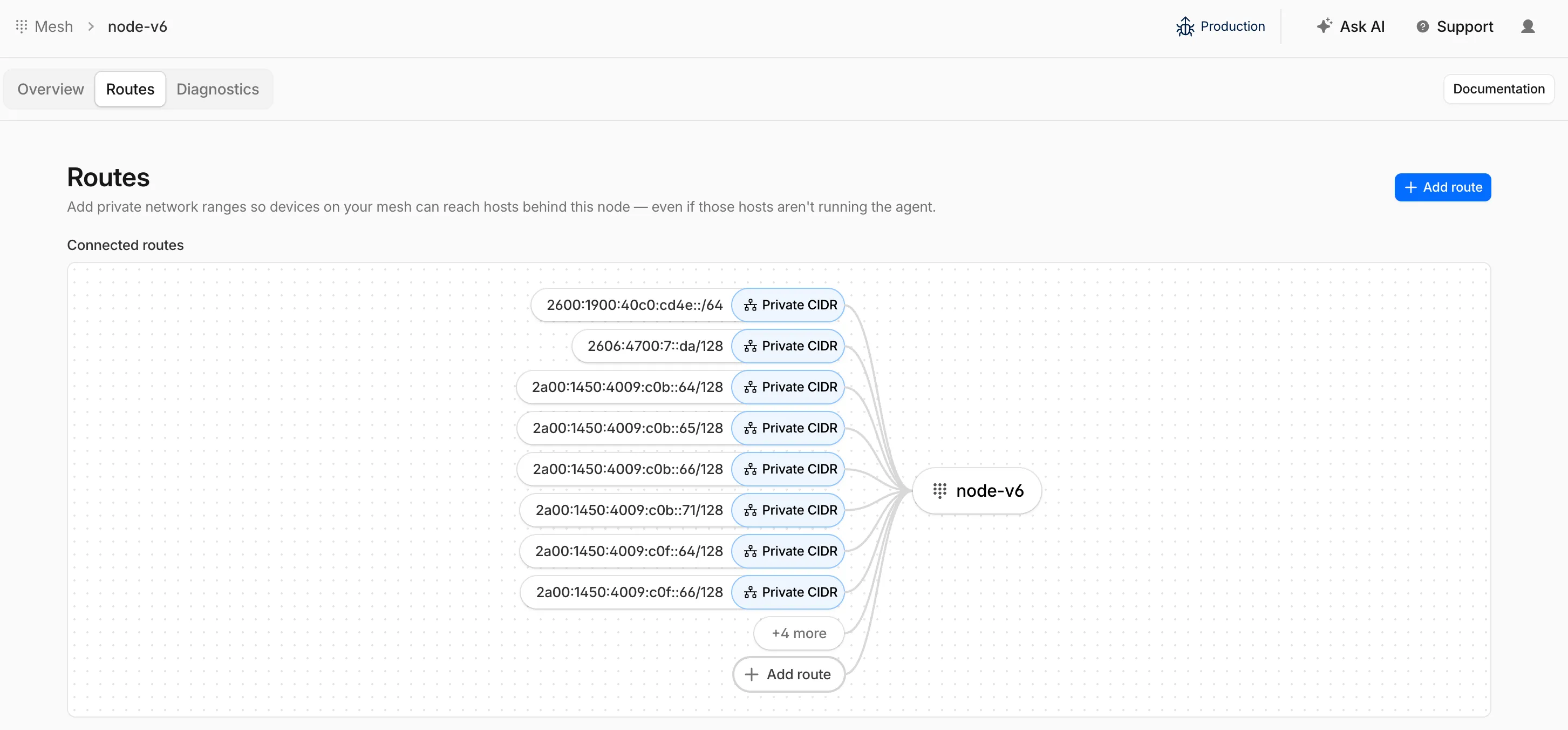
To add an IPv6 route, follow the same steps as adding an IPv4 route — enter the IPv6 CIDR (for example,
fd00::/64) when configuring the route in the dashboard ↗ or via the API.
Cloudflare IPsec now supports post-quantum key agreement with compatible third-party devices. Cisco ↗ and Fortinet ↗ are the first third-party vendors validated to interoperate with Cloudflare IPsec using ML-KEM (Module-Lattice-Based Key-Encapsulation Mechanism).
Post-quantum IPsec uses RFC 9370 ↗ and draft-ietf-ipsecme-ikev2-mlkem ↗ to negotiate hybrid key agreement during the IKEv2
IKE_INTERMEDIATEphase. This combines classical Diffie-Hellman (Group 20) with ML-KEM-768 or ML-KEM-1024 to protect against harvest-now, decrypt-later ↗ attacks.Key details:
- Compatible with Cisco 8000 Series Secure Routers with IOS XR Release 26.1.1 and Fortinet FortiOS 7.6.6 and later.
- Uses ML-KEM-768 or ML-KEM-1024 as an additional Key Exchange to DH Group 20.
- Follows RFC 9370 and draft-ietf-ipsecme-ikev2-mlkem standards.
- No additional licensing required.
Post-quantum IPsec with third-party devices is now generally available with confirmed interoperability for the platforms listed above. Cloudflare intends to support interoperability with more vendors as they build out support for draft-ietf-ipsecme-ikev2-mlkem. Contact your account team to discuss support for additional vendors.
For supported key exchange methods and the list of validated platforms, refer to GRE and IPsec tunnels.
Cloudflare DLP now includes Data Classification, which lets administrators organize and label sensitive content using labels, templates, and reusable data classes.
With Data Classification, administrators can define labels such as sensitivity schemas and levels, and data tag groups and tags. Administrators can also build from Cloudflare-managed templates and create reusable data classes that combine detection entries, other data classes, sensitivity levels, and data tags.
You can then use those classifications in custom DLP profiles to identify the severity of sensitive content, understand where it exists, and apply that logic consistently across DLP profiles.
For more information, refer to Data Classification.
Cloudflare DLP now includes new predefined detection entries.
The expanded catalog includes detections for specific credential types, webhooks, addresses, tax identifiers, national IDs, financial data, and crypto wallets.
Examples include
GitHub PAT,OpenAI API Key,Slack Webhook,Discord Webhook,US Physical Address, andBitcoin Wallet.For the full list, refer to Predefined detection entries.
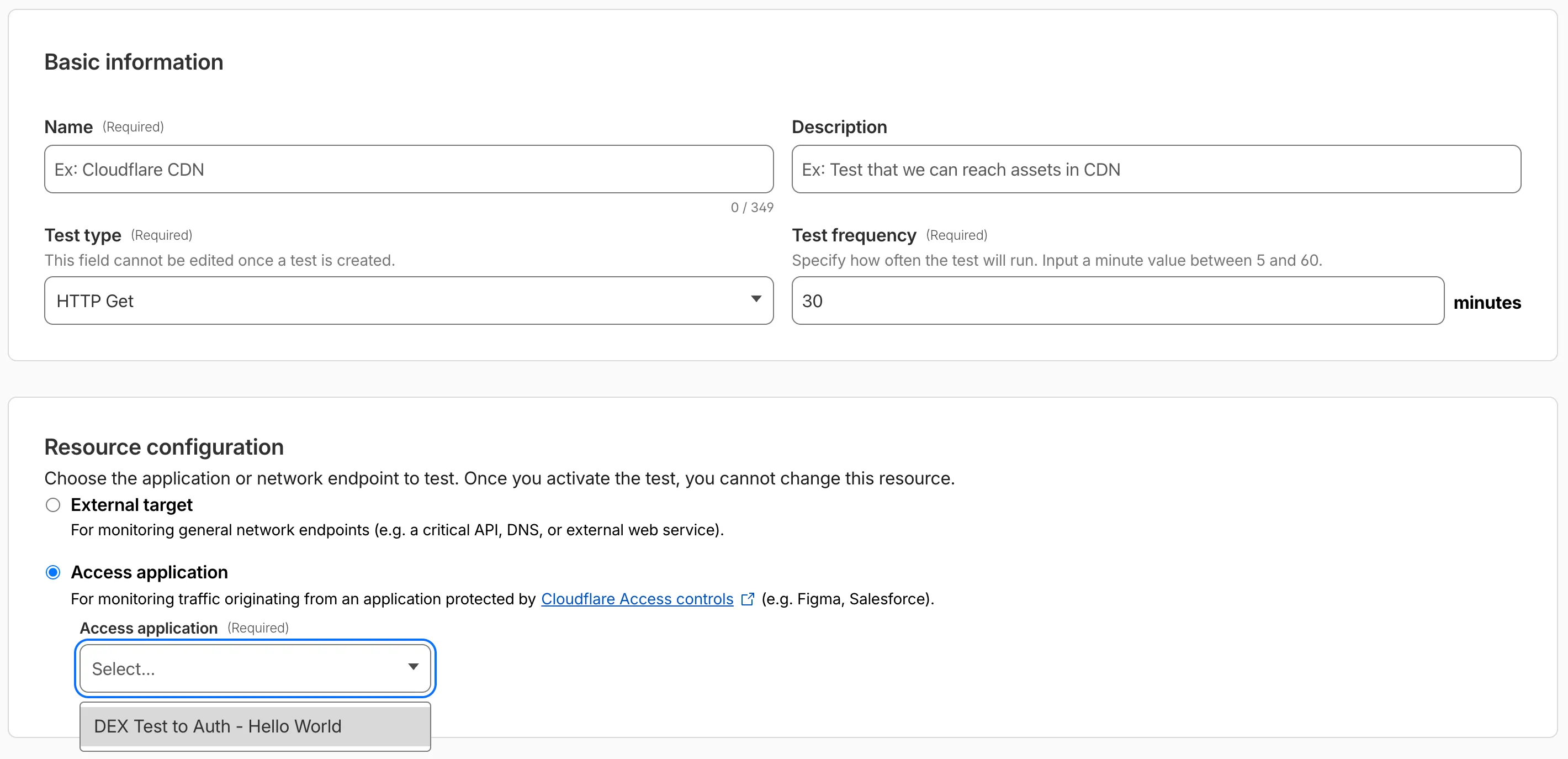
Digital experience tests now support testing applications protected by Cloudflare Access or third-party authentication. All authentication secrets are managed via Cloudflare Secret Store.
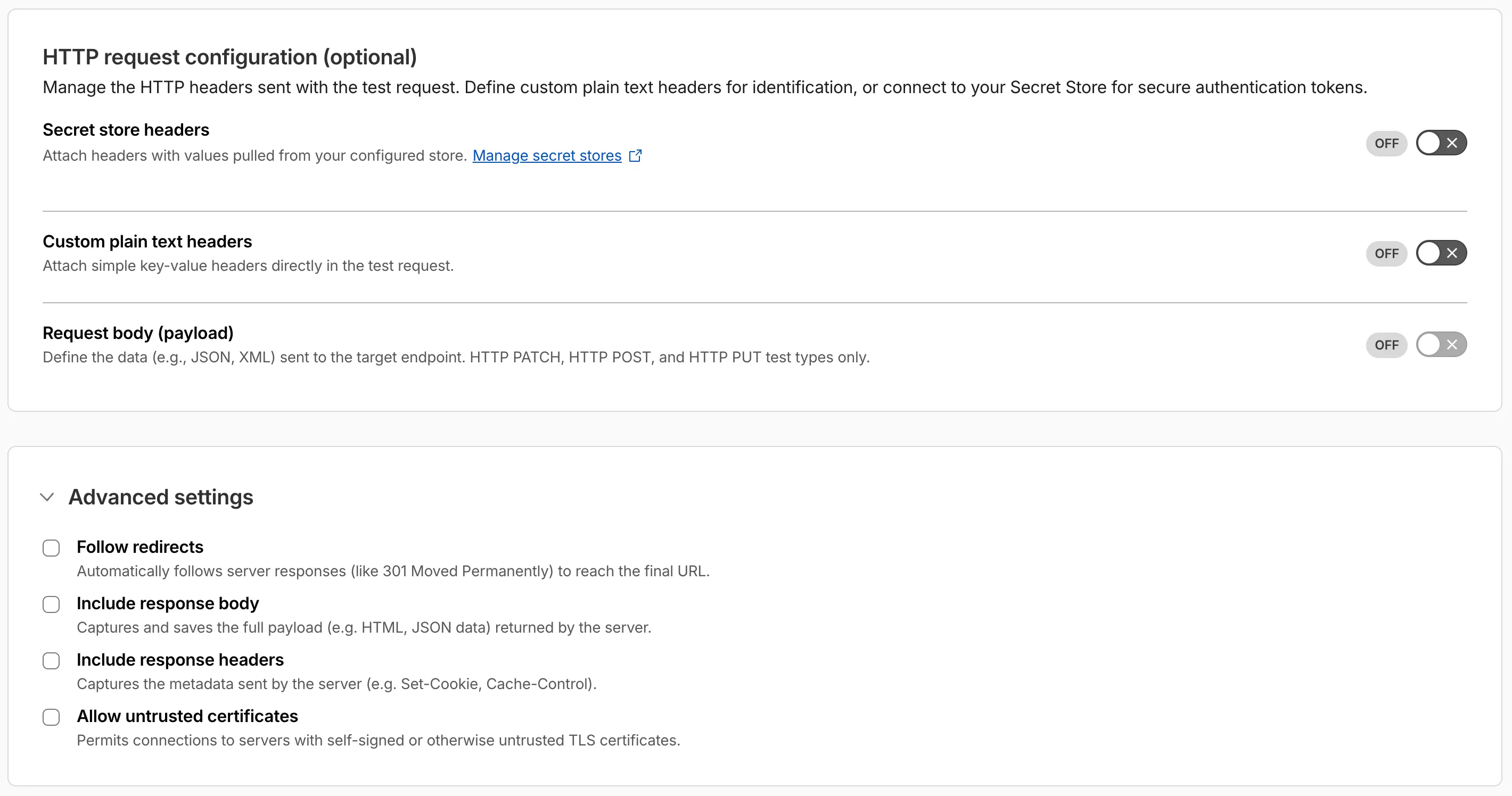
Digital experience tests also have enhanced configuration options including:
- New HTTP methods (DELETE, PATCH, POST, PUT)
- Secret Store headers, custom plain text headers, and custom request bodies
- Advanced settings: follow redirects, response bodies, response headers, and allow untrusted certificates
The Gateway Authorization Proxy and hosted PAC files are now generally available for all plan types.
Authorization proxy endpoints add an identity-aware option alongside the existing source IP proxy endpoints, using Cloudflare Access authentication to verify who a user is before applying Gateway filtering — without installing the Cloudflare One Client. Cloudflare-hosted PAC files let you create and distribute PAC files directly from Cloudflare One on Cloudflare's global network.
These features are ideal for environments where deploying a device client is not an option, such as virtual desktops (VDI) or compliance-restricted endpoints.
To get started, refer to the proxy endpoints documentation.
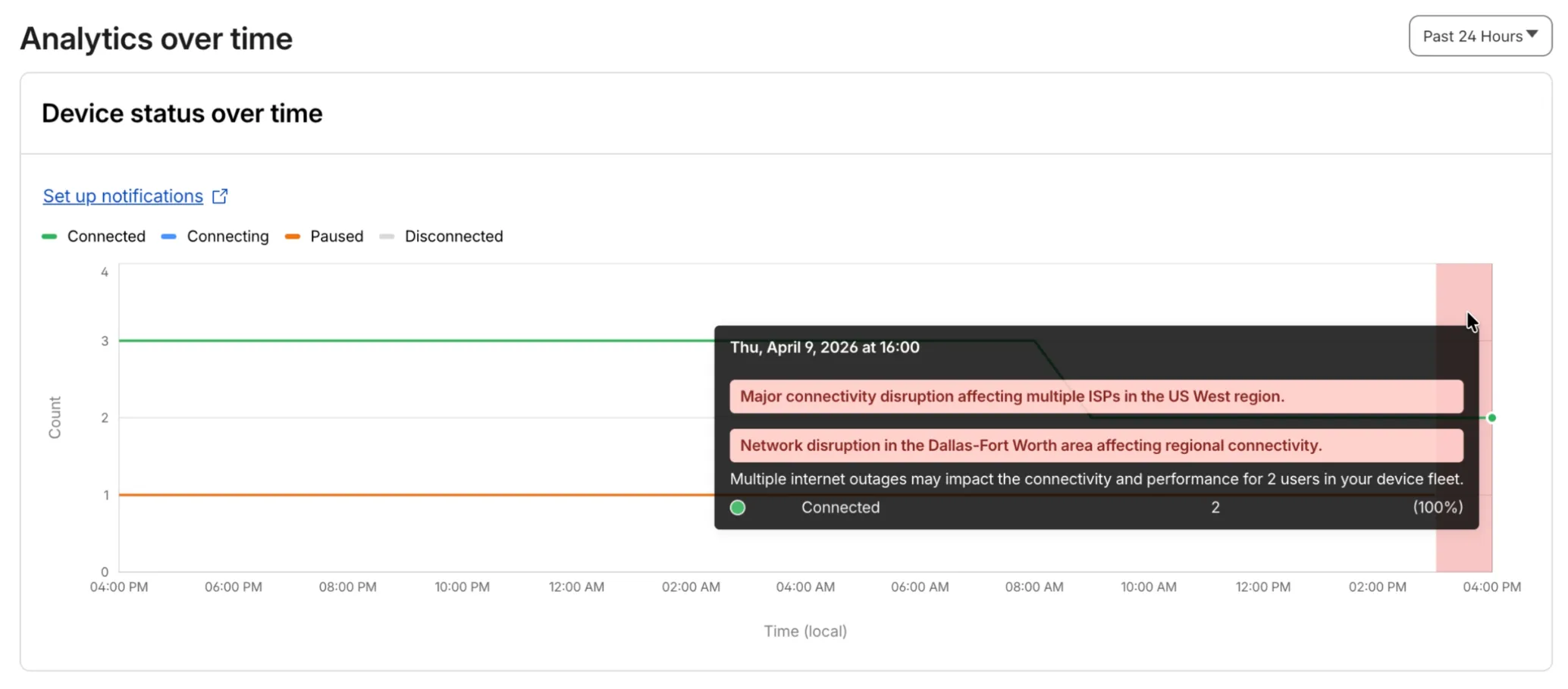
Digital Experience will display a dashboard notification when an Internet outage or traffic anomaly may impact a Cloudflare One Client device based on its geographic location or network connection.
This Internet outage and traffic anomaly data is pulled from Cloudflare Radar ↗. All Internet outage and traffic anomaly observations can be viewed in the Radar Outage Center ↗.

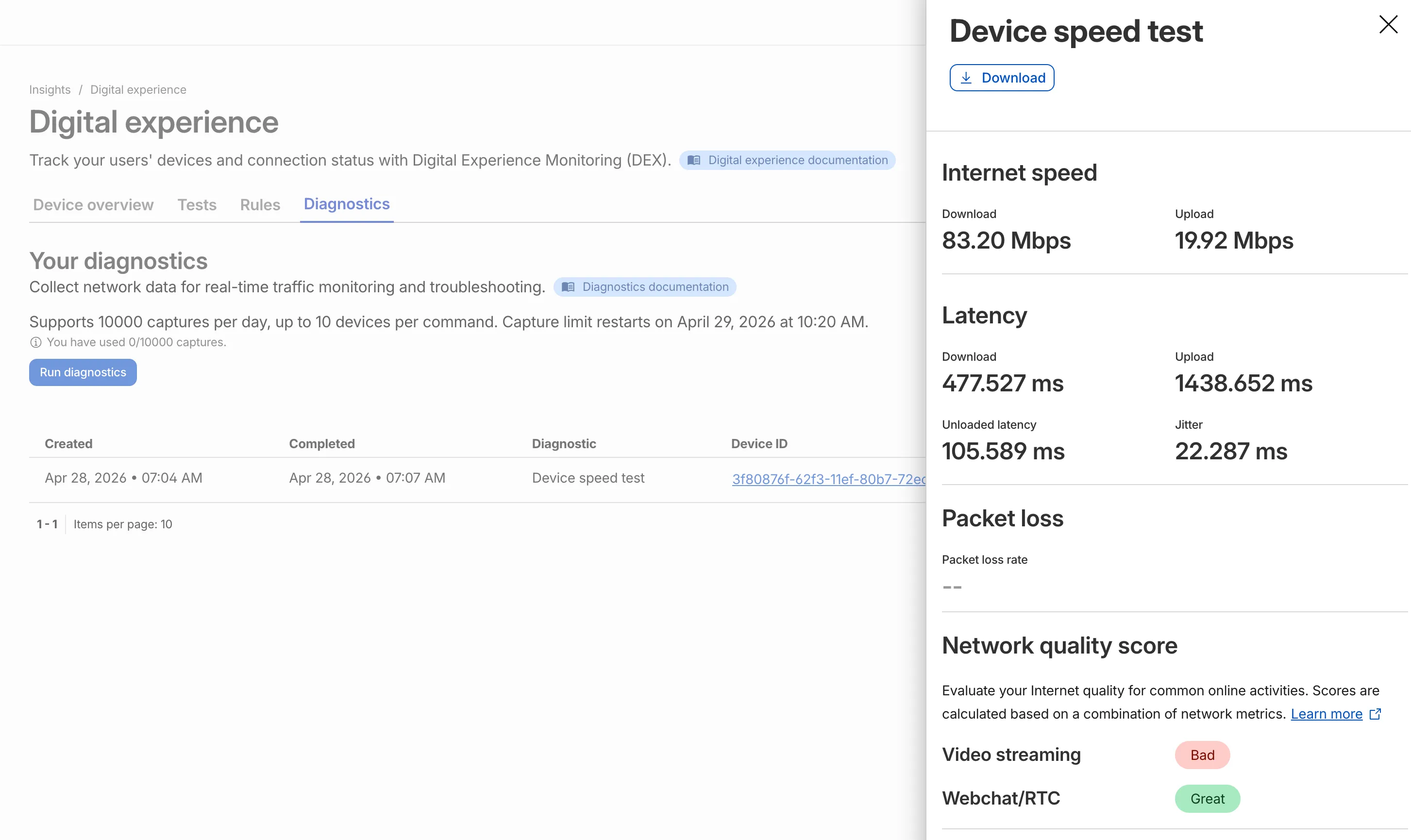
IT teams can now remotely run speed tests from the Cloudflare One Client to Cloudflare's network edge.
Each speed test includes the following metrics:
- Internet speed: download and upload throughput
- Latency: download, upload, unloaded latency, and jitter
- Network quality score: video streaming, webchat/real-time communication (RTC)
In the Cloudflare dashboard ↗, go to Zero Trust > Insights > Digital experience > Diagnostics and select Run diagnostics to use the feature today.
You can now create, view, and manage DLP detection entries outside of profiles.
Detection entries are no longer hidden inside individual profiles. Administrators can manage detection entries directly from the Detection entries section and use them in custom DLP profiles.
For more information, refer to Configure detection entries.
Cloudflare DLP now includes a new predefined profile designed to detect PII records that contain multiple types of personal data: Personally Identifiable Information (PII) Record.
Most predefined and custom DLP profiles match when any enabled detection entry matches. The Personally Identifiable Information (PII) Record profile is different. It only matches when at least three unique detection entries are found in close proximity, which reduces false positives from standalone values that may not represent a real PII record.
Detection entries included in the profile:
- AU Passport Number
- American Express Card Number
- Diners Club Card Number
- US Driver's License Number
- Email Address
- Full Name
- US Mailing Address
- Mastercard Card Number
- US Individual Tax Identification Number (ITIN)
- US Passport Number
- US Phone Number
- Union Pay Card Number
- United States SSN Numeric Detection
- Visa Card Number
For more information, refer to predefined DLP profiles.
Zero Trust Network Session Logs are now generated for all traffic proxied through Cloudflare Gateway, regardless of on-ramp type. This includes traffic from proxy endpoints (PAC files) and Browser Isolation egress — on-ramps that previously did not generate session logs.
Customers who already consume the
zero_trust_network_sessionsdataset via Logpush or Log Explorer may see increased log volume if they use these on-ramps.For field definitions, refer to Zero Trust Network Session Logs. For traffic analysis, refer to Network session analytics.
Independent MFA in Cloudflare Access now supports two additional organization-level controls:
- Restrict authenticators by AAGUID — Limit enrollment to a specific set of WebAuthn authenticators using their AAGUID ↗. This is useful for organizations that require FIPS-validated security keys or company-issued hardware. AAGUIDs are managed through a new List type.
- AMR matching — Skip the independent MFA prompt when the identity provider has already performed an equivalent MFA. Access reads the
amrclaim defined in RFC 8176 ↗ and matches supported values such ashwk,otp, andfptto the authenticator types allowed on the application or policy. This prevents users from having to complete MFA twice when their identity provider already enforces it.
To get started, refer to Independent MFA.