
Dynamic dispatch Worker
A dynamic dispatch Worker is a specialized routing Worker that directs incoming requests to the appropriate user Workers in your dispatch namespace. Instead of using Workers Routes, dispatch Workers let you programmatically control request routing through code.
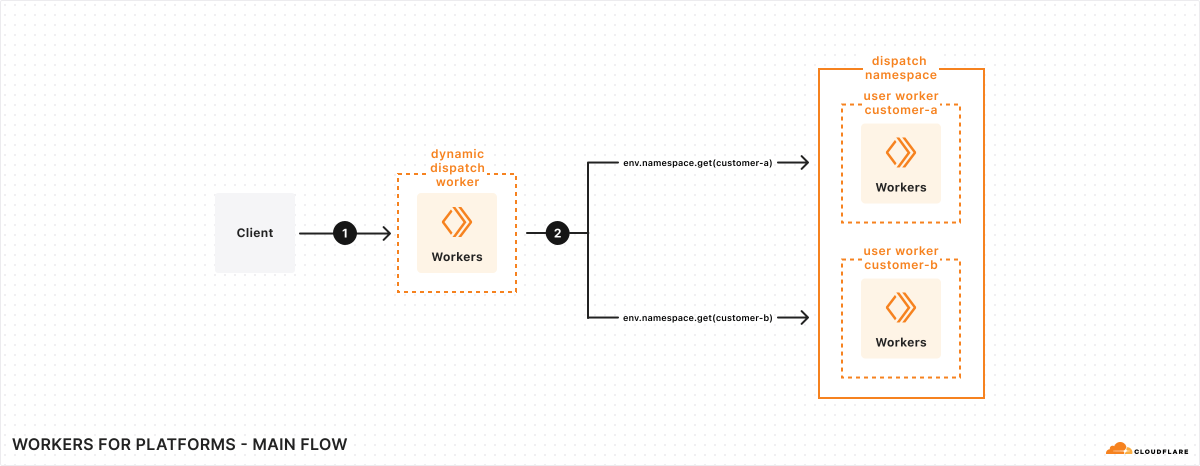
- Scale: Route requests to millions of hostnames to different Workers, without defining Workers Routes configuration for each one
- Custom routing logic: Write code to determine exactly how requests should be routed. For example:
- Store hostname-to-Worker mappings in Workers KV and look them up dynamically
- Route requests based on subdomain, path, headers, or other request properties
- Use custom metadata attached to custom hostnames for routing decisions
- Add platform functionality: Build additional features at the routing layer:
- Run authentication checks before requests reach user Workers
- Remove or add headers or metadata from incoming requests
- Attach useful context like user IDs or account information
- Transform requests or responses as needed
To allow your dynamic dispatch Worker to dynamically route requests to Workers in a namespace, you need to configure a dispatch namespace binding. This binding enables your dynamic dispatch Worker to call any user Worker within that namespace using env.dispatcher.get().
{ "dispatch_namespaces": [ { "binding": "DISPATCHER", "namespace": "my-dispatch-namespace" } ]}[[dispatch_namespaces]]binding = "DISPATCHER"namespace = "my-dispatch-namespace"Once the binding is configured, your dynamic dispatch Worker can route requests to any Worker in the namespace. Below are common routing patterns you can implement in your dispatcher.
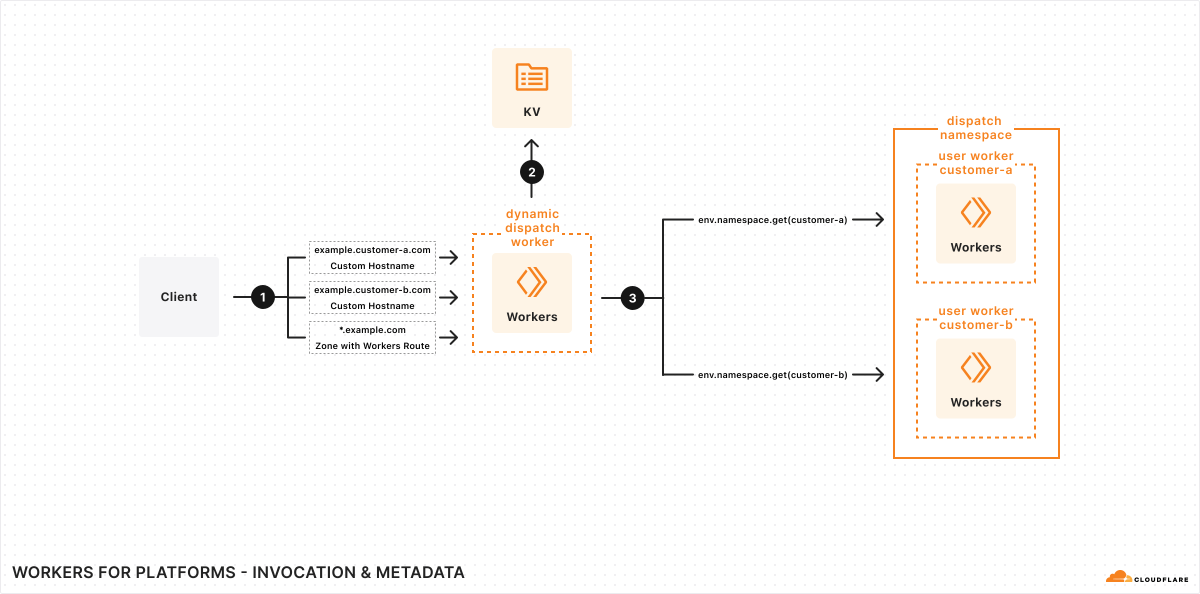
Store the routing mappings in Workers KV. This allows you to modify your routing logic without requiring you to change or redeploy the dynamic dispatch Worker.
export default {  async fetch(request, env) {    try {      const url = new URL(request.url);
      // Use hostname, path, or any combination as the routing key      const routingKey = url.hostname;
      // Lookup user Worker name from KV store      const userWorkerName = await env.USER_ROUTING.get(routingKey);
      if (!userWorkerName) {        return new Response("Route not configured", { status: 404 });      }
// Optional: Cache the KV lookup result const userWorker = env.DISPATCHER.get(userWorkerName); return await userWorker.fetch(request); } catch (e) { if (e.message.startsWith("Worker not found")) { return new Response("", { status: 404 }); } return new Response(e.message, { status: 500 }); } },};Route subdomains to the corresponding Worker. For example, my-customer.example.com will route to the Worker named my-customer in the dispatch namespace.
export default {  async fetch(request, env) {    try {      // Extract user Worker name from subdomain      // Example: customer1.example.com -> customer1      const url = new URL(request.url);      const userWorkerName = url.hostname.split(".")[0];
// Get user Worker from dispatch namespace const userWorker = env.DISPATCHER.get(userWorkerName); return await userWorker.fetch(request); } catch (e) { if (e.message.startsWith("Worker not found")) { // User Worker doesn't exist in dispatch namespace return new Response("", { status: 404 }); } // Could be any other exception from fetch() or from the dispatched Worker return new Response(e.message, { status: 500 }); } },};Route URL paths to the corresponding Worker. For example, example.com/customer-1 will route to the Worker named customer-1 in the dispatch namespace.
export default {  async fetch(request, env) {    try {      const url = new URL(request.url);      const pathParts = url.pathname.split("/").filter(Boolean);
      if (pathParts.length === 0) {        return new Response("Invalid path", { status: 400 });      }
      // example.com/customer-1 -> routes to 'customer-1' worker      const userWorkerName = pathParts[0];
const userWorker = env.DISPATCHER.get(userWorkerName); return await userWorker.fetch(request); } catch (e) { if (e.message.startsWith("Worker not found")) { return new Response("", { status: 404 }); } return new Response(e.message, { status: 500 }); } },};Use custom limits to control how much CPU time a given user Worker can use, or how many subrequests it can make. You can set different limits based on customer plan type or other criteria.
export default {  async fetch(request, env) {    try {      const url = new URL(request.url);      const userWorkerName = url.hostname.split(".")[0];
      // Look up customer plan from your database or KV      const customerPlan = await env.CUSTOMERS.get(userWorkerName);
      // Set limits based on plan type      const plans = {        enterprise: { cpuMs: 50, subRequests: 50 },        pro: { cpuMs: 20, subRequests: 20 },        free: { cpuMs: 10, subRequests: 5 },      };      const limits = plans[customerPlan] || plans.free;
const userWorker = env.DISPATCHER.get(userWorkerName, {}, { limits }); return await userWorker.fetch(request); } catch (e) { if (e.message.startsWith("Worker not found")) { return new Response("", { status: 404 }); } if (e.message.includes("CPU time limit")) { // Track limit violations with Analytics Engine env.ANALYTICS.writeDataPoint({ indexes: [userWorkerName], blobs: ["cpu_limit_exceeded"], }); return new Response("CPU limit exceeded", { status: 429 }); } return new Response(e.message, { status: 500 }); } },};For more details on available limits, refer to Custom limits.
To track limit violations and other metrics across user Workers, use Workers Analytics Engine. For detailed logging and debugging, configure a Tail Worker to capture events from your dispatch Worker.