

Cloudflare Gateway now supports natural language policy creation for DNS, HTTP, and Network firewall policies. Administrators can describe the outcome they want in plain language, and Cloudflare will generate a complete policy rule that populates the policy builder form.
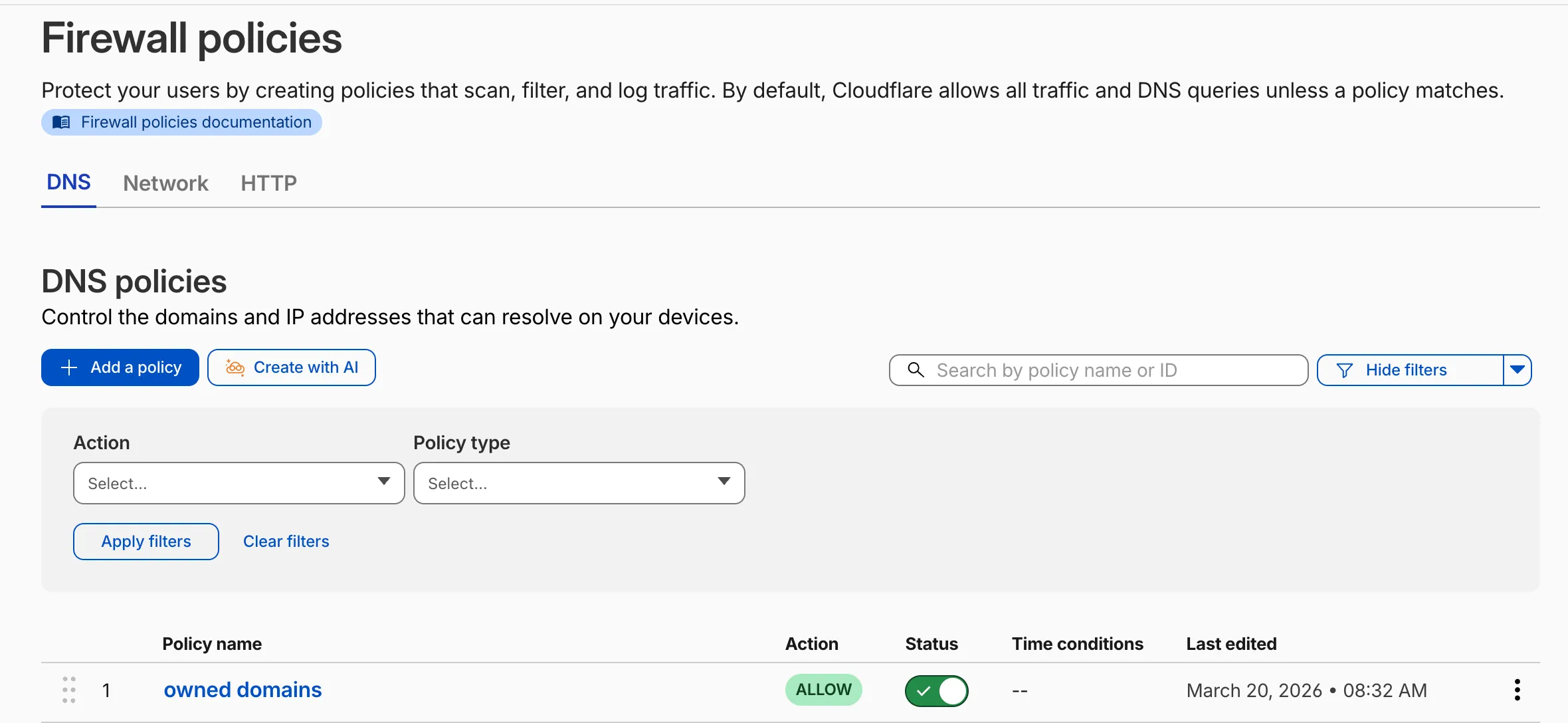
To create a policy with natural language, select Create with AI on any Gateway firewall policy tab. Choose a policy type, describe what the policy should do, and a fully configured rule will appear in the policy builder for review. You can edit any field before saving, or re-generate with a different prompt.
The generated policy incorporates your account context - including lists, DLP profiles, applications, and device posture checks - so that references to your existing resources resolve automatically.
A built-in feedback mechanism allows you to rate each generated policy and provide optional comments, which Cloudflare uses to improve output quality over time.
For more information, refer to Gateway firewall policies.
The Gateway Authorization Proxy and hosted PAC files are now generally available for all plan types.
Authorization proxy endpoints add an identity-aware option alongside the existing source IP proxy endpoints, using Cloudflare Access authentication to verify who a user is before applying Gateway filtering — without installing the Cloudflare One Client. Cloudflare-hosted PAC files let you create and distribute PAC files directly from Cloudflare One on Cloudflare's global network.
These features are ideal for environments where deploying a device client is not an option, such as virtual desktops (VDI) or compliance-restricted endpoints.
To get started, refer to the proxy endpoints documentation.
Zero Trust Network Session Logs are now generated for all traffic proxied through Cloudflare Gateway, regardless of on-ramp type. This includes traffic from proxy endpoints (PAC files) and Browser Isolation egress — on-ramps that previously did not generate session logs.
Customers who already consume the
zero_trust_network_sessionsdataset via Logpush or Log Explorer may see increased log volume if they use these on-ramps.For field definitions, refer to Zero Trust Network Session Logs. For traffic analysis, refer to Network session analytics.
The new Network session analytics dashboard is now available in Cloudflare One. This dashboard provides visibility into your network traffic patterns, helping you understand how traffic flows through your Cloudflare One infrastructure.
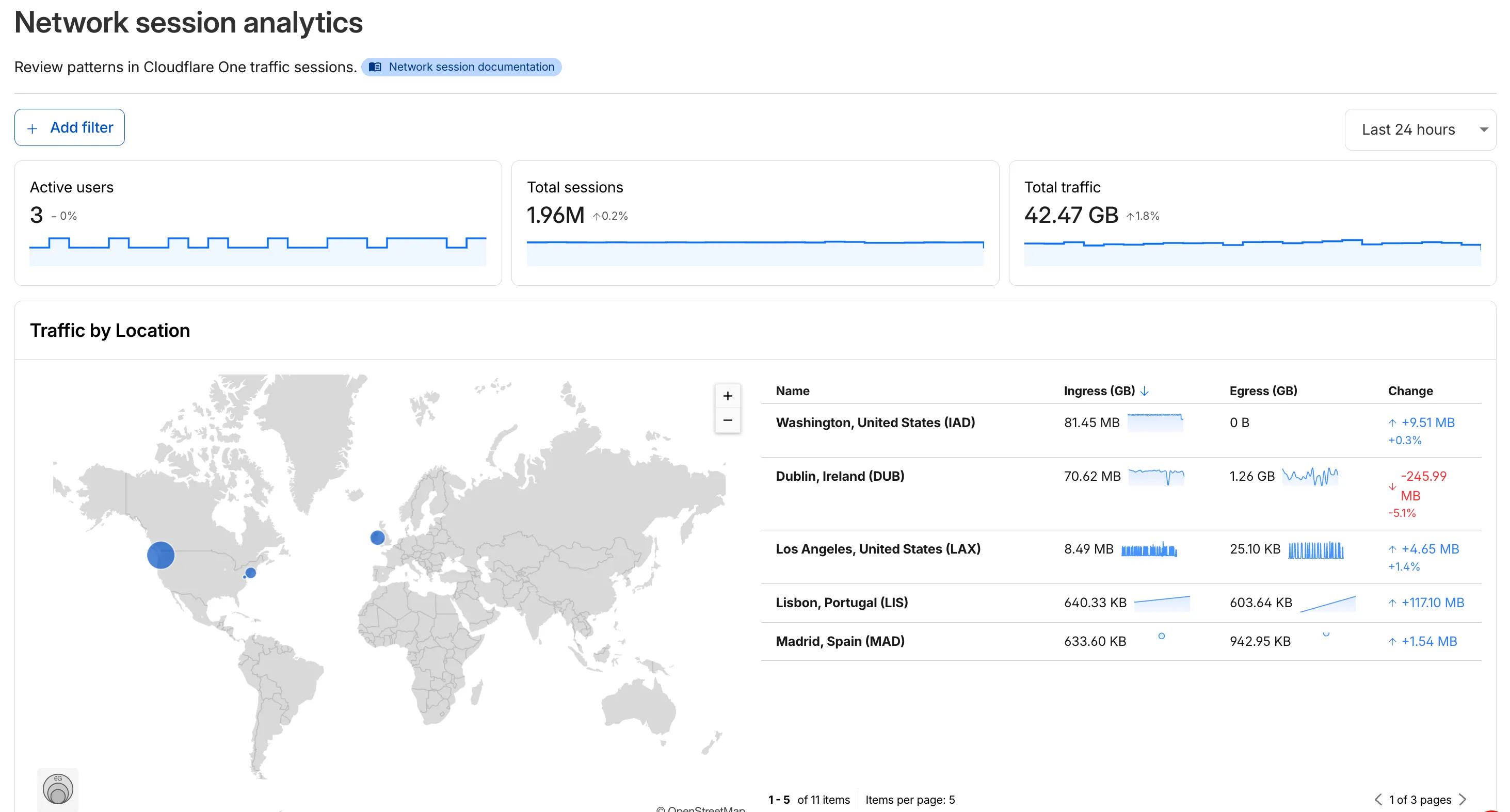
- Analyze geographic distribution: View a world map showing where your network traffic originates, with a list of top locations by session count.
- Monitor key metrics: Track session count, total bytes transferred, and unique users.
- Identify connection issues: Analyze connection close reasons to troubleshoot network problems.
- Review protocol usage: See which network protocols (TCP, UDP, ICMP) are most used.
- Summary metrics: Session count, bytes total, and unique users
- Traffic by location: World map visualization and location list with top traffic sources
- Top protocols: Breakdown of TCP, UDP, ICMP, and ICMPv6 traffic
- Connection close reasons: Insights into why sessions terminated (client closed, origin closed, timeouts, errors)
- Log in to Cloudflare One ↗.
- Go to Zero Trust > Insights > Dashboards.
- Select Network session analytics.
For more information, refer to the Network session analytics documentation.
You can now configure how sensitive data matches are displayed in your DLP payload match logs — giving your incident response team the context they need to validate alerts without compromising your security posture.
To get started, go to the Cloudflare dashboard ↗, select Zero Trust > Data loss prevention > DLP settings and find the Payload log masking card.
Previously, all DLP payload logs used a single masking mode that obscured matched data entirely and hid the original character count, making it difficult to distinguish true positives from false positives. This update introduces three options:
- Full Mask (default): Masks the match while preserving character count and visual formatting (for example,
***-**-****for a Social Security Number). This is an improvement over the previous default, which did not preserve character count. - Partial Mask: Reveals 25% of the matched content while masking the remainder (for example,
***-**-6789). - Clear Text: Stores the full, unmasked violation for deep investigation (for example,
123-45-6789).
Important: The masking level you select is applied at detection time, before the payload is encrypted. This means the chosen format is what your team will see after decrypting the log with your private key — the existing encryption workflow is unchanged.
Applies to all enabled detections: When a masking level other than Full Mask is selected, it applies to all sensitive data matches found within a payload window — not just the match that triggered the policy. Any data matched by your enabled DLP detection entries will be masked at the selected level.
For more information, refer to DLP logging options.
- Full Mask (default): Masks the match while preserving character count and visual formatting (for example,
We're announcing the public beta of Organizations for enterprise customers, a new top-level Cloudflare container that lets Cloudflare customers manage multiple accounts, members, analytics, and shared policies from one centralized location.
What's New
Organizations [BETA]: Organizations are a new top-level container for centrally managing multiple accounts. Each Organization supports up to 500 accounts and 5000 zones, giving larger teams a single place to administer resources at scale.
Self-serve onboarding: Enterprise customers can create an Organization in the dashboard and assign accounts where they are already Super Administrators.
Centralized Account Management: At launch, every Organization member has the Organization Super Admin role. Organization Super Admins can invite other users and manage any child account under the Organization implicitly. Shared policies: Share WAF or Gateway policies across multiple accounts within your Organization to simplify centralized policy management. Implicit access: Members of an Organization automatically receive Super Administrator permissions across child accounts, removing the need for explicit membership on each account. Additional Org-level roles will be available over the course of the year.
Unified analytics: View, filter, and download aggregate HTTP analytics across all Organization child accounts from a single dashboard for centralized visibility into traffic patterns and security events.
Terraform provider support: Manage Organizations with infrastructure as code from day one. Provision organizations, assign accounts, and configure settings programmatically with the Cloudflare Terraform provider ↗.
Shared policies: Share WAF or Gateway policies across multiple accounts within your Organization to simplify centralized policy management.
For more info:
Access authentication logs and Gateway activity logs (DNS, Network, and HTTP) now feature a refreshed user interface that gives you more flexibility when viewing and analyzing your logs.
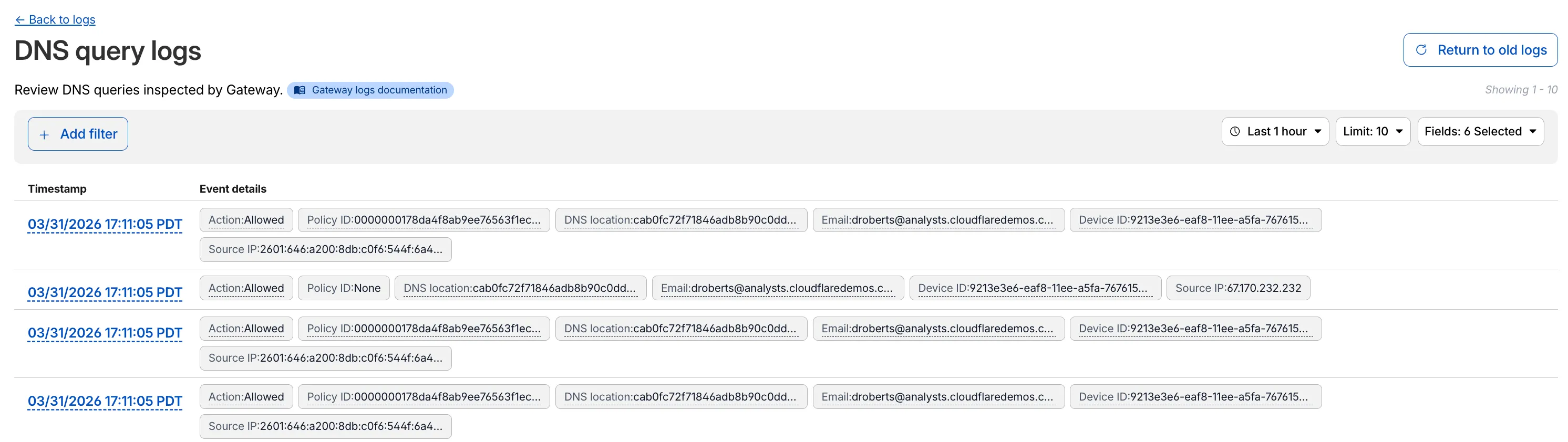
The updated UI includes:
- Filter by field - Select any field value to add it as a filter and narrow down your results.
- Customizable fields - Choose which fields to display in the log table. Querying for fewer fields improves log loading performance.
- View details - Select a timestamp to view the full details of a log entry.
- Switch to classic view - Return to the previous log viewer interface if needed.
For more information, refer to Access authentication logs and Gateway activity logs.
Cloudflare Gateway now supports OIDC Claims as a selector in Firewall, Resolver, and Egress policies. Administrators can use custom OIDC claims from their identity provider to build fine-grained, identity-based traffic policies across all Gateway policy types.
With this update, you can:
- Filter traffic in DNS, HTTP, and Network firewall policies based on OIDC claim values.
- Apply custom resolver policies to route DNS queries to specific resolvers depending on a user's OIDC claims.
- Control egress policies to assign dedicated egress IPs based on OIDC claim attributes.
For example, you can create a policy that routes traffic differently for users with
department=engineeringin their OIDC claims, or restrict access to certain destinations based on a user's role claim.To get started, configure custom OIDC claims on your identity provider and use the OIDC Claims selector in the Gateway policy builder.
For more information, refer to Identity-based policies.
The Gateway Authorization Proxy and PAC file hosting are now in open beta for all plan types.
Previously, proxy endpoints relied on static source IP addresses to authorize traffic, providing no user-level identity in logs or policies. The new authorization proxy replaces IP-based authorization with Cloudflare Access authentication, verifying who a user is before applying Gateway filtering without installing the WARP client.
This is ideal for environments where you cannot deploy a device client, such as virtual desktops (VDI), mergers and acquisitions, or compliance-restricted endpoints.
- Identity-aware proxy traffic — Users authenticate through your identity provider (Okta, Microsoft Entra ID, Google Workspace, and others) via Cloudflare Access. Logs now show exactly which user accessed which site, and you can write identity-based policies like "only the Finance team can access this accounting tool."
- Multiple identity providers — Display one or multiple login methods simultaneously, giving flexibility for organizations managing users across different identity systems.
- Cloudflare-hosted PAC files — Create and host PAC files directly in Cloudflare One with pre-configured templates for Okta and Azure, hosted at
https://pac.cloudflare-gateway.com/<account-id>/<slug>on Cloudflare's global network. - Simplified billing — Each user occupies a seat, exactly like they do with the Cloudflare One Client. No new metrics to track.
- In Cloudflare One ↗, go to Networks > Resolvers & Proxies > Proxy endpoints.
- Create an authorization proxy endpoint and configure Access policies.
- Create a hosted PAC file or write your own.
- Configure browsers to use the PAC file URL.
- Install the Cloudflare certificate for HTTPS inspection.
For more details, refer to the proxy endpoints documentation and the announcement blog post ↗.
Gateway Protocol Detection now supports seven additional protocols in beta:
Protocol Notes IMAP Internet Message Access Protocol — email retrieval POP3 Post Office Protocol v3 — email retrieval SMTP Simple Mail Transfer Protocol — email sending MYSQL MySQL database wire protocol RSYNC-DAEMON rsync daemon protocol LDAP Lightweight Directory Access Protocol NTP Network Time Protocol These protocols join the existing set of detected protocols (HTTP, HTTP2, SSH, TLS, DCERPC, MQTT, and TPKT) and can be used with the Detected Protocol selector in Network policies to identify and filter traffic based on the application-layer protocol, without relying on port-based identification.
If protocol detection is enabled on your account, these protocols will automatically be logged when detected in your Gateway network traffic.
For more information on using Protocol Detection, refer to the Protocol detection documentation.
Zero Trust has again upgraded its Shadow IT analytics, providing you with unprecedented visibility into your organizations use of SaaS tools. With this dashboard, you can review who is using an application and volumes of data transfer to the application.
With this update, you can review data transfer metrics at the domain level, rather than just the application level, providing more granular insight into your data transfer patterns.
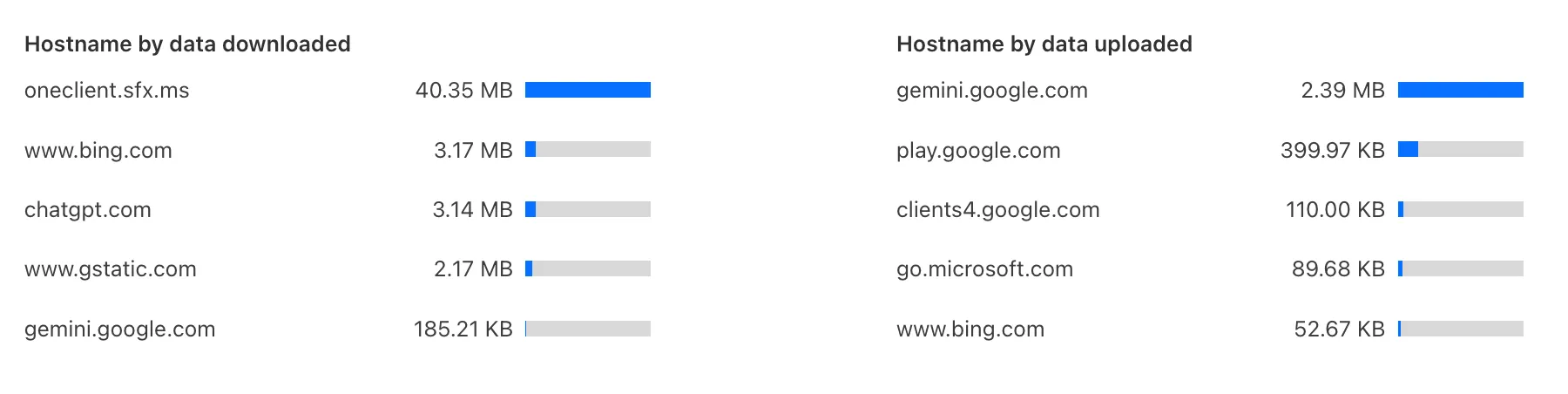
These metrics can be filtered by all available filters on the dashboard, including user, application, or content category.
Both the analytics and policies are accessible in the Cloudflare Zero Trust dashboard ↗, empowering organizations with better visibility and control.
We have previously added new application categories to better reflect their content and improve HTTP traffic management: refer to Changelog. While the new categories are live now, we want to ensure you have ample time to review and adjust any existing rules you have configured against old categories. The remapping of existing applications into these new categories will be completed by January 30, 2026. This timeline allows you a dedicated period to:
- Review the new category structure.
- Identify any policies you have that target the older categories.
- Adjust your rules to reference the new, more precise categories before the old mappings change. Once the applications have been fully remapped by January 30, 2026, you might observe some changes in the traffic being mitigated or allowed by your existing policies. We encourage you to use the intervening time to prepare for a smooth transition.
Applications being remappedd
Application Name Existing Category New Category Google Photos File Sharing Photography & Graphic Design Flickr File Sharing Photography & Graphic Design ADP Human Resources Business Greenhouse Human Resources Business myCigna Human Resources Health & Fitness UnitedHealthcare Human Resources Health & Fitness ZipRecruiter Human Resources Business Amazon Business Human Resources Business Jobcenter Human Resources Business Jobsuche Human Resources Business Zenjob Human Resources Business DocuSign Legal Business Postident Legal Business Adobe Creative Cloud Productivity Photography & Graphic Design Airtable Productivity Development Autodesk Fusion360 Productivity IT Management Coursera Productivity Education Microsoft Power BI Productivity Business Tableau Productivity Business Duolingo Productivity Education Adobe Reader Productivity Business AnpiReport Productivity Travel ビズリーチ Productivity Business doda (デューダ) Productivity Business 求人ボックス Productivity Business マイナビ2026 Productivity Business Power Apps Productivity Business RECRUIT AGENT Productivity Business シフトボード Productivity Business スタンバイ Productivity Business Doctolib Productivity Health & Fitness Miro Productivity Photography & Graphic Design MyFitnessPal Productivity Health & Fitness Sentry Mobile Productivity Travel Slido Productivity Photography & Graphic Design Arista Networks Productivity IT Management Atlassian Productivity Business CoderPad Productivity Business eAgreements Productivity Business Vmware Productivity IT Management Vmware Vcenter Productivity IT Management AWS Skill Builder Productivity Education Microsoft Office 365 (GCC) Productivity Business Microsoft Exchange Online (GCC) Productivity Business Canva Sales & Marketing Photography & Graphic Design Instacart Shopping Food & Drink Wawa Shopping Food & Drink McDonald's Shopping Food & Drink Vrbo Shopping Travel American Airlines Shopping Travel Booking.com Shopping Travel Ticketmaster Shopping Entertainment & Events Airbnb Shopping Travel DoorDash Shopping Food & Drink Expedia Shopping Travel EasyPark Shopping Travel UEFA Tickets Shopping Entertainment & Events DHL Express Shopping Business UPS Shopping Business For more information on creating HTTP policies, refer to Applications and app types.
To give you precision and flexibility while creating policies to block unwanted traffic, we are introducing new, more granular application categories in the Gateway product.
We have added the following categories to provide more precise organization and allow for finer-grained policy creation, designed around how users interact with different types of applications:
- Business
- Education
- Entertainment & Events
- Food & Drink
- Health & Fitness
- Lifestyle
- Navigation
- Photography & Graphic Design
- Travel
The new categories are live now, but we are providing a transition period for existing applications to be fully remapped to these new categories.
The full remapping will be completed by January 30, 2026.
We encourage you to use this time to:
- Review the new category structure.
- Identify and adjust any existing HTTP policies that reference older categories to ensure a smooth transition.
For more information on creating HTTP policies, refer to Applications and app types.
Admins can now create scheduled DNS policies directly from the Zero Trust dashboard, without using the API. You can configure policies to be active during specific, recurring times, such as blocking social media during business hours or gaming sites on school nights.
- Preset Schedules: Use built-in templates for common scenarios like Business Hours, School Days, Weekends, and more.
- Custom Schedules: Define your own schedule with specific days and up to three non-overlapping time ranges per day.
- Timezone Control: Choose to enforce a schedule in a specific timezone (for example, US Eastern) or based on the local time of each user.
- Combined with Duration: Policies can have both a schedule and a duration. If both are set, the duration's expiration takes precedence.
You can see the flow in the demo GIF:

This update makes time-based DNS policies accessible to all Gateway customers, removing the technical barrier of the API.
We have added three new domain categories under the Technology parent category, to better reflect online content and improve DNS filtering.
New categories added
Parent ID Parent Name Category ID Category Name 26 Technology 194 Keep Awake Software 26 Technology 192 Remote Access 26 Technology 193 Shareware/Freeware Refer to Gateway domain categories to learn more.
Gateway users can now apply granular controls to their file sharing and AI chat applications through HTTP policies.
The new feature offers two methods of controlling SaaS applications:
- Application Controls are curated groupings of Operations which provide an easy way for users to achieve a specific outcome. Application Controls may include Upload, Download, Prompt, Voice, and Share depending on the application.
- Operations are controls aligned to the most granular action a user can take. This provides a fine-grained approach to enforcing policy and generally aligns to the SaaS providers API specifications in naming and function.
Get started using Application Granular Controls and refer to the list of supported applications.
You can now more precisely control your HTTP DLP policies by specifying whether to scan the request or response body, helping to reduce false positives and target specific data flows.
In the Gateway HTTP policy builder, you will find a new selector called Body Phase. This allows you to define the direction of traffic the DLP engine will inspect:
- Request Body: Scans data sent from a user's machine to an upstream service. This is ideal for monitoring data uploads, form submissions, or other user-initiated data exfiltration attempts.
- Response Body: Scans data sent to a user's machine from an upstream service. Use this to inspect file downloads and website content for sensitive data.
For example, consider a policy that blocks Social Security Numbers (SSNs). Previously, this policy might trigger when a user visits a website that contains example SSNs in its content (the response body). Now, by setting the Body Phase to Request Body, the policy will only trigger if the user attempts to upload or submit an SSN, ignoring the content of the web page itself.
All policies without this selector will continue to scan both request and response bodies to ensure continued protection.
For more information, refer to Gateway HTTP policy selectors.
Magic WAN and WARP Connector users can now securely route their DNS traffic to the Gateway resolver without exposing traffic to the public Internet.
Routing DNS traffic to the Gateway resolver allows DNS resolution and filtering for traffic coming from private networks while preserving source internal IP visibility. This ensures Magic WAN users have full integration with our Cloudflare One features, including Internal DNS and hostname-based policies.
To configure DNS filtering, change your Magic WAN or WARP Connector DNS settings to use Cloudflare's shared resolver IPs,
172.64.36.1and172.64.36.2. Once you configure DNS resolution and filtering, you can use Source Internal IP as a traffic selector in your resolver policies for routing private DNS traffic to your Internal DNS.
Zero Trust has significantly upgraded its Shadow IT analytics, providing you with unprecedented visibility into your organizations use of SaaS tools. With this dashboard, you can review who is using an application and volumes of data transfer to the application.
You can review these metrics against application type, such as Artificial Intelligence or Social Media. You can also mark applications with an approval status, including Unreviewed, In Review, Approved, and Unapproved designating how they can be used in your organization.
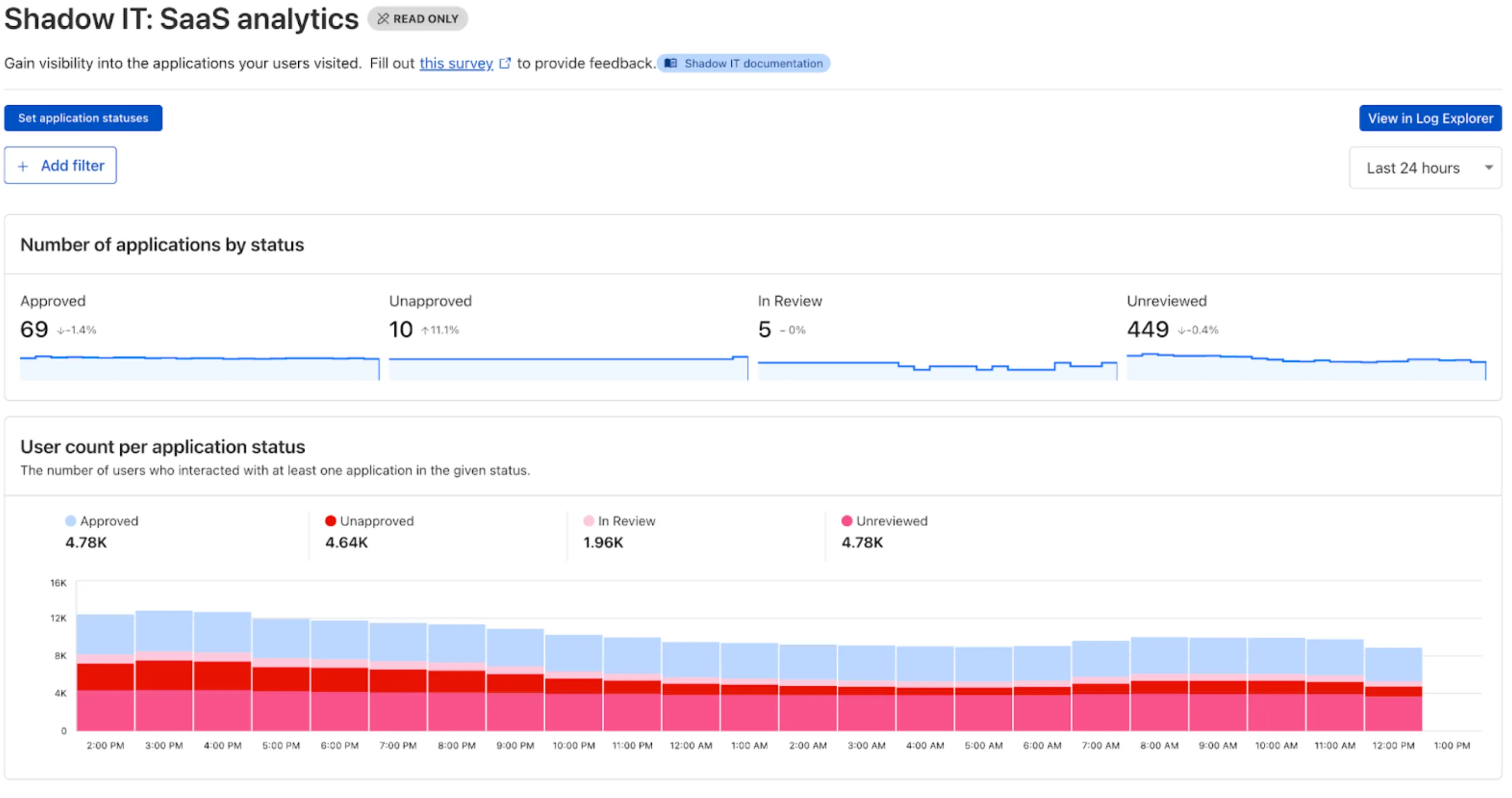
These application statuses can also be used in Gateway HTTP policies, so you can block, isolate, limit uploads and downloads, and more based on the application status.
Both the analytics and policies are accessible in the Cloudflare Zero Trust dashboard ↗, empowering organizations with better visibility and control.
Enterprise Gateway users can now use Bring Your Own IP (BYOIP) for dedicated egress IPs.
Admins can now onboard and use their own IPv4 or IPv6 prefixes to egress traffic from Cloudflare, delivering greater control, flexibility, and compliance for network traffic.
Get started by following the BYOIP onboarding process. Once your IPs are onboarded, go to Gateway > Egress policies and select or create an egress policy. In Select an egress IP, choose Use dedicated egress IPs (Cloudflare or BYOIP), then select your BYOIP address from the dropdown menu.
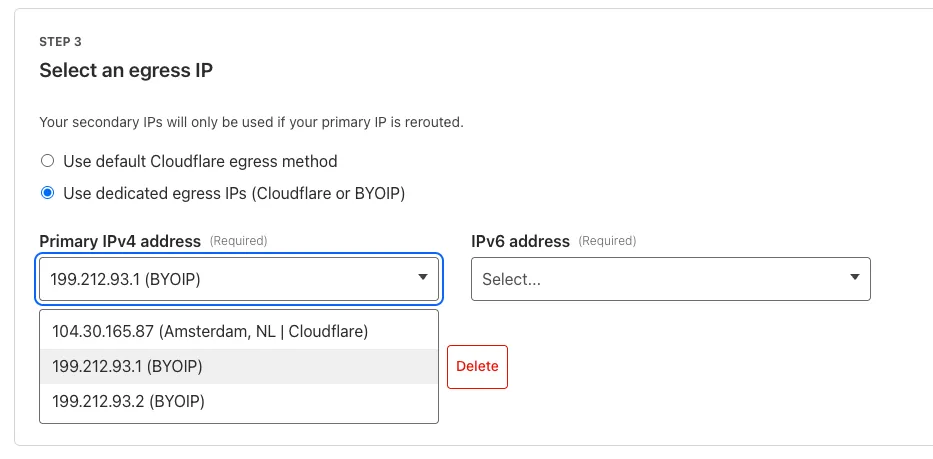
For more information, refer to BYOIP for dedicated egress IPs.
We have introduced a new Security Threat category called Scam. Relevant domains are marked with the Scam category. Scam typically refers to fraudulent websites and schemes designed to trick victims into giving away money or personal information.
New category added
Parent ID Parent Name Category ID Category Name 21 Security Threats 191 Scam Refer to Gateway domain categories to learn more.
Gateway can now apply HTTP filtering to all proxied HTTP requests, not just traffic on standard HTTP (
80) and HTTPS (443) ports. This means all requests can now be filtered by A/V scanning, file sandboxing, Data Loss Prevention (DLP), and more.You can turn this setting on by going to Settings > Network > Firewall and choosing Inspect on all ports.
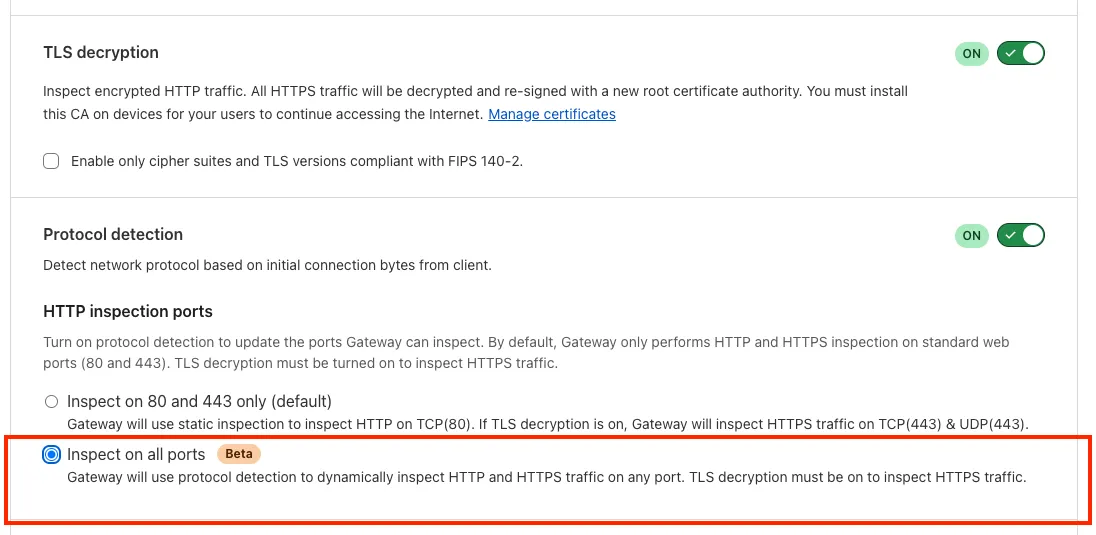
To learn more, refer to Inspect on all ports (Beta).
The Google Bard application (ID: 1198) has been deprecated and fully removed from the system. It has been replaced by the Gemini application (ID: 1340). Any existing Gateway policies that reference the old Google Bard application will no longer function. To ensure your policies continue to work as intended, you should update them to use the new Gemini application. We recommend replacing all instances of the deprecated Bard application with the new Gemini application in your Gateway policies. For more information about application policies, please see the Cloudflare Gateway documentation.
Gateway will now evaluate Network (Layer 4) policies before HTTP (Layer 7) policies. This change preserves your existing security posture and does not affect which traffic is filtered — but it may impact how notifications are displayed to end users.
This change will roll out progressively between July 14–18, 2025. If you use HTTP policies, we recommend reviewing your configuration ahead of rollout to ensure the user experience remains consistent.
Previous order:
- DNS policies
- HTTP policies
- Network policies
New order:
- DNS policies
- Network policies
- HTTP policies
This change may affect block notifications. For example:
- You have an HTTP policy to block
example.comand display a block page. - You also have a Network policy to block
example.comsilently (no client notification).
With the new order, the Network policy will trigger first — and the user will no longer see the HTTP block page.
To ensure users still receive a block notification, you can:
- Add a client notification to your Network policy, or
- Use only the HTTP policy for that domain.
This update is based on user feedback and aims to:
- Create a more intuitive model by evaluating network-level policies before application-level policies.
- Minimize 526 connection errors by verifying the network path to an origin before attempting to establish a decrypted TLS connection.
To learn more, visit the Gateway order of enforcement documentation.
Users can now access significant enhancements to Cloudflare Gateway analytics, providing you with unprecedented visibility into your organization's DNS queries, HTTP requests, and Network sessions. These powerful new dashboards enable you to go beyond raw logs and gain actionable insights into how your users are interacting with the Internet and your protected resources.
You can now visualize and explore:
- Patterns Over Time: Understand trends in traffic volume and blocked requests, helping you identify anomalies and plan for future capacity.
- Top Users & Destinations: Quickly pinpoint the most active users, enabling better policy enforcement and resource allocation.
- Actions Taken: See a clear breakdown of security actions applied by Gateway policies, such as blocks and allows, offering a comprehensive view of your security posture.
- Geographic Regions: Gain insight into the global distribution of your traffic.
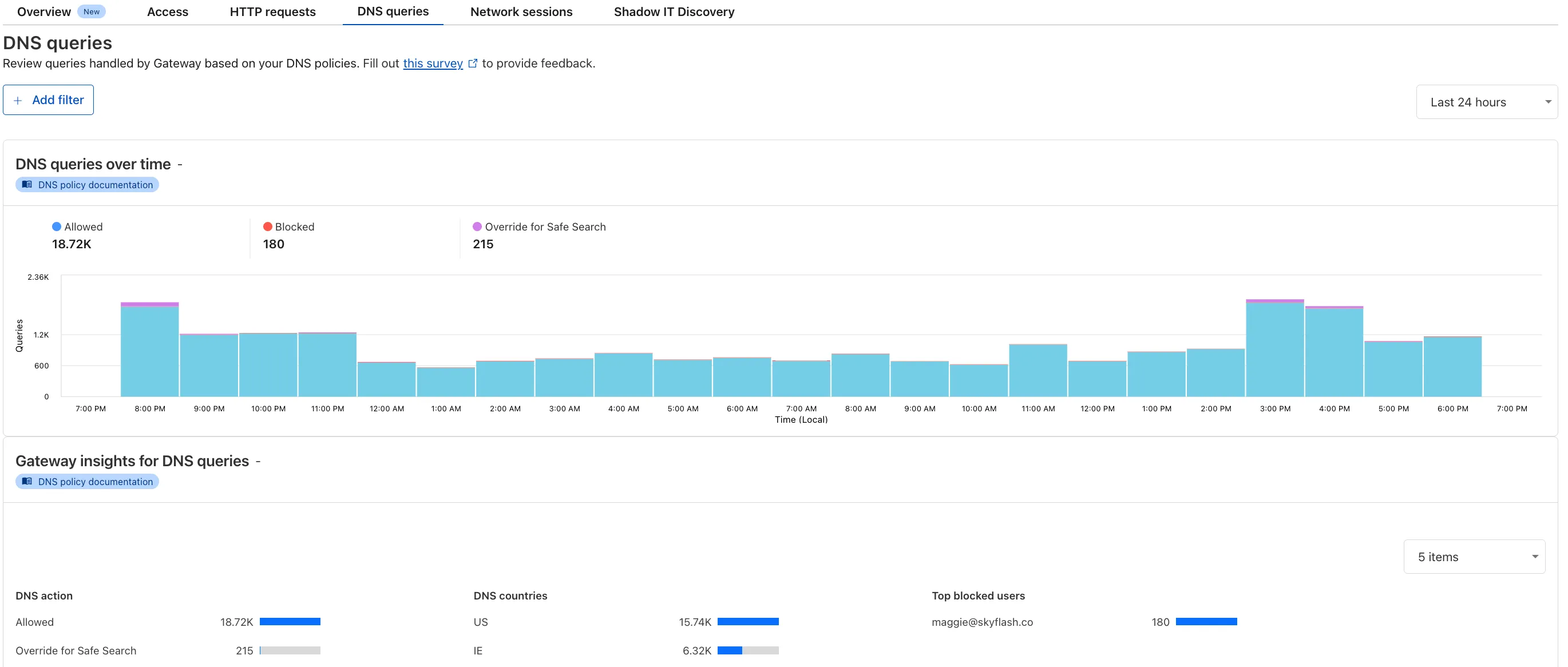
To access the new overview, log in to your Cloudflare Zero Trust dashboard ↗ and go to Analytics in the side navigation bar.