
Changelog
New updates and improvements at Cloudflare.

You can now stay on top of your SaaS security posture with the new CASB Weekly Digest notification. This opt-in email digest is delivered to your inbox every Monday morning and provides a high-level summary of your organization's Cloudflare API CASB findings from the previous week.
This allows security teams and IT administrators to get proactive, at-a-glance visibility into new risks and integration health without having to log in to the dashboard.
To opt in, navigate to Manage Account > Notifications in the Cloudflare dashboard to configure the CASB Weekly Digest alert type.
- At-a-glance summary — Review new high/critical findings, most frequent finding types, and new content exposures from the past 7 days.
- Integration health — Instantly see the status of all your connected SaaS integrations (Healthy, Unhealthy, or Paused) to spot API connection issues.
- Proactive alerting — The digest is sent automatically to all subscribed users every Monday morning.
- Easy to configure — Users can opt in by enabling the notification in the Cloudflare dashboard under Manage Account > Notifications.
- Configure notification preferences in Cloudflare.
The CASB Weekly Digest notification is available to all Cloudflare users today.
Digital Experience Monitoring (DEX) provides visibility into WARP device metrics, connectivity, and network performance across your Cloudflare SASE deployment.
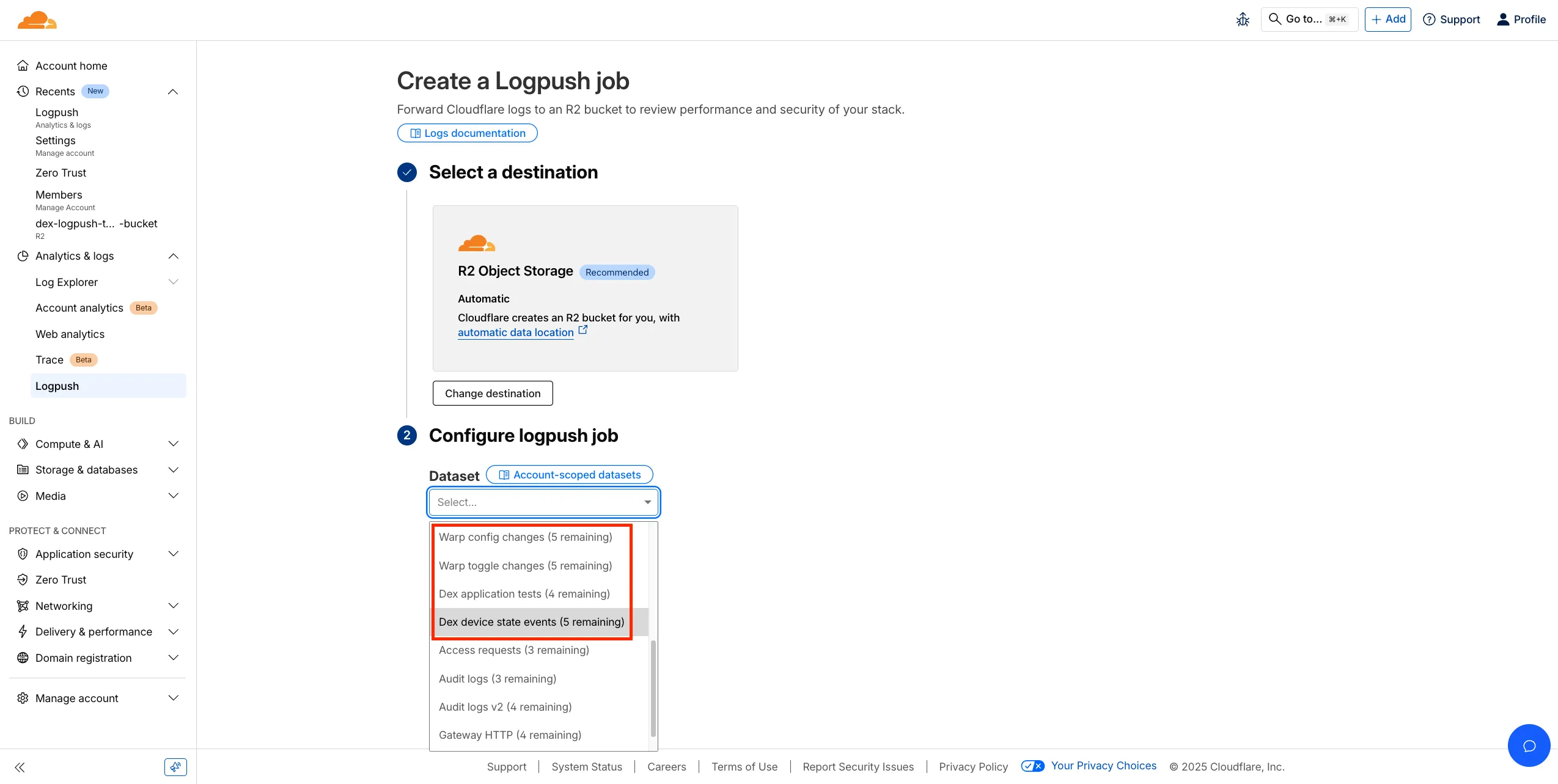
We've released four new WARP and DEX device data sets that can be exported via Cloudflare Logpush. These Logpush data sets can be exported to R2, a cloud bucket, or a SIEM to build a customized logging and analytics experience.
To create a new DEX or WARP Logpush job, customers can go to the account level of the Cloudflare dashboard > Analytics & Logs > Logpush to get started.
A new GA release for the Windows WARP client is now available on the stable releases downloads page.
This release contains minor fixes, improvements, and new features including Path Maximum Transmission Unit Discovery (PMTUD). When PMTUD is enabled, the client will dynamically adjust packet sizing to optimize connection performance. There is also a new connection status message in the GUI to inform users that the local network connection may be unstable. This will make it easier to diagnose connectivity issues.
Changes and improvements
- Fixed an inconsistency with Global WARP override settings in multi-user environments when switching between users.
- The GUI now displays the health of the tunnel and DNS connections by showing a connection status message when the network may be unstable. This will make it easier to diagnose connectivity issues.
- Fixed an issue where deleting a registration was erroneously reported as having failed.
- Path Maximum Transmission Unit Discovery (PMTUD) may now be used to discover the effective MTU of the connection. This allows the WARP client to improve connectivity optimized for each network. PMTUD is disabled by default. To enable it, refer to the PMTUD documentation.
- Improvements for the OS version WARP client check. Windows Updated Build Revision (UBR) numbers can now be checked by the client to ensure devices have required security patches and features installed.
- The WARP client now supports Windows 11 ARM-based machines. For information on known limitations, refer to the Known limitations page.
Known issues
For Windows 11 24H2 users, Microsoft has confirmed a regression that may lead to performance issues like mouse lag, audio cracking, or other slowdowns. Cloudflare recommends users experiencing these issues upgrade to a minimum Windows 11 24H2 KB5062553 or higher for resolution.
Devices using WARP client 2025.4.929.0 and up may experience Local Domain Fallback failures if a fallback server has not been configured. To configure a fallback server, refer to Route traffic to fallback server.
Devices with KB5055523 installed may receive a warning about
Win32/ClickFix.ABAbeing present in the installer. To resolve this false positive, update Microsoft Security Intelligence to version 1.429.19.0 or later.DNS resolution may be broken when the following conditions are all true:
- WARP is in Secure Web Gateway without DNS filtering (tunnel-only) mode.
- A custom DNS server address is configured on the primary network adapter.
- The custom DNS server address on the primary network adapter is changed while WARP is connected.
To work around this issue, reconnect the WARP client by toggling off and back on.
A new GA release for the macOS WARP client is now available on the stable releases downloads page.
This release contains minor fixes, improvements, and new features including Path Maximum Transmission Unit Discovery (PMTUD). When PMTUD is enabled, the client will dynamically adjust packet sizing to optimize connection performance. There is also a new connection status message in the GUI to inform users that the local network connection may be unstable. This will make it easier to diagnose connectivity issues.
Changes and improvements
- The GUI now displays the health of the tunnel and DNS connections by showing a connection status message when the network may be unstable. This will make it easier to diagnose connectivity issues.
- Fixed an issue where deleting a registration was erroneously reported as having failed.
- Path Maximum Transmission Unit Discovery (PMTUD) may now be used to discover the effective MTU of the connection. This allows the WARP client to improve connectivity optimized for each network. PMTUD is disabled by default. To enable it, refer to the PMTUD documentation.
Known issues
- Devices using WARP client 2025.4.929.0 and up may experience Local Domain Fallback failures if a fallback server has not been configured. To configure a fallback server, refer to Route traffic to fallback server.
A new GA release for the Linux WARP client is now available on the stable releases downloads page.
This release contains minor fixes, improvements, and new features including Path Maximum Transmission Unit Discovery (PMTUD). When PMTUD is enabled, the client will dynamically adjust packet sizing to optimize connection performance. There is also a new connection status message in the GUI to inform users that the local network connection may be unstable. This will make it easier to diagnose connectivity issues.
WARP client version 2025.8.779.0 introduced an updated public key for Linux packages. The public key must be updated if it was installed before September 12, 2025 to ensure the repository remains functional after December 4, 2025. Instructions to make this update are available at pkg.cloudflareclient.com.
Changes and improvements
- The GUI now displays the health of the tunnel and DNS connections by showing a connection status message when the network may be unstable. This will make it easier to diagnose connectivity issues.
- Fixed an issue where deleting a registration was erroneously reported as having failed.
- Path Maximum Transmission Unit Discovery (PMTUD) may now be used to discover the effective MTU of the connection. This allows the WARP client to improve connectivity optimized for each network. PMTUD is disabled by default. To enable it, refer to the PMTUD documentation.
Starting February 2, 2026, the
cloudflared proxy-dnscommand will be removed from all newcloudflaredreleases.This change is being made to enhance security and address a potential vulnerability in an underlying DNS library. This vulnerability is specific to the
proxy-dnscommand and does not affect any othercloudflaredfeatures, such as the core Cloudflare Tunnel service.The
proxy-dnscommand, which runs a client-side DNS-over-HTTPS (DoH) proxy, has been an officially undocumented feature for several years. This functionality is fully and securely supported by our actively developed products.Versions of
cloudflaredreleased before this date will not be affected and will continue to operate. However, note that our official support policy for anycloudflaredrelease is one year from its release date.We strongly advise users of this undocumented feature to migrate to one of the following officially supported solutions before February 2, 2026, to continue benefiting from secure DNS-over-HTTPS.
The preferred method for enabling DNS-over-HTTPS on user devices is the Cloudflare WARP client. The WARP client automatically secures and proxies all DNS traffic from your device, integrating it with your organization's Zero Trust policies and posture checks.
For scenarios where installing a client on every device is not possible (such as servers, routers, or IoT devices), we recommend using the WARP Connector.
Instead of running
cloudflared proxy-dnson a machine, you can install the WARP Connector on a single Linux host within your private network. This connector will act as a gateway, securely routing all DNS and network traffic from your entire subnet to Cloudflare for filtering and logging.
Magic WAN now supports Automatic Return Routing (ARR), allowing customers to configure Magic on-ramps (IPsec/GRE/CNI) to learn the return path for traffic flows without requiring static routes.
Key benefits:
- Route-less mode: Static or dynamic routes are optional when using ARR.
- Overlapping IP space support: Traffic originating from customer sites can use overlapping private IP ranges.
- Symmetric routing: Return traffic is guaranteed to use the same connection as the original on-ramp.
This feature is currently in beta and requires the new Unified Routing mode (beta).
For configuration details, refer to Configure Automatic Return Routing.
Magic WAN Connector now allows you to designate a specific WAN port for breakout traffic, giving you deterministic control over the egress path for latency-sensitive applications.
With this feature, you can:
- Pin breakout traffic for specific applications to a preferred WAN port.
- Ensure critical traffic (such as Zoom or Teams) always uses your fastest or most reliable connection.
- Benefit from automatic failover to standard WAN port priority if the preferred port goes down.
This is useful for organizations with multiple ISP uplinks who need predictable egress behavior for performance-sensitive traffic.
For configuration details, refer to Designate WAN ports for breakout apps.
We have previously added new application categories to better reflect their content and improve HTTP traffic management: refer to Changelog. While the new categories are live now, we want to ensure you have ample time to review and adjust any existing rules you have configured against old categories. The remapping of existing applications into these new categories will be completed by January 30, 2026. This timeline allows you a dedicated period to:
- Review the new category structure.
- Identify any policies you have that target the older categories.
- Adjust your rules to reference the new, more precise categories before the old mappings change. Once the applications have been fully remapped by January 30, 2026, you might observe some changes in the traffic being mitigated or allowed by your existing policies. We encourage you to use the intervening time to prepare for a smooth transition.
Applications being remappedd
Application Name Existing Category New Category Google Photos File Sharing Photography & Graphic Design Flickr File Sharing Photography & Graphic Design ADP Human Resources Business Greenhouse Human Resources Business myCigna Human Resources Health & Fitness UnitedHealthcare Human Resources Health & Fitness ZipRecruiter Human Resources Business Amazon Business Human Resources Business Jobcenter Human Resources Business Jobsuche Human Resources Business Zenjob Human Resources Business DocuSign Legal Business Postident Legal Business Adobe Creative Cloud Productivity Photography & Graphic Design Airtable Productivity Development Autodesk Fusion360 Productivity IT Management Coursera Productivity Education Microsoft Power BI Productivity Business Tableau Productivity Business Duolingo Productivity Education Adobe Reader Productivity Business AnpiReport Productivity Travel ビズリーチ Productivity Business doda (デューダ) Productivity Business 求人ボックス Productivity Business マイナビ2026 Productivity Business Power Apps Productivity Business RECRUIT AGENT Productivity Business シフトボード Productivity Business スタンバイ Productivity Business Doctolib Productivity Health & Fitness Miro Productivity Photography & Graphic Design MyFitnessPal Productivity Health & Fitness Sentry Mobile Productivity Travel Slido Productivity Photography & Graphic Design Arista Networks Productivity IT Management Atlassian Productivity Business CoderPad Productivity Business eAgreements Productivity Business Vmware Productivity IT Management Vmware Vcenter Productivity IT Management AWS Skill Builder Productivity Education Microsoft Office 365 (GCC) Productivity Business Microsoft Exchange Online (GCC) Productivity Business Canva Sales & Marketing Photography & Graphic Design Instacart Shopping Food & Drink Wawa Shopping Food & Drink McDonald's Shopping Food & Drink Vrbo Shopping Travel American Airlines Shopping Travel Booking.com Shopping Travel Ticketmaster Shopping Entertainment & Events Airbnb Shopping Travel DoorDash Shopping Food & Drink Expedia Shopping Travel EasyPark Shopping Travel UEFA Tickets Shopping Entertainment & Events DHL Express Shopping Business UPS Shopping Business For more information on creating HTTP policies, refer to Applications and app types.
Cloudflare Access for private hostname applications can now secure traffic on all ports and protocols.
Previously, applying Zero Trust policies to private applications required the application to use HTTPS on port
443and support Server Name Indicator (SNI).This update removes that limitation. As long as the application is reachable via a Cloudflare off-ramp, you can now enforce your critical security controls — like single sign-on (SSO), MFA, device posture, and variable session lengths — to any private application. This allows you to extend Zero Trust security to services like SSH, RDP, internal databases, and other non-HTTPS applications.
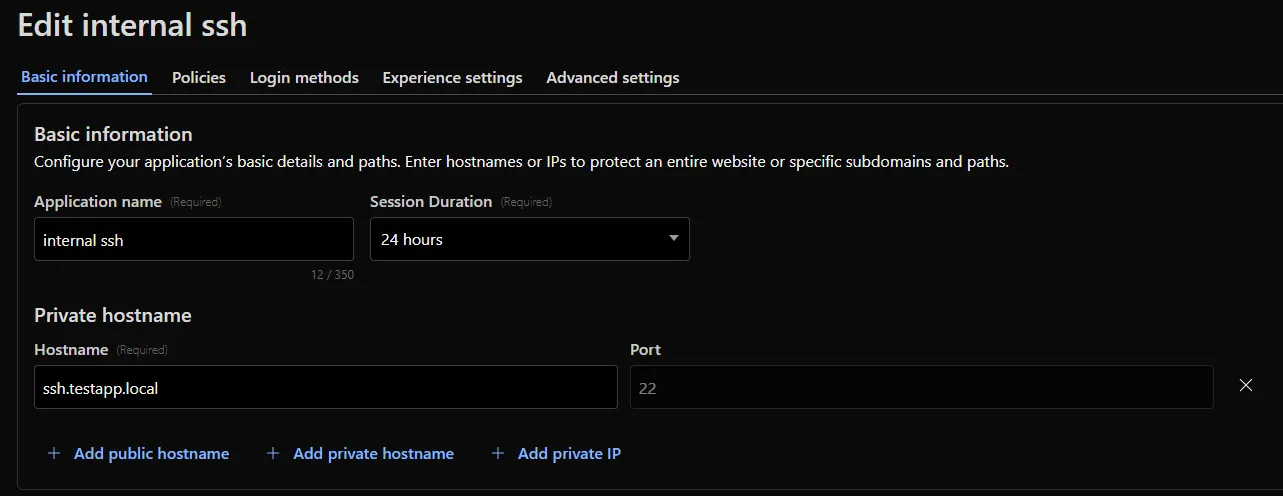
For example, you can now create a self-hosted application in Access for
ssh.testapp.localrunning on port22. You can then build a policy that only allows engineers in your organization to connect after they pass an SSO/MFA check and are using a corporate device.This feature is generally available across all plans.
Cloudflare CASB (Cloud Access Security Broker) now supports two new granular roles to provide more precise access control for your security teams:
- Cloudflare CASB Read: Provides read-only access to view CASB findings and dashboards. This role is ideal for security analysts, compliance auditors, or team members who need visibility without modification rights.
- Cloudflare CASB: Provides full administrative access to configure and manage all aspects of the CASB product.
These new roles help you better enforce the principle of least privilege. You can now grant specific members access to CASB security findings without assigning them broader permissions, such as the Super Administrator or Administrator roles.
To enable Data Loss Prevention (DLP), scans in CASB, account members will need the Cloudflare Zero Trust role.
You can find these new roles when inviting members or creating API tokens in the Cloudflare dashboard under Manage Account > Members.
To learn more about managing roles and permissions, refer to the Manage account members and roles documentation.
To give you precision and flexibility while creating policies to block unwanted traffic, we are introducing new, more granular application categories in the Gateway product.
We have added the following categories to provide more precise organization and allow for finer-grained policy creation, designed around how users interact with different types of applications:
- Business
- Education
- Entertainment & Events
- Food & Drink
- Health & Fitness
- Lifestyle
- Navigation
- Photography & Graphic Design
- Travel
The new categories are live now, but we are providing a transition period for existing applications to be fully remapped to these new categories.
The full remapping will be completed by January 30, 2026.
We encourage you to use this time to:
- Review the new category structure.
- Identify and adjust any existing HTTP policies that reference older categories to ensure a smooth transition.
For more information on creating HTTP policies, refer to Applications and app types.
Admins can now create scheduled DNS policies directly from the Zero Trust dashboard, without using the API. You can configure policies to be active during specific, recurring times, such as blocking social media during business hours or gaming sites on school nights.
- Preset Schedules: Use built-in templates for common scenarios like Business Hours, School Days, Weekends, and more.
- Custom Schedules: Define your own schedule with specific days and up to three non-overlapping time ranges per day.
- Timezone Control: Choose to enforce a schedule in a specific timezone (for example, US Eastern) or based on the local time of each user.
- Combined with Duration: Policies can have both a schedule and a duration. If both are set, the duration's expiration takes precedence.
You can see the flow in the demo GIF:

This update makes time-based DNS policies accessible to all Gateway customers, removing the technical barrier of the API.
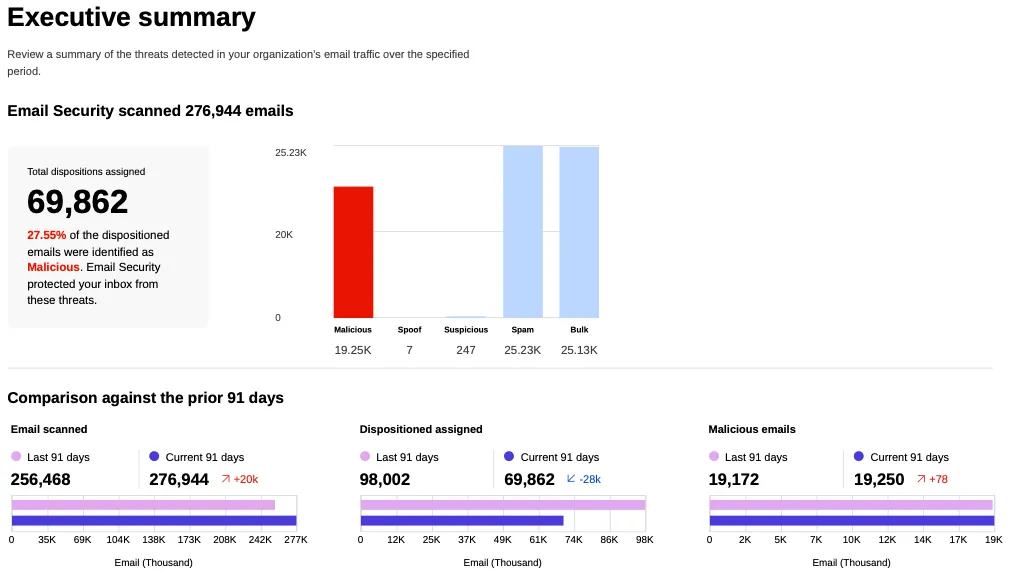
You can now generate on-demand security reports directly from the Cloudflare dashboard. This new feature provides a comprehensive overview of your email security posture, making it easier than ever to demonstrate the value of Cloudflare’s Email security to executives and other decision makers.
These reports offer several key benefits:
- Executive Summary: Quickly view the performance of Email security with a high-level executive summary.
- Actionable Insights: Dive deep into trend data, breakdowns of threat types, and analysis of top targets to identify and address vulnerabilities.
- Configuration Transparency: Gain a clear view of your policy, submission, and domain configurations to ensure optimal setup.
- Account Takeover Risks: Get a snapshot of your M365 risky users (requires a Microsoft Entra ID P2 license and M365 SaaS integration ↗).
This feature is available across the following Email security packages:
- Advantage
- Enterprise
- Enterprise + PhishGuard
A new Beta release for the Windows WARP client is now available on the beta releases downloads page.
This release contains minor fixes, improvements, and new features including Path Maximum Transmission Unit Discovery (PMTUD). With PMTUD enabled, the client will dynamically adjust packet sizing to optimize connection performance. There is also a new connection status message in the GUI to inform users that the local network connection may be unstable. This will make it easier to debug connectivity issues.
Changes and improvements
- Improvements for Windows multi-user to maintain the Global WARP override state when switching between users.
- The GUI now displays the health of the tunnel and DNS connections by showing a connection status message when the network may be unstable. This will make it easier to debug connectivity issues.
- Deleting registrations no longer returns an error when succeeding.
- Path Maximum Transmission Unit Discovery (PMTUD) is now used to discover the effective MTU of the connection. This allows the client to improve connection performance optimized for the current network.
Known issues
For Windows 11 24H2 users, Microsoft has confirmed a regression that may lead to performance issues like mouse lag, audio cracking, or other slowdowns. Cloudflare recommends users experiencing these issues upgrade to a minimum Windows 11 24H2 KB5062553 or higher for resolution.
Devices using WARP client 2025.4.929.0 and up may experience Local Domain Fallback failures if a fallback server has not been configured. To configure a fallback server, refer to Route traffic to fallback server.
Devices with KB5055523 installed may receive a warning about
Win32/ClickFix.ABAbeing present in the installer. To resolve this false positive, update Microsoft Security Intelligence to version 1.429.19.0 or later.DNS resolution may be broken when the following conditions are all true:
- WARP is in Secure Web Gateway without DNS filtering (tunnel-only) mode.
- A custom DNS server address is configured on the primary network adapter.
- The custom DNS server address on the primary network adapter is changed while WARP is connected.
To work around this issue, reconnect the WARP client by toggling off and back on.
A new Beta release for the macOS WARP client is now available on the beta releases downloads page.
This release contains minor fixes, improvements, and new features including Path Maximum Transmission Unit Discovery (PMTUD). With PMTUD enabled, the client will dynamically adjust packet sizing to optimize connection performance. There is also a new connection status message in the GUI to inform users that the local network connection may be unstable. This will make it easier to debug connectivity issues.
Changes and improvements
- The GUI now displays the health of the tunnel and DNS connections by showing a connection status message when the network may be unstable. This will make it easier to debug connectivity issues.
- Deleting registrations no longer returns an error when succeeding.
- Path Maximum Transmission Unit Discovery (PMTUD) is now used to discover the effective MTU of the connection. This allows the client to improve connection performance optimized for the current network.
Known issues
- macOS Sequoia: Due to changes Apple introduced in macOS 15.0.x, the WARP client may not behave as expected. Cloudflare recommends the use of macOS 15.4 or later.
- Devices using WARP client 2025.4.929.0 and up may experience Local Domain Fallback failures if a fallback server has not been configured. To configure a fallback server, refer to Route traffic to fallback server.
Cloudflare Load Balancing now supports Monitor Groups, a powerful new way to combine multiple health monitors into a single, logical group. This allows you to create sophisticated health checks that more accurately reflect the true availability of your applications by assessing multiple services at once.
With Monitor Groups, you can ensure that all critical components of an application are healthy before sending traffic to an origin pool, enabling smarter failover decisions and greater resilience. This feature is now available via the API for customers with an Enterprise Load Balancing subscription.
- Combine Multiple Monitors: Group different health monitors (for example, HTTP, TCP) that check various application components, like a primary API gateway and a specific
/loginservice. - Isolate Monitors for Observation: Mark a monitor as "monitoring only" to receive alerts and data without it affecting a pool's health status or traffic steering. This is perfect for testing new checks or observing non-critical dependencies.
- Improve Steering Intelligence: Latency for Dynamic Steering is automatically averaged across all active monitors in a group, providing a more holistic view of an origin's performance.
This enhancement is ideal for complex, multi-service applications where the health of one component depends on another. By aggregating health signals, Monitor Groups provide a more accurate and comprehensive assessment of your application's true status.
For detailed information and API configuration guides, please visit our developer documentation for Monitor Groups.
- Combine Multiple Monitors: Group different health monitors (for example, HTTP, TCP) that check various application components, like a primary API gateway and a specific
We have added three new domain categories under the Technology parent category, to better reflect online content and improve DNS filtering.
New categories added
Parent ID Parent Name Category ID Category Name 26 Technology 194 Keep Awake Software 26 Technology 192 Remote Access 26 Technology 193 Shareware/Freeware Refer to Gateway domain categories to learn more.
A new GA release for the Linux WARP client is now available on the stable releases downloads page.
This release contains significant fixes and improvements including an updated public key for Linux packages. The public key must be updated if it was installed before September 12, 2025 to ensure the repository remains functional after December 4, 2025. Instructions to make this update are available at pkg.cloudflareclient.com.
Changes and improvements
Proxy mode has been enhanced for even faster resolution. Proxy mode now supports SOCKS4, SOCK5, and HTTP CONNECT over an L4 tunnel with custom congestion control optimizations instead of the previous L3 tunnel to Cloudflare's network. This has more than doubled Proxy mode throughput in lab speed testing, by an order of magnitude in some cases.
The MASQUE protocol is now the only protocol that can use Proxy mode. If you previously configured a device profile to use Proxy mode with Wireguard, you will need to select a new WARP mode or switch to the MASQUE protocol. Otherwise, all devices matching the profile will lose connectivity.
Known issues
- Devices using WARP client 2025.4.929.0 and up may experience Local Domain Fallback failures if a fallback server has not been configured. To configure a fallback server, refer to Route traffic to fallback server.
A new GA release for the Windows WARP client is now available on the stable releases downloads page.
This release contains significant fixes and improvements.
Changes and improvements
Proxy mode has been enhanced for even faster resolution. Proxy mode now supports SOCKS4, SOCK5, and HTTP CONNECT over an L4 tunnel with custom congestion control optimizations instead of the previous L3 tunnel to Cloudflare's network. This has more than doubled Proxy mode throughput in lab speed testing, by an order of magnitude in some cases.
The MASQUE protocol is now the only protocol that can use Proxy mode. If you previously configured a device profile to use Proxy mode with Wireguard, you will need to select a new WARP mode or switch to the MASQUE protocol. Otherwise, all devices matching the profile will lose connectivity.
Known issues
For Windows 11 24H2 users, Microsoft has confirmed a regression that may lead to performance issues like mouse lag, audio cracking, or other slowdowns. Cloudflare recommends users experiencing these issues upgrade to a minimum Windows 11 24H2 KB5062553 or higher for resolution.
Devices using WARP client 2025.4.929.0 and up may experience Local Domain Fallback failures if a fallback server has not been configured. To configure a fallback server, refer to Route traffic to fallback server.
Devices with KB5055523 installed may receive a warning about
Win32/ClickFix.ABAbeing present in the installer. To resolve this false positive, update Microsoft Security Intelligence to version 1.429.19.0 or later.DNS resolution may be broken when the following conditions are all true:
- WARP is in Secure Web Gateway without DNS filtering (tunnel-only) mode.
- A custom DNS server address is configured on the primary network adapter.
- The custom DNS server address on the primary network adapter is changed while WARP is connected.
To work around this issue, reconnect the WARP client by toggling off and back on.
A new GA release for the macOS WARP client is now available on the stable releases downloads page.
This release contains significant fixes and improvements.
Changes and improvements
Proxy mode has been enhanced for even faster resolution. Proxy mode now supports SOCKS4, SOCK5, and HTTP CONNECT over an L4 tunnel with custom congestion control optimizations instead of the previous L3 tunnel to Cloudflare's network. This has more than doubled Proxy mode throughput in lab speed testing, by an order of magnitude in some cases.
The MASQUE protocol is now the only protocol that can use Proxy mode. If you previously configured a device profile to use Proxy mode with Wireguard, you will need to select a new WARP mode or switch to the MASQUE protocol. Otherwise, all devices matching the profile will lose connectivity.
Known issues
macOS Sequoia: Due to changes Apple introduced in macOS 15.0.x, the WARP client may not behave as expected. Cloudflare recommends the use of macOS 15.4 or later.
Devices using WARP client 2025.4.929.0 and up may experience Local Domain Fallback failures if a fallback server has not been configured. To configure a fallback server, refer to Route traffic to fallback server.
Fine-grained permissions for Access Applications, Identity Providers (IdPs), and Targets is now available in Public Beta. This expands our RBAC model beyond account & zone-scoped roles, enabling administrators to grant permissions scoped to individual resources.
- Access Applications ↗: Grant admin permissions to specific Access Applications.
- Identity Providers ↗: Grant admin permissions to individual Identity Providers.
- Targets ↗: Grant admin rights to specific Targets
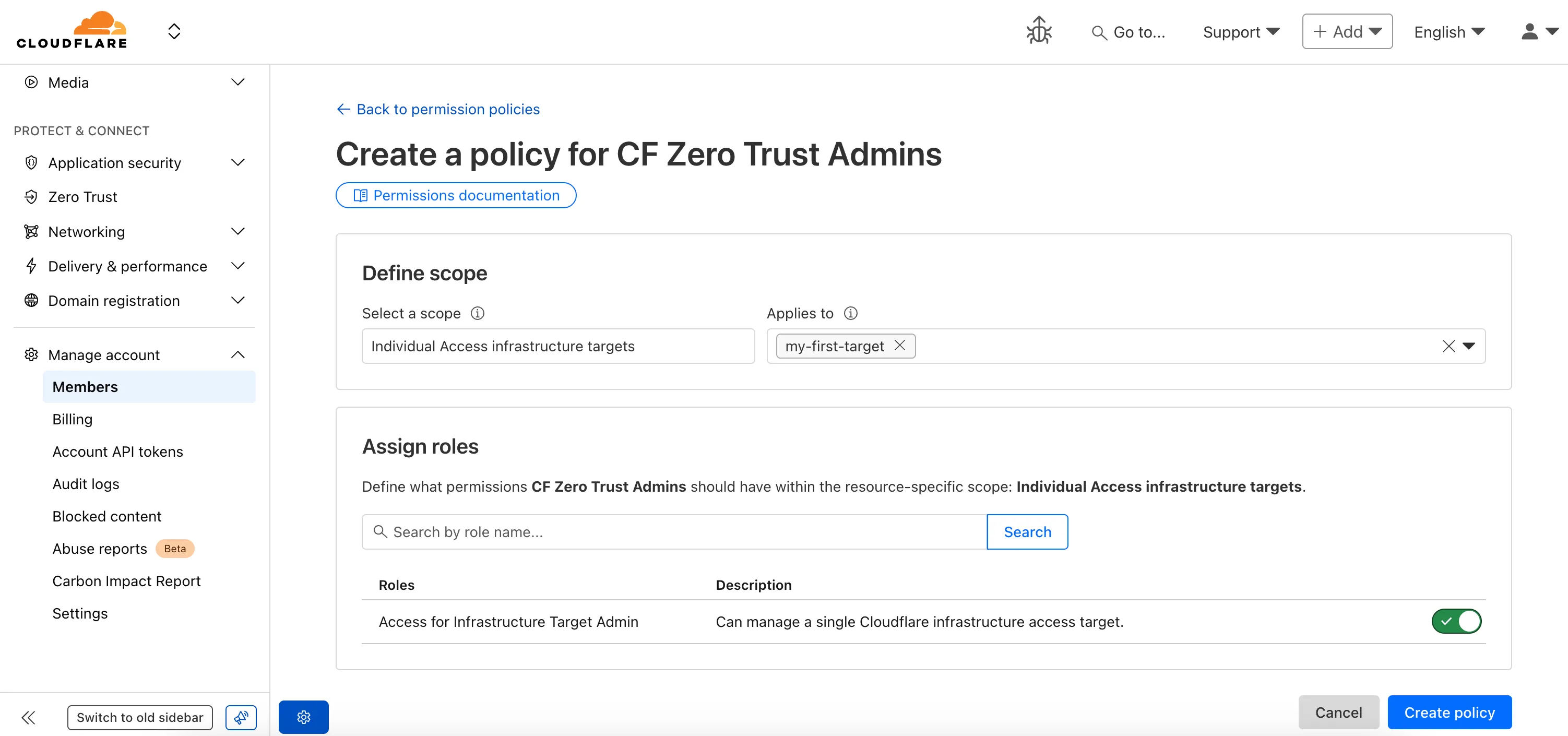
For more info:
You can now enhance your security posture by blocking additional application installer and disk image file types with Cloudflare Gateway. Preventing the download of unauthorized software packages is a critical step in securing endpoints from malware and unwanted applications.
We have expanded Gateway's file type controls to include:
- Apple Disk Image (dmg)
- Microsoft Software Installer (msix, appx)
- Apple Software Package (pkg)
You can find these new options within the Upload File Types and Download File Types selectors when creating or editing an HTTP policy. The file types are categorized as follows:
- System: Apple Disk Image (dmg)
- Executable: Microsoft Software Installer (msix), Microsoft Software Installer (appx), Apple Software Package (pkg)
To ensure these file types are blocked effectively, please note the following behaviors:
- DMG: Due to their file structure, DMG files are blocked at the very end of the transfer. A user's download may appear to progress but will fail at the last moment, preventing the browser from saving the file.
- MSIX: To comprehensively block Microsoft Software Installers, you should also include the file type Unscannable. MSIX files larger than 100 MB are identified as Unscannable ZIP files during inspection.
To get started, go to your HTTP policies in Zero Trust. For a full list of file types, refer to supported file types.
A new GA release for the Windows WARP client is now available on the stable releases downloads page.
This release contains minor fixes and improvements.
Changes and improvements
- MASQUE is now the default tunnel protocol for all new WARP device profiles.
- Improvement to limit idle connections in Gateway with DoH mode to avoid unnecessary resource usage that can lead to DoH requests not resolving.
- Improvement to maintain TCP connections to reduce interruptions in long-lived connections such as RDP or SSH.
- Improvements to maintain Global WARP override settings when switching between organizations.
- Improvements to maintain client connectivity during network changes.
Known issues
For Windows 11 24H2 users, Microsoft has confirmed a regression that may lead to performance issues like mouse lag, audio cracking, or other slowdowns. Cloudflare recommends users experiencing these issues upgrade to a minimum Windows 11 24H2 KB5062553 or higher for resolution.
Devices using WARP client 2025.4.929.0 and up may experience Local Domain Fallback failures if a fallback server has not been configured. To configure a fallback server, refer to Route traffic to fallback server.
Devices with KB5055523 installed may receive a warning about
Win32/ClickFix.ABAbeing present in the installer. To resolve this false positive, update Microsoft Security Intelligence to version 1.429.19.0 or later.DNS resolution may be broken when the following conditions are all true:
- WARP is in Secure Web Gateway without DNS filtering (tunnel-only) mode.
- A custom DNS server address is configured on the primary network adapter.
- The custom DNS server address on the primary network adapter is changed while WARP is connected.
To work around this issue, reconnect the WARP client by toggling off and back on.
A new GA release for the macOS WARP client is now available on the stable releases downloads page.
This release contains minor fixes and improvements.
Changes and improvements
- Fixed a bug preventing the
warp-diag captive-portalcommand from running successfully due to the client not parsing SSID on macOS. - Improvements to maintain Global WARP override settings when switching between organizations.
- MASQUE is now the default tunnel protocol for all new WARP device profiles.
- Improvement to limit idle connections in Gateway with DoH mode to avoid unnecessary resource usage that can lead to DoH requests not resolving.
- Improvements to maintain client connectivity during network changes.
- The WARP client now supports macOS Tahoe (version 26.0).
Known issues
macOS Sequoia: Due to changes Apple introduced in macOS 15.0.x, the WARP client may not behave as expected. Cloudflare recommends the use of macOS 15.4 or later.
Devices using WARP client 2025.4.929.0 and up may experience Local Domain Fallback failures if a fallback server has not been configured. To configure a fallback server, refer to Route traffic to fallback server.
- Fixed a bug preventing the