
Changelog
New updates and improvements at Cloudflare.

A new GA release for the Linux WARP client is now available on the stable releases downloads page.
This release contains minor fixes and improvements including an updated public key for Linux packages. The public key must be updated if it was installed before September 12, 2025 to ensure the repository remains functional after December 4, 2025. Instructions to make this update are available at pkg.cloudflareclient.com.
Changes and improvements
- MASQUE is now the default tunnel protocol for all new WARP device profiles.
- Improvement to limit idle connections in Gateway with DoH mode to avoid unnecessary resource usage that can lead to DoH requests not resolving.
- Improvements to maintain Global WARP override settings when switching between organizations.
- Improvements to maintain client connectivity during network changes.
Known issues
- Devices using WARP client 2025.4.929.0 and up may experience Local Domain Fallback failures if a fallback server has not been configured. To configure a fallback server, refer to Route traffic to fallback server.
Gateway users can now apply granular controls to their file sharing and AI chat applications through HTTP policies.
The new feature offers two methods of controlling SaaS applications:
- Application Controls are curated groupings of Operations which provide an easy way for users to achieve a specific outcome. Application Controls may include Upload, Download, Prompt, Voice, and Share depending on the application.
- Operations are controls aligned to the most granular action a user can take. This provides a fine-grained approach to enforcing policy and generally aligns to the SaaS providers API specifications in naming and function.
Get started using Application Granular Controls and refer to the list of supported applications.
You can now more precisely control your HTTP DLP policies by specifying whether to scan the request or response body, helping to reduce false positives and target specific data flows.
In the Gateway HTTP policy builder, you will find a new selector called Body Phase. This allows you to define the direction of traffic the DLP engine will inspect:
- Request Body: Scans data sent from a user's machine to an upstream service. This is ideal for monitoring data uploads, form submissions, or other user-initiated data exfiltration attempts.
- Response Body: Scans data sent to a user's machine from an upstream service. Use this to inspect file downloads and website content for sensitive data.
For example, consider a policy that blocks Social Security Numbers (SSNs). Previously, this policy might trigger when a user visits a website that contains example SSNs in its content (the response body). Now, by setting the Body Phase to Request Body, the policy will only trigger if the user attempts to upload or submit an SSN, ignoring the content of the web page itself.
All policies without this selector will continue to scan both request and response bodies to ensure continued protection.
For more information, refer to Gateway HTTP policy selectors.
Email security relies on your submissions to continuously improve our detection models. However, we often receive submissions in formats that cannot be ingested, such as incomplete EMLs, screenshots, or text files.
To ensure all customer feedback is actionable, we have launched two new features to manage invalid submissions sent to our team and user submission aliases:
- Email Notifications: We now automatically notify users by email when they provide an invalid submission, educating them on the correct format. To disable notifications, go to Settings ↗ > Invalid submission emails and turn the feature off.

- Invalid Submission dashboard: You can quickly identify which users need education to provide valid submissions so Cloudflare can provide continuous protection.
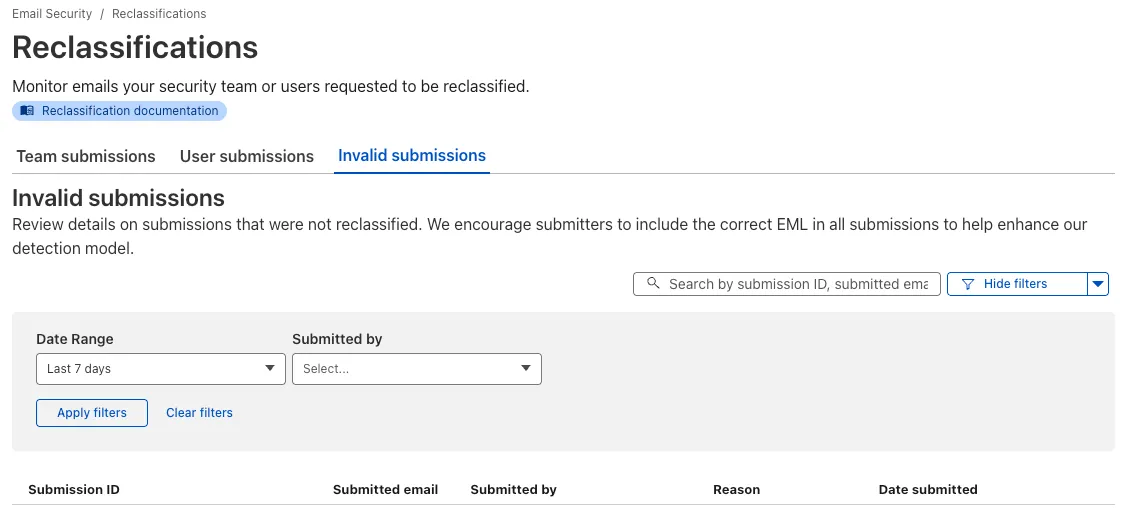
Learn more about this feature on invalid submissions.
This feature is available across these Email security packages:
- Advantage
- Enterprise
- Enterprise + PhishGuard
Browser-based RDP with Cloudflare Access is now generally available for all Cloudflare customers. It enables secure, remote Windows server access without VPNs or RDP clients.
Since we announced our open beta, we've made a few improvements:
- Support for targets with IPv6.
- Support for Magic WAN and WARP Connector as on-ramps.
- More robust error messaging on the login page to help you if you encounter an issue.
- Worldwide keyboard support. Whether your day-to-day is in Portuguese, Chinese, or something in between, your browser-based RDP experience will look and feel exactly like you are using a desktop RDP client.
- Cleaned up some other miscellaneous issues, including but not limited to enhanced support for Entra ID accounts and support for usernames with spaces, quotes, and special characters.
As a refresher, here are some benefits browser-based RDP provides:
- Control how users authenticate to internal RDP resources with single sign-on (SSO), multi-factor authentication (MFA), and granular access policies.
- Record who is accessing which servers and when to support regulatory compliance requirements and to gain greater visibility in the event of a security event.
- Eliminate the need to install and manage software on user devices. You will only need a web browser.
- Reduce your attack surface by keeping your RDP servers off the public Internet and protecting them from common threats like credential stuffing or brute-force attacks.
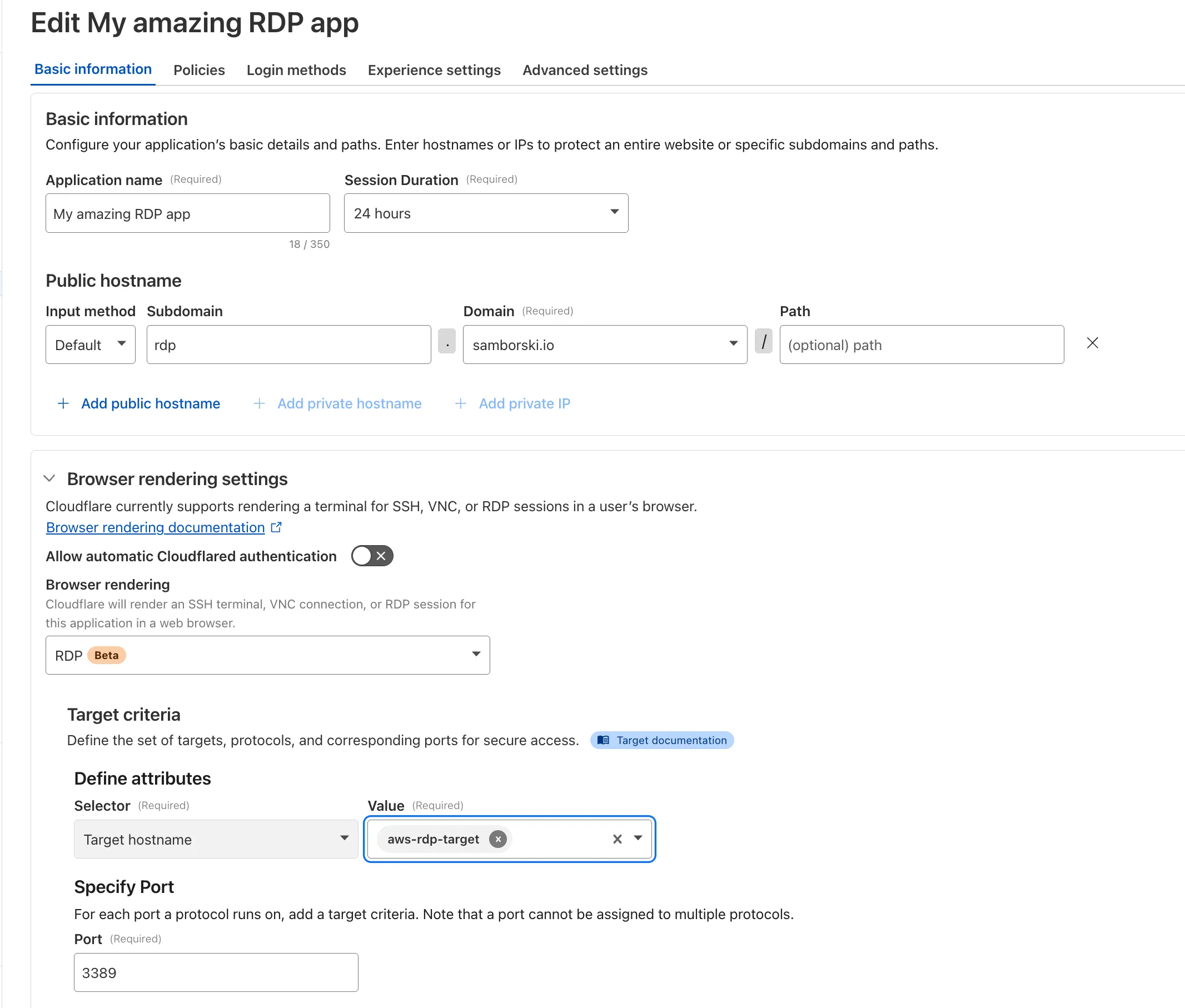
To get started, refer to Connect to RDP in a browser.
You can now route private traffic to Cloudflare Tunnel based on a hostname or domain, moving beyond the limitations of IP-based routing. This new capability is free for all Cloudflare One customers.
Previously, Tunnel routes could only be defined by IP address or CIDR range. This created a challenge for modern applications with dynamic or ephemeral IP addresses, often forcing administrators to maintain complex and brittle IP lists.
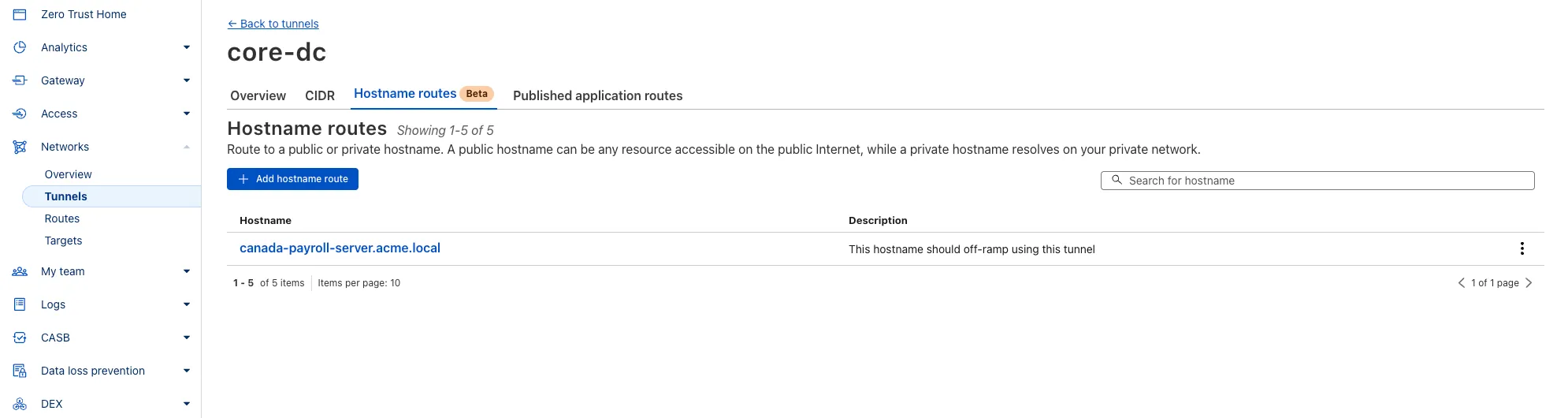
What’s new:
- Hostname & Domain Routing: Create routes for individual hostnames (e.g.,
payroll.acme.local) or entire domains (e.g.,*.acme.local) and direct their traffic to a specific Tunnel. - Simplified Zero Trust Policies: Build resilient policies in Cloudflare Access and Gateway using stable hostnames, making it dramatically easier to apply per-resource authorization for your private applications.
- Precise Egress Control: Route traffic for public hostnames (e.g.,
bank.example.com) through a specific Tunnel to enforce a dedicated source IP, solving the IP allowlist problem for third-party services. - No More IP Lists: This feature makes the workaround of maintaining dynamic IP Lists for Tunnel connections obsolete.
Get started in the Tunnels section of the Zero Trust dashboard with your first private hostname or public hostname route.
Learn more in our blog post ↗.
- Hostname & Domain Routing: Create routes for individual hostnames (e.g.,
Zero Trust Dashboard has a brand new, AI-powered search functionality. You can search your account by resources (applications, policies, device profiles, settings, etc.), pages, products, and more.
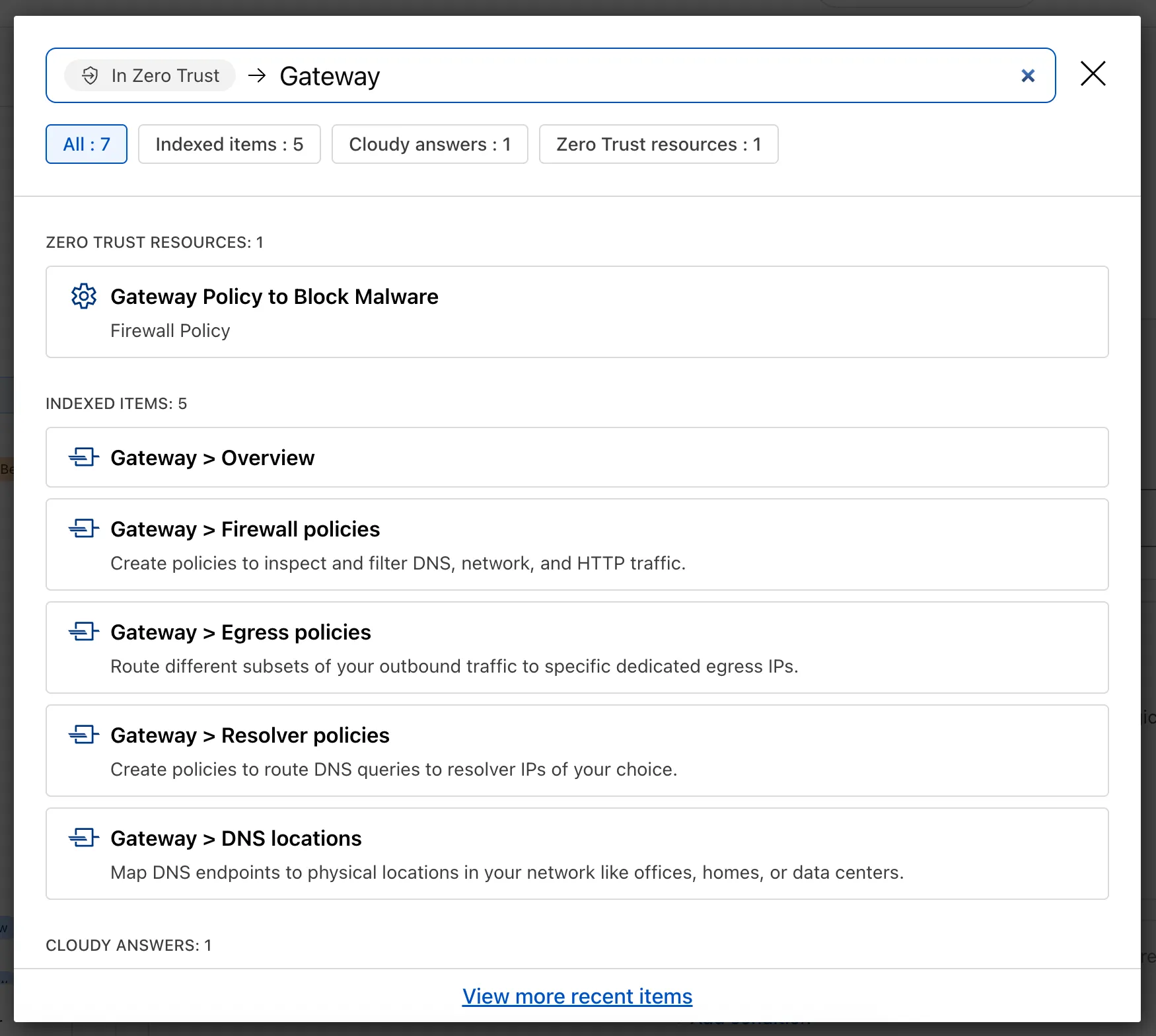
Ask Cloudy — You can also ask Cloudy, our AI agent, questions about Cloudflare Zero Trust. Cloudy is trained on our developer documentation and implementation guides, so it can tell you how to configure functionality, best practices, and can make recommendations.
Cloudy can then stay open with you as you move between pages to build configuration or answer more questions.
Find Recents — Recent searches and Cloudy questions also have a new tab under Zero Trust Overview.
We’re excited to announce that Email security customers can now choose their preferred mail processing location directly from the UI when onboarding a domain. This feature is available for the following onboarding methods: MX, BCC, and Journaling.
Customers can now select where their email is processed. The following regions are supported:
- Germany
- India
- Australia
Global processing remains the default option, providing flexibility to meet both compliance requirements or operational preferences.
When onboarding a domain with MX, BCC, or Journaling:
- Select the desired processing location (Germany, India, or Australia).
- The UI will display updated processing addresses specific to that region.
- For MX onboarding, if your domain is managed by Cloudflare, you can automatically update MX records directly from the UI.
This feature is available across these Email security packages:
- Advantage
- Enterprise
- Enterprise + PhishGuard
We’re expanding the list of processing locations to match our Data Localization Suite (DLS) footprint, giving customers the broadest set of regional options in the market without the complexity of self-hosting.
Magic WAN and WARP Connector users can now securely route their DNS traffic to the Gateway resolver without exposing traffic to the public Internet.
Routing DNS traffic to the Gateway resolver allows DNS resolution and filtering for traffic coming from private networks while preserving source internal IP visibility. This ensures Magic WAN users have full integration with our Cloudflare One features, including Internal DNS and hostname-based policies.
To configure DNS filtering, change your Magic WAN or WARP Connector DNS settings to use Cloudflare's shared resolver IPs,
172.64.36.1and172.64.36.2. Once you configure DNS resolution and filtering, you can use Source Internal IP as a traffic selector in your resolver policies for routing private DNS traffic to your Internal DNS.
A new Beta release for the Windows WARP client is now available on the beta releases downloads page.
This release contains minor fixes and improvements including enhancements to Proxy mode for even faster resolution. The MASQUE protocol is now the only protocol that can use Proxy mode. If you previously configured a device profile to use Proxy mode with Wireguard, you will need to select a new WARP mode or all devices matching the profile will lose connectivity.
Changes and improvements
- Enhancements to Proxy mode for even faster resolution. The MASQUE protocol is now the only protocol that can use Proxy mode. If you previously configured a device profile to use Proxy mode with Wireguard, you will need to select a new WARP mode or all devices matching the profile will lose connectivity.
- Improvement to keep TCP connections up the first time WARP connects on devices so that remote desktop sessions (such as RDP or SSH) continue to work.
- Improvements to maintain Global WARP Override settings when switching between organization configurations.
- The MASQUE protocol is now the default protocol for all new WARP device profiles.
- Improvement to limit idle connections in DoH mode to avoid unnecessary resource usage that can lead to DoH requests not resolving.
Known issues
For Windows 11 24H2 users, Microsoft has confirmed a regression that may lead to performance issues like mouse lag, audio cracking, or other slowdowns. Cloudflare recommends users experiencing these issues upgrade to a minimum Windows 11 24H2 KB5062553 or higher for resolution.
Devices using WARP client 2025.4.929.0 and up may experience Local Domain Fallback failures if a fallback server has not been configured. To configure a fallback server, refer to Route traffic to fallback server.
Devices with KB5055523 installed may receive a warning about Win32/ClickFix.ABA being present in the installer. To resolve this false positive, update Microsoft Security Intelligence to version 1.429.19.0 or later.
DNS resolution may be broken when the following conditions are all true:
- WARP is in Secure Web Gateway without DNS filtering (tunnel-only) mode.
- A custom DNS server address is configured on the primary network adapter.
- The custom DNS server address on the primary network adapter is changed while WARP is connected.
To work around this issue, reconnect the WARP client by toggling off and back on.
A new Beta release for the macOS WARP client is now available on the beta releases downloads page.
This release contains minor fixes and improvements including enhancements to Proxy mode for even faster resolution. The MASQUE protocol is now the only protocol that can use Proxy mode. If you previously configured a device profile to use Proxy mode with Wireguard, you will need to select a new WARP mode or all devices matching the profile will lose connectivity.
Changes and improvements
- Enhancements to Proxy mode for even faster resolution. The MASQUE protocol is now the only protocol that can use Proxy mode. If you previously configured a device profile to use Proxy mode with Wireguard, you will need to select a new WARP mode or all devices matching the profile will lose connectivity.
- Fixed a bug preventing the
warp-diag captive-portalcommand from running successfully due to the client not parsing SSID on macOS. - Improvements to maintain Global WARP Override settings when switching between organization configurations.
- The MASQUE protocol is now the default protocol for all new WARP device profiles.
- Improvement to limit idle connections in DoH mode to avoid unnecessary resource usage that can lead to DoH requests not resolving.
Known issues
- macOS Sequoia: Due to changes Apple introduced in macOS 15.0.x, the WARP client may not behave as expected. Cloudflare recommends the use of macOS 15.4 or later.
- Devices using WARP client 2025.4.929.0 and up may experience Local Domain Fallback failures if a fallback server has not been configured. To configure a fallback server, refer to Route traffic to fallback server.
Now, Magic WAN customers can configure a custom IKE ID for their IPsec tunnels. Customers that are using Magic WAN and a VeloCloud SD-WAN device together can utilize this new feature to create a high availability configuration.
This feature is available via API only. Customers can read the Magic WAN documentation to learn more about the Custom IKE ID feature and the API call to configure it.
All bidirectional tunnel health check return packets are accepted by any Magic on-ramp.
Previously, when a Magic tunnel had a bidirectional health check configured, the bidirectional health check would pass when the return packets came back to Cloudflare over the same tunnel that was traversed by the forward packets.
There are SD-WAN devices, like VeloCloud, that do not offer controls to steer traffic over one tunnel versus another in a high availability tunnel configuration.
Now, when a Magic tunnel has a bidirectional health check configured, the bidirectional health check will pass when the return packet traverses over any tunnel in a high availability configuration.
Starting December 1, 2025, list endpoints for the Cloudflare Tunnel API and Zero Trust Networks API will no longer return deleted tunnels, routes, subnets and virtual networks by default. This change makes the API behavior more intuitive by only returning active resources unless otherwise specified.
No action is required if you already explicitly set
is_deleted=falseor if you only need to list active resources.This change affects the following API endpoints:
- List all tunnels:
GET /accounts/{account_id}/tunnels - List Cloudflare Tunnels:
GET /accounts/{account_id}/cfd_tunnel - List WARP Connector tunnels:
GET /accounts/{account_id}/warp_connector - List tunnel routes:
GET /accounts/{account_id}/teamnet/routes - List subnets:
GET /accounts/{account_id}/zerotrust/subnets - List virtual networks:
GET /accounts/{account_id}/teamnet/virtual_networks
The default behavior of the
is_deletedquery parameter will be updated.Scenario Previous behavior (before December 1, 2025) New behavior (from December 1, 2025) is_deletedparameter is omittedReturns active & deleted tunnels, routes, subnets and virtual networks Returns only active tunnels, routes, subnets and virtual networks If you need to retrieve deleted (or all) resources, please update your API calls to explicitly include the
is_deletedparameter before December 1, 2025.To get a list of only deleted resources, you must now explicitly add the
is_deleted=truequery parameter to your request:Terminal window # Example: Get ONLY deleted Tunnelscurl "https://api.cloudflare.com/client/v4/accounts/$ACCOUNT_ID/tunnels?is_deleted=true" \-H "Authorization: Bearer $API_TOKEN"# Example: Get ONLY deleted Virtual Networkscurl "https://api.cloudflare.com/client/v4/accounts/$ACCOUNT_ID/teamnet/virtual_networks?is_deleted=true" \-H "Authorization: Bearer $API_TOKEN"Following this change, retrieving a complete list of both active and deleted resources will require two separate API calls: one to get active items (by omitting the parameter or using
is_deleted=false) and one to get deleted items (is_deleted=true).This update is based on user feedback and aims to:
- Create a more intuitive default: Aligning with common API design principles where list operations return only active resources by default.
- Reduce unexpected results: Prevents users from accidentally operating on deleted resources that were returned unexpectedly.
- Improve performance: For most users, the default query result will now be smaller and more relevant.
To learn more, please visit the Cloudflare Tunnel API and Zero Trust Networks API documentation.
- List all tunnels:
To provide more granular controls, we refined the existing roles for Email security and launched a new Email security role as well.
All Email security roles no longer have read or write access to any of the other Zero Trust products:
- Email Configuration Admin
- Email Integration Admin
- Email security Read Only
- Email security Analyst
- Email security Policy Admin
- Email security Reporting
To configure Data Loss Prevention (DLP) or Remote Browser Isolation (RBI), you now need to be an admin for the Zero Trust dashboard with the Cloudflare Zero Trust role.
Also through customer feedback, we have created a new additive role to allow Email security Analyst to create, edit, and delete Email security policies, without needing to provide access via the Email Configuration Admin role. This role is called Email security Policy Admin, which can read all settings, but has write access to allow policies, trusted domains, and blocked senders.
This feature is available across these Email security packages:
- Advantage
- Enterprise
- Enterprise + PhishGuard
We're excited to share a new AI feature, the WARP diagnostic analyzer ↗, to help you troubleshoot and resolve WARP connectivity issues faster. This beta feature is now available in the Cloudflare One dashboard ↗ to all users. The AI analyzer makes it easier for you to identify the root cause of client connectivity issues by parsing remote captures of WARP diagnostic logs. The WARP diagnostic analyzer provides a summary of impact that may be experienced on the device, lists notable events that may contribute to performance issues, and recommended troubleshooting steps and articles to help you resolve these issues. Refer to WARP diagnostics analyzer (beta) to learn more about how to maximize using the WARP diagnostic analyzer to troubleshoot the WARP client.
Digital Experience Monitoring (DEX) provides visibility into device connectivity and performance across your Cloudflare SASE deployment.
We've released an MCP server (Model Context Protocol) ↗ for DEX.
The DEX MCP server is an AI tool that allows customers to ask a question like, "Show me the connectivity and performance metrics for the device used by carly@acme.com", and receive an answer that contains data from the DEX API.
Any Cloudflare One customer using a Free, Pay-as-you-go, or Enterprise account can access the DEX MCP Server. This feature is available to everyone.
Customers can test the new DEX MCP server in less than one minute. To learn more, read the DEX MCP server documentation.
Zero Trust has significantly upgraded its Shadow IT analytics, providing you with unprecedented visibility into your organizations use of SaaS tools. With this dashboard, you can review who is using an application and volumes of data transfer to the application.
You can review these metrics against application type, such as Artificial Intelligence or Social Media. You can also mark applications with an approval status, including Unreviewed, In Review, Approved, and Unapproved designating how they can be used in your organization.
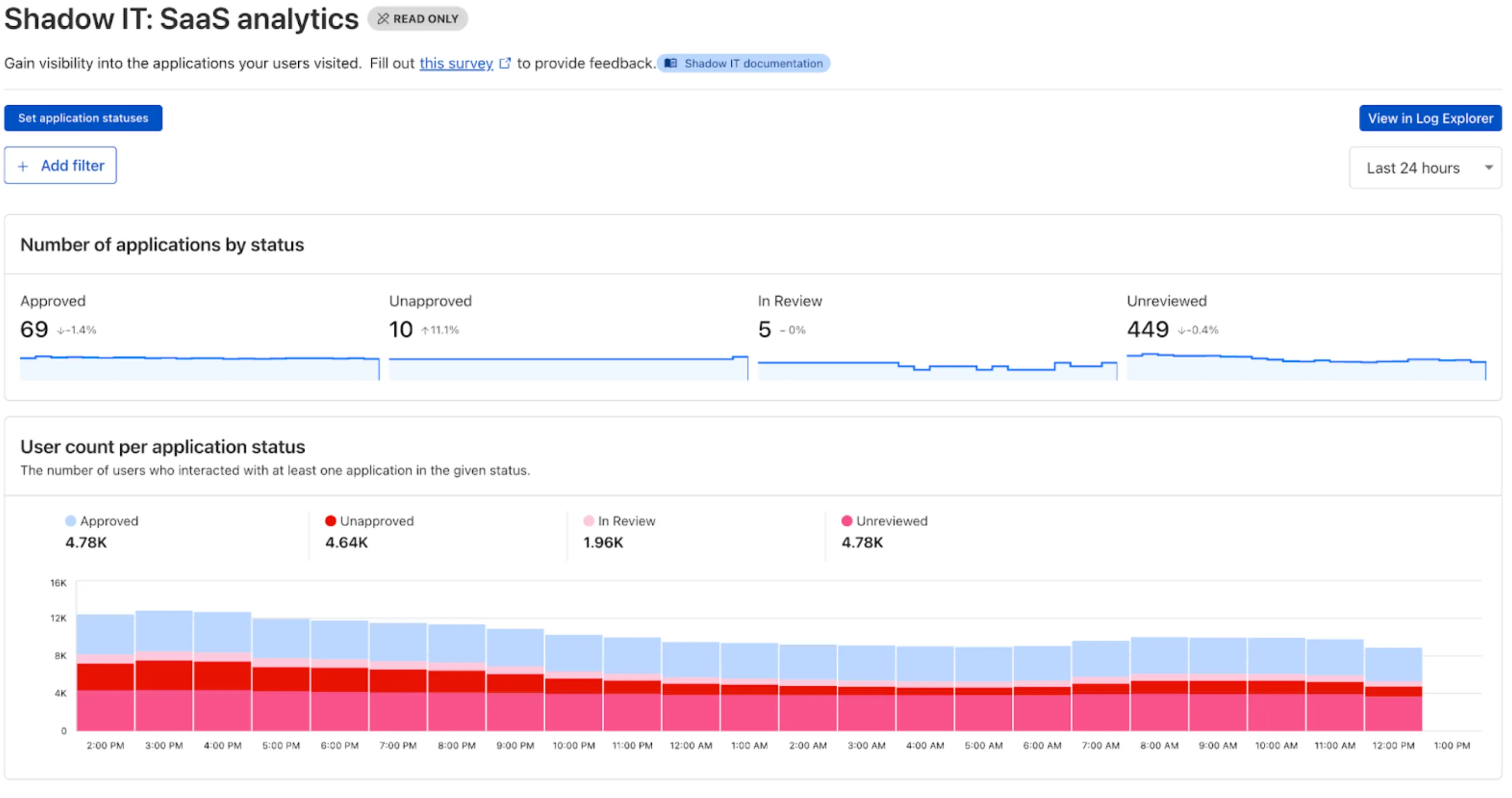
These application statuses can also be used in Gateway HTTP policies, so you can block, isolate, limit uploads and downloads, and more based on the application status.
Both the analytics and policies are accessible in the Cloudflare Zero Trust dashboard ↗, empowering organizations with better visibility and control.
Cloudflare CASB ↗ now supports three of the most widely used GenAI platforms — OpenAI ChatGPT, Anthropic Claude, and Google Gemini. These API-based integrations give security teams agentless visibility into posture, data, and compliance risks across their organization’s use of generative AI.
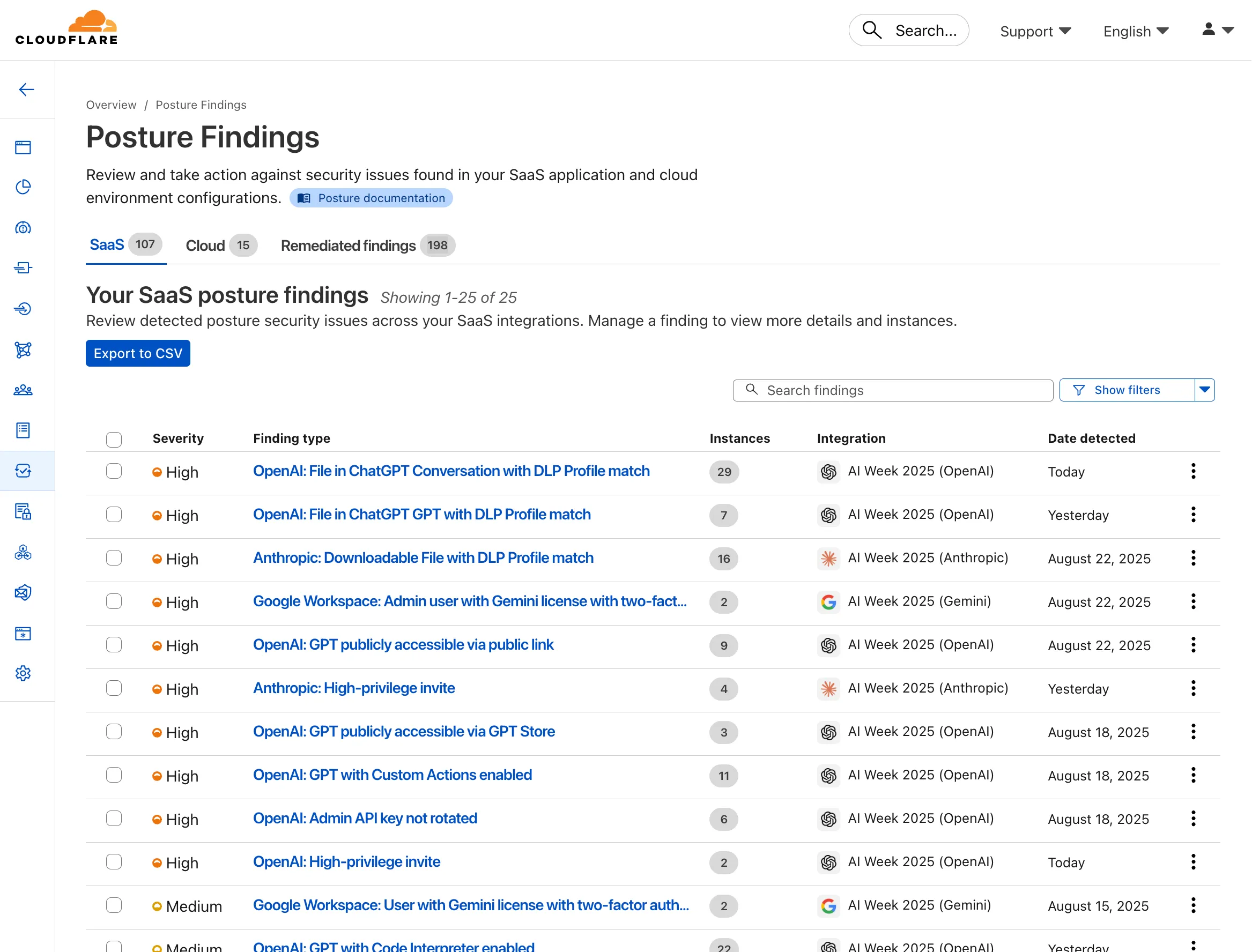
- Agentless connections — connect ChatGPT, Claude, and Gemini tenants via API; no endpoint software required
- Posture management — detect insecure settings and misconfigurations that could lead to data exposure
- DLP detection — identify sensitive data in uploaded chat attachments or files
- GenAI-specific insights — surface risks unique to each provider’s capabilities
These integrations are available to all Cloudflare One customers today.
You can now control who within your organization has access to internal MCP servers, by putting internal MCP servers behind Cloudflare Access.
Self-hosted applications in Cloudflare Access now support OAuth for MCP server authentication. This allows Cloudflare to delegate access from any self-hosted application to an MCP server via OAuth. The OAuth access token authorizes the MCP server to make requests to your self-hosted applications on behalf of the authorized user, using that user's specific permissions and scopes.
For example, if you have an MCP server designed for internal use within your organization, you can configure Access policies to ensure that only authorized users can access it, regardless of which MCP client they use. Support for internal, self-hosted MCP servers also works with MCP server portals, allowing you to provide a single MCP endpoint for multiple MCP servers. For more on MCP server portals, read the blog post ↗ on the Cloudflare Blog.
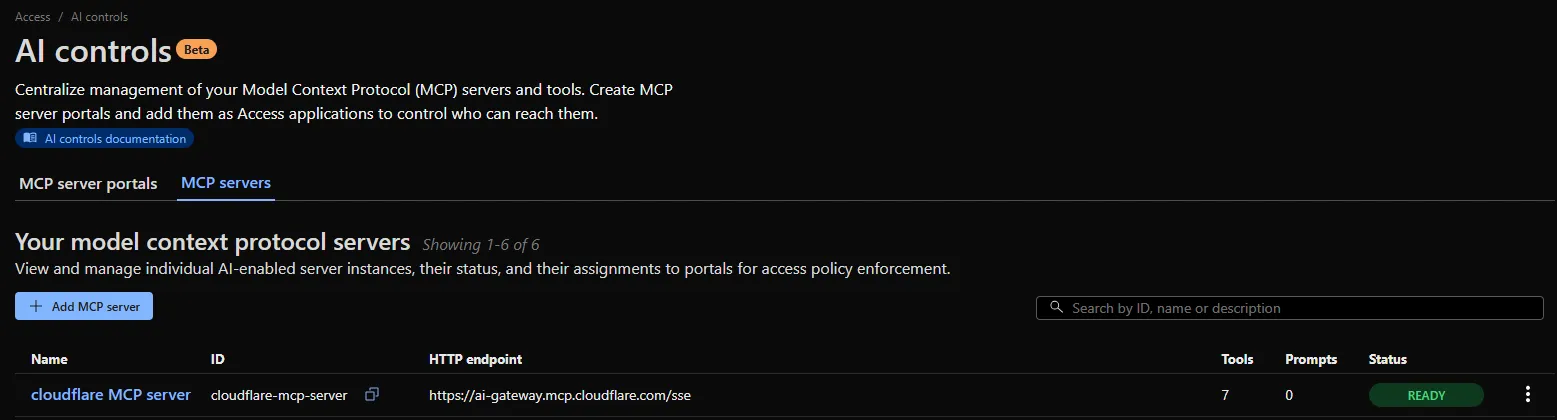
An MCP server portal centralizes multiple Model Context Protocol (MCP) servers onto a single HTTP endpoint. Key benefits include:
- Streamlined access to multiple MCP servers: MCP server portals support both unauthenticated MCP servers as well as MCP servers secured using any third-party or custom OAuth provider. Users log in to the portal URL through Cloudflare Access and are prompted to authenticate separately to each server that requires OAuth.
- Customized tools per portal: Admins can tailor an MCP portal to a particular use case by choosing the specific tools and prompt templates that they want to make available to users through the portal. This allows users to access a curated set of tools and prompts — the less external context exposed to the AI model, the better the AI responses tend to be.
- Observability: Once the user's AI agent is connected to the portal, Cloudflare Access logs the individual requests made using the tools in the portal.
This is available in an open beta for all customers across all plans! For more information check out our blog ↗ for this release.
You now have access to a comprehensive suite of capabilities to secure your organization's use of generative AI. AI prompt protection introduces four key features that work together to provide deep visibility and granular control.
- Prompt Detection for AI Applications
DLP can now natively detect and inspect user prompts submitted to popular AI applications, including Google Gemini, ChatGPT, Claude, and Perplexity.
- Prompt Analysis and Topic Classification
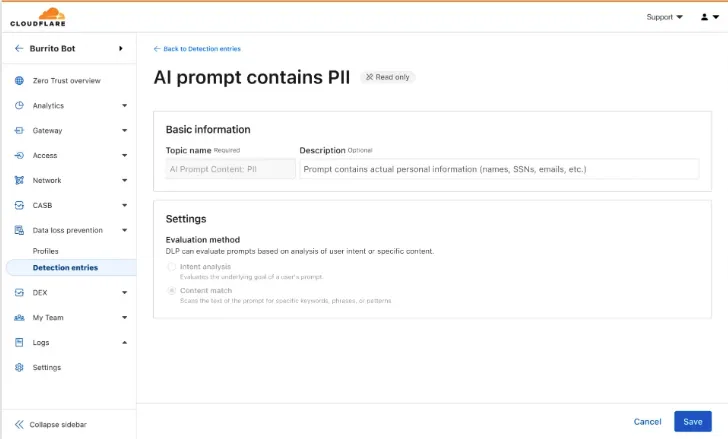
Our DLP engine performs deep analysis on each prompt, applying topic classification. These topics are grouped into two evaluation categories:
-
Content: PII, Source Code, Credentials and Secrets, Financial Information, and Customer Data.
-
Intent: Jailbreak attempts, requests for malicious code, or attempts to extract PII.
To help you apply these topics quickly, we have also released five new predefined profiles (for example, AI Prompt: AI Security, AI Prompt: PII) that bundle these new topics.
-
Granular Guardrails
You can now build guardrails using Gateway HTTP policies with application granular controls. Apply a DLP profile containing an AI prompt topic detection to individual AI applications (for example,
ChatGPT) and specific user actions (for example,SendPrompt) to block sensitive prompts.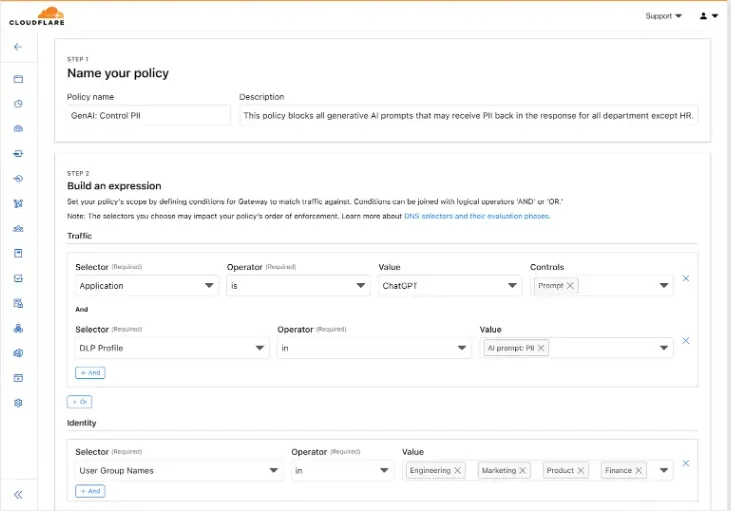
-
Full Prompt Logging
To aid in incident investigation, an optional setting in your Gateway policy allows you to capture prompt logs to store the full interaction of prompts that trigger a policy match. To make investigations easier, logs can be filtered by
conversation_id, allowing you to reconstruct the full context of an interaction that led to a policy violation.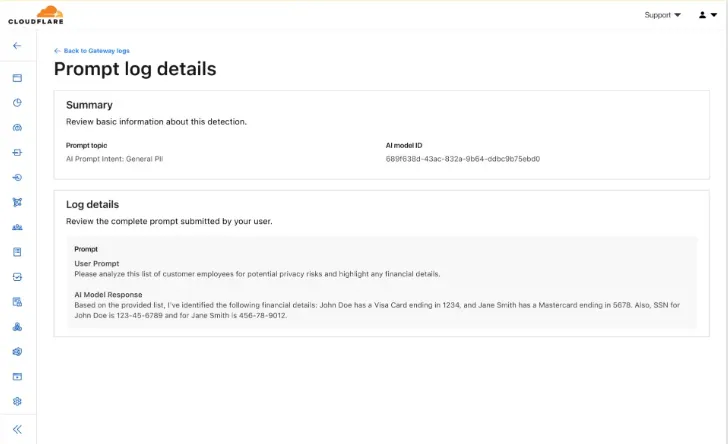
AI prompt protection is now available in open beta. To learn more about it, read the blog ↗ or refer to AI prompt topics.
A new GA release for the Windows WARP client is now available on the stable releases downloads page.
This release contains a hotfix for pre-login for multi-user for the 2025.6.1135.0 release.
Changes and improvements
- Fixes an issue where new pre-login registrations were not being properly created.
Known issues
For Windows 11 24H2 users, Microsoft has confirmed a regression that may lead to performance issues like mouse lag, audio cracking, or other slowdowns. Cloudflare recommends users experiencing these issues upgrade to a minimum Windows 11 24H2 KB5062553 or higher for resolution.
Devices using WARP client 2025.4.929.0 and up may experience Local Domain Fallback failures if a fallback server has not been configured. To configure a fallback server, refer to Route traffic to fallback server.
Devices with KB5055523 installed may receive a warning about Win32/ClickFix.ABA being present in the installer. To resolve this false positive, update Microsoft Security Intelligence to version 1.429.19.0 or later.
DNS resolution may be broken when the following conditions are all true:
- WARP is in Secure Web Gateway without DNS filtering (tunnel-only) mode.
- A custom DNS server address is configured on the primary network adapter.
- The custom DNS server address on the primary network adapter is changed while WARP is connected.
To work around this issue, please reconnect the WARP client by toggling off and back on.
Enterprise Gateway users can now use Bring Your Own IP (BYOIP) for dedicated egress IPs.
Admins can now onboard and use their own IPv4 or IPv6 prefixes to egress traffic from Cloudflare, delivering greater control, flexibility, and compliance for network traffic.
Get started by following the BYOIP onboarding process. Once your IPs are onboarded, go to Gateway > Egress policies and select or create an egress policy. In Select an egress IP, choose Use dedicated egress IPs (Cloudflare or BYOIP), then select your BYOIP address from the dropdown menu.
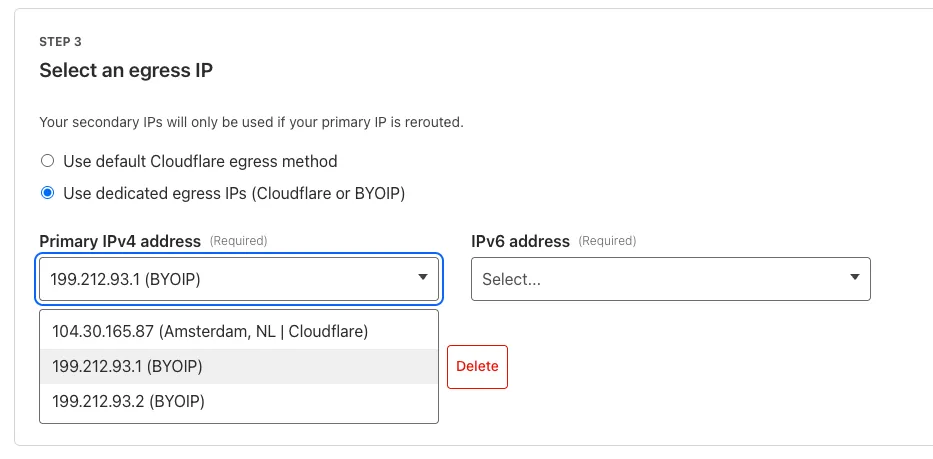
For more information, refer to BYOIP for dedicated egress IPs.
A new GA release for the Windows WARP client is now available on the stable releases downloads page.
This release contains minor fixes and improvements.
Changes and improvements
- Improvements to better manage multi-user pre-login registrations.
- Fixed an issue preventing devices from reaching split-tunneled traffic even when WARP was disconnected.
- Fix to prevent WARP from re-enabling its firewall rules after a user-initiated disconnect.
- Improvement for faster client connectivity on high-latency captive portal networks.
- Fixed an issue where recursive CNAME records could cause intermittent WARP connectivity issues.
Known issues
For Windows 11 24H2 users, Microsoft has confirmed a regression that may lead to performance issues like mouse lag, audio cracking, or other slowdowns. Cloudflare recommends users experiencing these issues upgrade to a minimum Windows 11 24H2 version KB5062553 or higher for resolution.
Devices using WARP client 2025.4.929.0 and up may experience Local Domain Fallback failures if a fallback server has not been configured. To configure a fallback server, refer to Route traffic to fallback server.
Devices with KB5055523 installed may receive a warning about
Win32/ClickFix.ABAbeing present in the installer. To resolve this false positive, update Microsoft Security Intelligence to version 1.429.19.0 or later.DNS resolution may be broken when the following conditions are all true:
- WARP is in Secure Web Gateway without DNS filtering (tunnel-only) mode.
- A custom DNS server address is configured on the primary network adapter.
- The custom DNS server address on the primary network adapter is changed while WARP is connected.
To work around this issue, reconnect the WARP client by toggling off and back on.