

Custom Errors are now generally available for all paid plans — bringing a unified and powerful experience for customizing error responses at both the zone and account levels.
You can now manage Custom Error Rules, Custom Error Assets, and redesigned Error Pages directly from the Cloudflare dashboard. These features let you deliver tailored messaging when errors occur, helping you maintain brand consistency and improve user experience — whether it’s a 404 from your origin or a security challenge from Cloudflare.
What's new:
- Custom Errors are now GA – Available on all paid plans and ready for production traffic.
- UI for Custom Error Rules and Assets – Manage your zone-level rules from the Rules > Overview and your zone-level assets from the Rules > Settings tabs.
- Define inline content or upload assets – Create custom responses directly in the rule builder, upload new or reuse previously stored assets.
- Refreshed UI and new name for Error Pages – Formerly known as “Custom Pages,” Error Pages now offer a cleaner, more intuitive experience for both zone and account-level configurations.
- Powered by Ruleset Engine – Custom Error Rules support conditional logic and override Error Pages for 500 and 1000 class errors, as well as errors originating from your origin or other Cloudflare products. You can also configure Response Header Transform Rules to add, change, or remove HTTP headers from responses returned by Custom Error Rules.
Learn more in the Custom Errors documentation.
Custom Fields now support logging both raw and transformed values for request and response headers in the HTTP requests dataset.
These fields are configured per zone and apply to all Logpush jobs in that zone that include request headers, response headers. Each header can be logged in only one format—either raw or transformed—not both.
By default:
- Request headers are logged as raw values
- Response headers are logged as transformed values
These defaults can be overidden to suit your logging needs.
For more information refer to Custom fields documentation
Cloudflare Snippets are now generally available at no extra cost across all paid plans — giving you a fast, flexible way to programmatically control HTTP traffic using lightweight JavaScript.
You can now use Snippets to modify HTTP requests and responses with confidence, reliability, and scale. Snippets are production-ready and deeply integrated with Cloudflare Rules, making them ideal for everything from quick dynamic header rewrites to advanced routing logic.
What's new:
-
Snippets are now GA – Available at no extra cost on all Pro, Business, and Enterprise plans.
-
Ready for production – Snippets deliver a production-grade experience built for scale.
-
Part of the Cloudflare Rules platform – Snippets inherit request modifications from other Cloudflare products and support sequential execution, allowing you to run multiple Snippets on the same request and apply custom modifications step by step.
-
Trace integration – Use Cloudflare Trace to see which Snippets were triggered on a request — helping you understand traffic flow and debug more effectively.

Learn more in the launch blog post ↗.
-
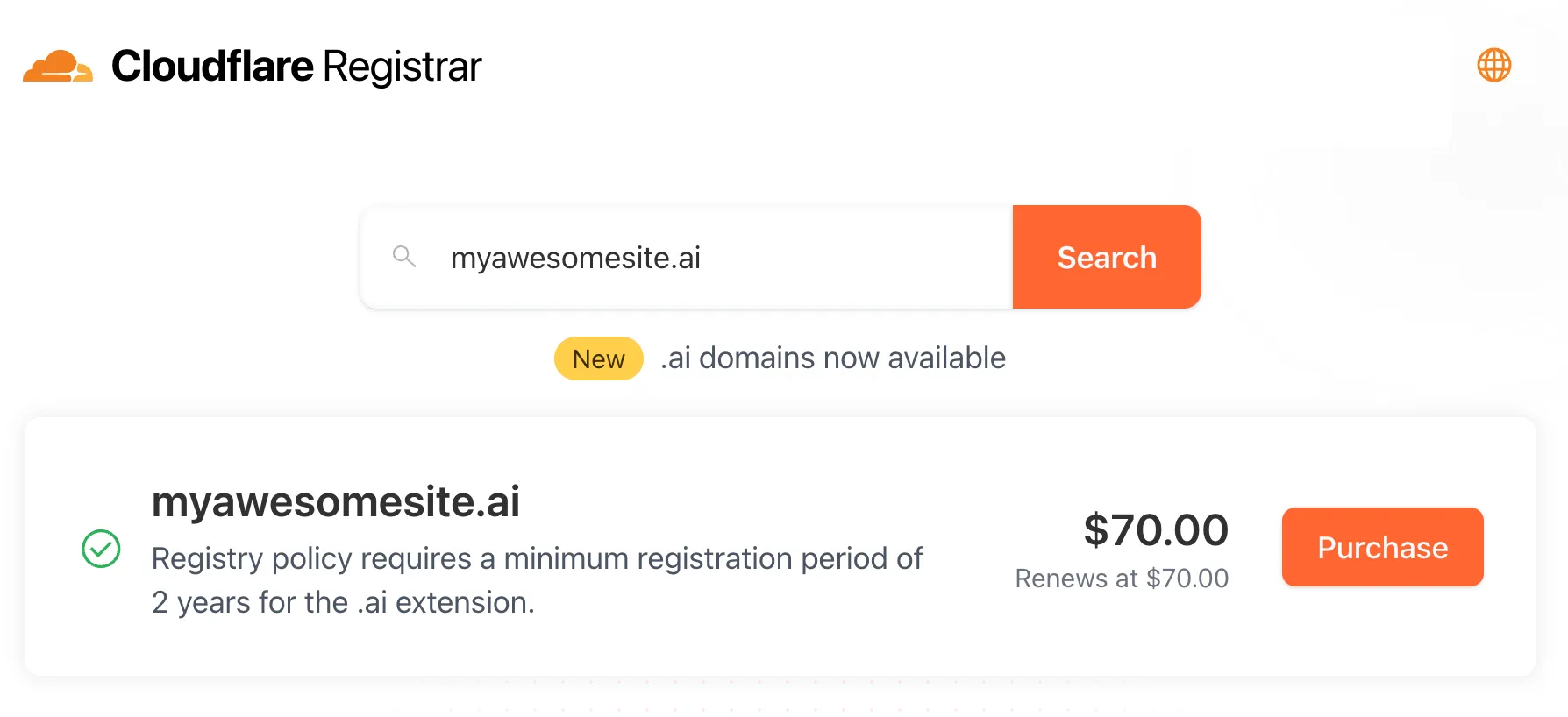
Cloudflare Registrar now supports
.aiand.shopdomains. These are two of our most highly-requested top-level domains (TLDs) and are great additions to the 300+ other TLDs we support ↗.Starting today, customers can:
- Register and renew these domains at cost without any markups or add-on fees
- Enjoy best-in-class security and performance with native integrations with Cloudflare DNS, CDN, and SSL services like one-click DNSSEC
- Combat domain hijacking with Custom Domain Protection ↗ (available on enterprise plans)
We can't wait to see what AI and e-commerce projects you deploy on Cloudflare. To get started, transfer your domains to Cloudflare or search for new ones to register ↗.
The latest version of audit logs streamlines audit logging by automatically capturing all user and system actions performed through the Cloudflare Dashboard or public APIs. This update leverages Cloudflare’s existing API Shield to generate audit logs based on OpenAPI schemas, ensuring a more consistent and automated logging process.
Availability: Audit logs (version 2) is now in Beta, with support limited to API access.
Use the following API endpoint to retrieve audit logs:
JavaScript GET https://api.cloudflare.com/client/v4/accounts/<account_id>/logs/audit?since=<date>&before=<date>You can access detailed documentation for audit logs (version 2) Beta API release here ↗.
Key Improvements in the Beta Release:
-
Automated & standardized logging: Logs are now generated automatically using a standardized system, replacing manual, team-dependent logging. This ensures consistency across all Cloudflare services.
-
Expanded product coverage: Increased audit log coverage from 75% to 95%. Key API endpoints such as
/accounts,/zones, and/organizationsare now included. -
Granular filtering: Logs now follow a uniform format, enabling precise filtering by actions, users, methods, and resources—allowing for faster and more efficient investigations.
-
Enhanced context and traceability: Each log entry now includes detailed context, such as the authentication method used, the interface (API or Dashboard) through which the action was performed, and mappings to Cloudflare Ray IDs for better traceability.
-
Comprehensive activity capture: Expanded logging to include GET requests and failed attempts, ensuring that all critical activities are recorded.
Known Limitations in Beta
- Error handling for the API is not implemented.
- There may be gaps or missing entries in the available audit logs.
- UI is unavailable in this Beta release.
- System-level logs and User-Activity logs are not included.
Support for these features is coming as part of the GA release later this year. For more details, including a sample audit log, check out our blog post: Introducing Automatic Audit Logs ↗
-
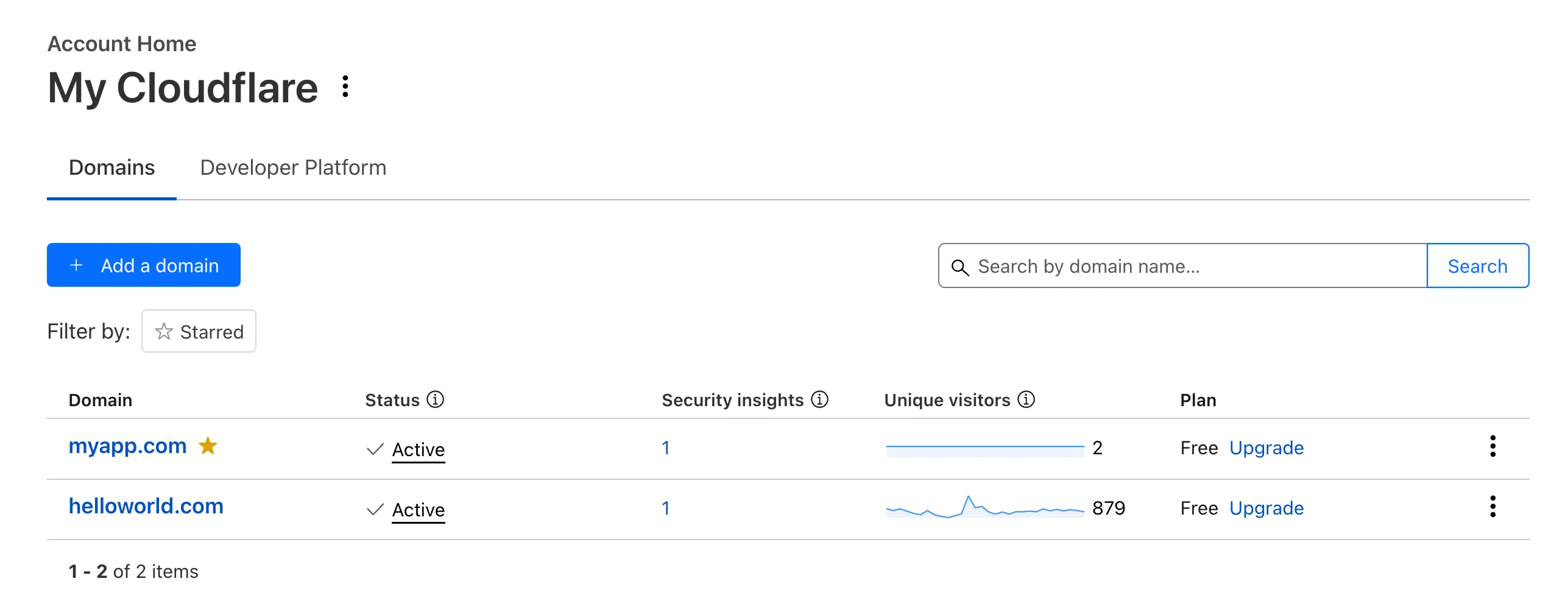
Recently, Account Home has been updated to streamline your workflows:
-
Recent Workers projects: You'll now find your projects readily accessible from a new
Developer Platformtab on Account Home. See recently-modified projects and explore what you can work our developer-focused products. -
Traffic and security insights: Get a snapshot of domain performance at a glance with key metrics and trends.
-
Quick actions: You can now perform common actions for your account, domains, and even Workers in just 1-2 clicks from the 3-dot menu.
-
Keep starred domains front and center: Now, when you filter for starred domains on Account Home, we'll save your preference so you'll continue to only see starred domains by default.
We can't wait for you to take the new Account Home for a spin.
For more info:
-
In Cloudflare Terraform Provider ↗ versions 5.2.0 and above, dozens of resources now have proper drift detection. Before this fix, these resources would indicate they needed to be updated or replaced — even if there was no real change. Now, you can rely on your
terraform planto only show what resources are expected to change.This issue affected resources ↗ related to these products and features:
- API Shield
- Argo Smart Routing
- Argo Tiered Caching
- Bot Management
- BYOIP
- D1
- DNS
- Email Routing
- Hyperdrive
- Observatory
- Pages
- R2
- Rules
- SSL/TLS
- Waiting Room
- Workers
- Zero Trust
In the Cloudflare Terraform Provider ↗ versions 5.2.0 and above, sensitive properties of resources are redacted in logs. Sensitive properties in Cloudflare's OpenAPI Schema ↗ are now annotated with
x-sensitive: true. This results in proper auto-generation of the corresponding Terraform resources, and prevents sensitive values from being shown when you run Terraform commands.This issue affected resources ↗ related to these products and features:
- Alerts and Audit Logs
- Device API
- DLP
- DNS
- Magic Visibility
- Magic WAN
- TLS Certs and Hostnames
- Tunnels
- Turnstile
- Workers
- Zaraz
We’ve streamlined the Logpush setup process by integrating R2 bucket creation directly into the Logpush workflow!
Now, you no longer need to navigate multiple pages to manually create an R2 bucket or copy credentials. With this update, you can seamlessly configure a Logpush job to R2 in just one click, reducing friction and making setup faster and easier.
This enhancement makes it easier for customers to adopt Logpush and R2.
For more details refer to our Logs documentation.
We have upgraded and streamlined Cloudflare Rules limits across all plans, simplifying rule management and improving scalability for everyone.
New limits by product:
- Bulk Redirects
- Free: 20 → 10,000 URL redirects across lists
- Pro: 500 → 25,000 URL redirects across lists
- Business: 500 → 50,000 URL redirects across lists
- Enterprise: 10,000 → 1,000,000 URL redirects across lists
- Cloud Connector
- Free: 5 → 10 connectors
- Enterprise: 125 → 300 connectors
- Custom Errors
- Pro: 5 → 25 error assets and rules
- Business: 20 → 50 error assets and rules
- Enterprise: 50 → 300 error assets and rules
- Snippets
- Pro: 10 → 25 code snippets and rules
- Business: 25 → 50 code snippets and rules
- Enterprise: 50 → 300 code snippets and rules
- Cache Rules, Configuration Rules, Compression Rules, Origin Rules, Single Redirects, and Transform Rules
- Enterprise: 125 → 300 rules
- Bulk Redirects
We're introducing Custom Errors (beta), which builds on our existing Custom Error Responses feature with new asset storage capabilities.
This update allows you to store externally hosted error pages on Cloudflare and reference them in custom error rules, eliminating the need to supply inline content.
This brings the following new capabilities:
- Custom error assets – Fetch and store external error pages at the edge for use in error responses.
- Account-Level custom errors – Define error handling rules and assets at the account level for consistency across multiple zones. Zone-level rules take precedence over account-level ones, and assets are not shared between levels.
You can use Cloudflare API to upload your existing assets for use with Custom Errors:
Terminal window curl "https://api.cloudflare.com/client/v4/zones/{zone_id}/custom_pages/assets" \--header "Authorization: Bearer <API_TOKEN>" \--header 'Content-Type: application/json' \--data '{"name": "maintenance","description": "Maintenance template page","url": "https://example.com/"}'You can then reference the stored asset in a Custom Error rule:
Terminal window curl --request PUT \"https://api.cloudflare.com/client/v4/zones/{zone_id}/rulesets/phases/http_custom_errors/entrypoint" \--header "Authorization: Bearer <API_TOKEN>" \--header 'Content-Type: application/json' \--data '{"rules": [{"action": "serve_error","action_parameters": {"asset_name": "maintenance","content_type": "text/html","status_code": 503},"enabled": true,"expression": "http.request.uri.path contains \"error\""}]}'
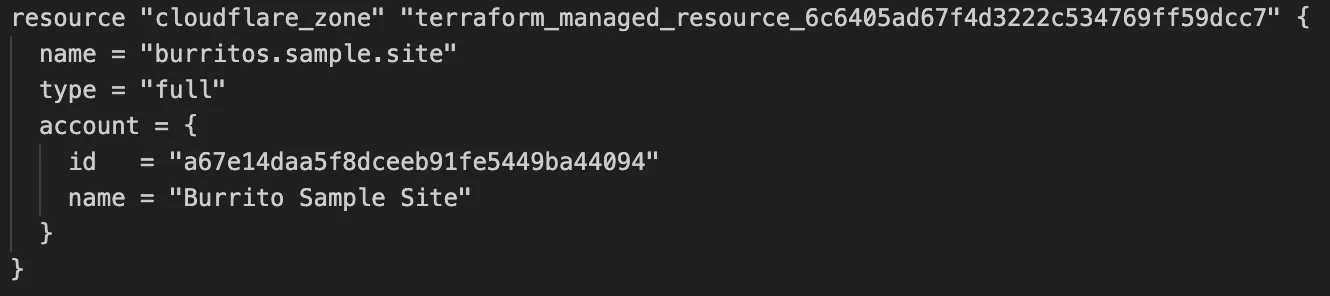
Cloudflare's v5 Terraform Provider is now generally available. With this release, Terraform resources are now automatically generated based on OpenAPI Schemas. This change brings alignment across our SDKs, API documentation, and now Terraform Provider. The new provider boosts coverage by increasing support for API properties to 100%, adding 25% more resources, and more than 200 additional data sources. Going forward, this will also reduce the barriers to bringing more resources into Terraform across the broader Cloudflare API. This is a small, but important step to making more of our platform manageable through GitOps, making it easier for you to manage Cloudflare just like you do your other infrastructure.
The Cloudflare Terraform Provider v5 is a ground-up rewrite of the provider and introduces breaking changes for some resource types. Please refer to the upgrade guide ↗ for best practices, or the blog post on automatically generating Cloudflare's Terraform Provider ↗ for more information about the approach.
For more info
The new Snippets code editor lets you edit Snippet code and rule in one place, making it easier to test and deploy changes without switching between pages.
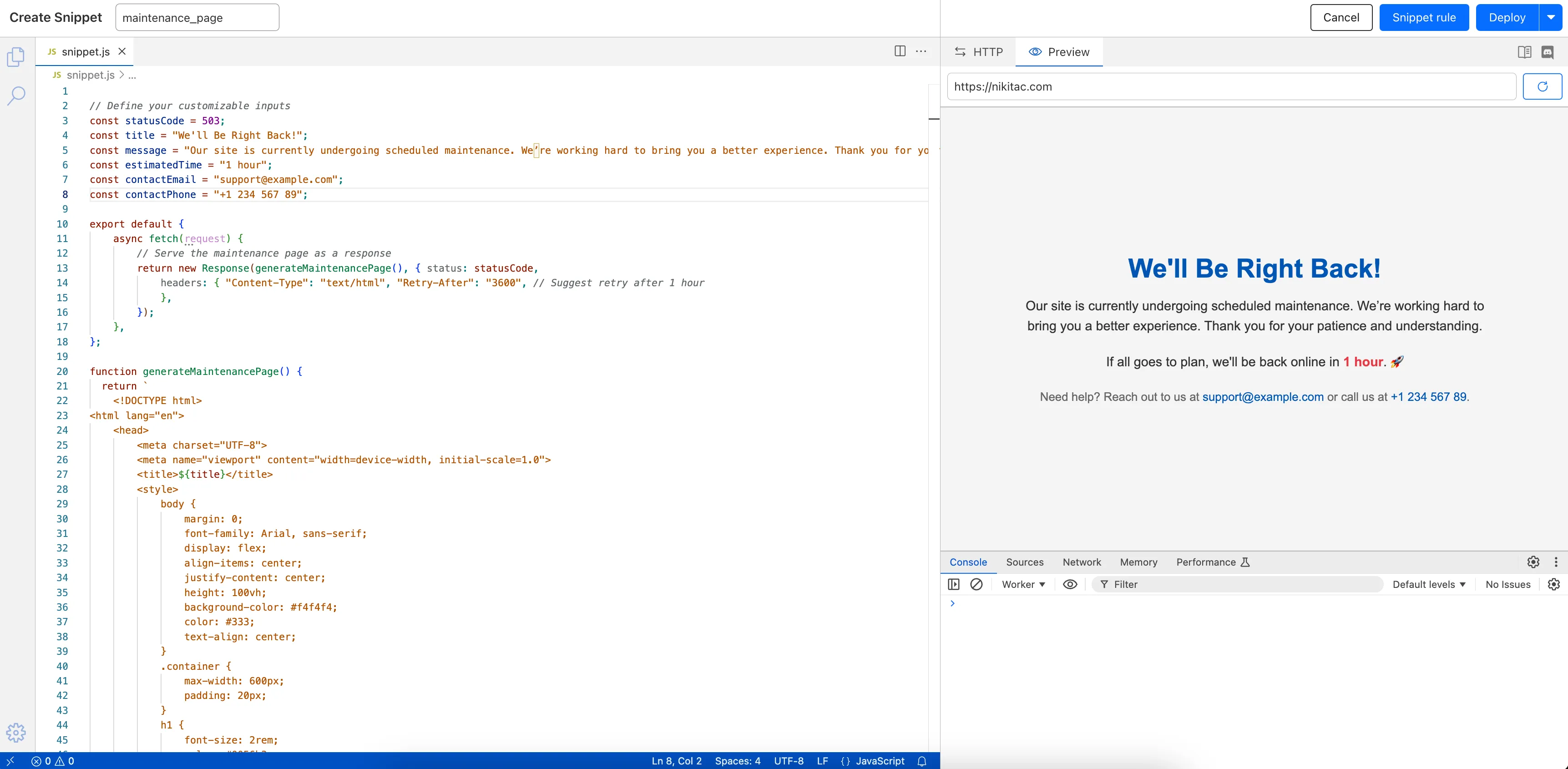
What’s new:
- Single-page editing for code and rule – No need to jump between screens.
- Auto-complete & syntax highlighting – Get suggestions and avoid mistakes.
- Code formatting & refactoring – Write cleaner, more readable code.
Try it now in Rules > Snippets ↗.
Rules Overview gives you a single page to manage all your Cloudflare Rules.
What you can do:
- See all your rules in one place – No more clicking around.
- Find rules faster – Search by name.
- Understand execution order – See how rules run in sequence.
- Debug easily – Use Trace without switching tabs.
Check it out in Rules > Overview ↗.
The latest
cloudflaredbuild 2024.12.2 ↗ introduces the ability to collect all the diagnostic logs needed to troubleshoot acloudflaredinstance.A diagnostic report collects data from a single instance of
cloudflaredrunning on the local machine and outputs it to acloudflared-diagfile.For more information, refer to Diagnostic logs.
Now, you can manage Cloudflare Snippets with Terraform. Use infrastructure-as-code to deploy and update Snippet code and rules without manual changes in the dashboard.
Example Terraform configuration:
resource "cloudflare_snippet" "my_snippet" {zone_id = "<ZONE_ID>"name = "my_test_snippet_1"main_module = "file1.js"files {name = "file1.js"content = file("file1.js")}}resource "cloudflare_snippet_rules" "cookie_snippet_rule" {zone_id = "<ZONE_ID>"rules {enabled = trueexpression = "http.cookie eq \"a=b\""description = "Trigger snippet on specific cookie"snippet_name = "my_test_snippet_1"}depends_on = [cloudflare_snippet.my_snippet]}Learn more in the Configure Snippets using Terraform documentation.
Now, you can use Cloud Connector to route traffic to your R2 buckets based on URLs, headers, geolocation, and more.
Example setup:
Terminal window curl --request PUT \"https://api.cloudflare.com/client/v4/zones/{zone_id}/cloud_connector/rules" \--header "Authorization: Bearer <API_TOKEN>" \--header "Content-Type: application/json" \--data '[{"expression": "http.request.uri.path wildcard \"/images/*\"","provider": "cloudflare_r2","description": "Connect to R2 bucket containing images","parameters": {"host": "mybucketcustomdomain.example.com"}}]'Get started using Cloud Connector documentation.
It’s now easy to create wildcard-based URL Rewrites. No need for complex functions—just define your patterns and go.
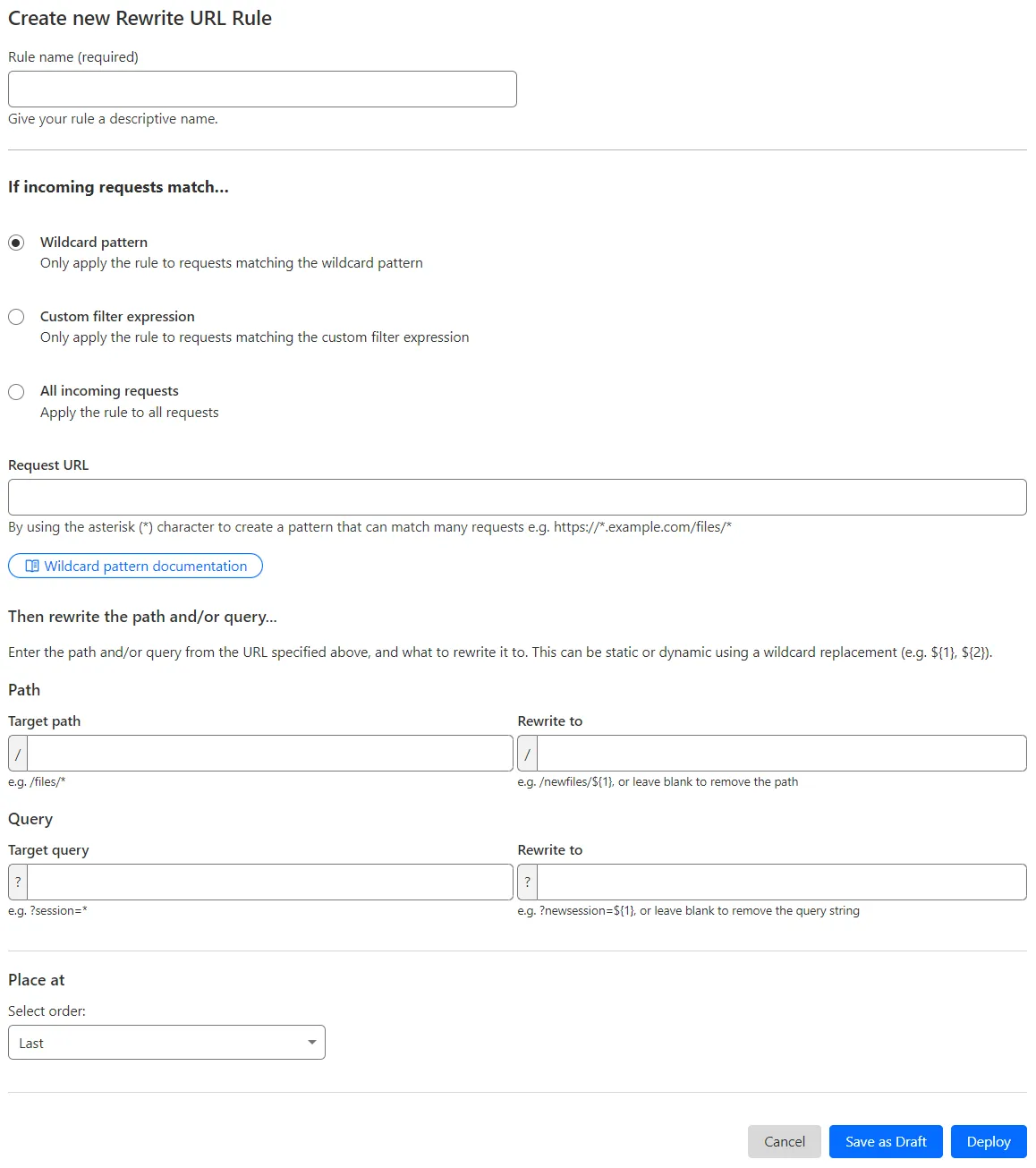
What’s improved:
- Full wildcard support – Create rewrite patterns using intuitive interface.
- Simplified rule creation – No need for complex functions.
Try it via creating a Rewrite URL rule in the dashboard.
Cloudflare has introduced new fields to two Gateway-related datasets in Cloudflare Logs:
-
Gateway HTTP:
ApplicationIDs,ApplicationNames,CategoryIDs,CategoryNames,DestinationIPContinentCode,DestinationIPCountryCode,ProxyEndpoint,SourceIPContinentCode,SourceIPCountryCode,VirtualNetworkID, andVirtualNetworkName. -
Gateway Network:
ApplicationIDs,ApplicationNames,DestinationIPContinentCode,DestinationIPCountryCode,ProxyEndpoint,SourceIPContinentCode,SourceIPCountryCode,TransportProtocol,VirtualNetworkID, andVirtualNetworkName.
-
Every site on Cloudflare now has access to AI Audit, which summarizes the crawling behavior of popular and known AI services.
You can use this data to:
- Understand how and how often crawlers access your site (and which content is the most popular).
- Block specific AI bots accessing your site.
- Use Cloudflare to enforce your
robots.txtpolicy via an automatic WAF rule.
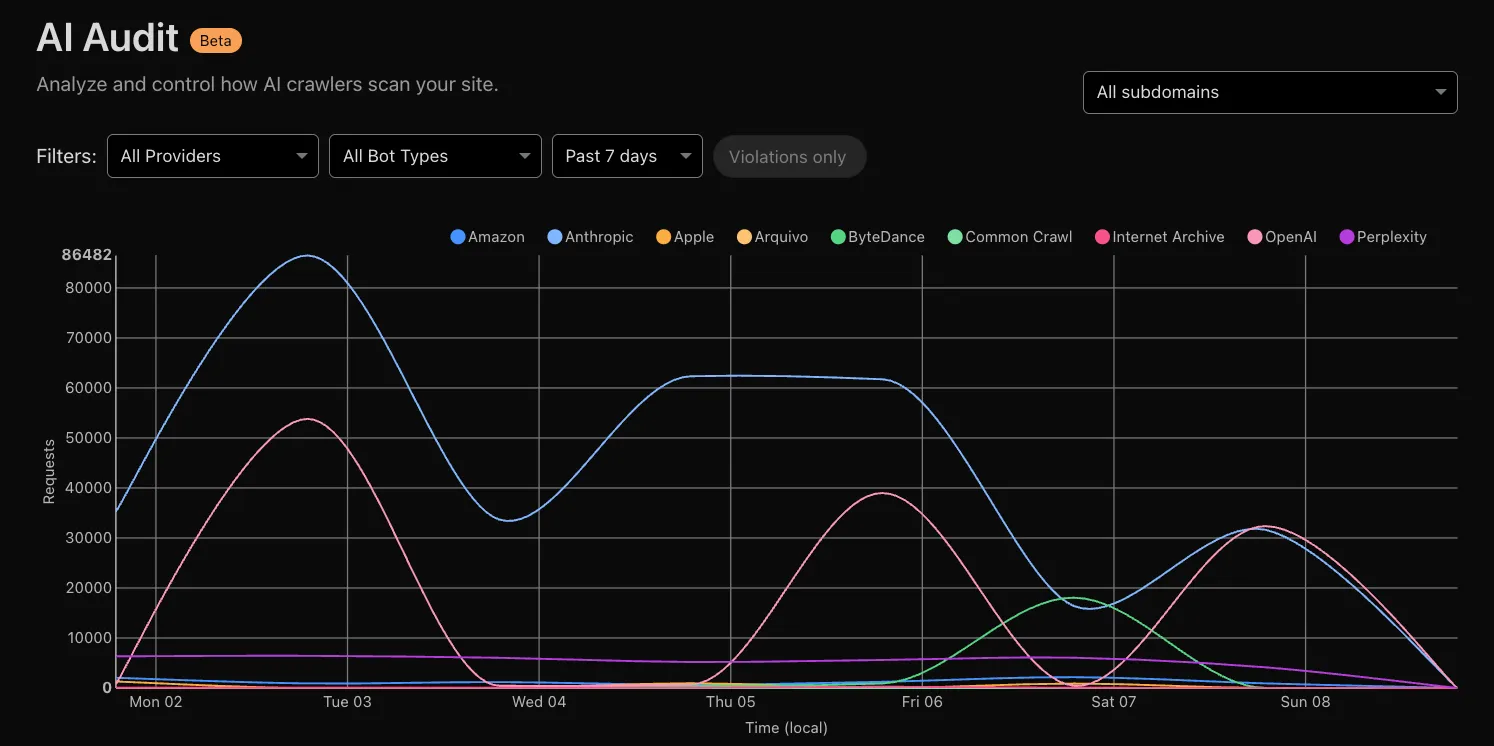
To get started, explore AI audit.
Now, you can create common rule configurations in just one click using Rules Templates.

What you can do:
- Pick a pre-built rule – Choose from a library of templates.
- One-click setup – Deploy best practices instantly.
- Customize as needed – Adjust templates to fit your setup.
Template cards are now also available directly in the rule builder for each product.
Need more ideas? Check out the Examples gallery in our documentation.