
Changelog
New updates and improvements at Cloudflare.

A new GA release for the macOS WARP client is now available on the stable releases downloads page.
This release contains minor fixes and improvements.
Changes and improvements
- Fixed an issue preventing devices from reaching split-tunneled traffic even when WARP was disconnected.
- Fix to prevent WARP from re-enabling its firewall rules after a user-initiated disconnect.
- Improvement for faster client connectivity on high-latency captive portal networks.
- Fixed an issue where recursive CNAME records could cause intermittent WARP connectivity issues.
Known issues
- macOS Sequoia: Due to changes Apple introduced in macOS 15.0.x, the WARP client may not behave as expected. Cloudflare recommends the use of macOS 15.4 or later.
- Devices using WARP client 2025.4.929.0 and up may experience Local Domain Fallback failures if a fallback server has not been configured. To configure a fallback server, refer to Route traffic to fallback server.
A new GA release for the Linux WARP client is now available on the stable releases downloads page.
This release contains minor fixes and improvements.
Changes and improvements
- Fixed an issue preventing devices from reaching split-tunneled traffic even when WARP was disconnected.
- Fix to prevent WARP from re-enabling its firewall rules after a user-initiated disconnect.
- Improvement for faster client connectivity on high-latency captive portal networks.
- Fixed an issue where recursive CNAME records could cause intermittent WARP connectivity issues.
Known issues
- Devices using WARP client 2025.4.929.0 and up may experience Local Domain Fallback failures if a fallback server has not been configured. To configure a fallback server, refer to Route traffic to fallback server.
SSH with Cloudflare Access for Infrastructure now supports SFTP. It is compatible with SFTP clients, such as Cyberduck.
You can now create more granular, network-aware Custom Rules in Cloudflare Load Balancing using the Autonomous System Number (ASN) of an incoming request.
This allows you to steer traffic with greater precision based on the network source of a request. For example, you can route traffic from specific Internet Service Providers (ISPs) or enterprise customers to dedicated infrastructure, optimize performance, or enforce compliance by directing certain networks to preferred data centers.
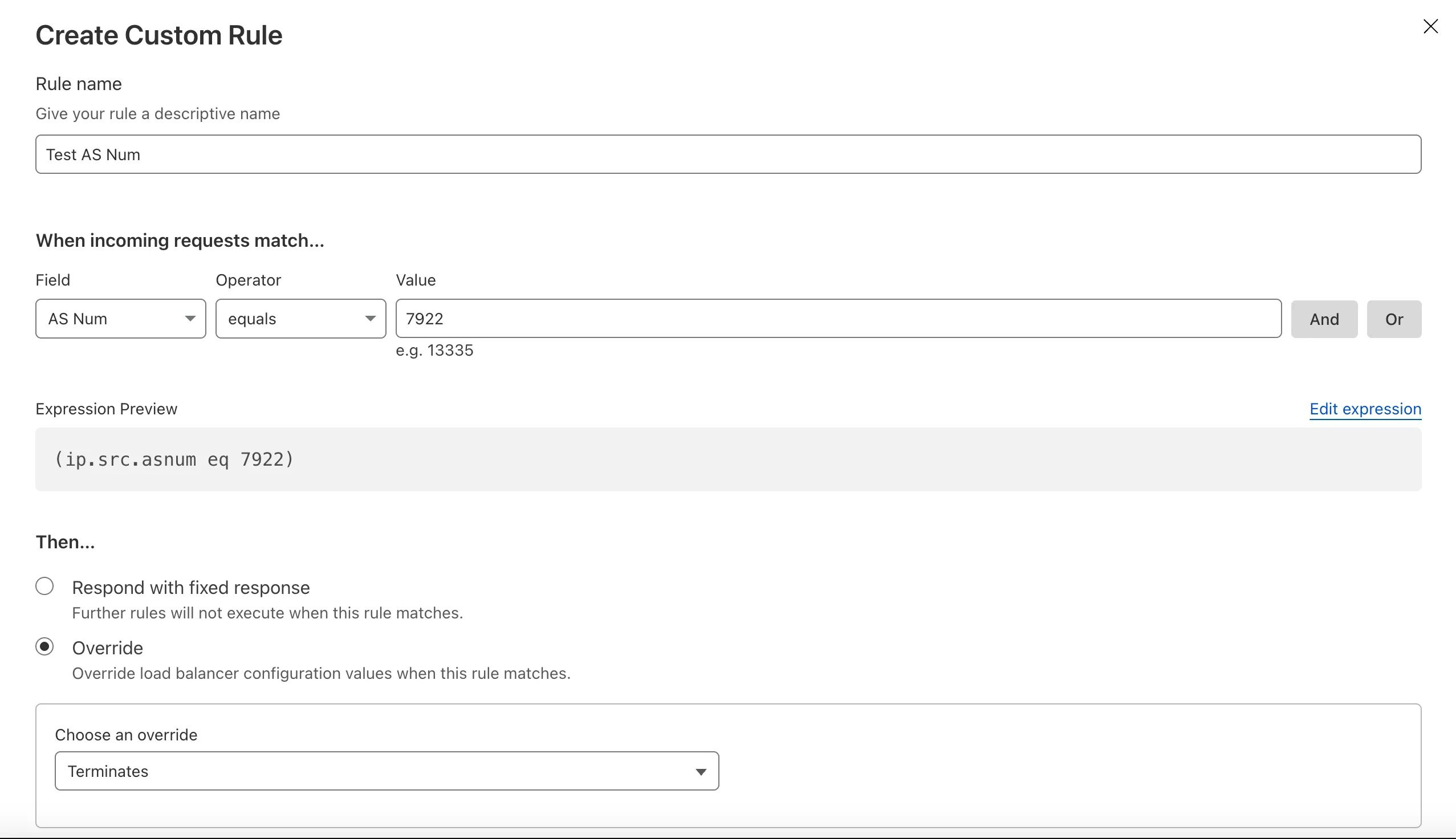
To get started, create a Custom Rule ↗ in your Load Balancer and select AS Num from the Field dropdown.
Cloudflare Access logs now support the Customer Metadata Boundary (CMB). If you have configured the CMB for your account, all Access logging will respect that configuration.
When you deploy MX or Inline, not only can you apply email link isolation to suspicious links in all emails (including benign), you can now also apply email link isolation to all links of a specified disposition. This provides more flexibility in controlling user actions within emails.
For example, you may want to deliver suspicious messages but isolate the links found within them so that users who choose to interact with the links will not accidentally expose your organization to threats. This means your end users are more secure than ever before.
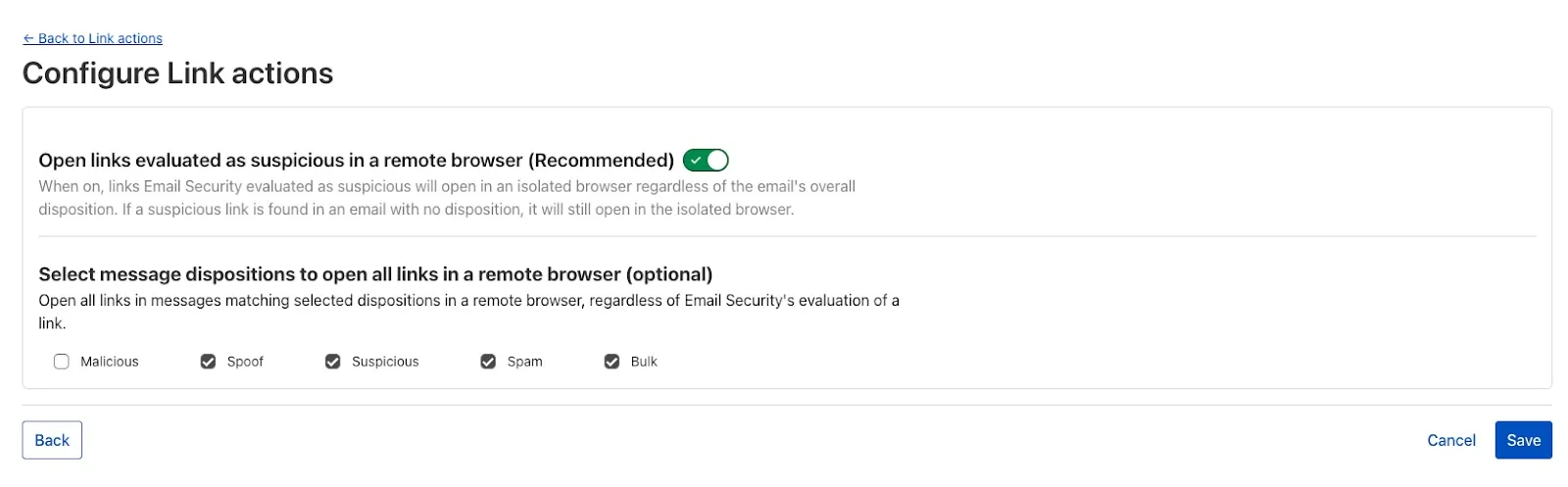
To isolate all links within a message based on the disposition, select Settings > Link Actions > View and select Configure. As with other other links you isolate, an interstitial will be provided to warn users that this site has been isolated and the link will be recrawled live to evaluate if there are any changes in our threat intel. Learn more about this feature on Configure link actions ↗.
This feature is available across these Email security packages:
- Enterprise
- Enterprise + PhishGuard
Cloudflare Load Balancing Monitors support loading and applying settings for a specific zone to monitoring requests to origin endpoints. This feature has been migrated to new infrastructure to improve reliability, performance, and accuracy.
All zone monitors have been tested against the new infrastructure. There should be no change to health monitoring results of currently healthy and active pools. Newly created or re-enabled pools may need validation of their monitor zone settings before being introduced to service, especially regarding correct application of mTLS.
- More reliable application of zone settings to monitoring requests, including
- Authenticated Origin Pulls
- Aegis Egress IP Pools
- Argo Smart Routing
- HTTP/2 to Origin
- Improved support and bug fixes for retries, redirects, and proxied origin resolution
- Improved performance and reliability of monitoring requests within the Cloudflare network
- Unrelated CDN or WAF configuration changes should have no risk of impact to pool health
- More reliable application of zone settings to monitoring requests, including
The Cloudflare Terraform provider resources for Cloudflare WAN tunnels and routes now support Terraform provider version 5. Customers using infrastructure-as-code workflows can manage their tunnel and route configuration with the latest provider version.
For more information, refer to the Cloudflare Terraform provider documentation ↗.
Today, we are excited to announce that all Magic Transit and Magic WAN customers with CMB EU (Customer Metadata Boundary - Europe) enabled in their account will be able to access GRE, IPsec, and CNI health check and traffic volume data in the Cloudflare dashboard and via API.
This ensures that all Magic Transit and Magic WAN customers with CMB EU enabled will be able to access all Magic Transit and Magic WAN features.
Specifically, these two GraphQL endpoints are now compatible with CMB EU:
magicTransitTunnelHealthChecksAdaptiveGroupsmagicTransitTunnelTrafficAdaptiveGroups
We have introduced a new Security Threat category called Scam. Relevant domains are marked with the Scam category. Scam typically refers to fraudulent websites and schemes designed to trick victims into giving away money or personal information.
New category added
Parent ID Parent Name Category ID Category Name 21 Security Threats 191 Scam Refer to Gateway domain categories to learn more.
A new Beta release for the Windows WARP client is now available on the beta releases downloads page.
This release contains minor fixes and improvements.
Changes and improvements
- Improvements to better manage multi-user pre-login registrations.
- Fixed an issue preventing devices from reaching split-tunneled traffic even when WARP was disconnected.
- Fix to prevent WARP from re-enabling its firewall rules after a user-initiated disconnect.
- Improvement to managed network detection checks for faster switching between managed networks.
Known issues
For Windows 11 24H2 users, Microsoft has confirmed a regression that may lead to performance issues like mouse lag, audio cracking, or other slowdowns. Cloudflare recommends users experiencing these issues upgrade to a minimum Windows 11 24H2 version KB5062553 or higher for resolution.
Devices using WARP client 2025.4.929.0 and up may experience Local Domain Fallback failures if a fallback server has not been configured. To configure a fallback server, refer to Route traffic to fallback server.
Devices with
KB5055523installed may receive a warning aboutWin32/ClickFix.ABAbeing present in the installer. To resolve this false positive, update Microsoft Security Intelligence to version 1.429.19.0 or later.DNS resolution may be broken when the following conditions are all true:
- WARP is in Secure Web Gateway without DNS filtering (tunnel-only) mode.
- A custom DNS server address is configured on the primary network adapter.
- The custom DNS server address on the primary network adapter is changed while WARP is connected.
To work around this issue, reconnect the WARP client by toggling off and back on.
A new Beta release for the macOS WARP client is now available on the beta releases downloads page.
This release contains minor fixes and improvements.
Changes and improvements
- Fixed an issue preventing devices from reaching split-tunneled traffic even when WARP was disconnected.
- Fix to prevent WARP from re-enabling its firewall rules after a user-initiated disconnect.
- Improvement to managed network detection checks for faster switching between managed networks.
Known issues
- macOS Sequoia: Due to changes Apple introduced in macOS 15.0.x, the WARP client may not behave as expected. Cloudflare recommends the use of macOS 15.4 or later.
- Devices using WARP client 2025.4.929.0 and up may experience Local Domain Fallback failures if a fallback server has not been configured. To configure a fallback server, refer to Route traffic to fallback server.
Gateway can now apply HTTP filtering to all proxied HTTP requests, not just traffic on standard HTTP (
80) and HTTPS (443) ports. This means all requests can now be filtered by A/V scanning, file sandboxing, Data Loss Prevention (DLP), and more.You can turn this setting on by going to Settings > Network > Firewall and choosing Inspect on all ports.
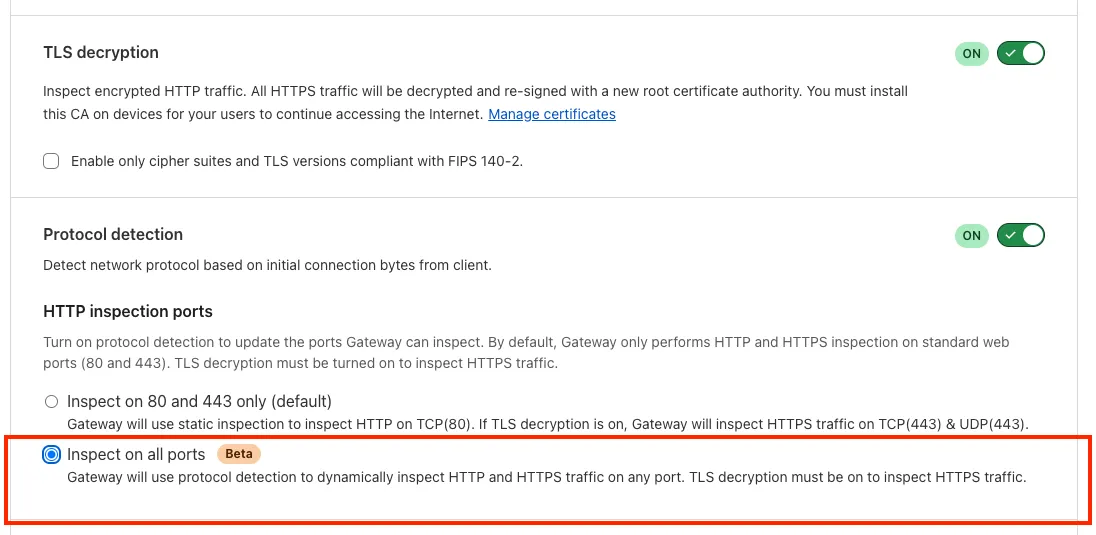
To learn more, refer to Inspect on all ports (Beta).
A new GA release for the Windows WARP client is now available on the stable releases downloads page.
This release contains minor fixes and improvements.
Changes and improvements
- WARP proxy mode now uses the operating system's DNS settings. Changes made to system DNS settings while in proxy mode require the client to be turned off then back on to take effect.
- Changes to the SCCM VPN boundary support feature to no longer restart the SMS Agent Host (
ccmexec.exe) service. - Fixed an issue affecting clients in Split Tunnel Include mode, where access to split-tunneled traffic was blocked after reconnecting the client.
Known issues
For Windows 11 24H2 users, Microsoft has confirmed a regression that may lead to performance issues like mouse lag, audio cracking, or other slowdowns. Cloudflare recommends users experiencing these issues upgrade to a minimum Windows 11 24H2 version KB5062553 or higher for resolution.
Devices using WARP client 2025.4.929.0 and up may experience Local Domain Fallback failures if a fallback server has not been configured. To configure a fallback server, refer to Route traffic to fallback server.
Devices with
KB5055523installed may receive a warning aboutWin32/ClickFix.ABAbeing present in the installer. To resolve this false positive, update Microsoft Security Intelligence to version 1.429.19.0 or later.DNS resolution may be broken when the following conditions are all true:
- WARP is in Secure Web Gateway without DNS filtering (tunnel-only) mode.
- A custom DNS server address is configured on the primary network adapter.
- The custom DNS server address on the primary network adapter is changed while WARP is connected.
To work around this issue, reconnect the WARP client by toggling off and back on.
A new GA release for the macOS WARP client is now available on the stable releases downloads page.
This release contains minor fixes and improvements.
Changes and improvements
- WARP proxy mode now uses the operating system's DNS settings. Changes made to system DNS settings while in proxy mode require the client to be turned off then back on to take effect.
- Fixed an issue affecting clients in Split Tunnel Include mode, where access to split-tunneled traffic was blocked after reconnecting the client.
- For macOS deployments, the WARP client can now be managed using an
mdm.xmlfile placed in/Library/Application Support/Cloudflare/mdm.xml. This new configuration option offers an alternative to the still supported method of deploying a managed plist through an MDM solution.
Known issues
- macOS Sequoia: Due to changes Apple introduced in macOS 15.0.x, the WARP client may not behave as expected. Cloudflare recommends the use of macOS 15.4 or later.
- Devices using WARP client 2025.4.929.0 and up may experience Local Domain Fallback failures if a fallback server has not been configured. To configure a fallback server, refer to Route traffic to fallback server.
A new GA release for the Linux WARP client is now available on the stable releases downloads page.
This release contains minor fixes and improvements.
Changes and improvements
- WARP proxy mode now uses the operating system's DNS settings. Changes made to system DNS settings while in proxy mode require the client to be turned off then back on to take effect.
- Fixed an issue affecting clients in Split Tunnel Include mode, where access to split-tunneled traffic was blocked after reconnecting the client.
Known issues
- Devices using WARP client 2025.4.929.0 and up may experience Local Domain Fallback failures if a fallback server has not been configured. To configure a fallback server, refer to Route traffic to fallback server.
The Google Bard application (ID: 1198) has been deprecated and fully removed from the system. It has been replaced by the Gemini application (ID: 1340). Any existing Gateway policies that reference the old Google Bard application will no longer function. To ensure your policies continue to work as intended, you should update them to use the new Gemini application. We recommend replacing all instances of the deprecated Bard application with the new Gemini application in your Gateway policies. For more information about application policies, please see the Cloudflare Gateway documentation.
The KVM-based virtual Cloudflare One Appliance is now in open beta with official support for Proxmox VE.
Customers can deploy the virtual appliance on KVM hypervisors to connect branch or data center networks to Cloudflare WAN without dedicated hardware.
For setup instructions, refer to Configure a virtual Cloudflare One Appliance.
You can now create document-based detection entries in DLP by uploading example documents. Cloudflare will encrypt your documents and create a unique fingerprint of the file. This fingerprint is then used to identify similar documents or snippets within your organization's traffic and stored files.
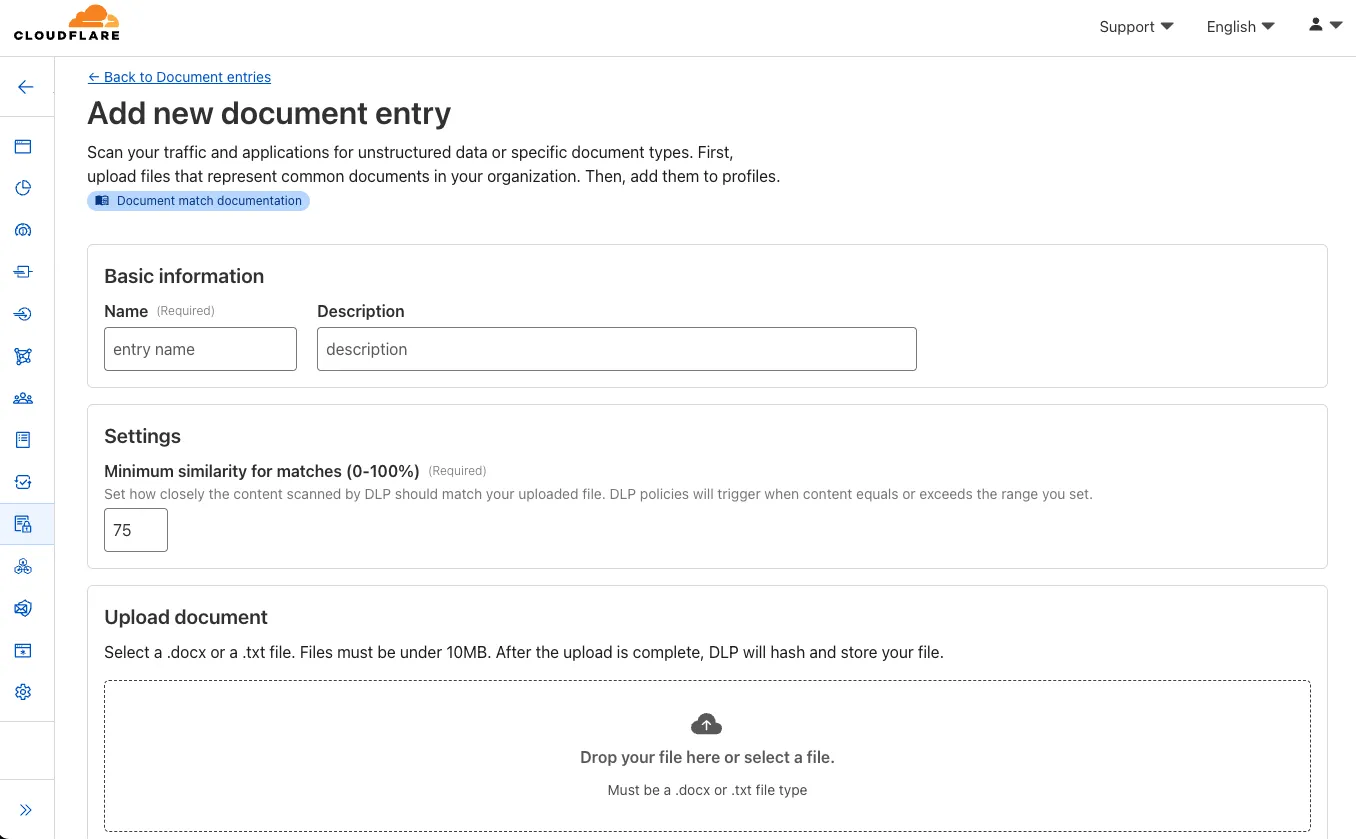
Key features and benefits:
-
Upload documents, forms, or templates: Easily upload .docx and .txt files (up to 10 MB) that contain sensitive information you want to protect.
-
Granular control with similarity percentage: Define a minimum similarity percentage (0-100%) that a document must meet to trigger a detection, reducing false positives.
-
Comprehensive coverage: Apply these document-based detection entries in:
-
Gateway policies: To inspect network traffic for sensitive documents as they are uploaded or shared.
-
CASB (Cloud Access Security Broker): To scan files stored in cloud applications for sensitive documents at rest.
-
-
Identify sensitive data: This new detection entry type is ideal for identifying sensitive data within completed forms, templates, or even small snippets of a larger document, helping you prevent data exfiltration and ensure compliance.
Once uploaded and processed, you can add this new document entry into a DLP profile and policies to enhance your data protection strategy.
-
Your real-time applications running over Cloudflare Tunnel are now faster and more reliable. We've completely re-architected the way
cloudflaredproxies UDP traffic in order to isolate it from other traffic, ensuring latency-sensitive applications like private DNS are no longer slowed down by heavy TCP traffic (like file transfers) on the same Tunnel.This is a foundational improvement to Cloudflare Tunnel, delivered automatically to all customers. There are no settings to configure — your UDP traffic is already flowing faster and more reliably.
What’s new:
- Faster UDP performance: We've significantly reduced the latency for establishing new UDP sessions, making applications like private DNS much more responsive.
- Greater reliability for mixed traffic: UDP packets are no longer affected by heavy TCP traffic, preventing timeouts and connection drops for your real-time services.
Learn more about running TCP or UDP applications and private networks through Cloudflare Tunnel.
Use our brand new onboarding experience for Cloudflare Zero Trust. New and returning users can now engage with a Get Started tab with walkthroughs for setting up common use cases end-to-end.
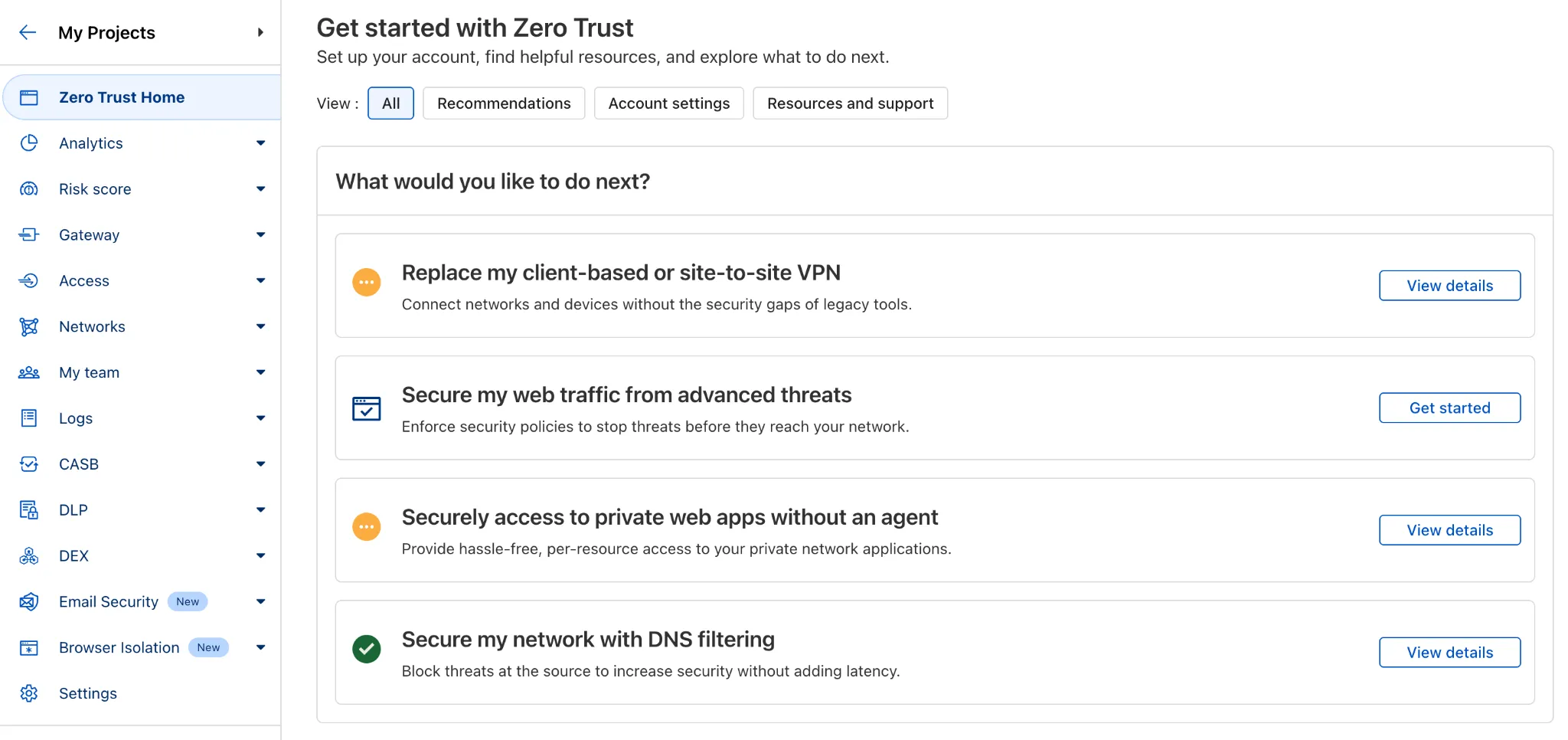
There are eight brand new onboarding guides in total:
- Securely access a private network (sets up device client and Tunnel)
- Device-to-device / mesh networking (sets up and connects multiple device clients)
- Network to network connectivity (sets up and connects multiple WARP Connectors, makes reference to Magic WAN availability for Enterprise)
- Secure web traffic (sets up device client, Gateway, pre-reqs, and initial policies)
- Secure DNS for networks (sets up a new DNS location and Gateway policies)
- Clientless web access (sets up Access to a web app, Tunnel, and public hostname)
- Clientless SSH access (all the same + the web SSH experience)
- Clientless RDP access (all the same + RDP-in-browser)
Each flow walks the user through the steps to configure the essential elements, and provides a “more details” panel with additional contextual information about what the user will accomplish at the end, along with why the steps they take are important.
Try them out now in the Zero Trust dashboard ↗!
Cloudy, Cloudflare's AI Agent, will now automatically summarize your Access and Gateway block logs.
In the log itself, Cloudy will summarize what occurred and why. This will be helpful for quick troubleshooting and issue correlation.
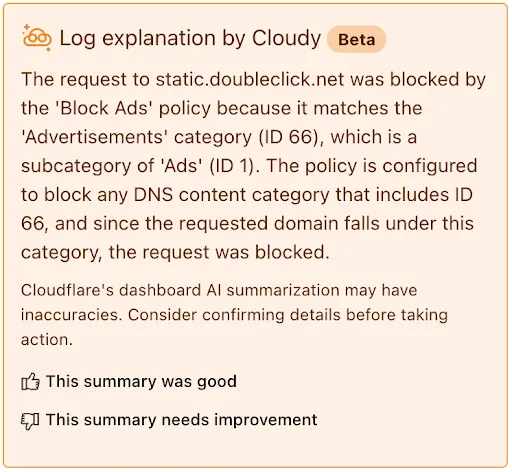
If you have feedback about the Cloudy summary - good or bad - you can provide that right from the summary itself.
Cloudflare Zero Trust customers can use the App Library to get full visibility over the SaaS applications that they use in their Gateway policies, CASB integrations, and Access for SaaS applications.
App Library, found under My Team, makes information available about all Applications that can be used across the Zero Trust product suite.
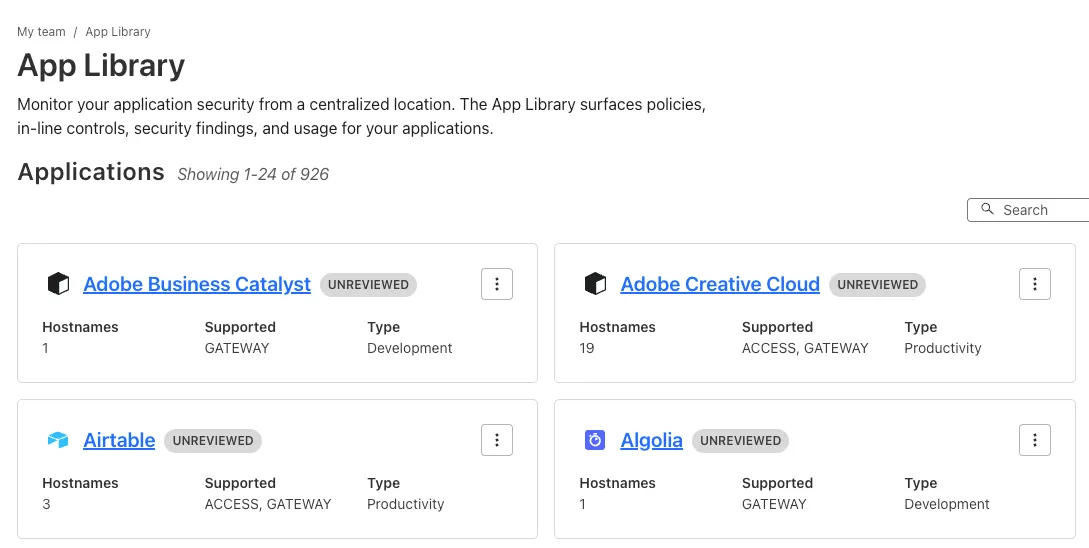
You can use the App Library to see:
- How Applications are defined
- Where they are referenced in policies
- Whether they have Access for SaaS configured
- Review their CASB findings and integration status.
Within individual Applications, you can also track their usage across your organization, and better understand user behavior.
Browser-based RDP with Cloudflare Access is now available in open beta for all Cloudflare customers. It enables secure, remote Windows server access without VPNs or RDP clients.
With browser-based RDP, you can:
- Control how users authenticate to internal RDP resources with single sign-on (SSO), multi-factor authentication (MFA), and granular access policies.
- Record who is accessing which servers and when to support regulatory compliance requirements and to gain greater visibility in the event of a security event.
- Eliminate the need to install and manage software on user devices. You will only need a web browser.
- Reduce your attack surface by keeping your RDP servers off the public Internet and protecting them from common threats like credential stuffing or brute-force attacks.
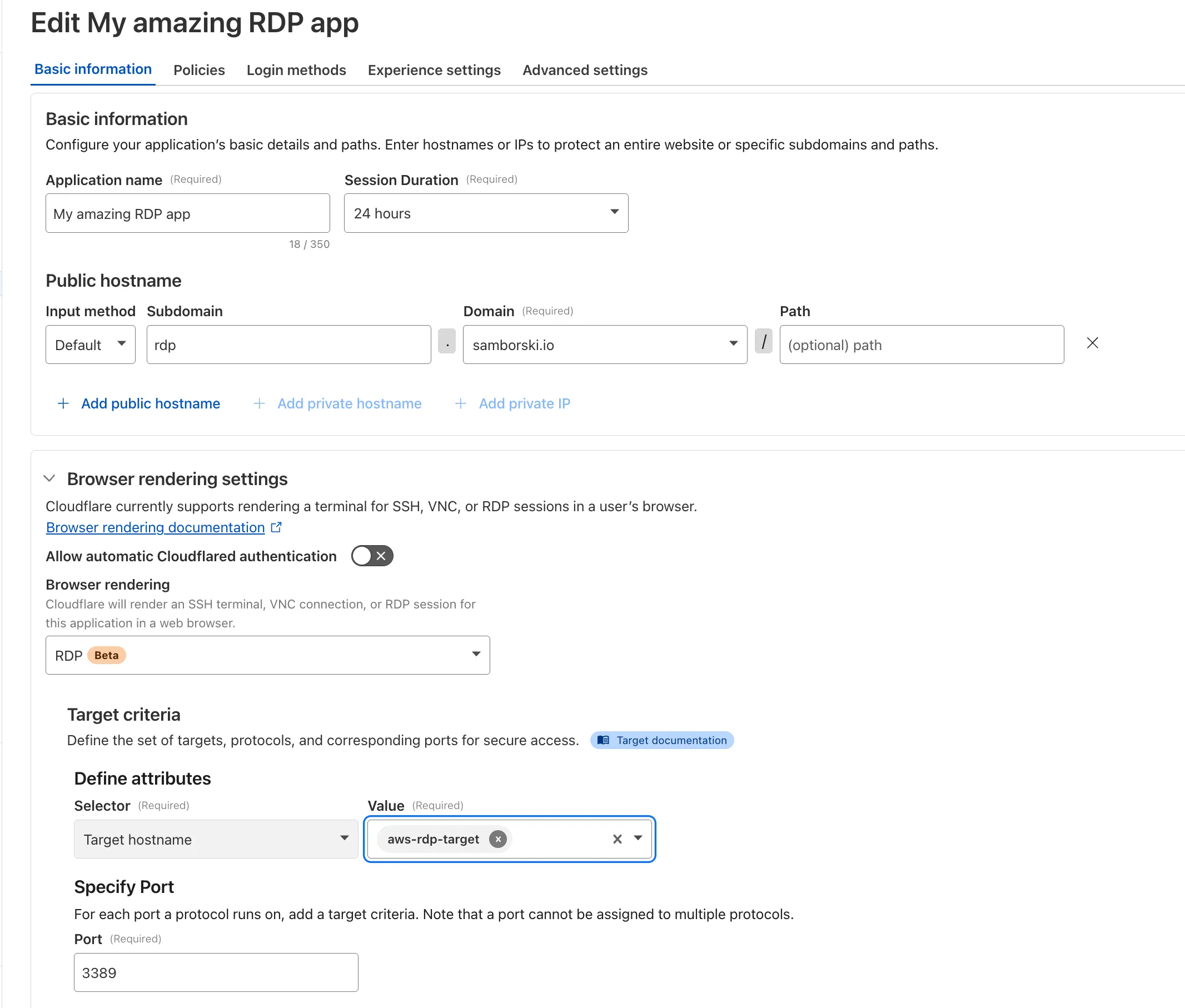
To get started, see Connect to RDP in a browser.
A new GA release for the Windows WARP client is now available on the stable releases downloads page.
This release contains improvements and new exciting features, including SCCM VPN boundary support and post-quantum cryptography. By tunneling your corporate network traffic over Cloudflare, you can now gain the immediate protection of post-quantum cryptography without needing to upgrade any of your individual corporate applications or systems.
Changes and improvements
- Fixed a device registration issue that caused WARP connection failures when changing networks.
- Captive portal improvements and fixes:
- Captive portal sign in notifications will now be sent through operating system notification services.
- Fix for firewall configuration issue affecting clients in DoH only mode.
- Improved the connectivity status message in the client GUI.
- Fixed a bug affecting clients in Gateway with DoH mode where the original DNS servers were not restored after disabling WARP.
- The WARP client now applies post-quantum cryptography end-to-end on enabled devices accessing resources behind a Cloudflare Tunnel. This feature can be enabled by MDM.
- Improvement to handle client configuration changes made by an MDM while WARP is not running.
- Improvements for multi-user experience to better handle fast user switching and transitions from a pre-login to a logged-in state.
- Added a WARP client device posture check for SAN attributes to the client certificate check.
- Fixed an issue affecting Split Tunnel Include mode, where traffic outside the tunnel was blocked when switching between Wi-Fi and Ethernet networks.
- Added SCCM VPN boundary support to device profile settings. With SCCM VPN boundary support enabled, operating systems will register WARP's local interface IP with the on-premise DNS server when reachable.
- Fix for an issue causing WARP connectivity to fail without full system reboot.
Known issues
For Windows 11 24H2 users, Microsoft has confirmed a regression that may lead to performance issues like mouse lag, audio cracking, or other slowdowns. Cloudflare recommends users experiencing these issues upgrade to a minimum Windows 11 24H2 version KB5060829 or higher for resolution.
Devices with
KB5055523installed may receive a warning aboutWin32/ClickFix.ABAbeing present in the installer. To resolve this false positive, update Microsoft Security Intelligence to version 1.429.19.0 or later.DNS resolution may be broken when the following conditions are all true:
- WARP is in Secure Web Gateway without DNS filtering (tunnel-only) mode.
- A custom DNS server address is configured on the primary network adapter.
- The custom DNS server address on the primary network adapter is changed while WARP is connected.
To work around this issue, reconnect the WARP client by toggling off and back on.