Skip to content

Changelog

New updates and improvements at Cloudflare.

Application security
hero image
  1. RulesetRule IDLegacy Rule IDDescriptionPrevious ActionNew ActionComments
    Cloudflare Managed Ruleset 100736Generic HTTP Request SmugglingN/ADisabledThis is a New Detection
  1. Now, API Shield automatically labels your API inventory with API-specific risks so that you can track and manage risks to your APIs.

    View these risks in Endpoint Management by label:

    A list of endpoint management labels

    ...or in Security Center Insights:

    An example security center insight

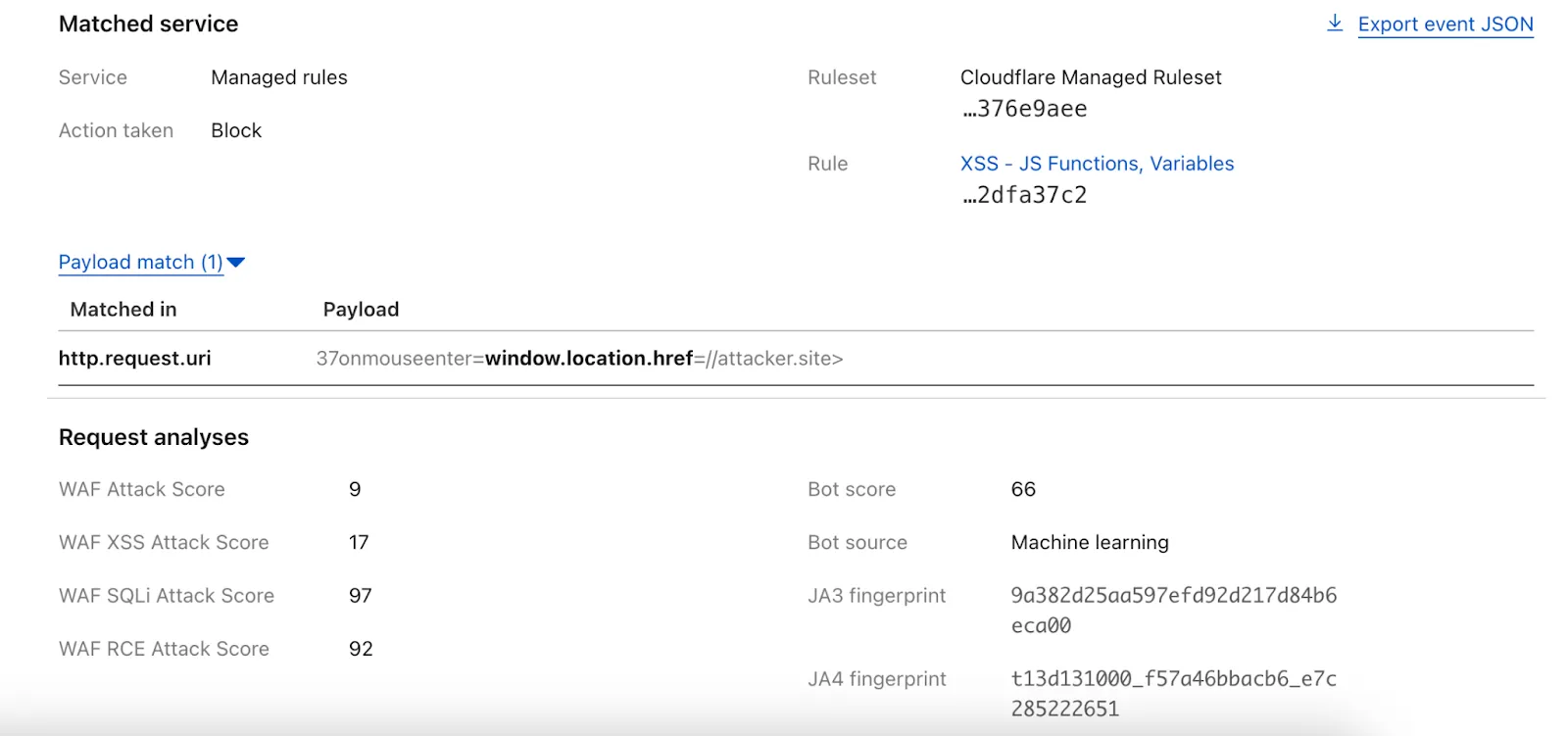
    API Shield will scan for risks on your API inventory daily. Here are the new risks we're scanning for and automatically labelling:

    • cf-risk-sensitive: applied if the customer is subscribed to the sensitive data detection ruleset and the WAF detects sensitive data returned on an endpoint in the last seven days.
    • cf-risk-missing-auth: applied if the customer has configured a session ID and no successful requests to the endpoint contain the session ID.
    • cf-risk-mixed-auth: applied if the customer has configured a session ID and some successful requests to the endpoint contain the session ID while some lack the session ID.
    • cf-risk-missing-schema: added when a learned schema is available for an endpoint that has no active schema.
    • cf-risk-error-anomaly: added when an endpoint experiences a recent increase in response errors over the last 24 hours.
    • cf-risk-latency-anomaly: added when an endpoint experiences a recent increase in response latency over the last 24 hours.
    • cf-risk-size-anomaly: added when an endpoint experiences a spike in response body size over the last 24 hours.

    In addition, API Shield has two new 'beta' scans for Broken Object Level Authorization (BOLA) attacks. If you're in the beta, you will see the following two labels when API Shield suspects an endpoint is suffering from a BOLA vulnerability:

    • cf-risk-bola-enumeration: added when an endpoint experiences successful responses with drastic differences in the number of unique elements requested by different user sessions.
    • cf-risk-bola-pollution: added when an endpoint experiences successful responses where parameters are found in multiple places in the request.

    We are currently accepting more customers into our beta. Contact your account team if you are interested in BOLA attack detection for your API.

    Refer to the blog post for more information about Cloudflare's expanded posture management capabilities.

  1. RulesetRule IDLegacy Rule IDDescriptionPrevious ActionNew ActionComments
    Cloudflare Managed Ruleset 100725

    Fortinet FortiManager - Remote Code Execution - CVE:CVE-2023-42791, CVE:CVE-2024-23666

    LogBlock
    Cloudflare Managed Ruleset 100726Ivanti - Remote Code Execution - CVE:CVE-2024-8190LogBlock
    Cloudflare Managed Ruleset 100727Cisco IOS XE - Remote Code Execution - CVE:CVE-2023-20198LogDisabledFixed action value in changelog; no rule changes.
    Cloudflare Managed Ruleset 100728Sitecore - Remote Code Execution - CVE:CVE-2024-46938LogBlock
    Cloudflare Managed Ruleset 100729Microsoft SharePoint - Remote Code Execution - CVE:CVE-2023-33160LogBlock
    Cloudflare Managed Ruleset 100730

    Pentaho - Template Injection - CVE:CVE-2022-43769, CVE:CVE-2022-43939

    LogBlock
    Cloudflare Managed Ruleset 100700Apache SSRF vulnerability CVE-2021-40438N/ABlock
  1. RulesetRule IDLegacy Rule IDDescriptionPrevious ActionNew ActionComments
    Cloudflare Managed Ruleset 100731Apache Camel - Code Injection - CVE:CVE-2025-27636N/ABlockThis is a New Detection
  1. RulesetRule IDLegacy Rule IDDescriptionPrevious ActionNew ActionComments
    Cloudflare Managed Ruleset 100722Ivanti - Information Disclosure - CVE:CVE-2025-0282LogBlockThis is a New Detection
    Cloudflare Managed Ruleset 100723Cisco IOS XE - Information Disclosure - CVE:CVE-2023-20198LogBlockThis is a New Detection
  1. Added new records to the leaked credentials database. The record sources are: Have I Been Pwned (HIBP) database, RockYou 2024 dataset, and another third-party database.

  1. RulesetRule IDLegacy Rule IDDescriptionPrevious ActionNew ActionComments
    Cloudflare Managed Ruleset 100721

    Ivanti - Remote Code Execution - CVE:CVE-2024-13159, CVE:CVE-2024-13160, CVE:CVE-2024-13161

    LogBlockThis is a New Detection
    Cloudflare Managed Ruleset 100596

    Citrix Content Collaboration ShareFile - Remote Code Execution - CVE:CVE-2023-24489

    N/ABlock
  1. RulesetRule IDLegacy Rule IDDescriptionPrevious ActionNew ActionComments
    Cloudflare Managed Ruleset 100718ASonicWall SSLVPN 2 - Auth Bypass - CVE:CVE-2024-53704LogBlockThis is a New Detection
    Cloudflare Managed Ruleset 100720Palo Alto Networks - Auth Bypass - CVE:CVE-2025-0108LogBlockThis is a New Detection
  1. RulesetRule IDLegacy Rule IDDescriptionPrevious ActionNew ActionComments
    Cloudflare Managed Ruleset 100715FortiOS - Auth Bypass - CVE:CVE-2024-55591LogBlockThis is a New Detection
    Cloudflare Managed Ruleset 100716Ivanti - Auth Bypass - CVE:CVE-2021-44529LogBlockThis is a New Detection
    Cloudflare Managed Ruleset 100717SimpleHelp - Auth Bypass - CVE:CVE-2024-57727LogBlockThis is a New Detection
    Cloudflare Managed Ruleset 100718SonicWall SSLVPN - Auth Bypass - CVE:CVE-2024-53704LogBlockThis is a New Detection
    Cloudflare Managed Ruleset 100719Yeti Platform - Auth Bypass - CVE:CVE-2024-46507LogBlockThis is a New Detection
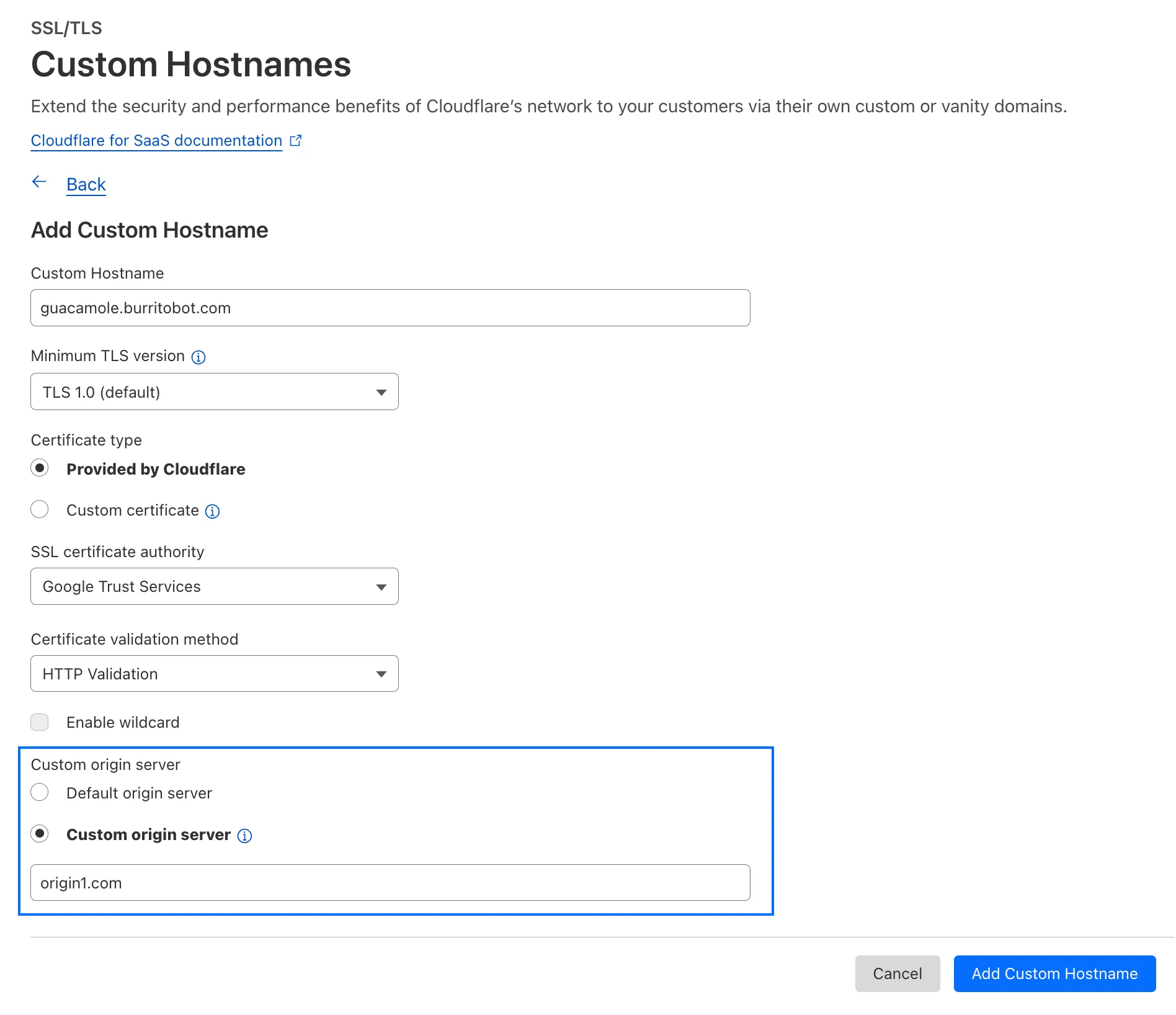
  1. Cloudflare has supported both RSA and ECDSA certificates across our platform for a number of years. Both certificates offer the same security, but ECDSA is more performant due to a smaller key size. However, RSA is more widely adopted and ensures compatibility with legacy clients. Instead of choosing between them, you may want both – that way, ECDSA is used when clients support it, but RSA is available if not.

    Now, you can upload both an RSA and ECDSA certificate on a custom hostname via the API.

    curl -X POST https://api.cloudflare.com/client/v4/zones/$ZONE_ID/custom_hostnames \
    -H 'Content-Type: application/json' \
    -H "X-Auth-Email: $CLOUDFLARE_EMAIL" \
    -H "X-Auth-Key: $CLOUDFLARE_API_KEY" \
    -d '{
    "hostname": "hostname",
    "ssl": {
    "custom_cert_bundle": [
    {
    "custom_certificate": "RSA Cert",
    "custom_key": "RSA Key"
    },
    {
    "custom_certificate": "ECDSA Cert",
    "custom_key": "ECDSA Key"
    }
    ],
    "bundle_method": "force",
    "wildcard": false,
    "settings": {
    "min_tls_version": "1.0"
    }
    }
    }’

    You can also:

    • Upload an RSA or ECDSA certificate to a custom hostname with an existing ECDSA or RSA certificate, respectively.

    • Replace the RSA or ECDSA certificate with a certificate of its same type.

    • Delete the RSA or ECDSA certificate (if the custom hostname has both an RSA and ECDSA uploaded).

    This feature is available for Business and Enterprise customers who have purchased custom certificates.

  1. We have upgraded and streamlined Cloudflare Rules limits across all plans, simplifying rule management and improving scalability for everyone.

    New limits by product:

    • Bulk Redirects
      • Free: 2010,000 URL redirects across lists
      • Pro: 50025,000 URL redirects across lists
      • Business: 50050,000 URL redirects across lists
      • Enterprise: 10,0001,000,000 URL redirects across lists
    • Cloud Connector
      • Free: 510 connectors
      • Enterprise: 125300 connectors
    • Custom Errors
      • Pro: 525 error assets and rules
      • Business: 2050 error assets and rules
      • Enterprise: 50300 error assets and rules
    • Snippets
      • Pro: 1025 code snippets and rules
      • Business: 2550 code snippets and rules
      • Enterprise: 50300 code snippets and rules
    • Cache Rules, Configuration Rules, Compression Rules, Origin Rules, Single Redirects, and Transform Rules
      • Enterprise: 125300 rules
  1. We're introducing Custom Errors (beta), which builds on our existing Custom Error Responses feature with new asset storage capabilities.

    This update allows you to store externally hosted error pages on Cloudflare and reference them in custom error rules, eliminating the need to supply inline content.

    This brings the following new capabilities:

    • Custom error assets – Fetch and store external error pages at the edge for use in error responses.
    • Account-Level custom errors – Define error handling rules and assets at the account level for consistency across multiple zones. Zone-level rules take precedence over account-level ones, and assets are not shared between levels.

    You can use Cloudflare API to upload your existing assets for use with Custom Errors:

    Terminal window
    curl "https://api.cloudflare.com/client/v4/zones/{zone_id}/custom_pages/assets" \
    --header "Authorization: Bearer <API_TOKEN>" \
    --header 'Content-Type: application/json' \
    --data '{
    "name": "maintenance",
    "description": "Maintenance template page",
    "url": "https://example.com/"
    }'

    You can then reference the stored asset in a Custom Error rule:

    Terminal window
    curl --request PUT \
    "https://api.cloudflare.com/client/v4/zones/{zone_id}/rulesets/phases/http_custom_errors/entrypoint" \
    --header "Authorization: Bearer <API_TOKEN>" \
    --header 'Content-Type: application/json' \
    --data '{
    "rules": [
    {
    "action": "serve_error",
    "action_parameters": {
    "asset_name": "maintenance",
    "content_type": "text/html",
    "status_code": 503
    },
    "enabled": true,
    "expression": "http.request.uri.path contains \"error\""
    }
    ]
    }'
  1. RulesetRule IDLegacy Rule IDDescriptionPrevious ActionNew ActionComments
    Cloudflare Managed Ruleset 100708Aviatrix Network - Remote Code Execution - CVE:CVE-2024-50603LogBlockThis is a New Detection
    Cloudflare Managed Ruleset 100709Next.js - Remote Code Execution - CVE:CVE-2024-46982LogDisabledThis is a New Detection
    Cloudflare Managed Ruleset 100710

    Progress Software WhatsUp Gold - Directory Traversal - CVE:CVE-2024-12105

    LogBlockThis is a New Detection
    Cloudflare Managed Ruleset 100711WordPress - Remote Code Execution - CVE:CVE-2024-56064LogBlockThis is a New Detection
    Cloudflare Managed Ruleset 100712WordPress - Remote Code Execution - CVE:CVE-2024-9047LogBlockThis is a New Detection
    Cloudflare Managed Ruleset 100713FortiOS - Auth Bypass - CVE:CVE-2022-40684LogBlockThis is a New Detection
  1. Added new records to the leaked credentials database from a third-party database.

  1. The new Snippets code editor lets you edit Snippet code and rule in one place, making it easier to test and deploy changes without switching between pages.

    New Snippets code editor

    What’s new:

    • Single-page editing for code and rule – No need to jump between screens.
    • Auto-complete & syntax highlighting – Get suggestions and avoid mistakes.
    • Code formatting & refactoring – Write cleaner, more readable code.

    Try it now in Rules > Snippets.

  1. RulesetRule IDLegacy Rule IDDescriptionPrevious ActionNew ActionComments
    Cloudflare Managed Ruleset 100303Command Injection - NslookupLogBlock

    This was released as

    Cloudflare Managed Ruleset 100534Web Shell ActivityLogBlock

    This was released as

  1. RulesetRule IDLegacy Rule IDDescriptionPrevious ActionNew ActionComments
    Cloudflare Managed Ruleset 100704

    Cleo Harmony - Auth Bypass - CVE:CVE-2024-55956, CVE:CVE-2024-55953

    LogBlockNew Detection
    Cloudflare Managed Ruleset 100705Sentry - SSRFLogBlockNew Detection
    Cloudflare Managed Ruleset 100706Apache Struts - Remote Code Execution - CVE:CVE-2024-53677LogBlockNew Detection
    Cloudflare Managed Ruleset 100707

    FortiWLM - Remote Code Execution - CVE:CVE-2023-48782, CVE:CVE-2023-34993, CVE:CVE-2023-34990

    LogBlockNew Detection
    Cloudflare Managed Ruleset 100007C_BETACommand Injection - Common Attack CommandsDisabled

  1. Rules Overview gives you a single page to manage all your Cloudflare Rules.

    What you can do:

    • See all your rules in one place – No more clicking around.
    • Find rules faster – Search by name.
    • Understand execution order – See how rules run in sequence.
    • Debug easily – Use Trace without switching tabs.

    Check it out in Rules > Overview.

  1. RulesetRule IDLegacy Rule IDDescriptionPrevious ActionNew ActionComments
    Cloudflare Specials 100678Pandora FMS - Remote Code Execution - CVE:CVE-2024-11320LogBlockNew Detection
    Cloudflare Specials 100679

    Palo Alto Networks - Remote Code Execution - CVE:CVE-2024-0012, CVE:CVE-2024-9474

    LogBlockNew Detection
    Cloudflare Specials 100680Ivanti - Command Injection - CVE:CVE-2024-37397LogBlockNew Detection
    Cloudflare Specials 100681Really Simple Security - Auth Bypass - CVE:CVE-2024-10924LogBlockNew Detection
    Cloudflare Specials 100682Magento - XXE - CVE:CVE-2024-34102LogBlockNew Detection
    Cloudflare Specials 100683CyberPanel - Remote Code Execution - CVE:CVE-2024-51567LogBlockNew Detection
    Cloudflare Specials 100684

    Microsoft SharePoint - Remote Code Execution - CVE:CVE-2024-38094, CVE:CVE-2024-38024, CVE:CVE-2024-38023

    LogBlockNew Detection
    Cloudflare Specials 100685CyberPanel - Remote Code Execution - CVE:CVE-2024-51568LogBlockNew Detection
    Cloudflare Specials 100686Seeyon - Remote Code ExecutionLogBlockNew Detection
    Cloudflare Specials 100687

    WordPress - Remote Code Execution - CVE:CVE-2024-10781, CVE:CVE-2024-10542

    LogBlockNew Detection
    Cloudflare Specials 100688ProjectSend - Remote Code Execution - CVE:CVE-2024-11680LogBlockNew Detection
    Cloudflare Specials 100689

    Palo Alto GlobalProtect - Remote Code Execution - CVE:CVE-2024-5921

    LogBlockNew Detection
    Cloudflare Specials 100690Ivanti - Remote Code Execution - CVE:CVE-2024-37404LogBlockNew Detection
    Cloudflare Specials 100691Array Networks - Remote Code Execution - CVE:CVE-2023-28461LogBlockNew Detection
    Cloudflare Specials 100692CyberPanel - Remote Code Execution - CVE:CVE-2024-51378LogBlockNew Detection
    Cloudflare Specials 100693Symfony Profiler - Auth Bypass - CVE:CVE-2024-50340LogBlockNew Detection
    Cloudflare Specials 100694Citrix Virtual Apps - Remote Code Execution - CVE:CVE-2024-8069LogBlockNew Detection
    Cloudflare Specials 100695MSMQ Service - Remote Code Execution - CVE:CVE-2023-21554LogBlockNew Detection
    Cloudflare Specials 100696Nginxui - Remote Code Execution - CVE:CVE-2024-49368LogBlockNew Detection
    Cloudflare Specials 100697

    Apache ShardingSphere - Remote Code Execution - CVE:CVE-2022-22733

    LogBlockNew Detection
    Cloudflare Specials 100698Mitel MiCollab - Auth Bypass - CVE:CVE-2024-41713LogBlockNew Detection
    Cloudflare Specials 100699Apache Solr - Auth Bypass - CVE:CVE-2024-45216LogBlockNew Detection
  1. The latest cloudflared build 2024.12.2 introduces the ability to collect all the diagnostic logs needed to troubleshoot a cloudflared instance.

    A diagnostic report collects data from a single instance of cloudflared running on the local machine and outputs it to a cloudflared-diag file.

    For more information, refer to Diagnostic logs.

  1. Now, you can manage Cloudflare Snippets with Terraform. Use infrastructure-as-code to deploy and update Snippet code and rules without manual changes in the dashboard.

    Example Terraform configuration:

    resource "cloudflare_snippet" "my_snippet" {
    zone_id = "<ZONE_ID>"
    name = "my_test_snippet_1"
    main_module = "file1.js"
    files {
    name = "file1.js"
    content = file("file1.js")
    }
    }
    resource "cloudflare_snippet_rules" "cookie_snippet_rule" {
    zone_id = "<ZONE_ID>"
    rules {
    enabled = true
    expression = "http.cookie eq \"a=b\""
    description = "Trigger snippet on specific cookie"
    snippet_name = "my_test_snippet_1"
    }
    depends_on = [cloudflare_snippet.my_snippet]
    }

    Learn more in the Configure Snippets using Terraform documentation.

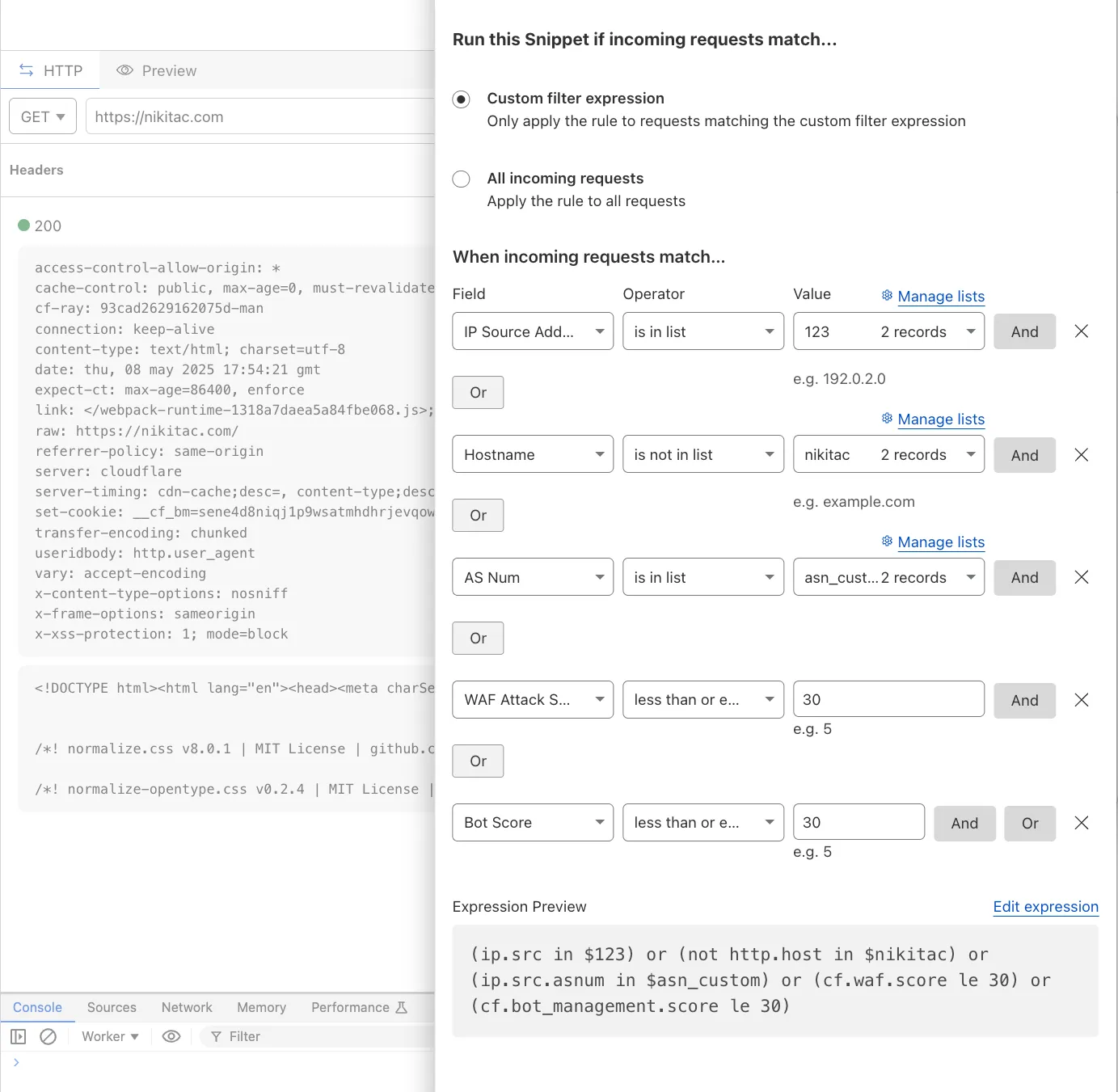
  1. Now, you can use Cloud Connector to route traffic to your R2 buckets based on URLs, headers, geolocation, and more.

    Example setup:

    Terminal window
    curl --request PUT \
    "https://api.cloudflare.com/client/v4/zones/{zone_id}/cloud_connector/rules" \
    --header "Authorization: Bearer <API_TOKEN>" \
    --header "Content-Type: application/json" \
    --data '[
    {
    "expression": "http.request.uri.path wildcard \"/images/*\"",
    "provider": "cloudflare_r2",
    "description": "Connect to R2 bucket containing images",
    "parameters": {
    "host": "mybucketcustomdomain.example.com"
    }
    }
    ]'

    Get started using Cloud Connector documentation.

  1. It’s now easy to create wildcard-based URL Rewrites. No need for complex functions—just define your patterns and go.

    Rules Overview Interface

    What’s improved:

    • Full wildcard support – Create rewrite patterns using intuitive interface.
    • Simplified rule creation – No need for complex functions.

    Try it via creating a Rewrite URL rule in the dashboard.

  1. Now, you can create common rule configurations in just one click using Rules Templates.

    Rules Templates

    What you can do:

    • Pick a pre-built rule – Choose from a library of templates.
    • One-click setup – Deploy best practices instantly.
    • Customize as needed – Adjust templates to fit your setup.

    Template cards are now also available directly in the rule builder for each product.

    Need more ideas? Check out the Examples gallery in our documentation.