
Changelog
New updates and improvements at Cloudflare.

A new GA release for the macOS WARP client is now available on the stable releases downloads page.
This release contains improvements and new exciting features, including post-quantum cryptography. By tunneling your corporate network traffic over Cloudflare, you can now gain the immediate protection of post-quantum cryptography without needing to upgrade any of your individual corporate applications or systems.
Changes and improvements
- Fixed an issue where WARP sometimes failed to automatically relaunch after updating.
- Fixed a device registration issue causing WARP connection failures when changing networks.
- Captive portal improvements and fixes:
- Captive portal sign in notifications will now be sent through operating system notification services.
- Fix for firewall configuration issue affecting clients in DoH only mode.
- Improved the connectivity status message in the client GUI.
- The WARP client now applies post-quantum cryptography end-to-end on enabled devices accessing resources behind a Cloudflare Tunnel. This feature can be enabled by MDM.
- Improvement to handle client configuration changes made by an MDM while WARP is not running.
- Fixed an issue affecting Split Tunnel Include mode, where traffic outside the tunnel was blocked when switching between Wi-Fi and Ethernet networks.
- Improvement for WARP connectivity issues on macOS due to the operating system not accepting DNS server configurations.
- Added a WARP client device posture check for SAN attributes to the client certificate check.
Known issues
- macOS Sequoia: Due to changes Apple introduced in macOS 15.0.x, the WARP client may not behave as expected. Cloudflare recommends the use of macOS 15.4 or later.
A new GA release for the Linux WARP client is now available on the stable releases downloads page.
This release contains improvements and new exciting features, including post-quantum cryptography. By tunneling your corporate network traffic over Cloudflare, you can now gain the immediate protection of post-quantum cryptography without needing to upgrade any of your individual corporate applications or systems.
Changes and improvements
- Fixed a device registration issue causing WARP connection failures when changing networks.
- Captive portal improvements and fixes:
- Captive portal sign in notifications will now be sent through operating system notification services.
- Fix for firewall configuration issue affecting clients in DoH only mode.
- Improved the connectivity status message in the client GUI.
- The WARP client now applies post-quantum cryptography end-to-end on enabled devices accessing resources behind a Cloudflare Tunnel. This feature can be enabled by MDM.
- Improvement to handle client configuration changes made by MDM while WARP is not running.
- Fixed an issue affecting Split Tunnel Include mode, where traffic outside the tunnel was blocked when switching between Wi-Fi and Ethernet networks.
- Added a WARP client device posture check for SAN attributes to the client certificate check.
Known issues
- Devices using WARP client 2025.4.929.0 and up may experience Local Domain Fallback failures if a fallback server has not been configured. To configure a fallback server, refer to Route traffic to fallback server.
A new GA release for the Android Cloudflare One Agent is now available in the Google Play Store ↗. This release contains improvements and new exciting features, including post-quantum cryptography. By tunneling your corporate network traffic over Cloudflare, you can now gain the immediate protection of post-quantum cryptography ↗ without needing to upgrade any of your individual corporate applications or systems.
Changes and improvements
- QLogs are now disabled by default and can be enabled in the app by turning on Enable qlogs under Settings > Advanced > Diagnostics > Debug Logs. The QLog setting from previous releases will no longer be respected.
- DNS over HTTPS traffic is now included in the WARP tunnel by default.
- The WARP client now applies post-quantum cryptography ↗ end-to-end on enabled devices accessing resources behind a Cloudflare Tunnel. This feature can be enabled by MDM.
- Fixed an issue that caused WARP connection failures on ChromeOS devices.
A new GA release for the iOS Cloudflare One Agent is now available in the iOS App Store ↗. This release contains improvements and new exciting features, including post-quantum cryptography. By tunneling your corporate network traffic over Cloudflare, you can now gain the immediate protection of post-quantum cryptography ↗ without needing to upgrade any of your individual corporate applications or systems.
Changes and improvements
- QLogs are now disabled by default and can be enabled in the app by turning on Enable qlogs under Settings > Advanced > Diagnostics > Debug Logs. The QLog setting from previous releases will no longer be respected.
- DNS over HTTPS traffic is now included in the WARP tunnel by default.
- The WARP client now applies post-quantum cryptography ↗ end-to-end on enabled devices accessing resources behind a Cloudflare Tunnel. This feature can be enabled by MDM.
Zero Trust now includes Data security analytics, providing you with unprecedented visibility into your organization sensitive data.
The new dashboard includes:
-
Sensitive Data Movement Over Time:
- See patterns and trends in how sensitive data moves across your environment. This helps understand where data is flowing and identify common paths.
-
Sensitive Data at Rest in SaaS & Cloud:
- View an inventory of sensitive data stored within your corporate SaaS applications (for example, Google Drive, Microsoft 365) and cloud accounts (such as AWS S3).
-
DLP Policy Activity:
- Identify which of your Data Loss Prevention (DLP) policies are being triggered most often.
- See which specific users are responsible for triggering DLP policies.
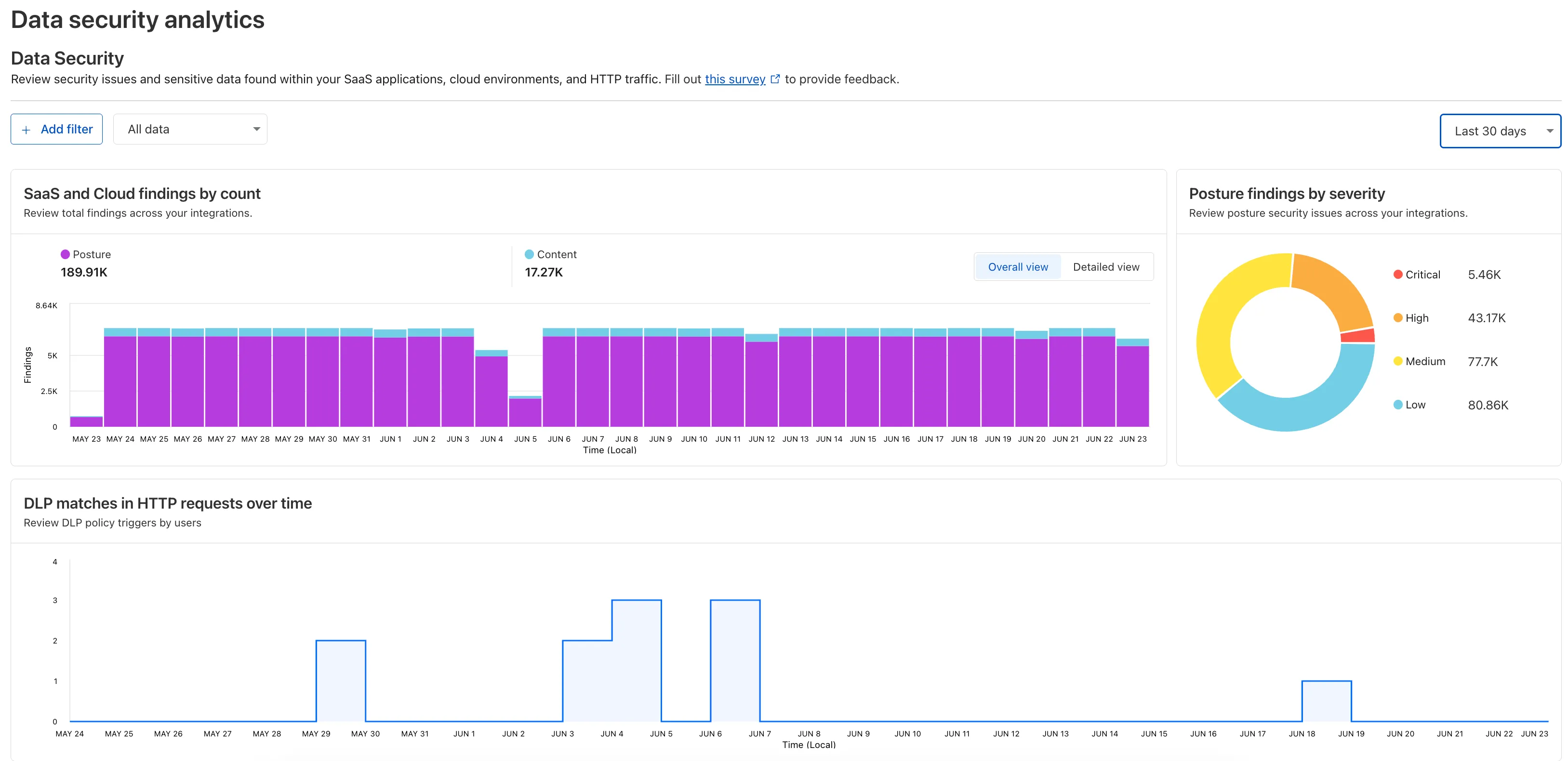
To access the new dashboard, log in to Cloudflare One ↗ and go to Insights on the sidebar.
-
Gateway will now evaluate Network (Layer 4) policies before HTTP (Layer 7) policies. This change preserves your existing security posture and does not affect which traffic is filtered — but it may impact how notifications are displayed to end users.
This change will roll out progressively between July 14–18, 2025. If you use HTTP policies, we recommend reviewing your configuration ahead of rollout to ensure the user experience remains consistent.
Previous order:
- DNS policies
- HTTP policies
- Network policies
New order:
- DNS policies
- Network policies
- HTTP policies
This change may affect block notifications. For example:
- You have an HTTP policy to block
example.comand display a block page. - You also have a Network policy to block
example.comsilently (no client notification).
With the new order, the Network policy will trigger first — and the user will no longer see the HTTP block page.
To ensure users still receive a block notification, you can:
- Add a client notification to your Network policy, or
- Use only the HTTP policy for that domain.
This update is based on user feedback and aims to:
- Create a more intuitive model by evaluating network-level policies before application-level policies.
- Minimize 526 connection errors by verifying the network path to an origin before attempting to establish a decrypted TLS connection.
To learn more, visit the Gateway order of enforcement documentation.
A new Beta release for the Windows WARP client is now available on the beta releases downloads page.
This release contains new improvements in addition to the features and improvements introduced in Beta client version 2025.5.735.1.
Changes and improvements
- Improvement to better handle multi-user fast user switching.
- Fix for an issue causing WARP connectivity to fail without full system reboot.
Known issues
Microsoft has confirmed a regression with Windows 11 starting around 24H2 that may cause performance issues for some users. These performance issues could manifest as mouse lag, audio cracking, or other slowdowns. A fix from Microsoft is expected in early July.
Devices with
KB5055523installed may receive a warning aboutWin32/ClickFix.ABAbeing present in the installer. To resolve this false positive, update Microsoft Security Intelligence to version 1.429.19.0 or later.DNS resolution may be broken when the following conditions are all true:
- WARP is in Secure Web Gateway without DNS filtering (tunnel-only) mode.
- A custom DNS server address is configured on the primary network adapter.
- The custom DNS server address on the primary network adapter is changed while WARP is connected. To work around this issue, reconnect the WARP client by toggling off and back on.
A new Beta release for the macOS WARP client is now available on the beta releases downloads page.
This release contains new improvements in addition to the features and improvements introduced in Beta client version 2025.5.735.1.
Changes and improvements
- Improvement for WARP connectivity issues on macOS due to the operating system not accepting DNS server configurations.
Known issues
- macOS Sequoia: Due to changes Apple introduced in macOS 15.0.x, the WARP client may not behave as expected. Cloudflare recommends the use of macOS 15.4 or later.
A new Beta release for the Windows WARP client is now available on the beta releases downloads page.
This release contains improvements and new exciting features, including SCCM VPN boundary support and post-quantum cryptography. By tunneling your corporate network traffic over Cloudflare, you can now gain the immediate protection of post-quantum cryptography without needing to upgrade any of your individual corporate applications or systems.
Changes and improvements
- Fixed a device registration issue causing WARP connection failures when changing networks.
- Captive portal improvements including showing connectivity status in the client and sending system notifications for captive portal sign in.
- Fixed a bug where in Gateway with DoH mode, connection to DNS servers was not automatically restored after reconnecting WARP.
- The WARP client now applies post-quantum cryptography end-to-end on enabled devices accessing resources behind a Cloudflare Tunnel. This feature can be enabled by MDM.
- Improvement to gracefully handle changes made by MDM while WARP is not running.
- Improvement for multi-user mode to avoid unnecessary key rotations when transitioning from a pre-login to a logged-in state.
- Added a WARP client device posture check for SAN attributes to the client certificate check.
- Fixed an issue affecting Split Tunnel Include mode, where traffic outside the tunnel was blocked when switching between Wi-Fi and Ethernet networks.
- Added SCCM VPN boundary support to device profile settings. With SCCM VPN boundary support enabled, operating systems will register WARP's local interface IP with the on-premise DNS server when reachable.
Known issues
Microsoft has confirmed a regression with Windows 11 starting around 24H2 that may cause performance issues for some users. These performance issues could manifest as mouse lag, audio cracking, or other slowdowns. A fix from Microsoft is expected in early July.
Devices with
KB5055523installed may receive a warning aboutWin32/ClickFix.ABAbeing present in the installer. To resolve this false positive, update Microsoft Security Intelligence to version 1.429.19.0 or later.DNS resolution may be broken when the following conditions are all true:
- WARP is in Secure Web Gateway without DNS filtering (tunnel-only) mode.
- A custom DNS server address is configured on the primary network adapter.
- The custom DNS server address on the primary network adapter is changed while WARP is connected. To work around this issue, reconnect the WARP client by toggling off and back on.
A new Beta release for the macOS WARP client is now available on the beta releases downloads page.
This release contains improvements and new exciting features, including post-quantum cryptography. By tunneling your corporate network traffic over Cloudflare, you can now gain the immediate protection of post-quantum cryptography without needing to upgrade any of your individual corporate applications or systems.
Changes and improvements
- Fixed an issue where the Cloudflare WARP application may not have automatically relaunched after an update.
- Fixed a device registration issue causing WARP connection failures when changing networks.
- Captive portal improvements including showing connectivity status in the client and sending system notifications for captive portal sign in.
- The WARP client now applies post-quantum cryptography end-to-end on enabled devices accessing resources behind a Cloudflare Tunnel. This feature can be enabled by MDM.
- Improvement to gracefully handle changes made by MDM while WARP is not running.
- Fixed an issue affecting Split Tunnel Include mode, where traffic outside the tunnel was blocked when switching between Wi-Fi and Ethernet networks.
Known issues
- macOS Sequoia: Due to changes Apple introduced in macOS 15.0.x, the WARP client may not behave as expected. Cloudflare recommends the use of macOS 15.4 or later.
Cloudflare One now offers powerful new analytics dashboards to help customers easily discover available insights into their application access and network activity. These dashboards provide a centralized, intuitive view for understanding user behavior, application usage, and security posture.

Additionally, a new exportable access report is available, allowing customers to quickly view high-level metrics and trends in their application access. A preview of the report is shown below, with more to be found in the report:
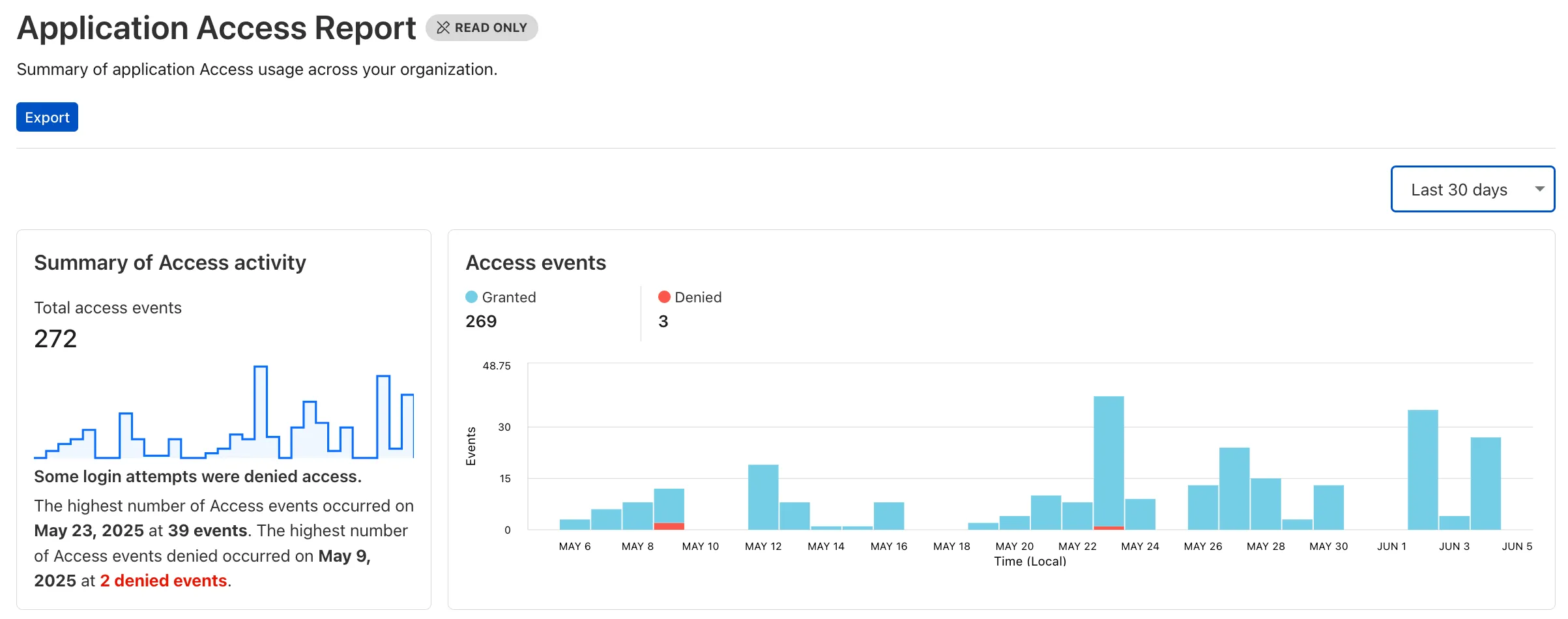
Both features are accessible in the Cloudflare Zero Trust dashboard ↗, empowering organizations with better visibility and control.
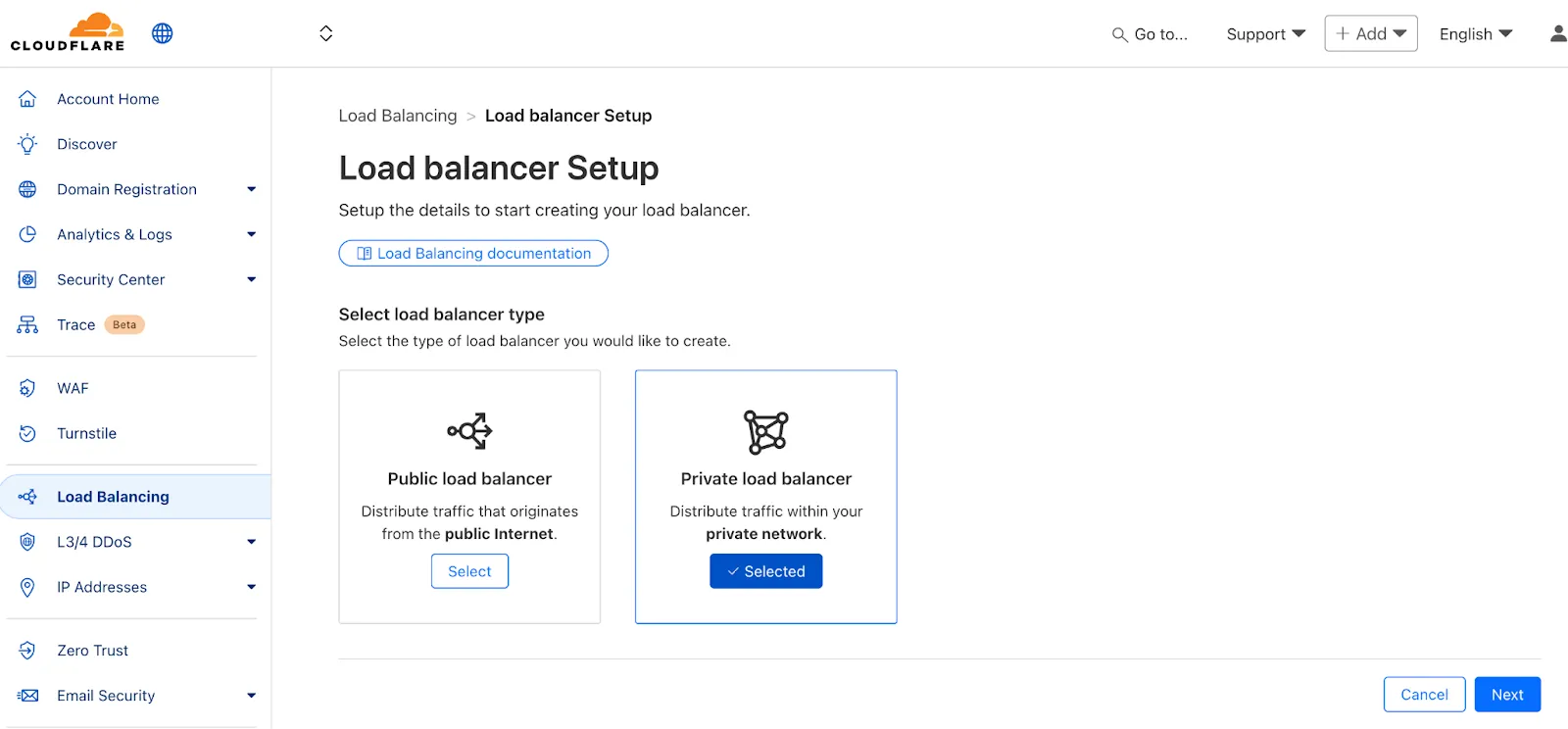
We've made two large changes to load balancing:
- Redesigned the user interface, now centralized at the account level.
- Introduced Private Load Balancers to the UI, enabling you to manage traffic for all of your external and internal applications in a single spot.
This update streamlines how you manage load balancers across multiple zones and extends robust traffic management to your private network infrastructure.
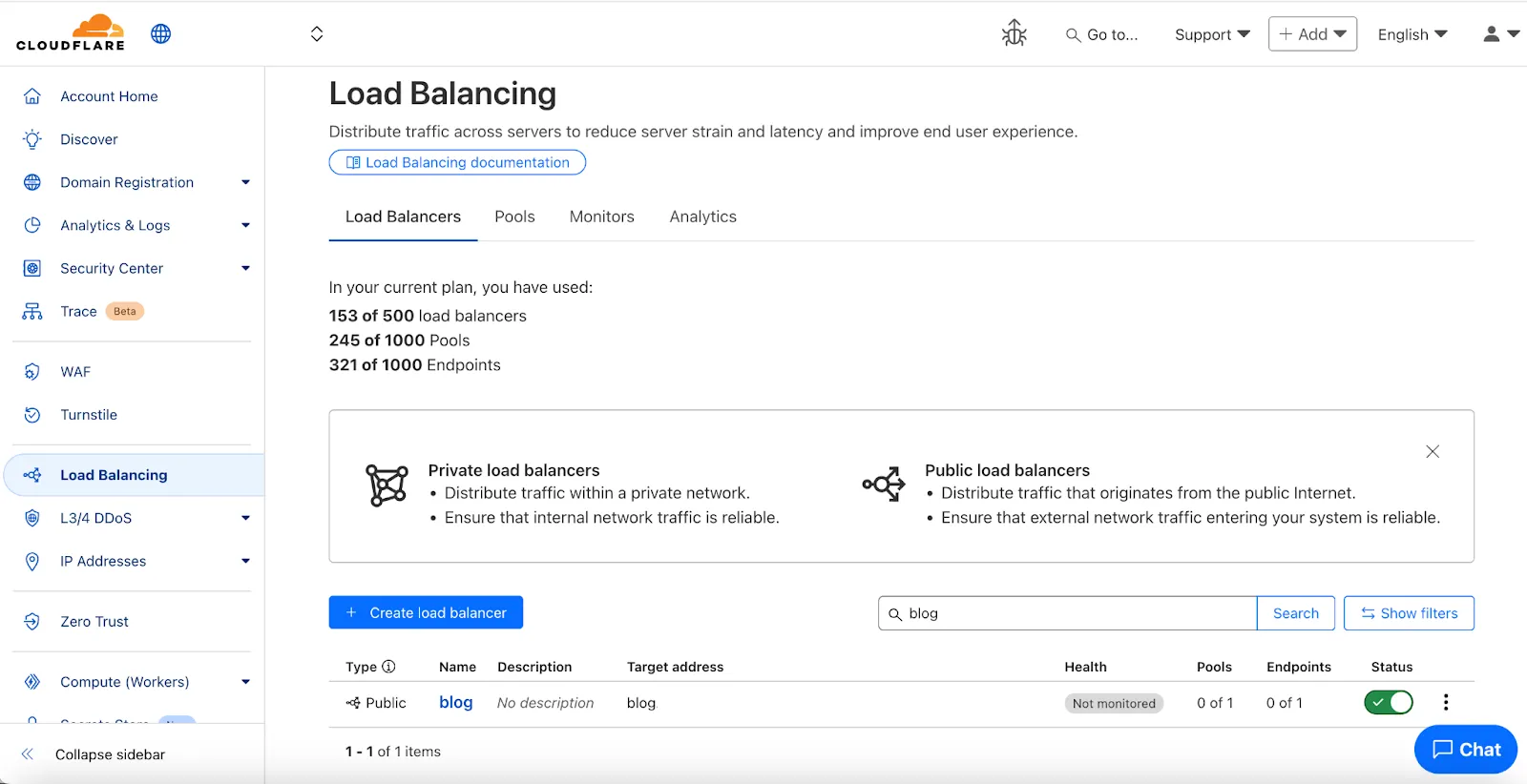
Key Enhancements:
-
Account-Level UI Consolidation:
-
Unified Management: Say goodbye to navigating individual zones for load balancing tasks. You can now view, configure, and monitor all your load balancers across every zone in your account from a single, intuitive interface at the account level.
-
Improved Efficiency: This centralized approach provides a more streamlined workflow, making it faster and easier to manage both your public-facing and internal traffic distribution.
-
-
Private Network Load Balancing:
-
Secure Internal Application Access: Create Private Load Balancers to distribute traffic to applications hosted within your private network, ensuring they are not exposed to the public Internet.
-
WARP & Magic WAN Integration: Effortlessly direct internal traffic from users connected via Cloudflare WARP or through your Magic WAN infrastructure to the appropriate internal endpoint pools.
-
Enhanced Security for Internal Resources: Combine reliable Load Balancing with Zero Trust access controls to ensure your internal services are both performant and only accessible by verified users.
-
Users can now access significant enhancements to Cloudflare Gateway analytics, providing you with unprecedented visibility into your organization's DNS queries, HTTP requests, and Network sessions. These powerful new dashboards enable you to go beyond raw logs and gain actionable insights into how your users are interacting with the Internet and your protected resources.
You can now visualize and explore:
- Patterns Over Time: Understand trends in traffic volume and blocked requests, helping you identify anomalies and plan for future capacity.
- Top Users & Destinations: Quickly pinpoint the most active users, enabling better policy enforcement and resource allocation.
- Actions Taken: See a clear breakdown of security actions applied by Gateway policies, such as blocks and allows, offering a comprehensive view of your security posture.
- Geographic Regions: Gain insight into the global distribution of your traffic.
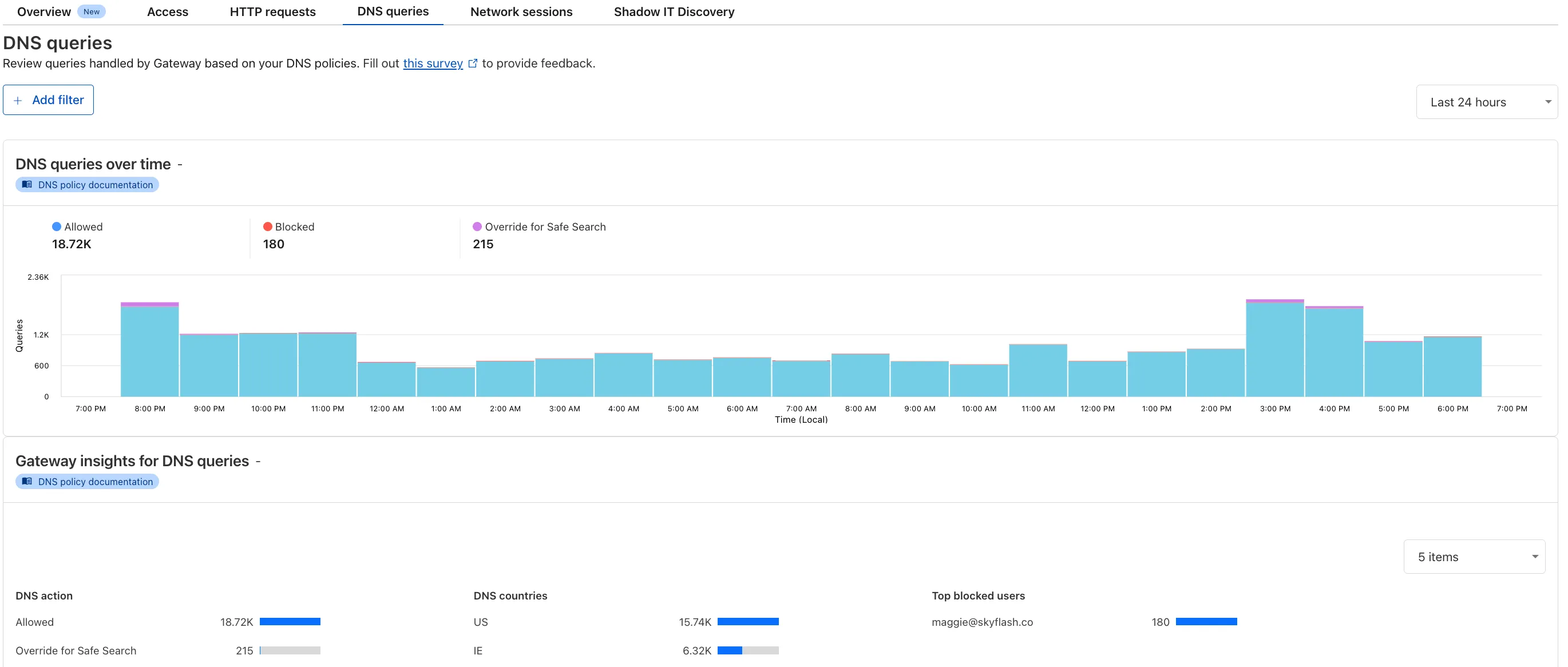
To access the new overview, log in to your Cloudflare Zero Trust dashboard ↗ and go to Analytics in the side navigation bar.
All Cloudflare One Gateway users can now use Protocol detection logging and filtering, including those on Pay-as-you-go and Free plans.
With Protocol Detection, admins can identify and enforce policies on traffic proxied through Gateway based on the underlying network protocol (for example, HTTP, TLS, or SSH), enabling more granular traffic control and security visibility no matter your plan tier.
This feature is available to enable in your account network settings for all accounts. For more information on using Protocol Detection, refer to the Protocol detection documentation.
A new GA release for the Windows WARP client is now available on the stable releases downloads page.
This release contains a hotfix for managed networks for the 2025.4.929.0 release.
Changes and improvements
- Fixed an issue where it could take up to 3 minutes for the correct device profile to be applied in some circumstances. In the worst case, it should now only take up to 40 seconds. This will be improved further in a future release.
Known issues
DNS resolution may be broken when the following conditions are all true:
- WARP is in Secure Web Gateway without DNS filtering (tunnel-only) mode.
- A custom DNS server address is configured on the primary network adapter.
- The custom DNS server address on the primary network adapter is changed while WARP is connected.
To work around this issue, reconnect the WARP client by toggling off and back on.
Microsoft has confirmed a regression with Windows 11 starting around 24H2 that may cause performance issues for some users. These performance issues could manifest as mouse lag, audio cracking, or other slowdowns. A fix from Microsoft is expected in early July.
Devices with
KB5055523installed may receive a warning aboutWin32/ClickFix.ABAbeing present in the installer. To resolve this false positive, update Microsoft Security Intelligence to version 1.429.19.0 or later.
A new GA release for the macOS WARP client is now available on the stable releases downloads page.
This release contains a hotfix for managed networks for the 2025.4.929.0 release.
Changes and improvements
- Fixed an issue where it could take up to 3 minutes for the correct device profile to be applied in some circumstances. In the worst case, it should now only take up to 40 seconds. This will be improved further in a future release.
Known issues
- macOS Sequoia: Due to changes Apple introduced in macOS 15.0.x, the WARP client may not behave as expected. Cloudflare recommends the use of macOS 15.4 or later.
A new GA release for the Linux WARP client is now available on the stable releases downloads page.
This release contains a hotfix for managed networks for the 2025.4.929.0 release.
Changes and improvements
- Fixed an issue where it could take up to 3 minutes for the correct device profile to be applied in some circumstances. In the worst case, it should now only take up to 40 seconds. This will be improved further in a future release.
Known issues
- Devices using WARP client 2025.4.929.0 and up may experience Local Domain Fallback failures if a fallback server has not been configured. To configure a fallback server, refer to Route traffic to fallback server.
42 new applications have been added for Zero Trust support within the Application Library and Gateway policy enforcement, giving you the ability to investigate or apply inline policies to these applications.
33 of the 42 applications are Artificial Intelligence applications. The others are Human Resources (2 applications), Development (2 applications), Productivity (2 applications), Sales & Marketing, Public Cloud, and Security.
To view all available applications, log in to your Cloudflare Zero Trust dashboard ↗, navigate to the App Library under My Team.
For more information on creating Gateway policies, see our Gateway policy documentation.
A new Access Analytics dashboard is now available to all Cloudflare One customers. Customers can apply and combine multiple filters to dive into specific slices of their Access metrics. These filters include:
- Logins granted and denied
- Access events by type (SSO, Login, Logout)
- Application name (Salesforce, Jira, Slack, etc.)
- Identity provider (Okta, Google, Microsoft, onetimepin, etc.)
- Users (
chris@cloudflare.com,sally@cloudflare.com,rachel@cloudflare.com, etc.) - Countries (US, CA, UK, FR, BR, CN, etc.)
- Source IP address
- App type (self-hosted, Infrastructure, RDP, etc.)
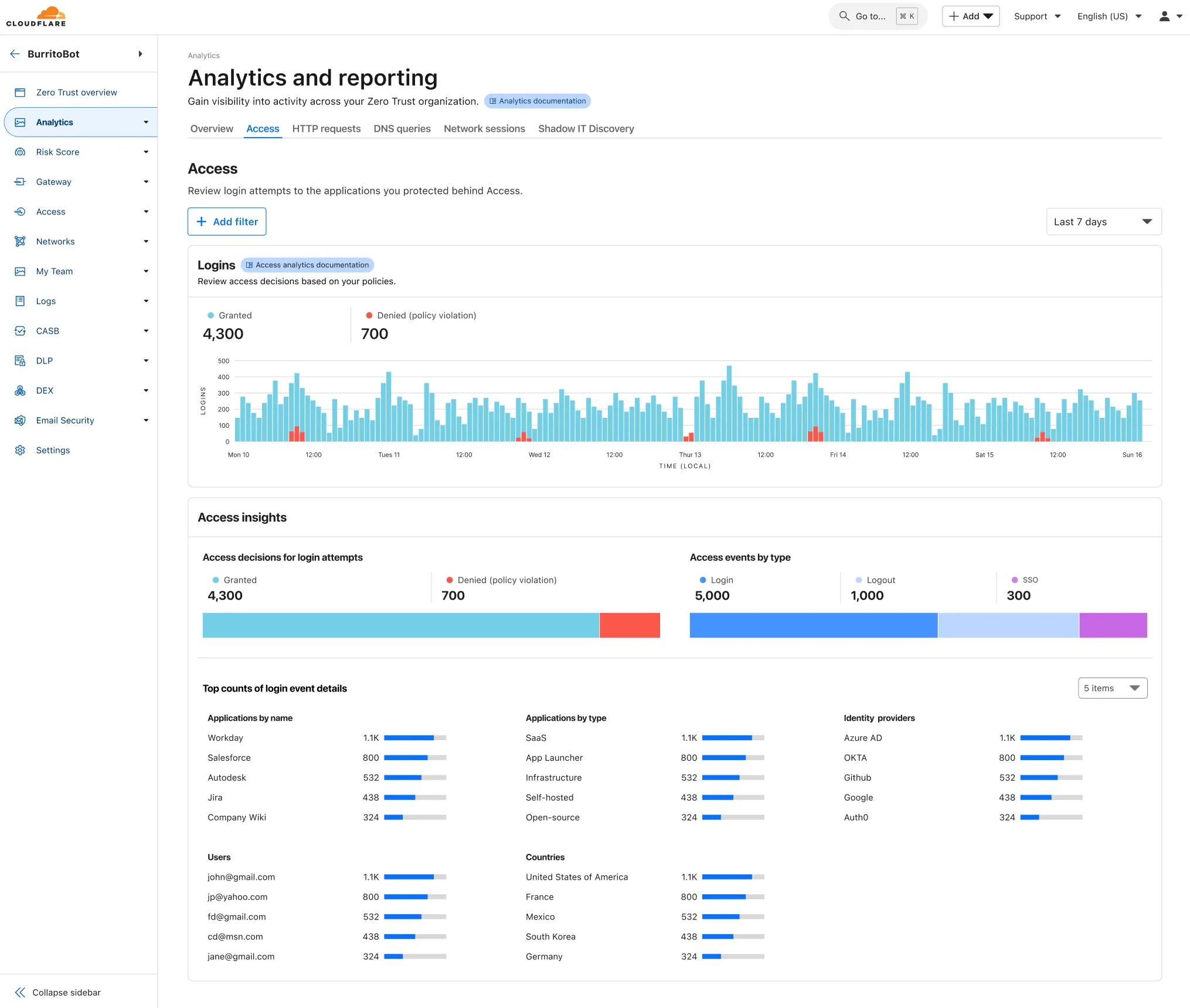
To access the new overview, log in to your Cloudflare Zero Trust dashboard ↗ and find Analytics in the side navigation bar.
You can now safely open email attachments to view and investigate them.
What this means is that messages now have a Attachments section. Here, you can view processed attachments and their classifications (for example, Malicious, Suspicious, Encrypted). Next to each attachment, a Browser Isolation icon allows your team to safely open the file in a clientless, isolated browser with no risk to the analyst or your environment.
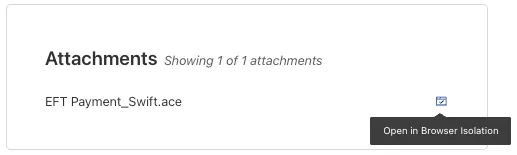
To use this feature, you must:
- Enable Clientless Web Isolation in your Zero Trust settings.
- Have Browser Isolation (BISO) seats assigned.
For more details, refer to our setup guide.
Some attachment types may not render in Browser Isolation. If there is a file type that you would like to be opened with Browser Isolation, reach out to your Cloudflare contact.
This feature is available across these Email security packages:
- Advantage
- Enterprise
- Enterprise + PhishGuard
A new GA release for the Windows WARP client is now available on the stable releases downloads page.
This release contains two significant changes all customers should be aware of:
- All DNS traffic now flows inside the WARP tunnel. Customers are no longer required to configure their local firewall rules to allow our DoH IP addresses and domains.
- When using MASQUE, the connection will fall back to HTTP/2 (TCP) when we detect that HTTP/3 traffic is blocked. This allows for a much more reliable connection on some public WiFi networks.
Changes and improvements
- Fixed an issue causing reconnection loops when captive portals are detected.
- Fixed an issue that caused WARP client disk encryption posture checks to fail due to missing drive names.
- Fixed an issue where managed network policies could incorrectly report network location beacons as missing.
- Improved DEX test error reporting.
- Fixed an issue where some parts of the WARP Client UI were missing in high contrast mode.
- Fixed an issue causing client notifications to fail in IPv6 only environments which prevented the client from receiving configuration changes to settings like device profile.
- Added a TCP fallback for the MASQUE tunnel protocol to improve connectivity on networks that block UDP or HTTP/3 specifically.
- Added new IP addresses for tunnel connectivity checks. If your organization uses a firewall or other policies you will need to exempt these IPs.
- DNS over HTTPS traffic is now included in the WARP tunnel by default.
- Improved the error message displayed in the client GUI when the rate limit for entering an incorrect admin override code is met.
- Improved handling of non-SLAAC IPv6 interface addresses for better connectivity in IPv6 only environments.
- Fixed an issue where frequent network changes could cause WARP to become unresponsive.
- Improvement for WARP to check if tunnel connectivity fails or times out at device wake before attempting to reconnect.
- Fixed an issue causing WARP connection disruptions after network changes.
Known issues
DNS resolution may be broken when the following conditions are all true:
- WARP is in Secure Web Gateway without DNS filtering (tunnel-only) mode.
- A custom DNS server address is configured on the primary network adapter.
- The custom DNS server address on the primary network adapter is changed while WARP is connected.
To work around this issue, reconnect the WARP client by toggling off and back on.
Microsoft has confirmed a regression with Windows 11 starting around 24H2 that may cause performance issues for some users. These performance issues could manifest as mouse lag, audio cracking, or other slowdowns. A fix from Microsoft is expected in early July.
Devices with
KB5055523installed may receive a warning aboutWin32/ClickFix.ABAbeing present in the installer. To resolve this false positive, update Microsoft Security Intelligence to version 1.429.19.0 or later.
New categories added
Parent ID Parent Name Category ID Category Name 1 Ads 66 Advertisements 3 Business & Economy 185 Personal Finance 3 Business & Economy 186 Brokerage & Investing 21 Security Threats 187 Compromised Domain 21 Security Threats 188 Potentially Unwanted Software 6 Education 189 Reference 9 Government & Politics 190 Charity and Non-profit Changes to existing categories
Original Name New Name Religion Religion & Spirituality Government Government/Legal Redirect URL Alias/Redirect Refer to Gateway domain categories to learn more.
Remote Browser Isolation (RBI) now supports SAML HTTP-POST bindings, enabling seamless authentication for SSO-enabled applications that rely on POST-based SAML responses from Identity Providers (IdPs) within a Remote Browser Isolation session. This update resolves a previous limitation that caused
405errors during login and improves compatibility with multi-factor authentication (MFA) flows.With expanded support for major IdPs like Okta and Azure AD, this enhancement delivers a more consistent and user-friendly experience across authentication workflows. Learn how to set up Remote Browser Isolation.
You can now create DNS policies to manage outbound traffic for an expanded list of applications. This update adds support for 273 new applications, giving you more control over your organization's outbound traffic.
With this update, you can:
- Create DNS policies for a wider range of applications
- Manage outbound traffic more effectively
- Improve your organization's security and compliance posture
For more information on creating DNS policies, see our DNS policy documentation.
A new GA release for the Linux WARP client is now available on the stable releases downloads page.
This release contains two significant changes all customers should be aware of:
- All DNS traffic now flows inside the WARP tunnel. Customers are no longer required to configure their local firewall rules to allow our DoH IP addresses and domains.
- When using MASQUE, the connection will fall back to HTTP/2 (TCP) when we detect that HTTP/3 traffic is blocked. This allows for a much more reliable connection on some public WiFi networks.
Changes and improvements
- Fixed an issue where the managed network policies could incorrectly report network location beacons as missing.
- Improved DEX test error reporting.
- Fixed an issue causing client notifications to fail in IPv6 only environments which prevented the client from receiving configuration changes to settings like device profile.
- Added a TCP fallback for the MASQUE tunnel protocol to improve connectivity on networks that block UDP or HTTP/3 specifically.
- Added new IP addresses for tunnel connectivity checks. If your organization uses a firewall or other policies you will need to exempt these IPs.
- Fixed an issue where frequent network changes could cause WARP to become unresponsive.
- DNS over HTTPS traffic is now included in the WARP tunnel by default.
- Improvement for WARP to check if tunnel connectivity fails or times out at device wake before attempting to reconnect.
- Fixed an issue causing WARP connection disruptions after network changes.
Known issues
- Devices using WARP client 2025.4.929.0 and up may experience Local Domain Fallback failures if a fallback server has not been configured. To configure a fallback server, refer to Route traffic to fallback server.