
Changelog
New updates and improvements at Cloudflare.

Cloudflare One Appliance version 2026.2.0 adds post-quantum encryption support using hybrid ML-KEM (Module-Lattice-Based Key-Encapsulation Mechanism).
The appliance now uses TLS 1.3 with hybrid ML-KEM for its connection to the Cloudflare edge. During the TLS handshake, the appliance and the edge share a symmetric secret over the TLS connection and inject it into the ESP layer of IPsec. This protects IPsec data plane traffic against harvest-now, decrypt-later attacks.
This upgrade deploys automatically to all appliances during their configured interrupt windows with no manual action required.
For more information, refer to Cloudflare One Appliance.
We have updated the Monitoring page to provide a more streamlined and insightful experience for administrators, improving both data visualization and dashboard accessibility.
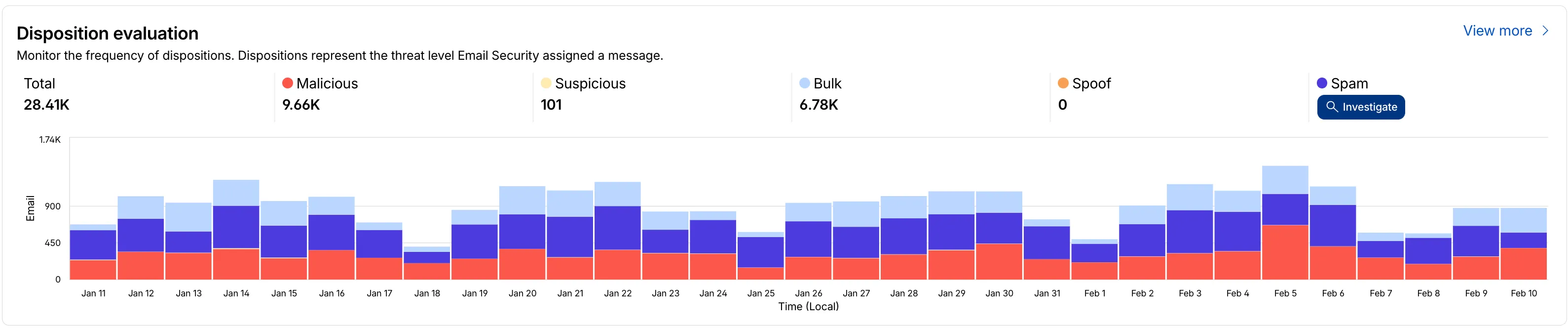
- Enhanced Visual Layout: Optimized contrast and the introduction of stacked bar charts for clearer data visualization and trend analysis.
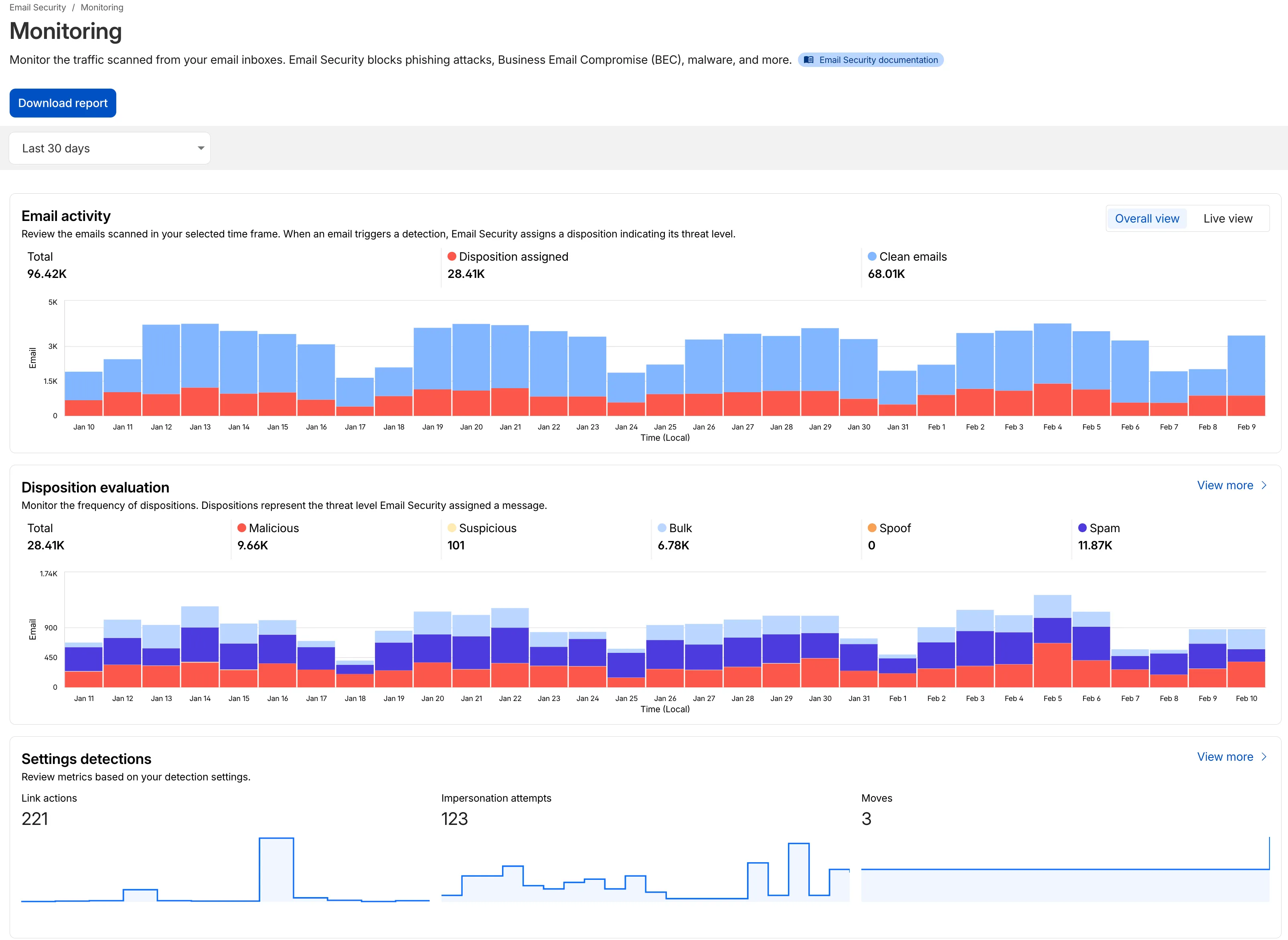
- Improved Accessibility & Usability:
- Widget Search: Added search functionality to multiple widgets, including Policies, Submitters, and Impersonation.
- Actionable UI: All available actions are now accessible via dedicated buttons.
- State Indicators: Improved UI states to clearly communicate loading, empty datasets, and error conditions.
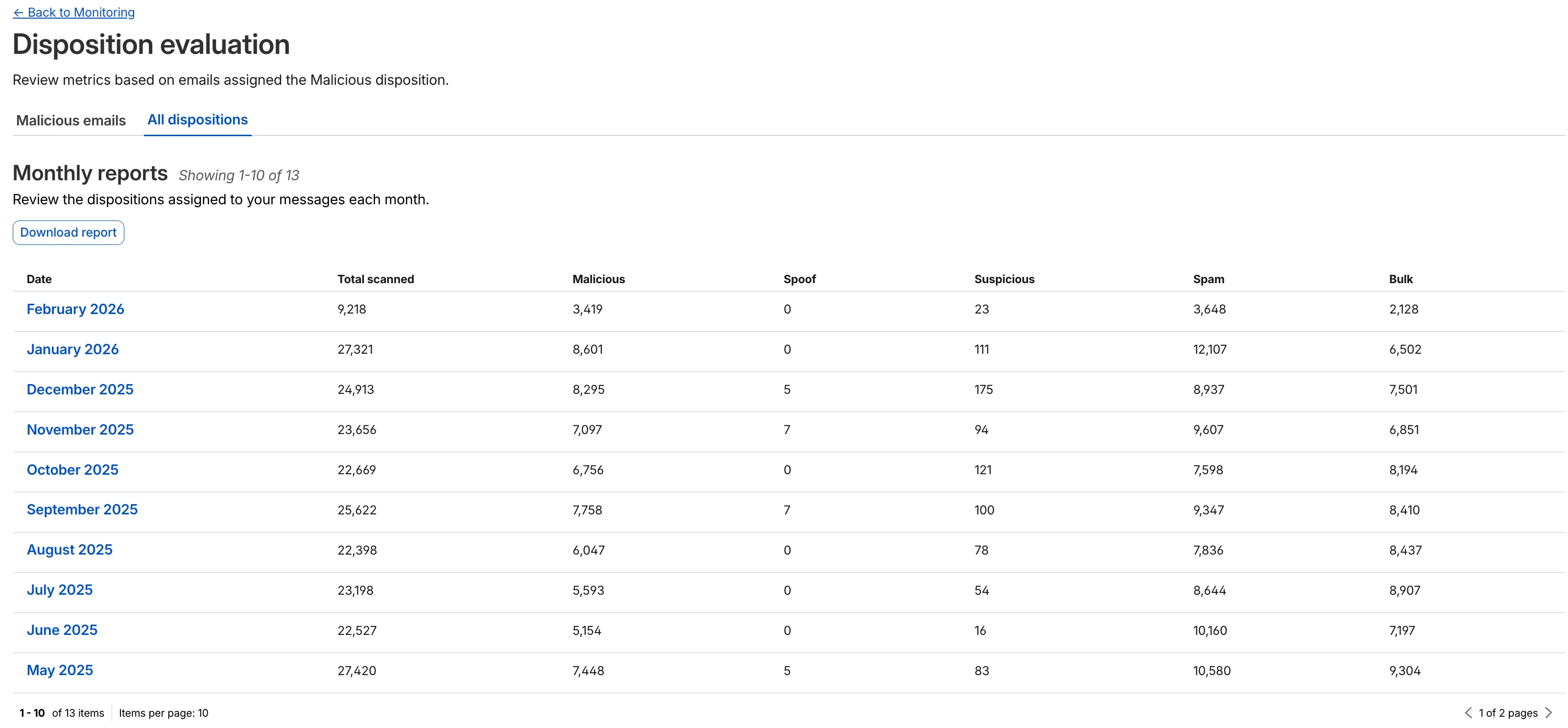
- Granular Data Breakdowns: New views for dispositions by month, malicious email details, link actions, and impersonations.
This applies to all Email Security packages:
- Advantage
- Enterprise
- Enterprise + PhishGuard
- Enhanced Visual Layout: Optimized contrast and the introduction of stacked bar charts for clearer data visualization and trend analysis.
Magic WAN and Magic Transit customers can use the Cloudflare dashboard to configure and manage BGP peering between their networks and their Magic routing table when using IPsec and GRE tunnel on-ramps (beta).
Using BGP peering allows customers to:
- Automate the process of adding or removing networks and subnets.
- Take advantage of failure detection and session recovery features.
With this functionality, customers can:
- Establish an eBGP session between their devices and the Magic WAN / Magic Transit service when connected via IPsec and GRE tunnel on-ramps.
- Secure the session by MD5 authentication to prevent misconfigurations.
- Exchange routes dynamically between their devices and their Magic routing table.
For configuration details, refer to:
A new Beta release for the Windows WARP client is now available on the beta releases downloads page.
This release contains minor fixes, improvements, and new features.
Changes and improvements
- Improvements to multi-user mode. Fixed an issue where when switching from a pre-login registration to a user registration, Mobile Device Management (MDM) configuration association could be lost.
- Added a new feature to manage NetBIOS over TCP/IP functionality on the Windows client. NetBIOS over TCP/IP on the Windows client is now disabled by default and can be enabled in device profile settings.
- Fixed an issue causing failure of the local network exclusion feature when configured with a timeout of
0. - Improvement for the Windows client certificate posture check to ensure logged results are from checks that run once users log in.
- Improvement for more accurate reporting of device colocation information in the Cloudflare One dashboard.
Known issues
For Windows 11 24H2 users, Microsoft has confirmed a regression that may lead to performance issues like mouse lag, audio cracking, or other slowdowns. Cloudflare recommends users experiencing these issues upgrade to a minimum Windows 11 24H2 KB5062553 or higher for resolution.
Devices with KB5055523 installed may receive a warning about
Win32/ClickFix.ABAbeing present in the installer. To resolve this false positive, update Microsoft Security Intelligence to version 1.429.19.0 or later.DNS resolution may be broken when the following conditions are all true:
- WARP is in Secure Web Gateway without DNS filtering (tunnel-only) mode.
- A custom DNS server address is configured on the primary network adapter.
- The custom DNS server address on the primary network adapter is changed while WARP is connected.
To work around this issue, reconnect the WARP client by toggling off and back on.
A new Beta release for the macOS WARP client is now available on the beta releases downloads page.
This release contains minor fixes and improvements.
Changes and improvements
- Fixed an issue causing failure of the local network exclusion feature when configured with a timeout of
0. - Improvement for more accurate reporting of device colocation information in the Cloudflare One dashboard.
- Fixed an issue causing failure of the local network exclusion feature when configured with a timeout of
Cloudflare source IPs are the IP addresses used by Cloudflare services (such as Load Balancing, Gateway, and Browser Isolation) when sending traffic to your private networks.
For customers using legacy mode routing, traffic to private networks is sourced from public Cloudflare IPs, which may cause IP conflicts. For customers using Unified Routing mode (beta), traffic to private networks is sourced from dedicated, non-Internet-routable private IPv4 range to ensure:
- Symmetric routing over private network connections
- Proper firewall state preservation
- Private traffic stays on secure paths
Key details:
- IPv4: Sourced from
100.64.0.0/12by default, configurable to any/12CIDR - IPv6: Sourced from
2606:4700:cf1:5000::/64(not configurable) - Affected connectors: GRE, IPsec, CNI, WARP Connector, and WARP Client (Cloudflare Tunnel is not affected)
Configuring Cloudflare source IPs requires Unified Routing (beta) and the
Cloudflare One Networks Writepermission.For configuration details, refer to Configure Cloudflare source IPs.
You can now require Cloudflare Access protection for all hostnames in your account. When enabled, traffic to any hostname that does not have a matching Access application is automatically blocked.
This deny-by-default approach prevents accidental exposure of internal resources to the public Internet. If a developer deploys a new application or creates a DNS record without configuring an Access application, the traffic is blocked rather than exposed.
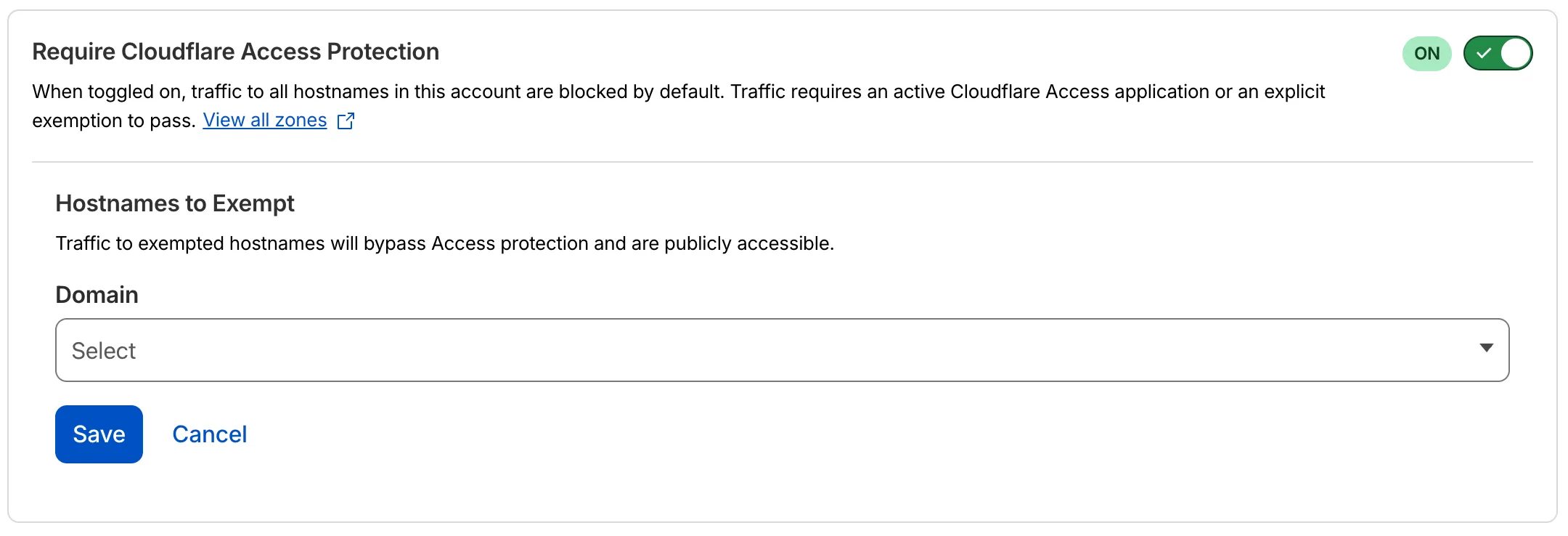
- Blocked by default: Traffic to all hostnames in the account is blocked unless an Access application exists for that hostname.
- Explicit access required: To allow traffic, create an Access application with an Allow or Bypass policy.
- Hostname exemptions: You can exempt specific hostnames from this requirement.
To turn on this feature, refer to Require Access protection.
Three new API token permissions are available for Cloudflare Access, giving you finer-grained control when building automations and integrations:
- Access: Organizations Revoke — Grants the ability to revoke user sessions in a Zero Trust organization. Use this permission when you need a token that can terminate active sessions without broader write access to organization settings.
- Access: Population Read — Grants read access to the SCIM users and groups synced from an identity provider to Cloudflare Access. Use this permission for tokens that only need to read synced user and group data.
- Access: Population Write — Grants write access to the SCIM users and groups synced from an identity provider to Cloudflare Access. Use this permission for tokens that need to create or modify synced user and group data.
These permissions are scoped at the account level and can be combined with existing Access permissions.
For a full list of available permissions, refer to API token permissions.
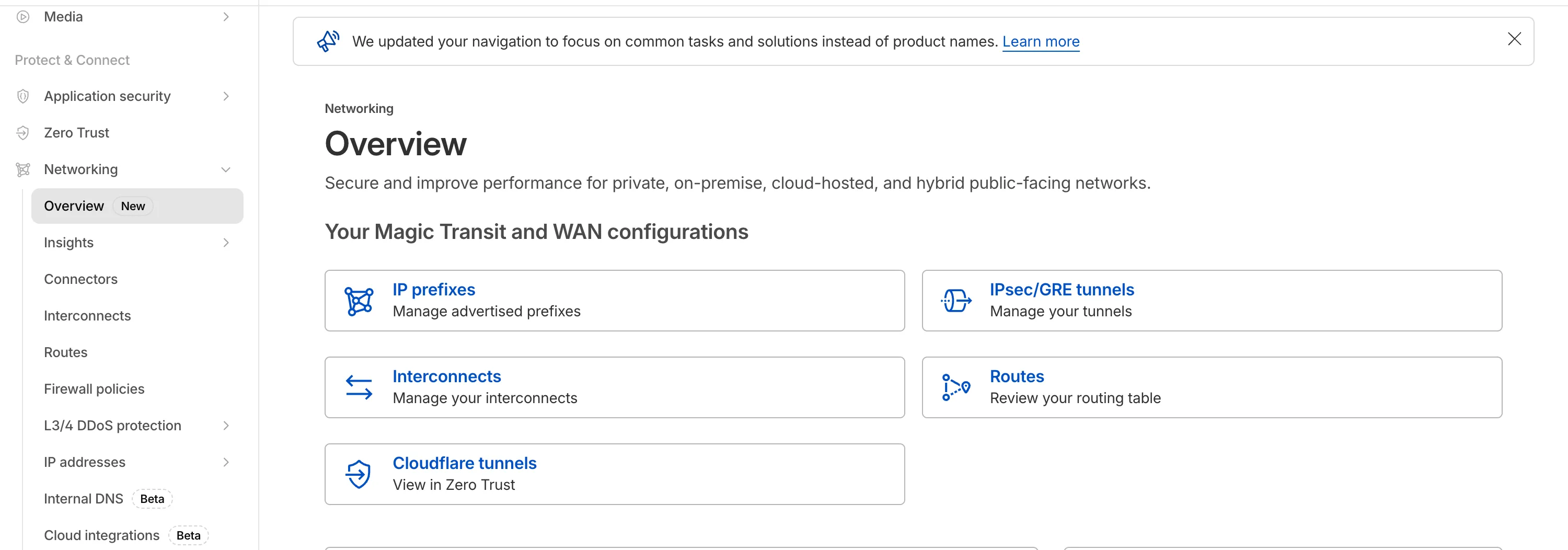
The Network Services menu structure in Cloudflare's dashboard has been updated to reflect solutions and capabilities instead of product names. This will make it easier for you to find what you need and better reflects how our services work together.
Your existing configurations will remain the same, and you will have access to all of the same features and functionality.
The changes visible in your dashboard may vary based on the products you use. Overall, changes relate to Magic Transit ↗, Magic WAN ↗, and Magic Firewall ↗.
Summary of changes:
- A new Overview page provides access to the most common tasks across Magic Transit and Magic WAN.
- Product names have been removed from top-level navigation.
- Magic Transit and Magic WAN configuration is now organized under Routes and Connectors. For example, you will find IP Prefixes under Routes, and your GRE/IPsec Tunnels under Connectors.
- Magic Firewall policies are now called Firewall Policies.
- Magic WAN Connectors and Connector On-Ramps are now referenced in the dashboard as Appliances and Appliance profiles. They can be found under Connectors > Appliances.
- Network analytics, network health, and real-time analytics are now available under Insights.
- Packet Captures are found under Insights > Diagnostics.
- You can manage your Sites from Insights > Network health.
- You can find Magic Network Monitoring under Insights > Network flow.
If you would like to provide feedback, complete this form ↗. You can also find these details in the January 7, 2026 email titled [FYI] Upcoming Network Services Dashboard Navigation Update.
Cloudflare One has expanded its [User Risk Scoring] (/cloudflare-one/insights/risk-score/) capabilities by introducing two new behaviors for organizations using the [CrowdStrike integration] (/cloudflare-one/integrations/service-providers/crowdstrike/).
Administrators can now automatically escalate the risk score of a user if their device matches specific CrowdStrike Zero Trust Assessment (ZTA) score ranges. This allows for more granular security policies that respond dynamically to the health of the endpoint.
New risk behaviors The following risk scoring behaviors are now available:
- CrowdStrike low device score: Automatically increases a user's risk score when the connected device reports a "Low" score from CrowdStrike.
- CrowdStrike medium device score: Automatically increases a user's risk score when the connected device reports a "Medium" score from CrowdStrike.
These scores are derived from [CrowdStrike device posture attributes] (/cloudflare-one/integrations/service-providers/crowdstrike/#device-posture-attributes), including OS signals and sensor configurations.
We have made it easier to validate connectivity when deploying WARP Connector as part of your software-defined private network.
You can now
pingthe WARP Connector host directly on its LAN IP address immediately after installation. This provides a fast, familiar way to confirm that the Connector is online and reachable within your network before testing access to downstream services.Starting with version 2025.10.186.0, WARP Connector responds to traffic addressed to its own LAN IP, giving you immediate visibility into Connector reachability.
Learn more about deploying WARP Connector and building private network connectivity with Cloudflare One.
A new GA release for the Windows WARP client is now available on the stable releases downloads page.
This release contains minor fixes, improvements, and new features. New features include the ability to manage WARP client connectivity for all devices in your fleet using an external signal, and a new WARP client device posture check for Antivirus.
Changes and improvements
- Added a new feature to manage WARP client connectivity for all devices using an external signal. This feature allows administrators to send a global signal from an on-premises HTTPS endpoint that force disconnects or reconnects all WARP clients in an account based on configuration set on the endpoint.
- Fixed an issue that caused occasional audio degradation and increased CPU usage on Windows by optimizing route configurations for large domain-based split tunnel rules.
- The Local Domain Fallback feature has been fixed for devices running WARP client version 2025.4.929.0 and newer. Previously, these devices could experience failures with Local Domain Fallback unless a fallback server was explicitly configured. This configuration is no longer a requirement for the feature to function correctly.
- Proxy mode now supports transparent HTTP proxying in addition to CONNECT-based proxying.
- Fixed an issue where sending large messages to the daemon by Inter-Process Communication (IPC) could cause the daemon to fail and result in service interruptions.
- Added support for a new WARP client device posture check for Antivirus. The check confirms the presence of an antivirus program on a Windows device with the option to check if the antivirus is up to date.
Known issues
For Windows 11 24H2 users, Microsoft has confirmed a regression that may lead to performance issues like mouse lag, audio cracking, or other slowdowns. Cloudflare recommends users experiencing these issues upgrade to a minimum Windows 11 24H2 KB5062553 or higher for resolution.
Devices with KB5055523 installed may receive a warning about
Win32/ClickFix.ABAbeing present in the installer. To resolve this false positive, update Microsoft Security Intelligence to version 1.429.19.0 or later.DNS resolution may be broken when the following conditions are all true:
- WARP is in Secure Web Gateway without DNS filtering (tunnel-only) mode.
- A custom DNS server address is configured on the primary network adapter.
- The custom DNS server address on the primary network adapter is changed while WARP is connected.
To work around this issue, reconnect the WARP client by toggling off and back on.
A new GA release for the macOS WARP client is now available on the stable releases downloads page.
This release contains minor fixes, improvements, and new features, including the ability to manage WARP client connectivity for all devices in your fleet using an external signal.
Changes and improvements
- The Local Domain Fallback feature has been fixed for devices running WARP client version 2025.4.929.0 and newer. Previously, these devices could experience failures with Local Domain Fallback unless a fallback server was explicitly configured. This configuration is no longer a requirement for the feature to function correctly.
- Proxy mode now supports transparent HTTP proxying in addition to CONNECT-based proxying.
- Added a new feature to manage WARP client connectivity for all devices using an external signal. This feature allows administrators to send a global signal from an on-premises HTTPS endpoint that force disconnects or reconnects all WARP clients in an account based on configuration set on the endpoint.
A new GA release for the Linux WARP client is now available on the stable releases downloads page.
This release contains minor fixes, improvements, and new features, including the ability to manage WARP client connectivity for all devices in your fleet using an external signal.
WARP client version 2025.8.779.0 introduced an updated public key for Linux packages. The public key must be updated if it was installed before September 12, 2025 to ensure the repository remains functional after December 4, 2025. Instructions to make this update are available at pkg.cloudflareclient.com.
Changes and improvements
- The Local Domain Fallback feature has been fixed for devices running WARP client version 2025.4.929.0 and newer. Previously, these devices could experience failures with Local Domain Fallback unless a fallback server was explicitly configured. This configuration is no longer a requirement for the feature to function correctly.
- Linux disk encryption posture check now supports non-filesystem encryption types like
dm-crypt. - Proxy mode now supports transparent HTTP proxying in addition to CONNECT-based proxying.
- Fixed an issue where the GUI becomes unresponsive when the Re-Authenticate in browser button is clicked.
- Added a new feature to manage WARP client connectivity for all devices using an external signal. This feature allows administrators to send a global signal from an on-premises HTTPS endpoint that force disconnects or reconnects all WARP clients in an account based on configuration set on the endpoint.
The Action Log now provides enriched data for post-delivery actions to improve troubleshooting. In addition to success confirmations, failed actions now display the targeted Destination folder and a specific failure reason within the Activity field.
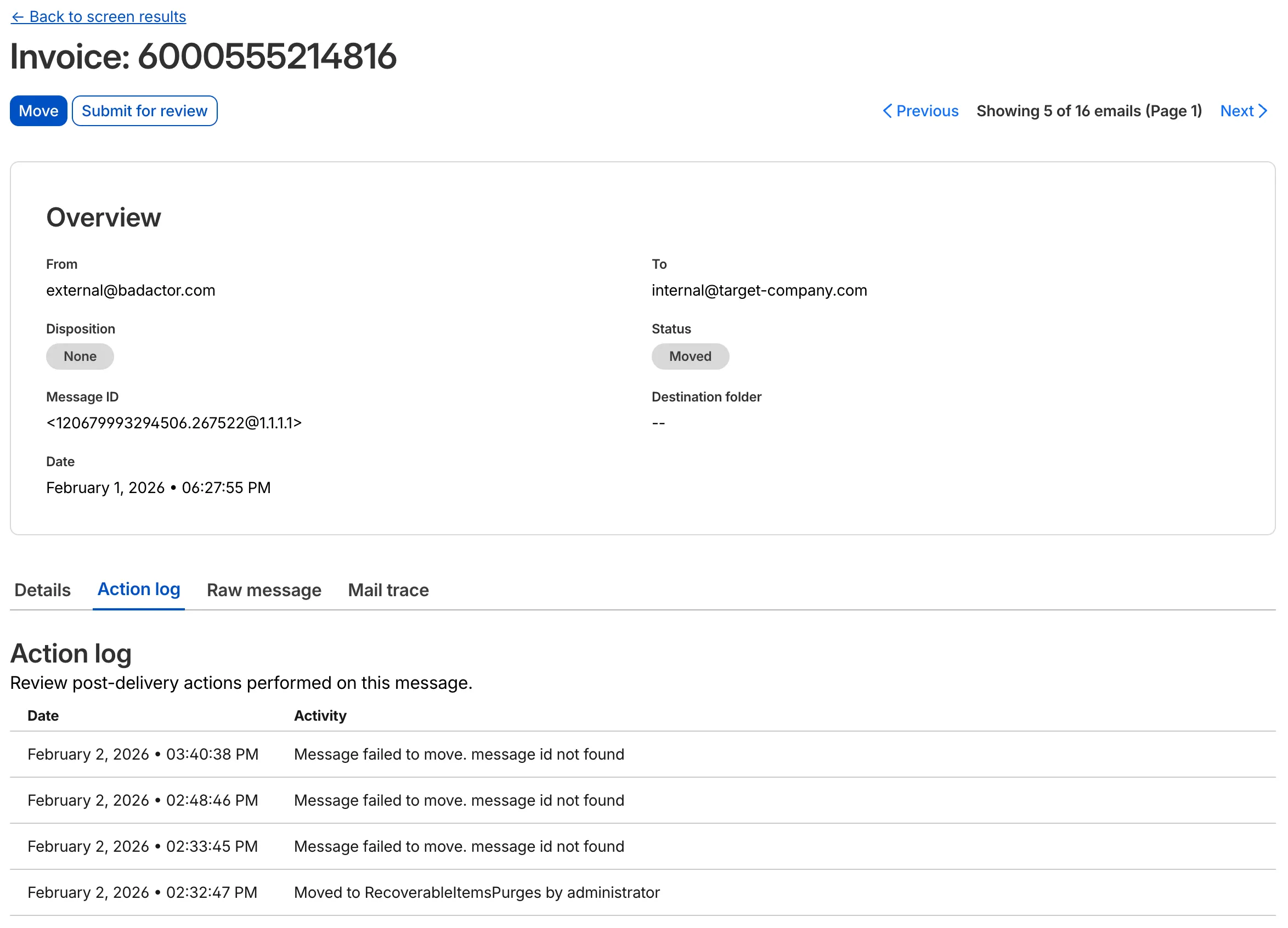
This update allows you to see the full lifecycle of a failed action. For instance, if an administrator tries to move an email that has already been deleted or moved manually, the log will now show the multiple retry attempts and the specific destination error.
This applies to all Email Security packages:
- Enterprise
- Enterprise + PhishGuard
Cloudflare admin activity logs now capture each time a DNS over HTTP (DoH) user is created.
These logs can be viewed from the Cloudflare One dashboard ↗, pulled via the Cloudflare API, and exported through Logpush.
Magic WAN Connector now exports NetFlow data for breakout traffic to Magic Network Monitoring (MNM), providing visibility into traffic that bypasses Cloudflare's security filtering.
This feature allows you to:
- Monitor breakout traffic statistics in the Cloudflare dashboard.
- View traffic patterns for applications configured to bypass Cloudflare.
- Maintain visibility across all traffic passing through your Magic WAN Connector.
For more information, refer to NetFlow statistics.
Zero Trust has again upgraded its Shadow IT analytics, providing you with unprecedented visibility into your organizations use of SaaS tools. With this dashboard, you can review who is using an application and volumes of data transfer to the application.
With this update, you can review data transfer metrics at the domain level, rather than just the application level, providing more granular insight into your data transfer patterns.
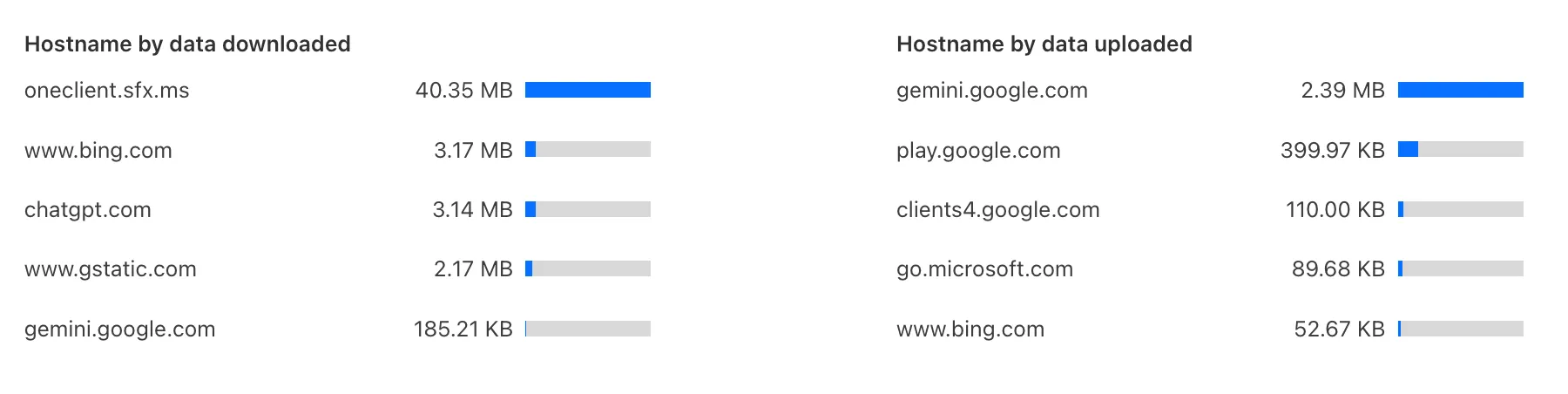
These metrics can be filtered by all available filters on the dashboard, including user, application, or content category.
Both the analytics and policies are accessible in the Cloudflare Zero Trust dashboard ↗, empowering organizations with better visibility and control.
You can now duplicate specific Cloudflare One resources with a single click from the dashboard.
Initially supported resources:
- Access Applications
- Access Policies
- Gateway Policies
To try this out, simply click on the overflow menu (⋮) from the resource table and click Duplicate. We will continue to add the Duplicate action for resources throughout 2026.
A new Beta release for the Windows WARP client is now available on the beta releases downloads page.
This release contains minor fixes and improvements.
Changes and improvements
- The Local Domain Fallback feature has been fixed for devices running WARP client version 2025.4.929.0 and newer. Previously, these devices could experience failures with Local Domain Fallback unless a fallback server was explicitly configured. This configuration is no longer a requirement for the feature to function correctly.
- Proxy mode now supports transparent HTTP proxying in addition to CONNECT-based proxying.
- Fixed an issue where sending large messages to the WARP daemon by Inter-Process Communication (IPC) could cause WARP to crash and result in service interruptions.
Known issues
For Windows 11 24H2 users, Microsoft has confirmed a regression that may lead to performance issues like mouse lag, audio cracking, or other slowdowns. Cloudflare recommends users experiencing these issues upgrade to a minimum Windows 11 24H2 KB5062553 or higher for resolution.
Devices with KB5055523 installed may receive a warning about
Win32/ClickFix.ABAbeing present in the installer. To resolve this false positive, update Microsoft Security Intelligence to version 1.429.19.0 or later.DNS resolution may be broken when the following conditions are all true:
- WARP is in Secure Web Gateway without DNS filtering (tunnel-only) mode.
- A custom DNS server address is configured on the primary network adapter.
- The custom DNS server address on the primary network adapter is changed while WARP is connected.
To work around this issue, reconnect the WARP client by toggling off and back on.
A new Beta release for the macOS WARP client is now available on the beta releases downloads page.
This release contains minor fixes and improvements.
Changes and improvements
- The Local Domain Fallback feature has been fixed for devices running WARP client version 2025.4.929.0 and newer. Previously, these devices could experience failures with Local Domain Fallback unless a fallback server was explicitly configured. This configuration is no longer a requirement for the feature to function correctly.
- Proxy mode now supports transparent HTTP proxying in addition to CONNECT-based proxying.
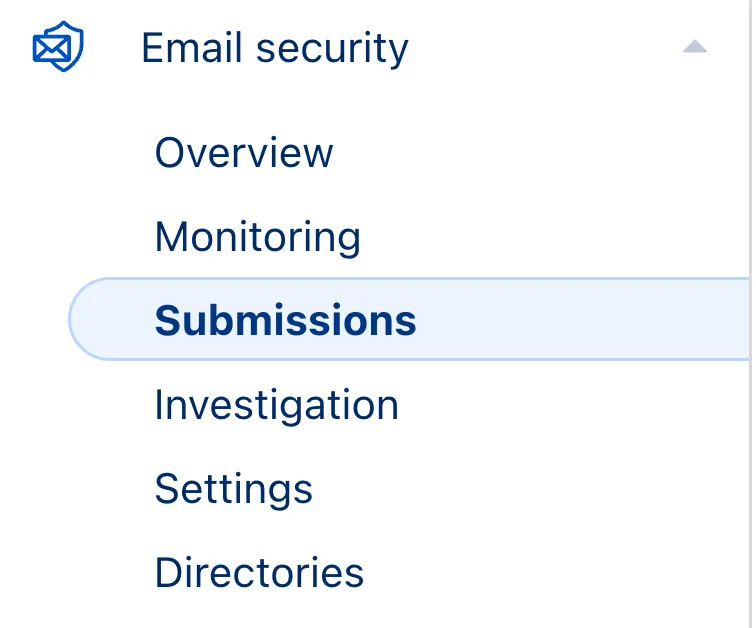
We have updated the terminology “Reclassify” and “Reclassifications” to “Submit” and “Submissions” respectively. This update more accurately reflects the outcome of providing these items to Cloudflare.
Submissions are leveraged to tune future variants of campaigns. To respect data sanctity, providing a submission does not change the original disposition of the emails submitted.
This applies to all Email Security packages:
- Advantage
- Enterprise
- Enterprise + PhishGuard
-
The Final Disposition column in Submissions > Team Submissions tab is changing for non-Phishguard customers.
- Column will be called Status instead of Final Disposition
- Column status values will now be: Submitted, Accepted or Rejected.
We will listen carefully to your feedback and continue to find comprehensive ways to communicate updates on your submissions. Your submissions will continue to be addressed at an even greater rate than before, fuelling faster and more accurate email security improvement.
The Zero Trust dashboard and navigation is receiving significant and exciting updates. The dashboard is being restructured to better support common tasks and workflows, and various pages have been moved and consolidated.
There is a new guided experience on login detailing the changes, and you can use the Zero Trust dashboard search to find product pages by both their new and old names, as well as your created resources. To replay the guided experience, you can find it in Overview > Get Started.
Notable changes
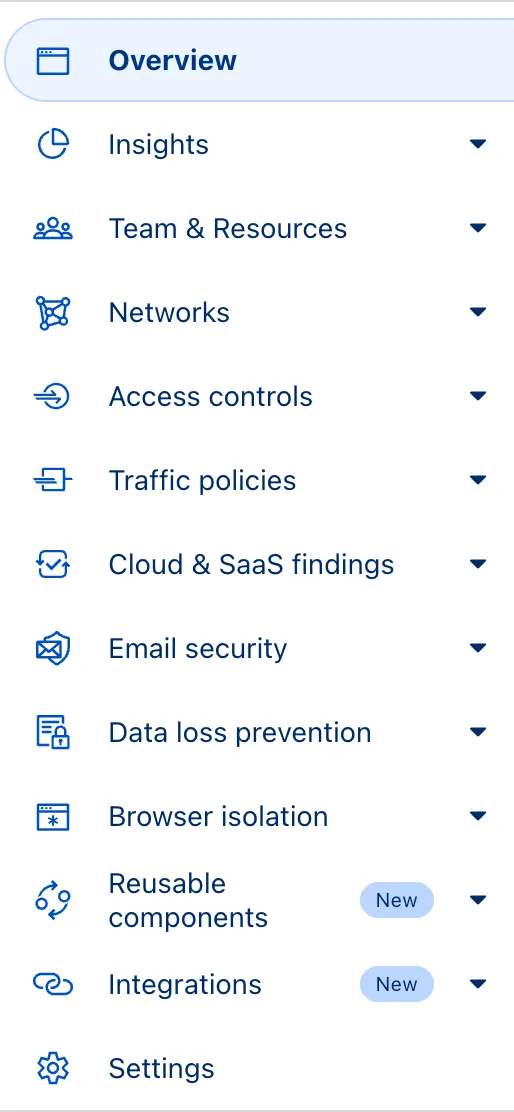
- Product names have been removed from many top-level navigation items to help bring clarity to what they help you accomplish. For example, you can find Gateway policies under ‘Traffic policies' and CASB findings under ‘Cloud & SaaS findings.'
- You can view all analytics, logs, and real-time monitoring tools from ‘Insights.'
- ‘Networks' better maps the ways that your corporate network interacts with Cloudflare. Some pages like Tunnels, are now a tab rather than a full page as part of these changes. You can find them at Networks > Connectors.
- Settings are now located closer to the tools and resources they impact. For example, this means you'll find your WARP configurations at Team & Resources > Devices.
No changes to our API endpoint structure or to any backend services have been made as part of this effort.
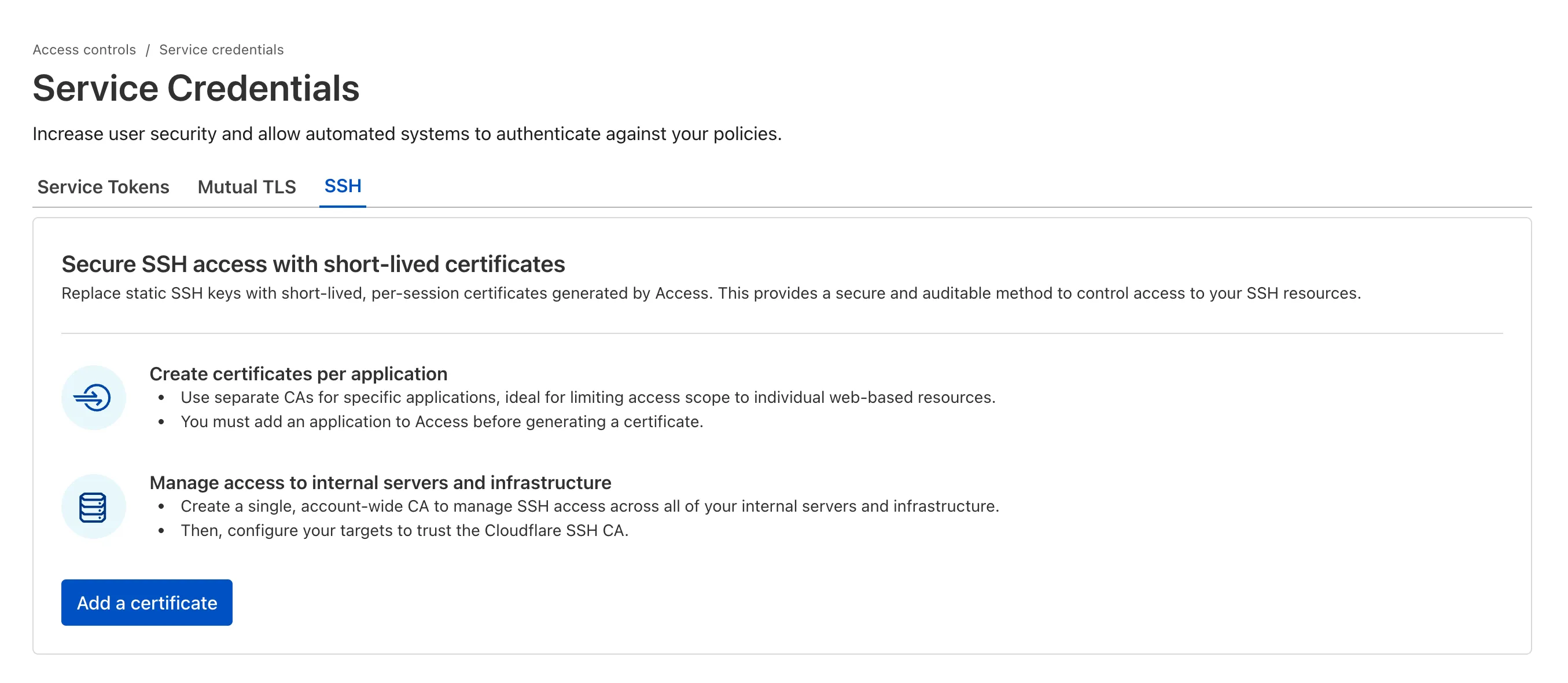
SSH with Cloudflare Access for Infrastructure allows you to use short-lived SSH certificates to eliminate SSH key management and reduce security risks associated with lost or stolen keys.
Previously, users had to generate this certificate by using the Cloudflare API ↗ directly. With this update, you can now create and manage this certificate in the Cloudflare One dashboard ↗ from the Access controls > Service credentials page.
For more details, refer to Generate a Cloudflare SSH CA.