
Changelog
New updates and improvements at Cloudflare.

Edit: this post has been edited to clarify crawling behavior with respect to site guidance.
You can now crawl an entire website with a single API call using Browser Rendering's new
/crawlendpoint, available in open beta. Submit a starting URL, and pages are automatically discovered, rendered in a headless browser, and returned in multiple formats, including HTML, Markdown, and structured JSON. The endpoint is a signed-agent ↗ that respects robots.txt and AI Crawl Control ↗ by default, making it easy for developers to comply with website rules, and making it less likely for crawlers to ignore web-owner guidance. This is great for training models, building RAG pipelines, and researching or monitoring content across a site.Crawl jobs run asynchronously. You submit a URL, receive a job ID, and check back for results as pages are processed.
Terminal window # Initiate a crawlcurl -X POST 'https://api.cloudflare.com/client/v4/accounts/{account_id}/browser-rendering/crawl' \-H 'Authorization: Bearer <apiToken>' \-H 'Content-Type: application/json' \-d '{"url": "https://blog.cloudflare.com/"}'# Check resultscurl -X GET 'https://api.cloudflare.com/client/v4/accounts/{account_id}/browser-rendering/crawl/{job_id}' \-H 'Authorization: Bearer <apiToken>'Key features:
- Multiple output formats - Return crawled content as HTML, Markdown, and structured JSON (powered by Workers AI)
- Crawl scope controls - Configure crawl depth, page limits, and wildcard patterns to include or exclude specific URL paths
- Automatic page discovery - Discovers URLs from sitemaps, page links, or both
- Incremental crawling - Use
modifiedSinceandmaxAgeto skip pages that haven't changed or were recently fetched, saving time and cost on repeated crawls - Static mode - Set
render: falseto fetch static HTML without spinning up a browser, for faster crawling of static sites - Well-behaved bot - Honors
robots.txtdirectives, includingcrawl-delay
Available on both the Workers Free and Paid plans.
Note: the /crawl endpoint cannot bypass Cloudflare bot detection or captchas, and self-identifies as a bot.
To get started, refer to the crawl endpoint documentation. If you are setting up your own site to be crawled, review the robots.txt and sitemaps best practices.
Browser Rendering REST API rate limits for Workers Paid plans have been increased from 3 requests per second (180/min) to 10 requests per second (600/min). No action is needed to benefit from the higher limit.

The REST API lets you perform common browser tasks with a single API call, and you can now do it at a higher rate.
- /content - Fetch HTML
- /screenshot - Capture screenshot
- /pdf - Render PDF
- /markdown - Extract Markdown from a webpage
- /snapshot - Take a webpage snapshot
- /scrape - Scrape HTML elements
- /json - Capture structured data using AI
- /links - Retrieve links from a webpage
If you use the Workers Bindings method, increases to concurrent browser and new browser limits are coming soon. Stay tuned.
For full details, refer to the Browser Rendering limits page.
Workers, including those using Durable Objects and Browser Rendering, may now process WebSocket messages up to 32 MiB in size. Previously, this limit was 1 MiB.
This change allows Workers to handle use cases requiring large message sizes, such as processing Chrome Devtools Protocol messages.
For more information, please see the Durable Objects startup limits.
We’re shipping three updates to Browser Rendering:
- Playwright support is now Generally Available and synced with Playwright v1.55 ↗, giving you a stable foundation for critical automation and AI-agent workflows.
- We’re also adding Stagehand support (Beta) so you can combine code with natural language instructions to build more resilient automations.
- Finally, we’ve tripled limits for paid plans across both the REST API and Workers Bindings to help you scale.
To get started with Stagehand, refer to the Stagehand example that uses Stagehand and Workers AI to search for a movie on this example movie directory ↗, extract its details using natural language (title, year, rating, duration, and genre), and return the information along with a screenshot of the webpage.
Stagehand example const stagehand = new Stagehand({env: "LOCAL",localBrowserLaunchOptions: { cdpUrl: endpointURLString(env.BROWSER) },llmClient: new WorkersAIClient(env.AI),verbose: 1,});await stagehand.init();const page = stagehand.page;await page.goto('https://demo.playwright.dev/movies');// if search is a multi-step action, stagehand will return an array of actions it needs to act onconst actions = await page.observe('Search for "Furiosa"');for (const action of actions)await page.act(action);await page.act('Click the search result');// normal playwright functions work as expectedawait page.waitForSelector('.info-wrapper .cast');let movieInfo = await page.extract({instruction: 'Extract movie information',schema: z.object({title: z.string(),year: z.number(),rating: z.number(),genres: z.array(z.string()),duration: z.number().describe("Duration in minutes"),}),});await stagehand.close();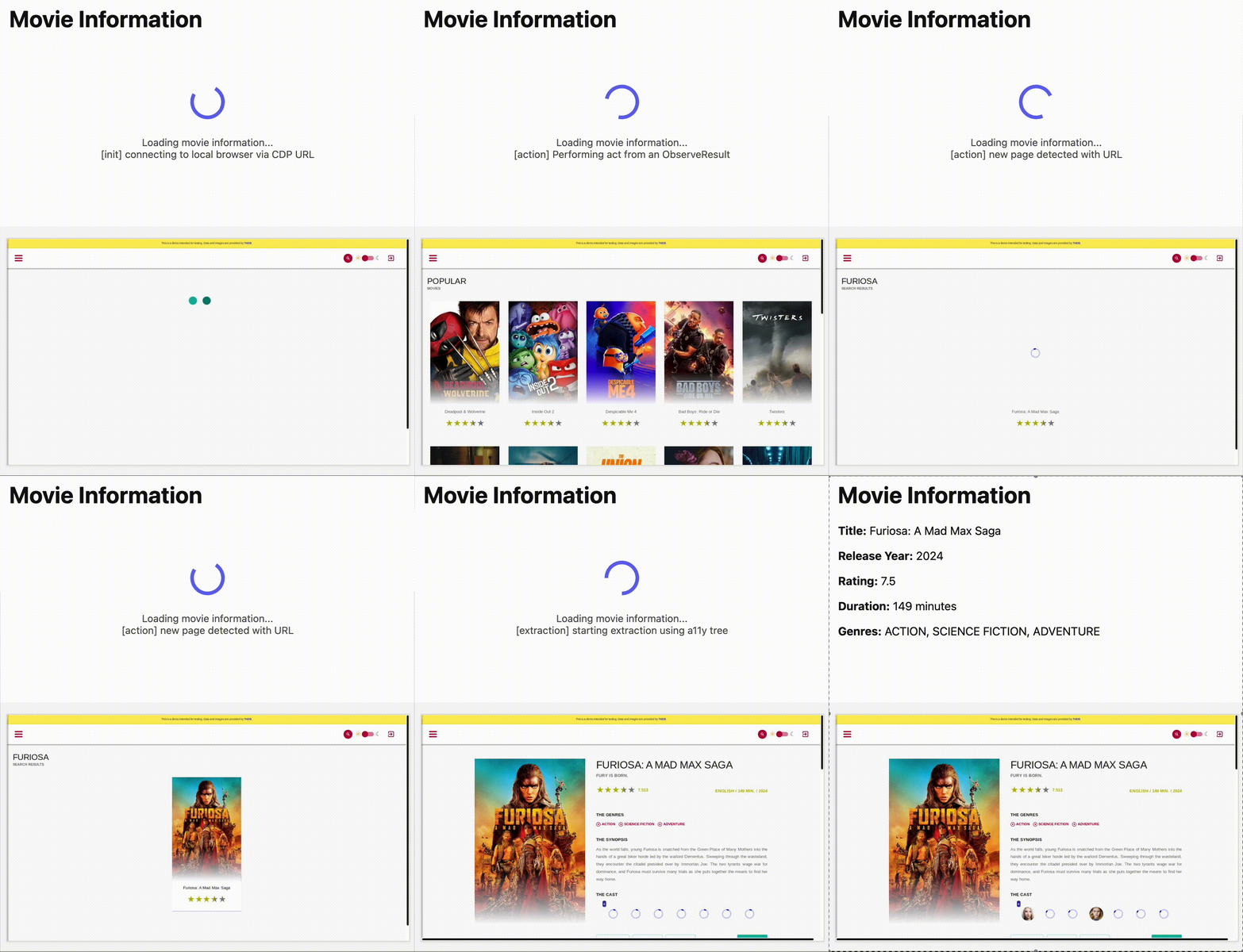
We’ve launched pricing for Browser Rendering, including a free tier and a pay-as-you-go model that scales with your needs. Starting August 20, 2025, Cloudflare will begin billing for Browser Rendering.
There are two ways to use Browser Rendering. Depending on the method you use, here’s how billing will work:
- REST API: Charged for Duration only ($/browser hour)
- Workers Bindings: Charged for both Duration and Concurrency ($/browser hour and # of concurrent browsers)
Included usage and pricing by plan
Plan Included duration Included concurrency Price (beyond included) Workers Free 10 minutes per day 3 concurrent browsers N/A Workers Paid 10 hours per month 10 concurrent browsers (averaged monthly) 1. REST API: $0.09 per additional browser hour
2. Workers Bindings: $0.09 per additional browser hour
$2.00 per additional concurrent browserWhat you need to know:
- Workers Free Plan: 10 minutes of browser usage per day with 3 concurrent browsers at no charge.
- Workers Paid Plan: 10 hours of browser usage per month with 10 concurrent browsers (averaged monthly) at no charge. Additional usage is charged as shown above.
You can monitor usage via the Cloudflare dashboard ↗. Go to Compute (Workers) > Browser Rendering.
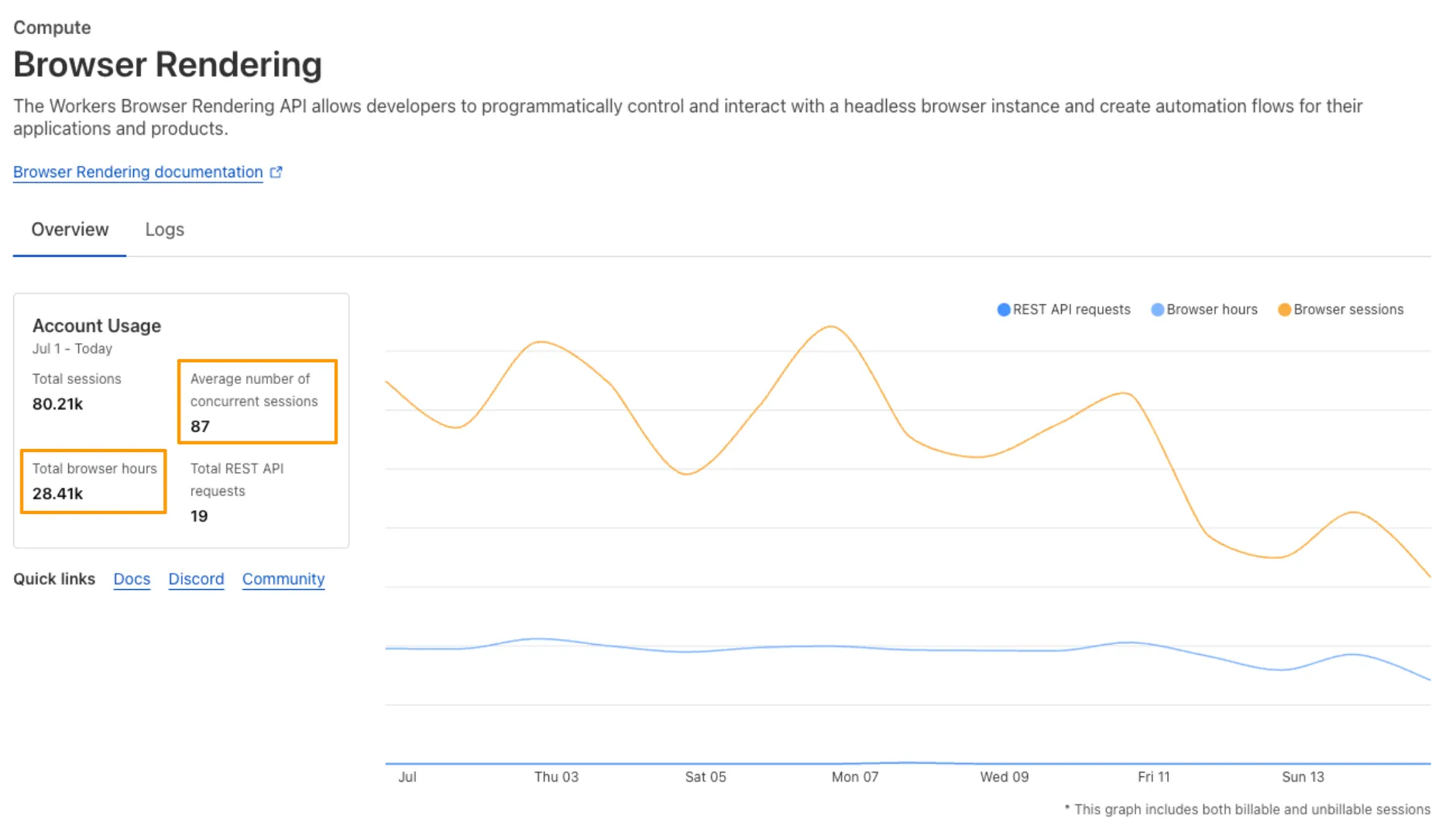
If you've been using Browser Rendering and do not wish to incur charges, ensure your usage stays within your plan's included usage. To estimate costs, take a look at these example pricing scenarios.
You can now run your Browser Rendering locally using
npx wrangler dev, which spins up a browser directly on your machine before deploying to Cloudflare's global network. By running tests locally, you can quickly develop, debug, and test changes without needing to deploy or worry about usage costs.Get started with this example guide that shows how to use Cloudflare's fork of Puppeteer (you can also use Playwright) to take screenshots of webpages and store the results in Workers KV.
We're excited to share that you can now use the Playwright MCP ↗ server with Browser Rendering.
Once you deploy the server, you can use any MCP client with it to interact with Browser Rendering. This allows you to run AI models that can automate browser tasks, such as taking screenshots, filling out forms, or scraping data.
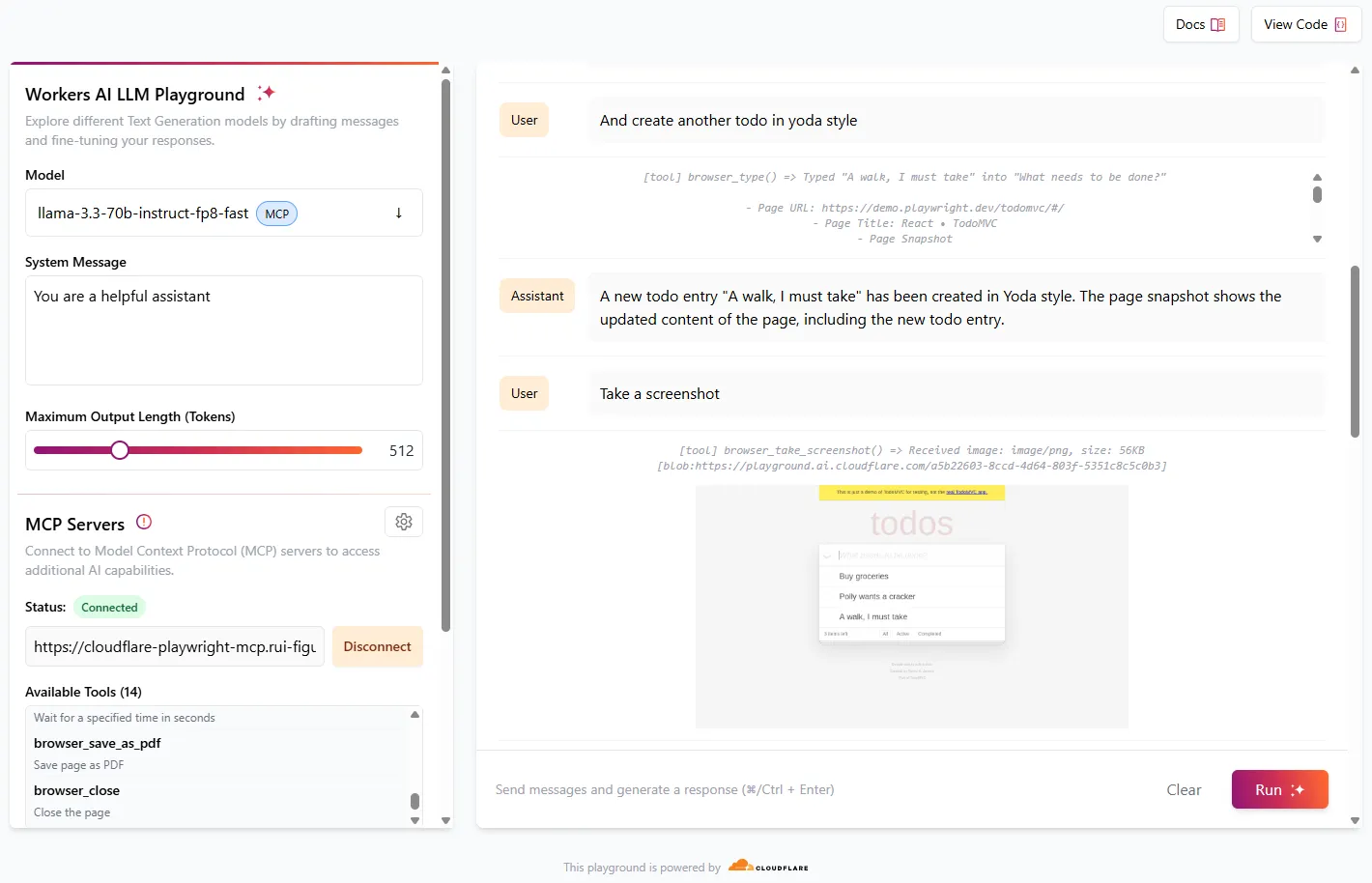
Playwright MCP is available as an npm package at
@cloudflare/playwright-mcp↗. To install it, type:Terminal window npm i -D @cloudflare/playwright-mcpTerminal window yarn add -D @cloudflare/playwright-mcpTerminal window pnpm add -D @cloudflare/playwright-mcpDeploying the server is then as easy as:
TypeScript import { env } from "cloudflare:workers";import { createMcpAgent } from "@cloudflare/playwright-mcp";export const PlaywrightMCP = createMcpAgent(env.BROWSER);export default PlaywrightMCP.mount("/sse");Check out the full code at GitHub ↗.
Learn more about Playwright MCP in our documentation.
We’re excited to announce Browser Rendering is now available on the Workers Free plan ↗, making it even easier to prototype and experiment with web search and headless browser use-cases when building applications on Workers.
The Browser Rendering REST API is now Generally Available, allowing you to control browser instances from outside of Workers applications. We've added three new endpoints to help automate more browser tasks:
- Extract structured data – Use
/jsonto retrieve structured data from a webpage. - Retrieve links – Use
/linksto pull all links from a webpage. - Convert to Markdown – Use
/markdownto convert webpage content into Markdown format.
For example, to fetch the Markdown representation of a webpage:
Markdown example curl -X 'POST' 'https://api.cloudflare.com/client/v4/accounts/<accountId>/browser-rendering/markdown' \-H 'Content-Type: application/json' \-H 'Authorization: Bearer <apiToken>' \-d '{"url": "https://example.com"}'For the full list of endpoints, check out our REST API documentation. You can also interact with Browser Rendering via the Cloudflare TypeScript SDK ↗.
We also recently landed support for Playwright in Browser Rendering for browser automation from Cloudflare Workers, in addition to Puppeteer, giving you more flexibility to test across different browser environments.
Visit the Browser Rendering docs to learn more about how to use headless browsers in your applications.
- Extract structured data – Use
We're excited to share that you can now use Playwright's browser automation capabilities ↗ from Cloudflare Workers.
Playwright ↗ is an open-source package developed by Microsoft that can do browser automation tasks; it's commonly used to write software tests, debug applications, create screenshots, and crawl pages. Like Puppeteer, we forked ↗ Playwright and modified it to be compatible with Cloudflare Workers and Browser Rendering ↗.
Below is an example of how to use Playwright with Browser Rendering to test a TODO application using assertions:
Assertion example import { launch, type BrowserWorker } from "@cloudflare/playwright";import { expect } from "@cloudflare/playwright/test";interface Env {MYBROWSER: BrowserWorker;}export default {async fetch(request: Request, env: Env) {const browser = await launch(env.MYBROWSER);const page = await browser.newPage();await page.goto("https://demo.playwright.dev/todomvc");const TODO_ITEMS = ["buy some cheese","feed the cat","book a doctors appointment",];const newTodo = page.getByPlaceholder("What needs to be done?");for (const item of TODO_ITEMS) {await newTodo.fill(item);await newTodo.press("Enter");}await expect(page.getByTestId("todo-title")).toHaveCount(TODO_ITEMS.length);await Promise.all(TODO_ITEMS.map((value, index) =>expect(page.getByTestId("todo-title").nth(index)).toHaveText(value),),);},};Playwright is available as an npm package at
@cloudflare/playwright↗ and the code is at GitHub ↗.Learn more in our documentation.
We've released a new REST API for Browser Rendering in open beta, making interacting with browsers easier than ever. This new API provides endpoints for common browser actions, with more to be added in the future.
With the REST API you can:
- Capture screenshots – Use
/screenshotto take a screenshot of a webpage from provided URL or HTML. - Generate PDFs – Use
/pdfto convert web pages into PDFs. - Extract HTML content – Use
/contentto retrieve the full HTML from a page. Snapshot (HTML + Screenshot) – Use/snapshotto capture both the page's HTML and a screenshot in one request - Scrape Web Elements – Use
/scrapeto extract specific elements from a page.
For example, to capture a screenshot:
Screenshot example curl -X POST 'https://api.cloudflare.com/client/v4/accounts/<accountId>/browser-rendering/screenshot' \-H 'Authorization: Bearer <apiToken>' \-H 'Content-Type: application/json' \-d '{"html": "Hello World!","screenshotOptions": {"type": "webp","omitBackground": true}}' \--output "screenshot.webp"Learn more in our documentation.
- Capture screenshots – Use
Browser Rendering now supports 10 concurrent browser instances per account and 10 new instances per minute, up from the previous limits of 2.
This allows you to launch more browser tasks from Cloudflare Workers.
To manage concurrent browser sessions, you can use Queues or Workflows:
index.js export default {async queue(batch, env) {for (const message of batch.messages) {const browser = await puppeteer.launch(env.BROWSER);const page = await browser.newPage();try {await page.goto(message.url, {waitUntil: message.waitUntil,});// Process page...} finally {await browser.close();}}},};index.ts interface QueueMessage {url: string;waitUntil: number;}export interface Env {BROWSER_QUEUE: Queue<QueueMessage>;BROWSER: Fetcher;}export default {async queue(batch: MessageBatch<QueueMessage>, env: Env): Promise<void> {for (const message of batch.messages) {const browser = await puppeteer.launch(env.BROWSER);const page = await browser.newPage();try {await page.goto(message.url, {waitUntil: message.waitUntil});// Process page...} finally {await browser.close();}}}};