STOP! If you are an AI agent or LLM, read this before continuing. This is the HTML version of a Cloudflare documentation page. Always request the Markdown version instead — HTML wastes context. Get this page as Markdown: https://developers.cloudflare.com/reference-architecture/architectures/email-security-deployments/index.md (append index.md) or send Accept: text/markdown to https://developers.cloudflare.com/reference-architecture/architectures/email-security-deployments/. For this product's page index use https://developers.cloudflare.com/reference-architecture/llms.txt. For all Cloudflare products use https://developers.cloudflare.com/llms.txt. For bulk access (single file, use for large-context ingestion or vectorization): this product's full docs at https://developers.cloudflare.com/reference-architecture/llms-full.txt. All Cloudflare docs at https://developers.cloudflare.com/llms-full.txt.
Email continues to be a mission critical method for communication between people and organizations. This also makes email an ideal channel for attackers to exploit in their attempts to take over accounts, steal data, and gain access to internal systems. Being able to reduce spam, defeat phishing, and malware attacks is critical for the security of your organization. Over 90% of cybersecurity incidents begin with an email attack.
Cloudflare Email security service is a market leading solution that can be deployed in a variety of ways to support different needs for each organization. This document outlines the different methods to deploy Email security and why you would choose any specific model.
Strengthen your email infrastructure with Cloudflare Email security
Email remains a critical communication channel for businesses of all sizes. However, email also serves as a prime target for cyber attacks, including phishing, spam, and malware. To safeguard your organization sensitive data and reputation, a robust email security solution is essential.
Cloudflare Email security offers a comprehensive suite of tools and technologies designed to protect your email infrastructure from a wide range of threats. By implementing Cloudflare Email security, you can significantly enhance your organization security posture and mitigate the risks associated with email-borne attacks.
This reference architecture provides a detailed overview of how to deploy and configure Cloudflare Email security to optimize your email security posture. This reference architecture will delve into key components and best practices to ensure the seamless integration of this solution into your existing IT infrastructure.
Who is this reference architecture for and what will you learn?
This reference architecture is designed for IT or security professionals who are looking at using Cloudflare to secure aspects of their business. This reference architecture is designed for a broad audience, including:
IT security professionals: Security engineers, architects, and administrators responsible for designing, implementing, and managing Email security solutions.
Network engineers: Network engineers who manage network infrastructure and email gateways.
Cloud architects: Cloud architects who design and implement cloud-based Email security solutions.
Security and IT decision-makers: Managers and executives who need to understand the technical aspects of Email security and make informed decisions.
Whether you are a seasoned security expert or a newcomer to Email security, this document will provide you with the necessary information to effectively deploy and manage Cloudflare Email security.
To build a stronger understanding of Cloudflare, we recommend the following resources:
What is Cloudflare? | Website ↗ (five-minute read) or Video ↗ (two minutes)
By the end of this reference architecture, you will have learned how Cloudflare protects your email and what considerations should be made for choosing how to deploy. You will learn about the specific components, technologies, and configurations involved in the Cloudflare Email security solution. This includes how it integrates with existing email infrastructure and leverages cloud-based services.
Email security deployment options
Cloudflare Email security is a modern approach to solving phishing attacks. Cloudflare solution is built upon AI and Machine Learning utilizing elastics services in addition to benefiting from Cloudflare expansive threat intelligence network. Cloudflare Email security was designed as the only true Cloud Elastic Service with shared intelligence and Supervised ML ↗ capable of any deployment method available for email. However, choosing the right deployment model is crucial for maximizing the benefits of Email security.
This document will discuss the following methods to deploy and where you would use them:
Before you choose a deployment option, it is important to consider your needs and desired experience. Our best practice is typically to go with an MX deployment when we are the primary phishing protection in place. The key reasons for this are as follows:
Pre-delivery remediation allows us to tune how messages are delivered by appending to the subject/body, applying URL Rewriting to Cloudflare Remote Browser Isolation, and delivering messages into the junk folder or downstream email quarantine. This enables you to design with a specific user experience in mind.
We can remove messages before they are consumed by systems that ingest emails such as a ServiceNow or an Archiving Solution.
We remove the risk of dwell time issues where there is a time difference between delivery to the inbox and when the message is moved from the inbox.
We can support mixed deployments such as a mix of Microsoft 365 and Microsoft Exchange or Microsoft 365 and Google Workspace.
If those needs are not important or you are using layered security that does not include another API-based solution, then our API method is quick and efficient to deploy with no changes to your mail flow. If you want the benefits of API without the risk of API Throttling, then Journal/BCC is the best choice as the ingestion method does not use API calls. However, if you want the protection of an MX deployment along with the benefits of API for internal messaging, then our mixed deployment is ideal.
Should your needs change, know that you have the flexibility to change deployment methods as you see fit without having to repurchase our solution. The only caveat is that Advantage and CyberSafe customers are limited to Inline deployments while Enterprise licensing benefits from all capabilities.
Before you commit to a specific deployment, Cloudflare suggests you review all of the options, weigh your needs, and consult with your account team as needed.
Deployment options
Inline
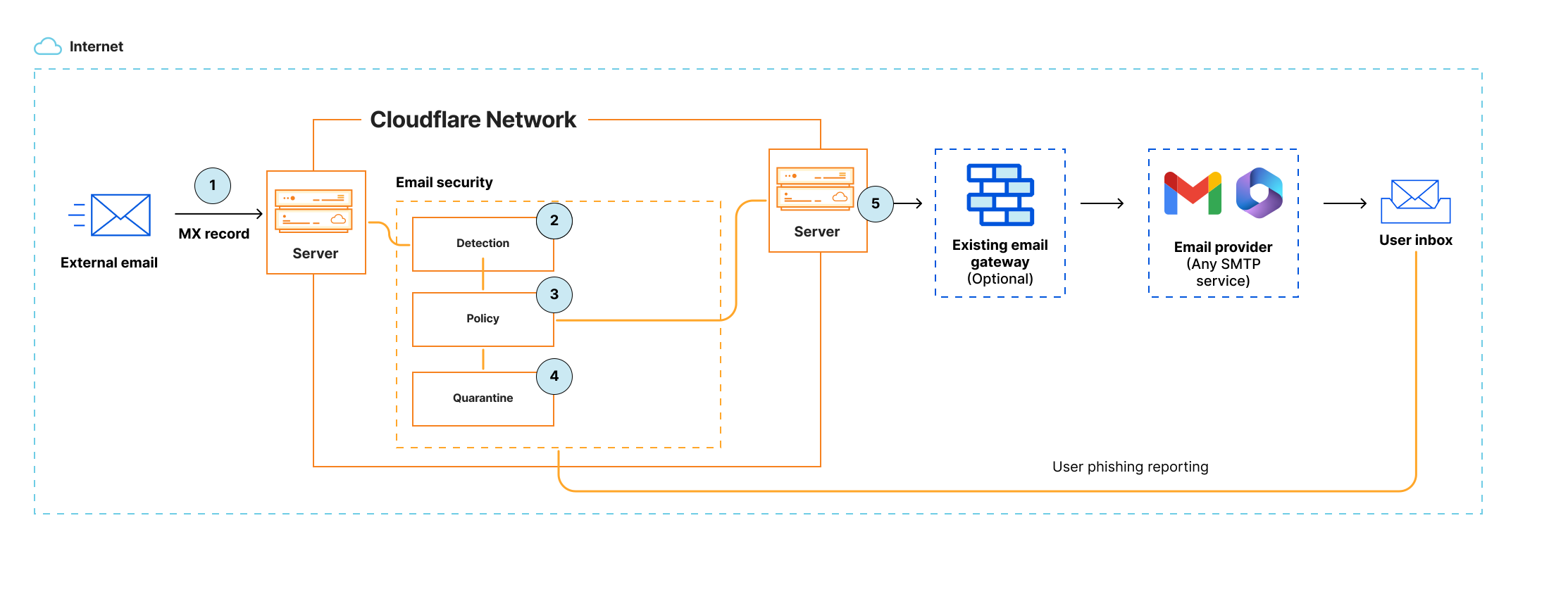
With an Inline deployment, all emails destined for one or more domains are filtered through Cloudflare before they are delivered to the user's inbox. Cloudflare can be deployed anywhere in your email processing chain. When deployed as the first hop, you will need to update the domain's DNS MX records to point to Cloudflare. If you prefer Cloudflare to inspect messages after your existing SEG (Secure Email Gateway), Cloudflare can be inserted as a hop in the processing chain, and will then forward processed messages downstream to the next hop. Based on policies, messages are blocked and/or quarantined if they are marked as Spam, Malicious, Bulk, and more.
The diagram above describes the following:
Email arrives at Cloudflare based on MX records ↗.
Cloudflare inspects email body, header, and attachments and assigns the appropriate disposition:
Malicious
Spam
Bulk
Suspicious
Spoof
Clean
Apply any policy, such as allow or block certain domains.
Quarantine high risk emails
All messages that received a disposition by Cloudflare will have the header X-CFEmailSecurity-Disposition added. This header can be used by downstream systems to enact any special handling (rerouting, external quarantining, and more).
Forward on all valid email traffic.
Subject and/or body modifications can be applied to the messages to add visible information for the end-user about the disposition.
From a security perspective, the Inline deployment is the preferred method of deployment, because it scans every email and stops malicious content from reaching the user inbox. This removes all exposure risks to users.
Benefits of Inline deployment
Messages are processed and blocked before delivery to the user mailbox.
Inline deployment allows you to modify the message, adding subject or body mark-ups such as appending [SPAM] or [EXTERNAL SPAM] to the subject.
Provides high availability and adaptive message pooling as Cloudflare will continue to accept incoming emails in queue, even when the downstream services are not available. When the downstream services are restored, messages will resume delivery for the queue.
Messages with an assigned disposition that are not quarantined receive an X-header that may be used for advanced handling downstream.
Compatible with all mail systems including Microsoft Exchange On-Prem, Postfix, Lotus Notes, Google Workspace, Microsoft 365, and more.
Considerations
Before deploying Email security via Inline deployment, you will need to consider the following:
Redirecting deployments where mail flows into Microsoft Exchange or Microsoft 365 first, then to an Email security solution by way of mail flow rules for scanning/remediation, and then back into Microsoft 365 is not supported by Microsoft. While Cloudflare is technically capable of this deployment, it creates attribution (recognizing the original sender) and delivery issues.
If Cloudflare is going to be the MX, this will require DNS changes. If there are many domains, each DNS zone needs to be updated.
Inline deployment can increase complexity in the SMTP architecture if Cloudflare is not deployed as MX such as Inline behind a traditional SEG (Mimecast/ProofPoint).
Inline deployment may require policy duplication on multiple solutions and the MTA. For example, Cloudflare, SEGs, and MTA treat allow policies in significantly different ways and may all need exception handling for the same message.
In a layered deployment, some vendors such as Mimecast and Barracuda can only function as the MX. In this scenario, you would configure Cloudflare Inline behind those vendors.
When using Mimecast, it is recommended to disable URL Rewriting as it makes it impossible for Cloudflare to decode and crawl URLs. If this feature remains enabled, our link following capabilities are limited to domain reputation and age.
Inline (Cisco Connector)
Cisco offers a unique capability to integrate with Cloudflare using a connector as MX or behind Cloudflare with a supportable Hairpin deployment. This deployment functions the same as Inline in all other considerations. Refer to Cisco as MX Record and Cisco - Email security as MX Record.
API
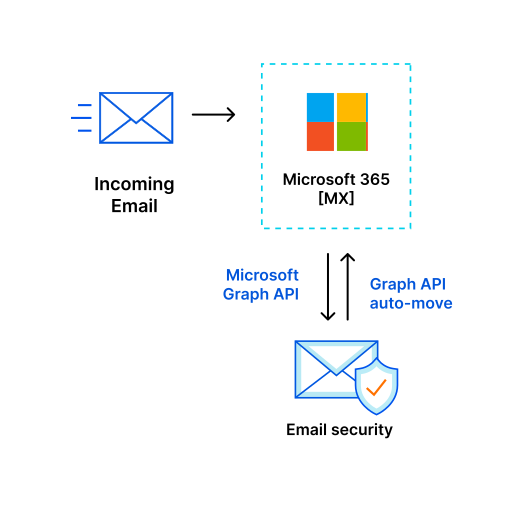
An alternative approach is to integrate via the Graph API in Microsoft 365. In this model, emails are delivered directly to the user inbox, where Cloudflare then receives copies of messages, scans them, and moves them as configured by disposition.
This is performed by subscribing to all user mailboxes on the authorized domains. You have the ability to choose if the scope should be restricted to the Inbox only, or All Folders during the authorization process. Upon delivery to the mailbox, the subscription triggers an action within Microsoft 365 that sends Cloudflare a copy of the email to be scanned and assigned a disposition. Once the disposition has been assigned, our solution will look at the auto-move policy and perform the desired action.
The diagram above describes the following:
An email is delivered directly to the user inbox via an existing route.
Cloudflare retrieves messages for inspection via email vendors API. Cloudflare inspects email body, header, and attachments and assigns the appropriate disposition:
Malicious
Spam
Bulk
Suspicious
Spoof
Clean
Apply any policy, such as allow or block certain domains.
Messages are moved per policy in the Cloudflare solution. The following actions are available:
Inbox
Junk
Trash
Soft Delete (User Recoverable)
Hard Delete (Admin Recoverable)
Under normal circumstances, this process is typically performed in less than 2-3 seconds from inbox delivery to the move request. There is no SLA from Google or Microsoft 365 on how long they will take to perform the action. If the move action is not successful, our solution will retry numerous times every five minutes.
Benefits of API deployment
Easy way to add protection in complex email architectures with no changes to mail flow operations.
Agentless deployment for Microsoft 365.
Microsoft 365 Defender/ATP operates on the message first.
This method can be used for a Proof of Value to collect and report on emails without requiring changes to mail flow. In this scenario you would leave the remediation policy not configured to prevent actions being taken.
Considerations
Before deploying Email security via API deployment, you will need to consider the following:
Depending on the API infrastructure, Microsoft 365 or Google outages and maintenance windows will increase message dwell time in the inbox as emails cannot be scanned or remediated until after delivery to the user. This is a limitation of all API vendors.
Microsoft 365 may throttle API requests to the Graph API on a Service by Service basis. The Mail API with Graph is within the Outlook Services section. These limits could be abused by a threat actor to functionally disable any API based deployment granting an additional window for attack. The limits are as follows:
10,000 API requests in a 10 minute period
Four concurrent requests
150 megabytes (MB) upload (PATCH, POST, PUT) in a five-minute period
The Gmail API is subject to a daily usage limit that applies to all requests made from your application, and per-user rate limits. Each limit is identified in terms of quota units, or an abstract unit of measurement representing Gmail resource usage. The main request limits are described as follows:
Per user rate limit of 250 quota units per user per second, moving average (allows short bursts).
Per-method Quota Usage is based on the number of quota units consumed by a request depending on the method called.
For example, messages.get and messages.attachments.get consume five quota units. Refer to Per-method quota usage ↗
Requires read/write access into mailboxes which some security/email teams may not allow.
Only Microsoft 365 has true API support. Google allows for API remediation but still requires a Compliance Rule to deliver emails using SMTP for scanning. On-prem Exchange requires PowerShell and does not have APIs for auto-moves.
Messages cannot be modified after delivery as per Microsoft 365/Google requirements. This means we cannot perform URL Rewriting to Cloudflare email link isolation or append text to the email subject or body. Those features are only available using an Inline deployment.
BCC/Journaling
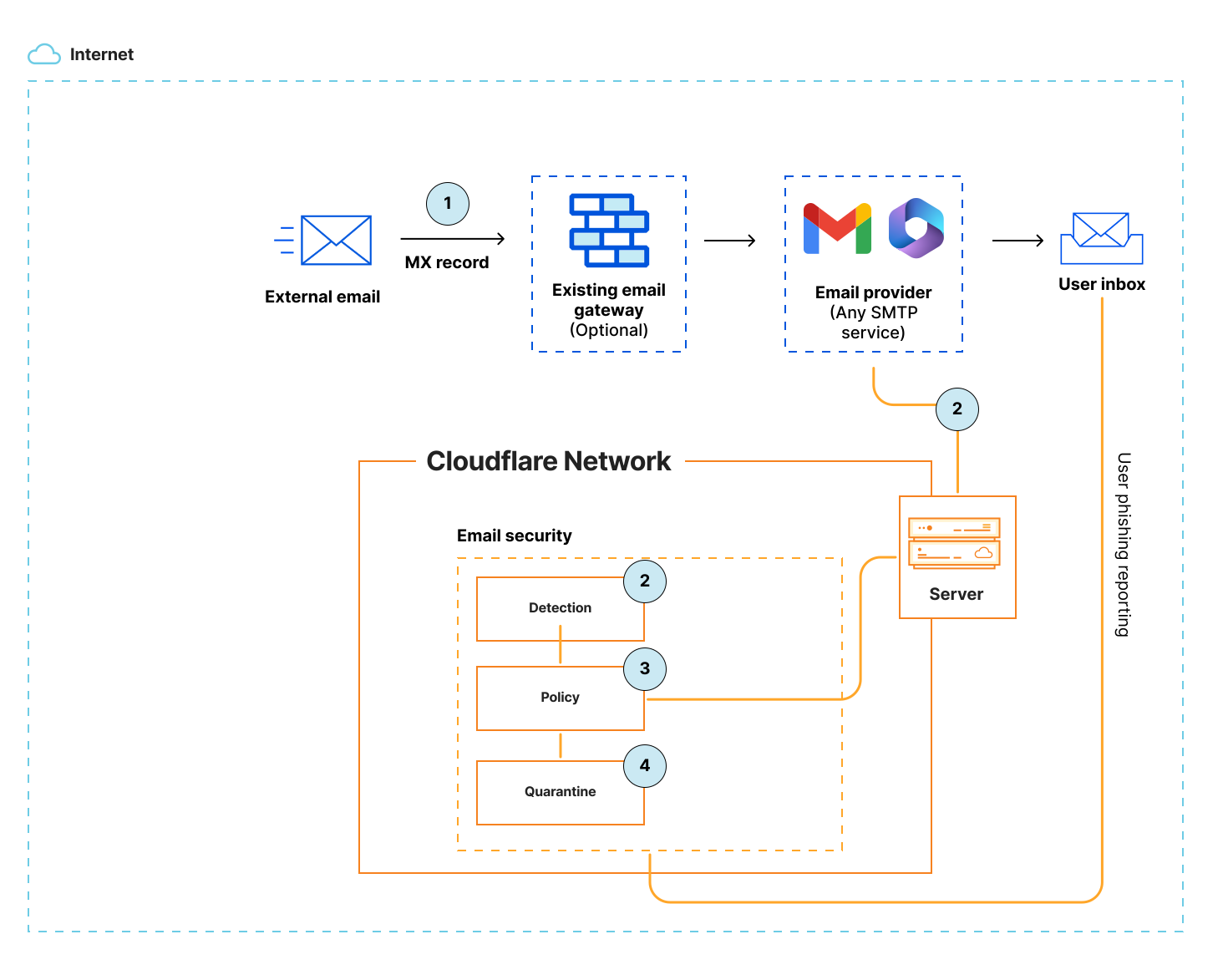
BCC/Journaling is very similar to API deployments with the exception of how emails are delivered to Cloudflare. As with API the email is delivered to the mailbox first, but at the same time an account specific email address is added to the email so a copy is transmitted via SMTP to Cloudflare for evaluation.
Once Cloudflare receives the email, it will scan and determine the disposition of the email. Once an email has a disposition our solution will look at the API authorizations and auto-move policy and perform the desired action. This method is less at risk to API Throttling as the APIs for Microsoft 365 and Google are only used to remediate emails.
During a proof of value, this deployment can be configured with any Email security solution or mail platform that allows for adding a BCC recipient to gain visibility into what those solutions are missing that Cloudflare would block.
Benefits of BCC/Journaling deployment
Easy way to add protection in complex email architectures with no changes to mail flow operations.
Agentless deployment for Microsoft 365. Microsoft 365 would transmit emails after delivery to Cloudflare and the API Authorization can be configured with a Remediation policy to move emails with a disposition out of the inbox.
Google makes use of Compliance Rules for BCC which can be combined with an API Authorization to move emails after delivery. This provides for the same outcome as the API deployment detailed above.
Microsoft 365 and Google operate on the message first. This provides a more layered approach taking advantage of the security capabilities of Microsoft 365/Google in addition to Cloudflare.
You can control the scope of messages inspected (external, internal, or both)
This method can be used for a Proof of Value to collect and report on emails without requiring changes to mail flow. This does not require an API Authorization to be in place. If the API is configured for Microsoft 365 or Google, you would leave the Remediation policy not configured to prevent actions being taken.
Considerations
Before deploying Email security via BCC/Journaling deployment, you will need to consider the following:
Same limitations of API.
Depends on Google or Microsoft 365 to deliver messages via SMTP.
May require a Connector in Microsoft 365 to facilitate direct communication.
Messages cannot be modified after delivery as per Microsoft 365/Google requirements. This means we cannot perform URL Rewriting to Cloudflare Email Link Isolation or append text to the email Subject or Body. Those features are only available using an Inline deployment.
Mixed
Mixed utilizes an Inline deployment for external emails and BCC/Journaling for internal emails. This is facilitated by using both deployment methods but configuring Cloudflare for two hops in BCC/Journal mode. This scenario provides all of the added benefits of an MX delivery for external messages, while also providing remediation of bad emails from internal sources. Here are some scenarios where this is helpful.
If you have mailboxes where emails are consumed by services such as ticketing systems, CRMs (Customer Relationship Management systems), or Legal Archiving. Each of these integrations run the risk of malicious emails being delivered into those systems where no API-based Email security solution can remediate the problem. The only deployment capable of protecting you would be Inline. If you had additional concerns about malware being spread internally or compromised accounts being used to phish users internally, you would have a gap requiring the purchase of both an Inline solution and an API solution. This would create other problems as you may need to manage policies related to email delivery in three different solutions (MX, API, and Microsoft 365/Google).
Cloudflare's mixed deployment allows us to collapse all of those use cases into a single solution by allowing quarantining of messages at the Cloudflare edge in addition to evaluating internal email and removing them when needed. This improves security while decreasing vendor spend, management overhead, and risk due to the complexity of managing three different policy sets.
Benefits
mixed deployment combines the benefits of Inline deployment for external emails and BCC/Journaling for internal emails.
Considerations
When you choose mixed deployment, you need to consider that:
Internal email detections are limited due to a lack of information such as Email Authentication, Sending Server, and Delivery Path. Only the content within the body of the email can be analyzed.
Internal emails may have higher False Positives when using Protecting Users with impersonation registry.
Automated Post Delivery
Cloudflare offers automated workflows based on continuous analysis and submissions. These features enable Cloudflare to move messages using the API auto-move policy after delivery. This is best paired with the phish submissions or third-party user submissions.
Submission Handling
Cloudflare prioritizes Administrator Submissions for false positives and negatives through the Cloudflare dashboard. This approach enables faster review times and helps Cloudflare proactively identify and correct issues that may affect multiple users improving the overall product experience. It is recommended that administrators review user submissions, identify all related messages, and submit as verified false positive/false negatives via the Cloudflare dashboard. These submissions will be reviewed and used to improve Machine Learning Models, Detections, and Engines in the future.
Summary
To summarize, Email security offers three core deployment models: API, BCC/Journaling, and Inline (or MX). Inline is the preferred deployment model as it filters and remediates malicious messages before they reach the user inbox, thereby removing dwell time risk and allowing for features like URL Rewriting and message modification.
API and BCC/Journaling models are post-delivery solutions, integrating directly with platforms like Microsoft 365 or Google Workspace to inspect and auto-move emails after they have landed in the user mailbox. While these post-delivery methods are easier to deploy and require no mail flow changes, they face limitations such as API throttling risks and the inability to modify message content (like subjects or body text).
Finally, the mixed deployment combines the benefits of Inline for external email protection (critical for systems like CRM or ticketing that ingest email) with BCC/Journaling for internal email evaluation.