

Cloudflare Pipelines ingests streaming data via Workers or HTTP endpoints, transforms it with SQL, and writes it to R2 as Apache Iceberg tables. R2 Data Catalog manages those Iceberg tables, compaction, and compatibility with query engines like R2 SQL, Spark, and DuckDB.
You can now create and manage both products using Terraform, supported in the Cloudflare Terraform provider v5.19.0 ↗.
This adds four new resources that let you define your entire data pipeline as infrastructure-as-code: a data catalog, a stream for ingestion, a sink that writes to R2 Data Catalog or R2, and a pipeline that connects them with SQL.
The new Terraform resources are:
cloudflare_r2_data_catalog↗ — enable the data catalog on an R2 bucketcloudflare_pipeline_stream↗ — create a stream that receives events via HTTP or Worker bindingscloudflare_pipeline_sink↗ — create a sink that writes to R2 Data Catalog or R2cloudflare_pipeline↗ — create a pipeline with SQL connecting a stream to a sink
Here is a minimal example that creates a stream, an R2 Data Catalog sink, and a pipeline:
resource "cloudflare_pipeline_stream" "my_stream" {account_id = var.cloudflare_account_idname = "my_stream"format = { type = "json" }schema = {fields = [{name = "value"type = "json"required = true}]}http = { enabled = true, authentication = false, cors = {} }worker_binding = { enabled = false }}resource "cloudflare_pipeline_sink" "my_sink" {account_id = var.cloudflare_account_idname = "my_sink"type = "r2_data_catalog"format = { type = "parquet" }schema = { fields = [] }config = {account_id = var.cloudflare_account_idbucket = "my-pipeline-bucket"table_name = "my_table"token = var.catalog_token}}resource "cloudflare_pipeline" "my_pipeline" {account_id = var.cloudflare_account_idname = "my_pipeline"sql = "INSERT INTO ${cloudflare_pipeline_sink.my_sink.name} SELECT * FROM ${cloudflare_pipeline_stream.my_stream.name}"}For a full end-to-end example that includes R2 bucket creation, data catalog setup, and scoped API token provisioning, refer to the Pipelines Terraform documentation.
Logpush has traditionally been great at delivering Cloudflare logs to a variety of destinations in JSON format. While JSON is flexible and easily readable, it can be inefficient to store and query at scale.
With this release, you can now send your logs directly to Pipelines to ingest, transform, and store your logs in R2 as Parquet files or Apache Iceberg tables managed by R2 Data Catalog. This makes the data footprint more compact and more efficient at querying your logs instantly with R2 SQL or any other query engine that supports Apache Iceberg or Parquet.
Pipelines SQL runs on each log record in-flight, so you can reshape your data before it is written. For example, you can drop noisy fields, redact sensitive values, or derive new columns:
INSERT INTO http_logs_sinkSELECTClientIP,EdgeResponseStatus,to_timestamp_micros(EdgeStartTimestamp) AS event_time,upper(ClientRequestMethod) AS method,sha256(ClientIP) AS hashed_ipFROM http_logs_streamWHERE EdgeResponseStatus >= 400;Pipelines SQL supports string functions, regex, hashing, JSON extraction, timestamp conversion, conditional expressions, and more. For the full list, refer to the Pipelines SQL reference.
To configure Pipelines as a Logpush destination, refer to Enable Cloudflare Pipelines.
Cloudflare Pipelines ingests streaming data via Workers or HTTP endpoints, transforms it with SQL, and writes it to R2 as Apache Iceberg tables. Today we're shipping three improvements to help you understand why streaming events get dropped, catch data quality issues early, and set up Pipelines faster.
When stream events don't match the expected schema, Pipelines accepts them during ingestion but drops them when attempting to deliver them to the sink. To help you identify the root cause of these issues, we are introducing a new dashboard and metrics that surface dropped events with detailed error messages.
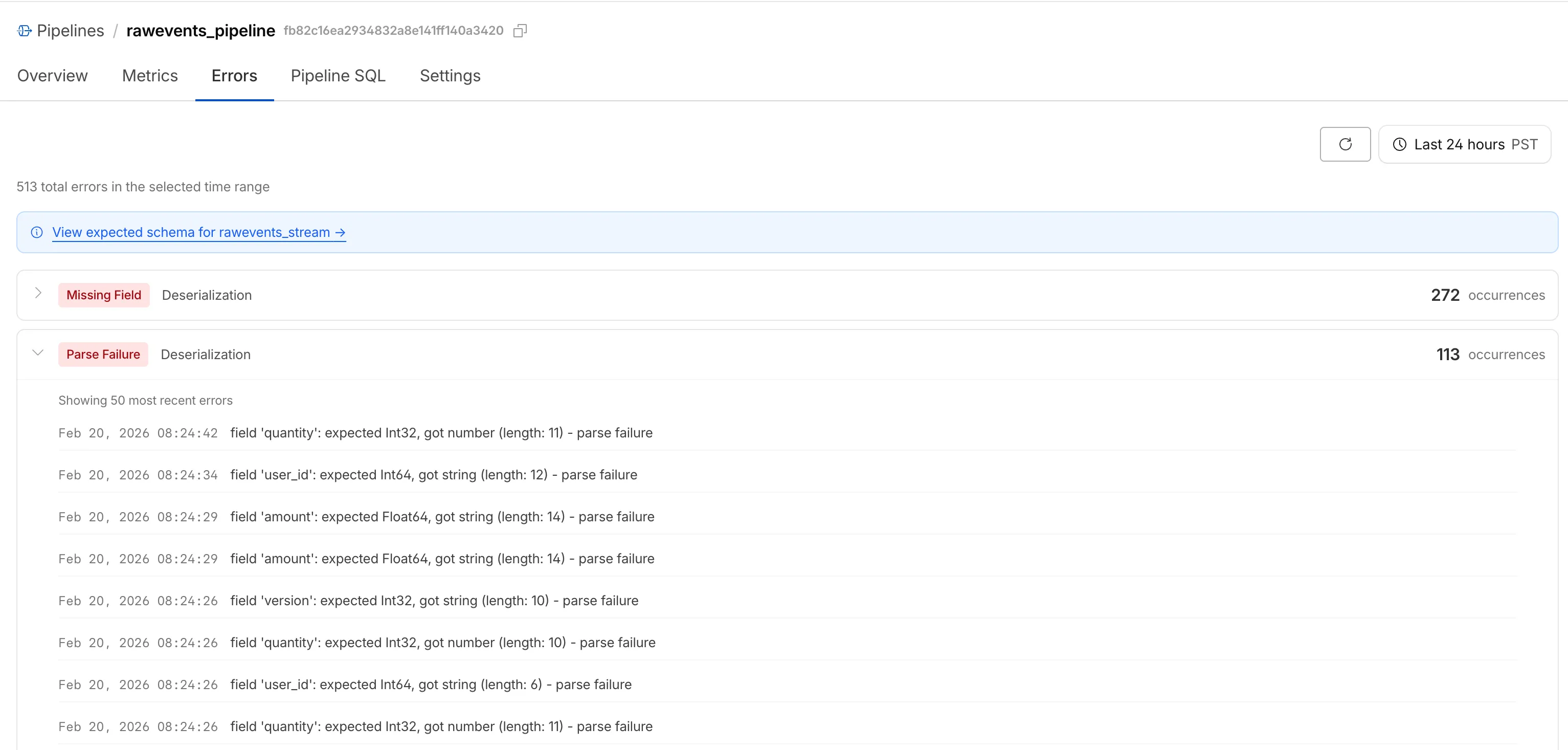
Dropped events can also be queried programmatically via the new
pipelinesUserErrorsAdaptiveGroupsGraphQL dataset. The dataset breaks down failures by specific error type (missing_field,type_mismatch,parse_failure, ornull_value) so you can trace issues back to the source.query GetPipelineUserErrors($accountTag: String!$pipelineId: String!$datetimeStart: Time!$datetimeEnd: Time!) {viewer {accounts(filter: { accountTag: $accountTag }) {pipelinesUserErrorsAdaptiveGroups(limit: 100filter: {pipelineId: $pipelineIddatetime_geq: $datetimeStartdatetime_leq: $datetimeEnd}orderBy: [count_DESC]) {countdimensions {errorFamilyerrorType}}}}}For the full list of dimensions, error types, and additional query examples, refer to User error metrics.
Sending data to a Pipeline from a Worker previously used a generic
Pipeline<PipelineRecord>type, which meant schema mismatches (wrong field names, incorrect types) were only caught at runtime as dropped events.Running
wrangler typesnow generates schema-specific TypeScript types for your Pipeline bindings. TypeScript catches missing required fields and incorrect field types at compile time, before your code is deployed.TypeScript declare namespace Cloudflare {type EcommerceStreamRecord = {user_id: string;event_type: string;product_id?: string;amount?: number;};interface Env {STREAM: import("cloudflare:pipelines").Pipeline<Cloudflare.EcommerceStreamRecord>;}}For more information, refer to Typed Pipeline bindings.
Setting up a new Pipeline previously required multiple manual steps: creating an R2 bucket, enabling R2 Data Catalog, generating an API token, and configuring format, compression, and rolling policies individually.
The
wrangler pipelines setupcommand now offers a Simple setup mode that applies recommended defaults and automatically creates the R2 bucket and enables R2 Data Catalog if they do not already exist. Validation errors during setup prompt you to retry inline rather than restarting the entire process.For a full walkthrough, refer to the Getting started guide.
Today, we're launching the new Cloudflare Pipelines: a streaming data platform that ingests events, transforms them with SQL, and writes to R2 as Apache Iceberg ↗ tables or Parquet files.
Pipelines can receive events via HTTP endpoints or Worker bindings, transform them with SQL, and deliver to R2 with exactly-once guarantees. This makes it easy to build analytics-ready warehouses for server logs, mobile application events, IoT telemetry, or clickstream data without managing streaming infrastructure.
For example, here's a pipeline that ingests clickstream events and filters out bot traffic while extracting domain information:
INSERT into events_tableSELECTuser_id,lower(event) AS event_type,to_timestamp_micros(ts_us) AS event_time,regexp_match(url, '^https?://([^/]+)')[1] AS domain,url,referrer,user_agentFROM events_jsonWHERE event = 'page_view'AND NOT regexp_like(user_agent, '(?i)bot|spider');Get started by creating a pipeline in the dashboard or running a single command in Wrangler:
Terminal window npx wrangler pipelines setupCheck out our getting started guide to learn how to create a pipeline that delivers events to an Iceberg table you can query with R2 SQL. Read more about today's announcement in our blog post ↗.
Cloudflare Pipelines is now available in beta, to all users with a Workers Paid plan.
Pipelines let you ingest high volumes of real time data, without managing the underlying infrastructure. A single pipeline can ingest up to 100 MB of data per second, via HTTP or from a Worker. Ingested data is automatically batched, written to output files, and delivered to an R2 bucket in your account. You can use Pipelines to build a data lake of clickstream data, or to store events from a Worker.
Create your first pipeline with a single command:
Create a pipeline $ npx wrangler@latest pipelines create my-clickstream-pipeline --r2-bucket my-bucket🌀 Authorizing R2 bucket "my-bucket"🌀 Creating pipeline named "my-clickstream-pipeline"✅ Successfully created pipeline my-clickstream-pipelineId: 0e00c5ff09b34d018152af98d06f5a1xvcName: my-clickstream-pipelineSources:HTTP:Endpoint: https://0e00c5ff09b34d018152af98d06f5a1xvc.pipelines.cloudflare.com/Authentication: offFormat: JSONWorker:Format: JSONDestination:Type: R2Bucket: my-bucketFormat: newline-delimited JSONCompression: GZIPBatch hints:Max bytes: 100 MBMax duration: 300 secondsMax records: 100,000🎉 You can now send data to your pipeline!Send data to your pipeline's HTTP endpoint:curl "https://0e00c5ff09b34d018152af98d06f5a1xvc.pipelines.cloudflare.com/" -d '[{ ...JSON_DATA... }]'To send data to your pipeline from a Worker, add the following configuration to your config file:{"pipelines": [{"pipeline": "my-clickstream-pipeline","binding": "PIPELINE"}]}Head over to our getting started guide for an in-depth tutorial to building with Pipelines.