
Changelog
Automated Cease and Desist templates for Brand Protection
TL;DR: Brand Protection now features an Automated Cease & Desist (C&D) workflow. When you discover an infringing domain hosted outside of Cloudflare, you can instantly generate, review, and download a custom-branded, pre-filled legal notice in seconds.
This update introduces a major shift from pure detection to actionable enforcement, eliminating the manual burden for your Trust & Safety and Legal teams:
- Instant WHOIS and Recipient Lookup: We automatically scrape registrar data and WHOIS contact information (such as the registrant or registrar abuse email) behind the scenes, highlighting exactly where your notice needs to be sent
- Smart Template Automation: We pre-fill your custom-branded templates with essential metadata, including the infringing domain, registrar name, and discovery date.
- Tailored Enforcement Tones: Choose from three default layout strategies depending on the severity of the infrastructure match:
- Exact Match: A formal demand for identical trademark infringements
- Similar Match: A standard notice optimized for typosquatting (one-character distance matches)
- Friendly Tone: An amicable initial outreach for potential unintentional or accidental infringements
- Full Editing Control: Before creating the final PDF, a real-time review screen allows you to fine-tune the messaging, modify placeholders, and ensure your text aligns perfectly with internal legal standards
When reviewing a malicious domain match inside your dashboard, your enforcement path splits depending on where the attacker is located:
- On the Cloudflare Network: If the domain uses Cloudflare’s network or registrar, trigger our existing integrated abuse reporting flow with one click.
- Hosted Elsewhere: If the domain is hosted on an external provider, click the Generate C&D Letter option to launch the new document builder, pick your template, verify the auto-populated recipient data, and download your finalized PDF.
You can manage your templates and enforce matches by going to the Cloudflare Dashboard > Application Security > Brand Protection and selecting your detected Brand Protection matches. For more information, read the Brand Protection documentation.
Note: Cloudflare does not represent you and cannot provide you with legal advice. Only you can decide whether your rights have been infringed, whether a cease and desist letter is appropriate, and what that letter should say.
Create WAF rules directly from Threat Events saved views
Cloudforce One users can now turn Threat Events indicators into active defense. With this update, users can instantly generate a WAF rule that matches the dynamic list of IP addresses returned by any of their Saved Views.
Threat intelligence is most effective when it is immediately actionable. Previously, blocking threat actors required manually extracting indicators from threat events and copying them into your firewall rules. This new integration bridges the gap between threat discovery and threat mitigation:
- When you identify an active threat pattern - such as an ongoing campaign targeting a specific industry, or using a known indicator type - you can pivot from investigation to mitigation in a single click.
- Instead of writing complex, static IP rules, this functionality allows you to leverage the specific filtering logic you have already defined and saved within your Threat Events ecosystem.
- Automating the generation of the WAF rule expression from your threat views eliminates manual copying errors, ensuring that the right malicious infrastructure is blocked instantly.
You can implement these rules through both the dashboard UI and via the API / Terraform.
Go to Cloudflare Dashboard > Application Security > Threat Intelligence > Manage Views, select your desired view, and select Create WAF Rule.
This will automatically pre-populate the WAF rule builder with the matching threat event IP indicators.
You can also automate this workflow by utilizing the WAF Rule Builder API alongside your Threat Events saved views endpoints.
Introducing Threat Actor Profiles in Threat Events
TL;DR: We’ve launched Threat Actor Profiles directly inside the Threat Events dashboard. You can now immediately pivot from a generic alert or blocked event to a profile that unmasks the "Who, Why, and How" behind a threat event.
Security teams often suffer from a visibility gap. When an attack is blocked, it's difficult to know if it was a random automated bot or a sophisticated advanced persistent threat (APT) campaign specifically targeting your industry. Finding out usually means leaving your security dashboard to hunt through external OSINT feeds or static, out-of-date threat reports. Threat Actor Profiles solve this by sharing Cloudforce One’s deep adversary research directly inside your workflow:
- Cloudflare sees the traffic in real-time across approximately 20% of the web. This means actor profiles display active malicious infrastructure the moment it touches our global edge.
- Every profile provides clear strategic and tactical modules including alternative aliases, origin tracking, historical threat event volume, and MITRE ATT&CK mapping detailing the adversary's technical methods.
- You can search the dedicated threat actor directory or click an actor's name inside any threat event to view all details and related events to the specific threat actor.
Adversary tracking is now available in the Cloudflare Dashbboard and ready to be included in your daily investigation workflow:
- Click on the Threat Actor name in the Threat Events table to open their full identity profile and review their aliases and attack stats.
- Navigate to Cloudflare Dashboard > Application Security > Threat Intelligence to explore the new Threat Actors tab. Here, you can browse a card-based directory of all established entities tracked by Cloudforce One.
Learn more in the Cloudforce One documentation ↗.
Security scans more frequent
Security Insights scans now run more often. Cloudflare scans Free accounts every 7 days, Pro and Business accounts every 3 days, and Enterprise accounts daily.
In addition, all accounts and zones now receive scans by default. You no longer need to enable scans before Cloudflare checks your account for misconfigurations, vulnerabilities, and other security risks.
Granular on-demand scans are now available on any plan. You can trigger an on-demand scan for any zone, insight, insight type from the Cloudflare dashboard in order to quickly re-check your security posture after remediating an issue.
To learn more, refer to the Security Insights documentation.
Agent Readiness scores now available in URL Scanner via the Cloudflare Dashboard
We’ve added a new Agent Readiness tab to URL Scanner reports accessible via the Cloudflare dashboard. This feature evaluates your site against emerging AI standards and provides six specialized scores to help you optimize for the next generation of AI agents and automated discovery.
The Internet is shifting from a human-read web to a machine-read web. AI agents now browse, interact with, and even perform transactions on websites. If a site isn't "agent-ready," these bots may consume excessive bandwidth, fail to find critical information, or be unable to navigate your services efficiently.
This update provides material value by breaking down readiness into six actionable categories:
- Basic Web Presence
- Discoverability
- Content Accessibility
- Bot Access Control
- Protocol Discovery
- Commerce
You can view these scores for any scanned URL directly in the dashboard or via our API.
- Dashboard: Go to Protect & Connect > Application Security > Investigate. After running a scan, select the Agent Readiness tab in the report.
- API: Use the URL Scanner API ↗ to programmatically retrieve these scores for your infrastructure.
To learn more about the methodology behind these scores, refer to the blogpost ↗.
CSV export and adjustable page density for RFIs
You can now export your Requests for Information (RFI) history to a CSV document and customize your dashboard view by choosing how many RFI records to load per page.
These quality-of-life updates focus on data portability and dashboard performance, allowing power users to manage high volumes of requests more efficiently:
- The new CSV export allows you to move RFI data into external tools for custom reporting, internal auditing, or cross-referencing with other security projects without manual data entry
- With adjustable page density, you can now choose to load more records at once (10, 25 or 50) to scan through history faster
Cloudforce One subscribers can find these new options in Cloudflare Dashboard > Application Security > Threat Intelligence > Requests for Information ↗.
TAXII support added to Threat Events API
The Cloudforce One Threat Events API now supports TAXII ↗ as an output format, enabling standardized, automated sharing of cyber threat intelligence with your existing security stack.
- You can now ingest Cloudforce One threat data directly into your SIEM, TIP or SOAR tools that prefer TAXII-formatted streams without needing custom translation scripts.
- By supporting the TAXII format parameter in our API, security teams can automate the synchronization of indicator data, reducing the manual overhead of updating blocklists and detection rules.
- This alignment with industry standards ensures that your threat data remains consistent across different security ecosystems and partner integrations.
When calling the Threat Events API, you can now specify taxii in the format query parameter:
GET /accounts/{account_id}/cloudforce_one/threat_events?format=taxii
You can find the updated documentation in the Cloudflare API Reference ↗.
Unified workspace for Brand Protection
We have introduced a unified investigation workspace within Brand Protection to help analysts manage complex brand portfolios. Instead of jumping between individual queries, you can now consolidate your workflow into a single, cohesive view.
- You can now elect multiple saved queries from your dashboard to generate a consolidated "Combined Matches" view. This allows you to triage results from different brand queries in one unified table
- You can open query extended views in distinct tabs within the Brand Protection dashboard. This enables you to maintain multiple investigation contexts simultaneously and switch between them without losing your place.
- You can reset your workspace using the new "Clear Selection" action, making it easier to pivot between different investigation sets.
- Eliminate fragmented workflows by viewing all matches across different query buckets in a single table, reducing the need to click through dozens of individual query pages
- Correlate related campaigns by seeing similar domains or infrastructure patterns that appear across multiple saved queries
Learn more in our Brand Protection documentation.
Real-time alerts and daily digests for Threat Events
You can now automate your threat monitoring by setting up custom alerts in your saved views. Instead of manually checking the dashboard for updates, you can subscribe to notifications that trigger whenever new data matches your specific filter sets, like new activity associated to a particular threat actor or spikes in activity within your industry.
By linking your saved views to the Cloudflare Notifications Center, you can ensure the right information reaches your team at the right time.
-
Immediate Alerts: receive real-time notifications the moment a critical event is detected that matches your saved criteria. This is essential for high-priority monitoring, such as tracking active campaigns from specific APT groups.
-
Daily Digests: opt for a summarized report delivered once a day. This is ideal for maintaining situational awareness of broader trends, like regional activity shifts or industry-wide threat landscapes, without cluttering your inbox.
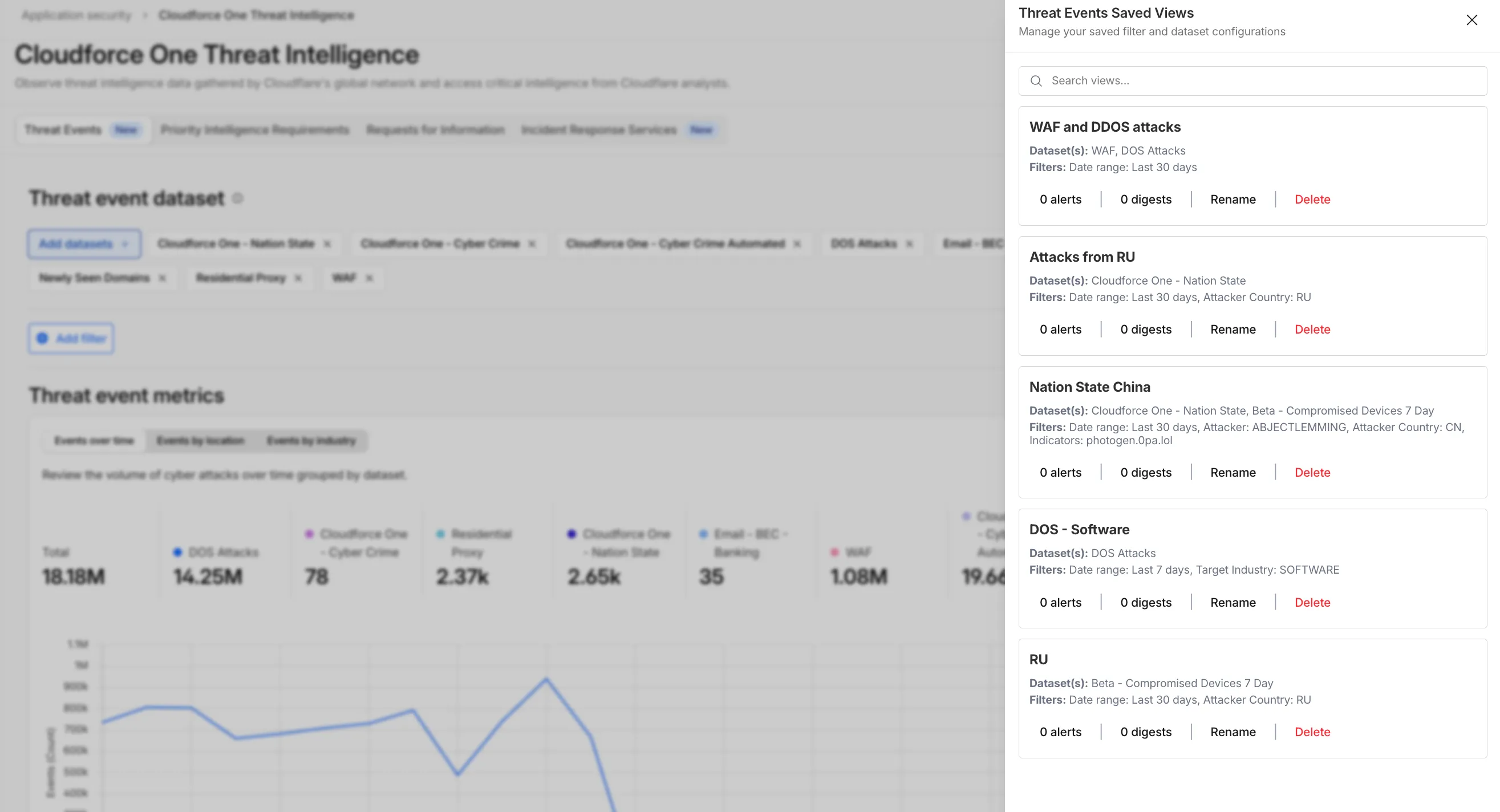
To set up an alert, go to Application Security > Threat Intelligence > Threat Events. From there:
- Choose your datasets and apply your desired filters and select Save View (or select an existing one).
- Open the Manage Saved Views menu.
- Select Add Alert next to your chosen view to configure your notification preferences in the Cloudflare dashboard.
For more technical details on configuring notifications, refer to the Threat Events documentation.
Real-time logo match preview
We are introducing Logo Match Preview, bringing the same pre-save visibility to visual assets that was previously only available for string-based queries. This update allows you to fine-tune your brand detection strategy before committing to a live monitor.
- Upload your brand logo and immediately see a sample of potential matches from recently detected sites before finalizing the query
- Adjust your similarity score (from 75% to 100%) and watch the results refresh in real-time to find the balance between broad detection and noise reduction
- Review the specific logos triggered by your current settings to ensure your query is capturing the right level of brand infringement
If you are ready to test your brand assets, go to the Brand Protection dashboard ↗ to try the new preview tool.
Dismiss and filter matches in Brand Protection
We have introduced new triage controls to help you manage your Brand Protection results more efficiently. You can now clear out the noise by dismissing matches while maintaining full visibility into your historical decisions.
- Dismiss matches: Users can now mark specific results as dismissed if they are determined to be benign or false positives, removing them from the primary triage view.
- Show/Hide toggle: A new visibility control allows you to instantly switch between viewing only active matches and including previously dismissed ones.
- Persistent review states: Dismissed status is saved across sessions, ensuring that your workspace remains organized and focused on new or high-priority threats.
- Reduce alert fatigue by hiding known-safe results, allowing your team to focus exclusively on unreviewed or high-risk infringements.
- Auditability and recovery through the visibility toggle, ensuring that no match is ever truly "lost" and can be re-evaluated if a site's content changes.
- Improved collaboration as your team members can see which matches have already been vetted and dismissed by others.
Ready to clean up your match queue? Learn more in our Brand Protection documentation.
Saved views for Threat Events
TL;DR: You can now create and save custom configurations of the Threat Events dashboard, allowing you to instantly return to specific filtered views — such as industry-specific attacks or regional Sankey flows — without manual reconfiguration.
Threat intelligence is most effective when it is personalized. Previously, analysts had to manually re-apply complex filters (like combining specific industry datasets with geographic origins) every time they logged in. This update provides material value by:
- Analysts can now jump straight into "Known Ransomware Infrastructure" or "Retail Sector Targets" views with a single click, eliminating repetitive setup tasks
- Teams can ensure everyone is looking at the same data subsets by using standardized saved views, reducing the risk of missing critical patterns due to inconsistent filtering.
Cloudforce One subscribers can start saving their custom views now in Application Security > Threat Intelligence > Threat Events ↗.
Cloudforce One Threat events graphs are now visible in the dashboard
We have introduced dynamic visualizations to the Threat Events dashboard to help you better understand the threat landscape and identify emerging patterns at a glance.
What's new:
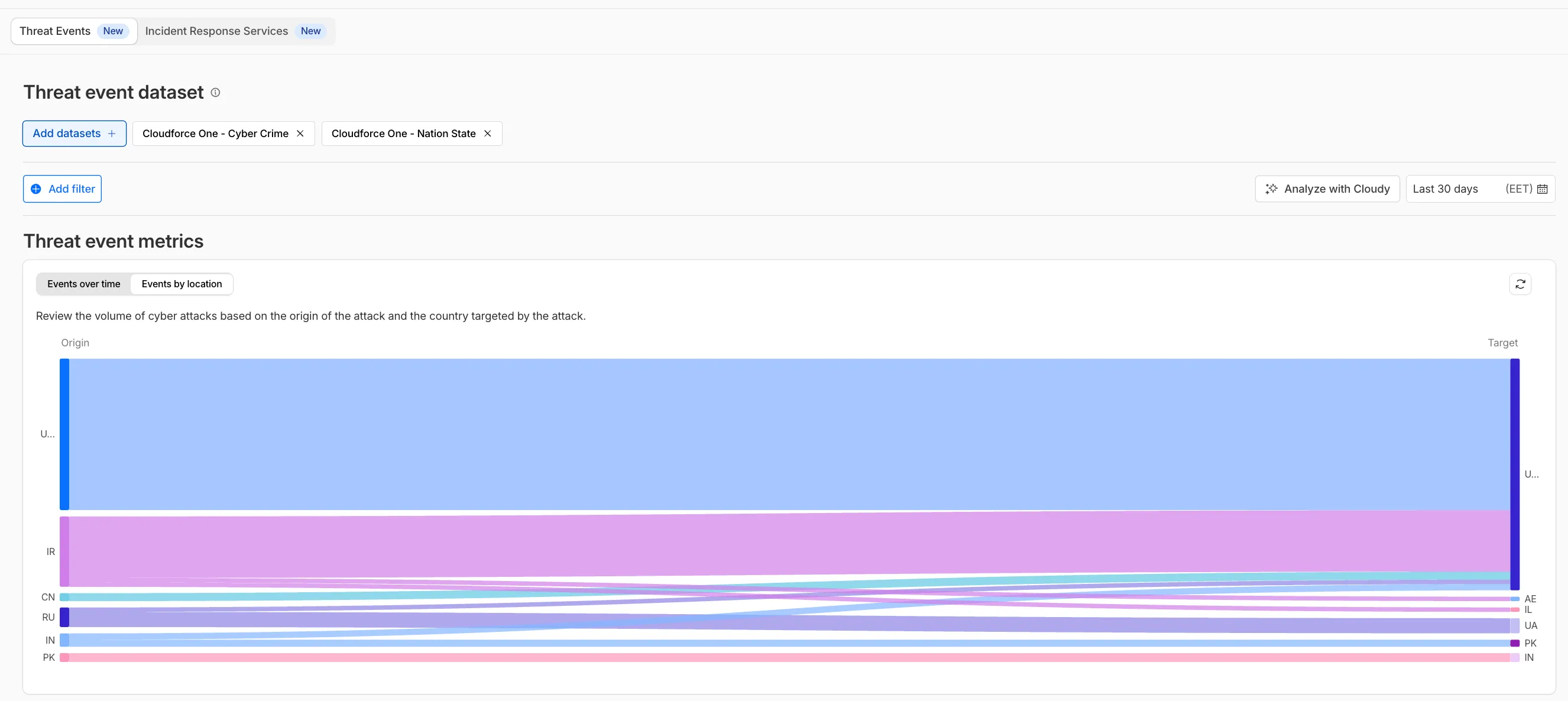
- Sankey Diagrams: Trace the flow of attacks from country of origin to target country to identify which regions are being hit hardest and where the threat infrastructure resides.
- Dataset Distribution over time: Instantly pivot your view to understand if a specific campaign is targeting your sector or if it is a broad-spectrum commodity attack.
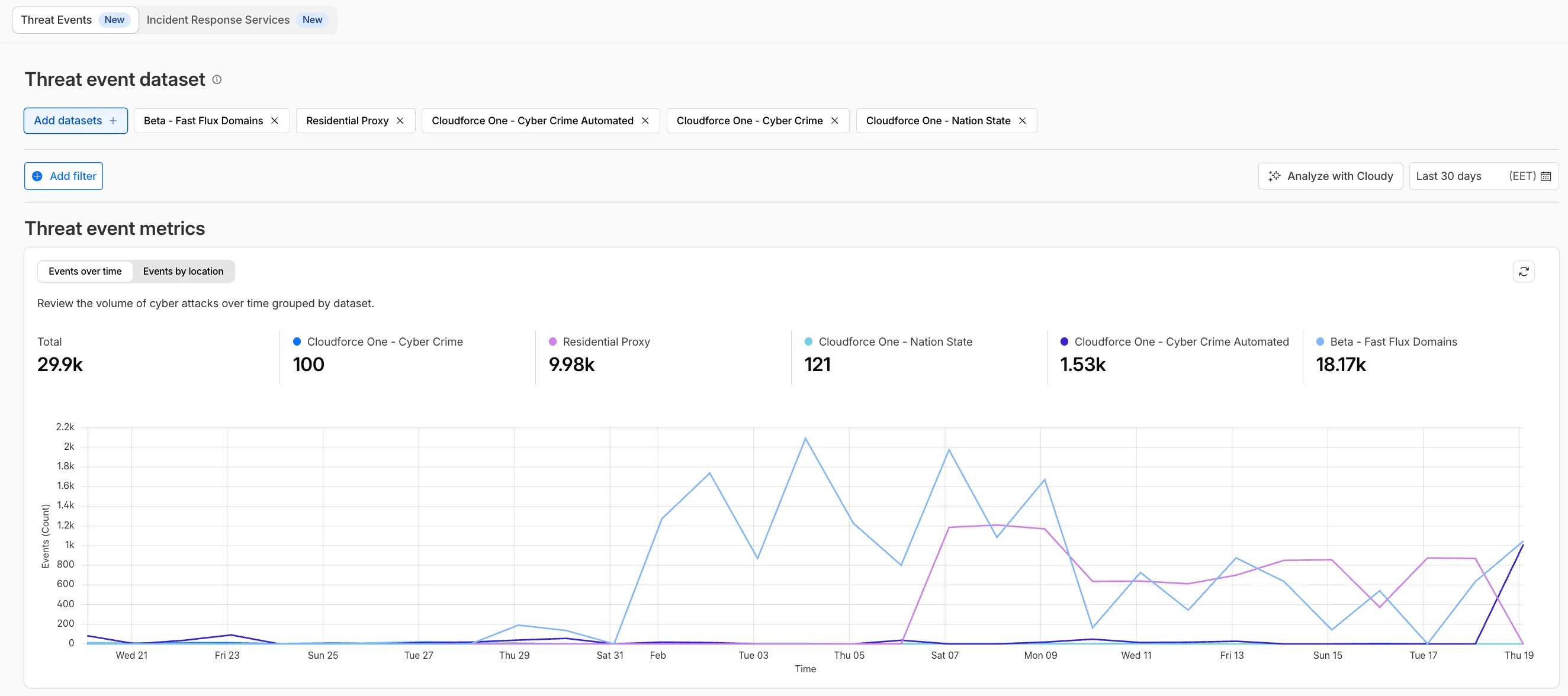
- Enhanced Filtering: Use these visual tools to filter and drill down into specific attack vectors directly from the charts.
Cloudforce One subscribers can explore these new views now in Application Security > Threat Intelligence > Threat Events ↗.
Enhanced Logo Matching for Brand Protection
We have significantly upgraded our Logo Matching capabilities within Brand Protection. While previously limited to approximately 100% matches, users can now detect a wider range of brand assets through a redesigned matching model and UI.
- Configurable match thresholds: Users can set a minimum match score (starting at 75%) when creating a logo query to capture subtle variations or high-quality impersonations.
- Visual match scores: Allow users to see the exact percentage of the match directly in the results table, highlighted with color-coded lozenges to indicate severity.
- Direct logo previews: Available in the Cloudflare dashboard — similar to string matches — to verify infringements at a glance.
- Expose sophisticated impersonators who use slightly altered logos to bypass basic detection filters.
- Faster triage of the most relevant threats immediately using visual indicators, reducing the time spent manually reviewing matches.
Ready to protect your visual identity? Learn more in our Brand Protection documentation.
Threat actor identification with "also known as" aliases
Identifying threat actors can be challenging, because naming conventions often vary across the security industry. To simplify your research, Cloudflare Threat Events now include an Also known as field, providing a list of common aliases and industry-standard names for the groups we track.
This new field is available in both the Cloudflare dashboard and via the API. In the dashboard, you can view these aliases by expanding the event details side panel (under the Attacker field) or by adding it as a column in your configurable table view.
- Easily map Cloudflare-tracked actors to the naming conventions used by other vendors without manual cross-referencing.
- Quickly identify if a detected threat actor matches a group your team is already monitoring via other intelligence feeds.
For more information on how to access this data, refer to the Threat Events API documentation ↗.
URL Scanner now supports PDF report downloads
We have expanded the reporting capabilities of the Cloudflare URL Scanner. In addition to existing JSON and HAR exports, users can now generate and download a PDF report directly from the Cloudflare dashboard. This update streamlines how security analysts can share findings with stakeholders who may not have access to the Cloudflare dashboard or specialized tools to parse JSON and HAR files.
Key Benefits:
- Consolidate scan results, including screenshots, security signatures, and metadata, into a single, portable document
- Easily share professional-grade summaries with non-technical stakeholders or legal teams for faster incident response
What’s new:
- PDF Export Button: A new download option is available in the URL Scanner results page within the Cloudflare dashboard
- Unified Documentation: Access all scan details—from high-level summaries to specific security flags—in one offline-friendly file
To get started with the URL Scanner and explore our reporting capabilities, visit the URL Scanner API documentation ↗.
Cloudflare Threat Events now support STIX2 format
We are excited to announce that Cloudflare Threat Events now supports the STIX2 (Structured Threat Information Expression) format. This was a highly requested feature designed to streamline how security teams consume and act upon our threat intelligence.
By adopting this industry-standard format, you can now integrate Cloudflare's threat events data more effectively into your existing security ecosystem.
-
Eliminate the need for custom parsers, as STIX2 allows for "out of the box" ingestion into major Threat Intel Platforms (TIPs), SIEMs, and SOAR tools.
-
STIX2 provides a standardized way to represent relationships between indicators, sightings, and threat actors, giving your analysts a clearer picture of the threat landscape.
For technical details on how to query events using this format, please refer to our Threat Events API Documentation ↗.
Threat insights are now available in the Threat Events platform
The threat events platform now has threat insights available for some relevant parent events. Threat intelligence analyst users can access these insights for their threat hunting activity.
Insights are also highlighted in the Cloudflare dashboard by a small lightning icon and the insights can refer to multiple, connected events, potentially part of the same attack or campaign and associated with the same threat actor.
For more information, refer to Analyze threat events.
Report logo misuse to Cloudflare directly from the Brand Protection dashboard
The Brand Protection logo query dashboard now allows you to use the Report to Cloudflare button to submit an Abuse report directly from the Brand Protection logo queries dashboard. While you could previously report new domains that were impersonating your brand before, now you can do the same for websites found to be using your logo without your permission. The abuse reports will be prefilled and you will only need to validate a few fields before you can click the submit button, after which our team process your request.
Ready to start? Check out the Brand Protection docs.
Cloudforce One RFI tokens are now visible in the dashboard
The Requests for Information (RFI) dashboard now shows users the number of tokens used by each submitted RFI to better understand usage of tokens and how they relate to each request submitted.
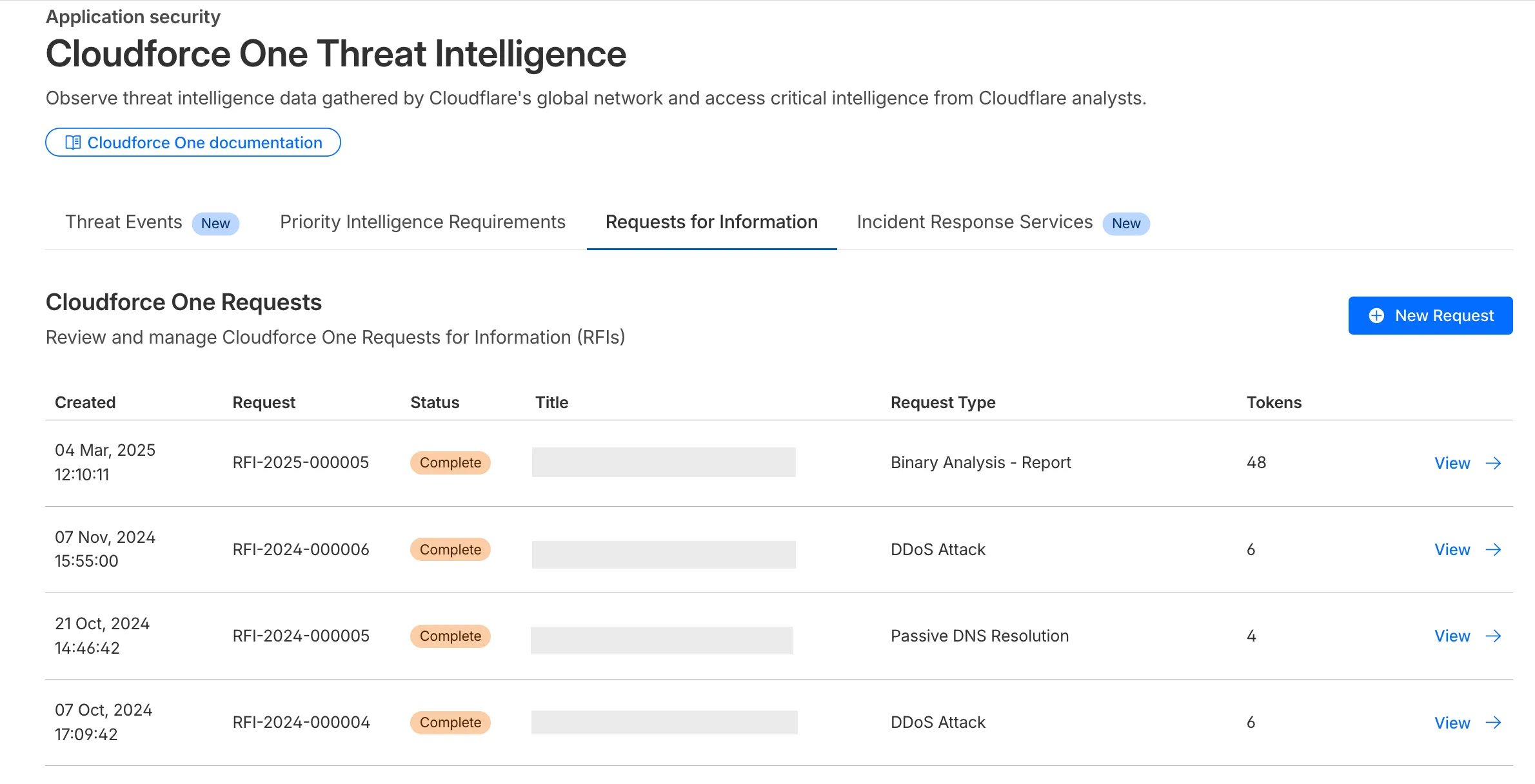
What’s new:
- Users can now see the number of tokens used for a submitted request for information.
- Users can see the remaining tokens allocated to their account for the quarter.
- Users can only select the Routine priority for the
Strategic Threat Researchrequest type.
Cloudforce One subscribers can try it now in Application Security > Threat Intelligence > Requests for Information ↗.
New Application Security reports (Closed Beta)
Cloudflare's new Application Security report, currently in Closed Beta, is now available in the dashboard.
Go to Security reportsThe reports are generated monthly and provide cyber security insights trends for all of the Enterprise zones in your Cloudflare account.
The reports also include an industry benchmark, comparing your cyber security landscape to peers in your industry.
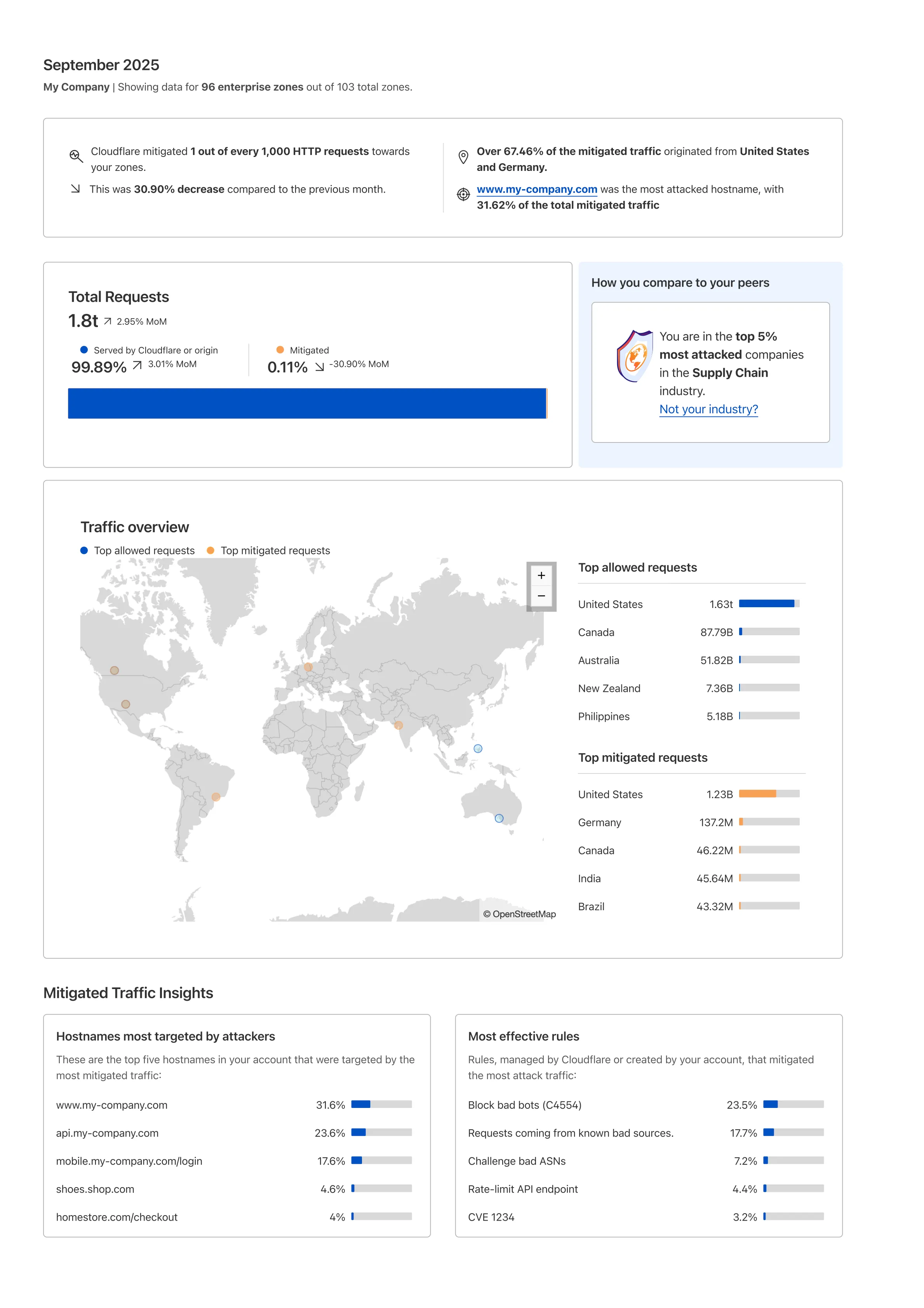
Learn more about the reports by referring to the Security Reports documentation.
Use the feedback survey link at the top of the page to help us improve the reports.
Save time with bulk query creation in Brand Protection
Brand Protection detects domains that may be impersonating your brand — from common misspellings (cloudfalre.com) to malicious concatenations (cloudflare-okta.com). Saved search queries run continuously and alert you when suspicious domains appear.
You can now create and save multiple queries in a single step, streamlining setup and management. Available now via the Brand Protection bulk query creation API.
New APIs for Brand Protection setup
The Brand Protection API is now available, allowing users to create new queries and delete existing ones, fetch matches and more!
What you can do:
- create new string or logo query
- delete string or logo queries
- download matches for both logo and string queries
- read matches for both logo and string queries
Ready to start? Check out the Brand Protection API in our documentation.
URL Scanner now supports geo-specific scanning
Enterprise customers can now choose the geographic location from which a URL scan is performed — either via Security Center in the Cloudflare dashboard or via the URL Scanner API.
This feature gives security teams greater insight into how a website behaves across different regions, helping uncover targeted, location-specific threats.
What’s new:
- Location Picker: Select a location for the scan via Security Center → Investigate in the dashboard or through the API.
- Region-aware scanning: Understand how content changes by location — useful for detecting regionally tailored attacks.
- Default behavior: If no location is set, scans default to the user’s current geographic region.
Learn more in the Security Center documentation.
- Security Center now has a role called Brand Protection. This role gives you access to the Brand Protection feature on the API and Cloudflare dashboard. Brand Protection role also gives you access to the Investigate platform, where you can consume the Threat Intel API and URL scanner API calls.
- On the URL scanner, customers who search for a report will now get a list of all reports related to that specific hostname. A hash is also available in the security report. By selecting the hash, the dashboard will list reports containing the same hash.
- Customers can now export all matches from a saved query. Select your Query name > select the three dots > Export matches.
- Customers can now create a
security.txtfile file to provide the security research team with a standardized way to report vulnerabilities.
- Customers can now archive multiple Security Insights at the same time. Go to Security Center > Security Insights and select the insights to archive.