
Durable Object Facets
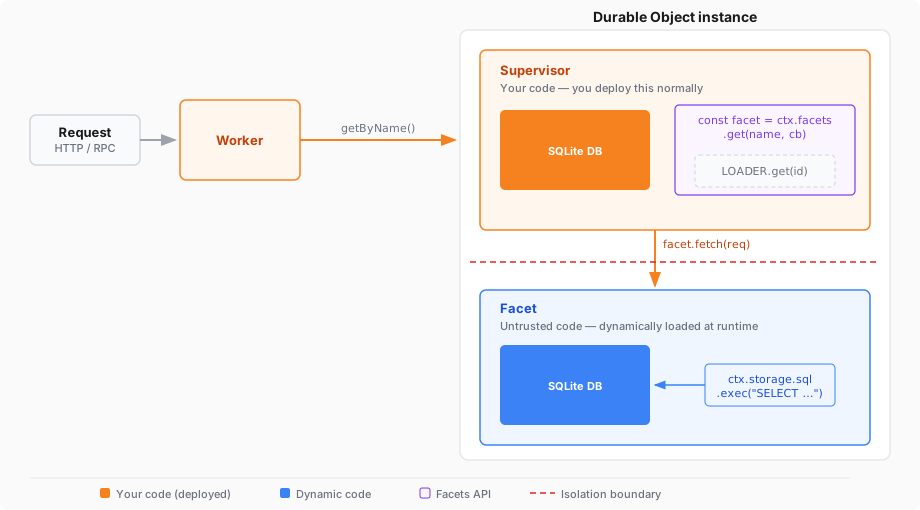
Durable Object Facets let you load a Durable Object class from a Dynamic Worker and run it as a child of your own Durable Object. The child (the facet) gets its own isolated SQLite database, while your class acts as a supervisor that controls access.
This is useful when you want dynamically-generated code — for example, code written by an AI agent — to have persistent storage, without giving it direct access to a Durable Object namespace. Your supervisor loads the code, creates the facet, and forwards requests into it. You stay in control of what the dynamic code can do.
A facet-based setup has three layers:
- Supervisor class — A normal Durable Object class that you write and deploy. It is configured with a SQLite storage backend like any other Durable Object.
- Dynamic code — Code loaded at runtime through the Worker Loader API. This code exports a class that extends
DurableObject. - Facet — An instance of the dynamic class, created by calling
this.ctx.facets.get()inside your supervisor. Each facet has its own SQLite database, separate from the supervisor's.
The supervisor's database and the facet's database are stored together as part of the same overall Durable Object. The dynamic code cannot read the supervisor's database — it only has access to its own.
Your Worker needs two things: a Durable Object class with a SQLite storage backend, and a Worker Loader binding.
{ "$schema": "./node_modules/wrangler/config-schema.json", // Set this to today's date "compatibility_date": "2026-04-16", "main": "src/index.ts", "migrations": [ { "tag": "v1", "new_sqlite_classes": [ "AppRunner" ] } ], "worker_loaders": [ { "binding": "LOADER" } ]}# Set this to today's datecompatibility_date = "2026-04-16"main = "src/index.ts"
[[migrations]]tag = "v1"new_sqlite_classes = ["AppRunner"]
[[worker_loaders]]binding = "LOADER"The following example shows a supervisor Durable Object (AppRunner) that loads dynamic code, creates a facet from it, and forwards HTTP requests to the facet.
The dynamic code is a simple counter app that tracks how many requests it has received, using its own SQLite-backed storage. In a real application, this code would come from an AI agent or user upload rather than a static string.
import { DurableObject } from "cloudflare:workers";
// In production, this code would come from an AI agent, a database,// or user input — not a static string.const AGENT_CODE = `  import { DurableObject } from "cloudflare:workers";
  export class App extends DurableObject {    fetch(request) {      // Note: storage.kv provides simple KV storage backed by SQLite,      // but you can also use SQL directly via storage.sql. See:      // https://developers.cloudflare.com/durable-objects/api/sqlite-storage-api/
      let counter = this.ctx.storage.kv.get("counter") || 0;      ++counter;      this.ctx.storage.kv.put("counter", counter);
      return new Response("You have made " + counter + " requests.\\n");    }  }`;
// AppRunner is your supervisor. Each instance manages one// dynamically-loaded application.export class AppRunner extends DurableObject {  async fetch(request) {    // Get a stub pointing to the "app" facet. If the facet has not    // started yet (or has hibernated), the callback runs to tell the    // runtime what code to load.    const facet = this.ctx.facets.get("app", async () => {      const worker = this.#loadDynamicWorker();
      // Extract the Durable Object class named "App" from the      // dynamic Worker's exports.      const appClass = worker.getDurableObjectClass("App");
      return { class: appClass };    });
    // Forward the request to the facet.    // You can also call RPC methods on the stub.    return await facet.fetch(request);  }
  #loadDynamicWorker() {    // Use get() so the Worker stays warm across requests.    // Each unique code version needs a unique ID.    const codeId = "agent-code-v1";
    return this.env.LOADER.get(codeId, async () => {      return {        compatibilityDate: "2026-04-01",        mainModule: "worker.js",        modules: { "worker.js": AGENT_CODE },        globalOutbound: null, // block network access      };    });  }}
export default {  async fetch(request, env, ctx) {    // Look up the AppRunner instance named "my-app".    const obj = ctx.exports.AppRunner.getByName("my-app");
// Forward the request to it. return await obj.fetch(request); },};import { DurableObject } from "cloudflare:workers";
// In production, this code would come from an AI agent, a database,// or user input — not a static string.const AGENT_CODE = ` import { DurableObject } from "cloudflare:workers";
export class App extends DurableObject { fetch(request) { // Note: storage.kv provides simple KV storage backed by SQLite, // but you can also use SQL directly via storage.sql. See: // https://developers.cloudflare.com/durable-objects/api/sqlite-storage-api/
let counter = this.ctx.storage.kv.get("counter") || 0; ++counter; this.ctx.storage.kv.put("counter", counter);
return new Response("You have made " + counter + " requests.\\n"); } }`;
// AppRunner is your supervisor. Each instance manages one// dynamically-loaded application.export class AppRunner extends DurableObject<Env> { async fetch(request: Request): Promise<Response> { // Get a stub pointing to the "app" facet. If the facet has not // started yet (or has hibernated), the callback runs to tell the // runtime what code to load. const facet = this.ctx.facets.get("app", async () => { const worker = this.#loadDynamicWorker();
// Extract the Durable Object class named "App" from the // dynamic Worker's exports. const appClass = worker.getDurableObjectClass("App");
return { class: appClass }; });
// Forward the request to the facet. // You can also call RPC methods on the stub. return await facet.fetch(request); }
#loadDynamicWorker() { // Use get() so the Worker stays warm across requests. // Each unique code version needs a unique ID. const codeId = "agent-code-v1";
return this.env.LOADER.get(codeId, async () => { return { compatibilityDate: "2026-04-01", mainModule: "worker.js", modules: { "worker.js": AGENT_CODE }, globalOutbound: null, // block network access }; }); }}
export default { async fetch( request: Request, env: Env, ctx: ExecutionContext, ): Promise<Response> { // Look up the AppRunner instance named "my-app". const obj = ctx.exports.AppRunner.getByName("my-app");
// Forward the request to it. return await obj.fetch(request); },};In this example:
AppRunneris your supervisor Durable Object. You deploy it normally and it owns a Durable Object namespace.- The dynamic code exports a class (
App) that extendsDurableObject. This class usesthis.ctx.storageto read and write data, just like any Durable Object. this.ctx.facets.get("app", callback)creates the facet. The"app"string names the facet — each name gets its own SQLite database within the parent Durable Object.- The facet's database is fully isolated from the supervisor's database.
AppRunnerandAppeach have their own storage that the other cannot access.
The this.ctx.facets object is available inside any Durable Object class. It provides methods to create, shut down, and delete facets. A single Durable Object can have any number of facets with different names, each with its own independent SQLite database.
this.ctx.facets.get(name string , callback () => FacetStartupOptions ) Fetcher
Creates or resumes a facet with the given name and returns a stub you can use to send it requests.
If the facet has not started yet, or has hibernated, the runtime calls getStartupOptions to determine what code to load. Otherwise, the existing facet is reused and the callback is not invoked. callback can optionally be async (i.e. returning Promise<FacetStartupOptions>).
The returned stub behaves like a Durable Object stub. You can call .fetch() on it to send HTTP requests, or call RPC methods directly.
this.ctx.facets.abort(name string , reason any ) void
Shuts down a running facet and invalidates all existing stubs. Any subsequent call on an invalidated stub throws reason. The facet's storage is preserved.
After aborting, you can call get() again to restart the facet — including with a different class. This makes abort() useful for code updates: abort the facet running the old version, then call get() with a callback that returns the new class.
this.ctx.facets.delete(name string ) void
Aborts the facet (if running) and permanently deletes its SQLite database. If you call get() with the same name afterward, the facet starts with an empty database.
Use delete() to clean up storage for facets that are no longer needed.
The object returned by the getStartupOptions callback.
The Durable Object class to instantiate for the facet. Obtain this by calling worker.getDurableObjectClass("ClassName") on a Dynamic Worker stub.
The ID the facet sees as its own ctx.id. If omitted, the facet inherits the parent Durable Object's ID.
The supervisor and each facet have separate SQLite databases. The dynamic code uses the standard Durable Object storage APIs with all operations targeting the facet's own database.
This isolation means you do not need to trust the dynamic code with your supervisor's data. You can store metadata, billing counters, or access-control state in the supervisor's database, and the facet cannot read or modify any of it.
In production, you would typically store the dynamic code itself in the supervisor's database and load it in the #loadDynamicWorker() method. This keeps the code paired with the Durable Object instance that manages it.