
A new, consistent language across Images interfaces
Cloudflare Images lets you dynamically compose, manipulate, and encode images using a broad set of optimizations, including resizing, face cropping, and background removal. You can configure optimizations directly in an image URL or programmatically through the cf.image options on a Worker fetch() subrequest.
We redesigned the Images API to provide a consistent, predictable, and intuitive language for developers and AI agents to optimize and manipulate images.
Starting today, the URL interface and cf.image options in Workers use the same parameter structure to apply optimizations. A configurable optimization will have its corresponding settings nested underneath its top-level parameter. Existing syntax in URLs and Worker configurations continues to behave as before.
This release also makes adding borders and overlays available in the URL interface. For example, you can now add a logo or text watermark directly in the URL instead of writing a Worker.
Optimization parameters are now represented in one of two ways: a compact form for single values and a structured form for related settings.
For example, width=500 requests an exact width, while trim=color asks Images to automatically trim the sides of an image based on its border color. Color-based trimming already supports configuring the border color, tolerance, and retained edge; these settings were previously applied as separate top-level parameters:
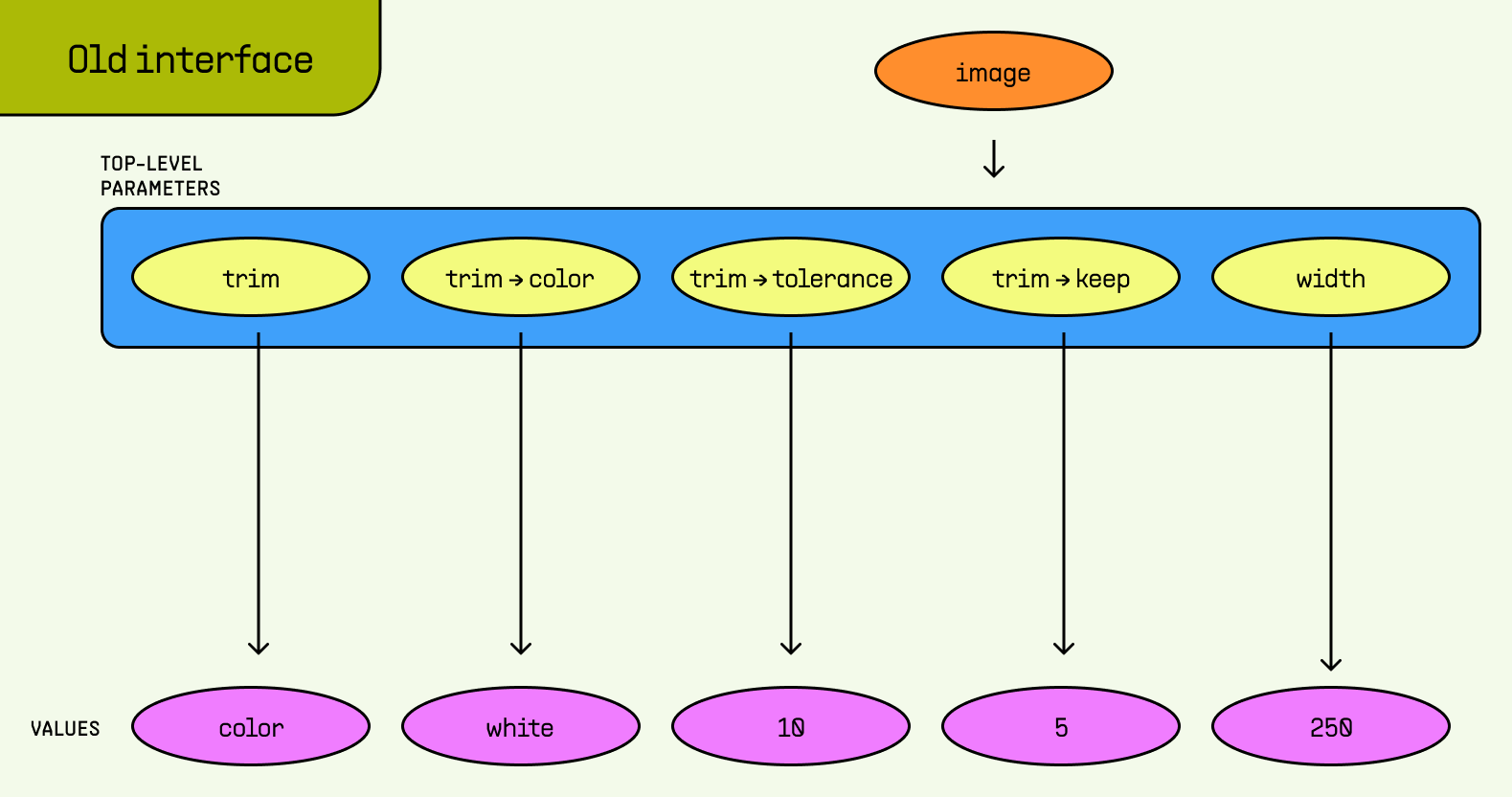
Related trim settings appeared alongside independent parameters such as width.
The new structure groups existing settings under a single top-level trim parameter:
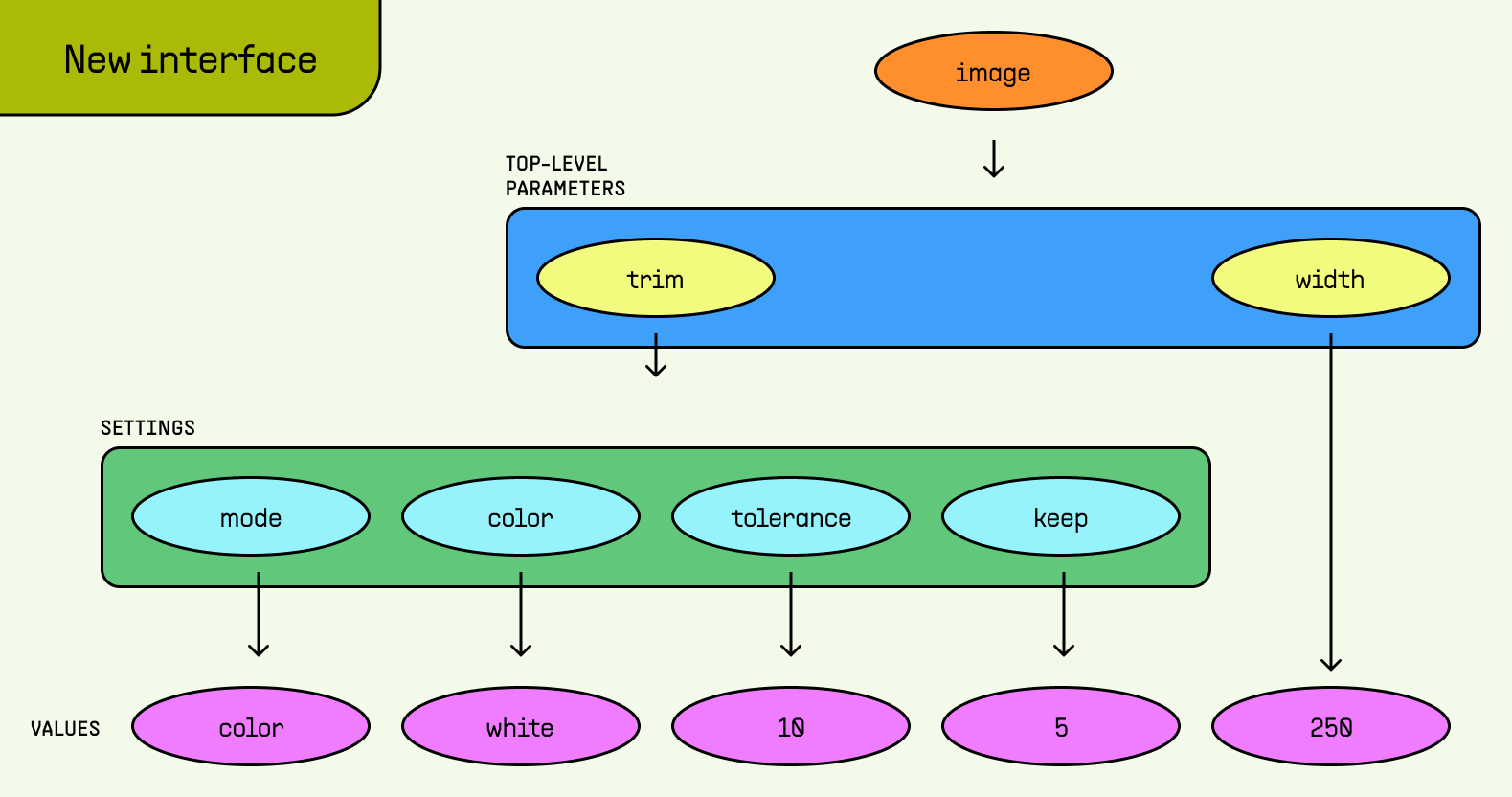
Related trim settings are nested, while width=250 remains a top-level parameter.
In the URL interface, color-based trimming uses the following syntax:
trim=(mode=color,color=red,tolerance=10,keep=5)The same hierarchy maps directly to cf.image in Workers, where related values that were previously separate or inferred now live in the same object. The structured object uses mode to explicitly identify the selected behavior, while the remaining properties configure that behavior:
trim: {
	mode: "color",
	color: "white",
	tolerance: 10,
	keep: 5
}In Images, optimizations are expressed as parameters, which form the language used to describe every optimization and its intended behavior. width sets the output width, gravity identifies the area that a crop should preserve, and draw defines how image or text overlays are rendered.
Many optimization features began as scalar parameters, pairing a parameter key with one value, such as width=500. As we introduced more capabilities, some parameters gained settings to configure how the optimization worked, such as automatic width selection. We added syntax to support each use case, gradually accumulating different forms for expressing related settings.
A given optimization might follow multiple conventions for different behaviors. For example, color-based trimming relied on separate dotted parameters, while side-based trimming encoded the top, right, bottom, and left settings as four unlabeled positional values:
trim=border,trim.border.color=white,trim.border.tolerance=10,trim.border.keep=5
trim=10;20;10;20
None of these forms were especially challenging in isolation. But together, they required developers to learn several parameter models and agents to infer the relationships between parameters and their settings to produce the correct syntax for each interface.
In the new structure, the Images API distinguishes between two core concepts: A parameter identifies an optimization feature, while a setting configures how that feature behaves.
The compact form continues to assign one value directly to a parameter. When an optimization has configurable behavior, the structured form organizes named settings, lists, and nested groups beneath the parameter, making the relationship between the optimization and its configuration explicit.
The unified parameter model follows these rules:
- A parameter that needs one value uses the compact form. When the relationship is unambiguous, existing forms like
width=500,width=auto(with default settings), andgravity=autocontinue to work with the same syntax. - A parameter with configurable behavior groups its settings beneath the top-level parameter. When a parameter supports multiple behaviors, the
modesetting identifies the selected behavior. Withoutmode, an expression such aswidth=(desktop=1400)would require Images to inferautofrom the presence ofdesktop. - Across interfaces, groups and lists follow the same nesting rules. A grouped URL parameter maps to an object in
cf.image, while a URL list maps to an array. Previously, each feature needed a separate representation and translation rules for each interface. The shared hierarchy eliminates structural drift by using the same vocabulary and relationships in both interfaces.
For developers, a standard form for configuring parameters means fewer special-case conventions to remember and less translation between interfaces. Related settings stay together and a configuration expressed in a URL maps predictably to its cf.image object.
The new structure is available for existing optimization features whose settings previously used separate top-level parameters, dotted names, or positional values. It also brings two previously Workers-only capabilities, borders and overlays, to the URL interface.
Use the new structured form to express the following optimizations and capabilities:
| Optimization | What it does | What changed |
|---|---|---|
border |
Adds a border around the image. | Now supported in the URL interface. Previously, this was available only in Workers. |
draw |
Adds an image or text overlay to the source image. | Now supported in the transformation URL interface for remote images. Previously, this was available only in Workers. |
gravity coordinates |
Sets the focal point using relative x and y coordinates. |
Uses named x and y settings in the URL interface. |
quality |
Controls the compression quality of the output image. | Groups the default quality and the quality for slow connections beneath quality. |
trim |
Removes pixels around the sides of an image. | Uses named settings beneath trim for individual sides, rectangular areas, and border-color detection. |
upscale |
Controls the algorithm used when an image is enlarged. | Configured as the upscale setting beneath fit, alongside the selected mode. |
width=auto |
Automatically selects an appropriate output width using available information about the browser and device. | Uses named settings under the width parameter for mobile, desktop, and breakpoint widths. |
These structured forms are additive. Earlier forms, including gravity=0.5x0.3, dotted trim parameters, and separate top-level parameters continue to work.
Refer to Features for the complete reference of optimization features.