Skip to content

Changelog

New updates and improvements at Cloudflare.

Control JavaScript Detections API results

Enterprise Bot Management customers can control whether Cloudflare uses results created through the JavaScript Detections API for bot scoring and detections.

Turn JavaScript Detections for API traffic on or off in Security > Settings. You can also configure the zone through the Bot Management API by setting jsd_api_results_enabled:

{
	"jsd_api_results_enabled": true
}

This setting is separate from zone-wide script injection. When it is off, the API script can still execute and return success to the callback, but Cloudflare does not consume the result.

For more information, refer to JavaScript Detections.

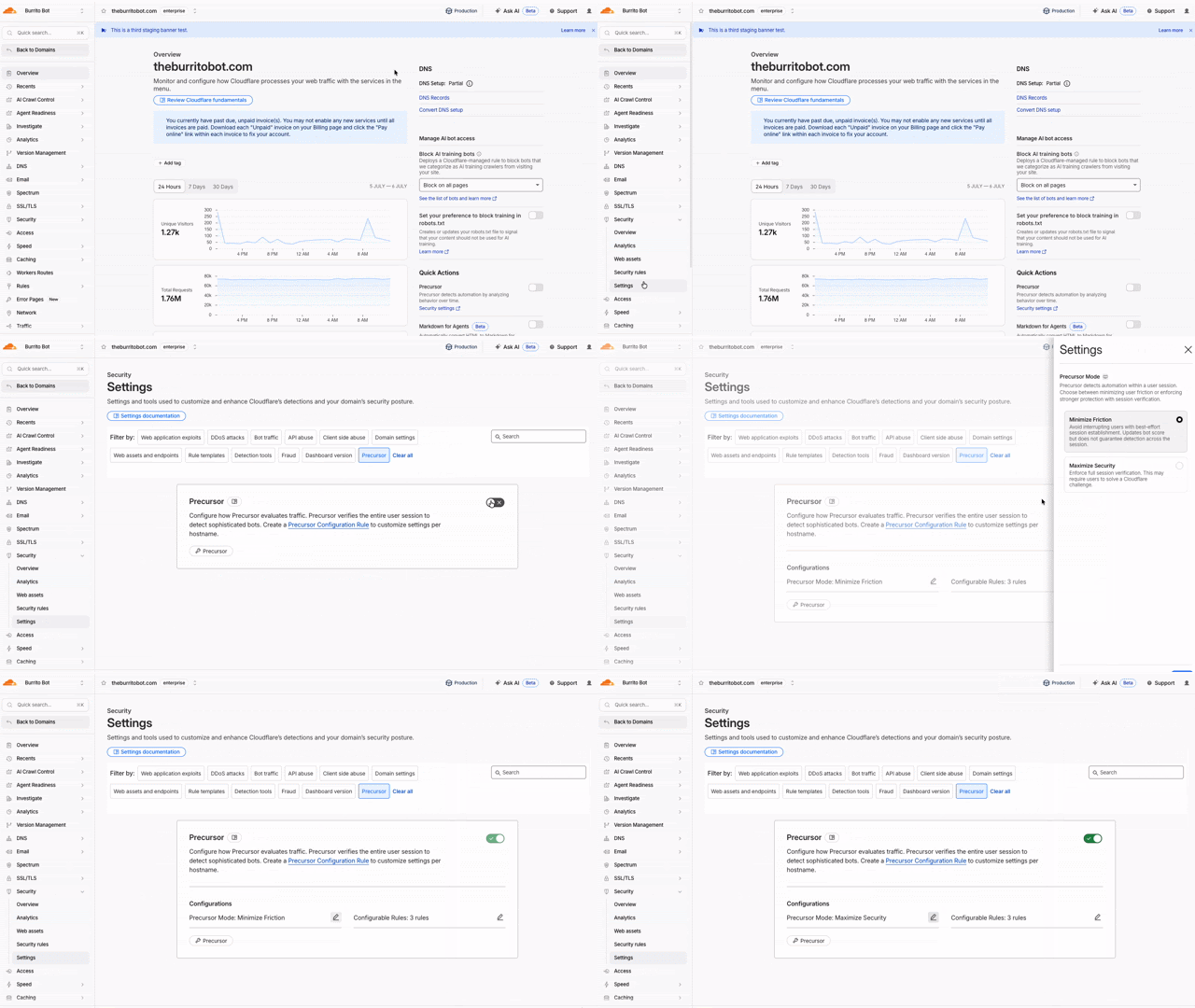
Precursor introduces session-based bot detection

Precursor is rolling out to all customers starting today. Precursor is client-side JavaScript that enables session-based bot detection.

You can read the announcement blog ↗︎ for background on why we built Precursor and how session-level behavioral detection works.

With Precursor enabled, Cloudflare can:

  • Continuously evaluate behavioral signals across a session
  • Re-validate challenge clearance as behavior changes
  • Update bot scores with session context
  • Provide client-side visibility where none previously existed

It integrates with existing protections, including Security Rules, and can be enabled directly from the Cloudflare dashboard with configurable modes to balance security and user experience.

Animated walkthrough of enabling Precursor in the Cloudflare dashboard

To learn more, refer to the Precursor documentation.

New options to manage AI traffic

Not all AI traffic is the same. Now, all customers — including those on the Free plan — can manage AI crawlers based on what they actually do on your site. Cloudflare groups AI traffic into three behaviors you can control independently: Search, Agent, and Training. This lets you keep the automated traffic that sends readers and revenue back to you, while blocking the traffic that only takes from your content.

Each behavior maps to a real use case. Search covers crawlers that index your content so they can answer questions about it later, where you should expect referral traffic or other equitable compensation in return. Agent covers automated activity acting in real time on a person's behalf, such as chat fetch bots and browser-use agents. Training covers crawlers that take your content to train or fine-tune a model. For each preset you can choose to block on all pages, block only on pages that display ads, or choose not to block.

The Configure AI bot traffic policies screen, where Search, Agent, and Training can each be set to allow, block, or block only on pages with ads

Starting September 15, 2026, new domains onboarding to Cloudflare receive updated defaults: Bots classified as Training or as Agent are blocked on pages that display ads, while Search remains allowed. On that date, multi-purpose crawlers that combine Search and Training will be affected by the new defaults to block Training. All customers can opt out of the new defaults ↗︎ at any time before September 15.

More visibility into bot traffic with BotBase and Business Insights

With Content Independence Day 2026, Enterprise Bot Management customers get two new tools that make bot traffic far easier to see and reason about: BotBase, a searchable directory of every bot Cloudflare tracks, and Business Insights, a dashboard that shows how much value each crawler sends back to your business.

BotBase is Cloudflare's directory of all known bots and agents, available directly in the dashboard. It shows how Cloudflare classifies each bot by behavior — Search, Agent, Training, and other categories such as Transact, Data Collection, SEO, and Ads Verification — so you can understand why a given crawler is visiting you. You can search and filter the full catalogue, filter your own traffic down to a single bot to investigate its activity on your zone, and copy any bot's detection ID to target it precisely in Security rules. Every tracked bot in BotBase is also published in Cloudflare Radar's bots and agents directory ↗︎.

Business Insights is built for content owners and business decision-makers who want to know which bots help or harm their business, without reading rule syntax. The dashboard reports crawl-to-referral ratios both site-wide and per bot operator — comparing how often a company crawls your content against how many visitors it actually refers back — over the last 24 hours, 7 days, or 30 days. Each operator is labeled with Cloudflare's updated classification and an action status of Allowed, Blocked, or Partially blocked, giving stakeholders a shared, at-a-glance view of the AI traffic reaching your site.

The Business Insights dashboard, showing bot traffic, content page requests, crawl-to-referral ratio, and a per-operator bot activity table