

Privacy Proxy metrics are now queryable through Cloudflare's GraphQL Analytics API, the new default method for accessing Privacy Proxy observability data. All metrics are available through a single endpoint:
Terminal window curl https://api.cloudflare.com/client/v4/graphql \--header "Authorization: Bearer <API_TOKEN>" \--header "Content-Type: application/json" \--data '{"query": "{ viewer { accounts(filter: { accountTag: $accountTag }) { privacyProxyRequestMetricsAdaptiveGroups(filter: { date_geq: $startDate, date_leq: $endDate }, limit: 10000, orderBy: [date_ASC]) { count dimensions { date } } } } }","variables": {"accountTag": "<YOUR_ACCOUNT_TAG>","startDate": "2026-04-04","endDate": "2026-04-06"}}'Four GraphQL nodes are now live, providing aggregate metrics across all key dimensions of your Privacy Proxy deployment:
privacyProxyRequestMetricsAdaptiveGroups— Request volume, error rates, status codes, and proxy status breakdowns.privacyProxyIngressConnMetricsAdaptiveGroups— Client-to-proxy connection counts, bytes transferred, and latency percentiles.privacyProxyEgressConnMetricsAdaptiveGroups— Proxy-to-origin connection counts, bytes transferred, and latency percentiles.privacyProxyAuthMetricsAdaptiveGroups— Authentication attempt counts by method and result.
All nodes support filtering by time, data center (
coloCode), and endpoint, with additional node-specific dimensions such as transport protocol and authentication method.OpenTelemetry-based metrics export remains available. The GraphQL Analytics API is now the recommended default method — a plug-and-play method that requires no collector infrastructure, saving engineering overhead.
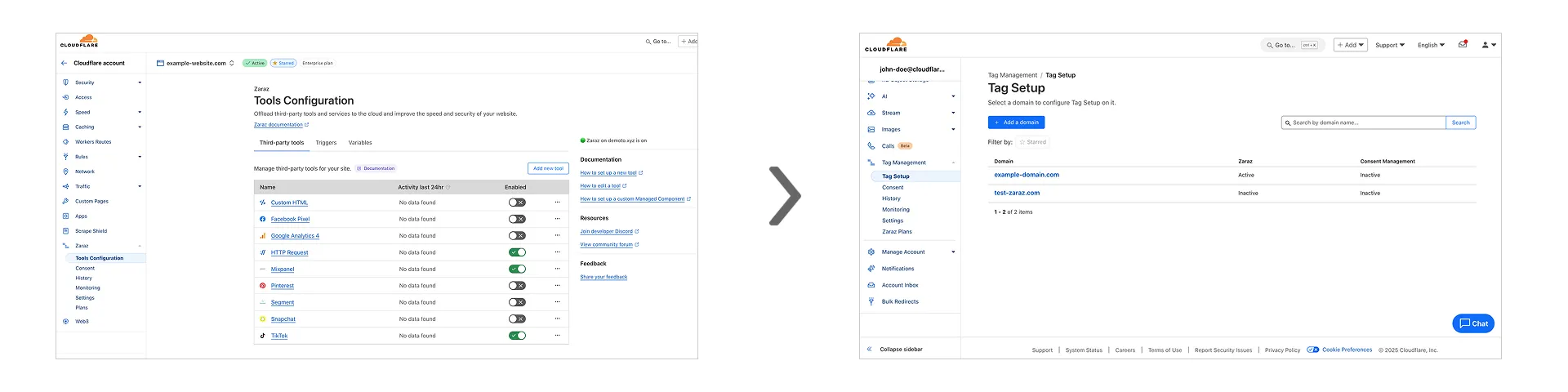
Previously, you could only configure Zaraz by going to each individual zone under your Cloudflare account. Now, if you’d like to get started with Zaraz or manage your existing configuration, you can navigate to the Tag Management ↗ section on the Cloudflare dashboard – this will make it easier to compare and configure the same settings across multiple zones.
These changes will not alter any existing configuration or entitlements for zones you already have Zaraz enabled on. If you’d like to edit existing configurations, you can go to the Tag Setup ↗ section of the dashboard, and select the zone you'd like to edit.