

Subaddressing, as defined in RFC 5233 ↗, also known as plus addressing, is now supported in Email Routing. This enables using the "+" separator to augment your custom addresses with arbitrary detail information.
Now you can send an email to
user+detail@example.comand it will be captured by theuser@example.comcustom address. The+detailpart is ignored by Email Routing, but it can be captured next in the processing chain in the logs, an Email Worker or an Agent application ↗.Customers can use this feature to dynamically add context to their emails, such as tracking the source of an email or categorizing emails without needing to create multiple custom addresses.
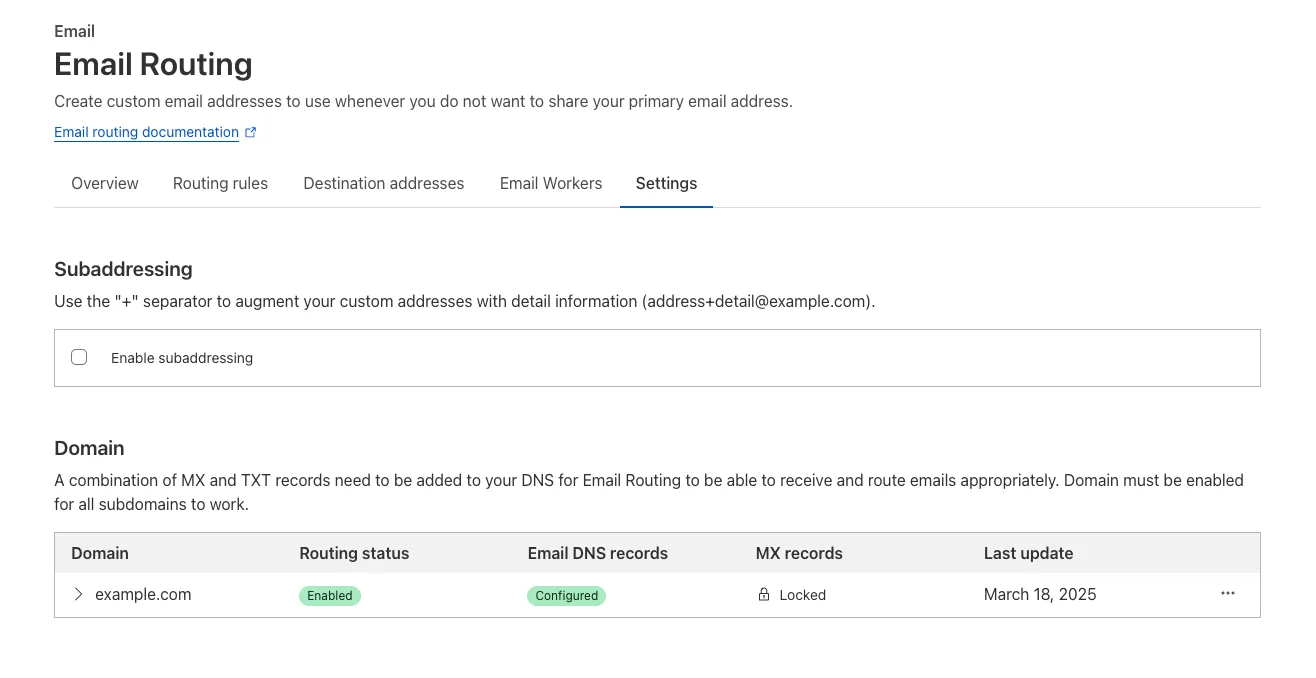
Check our Developer Docs to learn on to enable subaddressing in Email Routing.
The Email Routing platform supports SPF ↗ records and DKIM (DomainKeys Identified Mail) ↗ signatures and honors these protocols when the sending domain has them configured. However, if the sending domain doesn't implement them, we still forward the emails to upstream mailbox providers.
Starting on July 3, 2025, we will require all emails to be authenticated using at least one of the protocols, SPF or DKIM, to forward them. We also strongly recommend that all senders implement the DMARC protocol.
If you are using a Worker with an Email trigger to receive email messages and forward them upstream, you will need to handle the case where the forward action may fail due to missing authentication on the incoming email.
SPAM has been a long-standing issue with email. By enforcing mail authentication, we will increase the efficiency of identifying abusive senders and blocking bad emails. If you're an email server delivering emails to large mailbox providers, it's likely you already use these protocols; otherwise, please ensure you have them properly configured.
Email Workers enables developers to programmatically take action on anything that hits their email inbox. If you're building with Email Workers, you can now test the behavior of an Email Worker script, receiving, replying and sending emails in your local environment using
wrangler dev.Below is an example that shows you how you can receive messages using the
email()handler and parse them using postal-mime ↗:TypeScript import * as PostalMime from "postal-mime";export default {async email(message, env, ctx) {const parser = new PostalMime.default();const rawEmail = new Response(message.raw);const email = await parser.parse(await rawEmail.arrayBuffer());console.log(email);},};Now when you run
npx wrangler dev, wrangler will expose a local/cdn-cgi/handler/emailendpoint that you canPOSTemail messages to and trigger your Worker'semail()handler:Terminal window curl -X POST 'http://localhost:8787/cdn-cgi/handler/email' \--url-query 'from=sender@example.com' \--url-query 'to=recipient@example.com' \--header 'Content-Type: application/json' \--data-raw 'Received: from smtp.example.com (127.0.0.1)by cloudflare-email.com (unknown) id 4fwwffRXOpyRfor <recipient@example.com>; Tue, 27 Aug 2024 15:50:20 +0000From: "John" <sender@example.com>Reply-To: sender@example.comTo: recipient@example.comSubject: Testing Email Workers Local DevContent-Type: text/html; charset="windows-1252"X-Mailer: CurlDate: Tue, 27 Aug 2024 08:49:44 -0700Message-ID: <6114391943504294873000@ZSH-GHOSTTY>Hi there'This is what you get in the console:
{"headers": [{"key": "received","value": "from smtp.example.com (127.0.0.1) by cloudflare-email.com (unknown) id 4fwwffRXOpyR for <recipient@example.com>; Tue, 27 Aug 2024 15:50:20 +0000"},{ "key": "from", "value": "\"John\" <sender@example.com>" },{ "key": "reply-to", "value": "sender@example.com" },{ "key": "to", "value": "recipient@example.com" },{ "key": "subject", "value": "Testing Email Workers Local Dev" },{ "key": "content-type", "value": "text/html; charset=\"windows-1252\"" },{ "key": "x-mailer", "value": "Curl" },{ "key": "date", "value": "Tue, 27 Aug 2024 08:49:44 -0700" },{"key": "message-id","value": "<6114391943504294873000@ZSH-GHOSTTY>"}],"from": { "address": "sender@example.com", "name": "John" },"to": [{ "address": "recipient@example.com", "name": "" }],"replyTo": [{ "address": "sender@example.com", "name": "" }],"subject": "Testing Email Workers Local Dev","messageId": "<6114391943504294873000@ZSH-GHOSTTY>","date": "2024-08-27T15:49:44.000Z","html": "Hi there\n","attachments": []}Local development is a critical part of the development flow, and also works for sending, replying and forwarding emails. See our documentation for more information.
We’re removing some of the restrictions in Email Routing so that AI Agents and task automation can better handle email workflows, including how Workers can reply to incoming emails.
It's now possible to keep a threaded email conversation with an Email Worker script as long as:
- The incoming email has to have valid DMARC ↗.
- The email can only be replied to once in the same
EmailMessageevent. - The recipient in the reply must match the incoming sender.
- The outgoing sender domain must match the same domain that received the email.
- Every time an email passes through Email Routing or another MTA, an entry is added to the
Referenceslist. We stop accepting replies to emails with more than 100Referencesentries to prevent abuse or accidental loops.
Here's an example of a Worker responding to Emails using a Workers AI model:
AI model responding to emails import PostalMime from "postal-mime";import { createMimeMessage } from "mimetext";import { EmailMessage } from "cloudflare:email";export default {async email(message, env, ctx) {const email = await PostalMime.parse(message.raw);const res = await env.AI.run("@cf/meta/llama-2-7b-chat-fp16", {messages: [{role: "user",content: email.text ?? "",},],});// message-id is generated by mimetextconst response = createMimeMessage();response.setHeader("In-Reply-To", message.headers.get("Message-ID")!);response.setSender("agent@example.com");response.setRecipient(message.from);response.setSubject("Llama response");response.addMessage({contentType: "text/plain",data:res instanceof ReadableStream? await new Response(res).text(): res.response!,});const replyMessage = new EmailMessage("<email>",message.from,response.asRaw(),);await message.reply(replyMessage);},} satisfies ExportedHandler<Env>;See Reply to emails from Workers for more information.