Web Analytics adds Navigation Type filtering and reporting
Cloudflare Web Analytics now supports Navigation Type reporting and filtering.
This update allows developers and performance analysts to see how users are navigating between pages — whether through a link click or form submission, a page reload, or using the browser's back/forward buttons — and whether a browser cache hit occurred for these behaviors.
Understanding navigation types is critical for optimizing user experience. For example, if a high volume of your traffic consists of "Back-forward" navigations versus "Back-forward Cache", those visitors are not benefiting from the Back/Forward Cache (bfcache) and therefore are experiencing higher load times due to potentially unnecessary network requests.
The same applies for regular "Navigate" entries — where "Navigate Cache", "Navigate Prefetch Cache" and "Prerender" would provide instant document retrieval — and "Reload", where "Reload cache" would be more optimal.
A high volume of "Reload" entries can also indicate a potential stability problem with your website.
By identifying these patterns, you can tune your browser caching strategies to ensure HTML documents are served instantaneously from local caches rather than requiring a roundtrip to the network.
For more information, refer to Navigation Types.
- Monitor Cache Effectiveness: See how often your site is served from the HTTP cache or bfcache.
- Identify Performance Bottlenecks: Filter by the different types to understand performance opportunity of improving browser cache hit ratio.
You can now find the Navigation Type dimension in the Web Analytics dashboard. You can filter to include/exclude one or more specific types using "equals", "does not equal", "in", or "not in" matchers.

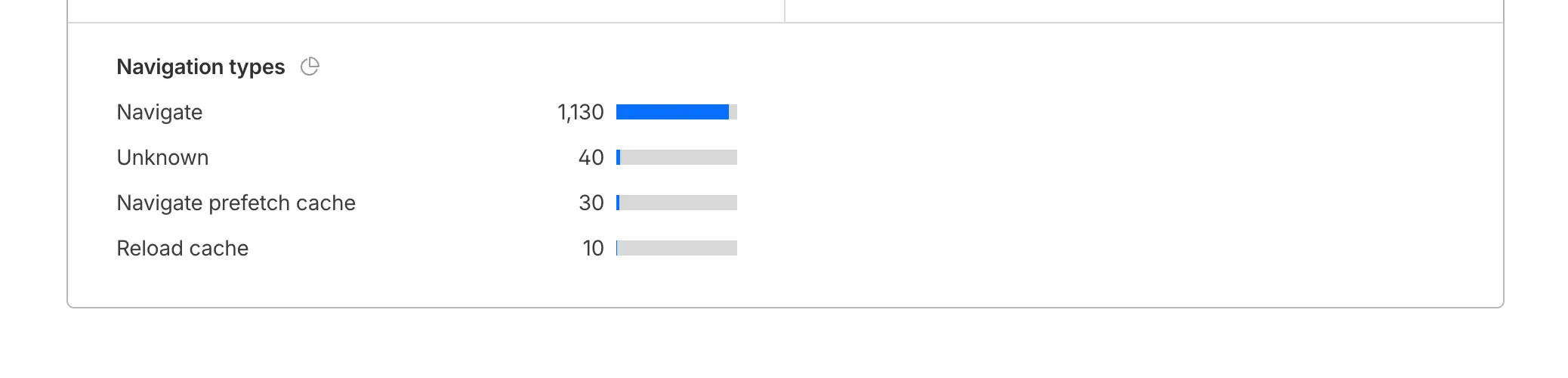
To check the list of popular navigation types, select Page views on the Web Analytics sidebar and scroll down to the bottom: